Getting Github : JavaScript Libraries Spilled EVERYWHERE! Series #003

This is an ongoing effort putting together some JavaScript app code on client and on server that started with blog entry series #001 and #002.

This how-to is going to kind of go all over the place. My goal is to get github data. The question however is, how and with what. I knew there were some available libraries, so writing straight and pulling straight off of the API myself seemed like it would be unnecessary work.

The github API documentation is located at http://developer.github.com/v3/ with the list of client libraries for ease of access listed at http://developer.github.com/v3/libraries/. The first two that I forked and cloned were the gh3 and npm installed the octonode and node-github libraries.

Node.js Based Github Libraries

The two node based projects install via npm, as things go with node and were super easy. The first one I gave a test drive to is the https://github.com/ajaxorg/node-github project. I forked it and dove right in.

[sourcecode language=”bash”]
$ npm install github
npm http GET https://registry.npmjs.org/github
npm http 200 https://registry.npmjs.org/github
npm http GET https://registry.npmjs.org/github/-/github-0.1.8.tgz
npm http 200 https://registry.npmjs.org/github/-/github-0.1.8.tgz
$
[/sourcecode]

After that quick install I took a stab at the test code they have in the README.md.

[sourcecode language=”javascript”]
var GitHubApi = require("github");

var github = new GitHubApi({
// required
version: "3.0.0",
// optional
timeout: 5000
});
github.user.getFollowingFromUser({
user: "adron"
}, function(err, res) {
console.log(JSON.stringify(res));
});
[/sourcecode]

This worked all well and good, so I moved on to some other examples. The following example however needed authentication. To authenticate you’ll need to add the little snippet below with the username and password. However there’s also a Oauth token method you can use too, which I’ve not documented below. To check out other auth methods check out the documentation.

[sourcecode language=”javascript”]
var GitHubApi = require("github");

var github = new GitHubApi({
version: "3.0.0", timeout: 5000,
});

github.authenticate({
type: "basic",
username: "adron",
password: "yoTurkiesGetYourOwn"
});

github.orgs.get({
org: "Basho"
}, function(err, res){
console.log(res);
});
[/sourcecode]

The result is prefect for putting together a good display page or something of the organizations.

[sourcecode language=”bash”]
$ node adron_test.js
{ login: ‘basho’,
id: 176293,
url: ‘https://api.github.com/orgs/basho’,
repos_url: ‘https://api.github.com/orgs/basho/repos’,
events_url: ‘https://api.github.com/orgs/basho/events’,
members_url: ‘https://api.github.com/orgs/basho/members{/member}’,
public_members_url: ‘https://api.github.com/orgs/basho/public_members{/member}’,
avatar_url: ‘https://secure.gravatar.com/avatar/ce5141b78d2fe237e8bfba49d6aff405?d=https://a248.e.akamai.net/assets.github.com%2Fimages%2Fgravatars%2Fgravatar-org-420.png’,
name: ‘Basho Technologies’,
company: Basho,
blog: ‘http://basho.com/blog/’,
location: ‘Cambridge, MA’,
email: null,
public_repos: 105,
public_gists: 0,
followers: 0,
following: 0,
html_url: ‘https://github.com/basho’,
created_at: ‘2010-01-04T19:05:19Z’,
updated_at: ‘2013-03-17T20:29:09Z’,
type: ‘Organization’,
total_private_repos: YYY,
owned_private_repos: XXX,
private_gists: 0,
disk_usage: 788016,
collaborators: 0,
billing_email: ‘not_a_valid_address@basho.com’,
plan: { name: ‘platinum’, space: 62914560, private_repos: billions },
meta: { ‘x-ratelimit-limit’: ‘5000’, ‘x-ratelimit-remaining’: ‘azillion’ }
}
[/sourcecode]

Now at this point there’s a few significant problems. Setting up tests of the integration variety for this library gets real tricky because you need to authenticate, or at least I do for the data that I want. This doesn’t bode well for sending any integration tests or otherwise to Travis-CI or otherwise. So even though this library works, and would be processed on the server-side and not on the client side, having it as a non-tested part of the code base bothers me a bit. What’s a good way to setup tests to verify that things are working? I’ll get that figured out shortly and it’ll have to be another blog entry, maybe. For now though, let’s jump into the client side library and see how it functions.

Client Side JavaScript Github

For the client side I started testing around with the gh3 library. It has two dependencies, jQuery and Underscore.js. jQuery is likely always going to be in your projects. Underscore.js is also pretty common, but sometimes you’ll find you’ll need to go download the library. Upon download and getting the additional libraries I needed installed, I gave the default sample a shot.

[sourcecode language=”html”]
<!DOCTYPE html>
<html>
<head>
<meta charset="utf-8">
<title>gh3 Sample</title>
</head>
<body>
<ul id="user"></ul>
</body>
<script src="js/jquery-1.7.1.min.js"></script>
<script src="js/underscore-min.js"></script>
<script src="js/gh3.js"></script>
<script>
var adron = new Gh3.User("adron")
, userInfos = $("#user");

adron.fetch(function (err, resUser){
if(err) {
throw "outch …"
}
console.log(adron, resUser);
_.each(_.keys(resUser), function (prop) {
userInfos.append(
$(‘<li>’).append(prop+" : "+resUser[prop])
);
});
});
</script>
</html>
[/sourcecode]

This worked pretty seamlessly. Also it got me thinking, “what do I really want to do with the github library?” If it’s a server side service, obviously I’d want to use the Node.js libraries probably. However if it is client side data I want, is it even ideal that the server side actually pull the data anyway? The other issues around cross site scripting and related matters come into play too if it is a client side script, but this might be, even in spite of that, just what I needed. For now, that left me with some solid things to think about. But I was done for now… so until next entry, cheers!

Setting Up Github for Windows for Powershell CLI Users

Recently I installed the Github for Windows App. It’s a great app, however, I’d rather not use it for the day to day interactions I have with Git. I have a lot of branching, forking and merging to do that just doesn’t happen to well with the app. It’s a great app, but overall I’m just a few dozen times faster with the command line versus using an application.

So why did I download it and install it? The UI is great looking. I wanted to check it out and see how it worked, overall I’ve been fairly impressed. It’s not all that bad. The other cool thing about having it installed is it makes getting started on a fresh machine much faster with Powershell and such, however all the repos are setup with https instead of git as the path. This I’m not a fan of, so I threw this video together real quick to show how I remedy the situation.

Deploy a Framework Friday #4 Some Node.js .gitignore Cloud 9 IDE Sharing toward Cloud Foundry / Iron Foundry Deployment

Today’s “Deploy a Framework Friday” is a little bit of a diversion. Today Richard (@rseroter) and I dove into Cloud9IDE (@Cloud9IDE) to try out some pair programming with the online IDE sharing. We made some minor progress with Matt (@matt_pardee) & Eric (@ang3lfir3) jumping in for a few minutes. The intent of this effort was to pull together a little code to deploy, as Richard wrote about a few months ago in the article “Deploying Node.js Applications to Iron Foundry using the Cloude9 IDE“.

Here’s a video of us all fumbling through attempting to get the .gitignore file setup.

Richard Seroter (@rseroter) and I (@adron) took a stab at sharing some code, with the attempt to do some pair programming. We made a little progress, and even had some people join us live via Twitter and edit some of the code with us. For a short play by play, check out the blog entry here: http://compositecode.com/2012/08/03/deploy-a-frame…dry-deployment/

Questions:

  1. Why did the .gitignore not show up on Richard’s Screen?
  2. What were the intermittent errors that came up?
  3. Why did it say I was setup for “premium” but I couldn’t use express?
  4. Is it supposed to be that the other person can’t make changes while someone is chatting?

I’m not sure what happened (anyone at Cloud 9 IDE know what happened) when the .gitignore totally disappeared  but in the video you can see that I committed and pushed the .gitignore file. I had to recreate it to get anything to show up, and initially it didn’t seem to share either. I’m not sure how that is supposed to work, but am assuming something wasn’t setup correctly in the first place.

As for express I’ll be giving that a try a little bit later.

Next Steps Toward Deployment

Over the next few weeks or so, Richard and I will be going back and forth building a Node.js based web application for deployment from Cloud 9 IDE to our Iron Foundry Environment. Overall, this will be a slightly drawn out “Deploy a Framework Friday“, with its own sub-parts to the series.

We’ll culminate the project in an open source project that will be available on Github and also with a summary on the Iron Foundry Blog. In one of our pending blog entries we’ll draw up the architecture of the application we’ll be building out. So stay tuned!

NOTE: Working in conjunction with these other bloggers / blogs:

Huboard, Github Issues ala Kanban, Implemented…

Recently I discovered Huboard. Thanks to those that helped me find it! Huboard is really simple and helps keep that kanban visibility when everyone can’t be in the same environment all the time. I setup a board for one of the pending OSS Projects that will be coming live. These are the steps I took. 1. Go to http://www.huboard.comand login with your Github identifiy. This will use your existing github account and you’ll then have access to all your projects to setup and use as you see fit with Huboard.

Allow Github to Provide Identify Access

2. Huboard will now list all of your projects you have github.

Huboard Repository List (Click for full size image)

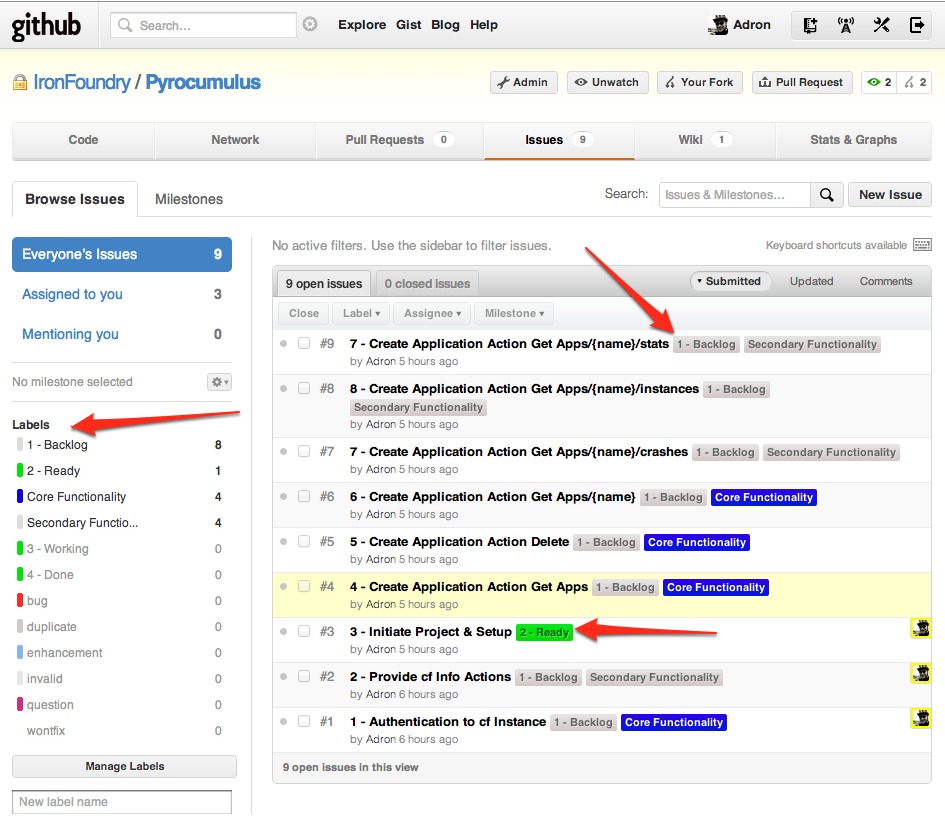
3. Get your list items all labeled appropriately. (All explained below image)

Issues listed with appropriate Labels (Click for full size image)

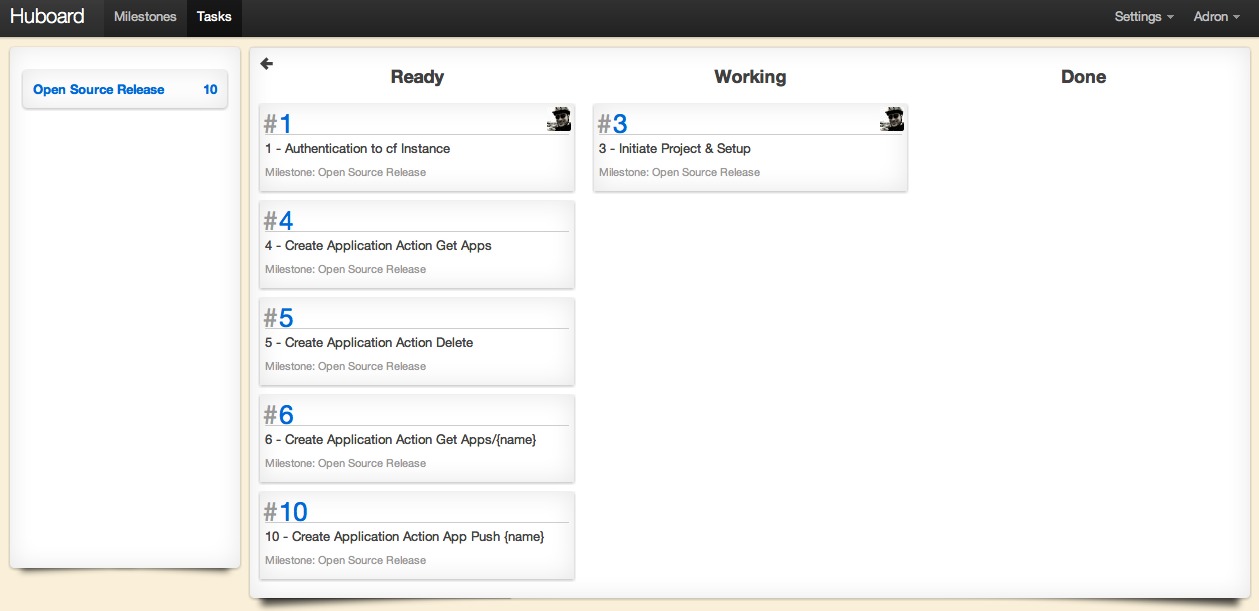
The key to Huboard is the simple tagging. Each issue in the project will display as an open issue on the repository/project list in Huboard, however to get them to show up on the kanban there is a special label pattern to use. Simply add a number, dash, and the title of the issue for it to be listed in the kanban. Then apply the label(s) to the issue. For example, in the screenshot above you can see that item #3, which has a titled of “#3 – Initiate Project & Setup” also has a label of “2 – Ready”. This label will list the item in the column “Ready” on the kanban board. The same goes for each of the items that are listed as backlog. The kanban board in Huboard uses the number to order the columns by the labels and the following title as the column header. The respective kanban board for the issue listing above looks like this.

Huboard kanban (Click for full size image)

For now I’ve primarily been just adding the issues and maintaining them via the Github web interface. However the items can be moved via commit messages. Here are some examples;

  • push GH-#
  • pushed GH-#
  • move GH-#
  • moves GH-#

With that you get maximum Github Awesome + Kanban Communication.

Completed Multiple Project Support in Infrastructure Solution Project

Still not sure what to call the infrastructure project. One suggestion that came up was, “Visual Fluent NInfrastructure .NET Sharp“.  It’s all trendy and wordy and can be turned into an unpronouncable acronym, VFN.NET#.  Anyway, got ideas?  Throw a comment on the post!  🙂

I got the multiple project completed and uploaded as template v1.1.

For information on how I put together the multiple project template, check out the links on the wiki here:

Also am working to add a basic vertical implementation of NHibernate up to the views with basic CRUD operations just for an example.  I’m pondering if that should be done as a separate template, maybe titled something like “template w/ samples”?  Then keeping the core template with only the skeleton code.

For more information on the project, check out the github infrastructure project page.