Backup Riak – Learning About Distributed Databases :: Issue 001

I’ve got more than a few series in the queue, so why not another one eh! The intent is, I’ll grab a specific topic to break down and add details to related to distributed systems, primarily around Riak. I will however diverge into other distributed databases too, but I’ll primarily be sticking to Riak. Without more introduction, the first topic is…

Backing Up and Recovery of Riak (Nodes)

I’ve been asked approximately 423,983,321.7 zillion times how this is done. So here’s a quick summary and respective links to the best ways to backup Riak, how to recover nodes.

When backing up Riak there are two key things that need copied to the backup storage; the ring and data directories. Each of these things are specific based on the backend used with Riak. In addition to the core backup containing the ring and data, another good thing to backup is the configuration directory. When recovering this comes in useful.

For the locations of data, it depends slightly based on the operating system being used. The two big variances are OS-X and Linux Distros. On OS-X the data path, ring data and configuration are located at the locations listed below:

  • Bitcask data: ./data/bitcask
  • LevelDB data: ./data/leveldb
  • Ring data: ./data/riak/ring
  • Configuration: ./etc

For each specific distro, there are slight variations on where the locations are, for a full list check out the Basho Riak docs on backups. But on Linux distros the paths are as follows:

Debian and Ubuntu

  • Bitcask data: /var/lib/riak/bitcask
  • LevelDB data: /var/lib/riak/leveldb
  • Ring data: /var/lib/riak/ring
  • Configuration: /etc/riak

Fedora and RHEL

  • Bitcask data: /var/lib/riak/bitcask
  • LevelDB data: /var/lib/riak/leveldb
  • Ring data: /var/lib/riak/ring
  • Configuration: /etc/riak

Other Operating System Paths

Freebsd

  • Bitcask data: /var/db/riak/bitcask
  • LevelDB data: /var/db/riak/leveldb
  • Ring data: /var/db/riak/ring
  • Configuration: /usr/local/etc/riak

SmartOS

  • Bitcask data: /var/db/riak/bitcask
  • LevelDB data: /var/db/riak/leveldb
  • Ring data: /var/db/riak/ring
  • Configuration: /opt/local/etc/riak

Solaris

  • Bitcask data: /opt/riak/data/bitcask
  • LevelDB data: /opt/riak/data/leveldb
  • Ring data: /opt/riak/ring
  • Configuration: /opt/riak/etc

When backing things up, it’s important to note that each node could have slightly inconsistent data. The data however is rebuilt by the Riak read-repair system once it is recovered and brought into use.

Backup Jobs

One of the easiest ways to backup Riak is to setup a cron job with your choice of cp, rsync or tar. Then just get those files onto whatever your choice of backup medium. An example tar cron job to backup a Bitcask backend is shown below (snagged from the documentation) just to give you an idea of where to start.

[sourcecode language=”bash”]tar -czf /mnt/riak_backups/riak_data_`date +%Y%m%d_%H%M`.tar.gz /var/lib/riak/bitcask /var/lib/riak/ring /etc/riak
[/sourcecode]

For a leveldb back end the most important thing to note is that the node must be stopped. The basic workflow of backing up a node in this manner is to stop the node, backup the data, ring and configuration and then start the node back up.

Backup Recovery / Restoring

When recovering data on a node that is replacing an existing node that has the same name (fully qualified or IP) then follow the steps below:

  1. Install Riak
  2. Restore the old node’s configuration, data & ring.
  3. Start the node

Once you’ve got the node started back up it’s a good idea to do a ping or status against the node to verify it is in a good state.

If node names have been changed there are additional steps.

  1. Mark the original instance down[sourcecode language=”bash”]riak-admin down [/sourcecode]
  2. Join the restored cluster  [sourcecode language=”bash”]riak-admin join [/sourcecode]
  3. Replace the original with [sourcecode language=”bash”]riak-admin cluster force-replcae  [/sourcecode]
  4. Get the cluster plan built [sourcecode language=”bash”]riak-admin cluster plan[/sourcecode]
  5. Commit the changes [sourcecode language=”bash”]riak-admin cluster commit[/sourcecode]
  6. Change the -name setting in the vm.args configuration file to match the new name.
  7. Change & verify that the IP reflects the instances IP in the app.config for http and protocol buffer interfaces.

Cluster Backups via Riak Enterprise Multi-Data Center (MDC)

In the above sections I wrote about the traditional backup approaches. This is very similar to the way RDBMS are backed up. However, with a distributed system like Riak there is another great alternative if you’re utilizing multiple datacenters and Enterprise Riak. In this version of Riak, which is basically Riak with additional features and capabilities, one of the possible backup scenarios is to use the Multi-Data Center, or MDC, to replicate a duplicate cluster and use it as an active, real-time and always ready backup.

One workflow that is an exceptionally effective way to provide backups is to setup the “backup” cluster beside the current operative cluster. As an example, if your cluster is operational in AWS and it is running in X region and Y zone then you’d want to put the backup cluster in that same region and zone. Once you’ve setup Riak Enterprise and MDC, then just setup a full sync. Once the full sync is done you can then remove the backup cluster and it provides a point in time backup of the data.

[sourcecode language=”bash”]riak-repl start-fullsync[/sourcecode]

It’s easy to schedule full sync operations to low usage periods and it is also possible to pause and resume full sync operations.

[sourcecode language=”bash”]riak-repl resume-fullsync<br />riak-repl pause-fullsync[/sourcecode]

The variations on backing up data with Riak Enterprise and MDC are pretty expansive. Doing a point in time, maintaining a secondary live copy of the data, using the replication as a data dump to another cluster or even just using the MDC replication to dump all of the data to a single instance.

File System Snapshots

One other technique that is extremely efficient, fast and thorough is snapshotting the file system. The backup workflow for snapshots is extremely easy. First stop Riak, then snapshot, then start Riak again. Of all the methods, snapshotting is one of the easiest of the options. Just like setting up a cron job, automating snapshots based on some pre-defined schedule and meshing that with automated start and stop of Riak provides a very thorough backup.

With these options, have fun strategizing your stratagems into strategies for backups.

Diskettes

One of the oldest, tried and true backups is the old diskette. The bestest way to backup with diskettes is to backup each node on three diskettes each. The send one of each diskettes to a geographically dispersed to a bank lock box or other secure facility. Do this for each node, and if need be use as many diskettes for each node as needed. A particularly useful method is to use the sharded zip strategy to stripe a backup across many diskettes. Once each lock box has a copy of the node for each node in the cluster, you’ll have one of the most secure backups in existence. Nothing compares to the diskette backup!

References:

  1. Basho Docs – Backups
  2. Basho Docs – MDC Full Sync

Light up a Riak Cluster with AWS, A Few Notes…

I wanted to write up an intro to getting Riak installed on AWS, even though the steps are absurdly simple and already available on the Basho Docs site, there’s a few extra notes that can be very helpful for a few specific points during the process.

Start off by logging into AWS. At this point you can take two different paths that are almost identical. You can follow the path of using the pre-built AWS Marketplace image of Riak, or just start form scratch. The difference is a total of about 2 steps; installing & setting some security port connections. I’m going to step through without using the prebuilt image in these instructions.

Security Group

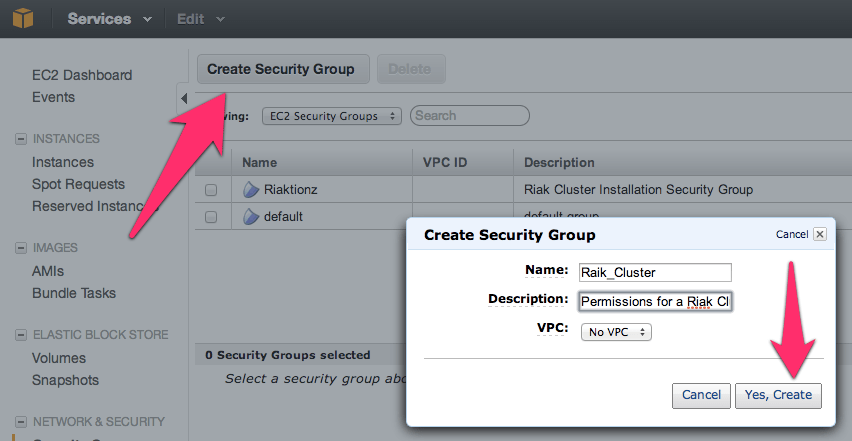
First thing you’ll need to get a security group with the correct permissions setup. For that, you’ll need to make a security group.

NOTE: No, I didn’t mean to misspell Riak, but it’s in there now.  😉

Before adding the ports, go to the security group details tab and copy the security group id. I’ve pointed it out in the image above.

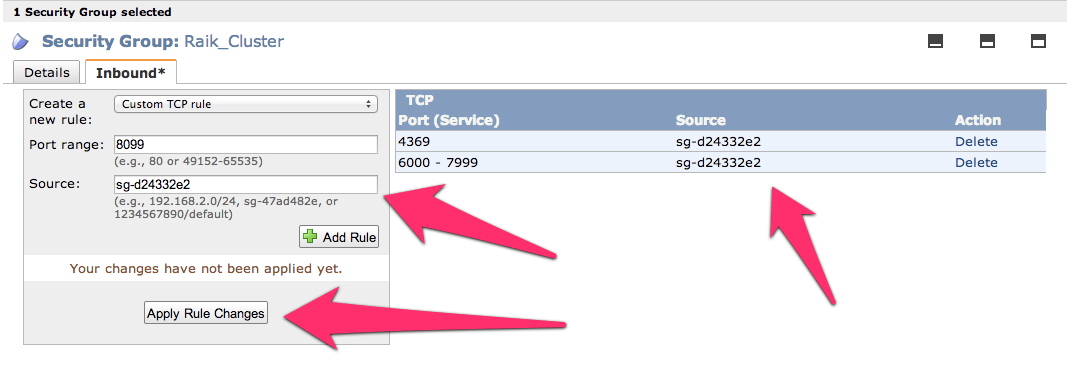
Now add the following three and assign the security group to the ports; 4369, 8099 & 6000-7999. For the source set it to the security group id. Once you get all three added the list should look like this (below). For each rule click the Add Rule button and remember to click the Apply Rule Changes. I often forget this because the screen on some of the machines I use only shows to the bottom of the Add Rule button, so you’ll have to scroll down to find the Apple Rule Changes button.

Now add the standard port 22 for SSH. Next get the final two of 8087 and 8098 setup and we’re ready for moving on to creating the virtual machines.

Server Virtual Machines

For creating virtual machines I just clicked on Launch Instance and used the classic wizard. From there you get a selection of items. I’ve used the AWS image to do this, but would actually suggest using a CentOS image of your choice or Red Hat Enterprise Linux (RHEL). Another great option is to use the Ubuntu 12.04 LTS. Really though, use whatever Linux version or distro you like, there are 1-2 step instructions for installing Riak on almost every distro out.

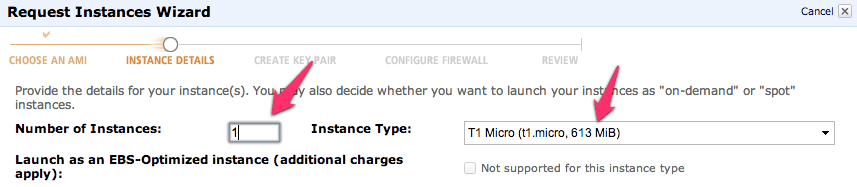
Next just launch a single instance. We’ll be able to launch duplicates of these further along in the process. I’ve selected a “Micro” here but I’m not intending to do anything with a remotely heavy load right now. At some point, I’ll upgrade this cluster to larger instances when I start putting it under a real load. I’ll have another blog entry to describe exactly how I do this too.

Keep hitting continue until you get to the key pair selection. Pick the key pair you want, either making a new one for this cluster or use one you already have. Either way works fine.

Continue again until you can select the security group that we created above.

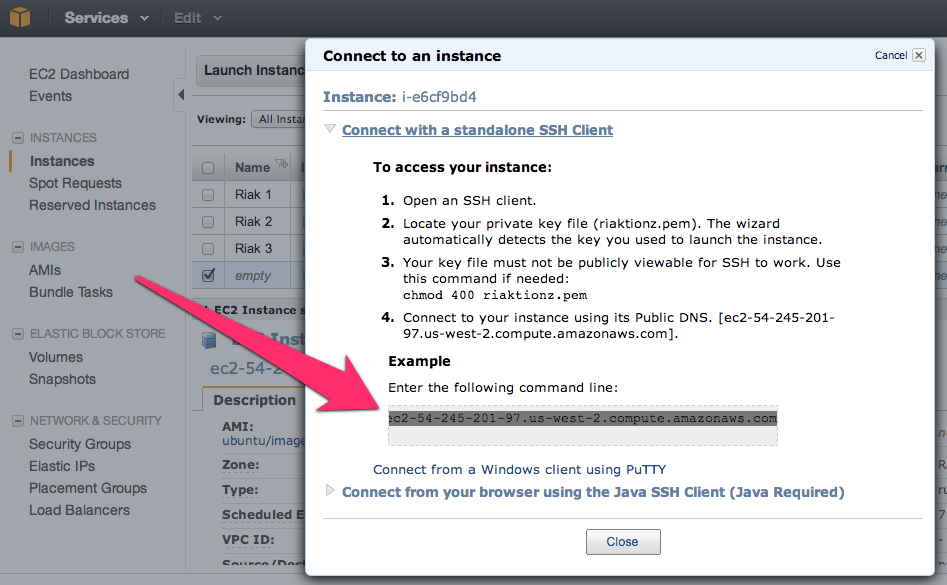
Now keep hitting that continue button, until you get to launch, and launch this thing. Once the instance is launched launch your preferred SSH connection tooling. The easiest way I’ve found for getting the most current private IP to connect to with the appropriate command is to right click on the instance in the AWS Console and click on Connect. There you’ll find the command to connect via SSH.

Paste that in and hit enter in your SSH App, you’ll see something akin to this.

[sourcecode language=”bash”]
$ cd Codez/working-content/
$ ssh -i riaktionz.pem root@ec2-54-245-201-97.us-west-2.compute.amazonaws.com
The authenticity of host ‘ec2-54-245-201-97.us-west-2.compute.amazonaws.com (54.245.201.97)’ can’t be established.
RSA key fingerprint is 31:18:ac:1a:ac:fc:6e:6d:55:e8:8a:83:9a:8f:c7:5f.
Are you sure you want to continue connecting (yes/no)? yes
Warning: Permanently added ‘ec2-54-245-201-97.us-west-2.compute.amazonaws.com,54.245.201.97′ (RSA) to the list of known hosts.
Please login as the user "ubuntu" rather than the user "root".
[/sourcecode]

Enter yes to continue connecting. For some instance types, like Ubuntu you’ll have to do some teaks to log into as “ubuntu” vs. “root” and the same goes for the AWS image or others. I’ll leave that to you, dear reader to get connected via ole’ SSH.

One of the other things, that you may have to do some tweaking about and googling, is figuring out the firewall setups on the various virtual machine images. For the RHEL you’ll want to turn off the firewall or open up the specific connection ports and such. Since the AWS firewall does this, it isn’t particularly important for the OS to continue running its firewall service. In this case, I’ve turned off the OS firewall and just rely on the AWS firewall. To turn off the RHEL firewall, execute the following commands.

[sourcecode language=”bash”]
[root@ip-x-x-x-x]# service iptables save
iptables: Saving firewall rules to /etc/sysconfig/iptables:[ OK ]
[root@ip-x-x-x-x]# service iptables stop
iptables: Flushing firewall rules: [ OK ]
iptables: Setting chains to policy ACCEPT: filter [ OK ]
iptables: Unloading modules: [ OK ]
[root@ip-x-x-x-x]# chkconfig iptables off
[root@ip-x-x-x-x]#
[/sourcecode]

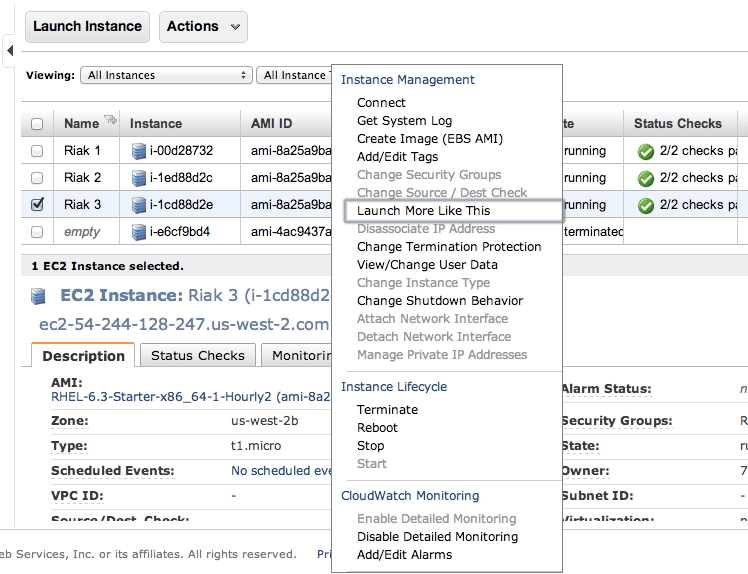
Now is a perfect time to start those other instances. Navigate into the AWS Console again and right click on the virtual machine instance you’ve created. On that menu select Launch More Like This.

Go through and check the configuration on each of these, make sure the firewall is turned off, etc. Then move on to the next step and install Riak and cluster them. So it’s time to get to the distributed, massively complex, extensive list of steps to install & cluster Riak. Ok, so that’s sarcasm.  😉

Step 1: Install Riak

Install Riak on each of the instances.

[sourcecode language=”bash”]
package=basho-release-6-1.noarch.rpm && \
wget http://yum.basho.com/gpg/$package -O /tmp/$package && \
sudo rpm -ivh /tmp/$package
sudo yum install riak
[/sourcecode]

NOTE: For other installation methods, such as directly downloading the RPM or other Linux OSes, check out the http://docs.basho.com/riak/latest/tutorials/installation/Installing-on-RHEL-and-CentOS/.

Step 2: Setup the Cluster

On the first instance, get the IP. You won’t need to do anything to this instance, just keep the IP handy. Then move on to the second instance and run the cluster command.

[sourcecode language=”bash”]
sudo riak-admin cluster join riak@<ip_of_the_first_node>
[/sourcecode]

Do this on each of the instances you’ve added, using that first node. When you’ve added them all, on that last instance (or really any of them) then run the plan. This will get you a display plan of what will take place when the cluster is committed.

[sourcecode language=”bash”]
sudo riak-admin cluster plan
[/sourcecode]

If that looks all cool. Commit the plan.

[sourcecode language=”bash”]
sudo riak-admin cluster commit
[/sourcecode]

Get a check of the cluster.

[sourcecode language=”bash”]
sudo riak-admin member_status
[/sourcecode]

That’s it all done. You know have a Riak Cluster. For more operations to try out your cluster, check out this list of base API Operations.

Portland, Oregon :: Riak Office Hours @ Nedspace

Today, albeit by obliviousness to the holiday, had scheduled “Riak Office Hours” at NedSpace today. Even with the holiday, we had a great turn out. Generally Office Hours & Open Hack type of meets are small, often 2-5 people. Today we had a whopping 10 people turn out!

Open Ended Topics

Each meet we have a variety of topics, from a tutorial on getting started with Riak to discussion around using Riak or Redis to cache data for Riak distributed across geographic regions.

Dark Horse Comics, read them in digital format or original formula, They ROCK!!

In the case today, we dove into the finer nuances of Dark Horse Comics and how their mobile apps use data across caching, tiered access, and on server and on mobile synchronization across the web application. All very interesting and provides insights not to just one person or team, but to anybody and everybody there involved in the conversations. There are lots of solutions to be had, the real problem is just getting to the right one.

Next to bat Ed Borasky, Github @znmeb and Twitter @znmeb and I discussed “Hacks & Hackers”. Ed works a lot these days with Node.js, all sorts of databases, and media collateral. He’s often found digging through data and will soon be digging through some Riak experimentation. For more on Ed’s work and efforts, check out Computational Journalism Publishers Workbench.

Riak Office Hours, Part III

The next Riak Office Hours is coming up on March 4th. To check it out, please RSVP, and even if you can’t make the office hours feel free to join the group to stay abreast of upcoming meetups, presentations, workshops or other events in Portland related to data, data science, distributed computing, Riak, Basho, Erlang, web machine and software in general. We have a good time and look forward to you joining the group. Cheers!

…and now back for my deluge of Erlang, Riak, C#, Node.js + JavaScript and whatever else…

Not So Versus, Riak Versus Redis

Recently a friend of mine and fellow coder, harkening back to my Russell Investments Enterprise Developer days posed the discussion of Redis versus Riak. Well, first off, I thought I myself needed to write down a line by line comparison. I’ve worked with both in various ways but I’d never really thought about them lined up side by side. Often I think of the two pieces of technologies as complementary in various ways. But before I dive into that, let’s take a look at the stats side by side of each.

Company/Maintainer/Builder Basho Technologies @basho Salvatore Sanfilippo @antirez w/ VMware
Official Product Name Riak Redis
License Apache (link) BSD (link)
Storage Type Key Value Key Value
Protocols HTTP/RESTful & Custom Binaries  Telnet like / Proprietary
Replication/Clustering Masterless Master / Slave Replication
Language/Framework Erlang / C C / C++
Best Use Dynamo style architecture & concepts. Primarily used for extreme high availability. Best known and used for extremely fast access to quickly changing data and known size.
Key Feature Fault Tolerant Crazy Fast

Redis is primarily something you’re going to use to move data in and out at crazy fast speeds. However, when you need to store data, it isn’t ideal. There are ways, but it tends to work better handing off to something else to store the data. However Riak on the other hand isn’t always the fastest database, but it’ll withstand serious hits and still maintain integrity of data. It is also tunable for writes, reads and other characteristics that enable tuning and also integrity of the data among nodes. The more nodes in Riak you have the higher available iOPs and fault tolerance. The other thing that Riak can do over time, is truly scale from a horizontal and vertical perspective. Grow Riak tall and wide, it’ll give you linear performance and integrity improvements.

The thing I’ve seen over and over, is Riak as a store and Redis as a cache or other temporal specific data store for websites or other high transaction systems. Overall each serves a very specific purpose but work well in conjunction with each other when you’re rolling together an extremely high performance architecture with an extremely highly available back end data store.

If you’re in Seattle and up for lunch this Wednesday, join me for the Riak Nerd Lunch.

The Friday Wrap Up: Write The Docs, Basho Coworking Office Hours & Node PDX

Wow, so this week has been an intense return to Portland for me. I got back earlier in the week and hit the ground doing a bit of catch up after being on the rails for two weeks to Denver, over to San Francisco and then back up here to Portland. The whole time cramming my brain full of Erlang, getting ramped up on efforts to help bring Riak to everybody that it can help, expand the open source community and do what I do. Expand the community and the risk taking, code inventing, hacker of hardware, and curious ideas that we all have as best I can.

Turning from looking back and looking forward, getting into a proactive view of events coming up there are a couple things I want to let everybody know about. They’re all intertwined here in the Portland Tech Community and well beyond, with events in Seattle and Vancouver BC coming up sooner than later!

Basho Coworking Office Hours

The Riak Products; Riak, RiakCS and Riak EnterpriseDS

These events are every two weeks, starting this Monday. The meet is at NedSpace, we’ll grab the excellent Butcher’s Block Table and converse, code together, implement or deploy Riak and generally answer, present or find the information you need. Feel free to come in and join at anytime during 9am-11am on Monday the 4th, and every two weeks hereafter. You can RSVP here (meetup.com) or here *(eventbrite). For those that are RSVPed and show we’ll have various swag. Prospectively after building some momentum we’ll start bringing in some premium coffee or other beverages to help kick off your day.

Write The Docs

Write The Docs
Write The Docs

This is a new conference here in Portland that is being put together around documentation, document driven development and topics surrounding this oft overlooked and extremely important aspect of software development. As one would expect, it has a github repo.

Currently there are some speakers, but the call for proposals is still open, so check it out and if you’re interested in speaking jump in there and add to the conference and growing conversation! Here’s a short description from the conference site about what Write The Docs is about,

“Write the Docs is a two-day conference focused on documentation systems, tech writing theory, and information delivery. It will be held on April 8-9 in Portland, Oregon.

Writing and maintaining documentation involves the talents of a multidisciplinary community of technical writers, designers, typesetters, developers, support teams, marketers, and many others.

This conference creates a time and a place for this community of documentarians to share information, discuss ideas, and work together to improve the art and science of documentation.

We invite all those who write the docs to spread the word:

Docs or it didn’t happen!”

Speakers so far… there are more coming!

Nóirín Plunkett Plunkett AKA @noirinp the Curator of People 

From the recent speaker announcement, “Nóirín Plunkett is a jack of all trades, and a master of several. By day, she works for Eucalyptus Systems, as a geek<->English translator, and general force multiplier. She’s passionate about community, communication, and collaboration. Nóirín got her open source start at Apache, helping out with the httpd documentation project.

Kenneth Reitz AKA @kennethreitz the Wandering street photographer and moral fallibilist & Pythoner

From the recent speaker announcement, “Kenneth Reitz is the product owner of Python at Heroku and a member of the Python Software Foundation. He embraces minimalism, elegant architecture, and simple interfaces. Kenneth is well known for his many open source projects, specifically Requests. His projects are always well documented, and he is the curator of the The Hitchhiker’s Guide to Python, which documents best practices for Python developers.

Jim R. Wilson AKA @helixb the jimbojw and helixb and…

From the recent speaker announcement, “Jim R. Wilson started hacking at the age of 13 and never looked back. He has contributed to open source projects such as MediaWiki and HBase, and managed the large-scale documentation system at Vistaprint. He’s co-author of one NoSQL book, and currently writing a node.js book.

The perpetrators of this conference are the reknown Troy Howard @thoward37, Eric Redmond @coderoshi and a fellow tech cohort I’ve recently met at The Side Door Eric Holscher @ericholscher.

Node PDX

There’s an announcement coming real soon about this!