Building a Node.js + Express.js + Jade CoderWall + Geekl.st Portfolio (cont…)

In the previous blog entry I went thru the steps needed to get a Node.js site up and running with Express.js. Next I’m going to leap right into getting some mash ups going with Coder Wall. I’m currently waiting on Geekli.st to get me some beta API access, when that happens I’ll be adding some of the geeky list to the portfolio. For now… on with the mash up.
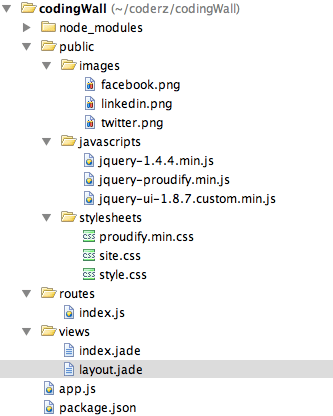
Folder Structure

Folder Structure

First things first, get the pertinent pieces you need from proudify.js (check it out here: https://github.com/icebreaker/proudify and on Mihail’s site here: http://proudify.me). My folder structure looked like this once I had pulled in the js & css files I needed. You may notice I have three image files too, I picked them up via http://iconfinder.com, but you can snag my github and they’re included in that.

If you just want to clone the code, I do have it available on github @ https://github.com/Adron/codingwall.

. . . . Next I setup the index.jade like this:

h1= title

div.splitter
    div.left
        div.navAlpha
          p Welcome to #{title}'s Portfolio Site

          a(href='http://www.linkedin/in/adron’)
            | <img alt="Linkedin" src="images/linkedin.png" style="border: 0px" />
          br
          a(href='http://twitter.com/adron&#8217;)
            | <img alt="Twitter @adron" src="images/twitter.png" style="border: 0px" />
          br
          a(href='http://www.facebook.com/adron&#8217;)
            | <img alt="Facebook" src="images/facebook.png" style="border: 0px" />

        div.navBeta
          p #{title}'s Other Web Presence

          ul
            li
              a(href='http://compositecode.com&#8217;)
                | Composite Code
            li
              a(href='https://github.com/Adron&#8217;)
                | Github
            li
              a(href='http://www.linkedin.com/in/adron&#8217;)
                | LinkedIn
            li
              a(href='http://www.facebook.com/adron&#8217;)
                | Facebook
            li
              a(href='http://twitter.com/adron&#8217;)
                | Twitter

    div.right
        div.crazy
          p the content

After I setup the index.jade I changed the layout.jade to have the following code.

doctype 5
html(lang="en")
  head
    title= title
    link(rel='stylesheet', href='/stylesheets/style.css')
    link(rel='stylesheet', href='/stylesheets/site.css')
    link(rel='stylesheet', href='/stylesheets/splitter.css')
    link(rel='stylesheet', href='/stylesheets/proudify.min.css')
    script(src='/javascripts/jquery-1.4.4.min.js')
    script(src='/javascripts/jquery-ui-1.8.7.custom.min.js')
    script(src='/javascripts/jquery-proudify.min.js')
  body!= body

Those are basically all the changes I made for the first push to github. Run the standard app:

node app.js

Once it runs you should see the basic display of information. The proudify.js pulls the CoderWall badges from the their site.
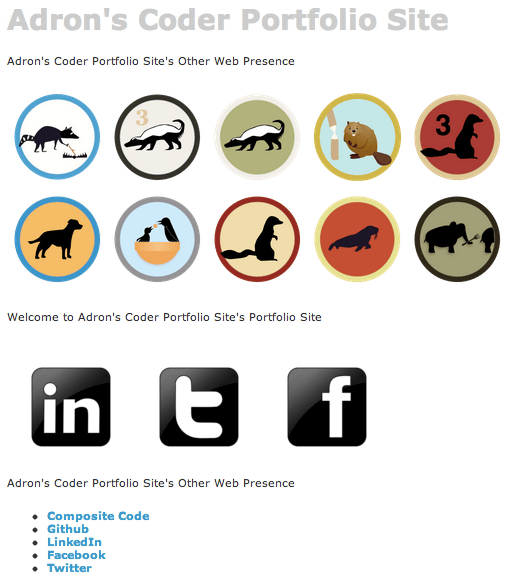
Coding Wall

Coding Wall

At this time I still haven’t had time to weave in the Geekli.st yet, but will work toward doing that in the future and making a post.

I’ll be adding other features to this, as an example, around database support, connecting to services and a host of other functionalities. So stay tuned to this blog and be sure to follow the github repository for the latest bits.

Until then, enjoy.

Building a Node.js + Express.js + Jade CoderWall + Geekl.st Portfolio

If you’re looking for Part 2…

Alright, diving right in. First, get an express.js application setup and install all the dependencies.

Creating the Express.js Web Application

$ express codingWall

   create : codingWall
   create : codingWall/package.json
   create : codingWall/app.js
   create : codingWall/public
   create : codingWall/public/javascripts
   create : codingWall/public/images
   create : codingWall/public/stylesheets
   create : codingWall/public/stylesheets/style.css
   create : codingWall/routes
   create : codingWall/routes/index.js
   create : codingWall/views
   create : codingWall/views/layout.jade
   create : codingWall/views/index.jade

   dont forget to install dependencies:
   $ cd codingWall && npm install

$ cd codingWall/
$ npm install
npm http GET https://registry.npmjs.org/express/2.5.8
npm http GET https://registry.npmjs.org/jade
npm http 200 https://registry.npmjs.org/express/2.5.8
npm http GET https://registry.npmjs.org/express/-/express-2.5.8.tgz
npm http 200 https://registry.npmjs.org/jade
npm http 200 https://registry.npmjs.org/express/-/express-2.5.8.tgz
npm http GET https://registry.npmjs.org/mime/1.2.4
npm http GET https://registry.npmjs.org/mkdirp/0.3.0
npm http GET https://registry.npmjs.org/qs
npm http GET https://registry.npmjs.org/connect
npm http GET https://registry.npmjs.org/commander/0.5.2
npm http 200 https://registry.npmjs.org/qs
npm http 200 https://registry.npmjs.org/mkdirp/0.3.0
npm http GET https://registry.npmjs.org/mkdirp/-/mkdirp-0.3.0.tgz
npm http 200 https://registry.npmjs.org/mime/1.2.4
npm http GET https://registry.npmjs.org/mime/-/mime-1.2.4.tgz
npm http 200 https://registry.npmjs.org/commander/0.5.2
npm http GET https://registry.npmjs.org/commander/-/commander-0.5.2.tgz
npm http 200 https://registry.npmjs.org/connect
npm http 200 https://registry.npmjs.org/mkdirp/-/mkdirp-0.3.0.tgz
npm http 200 https://registry.npmjs.org/mime/-/mime-1.2.4.tgz
npm http 200 https://registry.npmjs.org/commander/-/commander-0.5.2.tgz
npm http GET https://registry.npmjs.org/formidable
npm http 200 https://registry.npmjs.org/formidable
jade@0.26.0 ./node_modules/jade
├── commander@0.5.2
└── mkdirp@0.3.0
express@2.5.8 ./node_modules/express
├── qs@0.4.2
├── mime@1.2.4
├── mkdirp@0.3.0
└── connect@1.8.7
$

Next get a basic app with a message built. This will make sure all the Jade, Express.js and of course Node.js bits are all installed and running.

$ node app.js

Build The UI With Jade Templates

At this point you should be able to navigate to http://localhost:3000 in a browser and view the default express.js web app. So now let’s add something relevant to the page. First, I’m just going to stick my name on the page in the index.jade file. My method for editing the file is usually to just use a text editor such as TextMate.

$ mate views/index.jade

There isn’t really a whole lot to the file yet. One thing you’ll notice though, is the Jade Templating.

h1= title
p Welcome to #{title}

This might seem strange at first, but here’s an example of the HTML mess we normally see and then the same thing cleaned up. So here’s the some HTML goo…

<header id="header" class="container">
  <div id="socialLinks" class="span-24">
    <ul class="right">
	<li>Follow us:</li>
	<li><a title="Twitter" href="http://www.twitter.com&quot; target="_blank"><img src="images/Twitter_32x32.png" alt="" /></a></li>
	<li><a title="Facebook" href="http://www.facebook.com&quot; target="_blank"><img src="images/Facebook_32x32.png" alt="" /></a></li>
    </ul>
</div>
<div id="titleContent" class="span-24">
<div id="textLogo">
  <a title="GoldMind" href="/">
    <span id="companyName">GoldMind</span>
  </a>
</div>
  <span id="textLogoSubtitle">What do you have to learn?</span></div>
</header>

…and the Jade Template of the same.

header.container#header
  div.span-24#socialLinks
    ul.right
      li Follow us:
      li
        a(href='http://www.twitter.com&#8217;)
          | <img src="images/Twitter_32x32.png" alt="" />
      li
        a(href='http://www.facebook.com&#8217;)
          | <img src="images/Facebook_32x32.png" alt="" />
  div.span-24#titleContent
    div#textLogo
      a(href='/', title='GoldMind')
        span#companyName GoldMind
    span#textLogoSubtitle What do you have to learn?

Much shorter, much cleaner, and lots less noise when one yanks away all the repetitive chevrons. Now that we’ve looked at an example of nasty HTML and clean Jade, let’s step through how to get certain markup with Jade.

The first thing to note is that each tag is indented below the tag it is included within. That’s how things are nested in Jade, and intelligently, no closing tag is needed. But what if you need the id or class added to the tag. That’s also extremely easy. To add the id just add a hash between the tag and the id parameter like this.

div#theIdName

For a class added to the tag.

div.className

To add both an id and a class.

div.className#theIdName

If you open up the layout.jade file you’ll fine some other parts of the Jade Templating I haven’t covered, variables. In the layout.jade file you’ll find the following code.

!!!
html
  head
    title= title
    link(rel='stylesheet', href='/stylesheets/style.css')
  body!= body

The title is set to title. Which is actually set in the index.js file. The index.js file has the routing functions that are called from the app.js file that launches the web application. Looking in the index.js file you’ll find the value that is passed in as the title. Change that to something custom for our app example. I changed mine as follows.

exports.index = function(req, res){
  res.render('index', { title: "Adron's Coder Portfolio Site" })
};

Also, to get a little closer to the HTML5 Spec, I changed the layout.jade page as follows.

doctype 5
html(lang="en")
  head
    title= title
    link(rel='stylesheet', href='/stylesheets/style.css')
  body!= body

With those two changes we should have a custom message that is processed and also HTML5 compliance. Be sure to kill node.js if it is still running and restart it so all the changes are taken into account.

Mashing it Up!

Now it is time to mash this CoderWall & Geekli.st stuff up, but alas, that’s coming in the NEXT blog entry. Stay tuned, I’ll have it up in the morning!

Added: Part 2

I Can Talk About It Finally! => Tier 3 Web Fabric Platform as a Service (PaaS)

A couple months ago I shifted gears and started working for Tier 3 on a number of projects. I made this decision for a few reasons:

1. I’m a huge advocate of PaaS (Platform as a Service) technologies. I like what PaaS enables and what it eliminates. Matter of fact I’d say I’m a bull on the technology. I like to learn about, create and build the architectures within platforms. I also love the rather complex back end problems that come up when building a truly powerful, scalable, high end, highly available PaaS. You say, “Adron, Tier 3 doesn’t have any PaaS stuff, it’s an IaaS Provider, this doesn’t explain anything?” Aha! Read on (unless of course you’ve caught the news today… then you already know the answer)

2. I’m a polyglot dev. .NET kind of burned me out a few years back and I dedicated to learning as many other frameworks, languages, and tech stacks that I could. I’ve never been happier with the variety these days. I’ll admit though I still love to use all those years of experience I have with .NET. Indeed, I have a little soft spot in my heart for C#. Tier 3, along with the Iron Foundry Project, has given me the opportunity to work across languages and stacks including Node.js, Ruby, Objective-C and more.

3. I like to build things, advocate for those things and what they can do for you, for dev teams, and in the end what we developers can build with them. Sometimes this might mean I do it myself, sometimes it means coordinating and leading a team (or as I often say of leads, “serving” the team). Right now I’m getting to do a little bit of both and it is indeed fun and really exciting! This brings me to the answer.
The Answer:  Tier 3 now has one of the, if not the most advanced PaaS Environment available today.  Yeah, you can quote me on that. I’m not saying it because I work at Tier 3, I’m saying it because I decided to come work at Tier 3 to help build it. Those of you that know me, know why and where I do things. I have intent behind these decisions.  😉

The Tier 3 PaaS environment officially has more support for frameworks than any other PaaS Provider out there today. Congratulations to the team for getting this out the door! Needless to say, I’m proud to be a part of this team of bad ass devs! Cheers!

What is the Tier 3 Web Fabric?

Here’s a short tour I put together…

#

What exactly makes up a Web Fabric? We’ve taken Coud Foundry as a core, adding Iron Foundry for full support of all major Enterprise Frameworks and added a fabric over these services to provide an automated seem-less creation of a complete PaaS Environment.

How would you use a PaaS like this?

In an enterprise software and application development shop there is often a break out between development, testing, maybe a UAT (User Acceptance Testing) and finally production. One way to utilize such capabilities is to built a Web Fabric for each of these environments. Once each environment is built, these can then be scaled up or down as needed. Once the environment is done simply delete it. For an environment like UAT or Test, this is one of the most ideal situations to create an environment from scratch, ensuring that outliers don’t affect the testing criteria. How do you build a Tier 3 Web Fabric PaaS? This is the fun part. This process involves a little information and a few clicks, which then will build an entire PaaS environment.

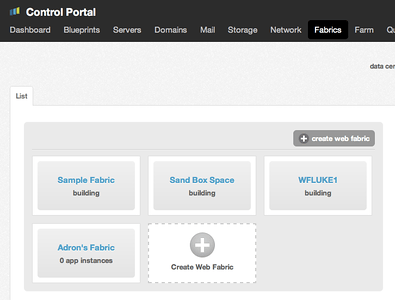
Step 1: In the Tier 3 Control Panel click on the tab titled “Fabrics“. Inside that view, click on “Create Web Fabric“.

Tier 3 Control Panel

Tier 3 Control Panel

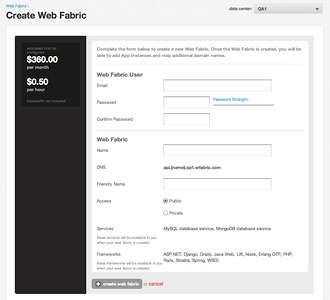
Step 2: Fill out the information requested on the screen. The user that you’re creating will be your Tier 3 Web Fabric Administrator. The name becomes part of your URI to access the PaaS API from, and the friendly name below that displays as a description in the control panel. The last piece of information is public or private, the private option limiting access to only VPN users of your Tier 3 Account.

Creating a New Web Fabric

Creating a New Web Fabric

Step 3: Now give it some time. Remember this is not merely a simple virtualized instance of an operating system. What is now happening is a Cloud Foundry environment is being built, Iron Foundry is also added & other enhancements are being applied and built. This then creates an entire Tier 3 Web Fabric that can be used with any of the following tools, languages, and databases.

A few of the languages and frameworks…

  • Ruby on Rails or Sinatra
  • ASP.NET w/ whichever .NET Language, it could be C#, VB.NET, or .NET COBOL if you so felt inclined to build a web application with it.
  • Java w/ Spring and other options.
  • Node.js Nuff’ Said
  • Python

Of course the database services too…

  • MongoDB
  • MS SQL Server
  • vmWare PostGreSQL
  • Redis

These are just a few that are and will be supported in the coming days. The Cloud Foundry base provides a massively powerful core to build off of and extend services and frameworks.

For pushing applications to the Tier 3 Web Fabric, here are some tools to help with that…

vmc-IronFoundry :: This is the same thing as the vmc CLI that is part of the Cloud Foundry Project except that it adds support for .NET pushes from the command line too.

vmc :: this is the default way used by most people working with Cloud Foundry based PaaS Environments.

Eclipse & STS for Java :: this is the extension that integrates into Eclipse.

Cloud Foundry Explorer :: this can be used to view and push .NET applications to the Tier 3 Web Fabric (or any Iron Foundry enabled Cloud Foundry Environment)

Open Source Software, Iron Foundry and More…

In the coming days, weeks, and months I’ll be working with the team here at Tier 3 to drive more capabilities and features. In addition I’ll also be driving the Iron Foundry Open Source effort, pushing to extend what we’ve provided already with the .NET support extension on Cloud Foundry and also more. We here at Tier 3 love the open source community, and we love being part of the community. So with this announcement I wanted to add a big, huge, awesome THANKS to everyone out there passionately involved in and building software that is open source. You all ROCK!

Stay tuned, this is merely the beginning.

Coder Society Seattle, Inaugural Report!

Coder Society Seattle got off to a start this weekend on this beautiful sunny Saturday! We all mozied into the Blue Box offices in downtown Seattle a mere block away from Pike Place Market. After a relaxed gathering we circled up to break out the kanban with the story ideas around our problem domain. We knocked this out in short order, all ready to dive into groups, frameworks, and determine what we’d learn for the day.

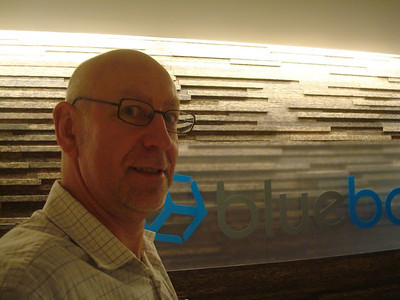
Clive, our picture taker, arriving at Blue Box

Clive, our picture taker, arriving at Blue Box (Click through on the image, you’ll need a Google+ Account)

We all then took a democratic vote on which tech stacks we’d all work with for the day. We came concluded the vote with Sinatra and Node.js as our primary two framework stacks.

During this voting however we broached the topic of doing Backbone.js and Knockout.js. So we decided that, instead of two, we would break into three groups. This created two server side web services teams and a more pure client side team. Each team would act as if they were an independent startup, working specifically to provide a web data service API or respectively a UI that offered a mash up of this data.

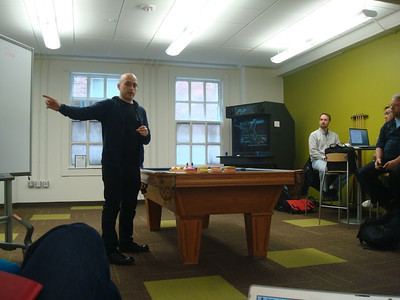
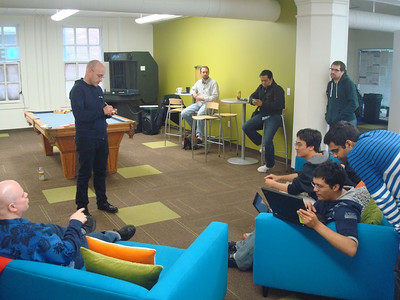
Kicking off the day...

Kicking off the day…

Using Sinatra for the Barista Business Data Domain

@ang3lfir3 @trevorbramble @strabd @ang3lsdream @adron @monkeynumberone

Backbone.js & Knockout.js for the Bash Up of Barista + Coffee Drinker Business Domain

@sechrest @volturiussystem @iamjoncortez @ph477y

Using Node.js for the Coffee Drinkers Business Domain

@scottkfraley @jayzeng @anupamonu @iC @pOch1

(NOTE: Some members didn’t have twitters yet, I’ll add em’ when they send em’.)

I Can Write on Post Its!

I Can Write on Post Its!

After the breakout we all dove into getting our various domains done. Many of us were not versed well with our respective technology stack we chose. Some time was consumed digging into that. After a few hours everyone had gotten a few solid key features done. In addition we’d all broken out our direct business objects into a set of models, interfaces, etc.

Mid-day we used the “Put your order on a post it note” ordering system and I (@adron) headed off to retrieve a true Chipotle Lunch. While there I experienced the odd queueing mismanagement that can happen since I had multiple orders and an unclear way to provide the messaging needed to get those orders into the “queue”. However, I succeeded finally and we all enjoyed lunch, courtesy of Tier 3! Thanks Tier 3!

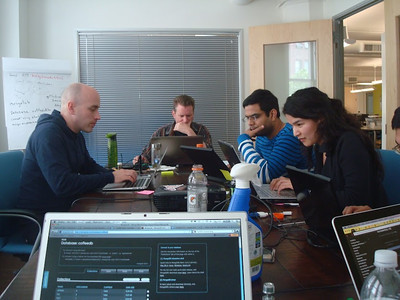
Coder Society Coders Coding Node.js (and Sinatra in the other room... etc)

Coder Society Coders Coding Node.js (and Sinatra in the other room… etc)

We came toward the end of the day having learned a lot, built various aspects of what we had intended and all joined back up in the common space for a review of the day. There were a number of lessons learned that’ll will be integrated into the Coder Society flow. It was unanimously voted to be a successful day by the group. We did a short review of things to do slightly different and came up with these conclusions:

  • Send links to git and github tutorials for those that aren’t familiar with this source control technology.
  • Determine frameworks and specifics to configuring machines ahead of time.
  • For web application development, PaaS by far saves hours of configuration and setup. Keep doing this in the future. However for certain “topics” we broach we’ll still use IaaS or other systems as needed.
  • Minimize user stories to 3-4 specific stories per team. Have more flexible kanban boards that can be moved around or taken (re: like a poster board) to the area teams break out to.

With that, the inaugural meetups in Seattle and Portland are complete. I’m aiming for one more in San Francisco and then working to organize regular monthly meetings for the Coder Society. I hope you’ll join us in the future. If you’re interested in kicking off a Coder Society user group in your city feel free to ping me @adron on Twitter and we’ll coordinate.  Cheers!

OS-X Cocoa Quickie #2 => Know Objective-C

When working with Objective-C one key thing to keep in mind is the differences between the other “C”s like C, C++, etc. One thing that crops up sometimes is the C char type. Normally, this isn’t the most ideal thing to use. The better type to use is NSString.

// c string
char *foo;
foo = "This is a c string.";

// NSString
NSString *bar;
bar = @"This is an NSString.";

The way to straighten this out is to give a little conversion if you do run into some C char types.

const char *footoo = "blah blah";
// Convert the NSString from a c string.
NSString *foobar;
foobar = [NSString stringWithUTF8String:footoo];

// Convert the c string to an NSString.
footoo = [foobar UTF8String];

One of the other things that is a little catchy is the isEqual method.

The result of this test is yes if the receiver and anObject are equal and no otherwise. Basically, both pointers must be to the same memory locations. This however is not always equal, which can cause a bit of confusion.

There are a host of other things to keep an eye out for. So be sure to check out the specifics of how Objective-C works versus the other “C”s.