An Open Source Software ala VMware Guide :: A.K.A. Get Clarity on Contributing to the CloudFoundry Project!

I’ve jumped into committing some source code to the Cloud Foundry Project and I wanted to document the process so far. The Cloud Foundry project is a little trickier than most open source projects, because there are a host of tools around the process. As that is the case, it isn’t a simple github repository with easy to push pull requests and other flows. Instead, there’s a trick to it all and that’s what this blog entry is about. These observations about getting a first pull request submitted:

  • The instructions, sort of, are located here for contributions: http://cloudfoundry.org/contribute There however seems to be some key parts missing from these (or I didn’t find them on any of the immediate links). The main one being any connection, information, or workflow around the internal git repository that they have setup. That should be more prominently displayed. Can I submit a pull request for the contributions page?  🙂
  • The github repository. I won’t beat around the bush on this particular observation. The github repository is almost entirely useless. You can’t send pull requests to it, nobody communicates around it, and all the existing pull requests are dead. It is a read-only repo of the internal git repo. So don’t look there for any key pieces of information – check the Google Groups and other information I’ve linked in this blog entry.
  • The real code base is in an internal git repository held by VMware that has a gerrit (code review) + Jenkins (awesome build server). This is actually a pretty slick setup. Albeit I admit this is absolutely more work for contributors. But when you got a hot potato you gotta pass around the pain (is that even an colloquialism? Probably not, so I just made it up).
  • There are some very useful google groups that you should sign up for if you intend to contribute code to Cloud Foundry.  This is where all the super smart and also friendly Cloud Foundry core team hang out. Even if you aren’t going to commit code, go sign up anyway. You’ll be able to get a lot of very useful information from these guys related to setting up, using, and deploying Cloud Foundry. http://groups.google.com/a/cloudfoundry.org/groups/dir
  • They also ask you to sign a document related to contributions located here: http://cloudfoundry.org/individualcontribution.pdf basically promising you didn’t steal someone else’s code and that you won’t sue VMware for making this code public.
  • The JIRA site (another account login you’ll need to setup, it is worth it to, so get one if you intend to commit code. Otherwise if you just want to lurk then don’t really worry about the JIRA site too much.)
  • Once you are logged in to the Google Groups you can hit this link: https://groups.google.com/a/cloudfoundry.org/group/vcap-dev/browse_thread/thread/af205159a17ec358 which actually has the best instructions I’ve found on getting a good clone and submitting a pull request via the gerrit command line tool.
  • Another more immediate way to get help is to bounce into IRC via freenode and join the #cloudfoundry channel. The core devs plus a number of other coders hang out in that room.

Getting it Cloned

Per the instructions above, the first thing you’ll need is the code base. You’ll need to make sure you have a gerrit account first and that you’ve submitted your SSH public keys to gain access. Then get the vcap code base via the gerrit CLI:

$ sudo gem install gerrit-cli
Password:
Successfully installed gerrit-cli-0.0.11 gem installed
Installing ri documentation for gerrit-cli-0.0.1...
Installing RDoc documentation for gerrit-cli-0.0.1...
$

I left the results of the command in just for familiarities sake. The next command is to clone the repo gerrit style.

$ gerrit clone ssh://adron@reviews.cloudfoundry.org:29418/vcap
Cloning into 'vcap'...remote:
Counting objects: 12253, doneremote: Finding sources: 100% (12253/12253)Receiving objects:  89% (10961/12253), Receiving objects:  89% (10961/12253), Receiving objects:  89% (10961/12253), Receiving objects:  89% (10961/12253), Receiving objects:  89% (10961/12253), Receiving objects:  89% (10961/12253), 247.05Receiving objects:  94% (11631/12
Receiving objects:  94% (11631/12253), Receiving objects:  94% (11631/12253), Receiving objects:  94% (11631/12253), Receiving objects:  94% (11631/12253), 548.27 MiB | 105
remote: Total 12253 (delta 6438), reused 11765 (delta 6438)
Receiving objects: 100% (12253/12253), 773.92 MiB | 311 KiB/s, done.

Resolving deltas: 100% (6438/6438), done.

Installing commit-msg hooks into 'vcap/.git/hooks'.commit-msg
100% 2331     2.3KB/s   00:00

Installing tracked git hooks:

$

NOTE: This will likely take a long while for the vcap repo. It took me about 45 minutes to clone. That’s based on two seperate machines on two different fast internet connections with two different operating systems.  So just be patient.

Then just cd vcap into the working directory and create your changes. Once the changes are committed then pull the latest, merging again if needed, and then push the pull request via the following command.

$ gerrit push

Once that is done your pull request will be put into the continuous integration build queue. Then someone from the core team will up vote your code or deny it with reasons. You can check out the status:

The OSS-Docs are located on Github, check those out here. They’re not super complete, but the information they do have in them is pretty solid. So check these out while hacking:  https://github.com/cloudfoundry/oss-docs.

In my next write up about my efforts with Cloud Foundry, I’ll dive into what I’m pushing and what for. So keep reading, I’ll be back with more good bits.
Coder Society Seattle, Meeting this Saturday

Here it comes. Coder Society Seattle, Inaugural Kick Off!
I hope you can make it. Here’s the plan so far. We’re all meeting at Blue Box in beautiful downtown Seattle at 10am. We’ll setup a board (ala kanban style) and immediately jump into breaking our domain out (re: See the Coder Society Google Group for conversation around this, or check out below). I’ll have the post its, you bring the desire to learn new frameworks and build a cool something another!

One thing learned while getting things done and learning at the first Coder Society Portland meeting was that building infrastructure elements really held us back. So for this meet up we’ll dive straight into a PaaS option with Iron Foundry’s Cloud Foundry Environment. This will allow us to use almost any environment application option we want and couple it to whatever database.

Some of the things you’ll need for the meet up:

  1. Desire to learn.
  2. Intent to code, code, and deploy.
  3. You will need a laptop. So buy one, steal it, borrow it, or whatever you gotta do.

The meeting will be held at Blue Box at 119 Pine Street, Suite 200, Seattle, WA 98101

Google Maps Link: http://maps.google.com/maps?q=119+Pine+Street,+Suite+200,+Seattle,+WA+98101++++++&hl=en&ll=47.609939,-122.339823&spn=0.010358,0.012939&sll=45.517333,-122.676016&sspn=0.010765,0.012939&t=h&hnear=119+Pine+St+%23200,+Seattle,+Washington+98101&z=16

Updates will also be provided via the Twitter Account: https://twitter.com/#!/codersociety and the site http://codersociety.org

Here’s a run down of our initial kick off goals. Polyglot applications for the win!

Here’s a review of our goals for the meeting:

Primary Goal: PolyGlot Systems For this we will do a simple project where we pick technologies using at least two different programming languages and have them perform different roles in an application and share information across something neutral like Mongo or Redis. The prime choices, and we can add others, will be to use Node.js/Express.js + Ruby & Sinatra, and possibly C#/.NET MVC. This all depends on the desire of the meeting audience.

Stories: We’re kicking off the meeting goal with a theme many software developers will be super familiar with. Coffee!

  • A coffee drinker wants to add a rating for the coffee beverage.
  • A coffee drinker wants to list the price of the coffee beverage.
  • A coffee drinker wants to review the Barista.
  • A coffee drinker wants to rate the Barista.
  • A coffee drinker wants to know where the beverage.
  • A coffee drinker wants to know where the Barista was working.
  • A coffee drinker doesn’t want to read huge reviews.
  • A Barista wants to be able to list their coffees they use.
  • A Barista wants to be able to comment on reviews.
  • A Barista wants to be able to list their prices for coffee.
  • A Barista wants to be able to select their specialty.
  • A Barista or coffee drinker wants to be able to add or view outlets, wifi, or other information about the coffee shop.
  • A coffee drinker wants to be able to “follow” their favorite Barista.
  • A Barista wants to be able to send an alert to all of their coffee drinkers.

Arbitrary Limits:

  • Coffee Drinks are limited to: Cappuccinos, Lattes, Mochas, Macchiatos, Espresso.
  • We’ll be deploying to the Iron Foundry (Cloud Foundry core) PaaS, which really doesn’t put any particular limitations on us.  😉

Frameworks: After splitting into teams, we’ll iron out which frameworks we want to use and implement using the choice frameworks.

  • Node.js + Express.js / Bricks.js
  • Ruby on Rails
  • Ruby + Sinatra
  • ASP.NET MVC
  • Assembly. Ya know, for the insanely hard core. 🙂

Database:

  • Mongo DB, maybe Redis, Postgresl, or Neo4j if needs arise.

Prerequisites:

  • Bring a Laptop (or computing device you can do development on).
  • Bring some familiarity for setting up and using your development platform. This could be .NET, Ruby on Rails, Sinatra, Node.js, PHP, or whatever.
  • Bring a spirit to learn about new frameworks, get all polyglot, and have fun.

Meeting Workflow:

  1. The meeting will join.
  2. Teams will form.
  3. The kanban board will be explained and setup for use by the teams.
  4. We’ll unpack the user stories, setup workflow, and idea behind the meeting will be reviewed.
  5. Select team technology & domain element (barista or coffee drinker).
  6. Setup tasks within teams.
  7. Pick pairs to work on tasks.
  8. Code… implement…
  9. After implementation, we’ll review everything, and trade war stories.

OS-X Cocoa Quickie #1 => Make Sure to Have Unit Tests

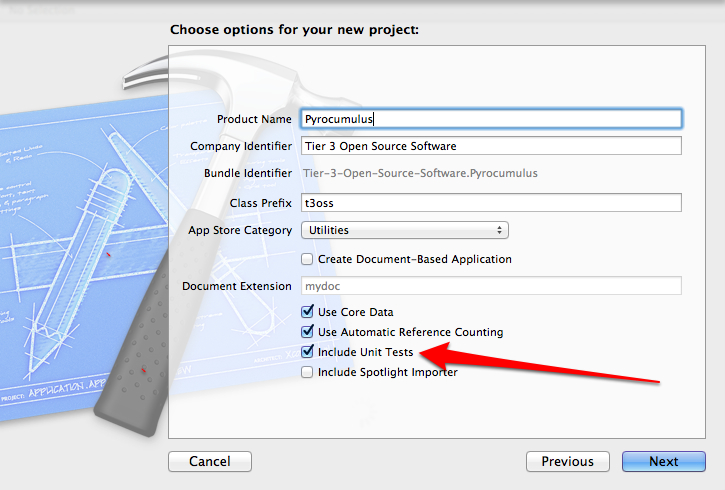
When starting an Xcode Cocoa Project you should have a testing project that you include. It’s a simple check box on the project creation dialogs.

Keep This Checked! Write Tests!

Keep This Checked! Write Tests!

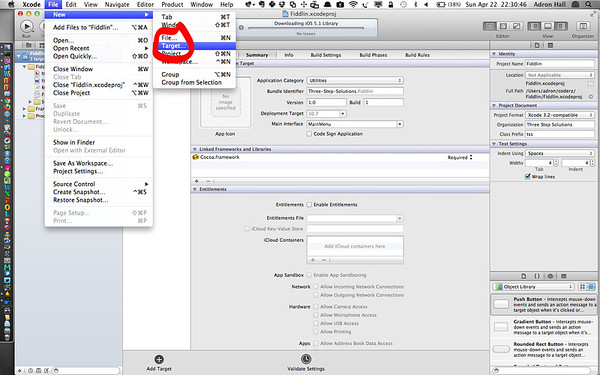
If for some reason you inherit a project that doesn’t have unit tests, tests, or anything of the sort and need to add a testing project follow these steps. With the project open add a new target as shown below.

Add a New Target to the Project

Add a New Target to the Project

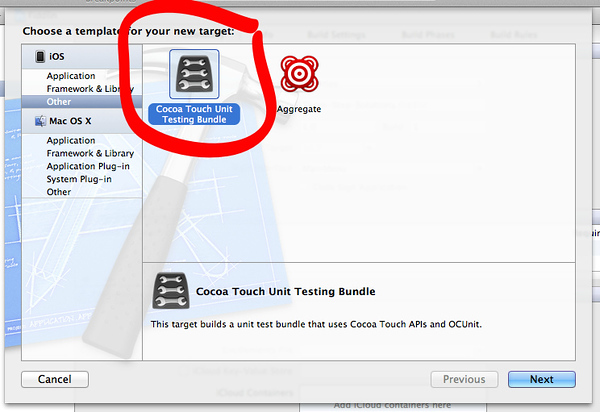
Add a Cocoa Unit Testing Bundle.

Cocoa Touch Unit Testing Bundle

Cocoa Touch Unit Testing Bundle (Click for full window and full size image)

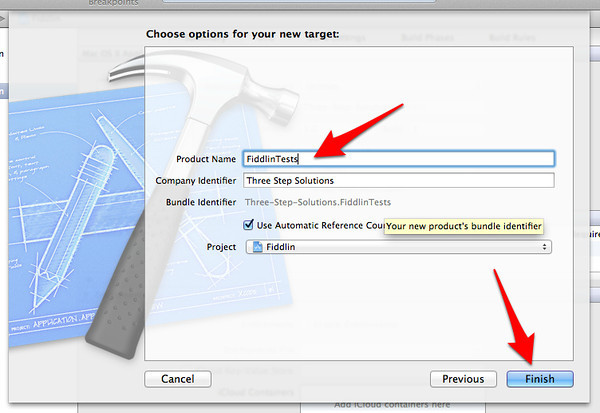
Set the appropriate parameters for your project. Be sure to select the project from the drop down.

Set the product name and be sure to select the correct Project from the drop down. (Click for full window and full size image)

Set the product name and be sure to select the correct Project from the drop down. (Click for full window and full size image)

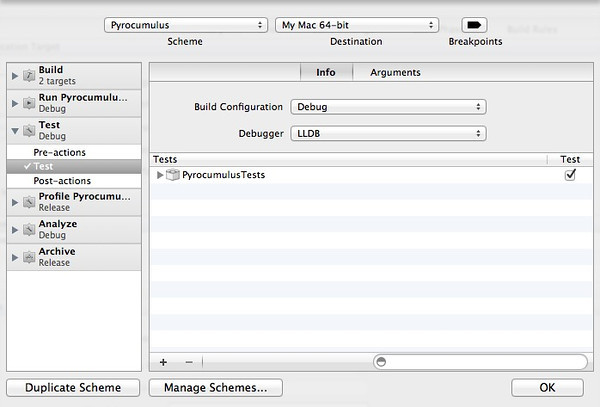
Once finished adding the testing target, edit the schema. The project will have an additional schema. I personally like to keep them rolled together, so delete the “*Tests” schema and just make sure that the Tests section has the right target listed.

Schema Settings

Schema Settings

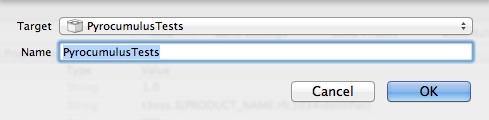
If it isn’t listed, as shown in the above dialog, click the + to add the tests project. Select it in the target dialog as shown below.

Adding the test target for the schema

Adding the test target for the schema

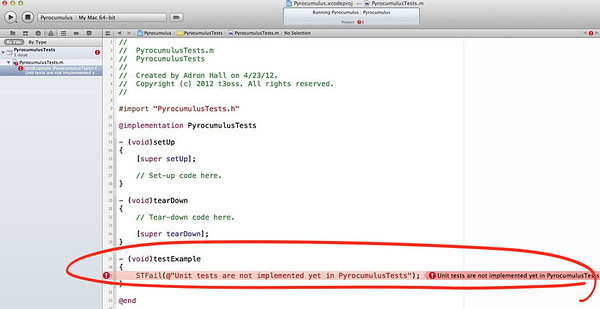
Once all that is done then the tests can be executed from the Product -> Test menu option or the shortcut key combo of ⌘U. With the default code that is added to the target project, you’ll end up with one failing test.

Test FAIL!

Test FAIL!

Now write tests!

Learn About TDD, Cloud Foundry, OSS, and OS Bridge

I’ll be attending OS Bridge (you should attend too, it’s only a few hundred bucks!!) this year. Hopefully I’ll be presenting also but I need everybody’s help! If you would, favorite (with the star) my presentations/workshops. Also leave a note of feedback related to how you’d dig seeing me present!  (I’ll owe ya a beer, feel free to call me on it at OS Bridge and the round is on me!)

Presentation #1:  Putting It Together, Letting Apps Lead the Cycle, TDD in the Cloud (Click Here to Favorite)

I’ll be taking a deep dive into cloud architectures and how to build applications, generally at the PaaS level mixed with a little IaaS, to get people rolling with high velocity, high quality, and without the need to worry about the little things.

Description

Want to learn about why PaaS and cloud computing is altering the very fabric of the development cycle? Want to know how to dive in with some abstractions and behavioral practices on the cloud, using PaaS, to bring apps, prototypes, and UX to market faster than anyone else? I’ll be touching on all of these things during this long form session. The sessions will step through these core concepts and ideas.

  • How to get up and running using cloud computing technologies and specifically to take advantage of PaaS providers.
  • How to bring UX designs and prototypes into a usable state even faster.
  • How to bridge that gap between development, test, QA, user acceptance testing, staging, and production (or whatever environments…) without blowing the bank.
  • How to scale, once the cycle is in place and continuous deployment is ready.

Presentation #2: Removing the Operating System Barrier with Platform as a Service (Click Here to Favorite)

This session will cover the major advances of platform as a service technology, what’s available in the OSS space to enable faster, easier, higher quality software development cycles in the cloud. The session will complete with a demo of PAAS technology in use, deploying a highly scalable, distributed & dispersed web application.

Description

This presentation will show why PAAS is the way of the future for application deployments. Enterprise, small business, and especially startups will want to learn more about the available PAAS OSS technology and also learn about what is coming in the near future.

This presentation will build upon my New Relic Blog Series on “Removing the Operating System Barrier with Platform as a Service”:

Huboard, Github Issues ala Kanban, Implemented…

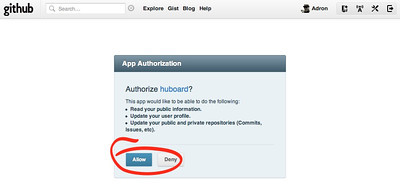
Recently I discovered Huboard. Thanks to those that helped me find it! Huboard is really simple and helps keep that kanban visibility when everyone can’t be in the same environment all the time. I setup a board for one of the pending OSS Projects that will be coming live. These are the steps I took. 1. Go to http://www.huboard.comand login with your Github identifiy. This will use your existing github account and you’ll then have access to all your projects to setup and use as you see fit with Huboard.

Allow Github to Provide Identify Access

Allow Github to Provide Identify Access

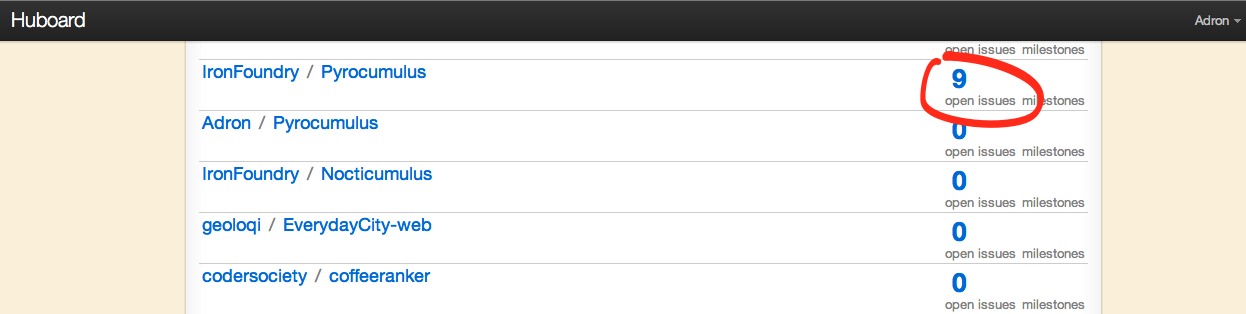
  1. Huboard will now list all of your projects you have github.

Huboard Repository List (Click for full size image)

Huboard Repository List (Click for full size image)

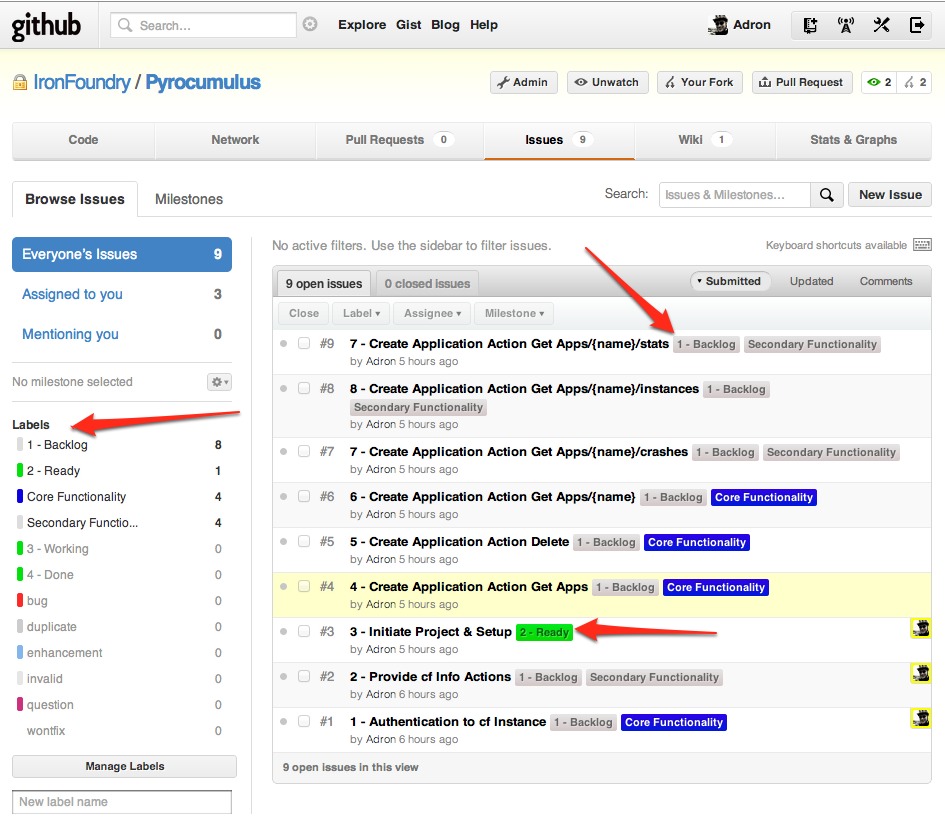
  1. Get your list items all labeled appropriately. (All explained below image)

Issues listed with appropriate Labels (Click for full size image)

Issues listed with appropriate Labels (Click for full size image)

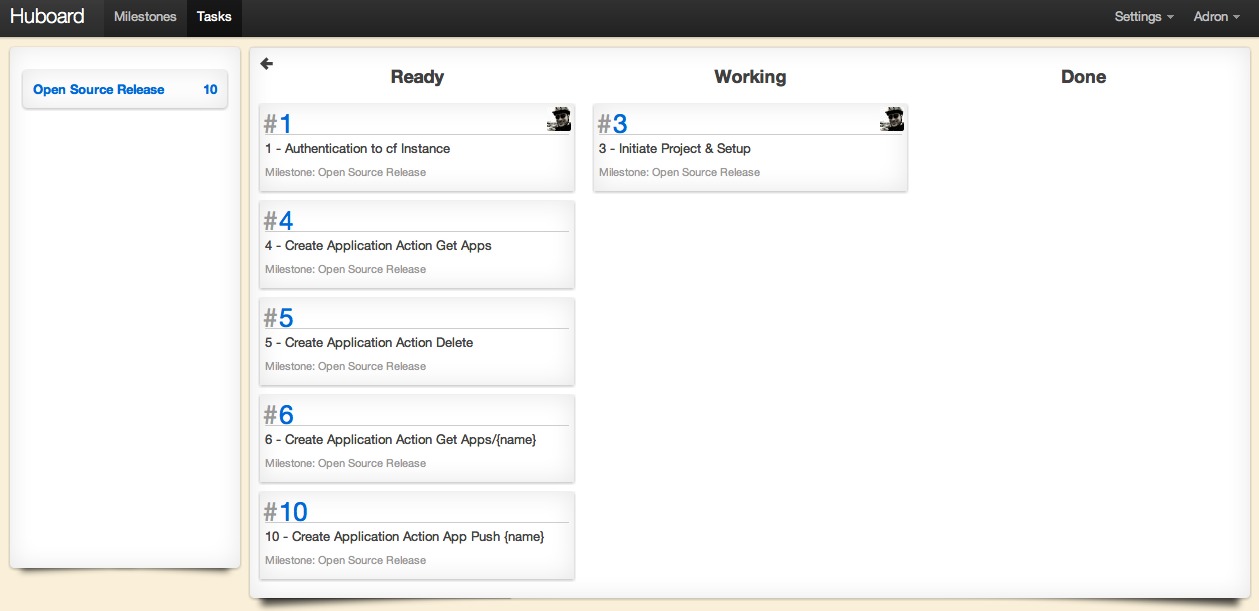
The key to Huboard is the simple tagging. Each issue in the project will display as an open issue on the repository/project list in Huboard, however to get them to show up on the kanban there is a special label pattern to use. Simply add a number, dash, and the title of the issue for it to be listed in the kanban. Then apply the label(s) to the issue. For example, in the screenshot above you can see that item #3, which has a titled of “#3 – Initiate Project & Setup” also has a label of “2 – Ready”. This label will list the item in the column “Ready” on the kanban board. The same goes for each of the items that are listed as backlog. The kanban board in Huboard uses the number to order the columns by the labels and the following title as the column header. The respective kanban board for the issue listing above looks like this.

Huboard kanban (Click for full size image)

Huboard kanban (Click for full size image)

For now I’ve primarily been just adding the issues and maintaining them via the Github web interface. However the items can be moved via commit messages. Here are some examples;

  • push GH-#
  • pushed GH-#
  • move GH-#
  • moves GH-#

With that you get maximum Github Awesome + Kanban Communication.