Why Your Presentations Might Just Suck!

Ok, so everybody’s presentations don’t suck. But the vast majority of them do. I know I’m not the first person to make this statement. I’d include a list of others who have said it but it would take more space than my entire blog does. Take this example slide deck from a presentation I saw recently. This is the actual color background theme that was chosen, with the wording changed slightly to protect the guilty – for now.

First, let’s tackle this wording. I rephrased it so it has almost the exactly same spacing and word style usage. The initial thing I’ve noticed is how long it takes one to read this. Is the presenter pausing while everyone reads the novel he wrote up on the slide? Nope, he’s blabbering on while everyone is looking at this slide reading it, pondering the huge words that are stuck in the slide. Not until the 4th or 5th sentence the presenter makes does the audience start to re-focus on the presenter. Already, everyone is rather lost in regards to the main topic. This is a major problem.
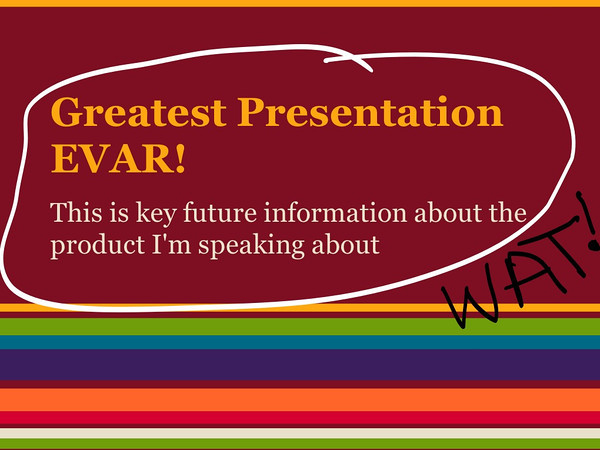
One of the worst slide decks EVAR!

One of the worst slide decks EVAR! (Click for full size image)

Don’t even get me started on the horrible decision to use this color scheme on the background. That can’t possibly be something that would allow people to pay attention to the speaker, WHO THE AUDIENCE IS SUPPORT TO BE PAYING ATTENTION TO!!!
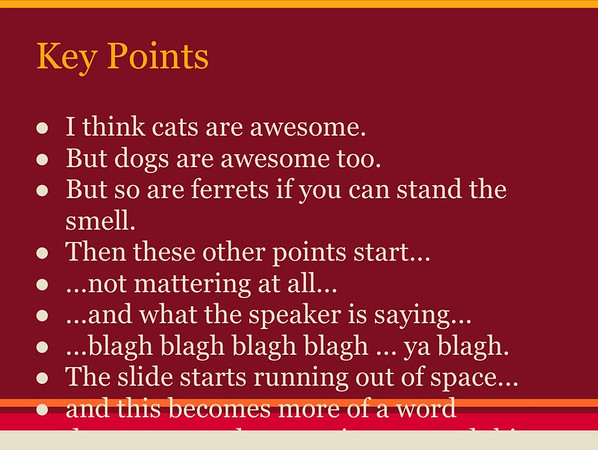
Oh dear, another absolutely horrible slide.

Oh dear, another absolutely horrible slide. (Click for full size image)

In this second slide, it brings up one of the other things that happen way too often in a slide during a presentation. Keep in mind presenters, this is NOT a hand out, it is a slide. It is presented on the wall, behind the speaker usually. Try to read the words on that and imagine listening to someone speak while that is on the wall! Seriously, it makes me ponder buying tomatoes to bring the tradition of throwing tomatoes at bad performers.

What is a Presentation?

Just for a moment let’s talk about what a presentation is. First the technical definition of what a presentation is:

transitive verb

1 a (1) : to bring or introduce into the presence of someone especially of superior rank or status (2) : to introduce socially b : to bring (as a play) before the public

2: to make a gift to

3: to give or bestow formally

4a : to lay (as a charge) before a court as an object of inquiry b : to bring a formal public charge, indictment, presentment against

5: to nominate to a benefice

6 a : to offer to view : show b : to bring to one’s attention

7: to act the part of : perform

8: to aim, point, or direct (as a weapon) so as to face something or in a particular direction

This gets us a little closer to exactly what it is, but really there is a lot more to presenting and getting to present then this simple definition implies.

Being able to present in front of a group is a chance to provide leadership. It is a chance to provide a vision of an idea, an opportunity to transfer knowledge and passion of a subject, and above all it is a chance to inspire progress and change in a positive way.

It doesn’t matter if the presentation is for a few corporate suits or an audience of revolutionaries. Having a chance to present to people is a chance to do well, to do good for people, and to step above and change things for the better. Presenting is a chance to change some small part of the world for the better, and in some cases maybe change a big part of the world!

Enough Griping and Such, How Does One Present Well?

The question that is left is, how do you put together a good presentation? It’s easier than you might imagine! I’ve actually seen a few recently that were great. The speaker captivated the audience, brought them into the topic, was inclusive and conversational and really left people wanting to know more. One of the first things that leads to a good presentation is one question.

Who cares and why should they?

If that question is not answered, or for some odd reason can’t be answered during the presentation then the presentation is a failure. When putting together a presentation ask yourself the question over and over and over again. Keep the audience in mind too, think about what the audience would ask or answer in regards to the topic.

Zen Aesthetic

This one I do NOT kid about. Don’t stick a bunch of stuff all over your slides. If anything, try to do a lot of presenting WITHOUT slides to really make an impact. If you want a prime example of average presentation skills versus good presentation skills, look no further then Bill Gates and Steve Jobs.

This video of Steve Jobs shows why he is a master presenter. Building the audience for the three devices they released in 2007 that changed the world…

Not many business leaders, or leaders for that matter, are very good at this. Note his slides. They’re simple, they have a few images or just one or two points each. The idea is, the audience is focusing on him, on what he is discussing, on what he is bringing forth to the world.

Learning to Present
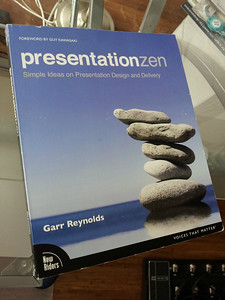
Check out Gary's blog at http://www.presentationzen.com/

Check out Gary’s blog at http://www.presentationzen.com/ or click on the image to navigate to his twitter account.

I could go on about great presentations, I could detail every single little point. Maybe I’ll continue this in another blog entry. But for now, I’m going to list a few masterful books on learning how and in which way to make great presentations.

There are more, but these two things will get you started toward good presentations, toward capturing and entertaining your audience. So get material, think and learn about how to be a better presenter! Before you know it you’ll be rocking the audience!

…as an aside. If you’re ever at a user group, conference, or other event that I’m presenting at please call me out on any of these things I fail at. If I lose your attention or have a slow part in my presentation or if my story does not come across clearly. Lay into me, tell me I’ve slipped, messed up, goofed, or butchered the story. I want to know. I want to make sure, whenever I’m presenting that I’m laying out the story, the vision that I’m trying to get across. I want the vision to be there no matter how technical of a deep dive it might be that I’m presenting. So yes, just know I’ve got a thick skin and I want to know!

Thanks, I’m looking forward to seeing you at my next preso!
Raven DB, A Kick Starter using Tier 3 IaaS

I’m putting together a pretty sweet little application. It does some basic things that are slowly but surely expanding to cover some interesting distributed cloud computing business cases. But today I’m going to dive into my Raven DB experience. The idea is that Raven DB will act as the data repository for a set of API web services (that seems kind of obvious, I state the obvious sometimes).

The first thing we need is a server instance to get our initial node up and running. You can use whatever service, virtualization tools, or a physical server if you want. I’m going to use Tier 3’s Services in my example, so just extrapolate for your own situation.

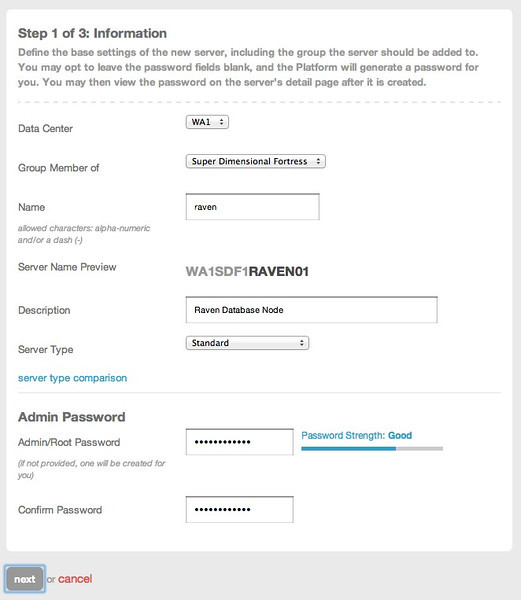
First I’ve logged in to the Tier 3 Control Site and am going to create a server instance.

Building the Tier 3 Node for Raven DB

Creating the Server Instance (Click for full size image)

Creating the Server Instance (Click for full size image)

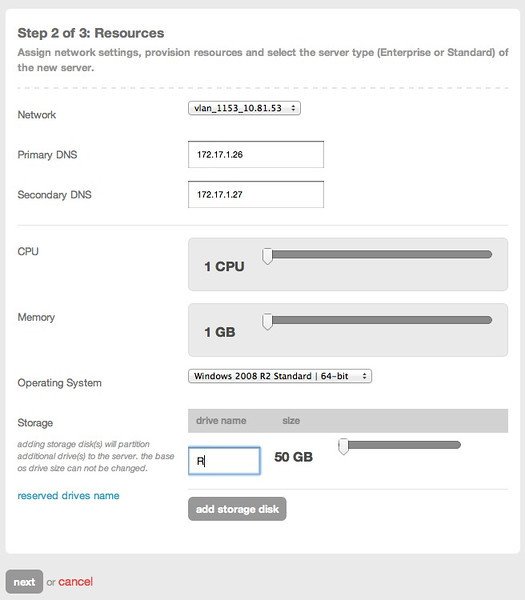
Next step is to assign resources. Since this is just a single Raven DB node, and I won’t have it under heavy load, I’ve minimized the resources. This is more of a developers install, but it could easily be a production deploy, just allocate more resources as needed. Also note, I’ve added 50 GB of storage to this particular instance.

Setting Resources (Click for full size image)

Setting Resources (Click for full size image)

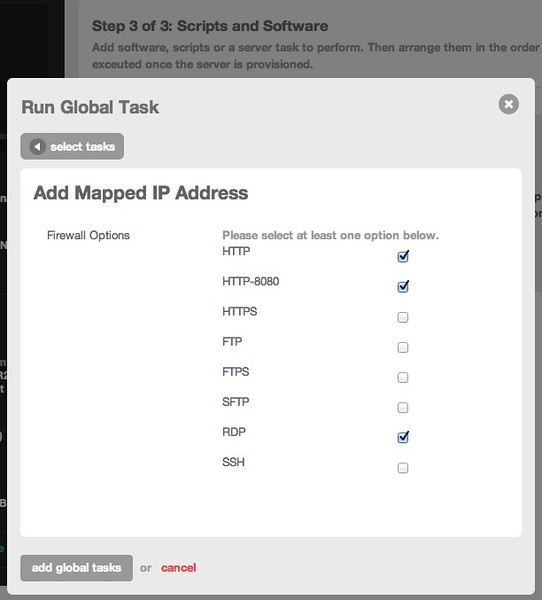
Now that we’ve set these, click next and on the next screen click on server task. Here add the public IP option and select the following services to open their ports.

Setting up a Public IP and the respective ports/services (Click for full size image)

Setting up a Public IP and the respective ports/services (Click for full size image)

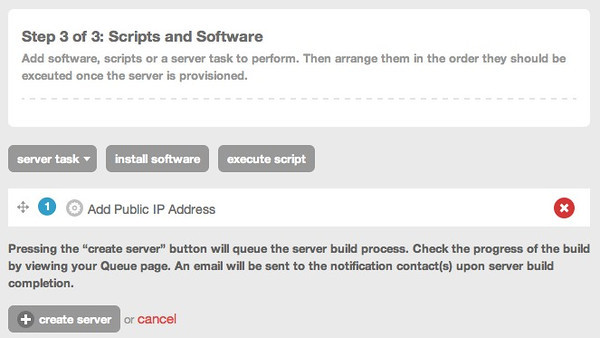
The task will display once added as an item on the create server view. Once that is done, click create server so the server build out will start.

Creating the Server (Click for full size image)

Creating the Server (Click for full size image)

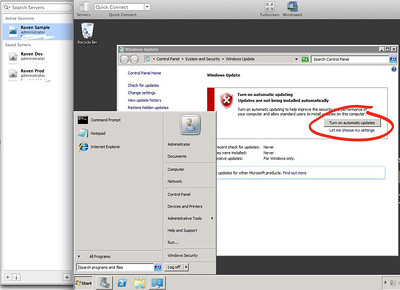
Now log in with RDP to start setting up the server in preparation of loading Raven DB. The first thing you’ll want to do is go ahead and get Windows Update turned on. My preference is to just turn it on and get every update that is available. Once that is done, make sure to get the latest .NET 4 download from Windows Update too.

Getting Windows Update Turned On (Click for full size image)

Getting Windows Update Turned On (Click for full size image)

Once all of the updates are finished and .NET 4 is installed we’ll get down to the business of getting Raven DB Installed. In this specific example I’ll be installing the Raven DB as a windows service, it however can be installed under IIS so there are many other options depending on how you need it installed.

Installing Raven DB

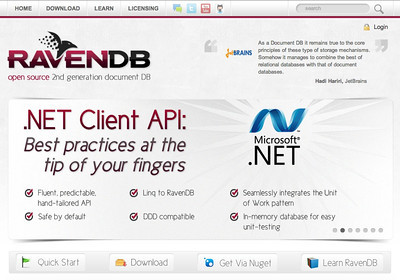
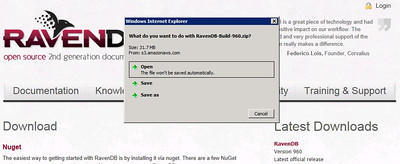
To get the software to install, navigate over to the Raven DB site at http://ravendb.net/ from the new instance we’ve just spun up. Click on the Download button and you’ll find the latest build over on the right hand side. Click to download the latest software package to a preferred location on the system.

Raven DB - Open Source 2nd Generation Document DB (Click to navigate to the site)

Raven DB – Open Source 2nd Generation Document DB (Click to navigate to the site)

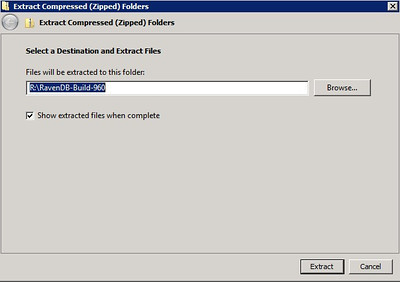
Once you’ve downloaded it (I’ve put my download in the root R:\ partition I created) unzip it into a directory (I’ve just unzipped it here into R:\ to make the paths easy to find, feel free to put it anywhere you would prefer. In our Tier 3 environment the R drive is on a higher speed, thus higher IOP drive system, thus the abilities exceed your standard EBS/AMI or S3 style storage mechanisms.).

Saving the Raven DB Download (Click for full size image)

Saving the Raven DB Download (Click for full size image)

Saving to R:/ (Click for full size image)

Saving to R:/ (Click for full size image)

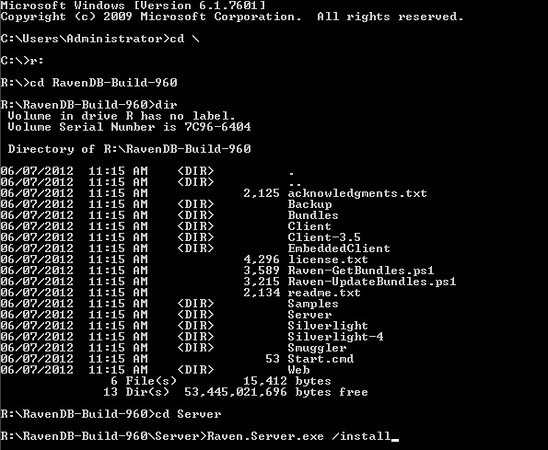
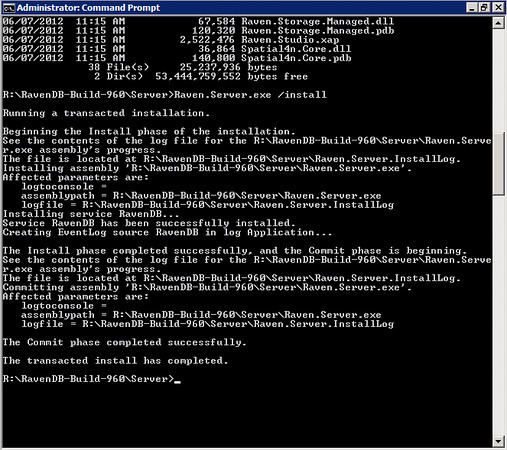
At this point, open a command prompt to install Raven DB as a service. Navigate to the drive and folder location you’ve saved the file to. Below I displayed a list of the folder and files in the structure.

CLI actions (click for full size image)

CLI actions (click for full size image)

Once you’re in the path of the Raven.Server.exe file then run a slash install on it to get a Windows Service of the Raven DB running.

Raven DB Installation results (click for full size image)

Raven DB Installation results (click for full size image)

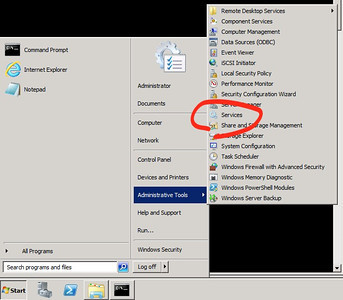
To verify that it is up and running (which if you’ve gotten these results, you can rest assured it is, but I always like to just see the services icon) check out the services MMC.

Launching services (Click for full size image)

Launching services (Click for full size image)

There it is running…

Now, you’re not complete yet. There are a few other things you may want to take note of to be sure you’re up and running in every way you need to be.

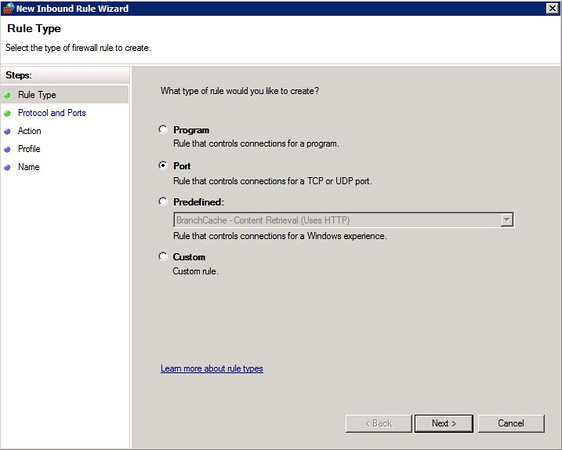
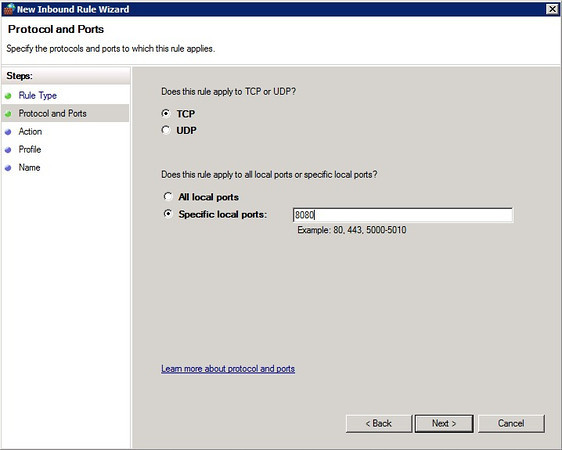
The management and http transport for Raven DB is done on port 8080. So you’ll have to open that port if you want to connect to the services of the database externally. On windows, open up the Windows Firewall. Right click on the Inbound Rules and click Add Rule.

Select Port (Click for full size image)

Select Port (Click for full size image)

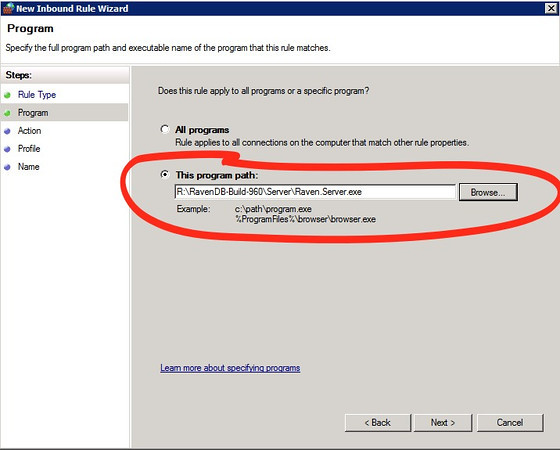
Select the Raven.Server.exe (click to see full size)

Select the Raven.Server.exe (click to see full size)

Inbound Rule (Click for full size image)

Inbound Rule (Click for full size image)

Open up however needed. (Click for full size image)

Open up however needed. (Click for full size image)

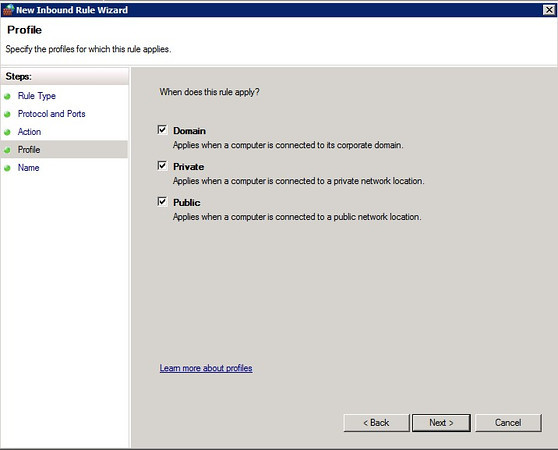
Public Private etc. (Click for full size image)

Public Private etc. (Click for full size image)

Enter a name and description on the next wizard dialog screen and click on Finish.

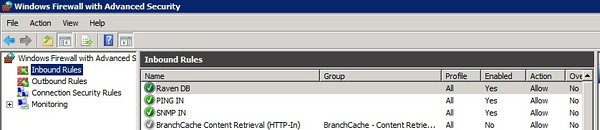
Displayed active firewall rule (Click for full size image)

Displayed active firewall rule (Click for full size image)

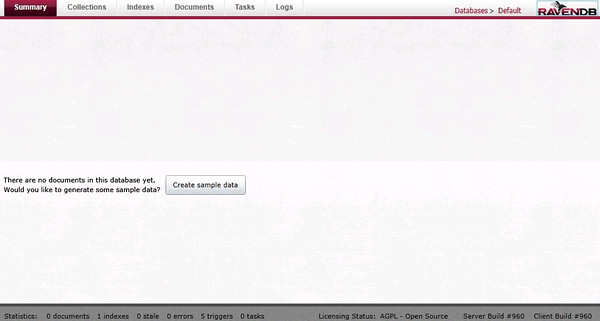
Now if you navigate to the IP of the instance with port 8080 you’ll be able to load the management portal for Raven DB and verify it is running and you have remote access.

Raven DB Management Screen

Raven DB Management Screen (Click for full size image)

At this point, if you’d like more evidence of success, click on the “Create Sample Data” button and the management screen will generate some data.

Raven DB Management console with data (Click for full size image)

Raven DB Management console with data (Click for full size image)

At this point you have a live Raven DB instance up and running in Tier 3. Next step is to break out and add nodes for better data integrity, etc.

Summary

In this write up I’ve shown a short how-to on installing and getting Raven DB ready for use on Windows Server 2008 in Tier 3’s Enterprise Cloud environment. In the very near future I’ll broach the topics of big data with Raven DB, and other databases like Riak and their usage in a cloud environment like Tier 3. Thanks for reading, cheers!

PDX & SEA Code Camp, OS Bridge, OSCON, Iron Foundry, Robotech and Action! Stage II

I usually don’t post two blog entries in one day, but I had so much to rattle on about it seemed like a rule to break.

DeployCon, Cloud Expo and Cloud Bootcamp

I’ll be speaking at the Cloud Bootcamp at the Cloud Expo in New York City. So if you’re coming to the conference, swing by and let’s talk PaaS and the future of software development and cloud computing. I’m looking forward to the event, it’ll be a good time and has a lot of educational content.

Also during Cloud Expo, be sure to check out the DeployCon. The DeployCon Conference is a PaaS Conference put together by Rishidot Research. Check out more information here.

Iron Foundry

Over on the Iron Foundry Project we’re going to be putting together some new material on what’s next, where we are on the project and where we are headed. The effort will be pushing forward with some possible hackathons or installathons for those interested. So if anyone is keen on checking out the latest and greatest of .NET PaaS options available, send me an e-mail and we’ll start coordinating some efforts.

Robotech

Yeah? Do you know the designation of the fighter type?

Yeah? Do you know the designation of the fighter type?

So why am I bringing up animated Anime from the 80s? Well, I was a pretty huge fan of the series, played the RPG, and own a few of the toys. Which yes, puts me in the nerd realm all that much more.

Know what this is?

Know what this is?

For the next few months I’ve decided that we’re going with Robotech for code names of our projects. Who is “we”? I mean that in the sense that any and all projects I’m working on are going to be prototype names from Robotech. So if you notice a Robotech theme going on, that’s the reason.

Action Shots

As promised, action shots…

…the Destroids stand guard over Portland and the Zentraedi onslaught. Just my creative dorky side.

Destroids standing ready...

Destroids standing ready…

Tomahawk

Tomahawk

Cheers!

PDX & SEA Code Camp, OS Bridge, OSCON, Iron Foundry, Robotech and Action!

May has been insane. I’ve spent a total of about 3 days of the entire month where I live in Portland, OR. It’s kind of an odd feeling to try not to travel since I love it so much. But I’m going to try and take it easy  this month and next. Especially since some kick ass conferences and code camps are happening right here in Portland (and Seattle) which helps me spend some quality time right here with Stumptown (that’s a nick name for Portland btw). So here’s a run down of the crazy action happening in June and July. There are lots of events and I’ve got lots of things coming your way!

PDX & SEA Code Camps

I just wrapped up speaking at Portland Code Camp. Again, thanks for coming out and hearing about PaaS Technologies, Cloud Foundry, Tier 3, AppFog, AppHarbor, Continuous Deployment, Integration, and all the things that have been pushed forward with Platform as a Service!

At the upcoming Seattle Code Camp on June 16th I’ll be providing 3 presentation, or workshops, or sessions, or whatever you may want to call them.  Here’s a quick blurb about these, if interested, head down and I’ll make sure you get into the presentation workshop sessions. Also note the schedule, which no, I did not make the schedule so I apologize ahead of time that I will be talking about Node.js at the mind numbing early hour of 8 am.

  • Node.js Rulz! JavaScript takes over the full stack! => From the client side with some jQuery action to the back end with Node.js, with a touch of JavaScript Object Notation . JavaScript is everywhere these days and simplifying our lives. In this session I’ll run the full stack, with a live example, deployed to a live environment to show how JavaScript is freeing us from the constraints of the traditional development environment.
  • Removing the Operating System Barrier with Platform as a Service=> This session will cover the major advances of platform as a service technology, what’s available in the OSS space to enable faster, easier, higher quality software development cycles in the cloud. The session will complete with a demo of PAAS technology in use, deploying a highly scalable, distributed & dispersed web application.
  • Putting it All Together, Letting Apps Lead the Cycle, TDD In The Cloud =>  I’ll be taking a deep dive into cloud architectures and how to build applications, generally at the PaaS level mixed with a little IaaS, to get people rolling with high velocity, high quality, and without the need to worry about the little things.  Want to learn about why PaaS and cloud computing is altering the very fabric of the development cycle? Want to know how to dive in with some abstractions and behavioral practices on the cloud, using PaaS, to bring apps, prototypes, and UX to market faster than anyone else? I’ll be touching on all of these things during this long form session. The sessions will step through these core concepts and ideas.

OS Bridge

Ouch, they didn’t pick any of my sessions.  :’(  Well, even though I wasn’t selected to present I will absolutely be at OS Bridge and you should be too! So if you can get into Portland between the 26th and 29th of June make the endeavor! There will be great networking, sessions and you get an excuse to hit up Portland’s awesome Cart Selection of exquisite food (if you haven’t been here, I’m NOT kidding, it is indeed epic!). Be sure to say hello or let’s pair up on some code or hack some PaaS apps.

OSCON

I’ll be attending OSCON, probably coding all the while. I’ll be reporting on a number of things, specifically the Cloud Track:

Rid the MAX to OSCON, from downtown, or the airport, or...

Rid the MAX to OSCON, from downtown, or the airport, or…

http://www.oscon.com/oscon2012/public/schedule/topic/805. If you’re going to be attending, again, ping me and we’ll meet and maybe build something, maybe start a twitter flame war and correct everything on the web, or something of that sort. Worse case scenario we’ll grab a beer and have some rocking conversations about OSS, Cloud Tech, and more.

Part II of this blog entry is coming a little later today…  so stay tuned for Robotech, Iron Foundry and all types of code action.

#nodejs, why I’m basically porting EVERYTHING to it…

Here’s my list of why I’m moving everything to Node.js that I run (i.e. maybe even THIS wordpress blog eventually).

  • Between the enhancements Google gave to JavaScript and the ease of use in writing with the language, it provides the least resistance of any framework and language stack out there.
  • Node.js + Express.js or Bricks.js + Jade + Every DB Choice on Earth really is a convincing reason too.
  • The developer community, if it isn’t now, is ridiculously close to the biggest development community on Earth. The JavaScript community goes into every corner of development too and crosses over easily into Ruby on Rails, .NET, and Java. Nobody is left untouched by JavaScript. This provides more avenues of joining up for projects than any other platform in existence.
  • Hiring for startups, mid- or enterprise business to build node.js and Javascript apps is 10x easier than hiring for anyone else right now. Which still makes it almost impossible. But that means it is “almost impossible” vs. “impossible” as it is with the other stacks!
  • Node.js is fast enough, and easy enough to distribute and less resource intensive than almost anything on the market. All that and it requires almost nothing to configure and setup compared to Apache, IIS, and a bunch of those other solutions.
  • The PaaS Solutions out there, thanks in large part to Nodejitsu, Nodester, and even the Windows Azure Node.js team have made deploying Node.js apps the easiest stack to deploy around – hands down – no contest.
  • Node.js uses JavaScript (if you haven’t noticed) and most of the NoSQL solutions already speak the common language, JSON or BSON which makes layering more transparent in your architectures.
  • I could go on… but you get the idea.  Node.js + JavaScript makes life EASIER and gives me more time to do other things. Other stacks typically have me tweaking and tinkering (which I do find fun) for hours more at a time per project than a Node.js Project. Generally though, I like to get a beer at some point, and Node.js get me there earlier!

Sure, I’m sticking to being polyglot. I’m even headed to the Polyglot Conference in Vancouver BC this evening. But nothing is as approachable as Node.js + JavaScript. Looking forward to a lot of PaaS discussion around Node.js and getting interoperability against .NET, Java, Rails and other frameworks.

So expect to see a lot more Node.js and JavaScript bits on the blog!  🙂   Cheers!