Getting Github : JavaScript Libraries Spilled EVERYWHERE! Series #003

This is an ongoing effort putting together some JavaScript app code on client and on server that started with blog entry series #001 and #002.

This how-to is going to kind of go all over the place. My goal is to get github data. The question however is, how and with what. I knew there were some available libraries, so writing straight and pulling straight off of the API myself seemed like it would be unnecessary work.

The github API documentation is located at http://developer.github.com/v3/ with the list of client libraries for ease of access listed at http://developer.github.com/v3/libraries/. The first two that I forked and cloned were the gh3 and npm installed the octonode and node-github libraries.

Node.js Based Github Libraries

The two node based projects install via npm, as things go with node and were super easy. The first one I gave a test drive to is the https://github.com/ajaxorg/node-github project. I forked it and dove right in.

$ npm install github
npm http GET https://registry.npmjs.org/github
npm http 200 https://registry.npmjs.org/github
npm http GET https://registry.npmjs.org/github/-/github-0.1.8.tgz
npm http 200 https://registry.npmjs.org/github/-/github-0.1.8.tgz
$

After that quick install I took a stab at the test code they have in the README.md.

var GitHubApi = require("github");

var github = new GitHubApi({
    // required
    version: "3.0.0",
    // optional
    timeout: 5000
});
github.user.getFollowingFromUser({
    user: "adron"
}, function(err, res) {
    console.log(JSON.stringify(res));
});

This worked all well and good, so I moved on to some other examples. The following example however needed authentication. To authenticate you’ll need to add the little snippet below with the username and password. However there’s also a Oauth token method you can use too, which I’ve not documented below. To check out other auth methods check out the documentation.

var GitHubApi = require("github");

var github = new GitHubApi({
    version: "3.0.0", timeout: 5000,
});

github.authenticate({
    type: "basic",
    username: "adron",
    password: "yoTurkiesGetYourOwn"
});

github.orgs.get({
	org: "Basho"
}, function(err, res){
	console.log(res);
});

The result is prefect for putting together a good display page or something of the organizations.

$ node adron_test.js
{ login: 'basho',
  id: 176293,
  url: 'https://api.github.com/orgs/basho’,
  repos_url: 'https://api.github.com/orgs/basho/repos’,
  events_url: 'https://api.github.com/orgs/basho/events’,
  members_url: 'https://api.github.com/orgs/basho/members{/member}',
  public_members_url: 'https://api.github.com/orgs/basho/public_members{/member}',
  avatar_url: 'https://secure.gravatar.com/avatar/ce5141b78d2fe237e8bfba49d6aff405?d=https://a248.e.akamai.net/assets.github.com%2Fimages%2Fgravatars%2Fgravatar-org-420.png’,
  name: 'Basho Technologies',
  company: Basho,
  blog: 'http://basho.com/blog/’,
  location: 'Cambridge, MA',
  email: null,
  public_repos: 105,
  public_gists: 0,
  followers: 0,
  following: 0,
  html_url: 'https://github.com/basho’,
  created_at: '2010-01-04T19:05:19Z',
  updated_at: '2013-03-17T20:29:09Z',
  type: 'Organization',
  total_private_repos: YYY,
  owned_private_repos: XXX,
  private_gists: 0,
  disk_usage: 788016,
  collaborators: 0,
  billing_email: 'not_a_valid_address@basho.com',
  plan: { name: 'platinum', space: 62914560, private_repos: billions },
  meta: { 'x-ratelimit-limit': '5000', 'x-ratelimit-remaining': 'azillion' }
}

Now at this point there’s a few significant problems. Setting up tests of the integration variety for this library gets real tricky because you need to authenticate, or at least I do for the data that I want. This doesn’t bode well for sending any integration tests or otherwise to Travis-CI or otherwise. So even though this library works, and would be processed on the server-side and not on the client side, having it as a non-tested part of the code base bothers me a bit. What’s a good way to setup tests to verify that things are working? I’ll get that figured out shortly and it’ll have to be another blog entry, maybe. For now though, let’s jump into the client side library and see how it functions.

Client Side JavaScript Github

For the client side I started testing around with the gh3 library. It has two dependencies, jQuery and Underscore.js. jQuery is likely always going to be in your projects. Underscore.js is also pretty common, but sometimes you’ll find you’ll need to go download the library. Upon download and getting the additional libraries I needed installed, I gave the default sample a shot.

<!DOCTYPE html>
<html>
<head>
    <meta charset="utf-8">
    <title>gh3 Sample</title>
</head>
<body>
    <ul id="user"></ul>
</body>
<script src="js/jquery-1.7.1.min.js"></script>
<script src="js/underscore-min.js"></script>
<script src="js/gh3.js"></script>
<script>
	var adron = new Gh3.User("adron")
	,	userInfos = $("#user");

	adron.fetch(function (err, resUser){
		if(err) {
			throw "outch ..."
		}
		console.log(adron, resUser);
		_.each(_.keys(resUser), function (prop) {
			userInfos.append(
				$('<li>').append(prop+" : "+resUser[prop])
			);
		});
	});
</script>
</html>

This worked pretty seamlessly. Also it got me thinking, “what do I really want to do with the github library?” If it’s a server side service, obviously I’d want to use the Node.js libraries probably. However if it is client side data I want, is it even ideal that the server side actually pull the data anyway? The other issues around cross site scripting and related matters come into play too if it is a client side script, but this might be, even in spite of that, just what I needed. For now, that left me with some solid things to think about. But I was done for now… so until next entry, cheers!


Distributed Coding Prefunc: Rebar Multinode Riak Core

Before diving into this entry, you might want to check out some of my other getting Erlang installed with appropriate testing frameworks entries. Moving on…

At Basho we’re are always trying to make it easier to do big things. A short time ago we pushed forward on Rebar, Riak Core and getting things put together to make it simpler to get kick started working on distributed systems like the Riak Database & distributed system itself. There’s way more that is possible, which I’ll get into in just a minute. Before diving into some of those things, here’s a few quick links & context of what exactly Rebar and Riak Core are.

Riak Core Github: https://github.com/basho/riak_core

Riak Core has been available for quite some time. We’ve also been hustling for a while getting together a robust array of material around Riak Core. One excellent place to get started on learning about Riak Core is the “Introducing Riak Core” blog article published on the Basho blog a while back. To describe Riak Core, or riak_core, it is the underpinnings of what Riak is built on. It provides many features to get you started building distributed systems. A few of the key features are being able to track and manage the nodes, clusters and related pieces of the distributed architecture within a system.

Rebar Github: https://github.com/basho/rebar Wiki: https://github.com/basho/rebar/wiki

Rebar is an Erlang build tool that helps you in putting together projects based on Riak Core.

Rebar Riak Core Github: https://github.com/basho/rebar_riak_core

The Rebar Riak Core project repository template helps you start writing things like the Riak Database itself. It’s based on setting up Riak Core via template scripting an N Node Cluster devrel, vnodes, etc. Once you’re up and running it can be used to help develop distributed, scalable and fault tolerant applications.

For more on the Rebar Riak Core check out the README.md in the github repository. There are some great examples of how to get a multinode devrel running in a few steps.

Rebar Riak Core Quick Start

The quickest way to get started using the Riak Core and Rebar scripts is to get the prebuilt binaries or you can just clone and install the Rebar scripts if you’d like all the things. To get the binaries and executables you can download and have them ready by wget (or use your preferred method to download).

wget http://cloud.github.com/downloads/basho/rebar/rebar && chmod u+x rebar

To get the cloned repository and ready for use.

$ git clone git://github.com/rebar/rebar.git
$ cd rebar
$ ./bootstrap

Now the easiest way possible is to use the Riak Core Templates with a quick git clone. After cloning the repo, copy them to the rebar templates directory (note that you’ll need to create this initially) and then create a working directory to put the project in and navigate into that directory.

git clone git://github.com/rzezeski/rebar_riak_core.git
mkdir -p ~/.rebar/templates
cp rebar_riak_core/* ~/.rebar/templates
mkdir projectNameHere
cd projectNameHere

Now that a template is available, run the following command to create the Erlang Project.

rebar create template=riak_core_multinode appid=rabbits nodeid=rabbits

You’re now ready to go to work using Rebar and the template you’ve created. I followed the try-try-try example repo in the example above to get started, check it out for a great walk through that dives in deeper to Riak Core, each small element of the project and files created, and a multi-node project as the sample.

So what to do now?

This is where it is time to throw around some creativity to get real solutions to real problems. Building distributed systems is becoming more and more paramount to effective usage of infrastructure and systems. Using Riak Core to get started building out your distributed system is an ideal place to start. These are a few ideas that the team was brainstorming on. Over the coming weeks we’ll be putting together material to outline ways to not only get started, but to implement systems like this.

Distributed Web Caching Tier

Caching tiers often come up in conversations, whether related to distributed systems or not, and often end up on the distributed topic. The question resounds, “how do I create a caching tier that can be distributed and provide real session, state management, cached elements, live data and other needs?” Well Riak Core is a great place to start developing a custom distributed caching tier that could even extend to use Riak KV (the Riak Database implemented on Riak Core), Redis, Rabbit MQ or many other solutions by pulling them together to provide appropriate cache at the appropriate tiers of an application architecture.

In House Cluster Monitoring & Smart Resolver

One of the things that the Riak Core would be used to great effect for is a multi-node, clustered and geographically dispersed monitoring system for any multi-data center application. This could be built out and used for almost any actual environment, with custom specifics or a completely generic situation of pizza box servers. Because fo the distributed concepts behind Riak Core it would provide an ideal basis for monitoring – and re-launching or otherwise dealing with systems that need high uptime and recovered as fast as possible if they go down.

Logging, Web, Server, and Business Analytics

In any situation where analytics are collected there are often dozens if not thousands of servers, various systems and even numerous devices that may be emitting data via services or other mediums. Riak Core is a great place to lay the groundwork for a distributed system that could maintain a massive store of managed data for fast searching of analytics. This could be the groundwork for biotech research analytics, analysis of market data or a dozen other things that need highly available systems storing vast data with map reduction or other search capabilities. Think Business Intelligence (BI) with serious technological power.

Multi-node Project

Of course, as the example I used to create the first sample above, dive into the try-try-try tutorial for some great multi-node how to. If you have any questions please jump in ping me on twitter @adron or ping @basho, join the mailing list, the IRC #riak channel on freenode.

Light up a Riak Cluster with AWS, A Few Notes…

I wanted to write up an intro to getting Riak installed on AWS, even though the steps are absurdly simple and already available on the Basho Docs site, there’s a few extra notes that can be very helpful for a few specific points during the process.

Start off by logging into AWS. At this point you can take two different paths that are almost identical. You can follow the path of using the pre-built AWS Marketplace image of Riak, or just start form scratch. The difference is a total of about 2 steps; installing & setting some security port connections. I’m going to step through without using the prebuilt image in these instructions.

Security Group

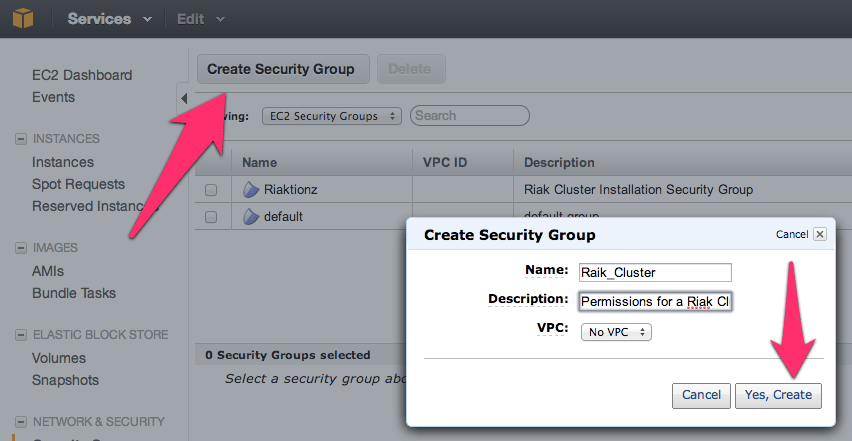
First thing you’ll need to get a security group with the correct permissions setup. For that, you’ll need to make a security group.

NOTE: No, I didn’t mean to misspell Riak, but it’s in there now.  😉

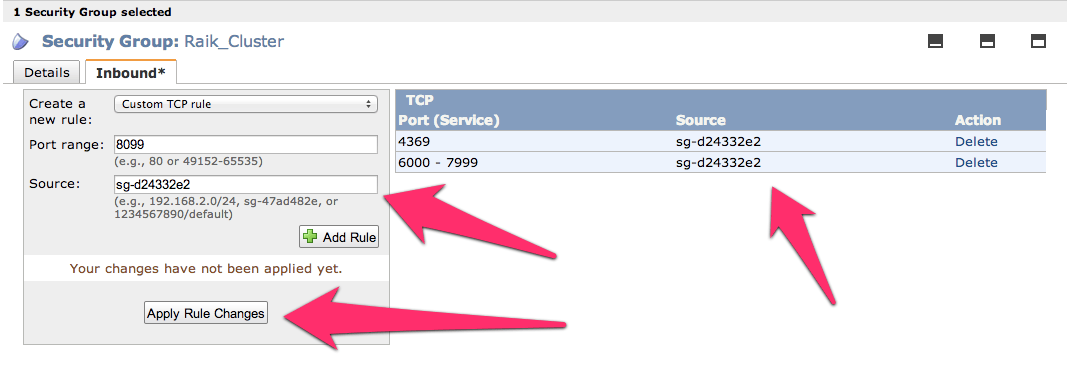
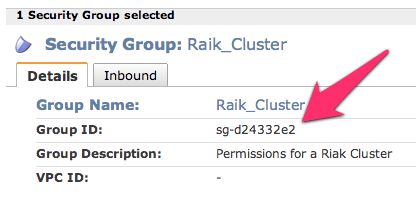
Before adding the ports, go to the security group details tab and copy the security group id. I’ve pointed it out in the image above.

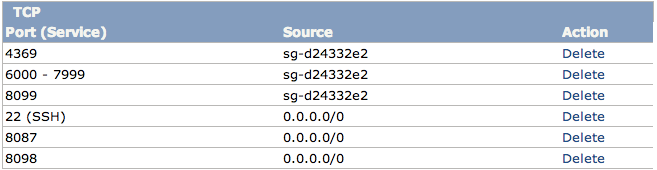
Now add the following three and assign the security group to the ports; 4369, 8099 & 6000-7999. For the source set it to the security group id. Once you get all three added the list should look like this (below). For each rule click the Add Rule button and remember to click the Apply Rule Changes. I often forget this because the screen on some of the machines I use only shows to the bottom of the Add Rule button, so you’ll have to scroll down to find the Apple Rule Changes button.

Now add the standard port 22 for SSH. Next get the final two of 8087 and 8098 setup and we’re ready for moving on to creating the virtual machines.

Server Virtual Machines

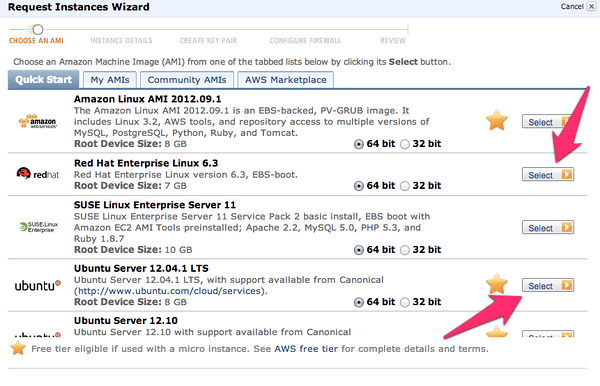
For creating virtual machines I just clicked on Launch Instance and used the classic wizard. From there you get a selection of items. I’ve used the AWS image to do this, but would actually suggest using a CentOS image of your choice or Red Hat Enterprise Linux (RHEL). Another great option is to use the Ubuntu 12.04 LTS. Really though, use whatever Linux version or distro you like, there are 1-2 step instructions for installing Riak on almost every distro out.

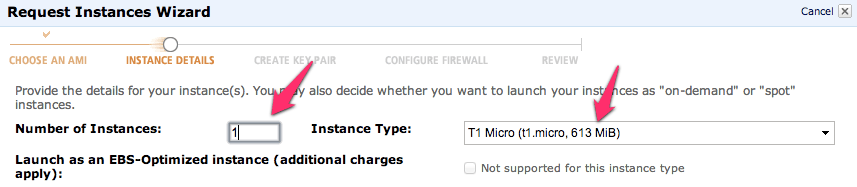
Next just launch a single instance. We’ll be able to launch duplicates of these further along in the process. I’ve selected a “Micro” here but I’m not intending to do anything with a remotely heavy load right now. At some point, I’ll upgrade this cluster to larger instances when I start putting it under a real load. I’ll have another blog entry to describe exactly how I do this too.

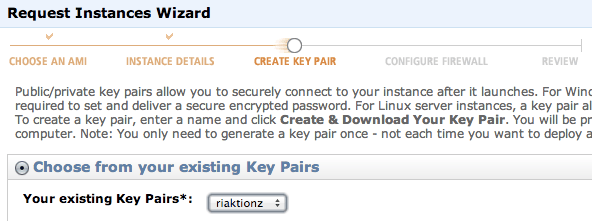
Keep hitting continue until you get to the key pair selection. Pick the key pair you want, either making a new one for this cluster or use one you already have. Either way works fine.

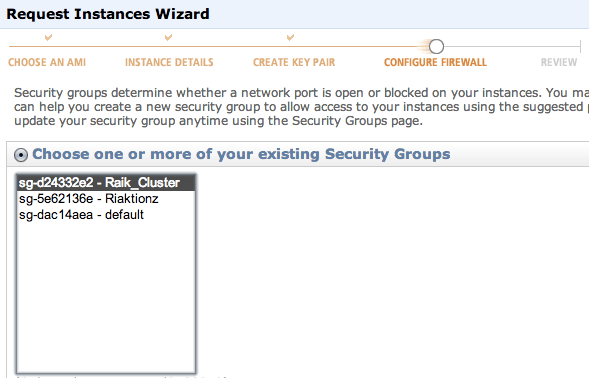
Continue again until you can select the security group that we created above.

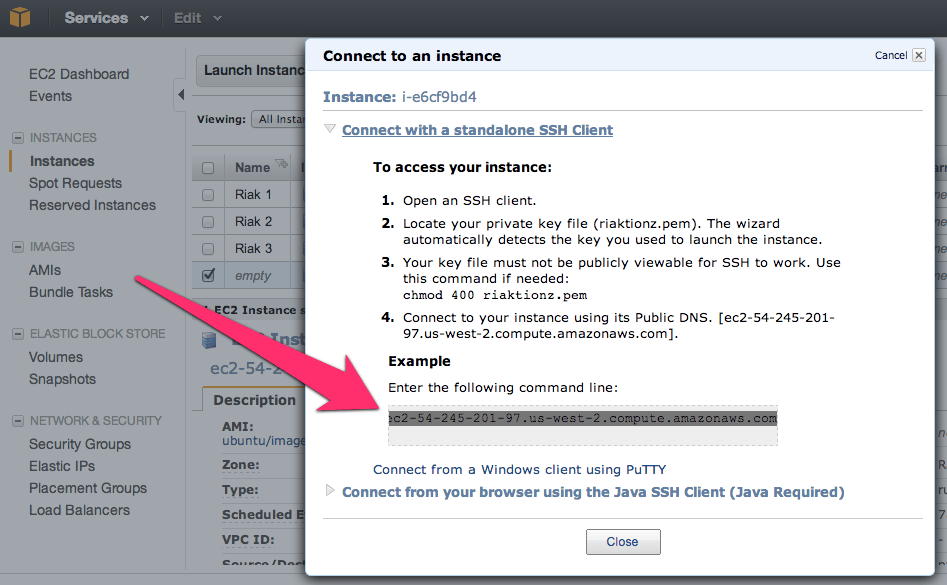
Now keep hitting that continue button, until you get to launch, and launch this thing. Once the instance is launched launch your preferred SSH connection tooling. The easiest way I’ve found for getting the most current private IP to connect to with the appropriate command is to right click on the instance in the AWS Console and click on Connect. There you’ll find the command to connect via SSH.

Paste that in and hit enter in your SSH App, you’ll see something akin to this.

$ cd Codez/working-content/
$ ssh -i riaktionz.pem root@ec2-54-245-201-97.us-west-2.compute.amazonaws.com
The authenticity of host 'ec2-54-245-201-97.us-west-2.compute.amazonaws.com (54.245.201.97)' can't be established.
RSA key fingerprint is 31:18:ac:1a:ac:fc:6e:6d:55:e8:8a:83:9a:8f:c7:5f.
Are you sure you want to continue connecting (yes/no)? yes
Warning: Permanently added 'ec2-54-245-201-97.us-west-2.compute.amazonaws.com,54.245.201.97' (RSA) to the list of known hosts.
Please login as the user "ubuntu" rather than the user "root".

Enter yes to continue connecting. For some instance types, like Ubuntu you’ll have to do some teaks to log into as “ubuntu” vs. “root” and the same goes for the AWS image or others. I’ll leave that to you, dear reader to get connected via ole’ SSH.

One of the other things, that you may have to do some tweaking about and googling, is figuring out the firewall setups on the various virtual machine images. For the RHEL you’ll want to turn off the firewall or open up the specific connection ports and such. Since the AWS firewall does this, it isn’t particularly important for the OS to continue running its firewall service. In this case, I’ve turned off the OS firewall and just rely on the AWS firewall. To turn off the RHEL firewall, execute the following commands.

[root@ip-x-x-x-x]# service iptables save
iptables: Saving firewall rules to /etc/sysconfig/iptables:[  OK  ]
[root@ip-x-x-x-x]# service iptables stop
iptables: Flushing firewall rules:                         [  OK  ]
iptables: Setting chains to policy ACCEPT: filter          [  OK  ]
iptables: Unloading modules:                               [  OK  ]
[root@ip-x-x-x-x]# chkconfig iptables off
[root@ip-x-x-x-x]#

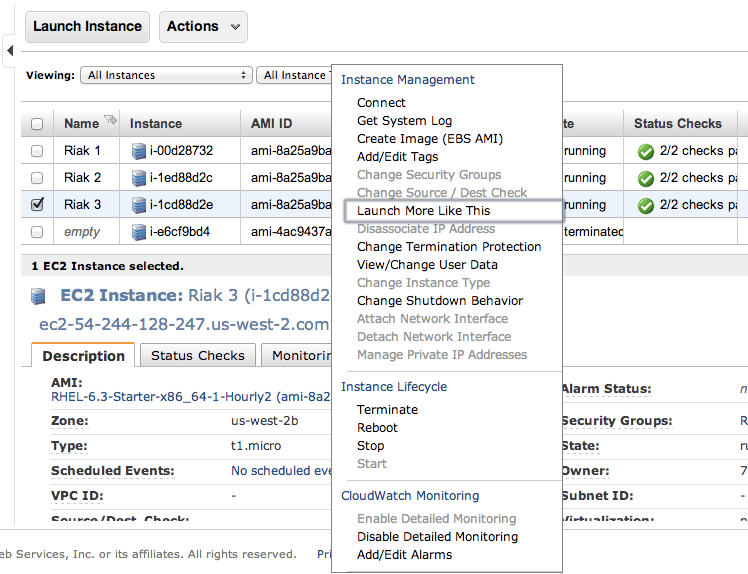
Now is a perfect time to start those other instances. Navigate into the AWS Console again and right click on the virtual machine instance you’ve created. On that menu select Launch More Like This.

Go through and check the configuration on each of these, make sure the firewall is turned off, etc. Then move on to the next step and install Riak and cluster them. So it’s time to get to the distributed, massively complex, extensive list of steps to install & cluster Riak. Ok, so that’s sarcasm.  😉

Step 1: Install Riak

Install Riak on each of the instances.

package=basho-release-6-1.noarch.rpm && \
wget http://yum.basho.com/gpg/$package -O /tmp/$package && \
sudo rpm -ivh /tmp/$package
sudo yum install riak

NOTE: For other installation methods, such as directly downloading the RPM or other Linux OSes, check out the http://docs.basho.com/riak/latest/tutorials/installation/Installing-on-RHEL-and-CentOS/.

Step 2: Setup the Cluster

On the first instance, get the IP. You won’t need to do anything to this instance, just keep the IP handy. Then move on to the second instance and run the cluster command.

sudo riak-admin cluster join riak@<ip_of_the_first_node>

Do this on each of the instances you’ve added, using that first node. When you’ve added them all, on that last instance (or really any of them) then run the plan. This will get you a display plan of what will take place when the cluster is committed.

sudo riak-admin cluster plan

If that looks all cool. Commit the plan.

sudo riak-admin cluster commit

Get a check of the cluster.

sudo riak-admin member_status

That’s it all done. You know have a Riak Cluster. For more operations to try out your cluster, check out this list of base API Operations.

Write the Docs, Railsconf Portland, RICON East, Node PDX, Vancouver Polyglot, Open Source Bridge and OSCON…

…if you are deciding what to attend this year, here’s the top of the list.

Just a few key conferences that will kick ass in technical & academic content. The other great thing about these conferences is that they either have a “code of ethics” or are reknown for real conference diversity vs. the “hey a bunch of privileged sameness all ended up in this room purely out of meritocracy” nonsense. So you can rest assured that at these conferences you’ll have interesting conversations, be actively involved in things that will expand our personal sphere of the world and in the end leave you dramatically more enriched than those “corporate warm body vacation conferences“. This list doesn’t mean I’ll be able to make it to all of them, but each conference I’m in some way intimately involved with and fully support with the “Conference Seal of Approval“! So here we go…

Write the Docs – April 8th and 9th – @writethedocs – A new movement, to know where we are, where we’ve been and where we’re going. Get here, know how and why to bring knowledge forth through documentation. This is not your grandpa’s documentation.

Portland RailsConf 2013 – April 29th-May 2nd – @railsconf – The rails community has grown by leaps and bounds. Regardless of your love or hate for the framework, it’s revolutionized the way web applications are built over the last decade.

RICON East in New York City – May 13th & 14th – @basho – (I do work for Basho, but this is on here because RICON last year ROCKED and meets the requirements, come see for yourself!)  🙂

Node PDX – May 16th & 17th – @nodepdx – Troy Howard and I are putting this together, we’re working hard to make sure it’s more of what you want, more than it was last year and kicking to the curb the things you don’t want. So come hack some node, JavaScript and enjoy yourselves.

Polyglot 2013 – May 24th through the 26th – @polyglotConf – Open spaces, with tons of really, truly smart people with no presumptuous marketing and sales bullshit to get in the way. This is about software development, across the realms of frameworks, languages and more.

OS Bridge – June 18th through the 21st – @osbridge – open source bridges the divide here and new thinking is created. You have to attend to see…

OSCON – July 22nd through the 26th – @oscon – This is the premier open source conference in North America. It’s in Portland. Nuff’ said.

I’ll be at a few more conferences this year, but these are the key conferences, if you have to pick one to go to, it should be on this list. If you can go to one or two others, pick em’ from this list. Software + Data + Giant Phat Data + NoSQL + Future Thinking + Leaders o’ Thoughts == Top Conference List.

See ya there. Cheers!

Systems Thinking, Measuring Things and Really, Cultural Change is Free and Why Your Measurement are Likely Screwing Up Your Business

I was going to write this up. I stumbled upon this video of John Seddon presenting. But seriously, WATCH the video, especially if you work in an enterprise. If you’re in management or in executive leadership you desperately need to watch this and know it, understand it and listen to it. To benefit of yourself and those around you and those that interact with you business. Whatever I write is tertiary in relation to what John says here.

Watched the video? Well, either way here’s a quick overview of things. John breaks out why targets make organisations worse and controlling, or managing costs, actually makes them higher. He explains, in a rather entertaining way, why the public sector along with the private sector is doing horribly compared to what they should be doing. As stated in the video description, the best way to put it is “Target Obsession Disorder” laid bare!

It’s like a breath of fresh air.

How does this tie back to programming and code? Simple. To truly draw together what needs to be built, to see the big picture, the focus of the consumer and where we’re heading one must try, as hard as it is, to understand the whole of a system. Thus, systems thinking is the cerebral approach to actually write software well, for what it is really needed for. As I’ve been saying a lot as lately, “Never make a decision on a single metric, it’ll very likely be the wrong decision.”

As John states, I’ll leave this article with, destroy your “failure demand“.