Performance Monitoring and Tuning in Relational Databases: With Observability Lagniappe

This is a continuation of my posts on relational databases, started here. Previous posts on this theme, “Data Modeling“, “Let’s Talk About Database Schema“, “The Exasperating Topic of Database Indexes“, “The Keys & Relationships of Relational Databases“, “Relational Database Query Optimization“, “Normalization in Relational Databases“, “Database (DB) Caching and DB Tertiary Caching“, “Security and Authentication in Relational Databases“, A Guide to Backup and Recovery Options for Relational Databases: Focusing on SQL Server, Oracle, MariaDB/MySQL, and PostgreSQL, and Concurrency Control in Relational Databases.

In the ever-evolving landscape of software development, the performance of relational databases isn’t just a feature; it’s a critical component of system health that can dramatically influence user satisfaction and operational efficiency. We’re starting a deep dive into the world of performance monitoring and tuning for relational databases, uncovering practices essential for maintaining robustness and speed during database interactions in this post.

Understanding the Basics of Database Performance Tuning

At its core, performance tuning in relational databases revolves around optimizing the queries and processes that interact with your database. This involves a suite of tasks including query optimization, indexing, configuration management, and resource allocation—each aimed at minimizing latency and maximizing throughput. These are the keys to ensuring your database can handle complex query requests and high loads with grace.

Performance tuning is a continual cycle of adjustments and improvements. It starts with performance monitoring: the systematic tracking of system performance over time. By keeping tabs on metrics such as query execution time, wait times, disk I/O, and CPU utilization, developers and database administrators can identify and rectify bottlenecks.

Integrating Observability into Database Management

Moving beyond mere monitoring, observability offers a more nuanced approach, involving logging, tracing, and metrics to gain deep insights into the database’s operational state. This comprehensive view is critical for diagnosing unexpected behaviors or slowdowns effectively.

For example, detailed logs and traces can pinpoint whether slow queries result from poor indexing or if a specific service is overtaxing the database, impacting overall performance. This deeper insight helps us understand the ‘why’ behind performance metrics, providing a multi-dimensional perspective on database health.

Connecting Database Observability with API and Interface Performance

The observability of a database directly influences the performance of application APIs and interfaces. If an API’s response time falters, it might be linked to a query inefficiency or a resource bottleneck within the database. By leveraging observability tools that integrate data across both the database and application layers, developers can correlate issues, streamline performance, and enhance service reliability.

This integrated observability approach ensures quick identification of whether performance issues stem from the database, application code, or the interplay between services, facilitating a well-aligned tuning strategy that caters to the comprehensive needs of the application and its user base.

Expanding Observability Across the Development Stack

In modern settings where microservices and distributed architectures prevail, the demand for expansive observability is heightened. Every layer of the stack, from the frontend to the backend, demands meticulous monitoring and tuning to guarantee peak performance.

Implementing observability across the development stack enables teams to detect and address issues proactively, fostering a culture of continuous improvement—crucial in today’s fast-paced development environments.

Leveraging Tooling Like Hasura for Advanced Observability

Integrating tooling from software solutions like Hasura can elevate PostgreSQL database observability, particularly in modern application architectures where databases are interfaced through APIs. Hasura, known for its real-time GraphQL API layer over PostgreSQL, offers invaluable tools for observing and tuning SQL queries it automatically generates and executes.

Enhancing SQL Management with Hasura

Hasura’s real-time monitoring capabilities allow developers to view the execution of queries dynamically, a crucial feature for understanding how different parts of your application interact with the database. Moreover, it provides detailed logs of SQL queries, including execution times, which aids in identifying and optimizing slow-performing queries.

Hasura’s ability to integrate seamlessly with existing observability tools like Prometheus, Grafana, and centralized logging solutions like ELK further strengthens the monitoring framework, providing a holistic view of database performance and aiding in swift diagnosis and optimization.

Best Practices for Using Hasura with PostgreSQL

  • Regular Review and Optimization of Queries: Regular assessments of SQL queries that Hasura generates ensure they are performance-optimized.
  • Data Model Optimization: Tailoring PostgreSQL schemas to suit common query patterns generated by Hasura can significantly enhance performance.
  • Continuous Monitoring and Tuning: Leveraging Hasura’s performance metrics and logs for ongoing tuning of database configurations and queries ensures optimal performance.

By methodically applying these tools and practices, you transform from a reactive to a proactive stance in database management. This ensures that your relational database environment is not just monitored and observable but also finely tuned for optimal performance. This approach is essential for maintaining an efficient, robust, and scalable application infrastructure, ready to meet the demands of modern business needs.

References

  1. PostgreSQL – Official PostgreSQL Website
  2. SQL Server:
  3. Oracle Database:
  4. MariaDB/MySQL:
  5. pgBadger – pgBadger GitHub Repository
  6. PostGIS – Official PostGIS Website
  7. Prometheus – Official Prometheus Website
  8. Grafana – Official Grafana Website
  9. pgAdmin 4 – Official pgAdmin Website
  10. Hasura – Official Hasura Website
  11. ELK Stack (Elasticsearch, Logstash, Kibana):
  12. Loki – Grafana Loki
  13. Jaeger – Official Jaeger Website
  14. Zipkin – Official Zipkin Website

Starting a New Project – Let’s Choose a Tech Stack!

It’s time to start a new project. Because one can never have enough side projects! /s

This particular project I’ll be writing about in this post is derived from the multi-tenant music collector’s database I’ve already started working on. I’ve finally gotten back to it, during a slight break in collecting and music listening, to write up some of my thinking about this particular project.

Stated Objectives For This Application

  1. Personal Reasons: I always like to have side projects that I could make use of myself. Since I’ve recently started collecting music again, and in that am a new collector of vinyl albums, I wanted a better way to organize all that music and the extensive history, members, song, lyrics, and related information about the music and artists.
  2. For Everybody: Beyond the desire to have a well built application to provide the capabilities I’ve described above, I also want to provide this capability to others. In light of that capability, I’ll be designing this application as a multi-tenant application so that you too dear reader, once I get it built can use the application for your own music collection.
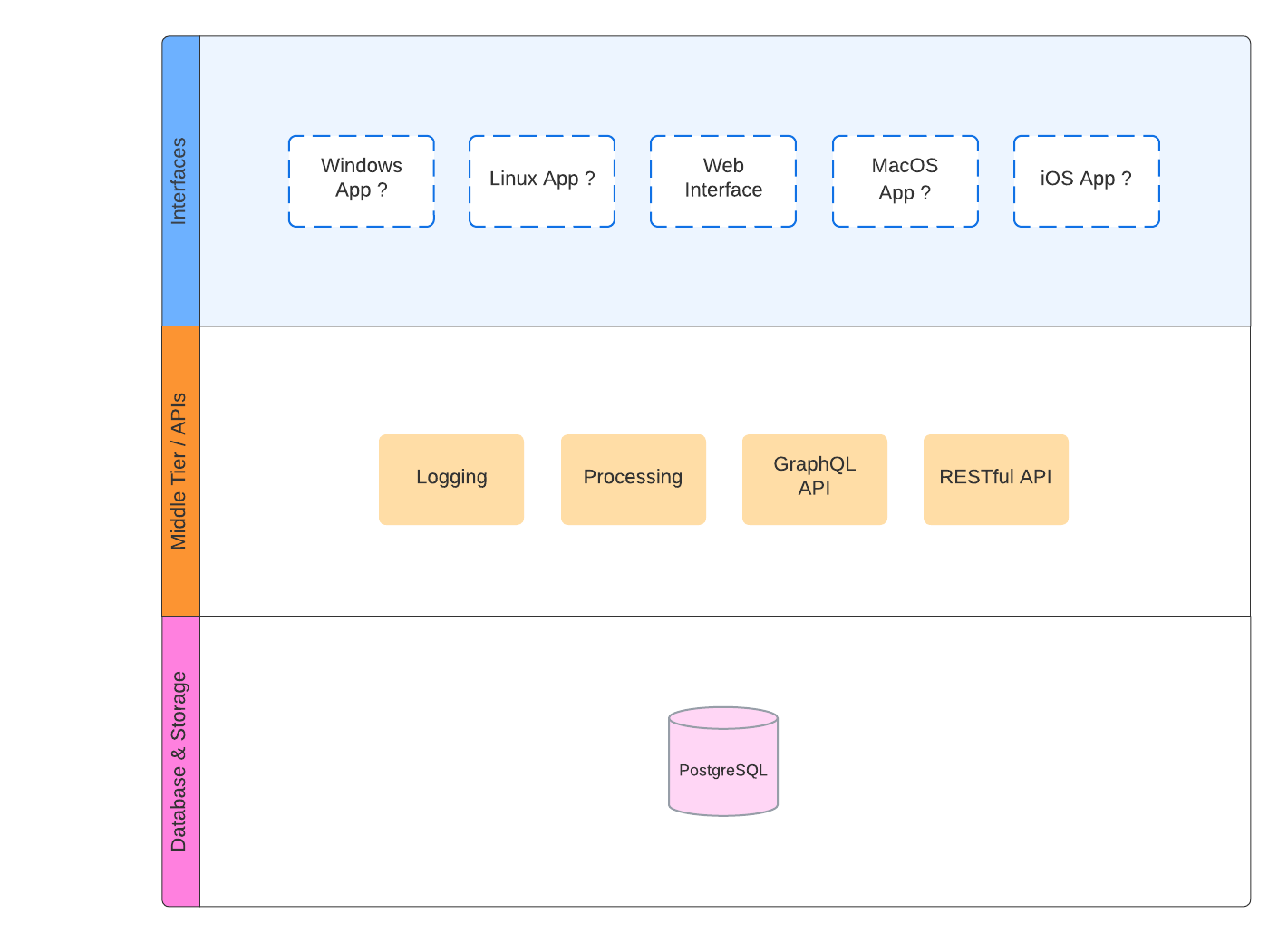
  3. Choose The Tech Stack: I’ll need to write this application in something, obviously, so this post is going to cover my reasoning for the tech stack I’m going to use. The application will be built in three core pieces: the database, the services and middle tier layer, and the user interface. I’ll detail each and cover the reasoning for the stack I’ll choose for each section.

My Own Personal Collection

Building an application to organize my (or your) growing collection of music (vinyls, CDs, Cassettes, digital, or whatever) albums and the rich history surrounding the music and artists you’re passionate about is not just a practical endeavor; it’s a journey into the heart of what makes music collecting a deeply personal and rewarding hobby. For enthusiasts, music is not just about the sounds. It’s about the stories, the people behind the creations, and the cultural moments captured in each track. By developing an application tailored to your needs, you’re crafting a tool that not only enhances your enjoyment of the hobby but also deepens your connection to the music. This goes beyond mere organization; it’s about creating an immersive experience that lets you explore and appreciate the intricate web of influences, history, and creativity that music embodies.

Moreover, such a project reflects a broader trend towards personalized solutions for niche interests. In a world where mainstream platforms often overlook the depth and specificity of niche hobbies (or food or a million other things), building my own application stands as a testament to this decentralization of teh commoditization of people’s personal interest in music. It enables you to track down, record, reflect on and introspect about what makes collectors, such as detailed cataloging options, historical insights, and track-by-track analysis. This level of customization is not just about convenience; it’s about creating a space that respects and elevates the art of music collecting. It becomes a dynamic archive, a living history, and a personal museum of your musical journey. By investing in this project, I’m not just organizing a collection; I’m working toward preserving a legacy and contributing to the culture of music appreciation in a digital age.

Available to All the Collectors

By adopting a multi-tenant architecture for this vinyl collection application, it becomes an accessible and scalable tool for a wide range of collectors, from novices to experts. This approach not only democratizes the management and appreciation of vinyl records but also fosters a vibrant community where users can exchange insights and experiences. The customizable nature of the platform ensures that each collector can tailor the application to the specifics of their collection, tracking everything from album history to personal anecdotes. This level of personalization enriches the collecting experience, allowing users to see their collections not just as music, but as a mosaic of cultural and historical significance.

The mostly decentralized aspect of the application offers enhanced security, reliability, and privacy, ensuring that users’ data and collections are safeguarded. This structure supports a more resilient platform with reduced risks of downtime or data loss, crucial for collectors who invest significant time in cataloging their albums. Moreover, the decentralized model promotes a collaborative environment, enabling collectors to contribute to and benefit from a collective pool of knowledge. This communal approach deepens the connection between collectors, transforming individual pursuits into a shared exploration of music history and culture.

In essence, this multi-tenant, decentralized application transcends mere organization of vinyl records, offering collectors a comprehensive tool that caters to the nuances of their hobby. It not only facilitates the management of collections but also enhances the overall experience of music collecting by fostering a sense of community and shared passion among enthusiasts. Through personalized features and collaborative opportunities, collectors are equipped with a dynamic platform that celebrates the art of music collection in the digital age.

Choose The Language & Stack

Caveat: The initial choice of language and technology stack for building this application is provisional. It’s crucial to maintain flexibility, as the evolving needs and challenges of the project might necessitate a reassessment of the chosen technologies. While a change in the stack should not be made lightly—considering the progress made, existing work, and potential obstacles—it’s important to weigh these factors carefully. Ultimately, the decision to adjust the technology stack should be guided by its impact on the project’s success, keeping in mind the importance of this choice for various reasons.

The right language and technology stack for your application will influence its development, scalability, and maintenance. Here are my top considerations to guide my choice:

Project Requirements: Assess the specific needs of your vinyl collection application, including the need for real-time updates, scalability, multi-tenancy, and decentralized data management. The technology stack should align with these functional and technical requirements.

Developer Expertise: Consider the skills and expertise of my development team – i.e. starting with, that’s me and me alone. Choosing technologies that a prospective future team is familiar with can accelerate development and reduce the learning curve, though it’s also an opportunity to adopt new technologies if they offer significant benefits. In addition, it also may spell disaster if people can’t be found that use a particular technology. Memories of finding Erlang developers, something that is almost impossible, comes to mind. Another is Haskell, both languages are extremely powerful but if you must grow a larger team, hiring that team can be extremely difficult or impossible.

Community Support and Ecosystem: Opt for languages and technologies with strong community support and a rich ecosystem of libraries and tools. This can significantly ease development challenges and provide access to pre-built solutions for common problems. In some cases, it might take a little bit more examination to really understand what is grassroots community vs. forced corporate community. Is it really driven by people’s motivations (i.e. Go vs. Rust vs. .NET vs. Java) or is it some other drivers, and how much do you trust or want to be involved in that particular community.

Security: Given the application’s focus on personalized collections, security is important. As it should be with all applications really, since it’s not exactly impossible or that difficult to decently secure most website application. Choosing technologies with robust security features and a good track record of addressing vulnerabilities is a great starting point.

Interoperability and Integration: The ability to easily integrate with other services, APIs, and data sources is crucial. Select technologies that offer flexibility in integration and support for standard data exchange formats. Does the technology have ways to easily shim in other languages or stacks or binaries of other sorts? How well does the language itself, and its stack, work within the overall realm of technology as a whole?

Deployment and Operational Considerations: Some technologies are easier to deploy and manage than others, especially in a decentralized environment. Consider the ease of deployment, monitoring, and ongoing management as part of your technology stack decision. This, especially since I’m starting this one off as a singular developer could be the make or break. As at some point, my intent would be for the bulk of my effort to be focused around operational needs and focusing on my collection and not particularly worrying about building features or such.

Balancing these considerations will help me choose a technology stack that not only meets the current needs of my application but also positions it for future growth and success. It’s also beneficial to prototype or conduct a feasibility study with shortlisted technologies to validate my choice before committing to a full-scale development project.

The Decisions

As I stated before, there are three key parts to this application. There is the database, the service(s) and middle tier, and the user interface. For the database I can easily go ahead and make that decision, as I’ll use a relational database and that database will be PostgreSQL for a billion and 1 reasons. For now though, I’m going to skip that and instead write a whole blog post about why I chose PostgreSQL.

Decision: Database is PostgreSQL.

Next up would be the services and middle tier. This part is probably the most difficult for the simple fact that there is the widest selection of options here. Every single language and stack can build whatever kind of services, APIs, middle tier, and the plethora of middleware one needs.

Comprehensive Integration Support: This framework supports both GraphQL and REST APIs right from the start, offering flexibility to cater to varied client data requirements. This inclusivity ensures developers can easily craft and manage diverse API endpoints, facilitating efficient data exchanges. The GraphQL integration aids in reducing data over-fetching and under-fetching, while REST API compatibility maintains simplicity and adherence to web standards.

Robust Database Connectivity: Known for its advanced ORM capabilities, it ensures seamless database interactions, particularly with PostgreSQL. This ORM layer simplifies complex queries and data operations, allowing developers to utilize PostgreSQL’s advanced features effectively without deep SQL knowledge. This comprehensive database support is crucial for applications requiring reliable and efficient data management.

Performance Optimization Features: It includes a suite of tools for enhancing API performance, such as asynchronous processing, caching, and efficient connection pooling. These features are vital for scaling applications and managing large volumes of requests smoothly. The framework’s design allows for easy performance tuning to meet specific application demands, ensuring optimized scalability and resource utilization.

Vibrant Developer Community: Beyond technical features, the framework boasts a vast and active developer community. This network is a rich resource for support, tutorials, and shared knowledge, significantly easing the learning curve and troubleshooting process. The availability of a large pool of skilled developers also bodes well for future application maintenance and enhancements. This community aspect ensures that new features, best practices, and updates are readily accessible, keeping applications up-to-date and secure.

My Own Experience: I’m actually choosing this language and stack not because it is what I’m most familiar with, but because I want to regain familiarity with the stack. Currently, it’s been more years than I’d like to admit since I regularly did work with this language and stack. Only recently have I delved back into it for some work related efforts, and now it’ll be the core of this project.

Decision: Java Spring Boot

Finally the user interface. I know I want it to be a web interface for many – what should be – obvious reasons. The choice basically comes down to two for me, React or Vuejs. I’ve spent some time learning Vuejs and some time developing with React.

I don’t like either. I don’t really like how the “web” and its “interface” works since its all janky and hacked together technologies. But it is the only “web” that we have and the most common way to build things for the web these days tends to be React. Thus…

Decision: React

So that’s that, in the coming days, weeks, and months as I build out this application, this is the starting point for which and why I’ve decided to use these particular pieces of tech.
References & Notes:

  • /s This is short for “sarcasm” to call out something that isn’t particularly obvious as sarcasm.
Speaking of Spring Boot Java Logging, Some Misadventures

Preface: I set out upon a task to incorporate some masking, redaction, or filtering of some sort on PII (Personally Identifying Information) for the log files and log data an application service is producing. The application pre-exists, so this isn’t entirely a green field situation, but the application generally fits a Spring Boot Service style application. The one key thing I wasn’t sure about when starting, was what kind of logging was already incorporated into the operational service.

Log Masking for Different Logging Libraries

The first solution I came up with was to incorporate a converter or appender of some sort that would mask PII with a string of some sort, like “****” or “—–“. This solution that I came up with, upon checking, looked like it would work out ok with or for a number of the top logging libraries for Java, specially libraries that run with or as a Spring Boot service like LogBack or Log4j.

Solution: Extend ClassicConverter & Write Up a Classic Converter

The way I implemented that involved the following implementation, I’ll dub this one the the log-mask-example, and have the repo available here. There are several key pieces of collateral that make this work, the first being the logback-spring.xml configuration, added to the resources directory. The file looks like this, including the template for the log message, and the converterClass class path.

<configuration>
    <conversionRule conversionWord="piiMask" converterClass="org.skidrow.logmaskexample.PiiMaskingConverter"/>
    <appender name="STDOUT" class="ch.qos.logback.core.ConsoleAppender">
        <encoder>
            <pattern>%d{yyyy-MM-dd HH:mm:ss} [%thread] %-5level %logger{36}- %piiMask %n</pattern>
        </encoder>
    </appender>
    <root level="info">
        <appender-ref ref="STDOUT"/>
    </root>
</configuration>

Then there is the PiiMasking Converter class itself. It shapes up like this, to which, note I’ve removed the imports for brevity. Check out the file here for the full imports and all.

public class PiiMaskingConverter extends ClassicConverter {

    private List<PiiRegexPattern> patterns;

    public PiiMaskingConverter() throws IOException {
        try {
            ObjectMapper mapper = new ObjectMapper();
            InputStream is = getClass().getResourceAsStream("/regexMasks.json");
            patterns = mapper.readValue(is, new TypeReference<>() {
            });
        } catch (IOException e) {
            throw new IOException("Error reading regex_patterns.json", e);
        }
    }

    @Override
    public String convert(ILoggingEvent event) {
        return maskMessage(event.getFormattedMessage());
    }

    private String maskMessage(String message) {

        boolean turnOn = getMaskingEnabled() {
        if (!turnOn)
            return message;
        for (PiiRegexPattern pattern : patterns) {
            message = message.replaceAll(pattern.getRegex().toString(), "****");
        }

        return message;
    }

    private boolean getMaskingEnabled() {

        Environment env = ApplicationContextProvider.getApplicationContext().getBean(Environment.class);
        return env.getProperty("masking.enabled", Boolean.class, true);
    }
}

The PiiRegexPattern I setup, which inflates from the values in the regexMasks.json file, looks like this.

public class PiiRegexPattern {

    private String title;
    private String regex;
    private String mask;

    public String getTitle() {
        return title;
    }

    public String getRegex() {
        return regex;
    }

    public String getMask() {return mask;}
}

Finally the regexMasks.json file shapes up with a few examples like this.

[
  {
    "title": "emailMask",
    "regex": "\\b[A-Za-z0-9._%+-]+@[A-Za-z0-9.-]+\\.[A-Z|a-z]{2,}\\b"
  },
  {
    "title": "ipAddress",
    "regex": "\\b(?:[0-9]{1,3}\\.){3}[0-9]{1,3}\\b"
  },
  {
    "title": "phoneMask",
    "regex": "\\b(1[-+]?\\s?)?(\\(\\d{3}\\)\\s?\\d{3}[-.]?\\d{4}|\\d{3}[-.]?\\d{3}[-.]?\\d{4})\\b"
  },
  {
    "title": "internationalPhoneMask",
    "regex": "\\b\\+?\\d{1,3}?[-.\\s]?\\d{1,4}?[-.\\s]?\\d{1,4}?[-.\\s]?\\d{1,4}(?:\\s*x\\d{1,5})?\\b"
  }
]

This way it’s easy to just add additional regular expressions to the mix without adding them in code. Just add them to the JSON file and it’ll pull them in and run each of them.

The example repository I’ve linked also generates some kind of arbitrary log messages and examples just to have something to work with, if you want to clone it and give it a try. If you’ve got any questions, scroll on down the page and pop a comment in there. Happy to answer questions and elaborate on the approach.

Solutions: Log4j2 Multi-Regular Expression Configuration Option

After further work I became aware of another option that eliminates the programmatic nature of this implementation and puts everything in configuration, requiring a shift to Log4j2, which is kind of ideal anyway considering the performance and other characteristics of Log4j2.

This option includes setting up some regular expressions via the properties section of a Log4j2.xml default configuration. You could use a custom configuration too, it doesn’t need to be a default configuration file. The properties shape up like this.

<Property name="phoneRegex">\b(1[-+]?\s)?(\(\d{3}\)\s?\d{3}[-.]?\d{4}|\d{3}[-.]?\d{3}[-.]?\d{4})\b</Property>
<Property name="emailRegex">\b[A-Za-z0-9._%+-]+@[A-Za-z0-9.-]+\.[A-Z|a-z]{2,}\b</Property>
<Property name="passwordFieldRegex">\bpassword\b\s+\[([^]]+)]</Property>
<Property name="redactText">RDCTD</Property>

My pattern layout, in the same configuration file, almost matching the default Spring Boot convention based configuration, shapes up like this.

<PatternLayout pattern="%d{yyyy-MM-dd'T'HH:mm:ss.SSSXXX} %5p ${sys:PID:-1} --- [%-15.15t] %-41.41logger : %replace{%replace{%replace{%msg}{${phoneRegex}}{${redactedText}}}{${emailRegex}}{${redactedText}}}{${fullPasswordEntryRegex}}{${redactedText}}%n"/>

Let’s break down the components of this pattern:

  1. %d{yyyy-MM-dd'T'HH:mm:ss.SSSXXX}: This is the date and time format. %d specifies that the timestamp of the log event should be included. The {} contains the format of the timestamp. In this case, it’s a standard ISO 8601 format, including the year, month, day, hour, minute, second, millisecond, and timezone.
  2. %5p: This represents the log level (like INFO, DEBUG, ERROR) in a 5-character wide field, right-aligned.
  3. ${sys:PID:-1}: This is a system property placeholder. It attempts to include the Process ID (PID) of the running application. If the PID is not available, it defaults to -1.
  4. ---: This is just a separator for readability.
  5. [%-15.15t]: This includes the name of the thread that generated the log message. The -15.15 formatting means the thread name will be truncated or padded to exactly 15 characters.
  6. %-41.41logger: This is the logger’s name, usually the class name where the log statement is written. Similar to the thread name, it’s truncated or padded to 41 characters.
  7. %replace{...}%n: This is a complex replace operation nested within the log message (%msg). It’s designed to redact sensitive information. Each %replace{} function takes three arguments: the input, a regex pattern to search for, and the replacement text. In this sequence, it redacts phone numbers, email addresses, and full password entries with ${redactedText}. The ${phoneRegex}, ${emailRegex}, and ${fullPasswordEntryRegex} are placeholders that should be defined elsewhere in the configuration to match their respective patterns.
  8. %n: This is a newline character, ensuring each log message is printed on a new line.

There is also a need to ensure the dependency for Log4j2 is present in your dependencies file (i.e. your Maven file or whatever you’d want to use).

Solutions Discussion

Below are additional ways to set up custom logging in a Spring Boot application, aside from the two already mentioned. I offer these to extend the brainstorming options when I, or you, are trying to get it sorted out what we need for logging in our applications. I hope it’s useful, and if you dear reader, know of any I’ve missed please add a comment with the additional option and I’ll add it to this list for completeness!

Aspect-Oriented Programming (AOP) for Logging

  • Description: Use AOP to intercept method calls and log relevant information. This is particularly useful for logging at the service or controller layer.
  • Advantages: Provides centralized control over logging, can easily add or remove logging without modifying the actual service or controller code.
  • Example: Using Spring AOP, create an aspect that logs method entry and exit, along with parameters and return values, optionally adding masking for sensitive data.

Custom Annotation for Logging

  • Description: Create a custom annotation that can be used to mark methods or parameters that need logging.
  • Advantages: Offers fine-grained control over what gets logged, as developers can choose which methods or parameters to annotate.
  • Example: Implement an annotation like @Loggable and use AOP or an interceptor to handle the logging logic whenever this annotation is encountered.

SLF4J MDC (Mapped Diagnostic Context) for Advanced Logging

  • Description: MDC allows for storing key-value pairs in the log context, which can then be included in the log messages.
  • Advantages: Useful for adding contextual information to logs, like user IDs or transaction IDs, which helps in tracing and debugging.
  • Example: In a web application, use a servlet filter or Spring interceptor to put a unique request ID into MDC at the beginning of a request and clear it at the end.

Custom Logback Filters

  • Description: Create custom filters in Logback for more control over what gets logged.
  • Advantages: Allows for complex logic to determine if a log line should be printed, which is useful for dynamic log levels or redacting specific information.
  • Example: Implement a filter that checks the content of each log message and decides whether to log it based on certain criteria, such as the presence of PII.

Integration with External Logging Systems

  • Description: Integrate with external logging systems or services like ELK (Elasticsearch, Logstash, Kibana) for more robust log management.
  • Advantages: Offers powerful search, visualization, and analysis capabilities for logs.
  • Example: Configure Spring Boot to send logs to Logstash, which then forwards them to Elasticsearch. Use Kibana for visualization and analysis.

Using JSON Log Format

  • Description: Configure loggers to output logs in JSON format, which is more structured and easier for parsing and analysis by log management tools.
  • Advantages: Facilitates the integration with log analysis tools and improves the readability and structure of log data.
  • Example: Set up Logback or Log4j2 to output logs in JSON format, including custom fields like method names, response times, etc.

Custom Log Levels

  • Description: Define custom log levels to categorize log messages more granely than the standard levels (INFO, DEBUG, etc.).
  • Advantages: Provides more control and flexibility in how log messages are categorized and filtered.
  • Example: Create custom log levels like AUDIT for logging user activities or METRIC for performance measurements.

Summary i.e. the TLDR

In this conversation, I’ve discussed custom logging solutions in Java Spring Boot applications, with a focus on redacting Personally Identifying Information (PII) from logs. The initial approach involved creating a custom Logback converter to mask PII using regular expressions based on the default dependencies included in Spring Boot, configured via logback-spring.xml and an external JSON file. We also explored a Log4j2 configuration that uses properties for regular expressions to redact sensitive information directly in the pattern layout. Additional custom logging strategies were suggested, including using Aspect-Oriented Programming (AOP), custom annotations, SLF4J’s Mapped Diagnostic Context (MDC), custom Logback filters, integration with external logging systems like ELK, outputting logs in JSON format, and defining custom log levels. These methods provide a comprehensive framework for effectively managing and securing log data in Spring Boot applications, ensuring sensitive information is adequately protected.

Using Multiple SSH Keys for Multiple Github Account

FIRST – Setup the Keys

If there is already a key, I can use this one to start with, but if there is no key to start with I’ll need to generate one. I can do this with the following command:

ssh-keygen -t rsa

When generating the keys, best to go with the default location, which is ~/.ssh/id_rsa. This will create two files, id_rsa and id_rsa.pub. The id_rsa file is the private key, and the id_rsa.pub file is the public key. The private key should be kept secret, and the public key can be shared with anyone.

For the next account, which I’ll just call the work account, I’ll generate another new key. This time I’ll hand off the following parameters to the key generation to provide the work account email and the file name:

ssh-keygen -t rsa -C "adron.account@work_mail.com" -f "work_account_one"

I’ve now got two keys, one for my personal account and one for my work account.

~/.ssh/id_rsa

~/.ssh/work_account_one

I’ll need to add these to the ssh-agent and the respect Github (or git whatever servers) so that I can use them.

SECOND – Add the Keys to Github

Adding the keys to Github. We’ll start with the personal account and then add the work account. Copy the public key using pbcopy < ~/.ssh/id_rsa.pub. With that copied log into the Github account that this key should be associated with.

1. Got to *settings*.
2. Select *SSH and GPG keys* from the account user menu.
3. Navigate into `New SSH Key`, give it a title, and paste the key into the key field.
4. Click *Add SSH Key*.

Now log out of that Github account and into the other account, the work account. Repeat the steps above, but this time use the work account email and the work account key.

THIRD

Register the new keys with ssh-agent. Start by checking that the ssh-agent is running with eval "$(ssh-agent -s)". In the past we would add the keys to the agent with ssh-add -K ~/.ssh/id_rsa and ssh-add -K ~/.ssh/work_account_one. Now the keys are registered with the agent with the following.

ssh-add --apple-use-keychain ~/.ssh/id_rsa
ssh-add --apple-use-keychain ~/.ssh/work_account_one

FOURTH

There is one last step, I need to tell the ssh client which key to use for which account. I can do this by adding the following to the ~/.ssh/config file.

# Account 1 - Primary
Host github.com
  HostName github.com
  User git
  IdentityFile ~/.ssh/id_rsa
  AddKeysToAgent yes
  UseKeychain yes

# Account 2 - Second Account
Host github.com-work_user_account_name
  HostName github.com
  User git
  IdentityFile ~/.ssh/work_account_one
  AddKeysToAgent yes
  UseKeychain yes

Note that work_user_account_name is the name of the work account, not the email address. I can now use the following commands to clone repositories from the respective accounts. This tells ssh-agent to use the id_rsa key for Git URLs starting with github.com and the work_account_one key for Git URLs starting with github-work_user_account_name.

FIFTH

One active SSH key per working session.

This is a good practice to follow. I can use the following command to start the ssh-agent and add the key to it.

eval "$(ssh-agent -s) ssh-add -K ~/.ssh/id_rsa ssh-add ~/.ssh/id_rsa

The same can then be done when the other key needs to be used.

Ubuntu on Hyper-V, Insuring Enhanced Session Works

Enhanced session mode provides significantly higher performance, hardware utilization, and things like copy & paste between the host and the VM. To make the best use of the VM as a work station this feature is a must have. However, an Ubuntu (or other) installation doesn’t have this capability provided by default, additional software and steps are required to get it working. Those steps are what follows.

1. Configure VM and Install Ubuntu.

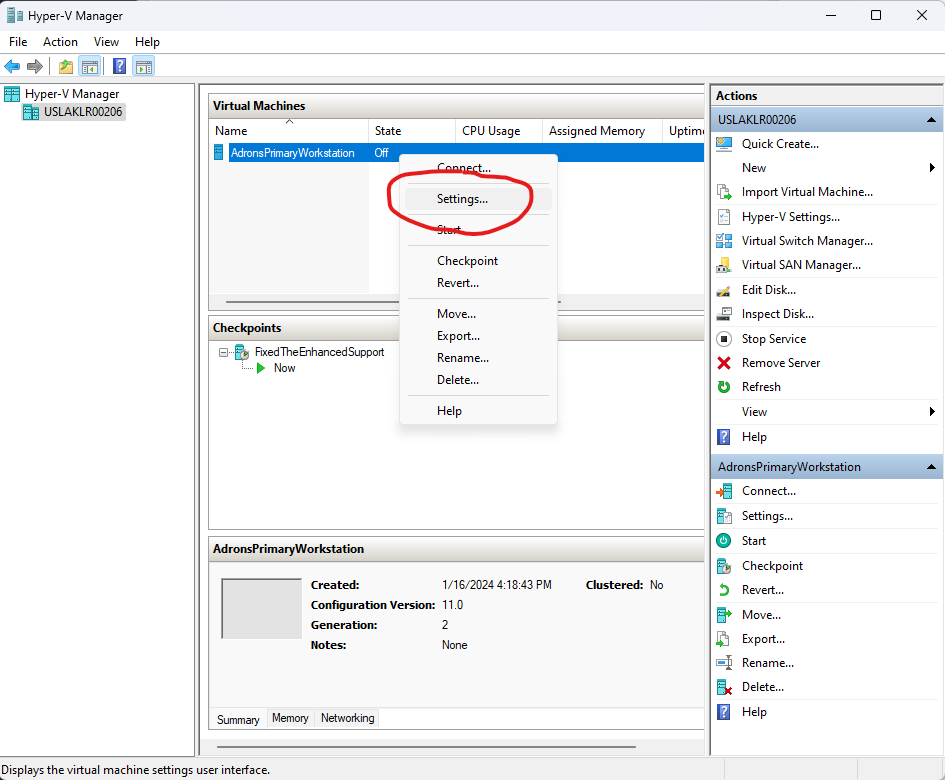
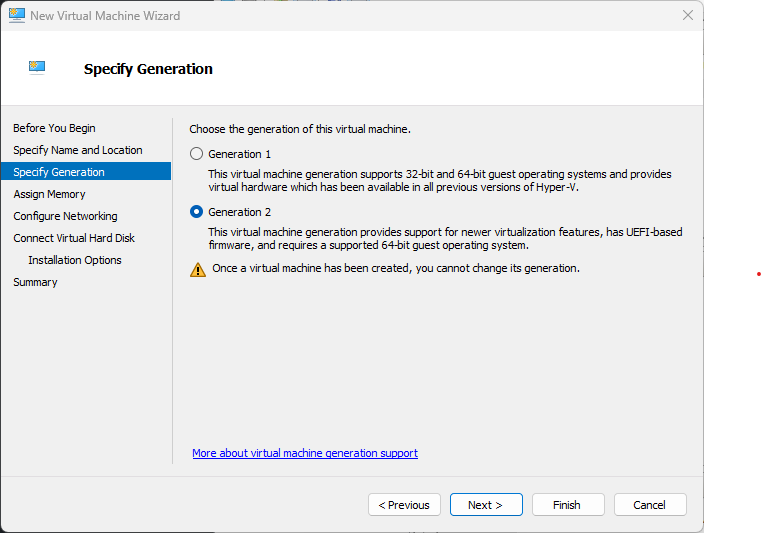
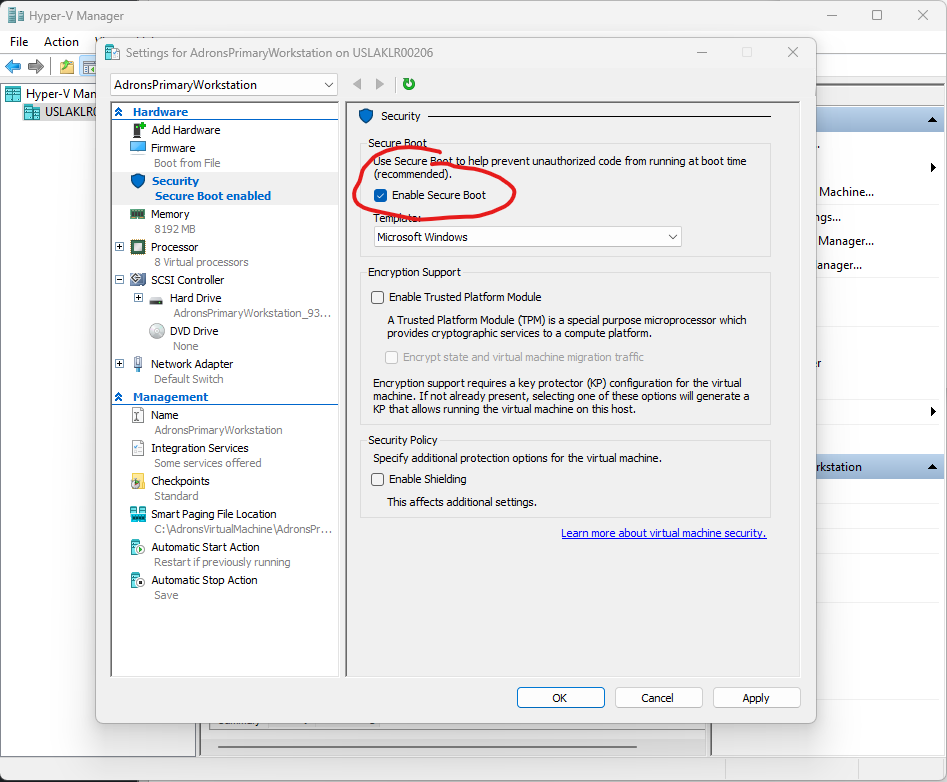
Extended session mode requires several features be enabled when setting up the VM for the installation of a guest OS. Configuration for the VM, done via the wizard when creating a new VM, but also available by right click and clicking on settings as shown.

Generation 2

Secure Boot Disabled

Stepping through the Ubuntu installation there are some key steps to make sure are taken. Make sure to setup the username and password, and have the login required. Do NOT set the Ubuntu instance to log in automatically.

2. Install XRDP and XORGXRDP

Before getting into the install, make sure apt is all up to date.

apt update && apt upgrade -y

2a. Install hv_kvp utils. Run these installations where HWE can be set to the kernel version like show.

apt install -y linux-tools-virtual${HWE} apt install -y linux-cloud-tools-virtual${HWE}

HWE packages could be set like this.

HWE=""

or

HWE="-hwe-20.04"

2b. Install the xrdp service for appropriate auto starting behavior.

apt install -y xrdp

2c. Setup autostart for xrdp.

systemctl stop xrdp
systemctl stop xrdp-sesman

2d. Configure the installed xrdp ini files now.

sed -i_orig -e 's/port=3389/port=vsock:\/\/-1:3389/g' /etc/xrdp/xrdp.ini
sed -i_orig -e 's/security_layer=negotiate/security_layer=rdp/g' /etc/xrdp/xrdp.ini
sed -i_orig -e 's/crypt_level=high/crypt_level=none/g' /etc/xrdp/xrdp.ini
sed -i_orig -e 's/bitmap_compression=true/bitmap_compression=false/g' /etc/xrdp/xrdp.ini

2e. Add setup script for Ubuntu sessions.

if [ ! -e /etc/xrdp/startubuntu.sh ]; then
cat >> /etc/xrdp/startubuntu.sh << EOF
#!/bin/sh
export GNOME_SHELL_SESSION_MODE=ubuntu
export XDG_CURRENT_DESKTOP=ubuntu:GNOME
exec /etc/xrdp/startwm.sh
EOF
chmod a+x /etc/xrdp/startubuntu.sh
fi

Now setup the script for the session.

sed -i_orig -e 's/startwm/startubuntu/g' /etc/xrdp/sesman.ini

2f. Rename drives to shared-drives, setup allowed users.

sed -i -e 's/FuseMountName=thinclient_drives/FuseMountName=shared-drives/g' /etc/xrdp/sesman.ini
sed -i_orig -e 's/allowed_users=console/allowed_users=anybody/g' /etc/X11/Xwrapper.config

2g. Now we need to exclude the vmw module if necessary.

echo "blacklist vmw_vsock_vmci_transport" > /etc/modprobe.d/blacklist-vmw_vsock_vmci_transport.conf

2h. Next up, make sure the kv-sock gets loaded. Dire consequences exist if we don’t do this. This is an, if necessary, type of addition similar to excluding the vmw module.

echo "hv_sock" > /etc/modules-load.d/hv_sock.conf

2i. Finally setup and configure the policy for xrdp sessions. At the end setup for startup, then after all this reboot.

cat > /etc/polkit-1/localauthority/50-local.d/45-allow-colord.pkla <<EOF
[Allow Colord all Users]
Identity=unix-user:*
Action=org.freedesktop.color-manager.create-device;org.freedesktop.color-manager.create-profile;org.freedesktop.color-manager.delete-device;org.freedesktop.color-manager.delete-profile;org.freedesktop.color-manager.modify-device;org.freedesktop.color-manager.modify-profile
ResultAny=no
ResultInactive=no
ResultActive=yes
EOF

systemctl daemon-reload
systemctl start xrdp

Did you reboot? Make sure to reboot, as I have myself forgotten and spent wasted time trying to sort out why things weren’t working when the appropriate services and all had not been restarted to have xrdp and such restart and initiate running under the appropriate state that a reboot allows.

So reboot!

3. Configure the VM Server

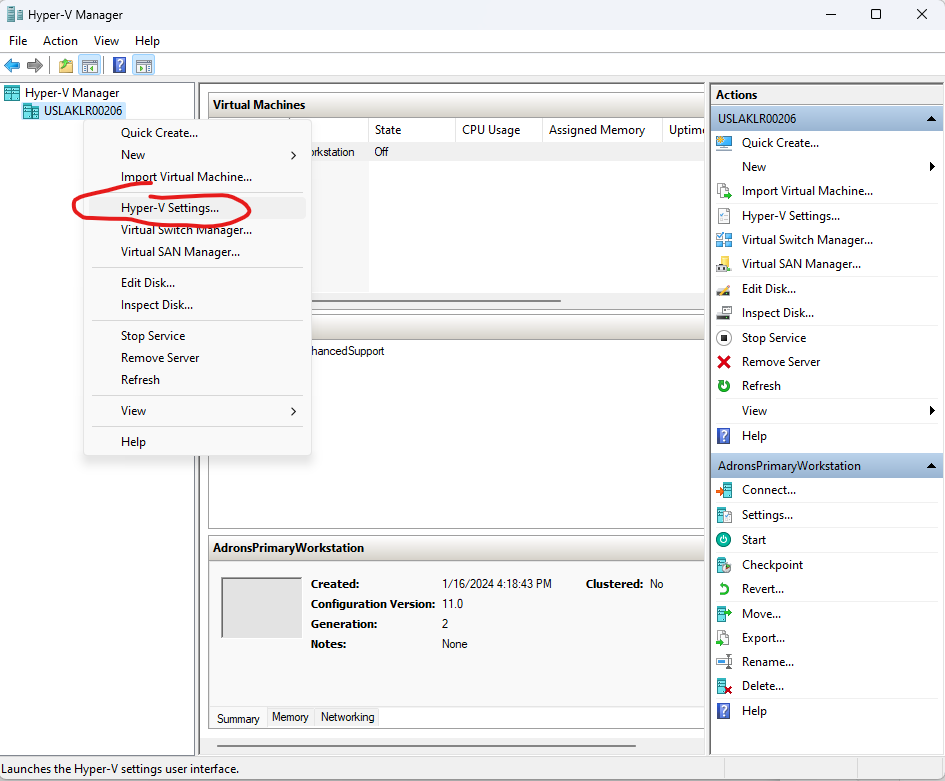
But that’s not all, we also need to configure the host and VM a bit more. Open up the Hyper-V MMC manager again and open the settings for the Hyper-V Server.

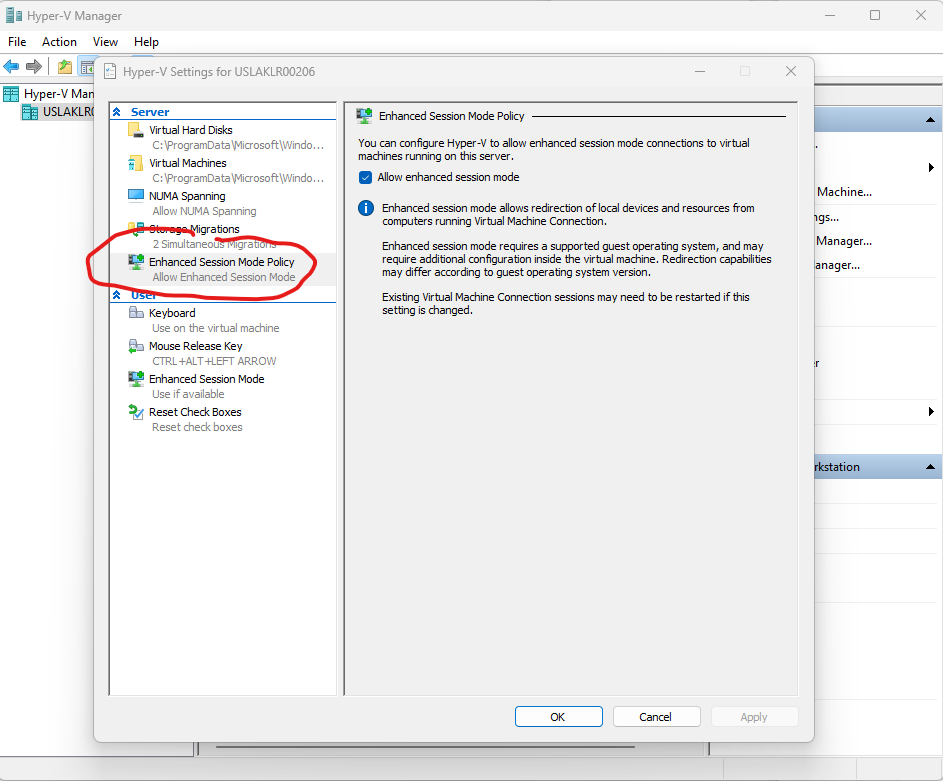
3a. In this dialog select the Enhanced Session Mode Policy and ensure the Allow enhanced session mode check box is checked.

3b. Below that under the user section, click on the Enhanced session Mode, and there too make sure Use enhanced session mode is selected.

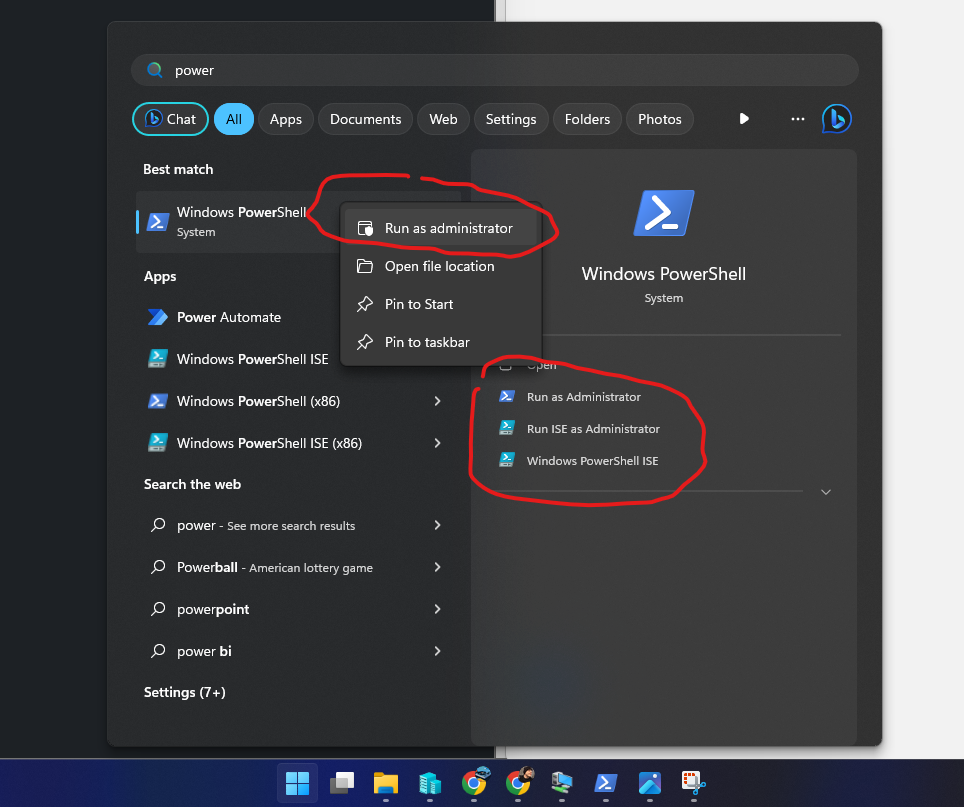
3c. Next up, yes there’s more, open up a PowerShell session in the host Windows machine in Administrator mode. Do this by clicking on the Start button on the taskbar (Windows button?), and type in “PowerShell” (or just “Power” or enough characters so that Windows PowerShell shows up). Then right click on the Windows PowerShell item. Select Run as administrator, or you can click on one of those options over to the right. The right click and select Run as administrator is available anywhere you have access to the executable or the direct link to it, but not via any shortcut of the executable.

3d. Now execute the following commands to ensure all the enhanced prerequisites for the machine are set. You can, before running the commands just check to see if they’re enabled with the first command in this list of commands.

Get-VMHost | select Name, EnableEnhancedSessionMode

Set-VMHost -EnableEnhancedSessionMode $true
Set-VM -VMName AdronsPrimaryWorkstation -EnhancedSessionTransportType HvSocket

I believe, at this point, all the steps are covered and you can then reboot the VM again and gain access to the Enhanced which provides a properly performant Ubuntu 22.04 LTS dev experience via VM!