Getting a coding agent productive is less about the prompt and more about whether the machine in front of it can actually build, run, and reach the systems the work depends on.
Cursor, Claude, Codex, and the rest are fast when the local world is already honest: dependencies install, the app boots, tests can run, and the external surfaces (GitHub, GitLab, Slack, Outlook, Teams, whatever is in play) are reachable through clear, permissioned paths. When those pieces are missing, the agent spends its tokens rediscovering your laptop instead of doing the job.
This post is about making that setup cheap and repeatable.
The real prerequisite is a bootable story
Every repo should answer, in files the agent can read, a small set of questions:
What do I need installed on this machine?
How do I get from clone to a running local system?
Which services does this project talk to, and which of those am I expected to use locally?
Where do secrets live, and what is not allowed?
How do I know the setup worked?
If those answers only exist in your head, the agent will invent something almost right. Almost right is expensive.
I keep this in the product repo as first-class docs and scripts: README, CONTRIBUTING, docs/setup, scripts/bootstrap, .env.example. When the work spans more than one codebase, I also mirror the “where the rest of the world lives” map in the project notes repo.
Make setup mechanical
Agents are excellent at following a checklist. They are mediocre at inferring your undocumented brew taps and tribal knowledge.
What works well right now:
A single bootstrap path. One script or documented sequence: install language runtimes, install dependencies, copy env templates, start local dependencies, run a smoke check. Prefer boring and explicit over clever.
Pinned, discoverable tooling. Version files (.nvmrc, .node-version, mise.toml, asdf configs, rust-toolchain, etc.) beat README poetry. The agent should be able to detect the toolchain without asking you which Node major you meant last quarter.
.env.example that matches reality. Every required variable named. No secret values. Short comments for where to get each one. If a variable is only for production, say so.
Smoke tests for the environment. A command that proves the local stack is alive: npm run doctor, make verify, a compose healthcheck, a migration status call. Green means “safe to start feature work.” Red means “fix the machine, not the feature.”
Dev containers or explicit host setup. Pick one and document it. Either the agent works inside a known container, or it works on the host with a known bootstrap. Mixing both without saying which is canonical creates two slightly broken worlds.
This is the same instinct as my old dev-setup-osx habit, updated for a world where the “new developer” might be an agent that showed up thirty seconds ago.
Tell the agent where the working systems are
Local build is only half the map. Most real work touches other systems: source hosts, chat, mail, issue trackers, cloud consoles, internal APIs.
Write down the topology.
Product repos and their remotes (GitHub, GitLab, both, mirrors).
Which environments exist: local, staging, production, preview apps.
Which human collaboration surfaces matter: Slack channels, Teams teams, Outlook lists, Linear/Jira projects.
Which of those the agent is allowed to read or write.
How authentication is supposed to happen for each.
Do not make the agent guess that “the deploy” means GitHub Actions in one repo and a GitLab pipeline in another. Put the pointers in markdown next to the code or in the notes repo. Ambiguity here turns into the wrong PR opened against the wrong remote, or a “fix” that never lands where humans look.
MCP is how agents reach the rest of the desk
Model Context Protocol servers are the practical bridge between the coding agent and the tools already on your desk. Used well, they turn “go check the thread / issue / inbox / pipeline” into a first-class action instead of a copy-paste scavenger hunt.
The useful pattern is not “connect everything.” It is “connect the systems this project actually depends on, with the least privilege that still helps.”
A sane MCP layout for project work often includes:
Source control: GitHub and/or GitLab for issues, PRs, checks, and releases.
Chat: Slack or Teams for the channels where decisions and unblockers live.
Mail/calendar: Outlook or similar when the work is genuinely gated on threads or meetings, not because it is fun to give an agent your inbox.
Project tracking: whatever holds the tickets, if that is not already the git host.
Docs and runbooks: if they live outside the repo and agents keep asking for them.
Wire these at the user or project level in Cursor (and equivalents elsewhere), then document in the repo which MCP servers are expected for this project and what they are for. An agent that knows “Teams is available for the eng channel, GitHub is available for PRs, Outlook is not in scope for this repo” wastes less time and takes fewer weird actions.
Authentication matters. Prefer the product’s normal OAuth/device flows. Keep tokens out of the notes repo and out of prompts. If a server needs auth, say so in setup docs and stop there. Do not paste credentials into markdown “for convenience.”
Boundaries beat cleverness
An agent with broad access and no rules will eventually do something technically impressive and socially awful: comment in the wrong channel, open a PR against the wrong fork, or dig through mail that was never part of the task.
Give it clear limits:
Read-only by default where write access is not required.
Explicit allow-lists of repos, channels, and projects.
Repo instructions that say when to use MCP versus when to stay local.
The same ask-plan-confirm gate you use for code changes when the action leaves the laptop (posting, labeling, merging, emailing).
Local environment setup gets the agent building. MCP gets the agent collaborating. Boundaries keep both from becoming a mess you have to unwind.
A minimal checklist I actually use
When I stand up a project for agent-assisted work, I want at least this:
Clone, bootstrap, and smoke test documented and scripted.
Toolchain versions pinned in-repo.
.env.example complete; real secrets elsewhere.
Notes/brief that name the remotes, environments, and collaboration surfaces.
MCP servers configured for the systems in play, with purpose notes in the project docs.
Clear write/read expectations for each integration.
A first prompt that points the agent at setup docs before feature work.
None of that is fancy. All of it is what makes Cursor, Claude, Codex, and friends look brilliant on day one instead of lost in your PATH.
The goal is simple: when an agent sits down at the project, the local world boots, the surrounding systems are findable, and the rules of engagement are already written down.
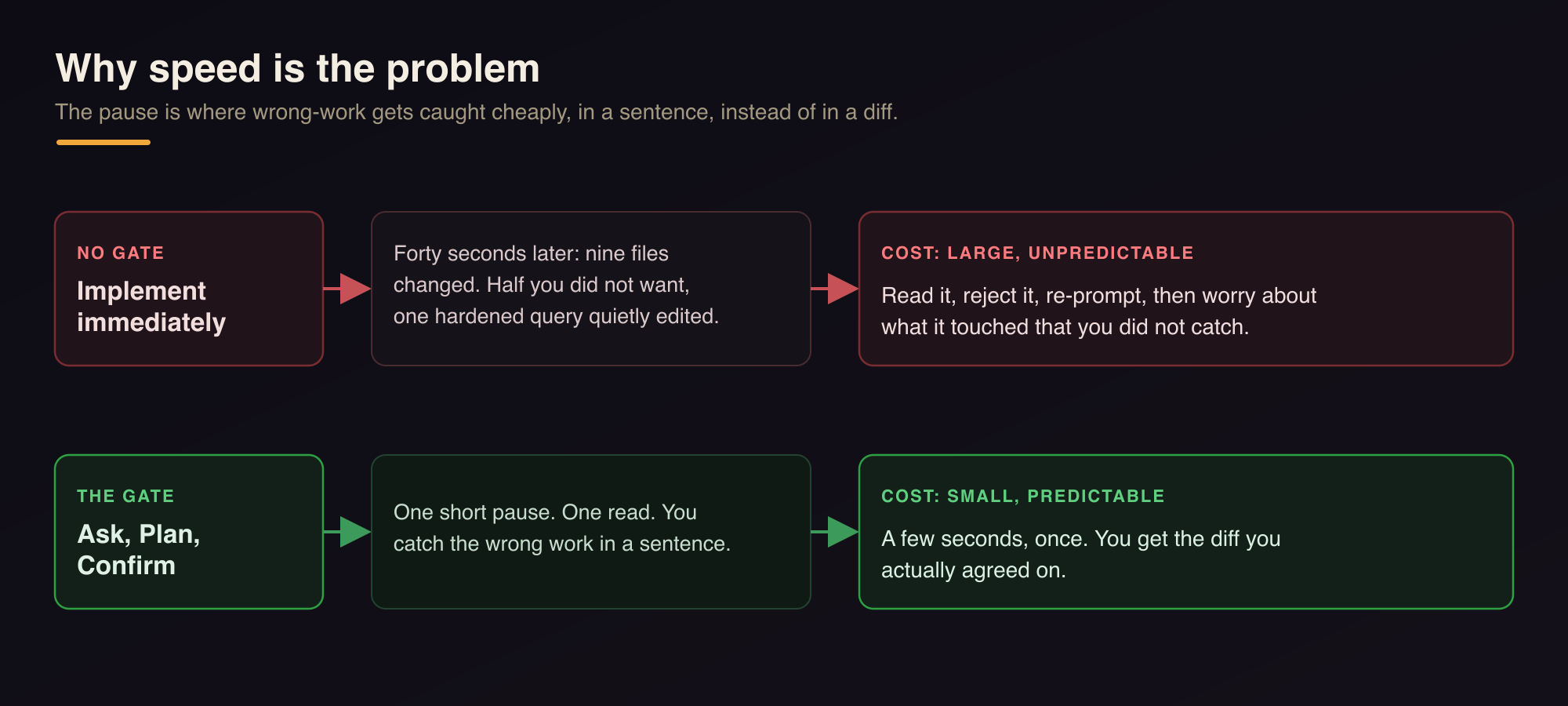
The scariest thing about a genuinely capable coding agent is how quickly it commits. You type two sentences, and forty seconds later there are changes across nine files, half of which you did not want and one of which quietly changed a query you spent a week hardening. The agent was not wrong about how to implement the thing. It was wrong about what the thing was, and it never stopped to check.
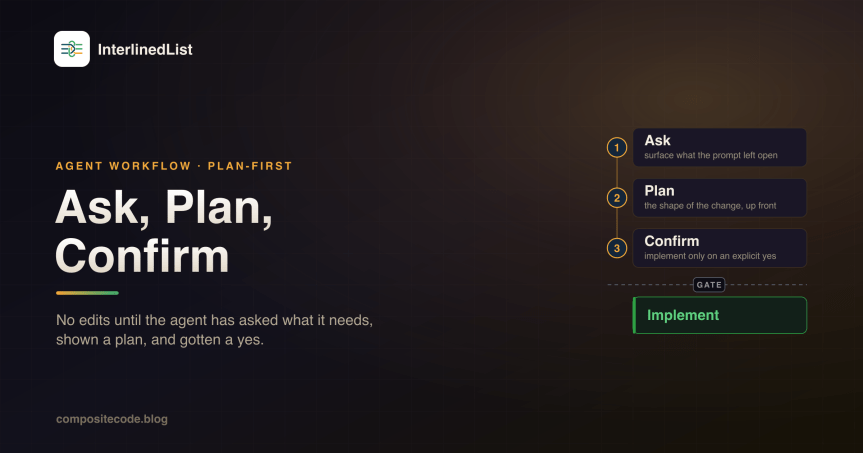
I have watched this happen enough times that I stopped treating it as a prompting problem and started treating it as a workflow problem. A better one-shot prompt is not the fix. A gate is: the agent is not allowed to edit files until it has asked what it needs to ask, shown me a plan, and gotten a yes.
Why speed is the problem
Human engineers have a built-in pause. Before a senior developer touches your codebase they ask a couple of questions, sketch the approach, maybe drop a comment on the ticket. That pause is where the wrong-work gets caught, cheaply, in a sentence, instead of expensively, in a diff you have to read and reject.
Agents removed the pause. That is most of their value and most of their danger in the same motion. An agent that implements immediately optimizes for the wrong thing: it treats “produce a diff” as the goal, when the goal was “produce the diff we agreed on.” The gap between those two is where the deleted work and the silent scope creep live.
That gap is not a knowledge problem. The agent knows how to write the code. It just never checked that it was writing the right code.
The same task, gated and ungated. Skipping the pause trades a small, predictable cost for a large, unpredictable one.
So I gave the pause back, deliberately, as a standing instruction on every agent in the InterlinedList repo.
The three beats
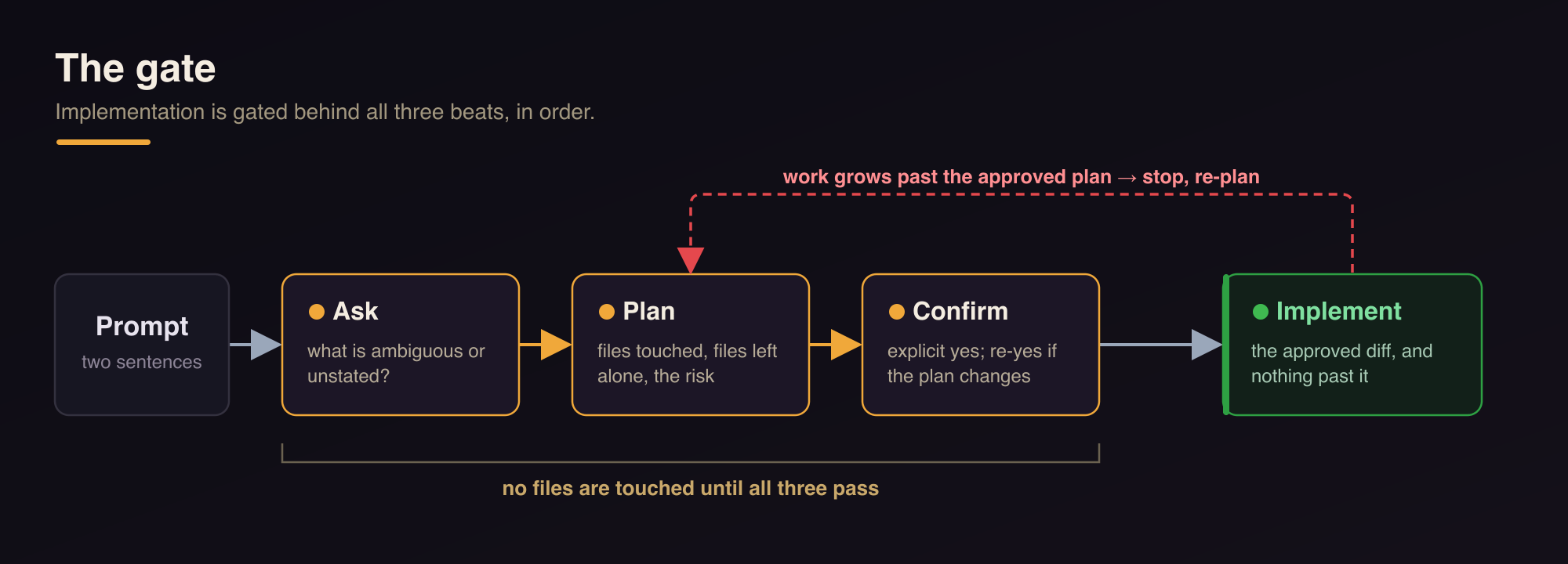
The workflow is written down in .claude/workflows/plan-first.md and every agent links to it. It is three beats, in order, and implementation is gated behind all three.
The three beats, in order. Nothing is edited until all three pass, and work that grows past the approved plan loops back to re-plan rather than quietly expanding.
Ask. Surface what the prompt left open before committing to an approach. Ambiguous scope, unstated edge cases, a product decision hiding inside a technical request, whether a feature should be tier-gated. The migrations agent asks about column types and nullability and whether anything destructive is implied. The Next.js agent asks which surfaces are in and out. The rule has an escape hatch, because asking three questions about a one-line copy fix is its own kind of annoying: skip the questions only when the request is genuinely unambiguous and low-risk. When in doubt, ask. A pointed question is cheaper than a wrong build every single time.
Plan. Before touching files, lay out the shape of the change: the files and routes and components you will touch, the ones you will deliberately leave alone, the approach, any migration (additive, always), the tests the change needs, and anything risky. In this repo “risky” has a specific meaning: auth, IDOR, subscription gating, SSRF, secret handling, anything destructive or hard to reverse. The plan is a decision aid, not a document. It should be short enough to read in one breath and specific enough that approving it means something.
Confirm. Implement only after an explicit yes. If the plan changes in the back-and-forth, restate the revised version and get the yes again. And the part that actually matters over a long session: approval is scoped to the plan that was approved. If the work grows past it, the agent stops and re-plans instead of quietly expanding. That last clause is what keeps a “small fix” from turning into an afternoon of changes I never signed off on.
What it looks like per agent
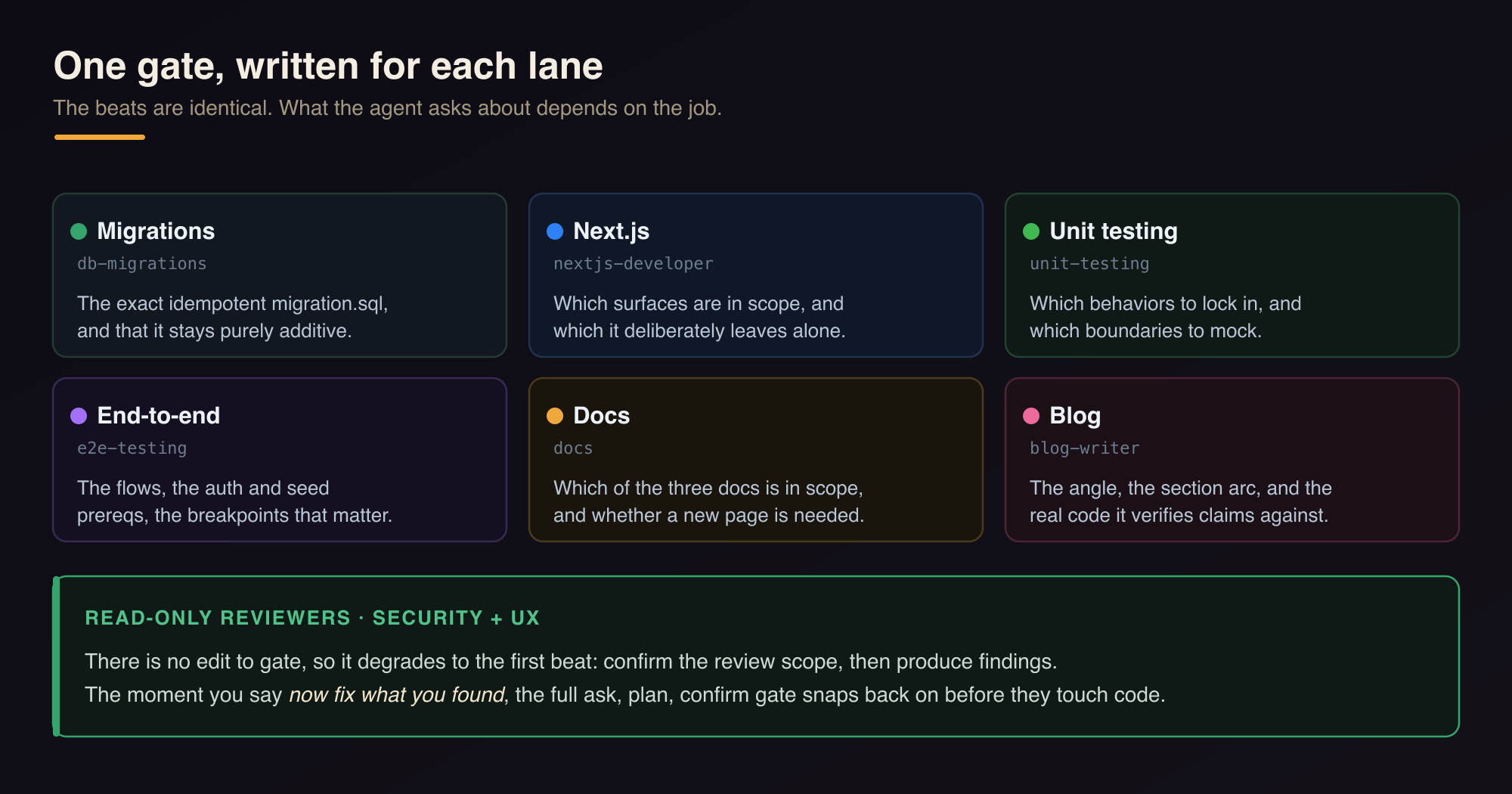
I did not want one generic paragraph pasted eight times. The gate is the same, but what you ask about depends on the job, so each agent got the beats written for its lane.
One gate, written for each lane. The two read-only reviewers pick the full gate back up the moment they move from finding to fixing.
The migrations agent plans the exact idempotent migration.sql and confirms it is purely additive before it applies anything. The unit-testing agent asks which behaviors to lock in and which boundaries to mock, then lists the cases each test file will assert. The e2e agent names the flows, the auth and seed prerequisites, and the breakpoints that matter. The docs agent confirms which of the three docs is in scope and whether a new page is needed. The blog agent (yes, this one) settles the angle and the section arc and which real code it will verify claims against before drafting a word.
The two read-only reviewers are the interesting edge. Security and UX do not implement, so there is no edit to gate. For them the gate degrades to its first beat: confirm the review scope if it is ambiguous (which routes, how deep, which breakpoints), then produce findings. But the moment the user says “now fix what you found,” they are implementers, and the full ask-plan-confirm gate snaps back on before they touch code. The reviewer does not get to slide from “here is a finding” into “and I fixed it” without crossing the same line everyone else crosses.
The obvious objection
This is slower. That is the point, and it is also not as true as it sounds. The plan step costs you a few seconds and one read. Rejecting a forty-second nine-file diff that went the wrong direction costs you the read plus the reject plus the re-prompt plus the nagging worry about what it touched that you did not catch. The gate front-loads a small, predictable cost to avoid a larger, unpredictable one. Over a day of handoffs it is not close.
It also composes with the other habit I built into these agents: every one of them does its work in an isolated git worktree, on its own branch, torn down when the task lands. Plan first, then do the approved work in a sandbox that cannot collide with anyone else. The worktree contains the blast radius. The plan makes sure there is not supposed to be a blast in the first place.
The pause was always the expensive part of good engineering. Worth teaching the machines to keep it.
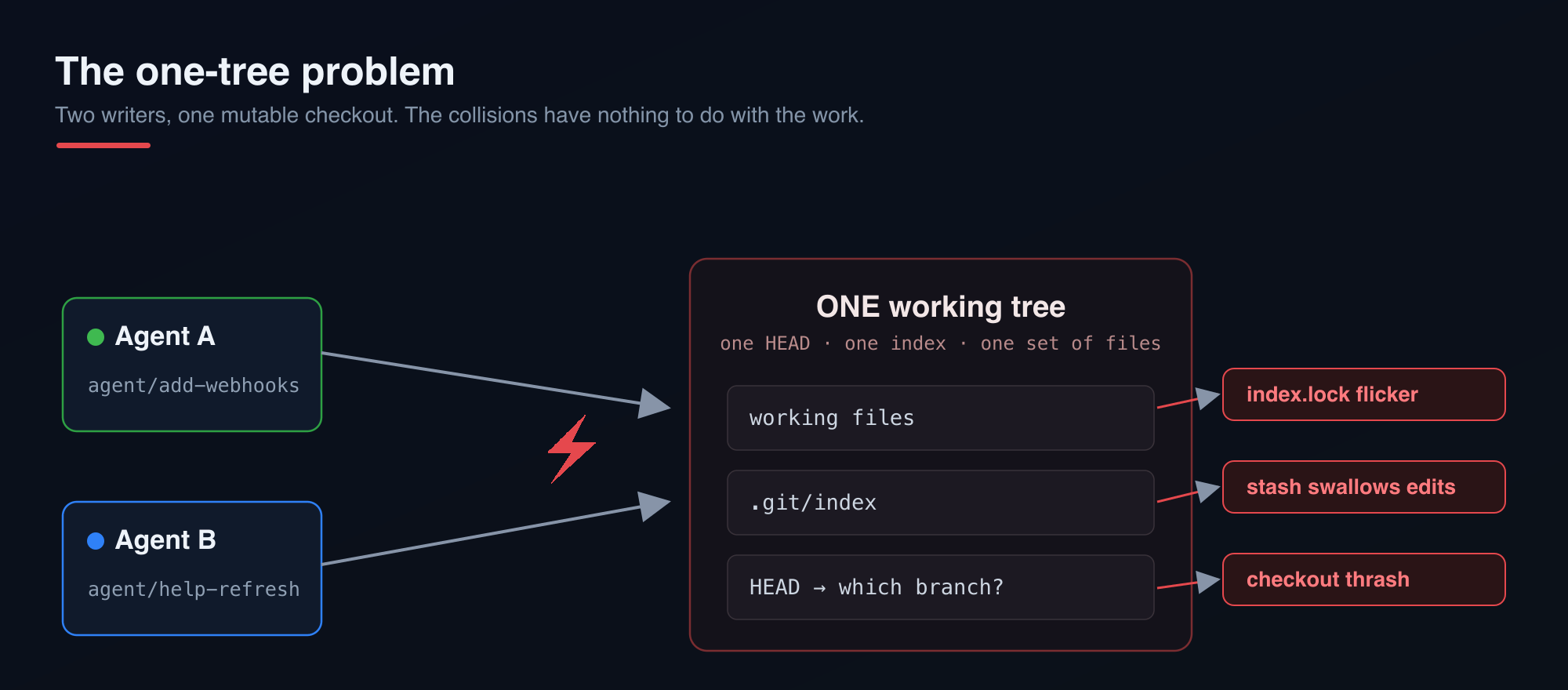
Run two coding agents against a single working tree and they will fight. One is halfway through editing app/api/messages/route.ts while the other checks out a different branch underneath it. The index lock flickers. A git stash from one session swallows the other’s uncommitted work. I have lost real edits this way, and every time the root cause was the same: one working tree, one HEAD, two writers.
The InterlinedList repo already had matching agents for the jobs I hand off most: a Next.js implementer, a migrations specialist, unit and e2e testers, a docs writer, security and UX reviewers. They are good at their lanes. What they were missing was a lane in the literal sense. They all drove on one road.
I found the pattern I wanted written up in Augment’s guide to git worktrees for parallel AI execution, and it maps almost one to one onto how I already think about agents. This is the writeup of what I built on top of it for this repo: the directory convention, the seven scripts that manage the lifecycle, and the wiring that makes every agent use them without being reminded.
The one-tree problem
A normal clone gives you a single working directory backed by one .git. That is fine for one person doing one thing. The moment you parallelize, the shared mutable state (the working files, the index, the current branch) becomes the bottleneck. You cannot have the migrations agent on agent/add-webhooks and the docs agent on agent/help-refresh at the same instant, because “the branch” is a property of the whole checkout.
Two writers, one mutable checkout. The collisions have nothing to do with the work: an index lock flickers, a git stash swallows the other session’s edits, HEAD thrashes between branches.
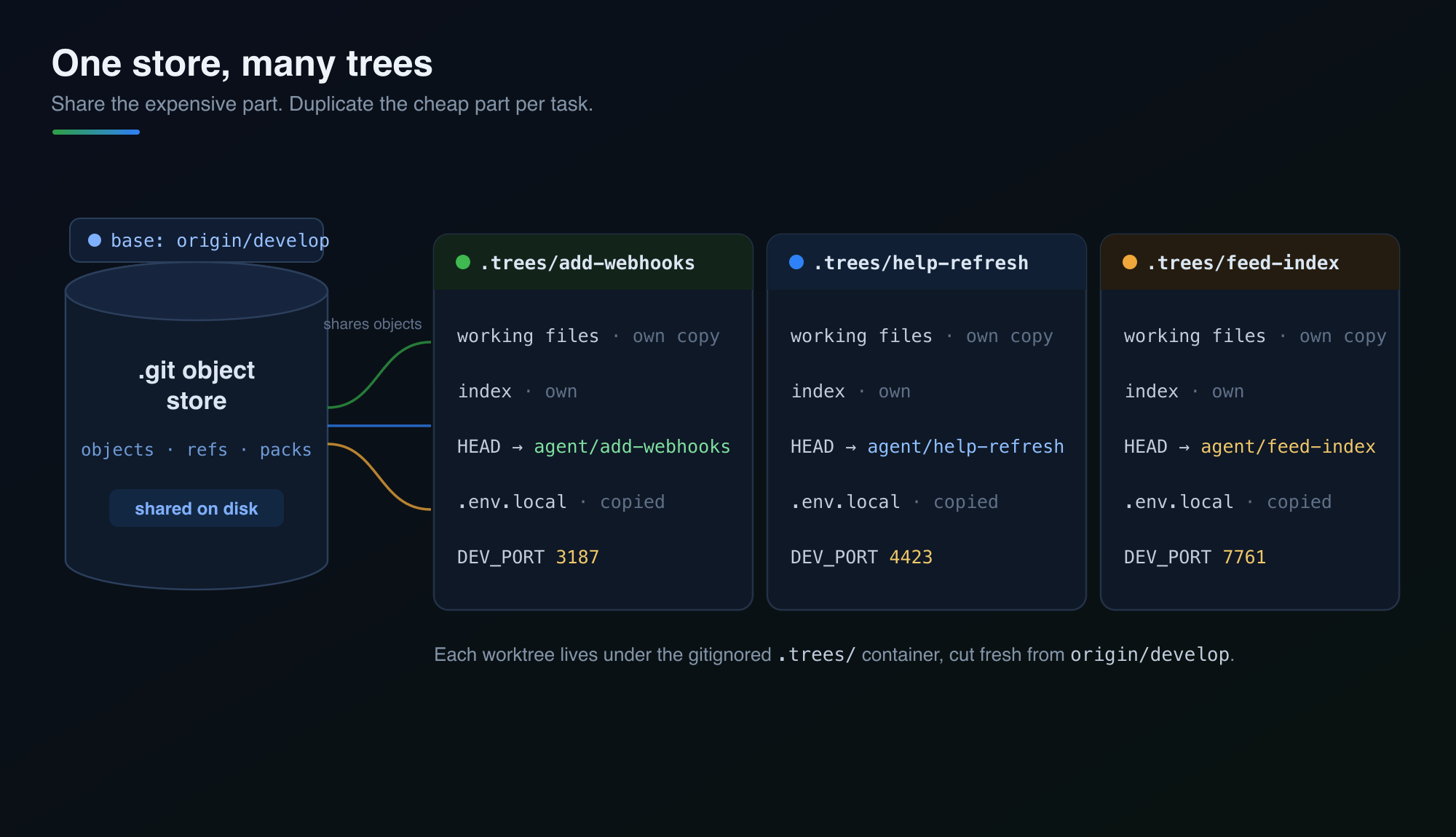
Git solved this in 2015 with git worktree. A worktree is a second (third, fourth) working directory attached to the same repository. Each one has its own files, its own index, and its own checked-out branch, while sharing one object store on disk. The object store is the expensive part, so you share it. A directory of files is cheap, so you duplicate it per task. That is exactly the tradeoff you want for parallel agents.
Share the expensive part, duplicate the cheap part. The object store lives on disk once; the working files, the index, the checked-out branch, and even the dev-server port are private to each worktree.
The convention
Every agent works in .trees/<task-id> on a branch named agent/<task-id>, cut from origin/develop (this repo integrates on develop, not main). So a task called add-list-webhooks lives at .trees/add-list-webhooks on branch agent/add-list-webhooks. The directory name and the branch name always agree because both are derived from the same sanitized slug.
The .trees/ container is gitignored. Worktrees are workspace, not history:
# .gitignore
# Agent worktrees (see scripts/worktrees/)
.trees/
That single ignore line is the whole footprint the pattern leaves in the tracked tree. Everything else is scripts and instructions.
The scripts
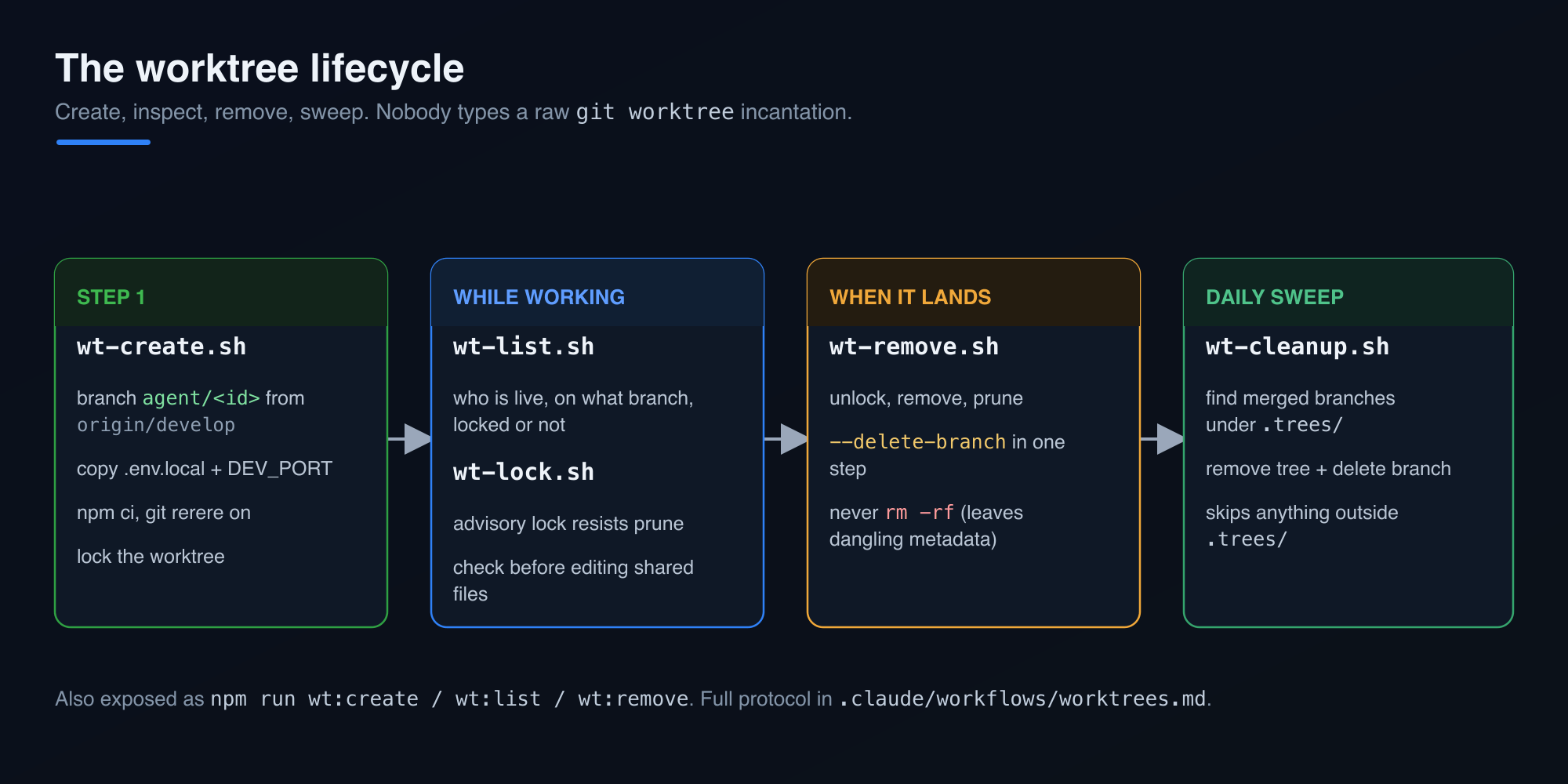
I did not want agents (or me) typing raw git worktree incantations and getting the branch name wrong, or forgetting to copy .env.local, or leaving stale metadata behind. So the lifecycle lives in scripts/worktrees/ as a small set of focused shell scripts. Here is every one of them.
The whole lifecycle before the per-script detail. Create, inspect while working, remove when it lands, sweep the merged trees on a schedule.
_lib.sh is the shared library the others source. It holds the functions that keep conventions consistent: wt_repo_root resolves the primary checkout even when you call it from inside a linked worktree (it reads git rev-parse --git-common-dir and walks up), wt_sanitize lowercases a task id and strips it to [a-z0-9._-], wt_resolve_base fetches and prefers origin/<base> over a local branch, wt_port_for hashes a branch name into a stable dev port, and wt_is_locked reads the porcelain worktree list to check lock state. Nothing in it is clever. It exists so the clever bits are written once.
wt-create.sh <task-id> [base] is the one agents call first. It creates the worktree and makes it ready to work in, in one shot:
scripts/worktrees/wt-create.sh add-list-webhooks
Under the hood it resolves the base ref (default develop), ensures .trees/ is in .gitignore, turns on git rerere so repeated conflict resolutions replay across parallel merges, runs git worktree add -b agent/<slug> .trees/<slug> origin/<base>, copies the root .env.local into the worktree, appends a deterministic DEV_PORT derived from the branch name, runs npm ci --prefer-offline, and finally locks the worktree so other sessions can see it is in use. Flags let you opt out where it makes sense: --no-install skips the dependency install for a quick plumbing check, --no-lock leaves it unlocked, and --baseline runs the test suite right after setup so a green baseline proves any later failure came from the agent’s change rather than a pre-existing break.
The port assignment is worth a sentence. Two agents both running next dev on 3000 is another collision, a quieter one. wt_port_for runs the branch name through cksum and maps it into the 3100 to 9998 range, so each worktree gets a stable, distinct port written into its own .env.local. Start the server with npm run dev -- -p "$DEV_PORT" and two dev servers coexist.
wt-list.sh answers “what is running right now.” It prunes stale metadata, then prints one row per worktree with path, branch, lock state, and short HEAD:
Before an agent touches a shared file, it can look here and see who else is holding what. Git will not warn you about two branches editing the same file, so this list plus discipline about non-overlapping file domains is the actual safety mechanism.
wt-lock.sh <task-id> [reason] and wt-unlock.sh <task-id> are thin wrappers over git worktree lock/unlock. A lock is advisory: it resists prune and move, and it is the signal in wt-list.sh that says “an agent is live in here, do not reap this.”
wt-remove.sh <task-id> is the teardown. It unlocks if needed, runs git worktree remove, and prunes. This matters more than it looks: deleting a worktree with rm -rf leaves dangling metadata in .git/worktrees/ that haunts you until the next prune. The script never does that. --force discards uncommitted changes on purpose, and --delete-branch drops agent/<task-id> in the same step when the work has landed.
wt-cleanup.sh [base] is the bulk sweep. It walks every worktree physically under .trees/, and for each one whose branch is already an ancestor of origin/develop (in other words, merged), it removes the worktree and deletes the branch. It deliberately skips anything outside .trees/, so the primary checkout and any sibling worktrees I keep elsewhere on disk are never touched. This is the script you point a daily cron or a post-merge hook at.
Each of these is also exposed as an npm script, so npm run wt:create -- add-list-webhooks, npm run wt:list, and npm run wt:remove -- add-list-webhooks all work if you prefer that entry point. There is a scripts/worktrees/README.md documenting the whole set alongside the code.
Wiring it into the agents
Scripts nobody runs are decoration. The point was to make every agent reach for a worktree by default, so I added the instruction in three places at three levels of specificity.
At the top, CLAUDE.md now states the standing rule: every agent works in an isolated worktree, torn down with the lifecycle scripts. That is the repo-wide contract.
In the middle, two shared protocol docs under .claude/workflows/ hold the full detail: worktrees.md spells out the create-work-remove lifecycle, the boundaries (shared object store, non-overlapping files, and the important caveat that the database is shared even though the files are not), and plan-first.md covers the companion habit I wrote about separately. Every agent and skill links to these rather than repeating them.
At the leaf, each of the eight agent definitions in .claude/agents/ got a “Work in an isolated git worktree (required)” section written for its job. The implementers (Next.js, migrations, tests, docs, blog) get the full create-work-remove flow. The two read-only reviewers (security, UX) get a variant that tells them to cd into the worktree under review and read its diff, and explicitly not to create, lock, or remove anything. The migrations agent gets an extra warning in bold, because the worktree isolates schema.prisma and the migration files but not the Postgres instance: db:migrate still hits localhost and db:migrate:deploy still hits production from any worktree. That is the one place the isolation is a lie, and the agent needs to know it.
The five paired skills in .claude/skills/ (the ones that back the implementer agents) got a short “Worktree-first, plan-first” block near the top pointing at the same protocol docs, so whether the work comes in through the agent or the skill, the instruction is there.
Proving it works
I ran the whole lifecycle before committing any of it. Create a worktree from develop, confirm it is locked and has its port, unlock and re-lock it, remove it with the branch, and verify the cleanup pass leaves the sibling worktrees alone:
Every step did what it said, the .gitignore guard refused to duplicate the .trees/ line it found already present, and the sibling worktree I keep for feed-perf work was never in scope for cleanup. That last part was the thing I most wanted to confirm, because a cleanup script that reaches outside its sandbox is worse than no cleanup script.
Where agents still get confused
Isolating the filesystem fixes the filesystem. It does nothing about the fact that the work itself overlaps, and there are a handful of ways an agent still gets lost.
The database is one instance, and every worktree writes to it. I flagged this to the migrations agent in bold, but it deserves more than a warning. If the migrations agent adds a column on agent/add-webhooks, that column now exists in the same localhost Postgres every other worktree points at. The docs agent three trees over never sees the changed schema.prisma, yet its queries hit the mutated database anyway. Additive-only migrations keep this survivable most of the time, since an extra column nobody reads is harmless. But the moment two agents touch the same table, or one runs db:migrate:deploy and reaches production from what looked like a sandbox, the isolation is a fiction. The files are private. The database is not.
Green in isolation, red on merge. This is the one that bites. Agent A changes a function signature in lib/lists/queries.ts. Agent B, on its own branch, calls that function from a route it owns. Their files never overlap, so wt-list.sh shows no conflict and git stays quiet. Both test suites pass, because A’s worktree still holds B’s old caller and B’s worktree still holds A’s old signature. It’s all green right up until both branches land on develop, and then the integration is broken in a way neither agent could see from inside its own tree. Worktrees convert a loud, immediate collision into a quiet one that surfaces later. Often a fair trade, but a trade.
Stale base drift. Every worktree is cut from origin/develop the moment it’s created. Agents aren’t always short-lived. Let one run for a few hours while three others merge back, and it’s now building on a develop that no longer exists. It will reintroduce a helper that got deleted upstream, or write against an API another agent already reshaped. The worktree has no idea the ground moved under it. Nothing in the create-work-remove loop forces a re-fetch, so a long-running agent drifts out of date without noticing.
“Does this already exist?” stops having one answer. With five branches in flight, whether feature X is “already built” depends on which tree you grep. An agent that checks the primary checkout won’t see work-in-progress on another branch, and it will happily build a second copy. I’ve watched two sessions independently implement overlapping halves of the same feature, each sure it was first, because neither branch was visible to the other and neither said up front what it was about to touch. wt-list.sh tells you which branches exist. It says nothing about what each one intends to change.
The lock is a suggestion.wt-lock resists prune and move, and it flags a tree as live in the list, but it will not stop another agent from opening the same file on its own branch and editing away. The real guard against two agents clobbering one file is the up-front decomposition plus the discipline to run wt-list.sh and honor what it shows. An agent that skips the check has no seatbelt, just the shape of one.
Abandoned trees pile up.wt-cleanup.sh only sweeps branches already merged into develop. A worktree from a crashed or cancelled session is unmerged, still locked, and invisible to the sweep. It sits on disk with a full node_modules until someone removes it by hand. And an agent resuming a task can trip over a half-finished tree from an earlier run and read its stale state as current work.
Losing the current directory. The workflow says cd .trees/<task-id> and do everything there. Shell state doesn’t always survive between tool calls, and an absolute path into the primary checkout looks identical to one into a worktree. An agent that loses track of where it is can read the main checkout’s copy of a file, reason about it as though it were its branch’s version, and edit the wrong tree. The isolation holds only as long as the agent keeps its bearings.
What this buys
The honest version: worktrees do not make independent tasks independent. If two agents both need to edit the same route, isolating their filesystems just delays the merge conflict, it does not prevent it. The decomposition still has to be real. What the pattern removes is the accidental collision, the kind that has nothing to do with the work and everything to do with sharing one mutable checkout. Those were most of my pain, and now they are gone by construction.
Advantages and disadvantages
Advantages
Accidental collisions disappear. Each agent gets its own files, index, and HEAD, so index-lock flicker, a stray git stash eating another session’s edits, and checkout thrash stop happening.
Every task lands on its own agent/<task-id> branch, which keeps review and merge clean and stops one task’s half-finished mess from bleeding into another’s diff.
The object store is shared, so the costly part of the repo lives on disk once and spinning up another tree is cheap.
Each worktree gets a deterministic DEV_PORT, so several next dev servers run side by side instead of fighting over 3000.
The lifecycle is scripted and wired into every agent definition, so the right setup and teardown happen without anyone remembering the incantation.
git rerere is on by default, so a conflict you resolve once replays across the parallel merges that hit it again.
Cleanup is fenced to .trees/, so the bulk sweep never reaches the primary checkout or the sibling worktrees I keep elsewhere.
Disadvantages
The database isn’t isolated, and neither is anything else global (production through db:migrate:deploy, OAuth apps, third-party rate limits). File isolation quietly implies an isolation that isn’t there.
Overlapping edits on separate branches turn into silent, deferred conflicts and semantic breakage that pass every isolated test and only show up at integration.
A long-running worktree drifts from a moving develop, and nothing in the loop forces the re-fetch that would catch it up.
Locks are advisory, so the actual protection against two agents editing one file is decomposition plus discipline, not anything git enforces.
With several branches live, “does this already exist” has no single answer, and agents duplicate each other’s work when branches can’t see one another.
Every worktree carries a full node_modules, so disk use and npm ci time multiply with each active task.
Crashed or abandoned sessions leave locked, unmerged trees that the merged-only cleanup won’t reap, so someone clears them by hand.
Coordination is still manual: the tooling shows which branches exist, not which files each agent means to touch.
The next habit I want in every agent sits upstream of all of this: stop and plan before touching a single file. That one is worth its own post.
More solutions to the confusion above are coming in the next few posts. Subscribe so you don’t miss ’em: drop your email into the box just below this post, or grab the RSS feed.
In my previous post, The Gap Is Widening and It’s Not Slowing Down, I focused on the growing divide between individuals and teams that have embraced Generative AI and those that have not. That divide is real, measurable, and growing faster than many people seem willing to acknowledge. I’m not walking any of that back.
But after watching organizations over the last year attempt to integrate AI into their engineering practices, I’m increasingly convinced the widening gap isn’t actually about AI – at least not entirely. The technology is only exposing something that has existed for decades. The bottleneck was never engineering. It was never software development. It was never the people building things.
The bottleneck has almost always been the machinery *surrounding* the people building things: the approvals, the reporting structures, the committees, the prioritization processes, the disconnected leadership layers, the bureaucracy, the politics – the endless collection of organizational systems that somehow manage to consume vast amounts of energy while producing remarkably little forward progress. Generative AI didn’t create this problem. It simply made it impossible to hide.
Individual Engineers Are Experiencing a Massive Productivity Expansion
There is very little debate left about whether Generative AI increases the productivity of individual contributors. We’ve moved well past that question. The debate today isn’t whether productivity gains exist – it’s about how *much* gain exists and, more importantly, who is actually capable of capturing it.
Engineers today can create prototypes in hours that once required days or weeks. Architectural alternatives can be explored in an afternoon instead of consuming entire sprints of spike work. Documentation can be generated, revised, and maintained at speeds that would have seemed unrealistic even five years ago. Testing frameworks, infrastructure automation, deployment pipelines, and application scaffolding can all be stood up dramatically faster than before.
Even beyond code generation, AI has become an accelerator for thinking itself. It provides rapid feedback loops, architectural critiques, alternative approaches, and research capabilities that allow engineers to move through uncertainty faster than they ever have before. An engineer operating effectively with modern tooling can often accomplish what previously required several engineers. A small team can frequently deliver what once demanded a much larger one. This isn’t speculation anymore – we’re watching it happen every day.
Yet despite these gains, many organizations report only marginal improvements in overall delivery speed. Why? Because software development was never the slowest part of the process.
The Bottleneck Was Hiding Somewhere Else
For years, organizations convinced themselves that software engineers were the constraint. The logic seemed simple enough: if projects are late, development must be slow; if features take too long, engineering capacity must be insufficient; if delivery struggles, more developers must be needed. So organizations hired more engineers, added process around them, and watched delivery timelines stay roughly the same.
Then AI dramatically accelerated the development side of the equation – and something interesting happened. The overall system didn’t accelerate proportionally. Instead, the delays became easier to identify. Features completed quickly sat for weeks waiting for approval. Product decisions that took months were backed by implementation work that took days. Architecture reviews became calendar-management exercises instead of engineering exercises. Governance processes consumed more time than development itself, and procurement delays stalled technology adoption before it could even begin.
The moment development became faster, every other inefficiency suddenly became visible. The tide went out and revealed the rocks – and there were far more rocks than most organizations were prepared to acknowledge.
We’ve Been Trying To Solve This Problem For Over A Century
One of the most frustrating aspects of this situation is that the underlying problem isn’t new. Some of the most influential thinkers in management spent their entire careers attempting to solve exactly these issues, and we largely ignored them.
Chief among them was W. Edwards Deming. His work fundamentally reshaped manufacturing, quality management, and organizational thinking throughout the twentieth century. His influence helped transform post-war Japanese manufacturing and directly shaped the practices that would eventually become Lean methodology and the Toyota Production System. One of Deming’s most important observations was that organizations routinely blame individuals for failures that are actually caused by systems — the worker gets blamed, the engineer gets blamed, the frontline employee gets blamed, while the actual system producing poor outcomes remains untouched and unexamined.
Deming repeatedly argued that management’s primary responsibility was improving the system itself – not creating more reports, not creating more oversight, not creating more bureaucracy, but actually improving the system. This remains one of the most ignored lessons in modern business. When productivity stalls, organizations add process. When communication breaks down, they add meetings. When delivery slows, they add approvals. When uncertainty increases, they add governance layers. The response is almost always additional complexity, rarely simplification – yet simplification is often exactly what’s needed.
The Toyota Way Was Never About Manufacturing
One of the most persistently misunderstood management concepts in business is the Toyota Production System and the principles described in *The Toyota Way*. Organizations study Toyota and immediately focus on manufacturing techniques, kanban boards, and production flow. That completely misses the point.
The true innovation was not manufacturing. It was the relentless pursuit of removing waste from systems. Toyota became exceptional because it continuously questioned every activity that consumed effort without creating value – every unnecessary handoff, every unnecessary delay, every unnecessary approval, every unnecessary process step. Everything was examined through the lens of whether it actually moved something of value forward. If it didn’t, it was a candidate for elimination.
Modern software organizations often claim to embrace these ideas while operating with approval chains that require six or seven layers of sign-off, organizational structures where decisions travel further than the code itself, and workflows designed to optimize reporting while actively damaging delivery speed. The language of Lean has become extremely popular in tech. The discipline required to actually implement it remains genuinely rare. There’s a meaningful difference between saying “we practice continuous improvement” and operating a system that systematically identifies and eliminates its own waste – most organizations are doing the former and calling it the latter.
AI Is Exposing Management Debt
The software industry talks constantly about technical debt, and rightly so – I’ve spent decades fighting it. But I’m increasingly convinced that many organizations suffer more from *management debt* than technical debt, and management debt is considerably harder to see from the inside.
Management debt accumulates when organizations create layers of process that never get removed. It accumulates when reporting structures expand indefinitely, when approval chains grow with every re-org, when every novel problem gets solved by introducing another committee, another meeting, another workflow, or another governance layer. Over time these accumulate into a dense friction system that surrounds every team trying to build and ship something. Unlike technical debt, management debt is often invisible to leadership because leadership frequently created it – and organizations don’t typically build mechanisms for evaluating whether the management decisions made five years ago are still earning their overhead.
Generative AI is now exposing these accumulated liabilities with uncomfortable clarity. If engineers can produce ten times more output and delivery only improves ten percent, leadership should not be asking what’s wrong with the engineers. They should be asking what’s wrong with the system. The answer may be uncomfortable. It may involve examining years of accumulated organizational decisions, questioning structures that have become politically entrenched, and acknowledging that the bureaucracy itself is the liability. But that’s where the actual solution lives.
Systemic Thinking Matters More Than Ever
One of the most valuable disciplines organizations can adopt today is genuine systemic thinking – not as a framework to be installed and presented to the board, but as an actual way of seeing how the organization produces its outputs.
The reason it matters comes down to a simple but uncomfortable idea: organizations are systems, and systems produce exactly what they are designed to produce. Not what leadership intends. Not what the org chart implies. What the actual system, with its real incentives and real workflows, is built to produce. Many organizations want innovation while designing systems optimized for risk avoidance. They want speed while designing systems that optimize for approval coverage. They want accountability while designing systems optimized for blame diffusion. They want creativity while designing systems that reward conformity and punish variance.
The outputs shouldn’t be surprising – the system is behaving exactly as designed. Generative AI doesn’t alter this reality. If anything, it amplifies it. The faster individual contributors become, the more visible systemic dysfunction becomes. You can’t paper over a broken approval process with faster code generation. You just end up with more finished work sitting in queues.
The Competitive Advantage Isn’t AI
Here’s something I genuinely believe will be borne out over the next five years: the next generation of competitive advantage is unlikely to come from simply adopting AI. Everyone will eventually have access to similar models. Everyone will have copilots, agents, and increasingly capable automation. The models will keep getting better and access will continue to become more democratic. Access is not a moat.
The differentiator will be organizational capability – specifically, whether the organization can actually move. Can it make decisions quickly? Can it remove friction from its own processes? Can it empower teams to act without running everything through three layers of approval? Can it identify waste and eliminate it rather than building process around it? Organizations that can answer yes to these questions will compound the productivity gains AI provides and experience something genuinely transformative. Organizations that answer no will continue wondering why expensive AI investments fail to produce the results they see in press releases and conference talks – and they’ll blame the technology.
The Answers Already Exist
What’s remarkable about all of this is that very few of these ideas are new. Deming wrote extensively about them. Lean practitioners have written extensively about them. Systems thinkers like Peter Senge have written extensively about them. Toyota demonstrated them repeatedly over decades. The playbook already exists. It just requires organizational will to actually use it.
Generative AI simply raises the stakes. For decades, organizations could survive despite bureaucratic inefficiencies because software creation itself was difficult enough that organizational dysfunction stayed hidden behind the sheer complexity of engineering work. That cover is disappearing fast. The engineering side of the equation is accelerating rapidly, and the remaining constraints are becoming impossible to ignore.
If I had to estimate — and I’m willing to commit to this number — I’d say the overwhelming majority of organizations, probably 90% or more, still carry enough management debt, process debt, and bureaucratic drag to prevent them from realizing even half of the value Generative AI could deliver. The technology is arriving right on schedule. The organizations are not.
Organizations that fail to introspect, simplify, and dismantle their accumulated management structures will realize only a fraction of what’s possible. Organizations that embrace systems thinking, Lean principles, continuous improvement, and genuine organizational simplification will unlock extraordinary advantages — not because AI magically transformed their business, but because they finally removed the barriers that had been slowing them down all along.
The gap is widening. But the bottleneck was never engineering. It was management. And management now has nowhere left to hide.
Further Reading
These are the thinkers and resources worth going deep on if you want to move beyond reading about these ideas and actually do something about them.
W. Edwards Deming — Start with his Fourteen Points for Management, then read *Out of the Crisis*. His work is the foundation for almost everything else on this list.
The Deming Institute — The most accessible ongoing resource for understanding and applying Deming’s system of profound knowledge in modern organizations.
*The Toyota Way* by Jeffrey Liker — The definitive English-language treatment of Toyota’s actual management philosophy, not just the production tools. The tools without the philosophy are just theater.
Toyota Production System — Understanding the origins and evolution of TPS is worthwhile context before diving into the derivative frameworks that have followed it.
Lean Enterprise Institute — Practical, applied Lean thinking for people who want to actually implement rather than just read about it.
*The Fifth Discipline* by Peter Senge — The foundational text on systems thinking in organizations. If you read one book from this list, make it this one.
*The Goal* by Eliyahu Goldratt — Theory of Constraints explained through a novel. Surprisingly readable and genuinely transformative for how you see bottlenecks. The production setting feels dated; the ideas do not.
Kaizen / Continuous Improvement — Understanding what kaizen actually means in practice versus how the word gets casually deployed in tech organizations is worth the time. The gap between those two things is significant.
Brendan O’Leary wrote a piece this week titled “The AI Coding Revolution Hasn’t Started Yet“. His headline observation: most professional engineers haven’t adopted AI coding tools in any meaningful way. Not even close.
In my experience too, he’s right. I’d push it further.
I’ve been deep in this work – helping companies actually get Generative AI tooling integrated into real development workflows, not just installed, not just “evaluated,” but actually integrated. Running sessions, doing the pairing, reviewing the setups, watching teams try to navigate the gap from “we have Copilot turned on” to “we’re doing something meaningfully different with how we build software.” and what I keep seeing isn’t just that most companies haven’t started. It’s that the gap between the teams that have started and everyone else is compounding. Every week that passes, that gap doesn’t hold steady. It widens.
The Observation from the Inside
The conference Brendan was at, where he made this observation is a good one. You talk to staff engineers, architects, team leads – people who are not amateurs at this craft – and you find out they’re still in the “I’ve heard of Claude Code” phase. That’s a real data point and it matches what I’m seeing at companies I work with. More than a few times they haven’t even gotten to that point.
But here’s the wrinkle that the conference floor view doesn’t fully capture: the gap isn’t just about adoption level. It’s about trajectory. The practitioners who’ve gone deep aren’t standing still. They’re getting faster, refining workflows, building intuition about how to orchestrate agents, where to trust the output, where to keep a tighter leash, and where to let things run. They’re compounding their advantage every single week. Meanwhile, a team that’s still on “tab completion is the whole idea” isn’t sitting on a fixed baseline. They’re falling behind in a relative sense, even if their absolute productivity is unchanged.
That’s a slow-moving disaster in competitive terms.
The Questions That Tell the Story
I’ve had almost the exact same hallway conversations described. The tells are in the questions:
“Wait, so the agent actually runs the tests itself?”
“How are you keeping it from just rewriting everything it touches?”
“Our security team said no to all of this, so we haven’t tried anything.”
None of these are dumb questions. In fact, they’re the correct questions — they mean the person is starting to actually reason about agentic tooling rather than dismissing it. But they’re also questions that someone who’s been working in this space for six months has already burned through, experimented on, and formed opinions about. There’s a widening experiential gap underneath the tooling gap and that part is harder to close quickly.
Why the Lag Is Rational (But Costly)
The reasons Brendan lists for slow adoption from security lockdowns, bad early Copilot experiences, tool landscape churn, team skepticism are all real and I’ve run into every single one of them. Let me add a few more from what I’ve encountered.
The “we tried it and it wasn’t impressive” problem is particularly pernicious, because the delta between the experience of using autocomplete in 2023 and using an agentic coding workflow in 2026 is genuinely massive. But if you hit the bad experience first and walked away, you should probably revisit it now. I know demos that happen at conferences aren’t likely to convince. A well-produced YouTube video either. But get your hands dirty and use it, otherwise the lag is going to send you, or the group you work with into luddite land and made “redundant” as they say in some places (i.e. laid off, unemployed, etc).
That’s one of the core things I try to do when working with teams: get past the “is this real” phase as fast as possible by showing it working on their actual code. Because abstract capabilities don’t move people. Seeing an agent navigate through a service you wrote, flag something you’d have missed, and propose a coherent refactor in thirty seconds — that moves people.
The security lockdown problem is also real but I want to name it more precisely: what organizations actually mean when they say “we can’t use AI tools on our codebase” is usually “we haven’t yet done the work to understand what the actual risk surface is.” Which is a very different thing than a reasoned security position. It’s a deferral masquerading as a decision. And that deferral has a cost that most orgs aren’t properly accounting for on their risk register.
The Vibe Coding Trap Is Real Too
Here’s where I’ll add some nuance that doesn’t always make it into the “you should adopt this” framing: adoption without discipline is its own problem.
There’s a Stanford study that just landed – SWE-chat, (which I have a lot of frustration with how it’s often mis-interpreted, for example the comment I’ve left here the post) looking at 6,000 real coding agent sessions from open-source developers in the wild – and the numbers are sobering. Only 44% of agent-produced code makes it into commits. Vibe-coded sessions (where the agent authors virtually all the code) burn roughly 3x more tokens and dollars per committed line than collaborative sessions. And vibe-coded code introduces about 9x more security vulnerabilities per committed line than code humans write themselves.
I’ve talked about this at length in Hurting or Helping Devs and in my breakdown of the types of code changes that AI agents produce. The tools are genuinely powerful. They’re also genuinely capable of quietly reshaping a codebase into something that looks correct but behaves like it was written by an overly confident intern with root access and no fear of consequences.
The right model isn’t “hand everything to the agent.” It’s orchestration with discipline – scoped prompts, diff limits, human gatekeeping on production deployments, and a clear-eyed understanding of where agent judgment is trustworthy and where it isn’t. That’s a craft skill that takes time to develop. It can’t be skipped.
So I’m not just saying adopt. I’m saying adopt correctly with discipline, which is harder, takes longer, and requires more deliberate investment. But the teams doing it right are building a durable advantage. The teams doing it sloppily are creating technical debt at a rate that will bite them in ways that are currently hard to see.
The Compounding Problem
Here’s the thing about compounding gaps that I keep coming back to: they don’t feel urgent when you’re inside them.
If your team is shipping at more or less the same pace it shipped at a year ago, nothing feels broken. Nothing is on fire. You’re not obviously behind. The gap is invisible to you because the other side of it isn’t in your day-to-day view.
But a team that’s been running agentic workflows for six months has built intuition, muscle memory, and workflow patterns that can’t be copied in a week. They’ve figured out what to scope, what to constrain, where to trust, and where to verify. They’ve failed in some interesting ways and learned from it. They’re operating at a different surface area of the problem than a team that’s starting from scratch — even if both teams have access to the same models and tools.
That’s the part that concerns me most when I work with orgs that are still in “evaluation mode” two years into this transition. The tools aren’t the moat. The practice is the moat. And practice requires time.
The clock is running.
What Needs to Happen
Brendan is optimistic about the diffusion curve tipping soon, and I think that’s probably right. The on-ramp needs to get lower – better model-agnostic tooling, less lock-in, less requirement to reconstruct your entire workflow to get started. Those are the right levers.
But I’d add one more: organizations need someone to physically show them what the other side looks like, in their context, with their problems. Not a demo environment. Not a benchmark. Their actual code. Their actual team. That’s the thing that moves the needle from “heard about it” to “we’re doing this.”
If you’re at a company still sitting on the sidelines on this – not because of a reasoned, deliberate decision, but because it hasn’t risen to the top of the priority stack yet – I’d genuinely encourage you to treat that as a risk and a significant one at that. Not a vague future risk. A significant present, compounding one.
The teams on the other side of that gap are not slowing down.



You must be logged in to post a comment.