An Approach to Learning Java Fast for New & Experienced Polyglot Coders

If you’re just starting out learning Java, here are the top 5 things you can do to get started effectively:

  1. Set Up Your Development Environment:
    • Install the Java Development Kit (JDK) on your computer. You can download it from the official Oracle website or use an open-source distribution like OpenJDK. It can be confusing at first, because there are a bunch of versions you *could* get started with depending on a million different variables, just pick the latest though and get going.
    • Choose a code editor or Integrated Development Environment (IDE) like Eclipse, IntelliJ IDEA, or Visual Studio Code to write and run your Java code. IDEs offer features like code completion and debugging, which can be very helpful for beginners.
  2. Learn the Basics of Java:
    • Start with the fundamental concepts of Java, such as variables, data types, operators, and control structures (if statements, loops).
    • Understand the object-oriented programming (OOP) principles that Java is based on, including classes, objects, inheritance, encapsulation, and polymorphism. Even if you do not use any of these and you’re taking a different approach (functional, top-down, etc) it’s really important to at least learn and understand the OOP concepts and capabilities of Java, as at some point you will see these and to understand what is going on, you’ll need to understand this part of Java.
  3. Practice Coding:
    • The best way to learn programming is by writing code. Start with simple programs and gradually work your way up to more complex ones. This is, without question, one of the best and most motivating ways to learn to program. Take something you might want to do, working with data, or moving files, or building a web page and build that thing you want. Practice breaking it down to the simplest form of whatever it is, and building that simplified thing.
    • Solve coding exercises and challenges on websites like LeetCode, HackerRank, or Codecademy, which offer Java-specific problems. To note, this isn’t going to really teach you how to accomplish a single real world problem, but it will get you to be familiar with the language and its parts. This way, when you do need to tackle a real problem you’re not stuck trying to deal with the language itself.
  4. Read Documentation and Books:
    • Explore the official Java documentation (Java API) to understand the built-in classes and libraries available in Java. Ok, this sounds exceedingly boring and at first it often is. My suggestion, to spice it up a bit is to combine this with the first tenant under practice coding. Look up a particular feature in the documentation and then just implement something with it and try to accomplish some random task. For example, like manipulating data or moving some files, but use the built in parts of the language or some library to do this.
    • Invest in a good Java programming book for beginners. Books like “Head First Java” by Kathy Sierra and Bert Bates or “Java: A Beginner’s Guide” by Herbert Schildt are excellent choices. If you can manage to focus your way through a book, it’s a pretty reliable way to learn the language completely. So if you’ve got the cash on hand, time, and ability to focus, I strongly recommend doing this. Specifically, I’d recommend this over all the above options as the first thing to do if it is a viable option.
  5. Join Online Communities and Seek Help:
    • Join Java programming forums, subreddits, or Stack Overflow to ask questions and seek help when you’re stuck. Be sure to think through your steps, write up your questions thoroughly, and before posting I’d bet you start finding most answers merely by going through this process. In any regards, some will definitely contribute good knowledge to the community as conversations and answers are added to those questions.
    • Engage with the programming community by following Java experts and developers on social media platforms like Threads, Mastadon, or GitHub. Ignore the negativity when it rears its ugly head, and just kind of lurk and read things for a while. It’s a great way to pick up the vibe of what’s going on with Java and get an idea for what kinds of things people are building and problems they’re running into.

Ok, these top 5 attributes are what I’d suggest if you are just starting out with Java. But what about if you’re a polyglot, know OOP, and other programming paradigms and have more than a few things deployed. What’s the fastest way to get ramped up on Java starting from that vantage point? Well, I’ve got a list for you too, because as the title suggests, over the last year I’ve just ramped back up on Java after an almost 20 years hiatus!

The Polyglot Senior Coder

First

First get a lay of the land for versions, ecosystem setup, and changes that have occurred or are occurring specific to the language and its respective stack. Either since you’ve last worked with the language or how that language differs from one you recently have worked with.

For Java that would be determining the most recent version, long term support vs. the active developed version and related characteristics. Then figure out what your ideal setup for development would be and get that installed, setup, and tidied. For me, that was getting Intellij setup and running with the versions – yes multiple versions – of Java that I would be building with and supporting.

Second

Build a simple “Hello World!” program. Once you’ve built that program expand on that and arbitrarily build it out to again familiarize, or to become familiar with the language syntax. Just build out some data structures, do some arbitrary mathematical calculations, do some file and data processing, and learn what is available from a language structure and syntax perspective.

Third

As a senior (or staff or principal, depending on where) developer you’ll most likely be honing in on specific problems and helping a team or teams of people work against those problems in a more efficient way. Once you have acclimated to the language and language stack, to be sure to gain the most effective use of the language and tools commit to discussing with the team members their recent work, efforts, research, learning, and related efforts. By doing so you can figure out where to fill gaps, help others on the team fill those gaps, and where priority focus should be applied.

Fourth

With acclimation of the language speeding things up technically, and delving into and filling the gaps and helping others to step in and fill the gaps, then it’s time to determine the best position for the technology to grow, change, recede, or otherwise mutate for the best value. In the case of Java, this is always a vast challenge since it is a stack that covers all of the bases in a pretty significant way. At this juncture though, just knowing the language is one thing, the important step here is to learn how it fits into existing products and services and how it should fit into those products and services. Where are the easy fixes and where are the gaps? Should another technology be brought in to complement Java? For example Go for some systems coding or console applications, maybe some Erlang for distributed systems coding or Python for data pipelines around artificial intelligence work? These questions are often hard to answer at any point in time. But as the senior/staff/principal it is the position that needs to determine the best answer for these questions. With a full breadth of technical, cultural, and social parameters being brought into focus to answer these questions effectively.

Summary

Diving into Java, whether you’re a newbie or a seasoned polyglot coder, boils down to a few key steps. For the rookies, it’s all about setting up your Java environment, getting your hands dirty with the basics of Java and OOP, and then diving headfirst into coding practice and community engagement. Don’t just read; code! For the experienced devs, it’s a different game: reacquaint yourself with Java’s latest landscape, brush up your skills with some hands-on coding, and then strategically integrate Java into your broader tech toolkit. Whether you’re starting out or scaling up, it’s about blending theory with practice, and always staying plugged into the Java community.

Building a Container Image w/ jib-maven Build Plugin

First I’ve setup a project, similar to the Hello World GraphQL API I setup here. I’ll setup another project that specifically uses Maven, to use the jib-maven plugin.

Setting Up the Project

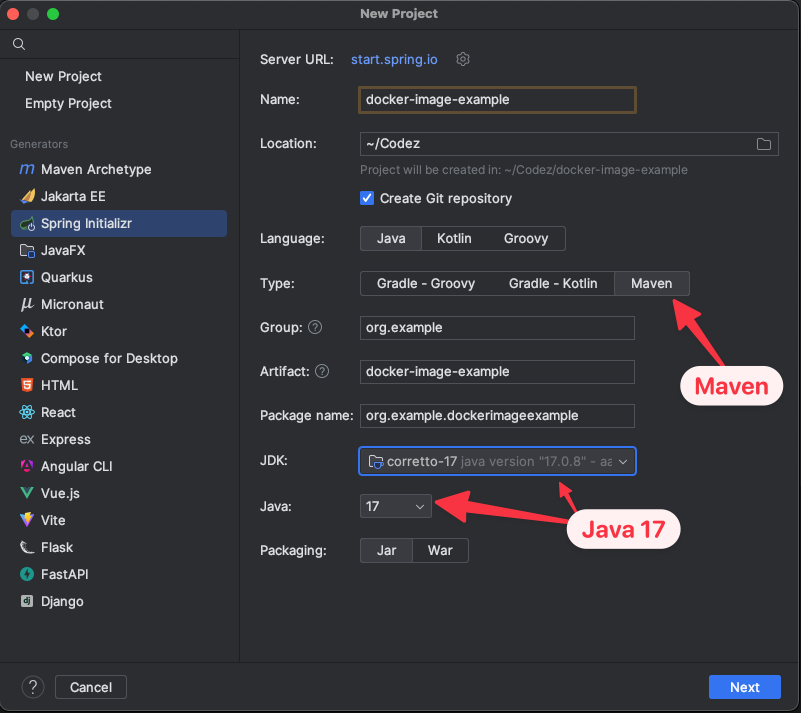
I’ve used the standard Spring Initializr in Intellij.

  • Project: Maven Project
  • Language: Java
  • Spring Boot: Choose the latest stable version
  • Project Metadata: Fill in as per your requirement
  • Packaging: Jar
  • Java Version: Choose your Java version (e.g., 11)
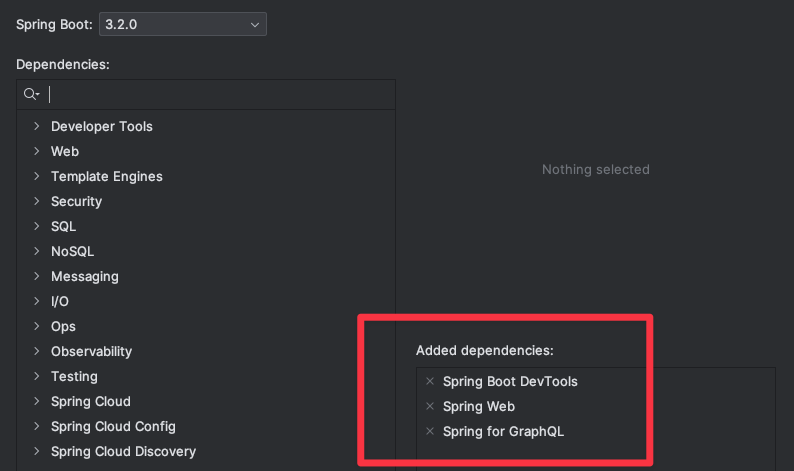
  • Dependencies: Add ‘Spring Web’, ‘Spring Boot DevTools’, and ‘Spring for GraphQL’

Next up I added the standard properties I always do when starting a new GraphQL API in the application.properties file (located in src/resources/application.properties).

server.error.whitelabel.enabled=false
server.error.include-stacktrace=always
server.error.include-message=always
server.error.include-binding-errors=always

spring.graphql.graphiql.enabled=true
spring.graphql.graphiql.path=graphiql

Next up a quick mini-schema for GraphQL.

type Query {
    hello: String
}

Finally a short and concise query mapping and controller.

package org.example.dockerimageexample;

import graphql.kickstart.tools.GraphQLQueryResolver;
import org.springframework.graphql.data.method.annotation.QueryMapping;
import org.springframework.stereotype.Controller;

@Controller
public class QueryResolver implements GraphQLQueryResolver {

    @QueryMapping
    public String hello() {
        return "Hello, World!";
    }
}

jib-maven

First step, add the jib-maven plugin to the pom.xml.

<!-- Jib Maven Plugin -->
<plugin>
    <groupId>com.google.cloud.tools</groupId>
    <artifactId>jib-maven-plugin</artifactId>
    <version>3.4.0</version>
    <configuration>
        <to>
            <image>adrons-cool-graphql-docker-image</image>
        </to>
        <dockerClient>
            <executable>/usr/local/bin/docker</executable>
        </dockerClient>
    </configuration>
</plugin>

In this configuration I’ve got the image name for the docker image set to adrons-cool-graphql-docker-image and set it to my local Docker executable at /usr/local/bin/docker. I had previously tried to run this without designating the local executable, but it didn’t seem to work, as the location default seemed to be off for the plugin. Thus, I might have a unique setup in this particular scenario, which I’ll eventually sort out but for the purpose of this post, I’ve left it in there.

In some scenarios, reading the docs that exist, this seems like all of the steps that I would have to take. But I still kept getting authentication build errors whenever I ran this. I needed to set the auth for Docker hub into a configuration file in spite of the fact I was deploying nothing – theoretically – to Docker hub. Which, this is one more specificity that I’ll have to probably sort out at some point. But for now, what I did to get authentication setup was set the auth account information in the settings.xml file located – not in the project, but at the user level in /~.m2.

In the m2 folder I simply did a quick touch settings.xml, opened up that file and added the following content, where I’ve obviously changed the username and password to something internet usable. So everything besides the username, password, and id are exactly the same as what would be needed for a new project. I don’t have any other settings added and no other servers, just this for starters. In addition, I mapped the id to the project name docker-image-example just so it maps. I’ve done a few experiments and it seems that I could set it to anything, as its a designator (it appears) of the particular build server, nothing more.

<settings>

    <!-- ... other settings ... -->

    <servers>
        <server>
            <id>docker-image-example</id>
            <username>adron@mydomain.com</username>
            <password>superSecretPassword!</password>
        </server>

        <!-- Add more servers here if needed -->

    </servers>
</settings>

That’s my first setup with jib-maven, with initial thoughts and discoveries. Until next time, cheers! 🤘🏻

Concurrency Control in Relational Databases

This is a continuation of my posts on relational databases, started here. Previous posts on this theme, “Data Modeling“, “Let’s Talk About Database Schema“, “The Exasperating Topic of Database Indexes“, “The Keys & Relationships of Relational Databases“, “Relational Database Query Optimization“, “Normalization in Relational Databases“, “Database (DB) Caching and DB Tertiary Caching“, “Security and Authentication in Relational Databases“, and A Guide to Backup and Recovery Options for Relational Databases: Focusing on SQL Server, Oracle, MariaDB/MySQL, and PostgreSQL.

Concurrency control in relational databases is a fundamental concept that ensures the integrity and consistency of data when multiple transactions are occurring simultaneously.

Real World Example

Imagine a bustling city where everyone is trying to get their tasks done efficiently and without stepping on each other’s toes. That’s what concurrency control is like in the world of relational databases. It’s all about managing the simultaneous operations on data in a way that ensures everyone gets their job done without causing chaos or data traffic jams.

In the realm of relational databases, transactions are like the citizens of our city. Each transaction wants to read, update, or delete data. Concurrency control is the set of traffic rules that governs how these transactions interact with each other. Without these rules, you’d have data inconsistencies, like two transactions trying to update the same piece of data at the same time, leading to conflicts and errors.

There are several methods to manage concurrency, each with its own pros and cons. Locking is like having traffic lights at intersections; it prevents conflicts by restricting access to data while a transaction is using it. However, just like traffic lights can cause delays, locking can lead to reduced database performance, especially if not managed well.

Another method is optimistic concurrency control. This is more like a roundabout, where transactions proceed assuming there won’t be conflicts, and if they do occur, the transactions are rolled back and retried. It’s efficient when conflicts are rare, but can be problematic when traffic is heavy.

Then there’s timestamp ordering, akin to giving each transaction a timestamp and ensuring they’re processed in that order. It’s like organizing our city’s tasks based on a schedule to avoid conflicts.

The choice of concurrency control depends heavily on the specific needs and characteristics of the database and its workload. Testing, understanding, and knowing what workloads demand and how the data interacts inbound and outbound, as well as internally to the database is key to determining the concurrency control paradigms to use.

Looking Further into Locking

Locking, in the context of concurrency control for relational databases, as mentioned is a bit like the traffic rules of a busy city. It’s a mechanism designed to maintain order and prevent chaos when multiple transactions are trying to access and modify the same data at the same time.

Let’s start with the basics: What is locking? Imagine you’re in a library with a bunch of other people. You all want to read or write in the same book. Locking is like saying, “Hey, I’m using this book right now, so you’ll have to wait your turn.” In database terms, a lock is a mechanism that prevents concurrent transactions from accessing the same data in conflicting ways.

How does it work? There are different types of locks, but let’s focus on two main ones: shared locks and exclusive locks. A shared lock is like a bunch of people reading the same book. They can all read it at the same time without any issues. In database terms, this means multiple transactions can read the same data simultaneously.

On the other hand, an exclusive lock is like saying, “I’m writing in this book, so no one else can use it until I’m done.” This is necessary when a transaction is modifying data. It ensures that no other transaction can read or write the data until the lock is released, preventing inconsistencies and data corruption.

Now, let’s look at an example. Imagine you’re running a ticket booking system for a concert. Two people, Alice and Bob, are trying to buy the last ticket at the same time. Alice’s transaction reads the number of tickets, sees one is available, and starts the process to buy it. At the same time, Bob’s transaction also reads that one ticket is available. Without locking, both transactions could proceed, and they would both think they’ve successfully bought the last ticket — a classic case of overbooking!

Here’s where locking comes into play. When Alice’s transaction starts, it places an exclusive lock on the ticket count. Now, when Bob’s transaction tries to read the ticket count, it can’t proceed because of Alice’s lock. It has to wait. Once Alice’s transaction is complete (and the ticket count is updated to show that there are no tickets left), the lock is released. Now Bob’s transaction can read the updated data and see that, unfortunately, the concert is sold out.

Delving into Optimistic Concurrency Control (OCC)

OCC in relational databases is like a trust-but-verify approach to managing data transactions. It’s a bit like letting skateboarders freely do their tricks in a skate park, trusting they won’t collide, but having a plan in place just in case they do.

So, what exactly is Optimistic Concurrency Control? It’s a strategy used in database systems when you expect that conflicts between transactions are rare, but you still need a way to handle them when they occur. Instead of locking resources to prevent conflicts (like in pessimistic concurrency control), OCC takes a more laid-back approach. It allows transactions to proceed without locking resources, but it checks for conflicts before committing the transactions.

How does it work? Let’s walk through the steps:

  1. Read Phase: In this phase, a transaction reads the data but doesn’t lock it. It’s like taking a mental snapshot of the current state of the data.
  2. Process Phase: Here, the transaction does its work, like updating records, but it still doesn’t lock anything. It’s operating under the assumption that nothing has changed since it took its snapshot.
  3. Validation Phase: This is where the magic happens. Before the transaction is committed, the system checks to see if the data it read and modified has been changed by another transaction in the meantime. If the data is unchanged, the transaction is committed. If the data has been altered, the transaction is rolled back, and it might be retried.

Now, let’s look at an example. Imagine you’re running a social media app, and two users, Alice and Bob, are simultaneously editing their profiles. Alice changes her profile picture, and Bob updates his bio. With OCC, both transactions read the current state of their profiles and proceed to make their updates independently.

When they’re done, the system checks if the profile data for each user has been changed by someone else during their updates. Since Alice and Bob are editing different parts of their profiles, their changes don’t conflict with each other. The system allows both transactions to commit successfully.

Timestamp Ordering Control

Timestamp Ordering Control in relational databases is like organizing a busy kitchen where every chef (transaction) gets a timestamped ticket dictating when they can cook their dish (access and modify data).

So, what is Timestamp Ordering Control? It’s a method of concurrency control in databases that uses timestamps to maintain the order of transactions. Each transaction is assigned a unique timestamp when it starts. This timestamp determines the transaction’s priority in accessing and modifying data.

How does it work? Let’s break it down:

  1. Timestamp Assignment: When a transaction begins, it’s given a timestamp. This could be the current time or a sequence number, but the key is that it’s unique and ordered.
  2. Ordering Rules: The database system uses these timestamps to decide the order in which transactions should access data. If one transaction has an earlier timestamp than another, it gets priority in reading and writing data.
  3. Conflict Resolution: If a transaction tries to perform an operation that conflicts with the timestamp ordering rules (like trying to write data that has been read or written by a transaction with a newer timestamp), it’s either rolled back or made to wait, depending on the system’s design.

Here’s an example to illustrate this: Imagine a flight booking system where two customers, Alice and Bob, are trying to book the last seat on a flight. Alice starts her transaction, which gets timestamped at 10:00 AM. A moment later, Bob starts his transaction, which gets timestamped at 10:01 AM.

Alice’s transaction reads the number of seats available (finding one seat left) and proceeds to book it. Meanwhile, Bob’s transaction also reads the seat availability. However, before Bob’s transaction can book the seat, the system checks the timestamps. It sees that Alice’s earlier timestamped transaction is already booking the last seat. Therefore, Bob’s transaction is either rolled back or made to wait, depending on how the system handles such conflicts.

Multiversion Concurrency Control (MVCC)

MVCC in relational databases is like a time machine for data. It’s a sophisticated way of handling transactions that allows multiple versions of data to coexist, enabling users to access data from different points in time.

So, what is MVCC? Imagine you’re in a museum where historical artifacts are continuously being updated and restored. MVCC allows each visitor (transaction) to see the museum (database) as it was at the time they entered, regardless of ongoing restorations (other transactions). This is achieved by maintaining different versions of data for different transactions.

How does it work? Let’s break it down:

  1. Version Creation: When a transaction modifies data, instead of overwriting the existing data, MVCC creates a new version of that data. Each version is tagged with a timestamp or transaction ID.
  2. Non-Blocking Reads: One of the key benefits of MVCC is that it allows read operations to occur without being blocked by write operations. When a transaction wants to read data, it gets the version of the data that was current at the time the transaction started.
  3. Consistency without Concurrency Issues: Since each transaction sees its own consistent view of the database, MVCC effectively handles concurrency issues. Transactions can operate independently without interfering with each other.

Now, let’s consider an example. Imagine you’re running an online bookstore. Two customers, Alice and Bob, are interacting with the store at the same time. Alice is purchasing a book, while Bob is browsing the book catalog.

With MVCC, when Alice starts her transaction to purchase a book, the database creates a new version of the inventory data reflecting the reduced stock. However, Bob, who started browsing before Alice made her purchase, still sees the version of the inventory as it was when he started his browsing session. He won’t see the updated inventory until he starts a new transaction after Alice’s purchase is complete.

MVCC is particularly effective in read-heavy environments. It allows for high concurrency and performance, as readers don’t have to wait for writers and vice versa. However, he would also note that MVCC can require more storage space, as multiple versions of data need to be maintained. Additionally, there’s the overhead of cleaning up old data versions once they’re no longer needed.

In summary, Multiversion Concurrency Control is like giving each user their own personal snapshot of the database, tailored to the moment they started their transaction. It’s a powerful way to manage data in a dynamic environment, allowing for high levels of concurrency and consistent views of data, all while minimizing the conflicts and bottlenecks that can arise in traditional locking mechanisms.

Snapshot Isolation

Snapshot Isolation in relational databases is akin to giving each user a camera to capture a moment in time, allowing them to work with that frozen moment even as the world around them continues to change.

So, what is Snapshot Isolation? It’s a concurrency control technique where each transaction works with a “snapshot” of the data as it existed at a specific point in time. This snapshot reflects the state of the database at the moment the transaction began, regardless of subsequent changes made by other transactions.

How does it work? Let’s delve into the steps:

  1. Snapshot Creation: When a transaction starts, the database takes a snapshot of the current state of the data. This snapshot is what the transaction interacts with, rather than the live database.
  2. Independent Operations: Transactions operate on their snapshots independently of each other. This means that a transaction does not see the changes made by other concurrent transactions.
  3. Commit Check: When a transaction is ready to commit, the database checks to ensure that the changes it wants to make have not been made by another transaction since its snapshot was taken. If there’s a conflict, the committing transaction may be rolled back.

Consider this example: Imagine a library system where two librarians, Alice and Bob, are updating records at the same time. Alice is updating the catalog to add new books, while Bob is modifying the borrower records.

With Snapshot Isolation, when Alice starts her transaction, she gets a snapshot of the current state of the library database. She adds the new books to this snapshot. Concurrently, Bob starts his transaction and gets his own snapshot, which doesn’t include Alice’s new books since they were added after his snapshot was taken.

Alice and Bob work independently on their tasks. When they’re done, the system checks if the records they modified have been changed by other transactions since their snapshots were taken. If not, their changes are committed. If there are conflicts, one of the transactions might have to be retried.

Snapshot Isolation is great for improving performance in read-heavy databases, as it allows many readers to access data without waiting for writers. However, he would also caution that it’s not a silver bullet. Snapshot Isolation can lead to “write skew,” a type of anomaly where two transactions may make changes based on the same data, leading to inconsistent results.

In essence, Snapshot Isolation is like giving each user a personal, unchanging view of the database, allowing them to work without interference from others. It’s a powerful tool for managing concurrency, particularly in scenarios where the database is read more often than it’s written to, ensuring smooth and efficient operations.

Summarized Concurrency Control

In the dynamic world of relational databases, managing the concurrent access of multiple transactions is akin to orchestrating a symphony with numerous musicians, each playing their own instrument. Concurrency control like the conductor’s baton, ensuring harmony and preventing discordant notes in an orchestra is how we manage our flow of data in and out of a database. It’s about striking the right balance between data integrity and system performance, much like a maestro ensuring each musician plays at the right moment. The choice of concurrency control strategy is crucial, as it can significantly impact the efficiency and reliability of database operations. It’s not just about keeping the data in tune; it’s about making the entire system perform its best.

Here’s a rundown of the specific options around concurrency control in relational databases:

  • Locking:
    • Shared Locks: Allow multiple transactions to read a resource but prevent writing.
    • Exclusive Locks: Prevent other transactions from reading or writing a resource.
    • Two-Phase Locking: Expands and contracts locks in two phases to ensure serializability.
  • Optimistic Concurrency Control:
    • Read Phase: Transactions read data without acquiring locks.
    • Validation Phase: Checks for conflicts before committing.
  • Timestamp Ordering:
    • Assigns Timestamps: Each transaction gets a unique timestamp.
    • Conflict Resolution: Transactions are ordered and executed based on timestamps.
  • Multiversion Concurrency Control (MVCC):
    • Versioning: Maintains multiple versions of data for different transactions.
    • Non-blocking Reads: Allows read operations without waiting for write locks.
  • Snapshot Isolation:
    • Snapshot of Data: Transactions work with a snapshot of data at a point in time.
    • Reduced Locking Needs: Minimizes the need for locks by working on snapshots.
  • Deadlock Detection and Resolution:
    • Detection Mechanisms: Identifies deadlocks when they occur.
    • Resolution Strategies: Includes rolling back transactions or waiting.

Each of these methods has its unique strengths and is suited to different scenarios. The art of concurrency control lies in choosing and fine-tuning these strategies to ensure that the database performs harmoniously, efficiently handling the concurrent demands placed upon it.


My Review of JetBrains’ Writerside ✅ or ❎ ?

Alright folks, let’s dive into the latest concoction from the JetBrains‘ lab – Writerside. This isn’t just another tool; it’s a game-changer in the technical writing arena. Buckle up as we take a tour of this nifty piece of tech wizardry.

The Gist of Writerside

Melding Code and Prose

JetBrains has pulled a rabbit out of their hat with Writerside, built on the IntelliJ platform. It’s like they’ve read the minds of developers and writers, blending their worlds seamlessly. Imagine crafting documentation right in the heart of your IDE – that’s Writerside for you!

Markdown Meets XML

Here’s where it gets spicy. Writerside juggles Markdown and a custom XML-based markup. It’s like having the best of both worlds, letting you switch hats between a Markdown maverick and an XML expert. This duality is a boon for those who want to add a bit more oomph to their docs.

Testing and Styling with Ease

Over 100 built-in tests? Check. Predefined designs that you can tweak? Double-check. Writerside isn’t just about writing; it’s about making sure your documentation is as robust as your code. No more fretting over broken links or layout hassles.

Real-Time Preview and AI Smarts

The live preview feature is like having a co-pilot, instantly showing you the impact of your edits and flagging errors on the fly. And the AI-based spellchecker and grammar tool? That’s the cherry on top, supporting a plethora of languages and keeping your prose polished.

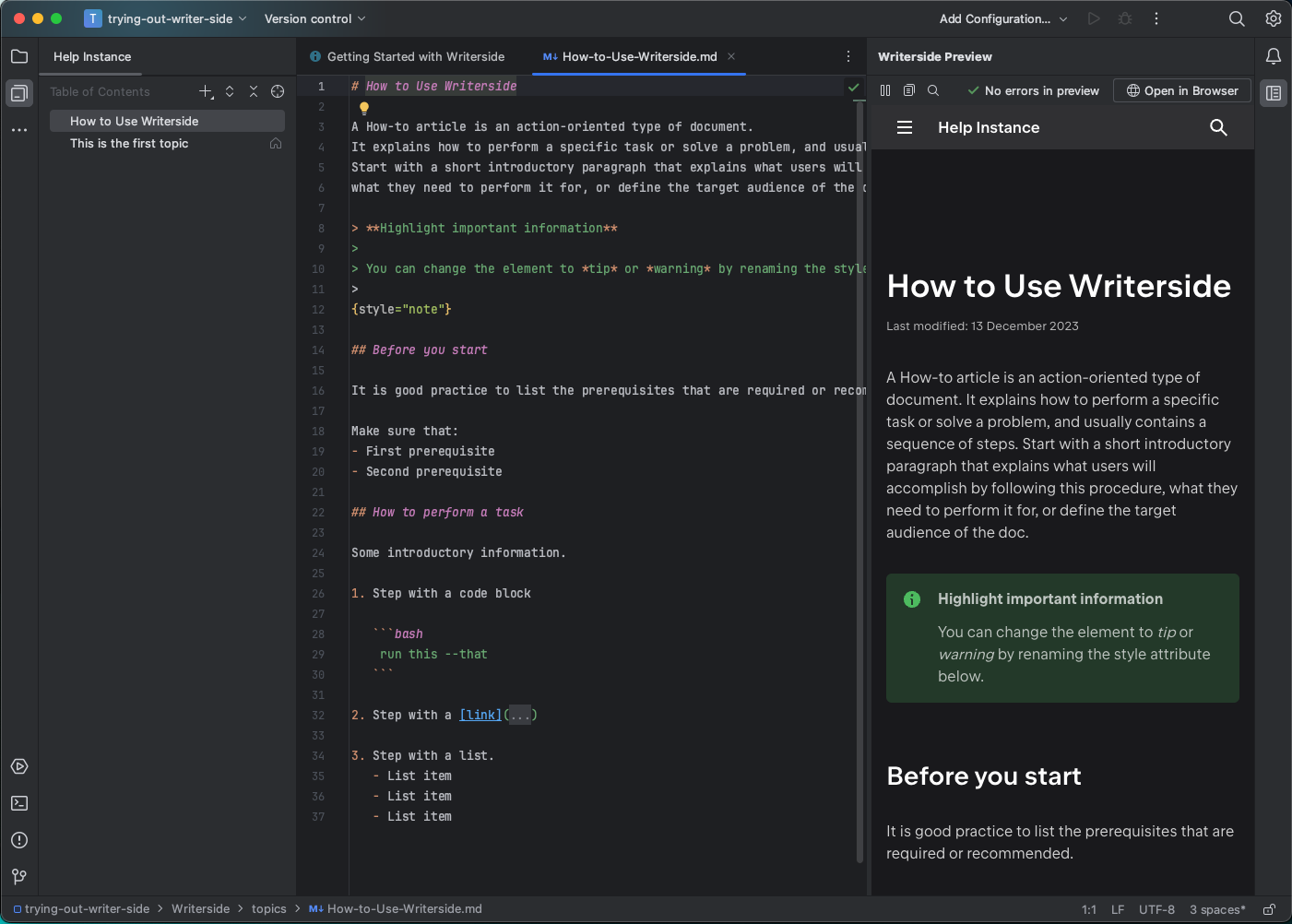
A screen shot of the markdown and side by side preview.

User Reactions and Real-World Use

First Impressions and Reddit Buzz

The crowd on Reddit is already giving Writerside thumbs up. The Markdown love and VCS integration are big hits. It’s like Writerside is the new cool kid on the block that everyone wants to hang out with.

Collaboration is Key

Writerside is all about tearing down walls between developers and writers. Its “doc as code” approach is like a bridge over troubled waters, aligning documentation with the dev process. It’s not just a tool; it’s a unifier.

Customizable and Accessible

Whether you’re a plugin person or a standalone aficionado, Writerside has got you covered. And the customization options? They let you tailor the experience to your liking, ensuring your docs don’t just sound good but also look the part.

Wrapping Up

In my meager experience with Writerside so far, this is not just another tool; it’s more of a massive shift in technical writing. It’s like they’ve taken the essence of coding and writing, mixed it in a blender, and served up a cocktail of productivity. For teams where code and prose coexist, Writerside is a no-brainer. It’s not just about making documentation; it’s about making it smart, seamless, and collaborative. Exactly what documentation writing needs to and ought to have as key elements of its workflow.

Shoutouts and References

A Guide to Backup and Recovery Options for Relational Databases: Focusing on SQL Server, Oracle, MariaDB/MySQL, and PostgreSQL

This is a continuation of my posts on relational databases, started here. Previous posts on this theme, “Data Modeling“, “Let’s Talk About Database Schema“, “The Exasperating Topic of Database Indexes“, “The Keys & Relationships of Relational Databases“, “Relational Database Query Optimization“, “Normalization in Relational Databases“, “Database (DB) Caching and DB Tertiary Caching“, and “Security and Authentication in Relational Databases“.

In the realm of data management, ensuring the safety and recoverability of data is paramount. Relational databases, being at the core of many business operations, require robust backup and recovery strategies. This article delves into the general concepts of backup and recovery in relational databases, followed by specific strategies for SQL Server, Oracle, MariaDB/MySQL, and PostgreSQL.

General Concepts of Backup and Recovery in Relational Databases

Types of Backups

  1. Full Backup: Captures the entire database at a point in time.
  2. Incremental Backup: Records the changes since the last backup.
  3. Differential Backup: Stores data changed since the last full backup.
  4. Log Backup: Specific to databases that maintain transaction logs.

Recovery Models

  • Simple Recovery Model: Ideal for scenarios where data recovery to a specific point in time is not critical.
  • Full Recovery Model: Necessary for databases where data loss is unacceptable, allowing recovery to a specific point in time.
  • Bulk-Logged Recovery Model: A variation of the full recovery model, optimizing for bulk operations.

Considerations for Backup and Recovery

  • Recovery Point Objective (RPO): Determines how much data loss is acceptable.
  • Recovery Time Objective (RTO): The acceptable time to restore operations after a failure.
  • Storage Media: Choosing between on-site, off-site, or cloud storage.
  • Encryption and Security: Ensuring data is protected during and after the backup process.
  • Regular Testing: Regularly testing backups to ensure data integrity.

Specific Strategies for Each Database

SQL Server

  1. Backup Options:
  • Full, differential, and transaction log backups.
  • Copy-Only Backup: A type of full backup that does not affect the sequence of regular backups.
  • File and Filegroup Backup: For large databases, backing up individual files or filegroups.
  1. Recovery Options:
  • Point-in-time recovery using full and log backups.
  • Tail-log backups for recovering to the point of failure.
  • Restoring to a specific recovery point using backup chains.

Oracle

  1. Backup Options:
  • Full Database Backup: Complete backup of the database.
  • Incremental Backup: Level 0 (similar to a full backup) and Level 1 (incremental).
  • Archive Log Backup: Capturing transaction logs.
  1. Recovery Options:
  • Complete Recovery: Using full and incremental backups.
  • Point-in-time Recovery (PITR): Using archive logs.
  • Flashback Technology: For quickly reverting to a previous state.

MariaDB/MySQL

  1. Backup Options:
  • Logical Backup: Using tools like mysqldump.
  • Physical Backup: Copying data files directly, tools like Percona XtraBackup.
  • Binary Log Backup: For capturing transactional changes.
  1. Recovery Options:
  • Full Recovery: From full backups.
  • Point-in-time Recovery: Using binary logs.
  • Partial Recovery: Restoring specific tables or databases.

PostgreSQL

  1. Backup Options:
  • SQL Dump: Logical backup using pg_dump.
  • File System Level Backup: Physical backup of the database files.
  • Continuous Archiving: Using Write-Ahead Logging (WAL) for incremental backups.
  1. Recovery Options:
  • Full Recovery: From SQL dump or file system backups.
  • Point-in-time Recovery: Using WAL files.
  • Streaming Replication: For real-time backup and recovery.

Beyond Backups

Backup strategies for databases like SQL Server, Oracle, MariaDB/MySQL, and PostgreSQL have evolved significantly, incorporating various innovative and robust methods to ensure data integrity and availability. Some of these advanced backup implementations include using hot swappable databases and online backups to cloud storage solutions like Amazon S3. Here’s an overview of these methods:

Hot Swappable (Standby) Databases

  1. SQL Server Always On Availability Groups: This feature allows users to configure multiple replicas of the database. These replicas can be in a synchronous or asynchronous commit mode, providing a hot standby database that can quickly take over in case of a primary database failure.
  2. Oracle Data Guard: Oracle’s solution for a standby database involves Data Guard, which maintains a set of standby databases as a copy of the primary database. It can switch over to these standby databases quickly, ensuring high availability and disaster recovery.
  3. MariaDB/MySQL Replication: MariaDB and MySQL support master-slave replication where the slave serves as a hot standby version of the master. This setup can be used for failover scenarios, ensuring minimal downtime.
  4. PostgreSQL Streaming Replication: PostgreSQL offers streaming replication to create a hot standby database. This standby can be promoted to a primary database in case of failure, providing a high-availability solution.

Online Backups to Cloud Storage (e.g., Amazon S3)

  1. SQL Server Backup to Azure Blob Storage: SQL Server supports backing up databases directly to Microsoft Azure Blob Storage, which can be a cost-effective and scalable solution for online backups.
  2. Oracle Cloud Backup: Oracle databases can be backed up directly to Oracle Cloud Infrastructure, including options to use Amazon S3 as a storage destination through Oracle’s RMAN (Recovery Manager).
  3. MariaDB/MySQL Backup to S3: Tools like Percona XtraBackup or mysqldump can be used to create backups of MariaDB/MySQL databases and store them on Amazon S3, providing a scalable and secure offsite backup solution.
  4. PostgreSQL Backup to S3: PostgreSQL databases can be backed up to S3 using tools like pgBackRest or WAL-E. These tools support continuous archiving of WAL files and base backups to S3, ensuring robust disaster recovery options.

Other Notable Implementations

  • Database Snapshots: Creating snapshots of the database state at a particular point in time. This is often used in cloud environments like AWS, where you can create snapshots of RDS instances.
  • Hybrid Solutions: Combining on-premises backups with cloud backups for added redundancy and flexibility.
  • Managed Backup Services: Using database-as-a-service (DBaaS) offerings where the service provider manages backups, often with options for cross-region replication and automated failover.
  • Backup Encryption: Encrypting backups, both in transit and at rest, to ensure data security, especially when using cloud storage solutions.
  • Disaster Recovery as a Service (DRaaS): Some organizations opt for DRaaS solutions that provide comprehensive disaster recovery capabilities, including regular backups, replication, and automated failover processes.

The choice of backup implementation depends on various factors including the size of the database, the criticality of data, budget constraints, and specific business continuity requirements. Modern databases offer a range of sophisticated options to cater to diverse backup and recovery needs.

Saasy Backup Solutions

Several Software-as-a-Service (SaaS) providers offer robust active backup solutions for popular databases like SQL Server, Oracle, MariaDB/MySQL, and PostgreSQL. These services typically include automated backups, easy restoration, and high availability features. Here’s an overview of some notable SaaS providers and their backup solutions for these databases:

1. Amazon Web Services (AWS)

  • RDS (Relational Database Service): AWS RDS provides managed services for SQL Server, Oracle, MariaDB, MySQL, and PostgreSQL. It includes automated backups, database snapshots, and the ability to restore to any point within the retention period. AWS also offers additional services like Aurora (for MySQL and PostgreSQL) which provides enhanced scalability and reliability.

2. Microsoft Azure

  • Azure SQL Database: A fully-managed SQL Server database service that includes automated backups, long-term backup retention, and active geo-replication for high availability.
  • Azure Database for PostgreSQL, MySQL, and MariaDB: These services offer built-in high availability, automated backups, and the ability to restore at any point in time within the backup retention period.

3. Google Cloud Platform (GCP)

  • Cloud SQL: Google’s Cloud SQL supports MySQL, PostgreSQL, and SQL Server. It provides automated backups, replication for high availability, and the ability to restore to any point in time.

4. Oracle Cloud

  • Oracle Database Cloud Service: Offers automated backups, both to Oracle’s own cloud storage and to Amazon S3. It provides tools for easy backup management and disaster recovery solutions.

5. IBM Cloud

  • IBM Cloud Databases: Offers managed services for PostgreSQL, MySQL, and other databases. It includes automated backups, high availability configurations, and disaster recovery options.

6. Heroku

  • Heroku Postgres: A managed PostgreSQL service that includes continuous protection (every change is written to a write-ahead log), automated backups, and easy rollback capabilities.

7. DigitalOcean

  • Managed Databases: Provides managed services for PostgreSQL, MySQL, and Redis. It includes automated backups, easy scaling, and high availability with standby nodes.

8. Backblaze B2 with Database Integration Tools

  • While not a direct database service provider, Backblaze B2 offers highly affordable cloud storage that can be integrated with database backup tools for SQL Server, MySQL, PostgreSQL, and Oracle.

9. Percona

  • Percona Monitoring and Management (PMM): Although primarily a monitoring solution, PMM can be integrated with backup tools for MySQL and PostgreSQL, providing a comprehensive management solution.

Key Features to Look For

When selecting a SaaS provider for database backup solutions, consider the following features:

  • Automated Backups: Regular, scheduled backups without manual intervention.
  • Point-in-Time Recovery: Ability to restore the database to any specific time point.
  • High Availability and Disaster Recovery: Features like multi-zone replication and failover capabilities.
  • Scalability: Easy scaling of resources as per the workload demands.
  • Security: Robust encryption and compliance with industry standards.
  • Monitoring and Alerts: Real-time monitoring and alerts for backup and recovery processes.

These SaaS providers offer a range of solutions tailored to different needs, from small projects to large enterprises, ensuring that there is a suitable option for various use cases and requirements.

Summary

In the context of relational databases such as SQL Server, Oracle, MariaDB/MySQL, and PostgreSQL, implementing effective backup and recovery strategies is crucial for data integrity and business continuity. This article explored various backup and recovery options, innovative implementations, and SaaS solutions catering to these databases.

General Backup and Recovery Concepts

  • Types of Backups: Full, incremental, differential, and log backups.
  • Recovery Models: Simple, full, and bulk-logged recovery models.
  • Key Considerations: RPO and RTO objectives, storage media choices, encryption and security, and regular testing of backup integrity.

Database-Specific Strategies

  • SQL Server: Offers full, differential, transaction log, and file/filegroup backups, with point-in-time recovery options.
  • Oracle: Provides full database and incremental backups, along with archive log backups, complete recovery, PITR, and Flashback technology.
  • MariaDB/MySQL: Supports logical, physical, and binary log backups, with full, point-in-time, and partial recovery options.
  • PostgreSQL: Features SQL dump, file system level backup, and continuous archiving with full recovery and PITR capabilities.

Advanced Backup Implementations

  • Hot Swappable Databases: Using standby databases for high availability (e.g., SQL Server Always On, Oracle Data Guard, MariaDB/MySQL replication, PostgreSQL streaming replication).
  • Online Backups to Cloud Storage: Leveraging cloud services like Amazon S3 for scalable and secure backups.

SaaS Providers for Active Backup Solutions

  • AWS RDS: Automated backups for SQL Server, Oracle, MariaDB, MySQL, and PostgreSQL.
  • Microsoft Azure: Managed services with automated backups for SQL Server, PostgreSQL, MySQL, and MariaDB.
  • Google Cloud Platform: Cloud SQL service offering automated backups for MySQL, PostgreSQL, and SQL Server.
  • Oracle Cloud: Automated backups with cloud storage options.
  • IBM Cloud and Heroku: Managed database services with automated backups and high availability.
  • DigitalOcean: Managed databases with automated backups for PostgreSQL and MySQL.
  • Backblaze B2 and Percona: Cloud storage integration and monitoring/management solutions for backups.

Key Features in SaaS Backup Solutions

  • Automated backups, point-in-time recovery, high availability, scalability, security, and real-time monitoring are essential features to consider in SaaS backup solutions.

The landscape of backup and recovery for relational databases is diverse and rich with options. From traditional backup methods to modern cloud-based solutions, organizations can choose from a variety of strategies and tools to ensure their data remains secure and recoverable in any scenario.