Deploy a Framework Friday #2 with ASP.NET MVC 4

First let’s build a standard ASP.NET MVC Application (yes, you can do the same without the MVC Project, but I STRONGLY recommend never creating a standard ASP.NET application again, EVER). This quick run through assumes you’ve already setup a Cloud Foundry enabled PaaS w/ your already installed Iron Foundry components for .NET development. Get an Iron Foundry enabled account here, it’s 100% free, so no reason not to give it a go.

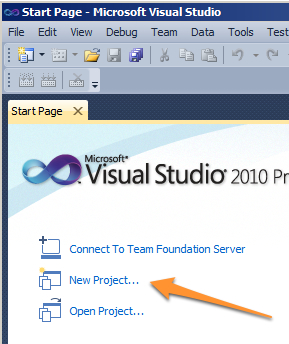
There are a few ways to do this. One, the click on the start page new project option.

Click on the start page new project option...

Click on the start page new project option…

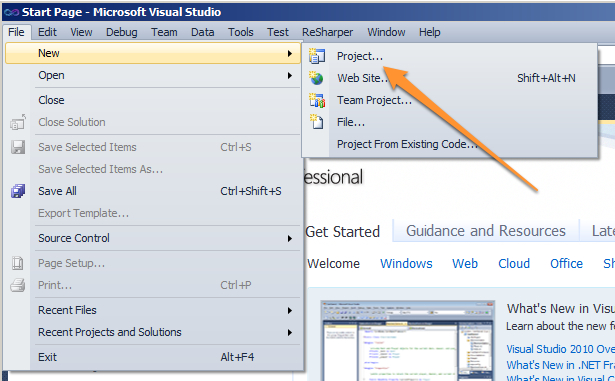
Two, the menu based selection option.

Menu based new project option...

Menu based new project option…

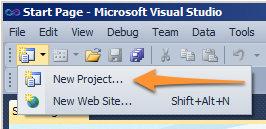
Three, the command button option.

Click on the command button new project option

Click on the command button new project option

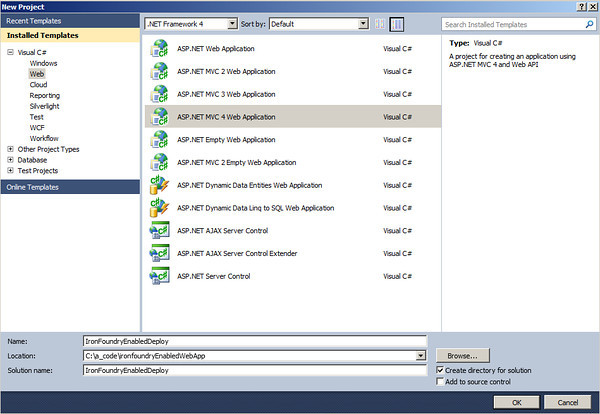
So pick your poison and then select the ASP.NET MVC 4 Project Template. On the next dialog, you’ll enter the information of where the project will go and choose the ASP.NET MVC 4 Web Application Project Template.

Selecting the ASP.NET MVC 4 Web Application (Click for full size image)

Selecting the ASP.NET MVC 4 Web Application (Click for full size image)

The next dialog select the Basic template, leave Razor selected, and I always leave the unit tests project there also. Once this is done we’re now ready to give our project a little taste of deployment.

Since we’re working in the land of GUIs and .NET, I’ll keep this to a completely GUI based deployment. However, don’t forget that the vmc-IronFoundry is available for pushing also. So don’t fear the CLI, but we’ll skip it for now (tip: It’s practically the same as the other deploys).

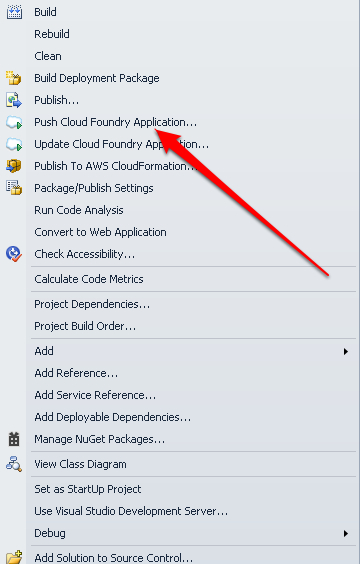
On the project in Visual Studio right click and select Push to Cloud Foundry.

Publish option on the context menu (click for full size image)

Publish option on the context menu (click for full size image)

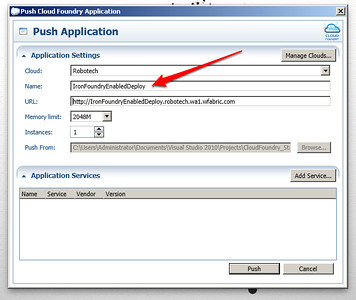
A dialog will appear for the basic parameters needed for the deployment. Enter information that you need for your application and click ok.

Setting the parameters (click for full size image)

Setting the parameters (click for full size image)

Now when you navigate to your cloud in the Cloud Explorer UI (Start -> All Programs -> Iron Foundry -> Cloud Explorer) you’ll see the application running under that cloud environment.

As always, it is indeed THAT easy when using a Platform as a Service to deploy to!

OSCON 2012 => Monday Ignited, Tuesday OpenShift Session ++

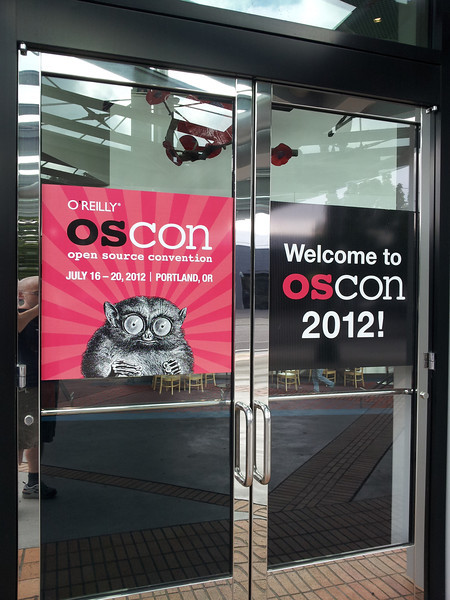
OSCON 2012 Opening Doors

OSCON 2012 Opening Doors

Today kicked off with a monster Reggie Biscuit from Pine State Biscuits. If you live in Portland or are visiting just for the conference and like soul food of the tastiest nature, check it out.

My first day ended up not as planned. Instead of attending sessions I ended up meeting a number of people and discussing the future of Cloud Foundry, where it is headed and in general, the direction of PaaS Technologies. I met Andy Piper (@andypiper) and Raja Rao (@rajaraodv) and discussed Node.js and Cloud Foundry specifically. We then dove into trying out some of the CLI features in the latest VMC builds.

After that I met Mark Atwood for a brief few moments. As always, Mark’s a friendly guy, and might I add pretty smart too. I’ve enjoyed our conversations in the past during the AWS Meetups in Seattle too. He’s always got interesting thoughts and perspectives on open source, linux and now on PaaS Technology too. Ya see, Mark has become the Red Hat OpenShift Advocate. It’s a perfect fit, as Mark loves this stuff!

Ignite!  ….or Bailey’s for more tech talk and #nodejs discussions.

After all of this I almost, and had planned, to attend the Ignite Presentations after OSCON, but instead ended up heading over to talk with some Node.js & JavaScript Coders about some of our latest efforts around getting concrete performance benchmarks for Node.js and some of the various libraries in use.

That brings us to Tuesday…

Tuesday brought forth a super busy, exciting and educational day. I headed straight to OSCON for the OpenShift Workshop with Mark Atwood & Krishna Raman (Mark’s Twitter is @fallenpegasus). The session was great and they hit on a lot of hugely important topics. Let’s go through each of these real quick, as this is where more than just the tech bits were involved.

OpenShift is Truly Open Source Software

Mark & Krishna made a strong point to outline and show how and why OpenShift is open source. For instance, they are following the original precepts of a particular guy named Stallman (http://stallman.org/ if you’re unfamiliar with Richard, he’s the guy who got GNU happening and a major originating advocate of open source software). Mark pointed out that Red Hat is open to keeping the governance of the project completely open, would even cede it to another governance entity when it grows beyond just Red Hat, and they intend to keep all the communication very open and public, as intended with open source projects.

Another thing that Mark and Krishna pointed out, was that the software is on github, and not just in a psuedo “read-only” state, but in an actively useful way, with interactions and tracking on github. The point being that there is no hidden processing of the code or private repositories of code. What you see is what you get in this regard. In addition all of the code that is available, is the exact code that Red Hat is using to actually host the OpenShift PaaS that they provide for testing and demoes. Simply, it is all there available in a completely open, contribution based, interactive, and publicly accessible way.

So far this is even more evident if you do a google search or even trace the twitter activity. They definitely have the search engines working in their favor with all of that searchable content publicly available.

Cloud Foundry & OpenShift

I’m still a huge Cloud Foundry fan, the team and effort and product is getting to be in pretty solid shape. However OpenShift is definitely here to provide some competitive interest. In the end, I’m a fan of PaaS Technology and what it can do for software developers and what we’re trying to achieve on a daily basis. The potential of PaaS to improve, dramatically, the software development lifecycle while reducing the overhead cost is pretty huge. The key is, people have to be aware of and start utilizing the technology well. Just implementing it and saying “I have PaaS” is one thing, but improving your software development process to use PaaS technologies well is where the seriously powerful advantage is.

I’m looking forward to seeing the market unfold and start making progress with these technologies. On that note, day #1 and #2 are finished for me. Cheers!

Deploy a Framework Friday #1 with Ruby and Sinatra

Alright, just for fun I’m kicking off a new blog series. I’m going to publish a new “Deploy a Framework Friday” each week for about the next, well, bunch of weeks. There are a TON of frameworks that are available on PaaS Technologies.

This first entry I’m going to implement a simple Sinatra app with Ruby. Nothing fancy, simply a hello world and the respective deployment to a Cloud Foundry PaaS.

First, let’s whip out the super complex code (right, this isn’t complex, I just like sarcasm). The hello.rb file I created.

require 'sinatra'

get '/' do
  "Hello World!"
end

get '/route' do
  "Hello from a route URI!"
end

Next add a Gemfile & respective Gemfile.lock as such.

Gemfile

source "http://rubygems.org"
gem 'sinatra'

Gemfile.lock

GEM
  remote: http://rubygems.org/
  specs:
    rack (1.4.1)
    rack-protection (1.2.0)
      rack
    sinatra (1.3.2)
      rack (~> 1.3, >= 1.3.6)
      rack-protection (~> 1.2)
      tilt (~> 1.3, >= 1.3.3)
    tilt (1.3.3)

PLATFORMS
  ruby

DEPENDENCIES
  sinatra

Then deploy using the Cloud Foundry VMC.

vmc push

If you’ve forgotten, be sure to target and login first.

vmc target api.ironfoundry.me
vmc login

That does it. Yeah, not a whole lot to get started working on a Sinatra Project. For more information on Sinatra check out the main web presence here http://www.sinatrarb.com/.

For more information on Cloud Foundry or Iron Foundry click on the respective link.

For the code sample, check out the working “paasIt” code repo on Github.

Next week I’ll do a baseline ASP.NET MVC 4 Application and get it deployed.

OSCON, The Sessions to Attend…

With OSCON just a week away I finally sat down with the trusty ole’ iPad and figured out what my schedule is going to be. It appears this year the OSCON team put together a perfect slice for me. For the sessions, I’ve narrowed them down to these:

9:00am Tuesday, 07/17/2012 Build your Own Platform-as-a-Service (PaaS), Just like Red Hat’s (Sponsored Tutorial) Mark Atwood (Red Hat), Krishna Raman (Red Hat)

10:40am Wednesday, 07/18/2012 Comparing Open Source Private Cloud Platforms Lance Albertson (Oregon State University Open Source Lab)

11:30am Wednesday, 07/18/2012 Highly Available Cloud: OpenStack integration with Pacemaker Florian Haas (hastexo)

1:40pm Wednesday, 07/18/2012 Designing for DevOps: Building Ops at New Relic Chris Kelly (New Relic)

2:30pm Wednesday, 07/18/2012 Test Driven UI Development Joakim Recht (Tradeshift)

5:00pm Wednesday, 07/18/2012 Programming with the OSS Cloud Stack Mike Amundsen (amundsen.com, inc.)

10:40am Thursday, 07/19/2012 Essential Node.js for Web Developers Mike Amundsen (amundsen.com, inc.)

11:30am Thursday, 07/19/2012 Node.js in Production: Postmortem Debugging and Performance Analysis David Pacheco (Joyent)

1:40pm Thursday, 07/19/2012 Location, Location, Location: Mastering HTML 5 Geolocation Andy Gup (Esri)

2:30pm Thursday, 07/19/2012 Adventures in Deploying Private Paas on the Open Cloud: Tales from the Enterprise Jeff Hobbs (ActiveState), Diane Mueller (ActiveState)

4:10pm Thursday, 07/19/2012 Mashing up JavaScript – Advanced techniques for modern web applications Bastian Hofmann (ResearchGate GmbH)

4:10pm Thursday, 07/19/2012 Automating Cloud Deployments with and Puppet and OpenStack Cloud, D139-140 Dan Bode (PuppetLabs)

11:00am Friday, 07/20/2012 Building Big Apps with Node.JS Javascript & HTML5, Portland 251 Rik Arends (Cloud9 IDE Inc)

11:50am Friday, 07/20/2012 node.js and ql.io – Build Your Own HTTP APIs for Agility and Scale Javascript & HTML5, Portland 251 Subbu Allamaraju (eBay Inc.), Jonathan LeBlanc (X.commerce)

Stay tuned here and on Cloud Ave for my full coverage of the conference. Hope to meet a lot of people, hear about your projects and efforts, and figure out a few more pieces to the whole future of cloud & software dev puzzle!

IaaS vs. PaaS or Infrastructure vs. Platform and I Want Beer NOW!

A friend and now coworker of mine, Richard Seroter (@rseroter & Blog) decided to do a comparo. I took the infrastructure based deployment, ala IaaS and he took the platform based deployment, ala PaaS. What we’ve done is taken a somewhat standard ASP.NET MVC with Entity Framework, a SQL Server Database, a UX & UI design and got it running locally. From there we then deployed the same application the two respective ways to deploy the web application to a live environment. He took the Tier 3 PaaS (Iron Foundry + Cloud Foundry for the win) and I took the tried and true method of deploying via Windows 2008 Server instances via the Tier 3 Infrastructure.

Here are the steps I went through and for his steps check out this blog article on the PaaS deployment.

Part #1 – Get Some Servers Setup

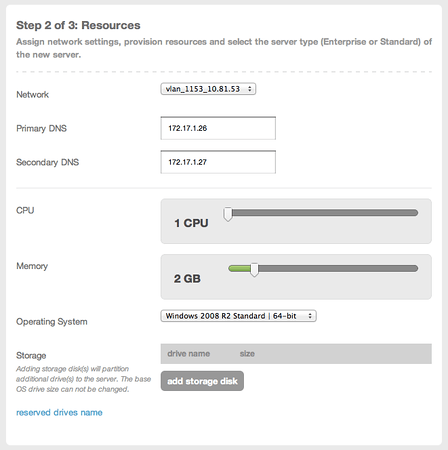
First things first, I need two instances. If you’re following along, you can basically use whatever instances or server you want. AWS, Rackspace, or Windows Azure. Based on that there may be a few steps here or there you may need to alter, add or subtract from the process. One for the ASP.NET MVC Application and one for the SQL Server Database. The web app server doesn’t need a ton of resources, so I built it and scaled back RAM and cores to a single core.
ASP.NET MVC Web Server

ASP.NET MVC Web Server (Click for full size image)

In the next step here I’ve selected additional software to be installed on the instance. I’ll need .NET 4.0 so I’ve added this as shown.
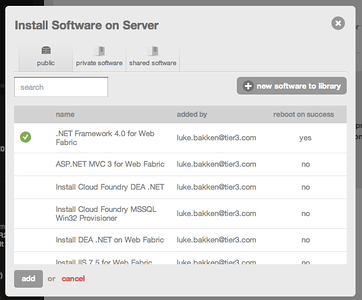
Selecting .NET 4.0 for Addition to the Instance

Selecting .NET 4.0 for Addition to the Instance (Click for full size image)

After setting up the web server I also setup a database server. For the database server I made sure to allocate some decent resource, setting up 2 cores and 8 GB RAM. I also added the SQL Server installation based on Tier 3’s software packages so it would install automatically when the image is created.
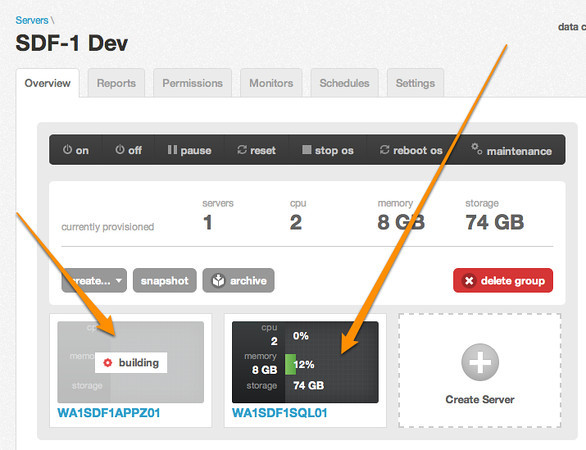
All My Instances Running

All My Instances Building & Running (Click for full size image)

When I setup the SQL Server instance, I used a blue print feature that allows the SQL Server to be installed directly on the image. This of course saved me a lot of time. But it does add to the deployment time of the instance in the cloud.

Part #2 – Setting up Windows Server 2008

The first thing we’ll need to do is log into these machines and configure them, standard infrastructure stuff. Open up the Server Manager (which launches automatically on instances) and verify that we have IIS installed on the web server.

Database Server
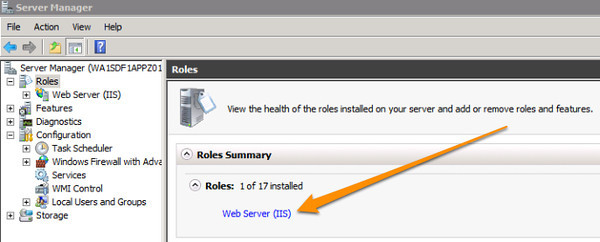
Server Manager

Server Manager (Click for full size image)

Next log into the database server and verify that the SQL Server is up, running and create the initial database.

Thusly…
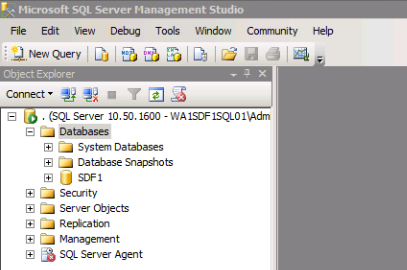
Using SQL Server Management Studio checking that the SQL Server Exists

Using SQL Server Management Studio checking that the SQL Server Exists

Once I had both of the servers up and running I got the application ready to deploy. First a little schema generation to use to deploy the database.

Don't Use "Script Database as..." option, use the "Tasks" option...

Don’t Use “Script Database as…” option, use the “Tasks” option…

Once the script is generated then transfer it and execute it against the database on the database server.
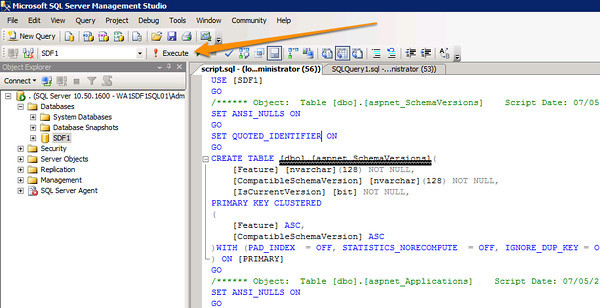
Execute the SQL Schema Create Script

Execute the SQL Schema Create Script (Click image for full size)

Always a good thing, even if all green lights are seen on the SQL execution, go in and make sure the tables are all there.

Web Server
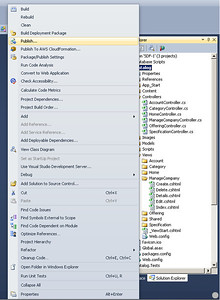
Publish

Publish (Click Full Image)

Publish Application (click for full size image)For the web server, as long as IIS is already installed, the setup is fairly easy. First snag the compiled bits that need deployed. We’ll do a direct drop onto the server and get it running.

To get the compiled bits, right click on the Visual Studio Project and select publish. Add a deployment scenario, which I did and set it up to just spit the bits out to a directory. There of course a multiple options at this point to use FTP, WebDav or whatever your choice is. I’m not a particular fan of any of those in particular, they’re all fairly easy.
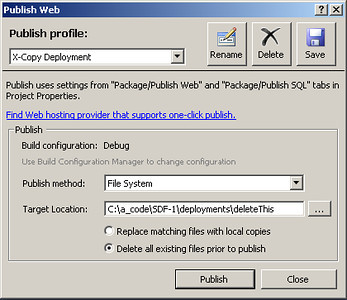
Deployment Publication Options

Deployment Publication Options (Click for full size image)

Interuption!!!

At this point I actually got hit with the “.NET 4.0 isn’t installed…” which it should have been. I opened up windows update and realized that it had not successfully executed nor had the .NET 4.0 install. This happens with all sorts of instances, regardless of provider, so make sure that the bits we need are installed. Also, with Windows, it’s a really good idea to get windows update turned on.

Back to Deployment

Now that we have the built bits just copy them onto the web application server into the inetpub wwwroot directory. Once you have that copied over you would be able to navigate to the IP of the machine this is setup on. At this time you may also want to setup a cname or a-record to point to the IP, so you can use a friendlier URI.

Retrospective

Now think about what has just gone on for a moment. We had to literally build out machines, add software and more. There were a lot of steps. This takes anywhere from 30 minutes to a few hours of actual work. In a larger business or an enterprise environment it could get extended out even further. Because of the extra complexity it could also end up broken, requiring extra troubleshooting and coding. There could even be a host of odd one off configuration issues with the hosting software itself.

Imagine you wanted to host an ASP.NET, PHP, Ruby on Rails and a Node.js App on the Server. That would be almost impossible. Consider how much extra configuration knowledge an ops person would need to troubleshoot each one of those frameworks. Just sit back and contemplate the complexities involved for a moment. All the complexity goes away with something like Cloud Foundry or Open Shift. With someone managing that system for you, such as us here at Tier 3 with our Web Fabric PaaS, AppFog, Cloud Foundry, or one of the other providers even more of the complexities just disappear.

Time for Summary & Beer

With all the steps and individual tasks needed to get something running in an IaaS Environment, go check out how slick getting something up and running with a PaaS style environment. The juxtaposition between what Richard had to go through versus what I had to go through is pretty significant. Simply put, for the vast majority of all application development can be done against a PaaS Environment and likely should. Digging deeper into the infrastruture elements is rarely needed except in rare scaling circumstances, such as the volume that Facebook, LinkedIn or Netflix deal with. Even then, as has been stated by these companies, they have a PaaS of their own they often build software to. So why not have this ability where you build software?

One of my key metrics, and I’ll be elaborating on this metric more in the future, is when I get to head out of the office for the day, relax, have a beer, and think about what I’ll get to create next. I call this my “Beer Enabler Measure“. PaaS technologies make it much easier for me to get to the relaxing part of my day a lot faster than IaaS technologies, and both of these make sure that I’m not pulling an all nighter without a beer like traditional hosting environments often do.

In the end, sure, infrastructure can be important and can help in transitioning legacy applications into an easier to manage environment. Today though, if you’re doing web application dev of any type, it should be deployed against a PaaS Environment either private or public.