HTML, CSS, JavaScript and Metro App Building on Windows 8 Part 1

I’m a fan of JavaScript and I’m warming to some of the Metro interfaces on Windows 8. I’ve always found the Windows 7 Phone UI, which is the first iteration of the Metro UI, to be a very slick phone interface. So with this blog entry I’m going to lay out setting up a default Windows 8 Metro application using JavaScript as the language of choice.

Prerequisites:

  • Windows 8
  • Visual Studio 2012

Open Visual Studio 2012 and click on file -> new project -> and then find the JavaScript section and pick the blank metro app.
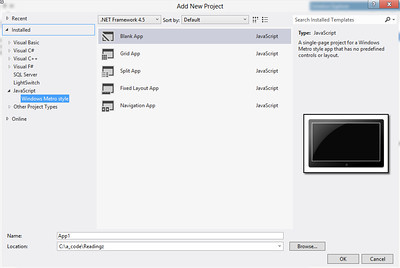
New Windows 8 Metro Project

Once you have the application created, I’d suggest following good practice and adding QUnit-Metro to your project with Nuget(or get the actual files if you don’t want to use Nuget).

Getting QUnit-Metro via Nuget

Once you’ve added the QUnit-Metro interface you’re ready to get started writing tests. But before writing a test take a look at the additional files that the QUnit-Metro Nuget Package adds to the project.
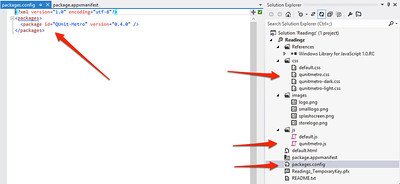
Things Added With QUnit-Metro

In the screenshot (click for a full size image), I’ve pointed in a clockwise order:

  • The package is added and listed in the packages file now for Nuget.
  • There are now three CSS files added for QUnit. Two are Metro specific, which gives a more Metro look to the results of the tests.
  • The qunitmetro.js file is the testing framework.

With this collateral added we can setup a test within the default.html page of the project. First add the following code so that your default.html file looks like this:

[sourcecode language=”html”]
<!DOCTYPE html>
<html>
<head>
<meta charset="utf-8" />
<title>Readingz</title>
<!– These files are included when the project is generated, I don’t really know where they are… –>
<link href="//Microsoft.WinJS.1.0.RC/css/ui-dark.css" rel="stylesheet" />
<script src="//Microsoft.WinJS.1.0.RC/js/base.js"></script>
<script src="//Microsoft.WinJS.1.0.RC/js/ui.js"></script>
<!– These are the CSS and JavaScript files that I’ve edited for testing. –>
<script src="/js/qunitmetro.js"></script>
<script src="/js/default.js"></script>
<script src="/js/default_tests.js"></script>
<link href="/css/default.css" rel="stylesheet" />
<link href="/css/qunitmetro-light.css" rel="stylesheet" />
</head>
<body>
<p>Content goes here</p>
<button>Press This!</button>
<!– This is for testing only. It goes away when application is ready to ship. –>
<div id="qunit"></div>
</body>
</html>
[/sourcecode]

The Microsoft.WinJS.1.0.RC libraries are included by default, which I’m assuming when I get fully upgraded to the released version of Windows 8 and Visual Studio 2012 that this might just read Microsoft.WinJS.1.0. The section of scripts and links below that are the added QUnit-Metro files. I included the qunitmetro-light.css file for metro style test results.

In the body of the page the div with the id of qunit…

[sourcecode language=”html”]
<div id="qunit"></div>
[/sourcecode]

is added where the test results will display. That’s how simple it actually is. To add actual tests, I’ve added a default_tests.js file to the js directory. I then added a simple test to the file that I’ve shown below.

[sourcecode language=”javascript”]
test("hello windows world of javascript tests!", function () {
ok(1 == "1", "Passed!");
});
[/sourcecode]

Run the application and you’ll find the following result displayed in your application.
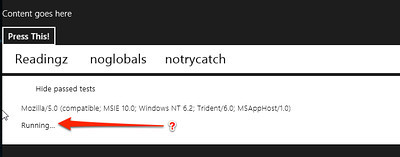
The Running Application

This is one place where an odd thing seems to be occurring (if you have any idea what the problem is, leave a comment, and I’ll do the same when I get the issues resolved). The test just keeps reporting “Running…” until you click on Readingz, noglobals, or somewhere else on the screen in that area to make an action occur. When I click on Readingz the test runs successfully like it should.
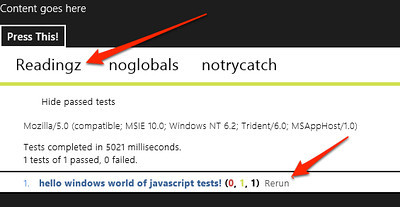
Test Ran
Test Ran

What’s up with that? It’s a pretty odd action.

Another issue that I ran into, which was a user error issue on my behalf, was I swapped around the three script files so the qunit-metro file loaded last. I actually stumbled and posted the issue on Stackoverflow here.
Shout it

OS-X Cocoa Quickie #1 => Make Sure to Have Unit Tests

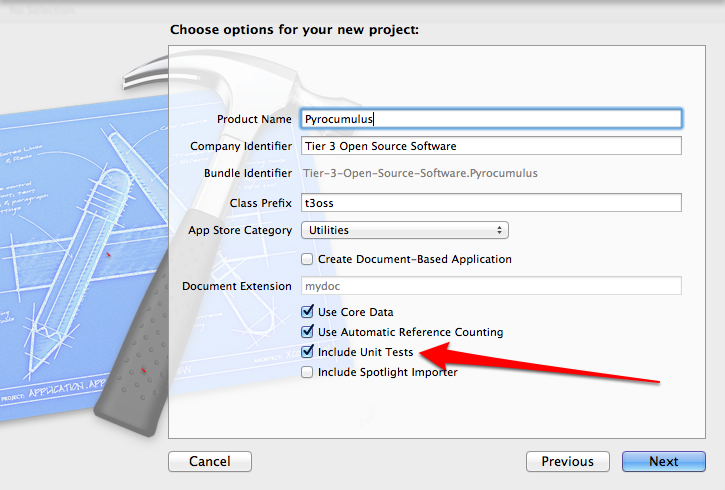
When starting an Xcode Cocoa Project you should have a testing project that you include. It’s a simple check box on the project creation dialogs.

Keep This Checked! Write Tests!

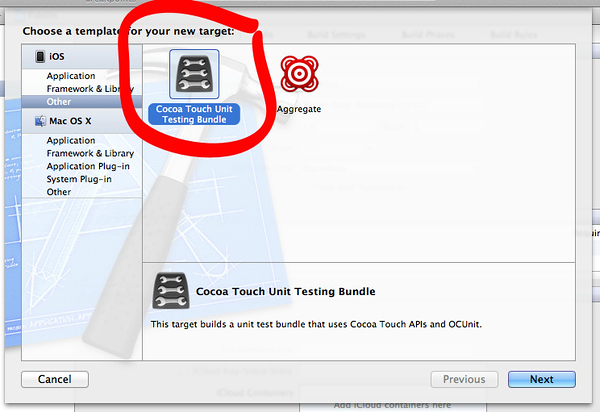
If for some reason you inherit a project that doesn’t have unit tests, tests, or anything of the sort and need to add a testing project follow these steps. With the project open add a new target as shown below.

Add a New Target to the Project

Add a Cocoa Unit Testing Bundle.

Cocoa Touch Unit Testing Bundle
Cocoa Touch Unit Testing Bundle (Click for full window and full size image)

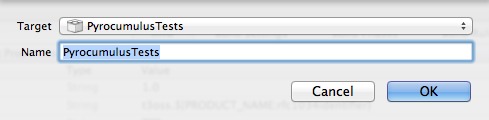
Set the appropriate parameters for your project. Be sure to select the project from the drop down.

Set the product name and be sure to select the correct Project from the drop down. (Click for full window and full size image)

Once finished adding the testing target, edit the schema. The project will have an additional schema. I personally like to keep them rolled together, so delete the “*Tests” schema and just make sure that the Tests section has the right target listed.

Schema Settings
Schema Settings

If it isn’t listed, as shown in the above dialog, click the + to add the tests project. Select it in the target dialog as shown below.

Adding the test target for the schema

Once all that is done then the tests can be executed from the Product -> Test menu option or the shortcut key combo of ⌘U. With the default code that is added to the target project, you’ll end up with one failing test.

Test FAIL!
Test FAIL!

Now write tests!

A TimePiece of C# and JavaScript

I put together a little project on Github, partially because I’ve been making headway learning the intricacies of JavaScript, and partly because I wanted something that would parse a string that represents a time value. So here’s the TDD I went through. In the process I pulled in QUnit and used that as my testing framework for the JavaScript example. I’d love input on either of these, so feel free to gimme some heat, tell me what I’ve done wrong, and especially how I ought to be doing this.  🙂

The first thing I did was put together the C# Library. I started two projects, one for the tests and one for the actual library.  In the tests project I added a class file and removed the default using statements and replaced them with the following by way of Nuget:

[sourcecode language=”csharp”]
using NUnit.Framework;
using Shouldly;
[/sourcecode]

After adding these references I jumped right into setting up the test fixture. Since I know I want to have something to parse the hour for military time also I’ve setup two test variables.

[sourcecode language=”csharp”]
[TestFixture]
public class with_static_parsing_of_time
{
protected string sampleTimeOne = "10:12am";
protected string sampleTimeTwo = "2:30pm";
[/sourcecode]

The first test I then dived into was to test the hour.

[sourcecode language=”csharp”]
[Test]
public void should_return_a_time_piece_with_correct_hour()
{
var timePiece = TimePiece.Parse(sampleTimeOne);
timePiece.Hour.ShouldBe(10);
}
[/sourcecode]

I then fleshed out the object and implemented enough to get this test to pass.

[sourcecode language=”csharp”]
namespace TimeSlicer
{
public class TimePiece
{
public TimePiece(string time)
{
ParseTime(time);
}

private void ParseTime(string time)
{
SetHour(time);
}

private void SetHour(string time)
{
Hour = Convert.ToInt32(time.Split(Convert.ToChar(":"))[0]);
}

public int Hour { get; set; }
[/sourcecode]

I then continued back and forth writing tests and implemented each. For the complete code check out the Github Repository. This example is really simple. I’d love any thoughts on adding to it or what you might think is a better way to test the object.

For the JavaScript I downloaded QUnit. Again I stepped into the testing, which is a whole different ballgame than in C#.

[sourcecode language=”javascript”]
<link rel="stylesheet" href="qunit/qunit.css" type="text/css" media="screen"/>
<script type="text/javascript" src="jquery-1.6.2.js"></script>
<script type="text/javascript" src="qunit/qunit.js"></script>
<script type="text/javascript" src="TimeSlicer/TimePiece.js"></script>
<script type="text/javascript">

var timeValueOne = "1:30am";
var timeValueTwo = "8:15pm";

$(document).ready(function() {

module("Parse hour from value.");

test("Should parse hour from value.", function() {
TimePiece(timeValueOne);
equal(TimePiece.Hour(), 1, "The appropriate hour value is returned for AM meridian value.");
});
[/sourcecode]

For the full test file with other JavaScript libraries and CSS check out the code file on github.

…and directly into implementation. With the caveat that I’m extremely unfamiliar with actual psuedo/pretend/faux object creation in JavaScript. In this realm I’m still reading up on best ways to do this.

[sourcecode language=”javascript”]
TimePiece = function(time) {
TimePiece.Hour = function () {
return time.toString().split(":")[0];
}
return time;
};
[/sourcecode]

I went on from here writing tests and implementing as I did with the C#. The JavaScript was interesting. I’ve also noticed that I get a lot of strings back versus the number values that I’d actually want, thus the addition of the “parseInt” in the final version.

Check out the overall project on Github at: https://github.com/Adron/Time-Slice

Windows Azure SDK Unit Testing Dilemma — F5DD Plz K Thx Bye

I’m a huge advocate for high quality code. I will admit I don’t always get to write, or am always able to write high quality code. But day in and out I make my best effort at figuring out the best way to write solid, high quality, easy to maintain, easy to read code.

Over the last year or so I’ve been working with Windows Azure (Amazon Web Services and other Cloud/Utility Platforms & Infrastructure also). One of the largest gaps that I’ve experienced when working with Windows Azure is the gross disregard for unit testing and especially unit testing in a Test Driven Development style way. The design of the SDK doesn’t make unit testing a high priority, and instead focuses mostly on what one might call F5 & Run Development.

I’ll be the first to stand up and point out why F5 Driven Development (for more on this, check out Jeff Schumacher‘s Blog Entry) is the slowest & distracting ways to build high quality code. I’d also be one to admit that F5 Development encourages poor design and development. A developer has to juggle far too many things to waste time hitting F5 every few seconds to assure that the build is running and code changes, additions, or deletions have been made correctly. If a developer disregards running the application when forced to do F5 Development the tendancy is to produce a lot of code, most likely not refactored or tested, during each run of the application. The list of reasons to not develop this way can get long pretty quick. A developer needs to be able to write a test, implement the code, and run the test without a framework launching the development fabric, or worse being forced to not write a test and running code that launches a whole development fabric framework.

Now don’t get me wrong, the development fabric is freaking AWESOME!! It is one of the things that really sets Windows Azure apart from other platforms and infrastructure models that one can develop to. But the level of work and effort makes effectively, cleanly, and intelligently unit testing code against Windows Azure with the development fabric almost impossible.

But with that context, I’m on a search to find some effective ways, with the current SDK limitations and frustrations, to write unit tests and encourage test driven design (TDD) or behaviour driven design (BDD) against Windows Azure, preferably using the SDK.

So far I’ve found the following methods of doing TDD against Windows Azure.

  • Don’t use the SDK. The easiest way to go TDD or BDD against Windows Azure and not being tightly bound to the SDK & Development Fabric is to ignore the SDK altogether and use regular service calls against the Windows Azure service end points. The problem with this however, is that it basically requires one rewrite all the things that the SDK wraps (albeit with better design principles). This is very time consuming but truly gives one absolute control over what they’re writing and also releases one from the issues/nuances that the Windows Azure SDK (1.3 comes to mind) has had.
  • Abstract, abstract, and abstract with a lock of stubbing, mocking, more stubbing, and some more abstractions underneath all of that to make sure the development fabric doesn’t kick off every time the tests are run.  I don’t want to abstract something just to fake, stub, or mock it.  The level of indirection needed gets a bit absurd because of the design issues with the SDK.  The big problem with this design process to move forward with TDD and BDD is that it requires the SDK to basically be rewritten as a whole virtual stubbed, faked, and mocked layer. Reminds me of many of the reasons the Entity Framework is so difficult to work with for testing (has the EF been cleaned up, opened up, and those nasty sealed classes removed yet??)

Now I’ll admit, sometimes I miss the obvious things and maybe there is a magic “build tests real easy right here” button for Windows Azure, but I haven’t found it.  I’d love to hear what else people are doing to enable good design principles around Windows Azure’s SDK. Any thoughts, ideas, or things I ought to try would be absolutely great – I’d love to read them. Please do comment!

More Cloud News

Recently Amazon jumped into the relational database cloud competition with Microsoft.  Up until the 6th of this month, Microsoft had the only cloud with a real dedicated relational database offering in SQL Azure.  Now Amazon has their Relational Database Service heating up the competition.

In other news, Google finally joined the storage party with their recent launch announcement at the I/O Conference.  So now we have Amazon, Microsoft, and Google as the big companies on the block throwing down on the storage offerings.  Stay tuned for more!

In other news I have been working through the katas setup for TDD practice.  They’re actually a lot of fun and would suggest anyone out there interested in TDD or just unit testing to just go out and give one a test drive.  : )

Currently I am working on a code kata putting together ideas from Roy Osherove‘s The Art of Unit Testing and what one needs to know for testing in enterprise environments, abstracting the appropriate code to take into account web services, files, I/O, architectural issues, and other elements of coding.