Kubernetes Networking Explained & The Other Projects

Still stumbling through determining what Kubernetes does for networking? Here’s a good piece written up by Mark Betz, titled “Understanding Kubernetes Networking: Pods”. Just reading Mark’s latest on Kubernetes is great, but definitely take a look at his other writing too, it’s a steady stream of really solid material that is insightful, helpful, and well thought out. Good job Mark.

I’ve got two more blog entries on getting Kubernetes deployed and what you get with default Terraform configuration setups in Azure and AWS (The Google Cloud Platform write up is posted here). Once complete that’s a wrap for that series. Then I’m going shift gears again and start working on a number of elements around application and services (ala microservices) development.

Always staying nimble means always jumping around to the specific details of the things that need done! This, among many efforts to jump around to the specific thing that needs done, actually feels more like a return to familiar territory. After all, the vast majority of my work in the last many years has been writing code implemented against various environments to ensure reliable data access and available services for customers; customers being web front end devs, nurses in a hospitals, GIS workers resolving mapping conflicts, veterinarians, video watching patrons on the internet, or any host of someone using the software I’ve built.

In light of that, here’s a few extra thoughts and tidbits about what’s in the works next.

  • Getting the Data Diluvium Project running, a core product implemented, and usable live out there on the wild web.
  • Getting blue-land-app (It’s a Go Service), blue-world-noding (It’s a Node.js Service), and blue-world-making (It’s the infrastructure the two run on) are all working and in usable states for prospective tutorials, sample usage, and for speaking from in presentations. They’re going to be, in the end, solid examples of how to get up and running with those particular stacks + Kubernetes. A kind of a from zero to launch examples.

Other Links of Note:

Build a Kubernetes Cluster on Google Cloud Platform with Terraform

terraformIn this blog entry I’m going to detail the exact configuration and cover in some additional details the collateral resources you can expect to find once the configuration is executed against with Terraform. For the repository to this write up, I create our_new_world available on Github.

First things first, locally you’ll want to have the respective CLI tools installed for Google Cloud Platform, Terraform, and Kubernetes.

Now that all the prerequisites are covered, let’s dive into the specifics of setup.

gcpIf you take a look at the Google Cloud Platform Console, it’s easy to get a before and after view of what is and will be built in the environment. The specific areas where infrastructure will be built out for Kubernetes are in the following areas, which I’ve taken a few screenshots of just to show what the empty console looks like. Again, it’s helpful to see a before and after view, it helps to understand all the pieces that are being put into place.

The first view is of the Google Compute Engine page, which currently on this account in this organization I have no instances running.

gcp-01

This view shows the container engines running. Basically this screen will show any Kubernetes clusters running, Google just opted for the super generic Google Container Engine as a title with Kubernetes nowhere to be seen. Yet.

gcp-02

Here I have one ephemeral IP address, which honestly will disappear in a moment once I delete that forwarding rule.

gcp-03

These four firewall rules are the default. The account starts out with these, and there isn’t any specific reason to change them at this point. We’ll see a number of additional firewall settings in a moment.

gcp-04

Load balancers, again, currently empty but we’ll see resources here shortly.

gcp-05

Alright, that’s basically an audit of the screens where we’ll see the meat of resources built. It’s time to get the configurations built now.

Time to Terraform Our New World

Using Terraform to build a Kubernetes cluster is pretty minimalistic. First, as I always do I add a few files the way I like to organize my Terraform configuration project. These files include:

  • .gitignore – for the requisite things I won’t want to go into the repository.
  • connections.tf – for the connection to GCP.
  • kubernetes.tf – for the configuration defining the characteristics of the Kubernetes cluster I’m working toward getting built.
  • README.md – cuz docs first. No seriously, I don’t jest, write the damned docs!
  • terraform.tfvars – for assigning variables created in variables.tf.
  • variables.tf – for declaring and adding doc/descriptions for the variables I use.

In the .gitignore I add just a few items. Some are specific to my setup that I have and IntelliJ. The contents of the file looks like this. I’ve included comments in my .gitignore so that one can easily make sense of what I’m ignoring.

# A silly MacOS/OS-X hidden file that is the bane of all repos.
.DS_Store

# .idea is the user setting configuration directory for IntelliJ, or more generally Jetbrains IDE Products.
.idea
.terraform

The next file I write up is the connections.tf file.

provider "google" {
  credentials = "${file("../secrets/account.json")}"
  project     = "thrashingcorecode"
  region      = "us-west1"
}

The path ../secrets/account.json is where I place my account.json file with keys and such, to keep it out of the repository.

The project in GCP is called thrashingcorecode, which whatever you’ve named yours you can always find right up toward the top of the GCP Console.

console-bar

Then the region is set to us-west1 which is the data centers that are located, most reasonably to my current geographic area, in The Dalles, Oregon. These data centers also tend to have a lot of the latest and greatest hardware, so they provide a little bit more oompf!

The next file I setup is the README.md, which you can just check out in the repository here.

Now I setup the variables.tf and the terraform.tfvars files. The variables.tf includes the following input and output variables declared.

// General Variables

variable "linux_admin_username" {
  type        = "string"
  description = "User name for authentication to the Kubernetes linux agent virtual machines in the cluster."
}

variable "linux_admin_password" {
  type ="string"
  description = "The password for the Linux admin account."
}

// GCP Variables
variable "gcp_cluster_count" {
  type = "string"
  description = "Count of cluster instances to start."
}

variable "cluster_name" {
  type = "string"
  description = "Cluster name for the GCP Cluster."
}

// GCP Outputs
output "gcp_cluster_endpoint" {
  value = "${google_container_cluster.gcp_kubernetes.endpoint}"
}

output "gcp_ssh_command" {
  value = "ssh ${var.linux_admin_username}@${google_container_cluster.gcp_kubernetes.endpoint}"
}

output "gcp_cluster_name" {
  value = "${google_container_cluster.gcp_kubernetes.name}"
}

In the terraform.tfvars file I have the following assigned. Obviously you wouldn’t want to keep your production Linux username and passwords in this file, but for this example I’ve set them up here as the repository sample code can only be run against your own GCP org service, so remember, if you run this you’ve got public facing default linux account credentials exposed right here!

cluster_name = "ournewworld"
gcp_cluster_count = 1
linux_admin_username = "frankie"
linux_admin_password = "supersecretpassword"

Now for the meat of this effort. The kubernetes.tf file. The way I’ve set this file up is as shown.

resource "google_container_cluster" "gcp_kubernetes" {
  name               = "${var.cluster_name}"
  zone               = "us-west1-a"
  initial_node_count = "${var.gcp_cluster_count}"

  additional_zones = [
    "us-west1-b",
    "us-west1-c",
  ]

  master_auth {
    username = "${var.linux_admin_username}"
    password = "${var.linux_admin_password}}"
  }

  node_config {
    oauth_scopes = [
      "https://www.googleapis.com/auth/compute",
      "https://www.googleapis.com/auth/devstorage.read_only",
      "https://www.googleapis.com/auth/logging.write",
      "https://www.googleapis.com/auth/monitoring",
    ]

    labels {
      this-is-for = "dev-cluster"
    }

    tags = ["dev", "work"]
  }
}

With all that setup I can now run the three commands to get everything built. The first command is terraform init. This is new with the latest releases of Terraform, which pulls down any of the respective providers that a Terraform execution will need. In this particular project it pulls down the GCP Provider. This command only needs to be run the first time before terraform plan or terraform apply are run, if you’ve deleted your .terraform directory, or if you’ve added configuration for something like Azure, Amazon Web Services, or Github that needs a new provider.

terraform-init

Now to ensure and determine what will be built, I’ll run terraform plan.

terraform-plan

Since everything looks good, time to execute with terraform apply. This will display output similar to the terraform plan command but for creating the command, and then you’ll see the countdown begin as it waits for instances to start up and networking to be configured and routed.

terraform-apply

While waiting for this to build you can also click back and forth and watch firewall rules, networking, external IP addresses, and instances start to appears in the Google Cloud Platform Console. When it completes, we can see the results, which I’ll step through here with some added notes about what is or isn’t happening and then wrap up with a destruction of the Kubernetes cluster. Keep reading until the end, because there are some important caveats about things that might or might not be destroyed during clean up. It’s important to ensure you’ve got a plan to review the cluster after it is destroyed to make sure resources and the respective costs aren’t still there.

Compute Engine View

In the console click on the compute engine option.

gcp-console-compute-engine

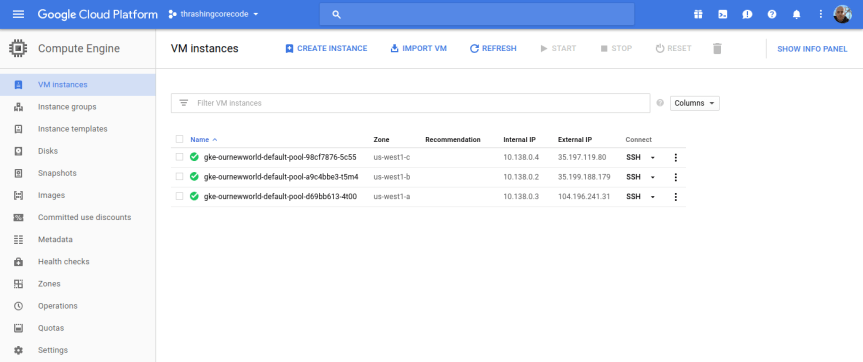
I’ll start with the Compute Engine view. I can see the individual virtual machine instances here and their respective zones.
gcp-console-01

Looking at the Terraform file confiugration I can see that the initial zone to create the cluster in was used, which is us-west1-a inside the us-west1 region. The next two instances are in the respective additional_zones that I marked up in the Terraform configuration.

additional_zones = [
  "us-west1-b",
  "us-west1-c",
]

You could even add additional zones here too. Terraform during creation will create an additional virtual machine instance to add to the Kubernetes cluster for each increment that initial_node_count is set to. Currently I set mine to a variable so I could set it and other things in my terraform.tfvars file. Right now I have it set to 1 so that one virtual machine instance will be created in the initial zone and in each of the designated additional_zones.

Beyond the VM instances view click on the Instance groups, Instance templates, and Disks to seem more items setup for each of the instances in the respective deployed zones.

If I bump my virtual machine instance count up to 2, I get 6 virtual machine instances. I did this, and took a screenshot of those instances running. You can see that there are two instances in each zone now.

gcp-console-2instances-01

Instance groups

Note that an instance group is setup for each zone, so this group kind of organizes all the instances in that zone.

gcp-console-02

Instance Templates

Like the instance groups, there is one template per zone. If I setup 1 virtual machine instance or 10 in the zone, I’ll have one template that describes the instances that are created.

gcp-console-03

gcp-console-04

To SSH into any of these virtual machine instances, the easiest way is to navigate into one of the views for the instances, such as under the VM instances section, and click on the SSH button for the instance.
gcp-console-05

Then a screen will pop up showing the session starting. This will take 10-20 seconds sometimes so don’t assume it’s broken. Then a browser based standard looking SSH terminal will be running against the instance.

ssh-window-01

ssh-window-02

This comes in handy if any of the instances ends up having issues down the line. Of all the providers GCP has made connecting to instances and such with this and tools like gcloud extremely easy and quick.

Container Engine View

In this view we have cluster specific information to check out.

gcp-console-container-clusters

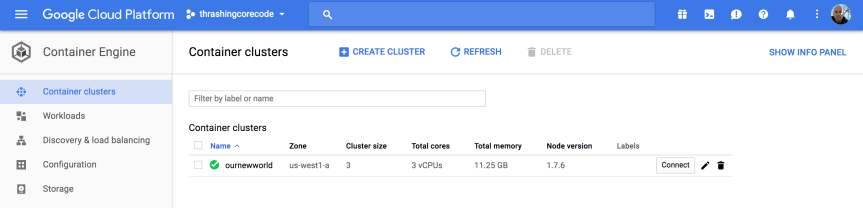
Once the cluster view comes up there sits the single cluster that is built. If there are additional, they display here just like instances or other resources on other screens. It’s all pretty standard and well laid out in Google Cloud Platform fashion.

gcp-console-05

The first thing to note, in my not so humble opinion, is the Connect button. This, like on so many other areas of the console, has immediate, quick, easy ways to connect to the cluster.

gcp-console-06

Gaining access to the cluster that is now created with the commands available is quick. The little button in the top right hand corner copies the command to the copy paste buffer. The two commands execute as shown.

gcloud container clusters get-credentials ournewworld --zone us-west1-a --project thrashingcorecode

and then

kubectl proxy

gcp-console-07

With the URI posted after execution of kubectl proxy I can check out the active dashboard rendered for the container cluster at 127.0.0.1:8001/ui.

IMPORTANT NOTE: If the kubectl version isn’t up to an appropriate parity version with the server then it may not render this page ok. To ensure that the version is at parity, run a kubectl version to see what versions are in place. I recently went through troubleshooting this scenario which rendered a blank page. After trial and error it came down to version differences on server and client kubectl.

Kubernetes_Dashboard

I’ll dive into more of the dashboard and related things in a later post. For now I’m going to keep moving forward and focus on the remaining resources built, in networking.

VPC Network

gcp-console-09

Once the networking view renders there are several key tabs on the left hand side; External IP addresses, Firewall rules, and Routes.

External IP Addresses

Setting and using external IP addresses allow for routing to the various Kubernetes nodes. Several ephemeral IP addresses are created and displayed in this section for each of the Kubernetes nodes. For more information check out the documentation on reserving a static external IP address and reserving an internal IP address.

gcp-console-11

Firewall Rules

In this section there are several new rules added for the cluster. For more information specific to GCP firewall rules check out the documentation about firewall rules.

gcp-console-12

Routes

Routes are used to setup paths mapping an IP range to a destination. Routes setup a VPC Networks where to send packets for a particular IP address. For more information about documentation route details.

gcp-console-13

Each of these sections have new resources built and added as shown above. More than a few convention based assumptions are made with Terraform.

Next steps…

In my next post I’ll dive into some things to setup once you’ve got your Kubernetes cluster. Setting up users, getting a continuous integration and delivery build started, and more. I’ll also be writing up another entry, similar to this for AWS and Azure Cloud Providers. If you’d like to see Kubernetes setup and a tour of the setup with Terraform beyond the big three, let me know and I’ll add that to the queue. Once we get past that there are a number of additional Kubernetes, containers, and dev specific posts that I’ll have coming up. Stay tuned, subscribe to the blog feed or follow @ThrashingCode for new blog posts.

Resources:


Speaking, Follow Up, and Improving

Recently I did a series of talks focused around building Kubernetes Clusters. In these I demoed how Terraform can be used to build out a Kubernetes cluster and then ideas for working with that Kubernetes cluster or building out other infrastructure with Terraform around the Kubernetes cluster. I’ve posted the first of several posts that I’m putting together related to the configuration, code, and work I did for those talks.

On this topic there are several additional things I try to do for and after every presentation I give. This adds value for me, the people who attend the presentation, but also for others that did not attend after the talk. At least, that’s my intent and hope in this and related follow up material. Here’s the breakdown of what I try to do with every presentation. Below I’ll also have links to presentations I have succeeded in accomplishing this mission.

Mission Goals

The mission goals involves getting the presentation posted along with other key goals upon notification of date, time, and related details to several key places:

  1. Calendar — Post to my speaking and meetup calendar here.
  2. RSVP Site — Next I ensure it is listed on meetup or whatever site the organizers are using.
  3. Composite Code Blog Listing — Next I create a page where I will put all of the collateral for the presentation and list it on this page. Often this starts out merely as a listing and then a link to the page where I’ll simply write “Content are TBD but actively being developed! Stay tuned!”
  4. Presentation Page — Then for each presentation I give I create a singular page to post and collect all the collateral elements. This is the page that the listing in #3 points to. Some examples include; “Elasticsearch with Terraform, Packer, and Immutability Magic” or “Terraform, Packer, Atlas @ The Orange Retailer”.
  5. Code, Slide Deck, Collateral — Other elements I make ever effort to include code repositories (usually on Github), image or slide deck files, and anything else I used to demonstrate during the presentation.

Presentations That Accomplish This Mission

There are a few of these presentations I’ve given that have had every mission criteria met. Here I’ve linked a few just to point out what a finished presentation and follow up looks like. At least, these are examples of what I aim for, there are always ways to improve on this.

  1. Managing (or not) The Data in Immutable Infrastructure — includes slides, a short write up, video, and related collateral.
  1. Organizing Infrastructure Config & Workflow — includes slides, and very thorough write up, video, etc.
  1. Visual Studio AWS Tooling & SDK — Even though this is a presentation from a different era of technology, it still represents all the pieces collected for a successful mission. Video, write up, and collateral repo and such. I’d be curious, since it has been such a long time, if the code still runs.

That’s that, and onward and forward to the next code challenge. I’ll be publishing that shortly on my blog, at https://compositecode.blog/.

Just Another Sunday

I sit here at the moment watching two Kubernetes Clusters build. One is building on Azure and one on Google Cloud Platform (GCP). I’ve got a presentation coming up this Tuesday and Thursday, both I’ll be digging into Kubernetes, Terraform, and a number of other technologies. Those are the two hot technologies for the talks though. Albeit, the continuous integration, languages, and tooling that Terraform builds via configuration and Kubernetes runs in containers is what is actually the meat of this whole sandwich. Which is where I ponder what all of this goo is that wires together things in this virtual programmatic realm in which I’ll build something on top of.

It seems messy from inception. But then of course, all programming and related ecosystem elements in which programming takes place is a messy bag of guts.

Here I sit then, waiting the rather unknown pseudo random amount of time for the Kubernetes Clusters to finish building. A few moments pass and sure enough, as always, very inconsistent build times. The Azure Kubernetes Cluster took 7 minutes to build and the GCP Kubernetes Cluster took just 4 minutes. Last night the Azure cluster was taking 20 minutes or more while the GCP cluster was consuming about 3–4 minutes to build. I’m not sure, as I’ve not dug into the matter deep enough, but something seems awry within the way Azure needs to build out its instances, networking, and related cluster mechanisms. I’m not surprised though, Azure has always behaved and felt slow and cumbersome during the build out of infrastructure. GCP on the other hand clearly comes from Google’s thoroughbred engineering focus on things. It generally builds in a much smaller range of time, consuming much less time overall.

As I build all of this, to work out what will and won’t be in the demo, I find myself next fiddling with presentation material. I really don’t even like to have presentation material, I’d much rather have an interesting enough talk and respective code, samples, and demo to just show the whole thing. Presentation slide decks always fell like, and almost always are, just a crutch for the inability to form ideas, show concepts, or otherwise actually engage the audience around what is being presented. It’s a frustrating dichotomy to say the least. Eventually, with these latest efforts, I actually intend to get down to two slides: one for my information when ending the talk, the requisite contact information and such, then two would be the intro slide with a fancy title for whatever the meat of the talk will be about.

All of this work however is going to be interrupted by the dramatically more important bike ride I’ll take later to clear my thoughts and get the blood flowing through my veins. As things go, I actually dislike sitting still for more than a few hours. I like to chunk my time into brackets, get the work done, and then go for a ride, walk, or something to get my mind cleared back up. I hear it’s healthier for us humans too, but I’ve not set the research to memory to make that argument.

Until later… fini.

Home Depot Wrap Up and Job Talk

First, I will be available with a possible start date of November the 28th. I’m currently wrapping up some big projects and completing training for the Home Depot Team and the great progress we’ve made over the last year. If your company is looking for someone with my mixed array of technical skills and soft skills, you can check out my resume & details and initiate job talk with me here!

On to the rest of the news. If you’ve seen me speak lately I’ve mentioned the open source efforts we’ve had going on at Home Depot and related efforts I was working on. Some I’m working dilligently to release via the Home Depot OSS Organization on Github and I’ll still be releasing others soon via my Github account (@Adron) and blogging about it here on Composite Code.

Since this is one of those rare times in my career where I’m not 100% sold on what I’ll do next, I’m open to fielding prospects and seeing what is out there. This is a different approach for me, as I usually determine a company, particular work that needs done and go after that gap. But I’d like to get a feel for what companies feel they need at this particular time. Since I have a wide range of skills, I can step into a number of positions and immediately start to contribute to projects within a company.

Here are some positions I’d find attractive and could provide value for (or build) a team immediately!

Building or Expanding a Team

Need someone to hire, build, and create a cohesive, diverse, and powerful culture of core contributors (developers, designers, advocates, evangelists, or similar). I can knock this one out of the park for the right company. Yes, I’m a bit particular, but I’m not just going to whimsically work for any company (the best people won’t work for just any old company anyway). If you are looking to put a team together and want somebody that can do that for you, I’d like to sit down to a conversation soon. Let’s talk jobs.

Coding Architect

Have some architecture problems, that seem a bit unique or problematic? If you need someone to come in and push forward on design, patterns, practices, and actual implementation then this would also be a conversation I’d be interested in having. I’d be happy to dive into whatever the stack might be (or help decide on the stack): Java (Scala/Kotlin), Golang, Node.js or even .NET (C#/F#) for the right company. Let’s talk jobs.

Development & Operations Architect

Have some architecture that needs to go along with an application and want to build or insure a solid continuous integration and delivery pipeline (or messaging based queue for delivery to production)? This is another possibility I’d be happy to talk about. I really love working with systems to build out reliable immutable infrastructure, data storage mechanisms (distributed, RDBMS, whatever the need calls for) and insure development can continue forward with extremely high confidence levels. Let’s talk jobs.

Developer Advocate/OSS Project Lead

If you have an open source project I’d love to take lead on it and also provide advocacy for that project. This role is not to be confused with evangelist, as that’s a fine role for other people, but I want to be in the code and advocating from a position with the team. I’ve done this before with projects like the Iron Foundry for Cloud Foundry and others, and loved it. Let’s talk jobs.

Mergers & Acquisition Technical Evaluations

This is not something one sees everyday, but I’ve worked in a consulting role and have assisted others with this work before. I find it really interesting looking at prospective ROI, current run rates, but also at the specific details of whehter a product or service can even be incorporated and integrated into the acquiring company. In the case of merging, this differs from acquisition in that both entities and both companies’ products and services will both need to polymorph into a new whole. If you’re company is looking to get into some M & A’s, let’s talk about how I can help.

If any of these sound like a need you have, please reach out with additional information and I will be in contact ASAP.

Besides the above theoretical jobs above, here are a few other things that I would like in a job. Things that just make it all worthwhile, here’s a list.

Work Environ / Soft Skills / Culture

  • Flexible hours remote or remote (out of office). Whatever the case, I’d like to work with a company that has the ability and acumen to manage the workflow and efforts among team members remotely. If you’re a company that wants to upgrade the development and operational characteristics of the culture, I can also help your company incorporate highly effective remote capabilities.
Cascadia
  • If there is travel, I prefer to keep it to a productively effective 10-15% of the time. Traveling dramatically decreases overall ability to contribute to actual work in an effective way. I do love to travel, speak, and get involved with the worldwide community but I always like to make sure that this involvement doesn’t stymie me from contributing to actual coding, design, and related efforts. NOTE: If travel is within the Cascadian Bioregion (see image: includes YVR, PDX, SEA, etc) it’s easy to increase my travel to 15-25% of the time as travel within the region is so easy. I probably should include SFO too, it’s super easy to get there and doesn’t cause disruption to daily workflow. (i.e. < 2 hr trip)
  • Design, build, and communicate. These are the things I like to do. I like to create what will work for high volume or high speed systems, then build prototypes and communicate how these work. Maybe I would be the one deploying to production, maybe the system is production that I’m deploying, but whatever the case is I’m happy to lead efforts on architecture and work with teams to build that architecture.
  • I love to provide leadership for teams, I love to build teams, and I like working with teams. Albeit I’m particular about team diversity and culture, I can bring my own skills and the ability to bring people together on a team and expand teams. If the culture is off kilter, I can help with that. If the culture is spot on, I can work effectively with that. Whatever the case, I’m a high communication, GSD type of guy provided the right environment and reigns removed.
Google Cloud Platform

Technical Skills

  • I’ve found Google Cloud Platform (GCP) a pleasure to work with lately. That combined with Terraform, Packer, and related HashiCorp tooling has been a lot of fun and provided an extremely high value for us at Home Depot.
HashiCorp
  • AWS has been another I’ve worked with that has been of stellar value, not particularly at Home Depot but at multitudes of startups and during consulting. AWS is still for many things my go to cloud provider option.
  • Azure is another I’ve used that would be an interesting service to use again. It’s been well over 2 years since I worked with or provided Azure support or consulting. I’ve got a soft spot in my heart for this cloud provider since I led teams back in 2010 writing some of the first white papers for the service!
  • I’m comfortable with C#, JavaScript, Java (mostly), and am looking forward to writing more Golang and happily will dive into Scala, Erlang, F#, and a whole host of other languages.
  • I’m happy to work with container tech (Rocket/CoreOS) or Docker and I’ll also help keep your company grounded that it might not be the panacea you’re looking for. But they definitely have lots of awesome uses!
  • I’d prefer a Unix/Linux environment to work in, but I’ll happily help remove Windows Servers from deployment requirements! 😉

Contact me or let’s talk jobs, cheers!