Hurting or Helping Devs?

This video features me, a Principal Software Engineer, discussing the impact of AI on software development, the risks of “vibe coding,” and the necessary shifts in engineering practices. Adron argues that traditional manual coding is becoming obsolete and that developers must adapt to a new paradigm defined by systems thinking and AI orchestration.

Key Takeaways:

  • The Dangers of “Vibe Coding”: Adron defines “vibe coding” as the practice of relying on AI to generate code without a deep understanding of the system (0:08:31). This often leads to unmaintainable, “disposable” software—a phenomenon he calls the shinification of software—which can cause significant production issues when systems fail (0:00:46, 0:08:31).
  • Managing AI Agents: To maintain code quality, developers must:
    • Rein in Scope: Avoid open-ended prompts; instead, provide specific, well-defined architectural plans to AI agents (0:05:13, 0:06:01).
    • Diff Discipline: Enforce hard limits on diff sizes (e.g., aiming for ~50 lines) to ensure human reviewers can feasibly audit changes (0:52:37, 0:55:00).
    • Human Gatekeeping: Keep humans as the final gatekeepers for production deployments to ensure security and reliability (0:16:50, 0:57:29).
  • The Evolution of the Developer Role: The junior pipeline is changing; instead of focusing on syntax or pixel-pushing, future developers should act as systemic architects who understand how to orchestrate AI tools and manage complex workflows (0:24:05, 0:26:05).
  • The Industry Reckoning: As VC-subsidized AI adoption faces future economic corrections, companies will need to prioritize efficiency, energy production, and true orchestration over simply generating massive amounts of code (1:02:41, 1:05:00).
  • Future Predictions: Adron predicts that AI will eventually develop its own programming language optimized for machine-to-machine communication, further distancing development from manual human typing (1:09:48).

In this episode, you’ll learn:

  1. Why writing code manually means you are already too far behind.
  2. How to manage the six specific types of AI code changes.
  3. The reason Diff Discipline is the only way to survive vibe coding.

Time Sliced Segments

  • (03:14) Why the junior developer pipeline is imploding
  • (05:13) How to reign in agent scope for better results
  • (08:31) The slow creeping dread of vibe coding
  • (12:50) Moving past communication cycles with prototypes
  • (16:50) Why shipping to production needs a human gatekeeper
  • (20:20) How roles shift when agents handle the workflow
  • (24:05) Why slinging individual lines of code is over
  • (29:47) Bringing a generalist approach back to computer science
  • (34:57) Breaking down the six types of code changes
  • (41:40) Why AI optimizes for plausible output instead of correctness
  • (52:37) Enforcing diff limits to keep human reviewers sane
  • (57:29) Setting up no-fly zones for sensitive code
  • (01:02:41) The coming hundred x shock to the tech industry
  • (01:11:27) What it means to be a coder in 2026

Monday’s Greeting & Miniature Emotive Micro-rant

I always find it painful for those of us that understand the semantic, etymologic, systemic, historical, and related first principles of things that have happened in our life time. For example the origination of “DevOps” or “Agile” and know the original coining, intent, and purpose of these terms and principles.

Also the simply things like “they’re”, “their”, and “there”, “where”, “were”, and “we’re”, or the comma usage in this very statement. Not just one or two misuses of these things, but the almost gas lighting nature of entire organizations (looking at whole parts of Microsoft) trying to redefine these things into other entirely new concepts, entire parts of society just ignoring or obliviously not learning these language elements, or a confluence of all these things coming together.

But even all that gas lighting and negligent use of ideas and words, the icing that makes the shit sandwich is, when the failures of society or organizations and people to know and use these concepts and terms and words correctly, then tells you – someone who was involved or knows the concepts and word usage well – that we’re somehow elitist or out of touch or don’t know what we’re talking about.

Utterly insane and levels of hubris that I just give no care to. It is almost as bad, and annoying, and frustrating I imagine as someone writing a code library, component, application, or inventing something and then having someone else explain it back to them wrong and tell them they’re wrong. Just wild madness among some to do this.

It’s painful, but also sometimes in that later case, hilarious to watch the person correct the confidently wrong, then mic drop with, “How do I know? Cuz I created the thing!” 🤣

The lesson, I suppose, that I’m inferring in this miniature emotive micro-rant, is don’t walk through life with the hubris and confidence that the wrong have. Walk through life with humility and learn to listen, always listen, even if you are the holder of knowledge, no matter the case, and be ready to learn and also teach.

With all that said, and my miniature emotive micro-rant complete – y’all have a great day and may this Monday not be like the trope Monday’s often have! Cheers!

InterlinedList Is Live: Lists, Posts, and Markdown Finally in One Place

It’s the 73rd Day of 2026! Per my previous post, I promised updates and thus, updates delivered!

There’s a problem I’ve run into repeatedly over the years. Actually, it’s more like a pattern of problems.

I’ve got:

  • notes scattered across markdown files
  • lists living in some task app
  • social media posts written in drafts somewhere else
  • and half-finished ideas bouncing between GitHub issues, notebooks, and random documents.

Individually, each of these tools is “fine” yet fragmented and leaves ideas, messaging, and lists leaking and losing ideas to the nebulous.

That’s exactly the mess that led me to build InterlinedList.

And now it’s live: 👉 https://interlinedlist.com

What InterlinedList Actually Is

At its core, InterlinedList is a platform that ties together three things that are usually awkwardly separated:

  1. Lists
  2. Social media posting (to your other accounts too, not just on IntelinedList)
  3. Markdown documents

Each of these solves a different part of the “organize your thinking and output” problem. But the real value shows up when they’re connected.

InterlinedList brings them together into a single system.

Not another note app. Not another scheduling tool. Not another task manager.

Instead, it’s a workflow** platform for ideas that turn into posts, lists, and documents.

Lists That Connect to What You Do

Everyone has lists. They might be all over the place. With InterlinedList you can create your own lists, with whatever schema of columns you want.

Ideas lists. Research lists. Feature lists. Writing queues. Project breakdowns.

The problem is most list tools treat lists like dead data. You write them down, check things off, and that’s about it. InterlinedList treats lists more like launch points. A list item can become:

  • a social media post
  • a markdown document
  • a reference entry
  • a trackable idea

Instead of bouncing between five tools, the list becomes the center of gravity. Which is how most people actually work. Over time, my intent is to bring these features to be even more seamlessly connected. Eventually, there will even be options to bring together your LLMs you prefer to extend the capabilities of each of these things in your workflow.

Social Media Posting Without the Chaos

Posting to social platforms today usually looks like this:

  • Write something somewhere
  • Copy it into another platform
  • Schedule it somewhere else
  • Lose track of what you’ve already posted

InterlinedList brings posting directly into the workflow.

You can:

  • draft posts
  • schedule posts
  • organize posts into lists
  • connect posts to notes or markdown docs
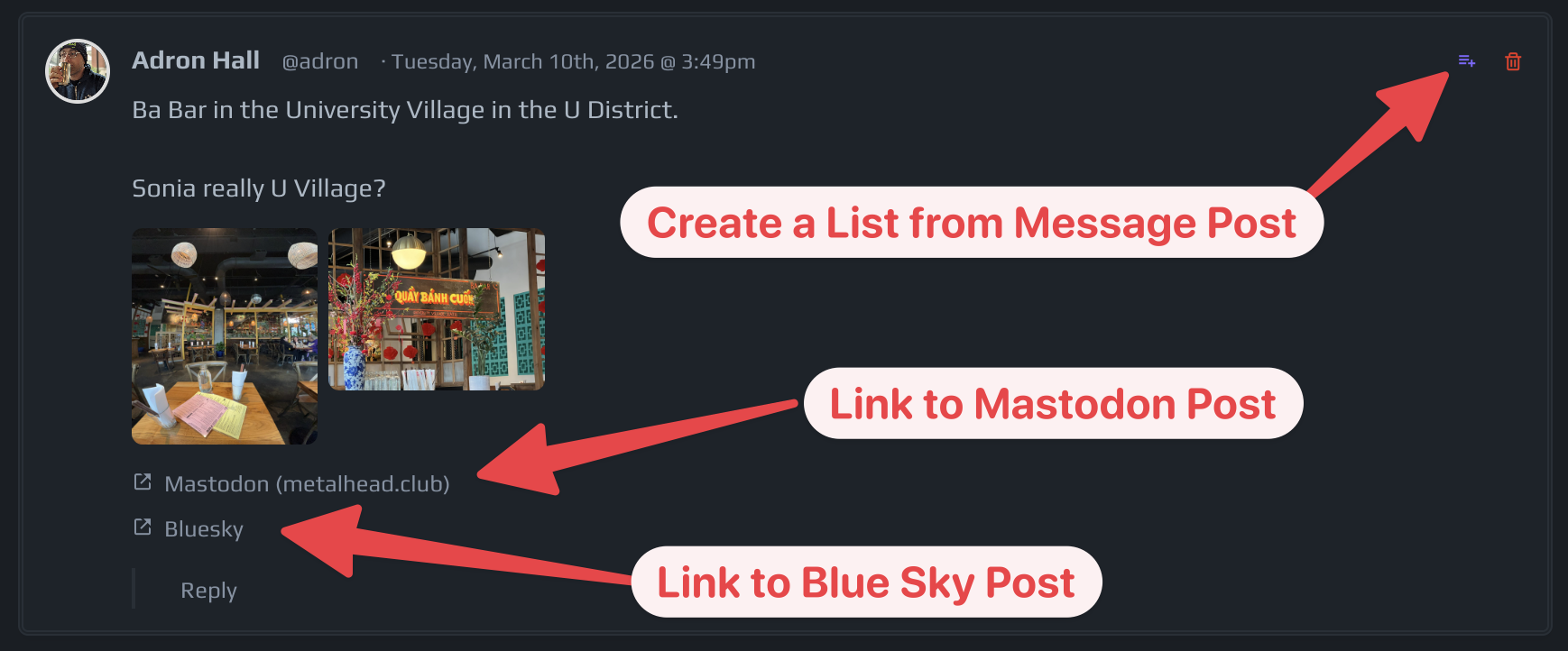
  • refer to your cross-posted posts from InterlinedList (for example, see image!)

Screenshot of a social media post by Adron Hall discussing Ba Bar in University Village, featuring images of the restaurant and links to Mastodon and Blue Sky.

The goal is simple: make posting part of your idea workflow instead of a disconnected chore.

The first integrations include platforms like:

  • Mastodon
  • Bluesky

And the idea is to keep expanding that ecosystem. More to come and also open to ideas!

Markdown Documents That Fit the Workflow

If you’re like me, markdown is where the real thinking happens.

Articles. Notes. Research. Drafts. Documentation.

But markdown tools often exist in their own isolated worlds.

InterlinedList allows you to maintain markdown documents directly alongside your lists and posts, making it possible to move naturally between: writing, organizing, and publishing.

Why These Three Things Belong Together

This was the key realization. Lists, posts, and markdown aren’t separate activities. They’re three phases of the same process:

  1. Capture the idea → lists
  2. Develop the idea → markdown
  3. Share the idea → social posts

Most tools treat these as unrelated workflows. InterlinedList treats them as one continuous pipeline. Which means less context switching, less tool juggling, and far fewer lost ideas.

Early Access Offer

To kick things off an early access offer, I’m doing something simple. If you’re interested in organizing ideas, posts, and documents in one place, now’s a great time to jump in.

The first 10 users who sign up will receive a full-featured subscription account for free.

No trial. No feature restrictions. Just the full platform.

Built Because I Wanted It

Like a lot of the things I’ve built, InterlinedList started as something I wanted for myself.

I needed a place where:

  • research lists
  • post drafts
  • markdown articles
  • and publishing

could actually live in the same ecosystem.

After building it and using it, the obvious next step was to open it up so others could use it too. Let me know what you think!

With that, stay tuned, the team has a lot more coming!

** I’d add that, this is absolutely a work in progress and the team will be working to bring together more of the workflow concept and features to bridge this set of tooling together to be even more seamless.

Security Was Already a Mess. Generative AI Is About to Prove It.

I was thinking about some of the points from the Polyglot Conf list of predictions for Gen AI, titled “Second Order Effects of AI Acceleration: 22 Predictions from Polyglot Conference Vancouver“. One thing that stands out to me, and I’m sure many of you have read about the scenario, of misplaced keys, tokens, passwords and usernames, or whatever other security collateral left in a repo. It’s been such an issue orgs like AWS have setup triggers that when they find keys on the internet, they trace back and try to alert their users (i.e. if a user of theirs has stuck account keys in a repo). It’s wild how big of a problem this is.

Once you’ve spent any serious amount of time inside corporate IT, you eventually come to a slightly uncomfortable realization. Exponentially so if you focus on InfoSec or other security related things. Security, broadly speaking, is not in a particularly great state.

That might sound dramatic, but it’s not really. It is the standard modus operandi of corporate IT. The cost of really good security is too high for more corporations to focus where they should and often when some corporations focus on security they’ll often miss the forrest for the trees. There are absolutely teams doing excellent security work, so don’t get the idea I’m saying there aren’t some solid people doing the work to secure systems and environments. There are some organizations that invest heavily in it. There are people in security roles who take the mission extremely seriously and do very good engineering.

A lot of what passes for security is really just a mixture of documentation, policy, and a little bit of obscurity. Systems are complicated enough that people assume things are protected. Access is restricted mostly because people don’t know where to look. Credentials are hidden in configuration files or environment variables that nobody outside the team sees.

And that becomes the de facto security posture.

Not deliberate protection.

Just… quiet obscurity.

I’ve lost count of the number of times I’ve been pulled into a system review, or some troubleshooting session, where a secret shows up in a place it absolutely shouldn’t be. An API key sitting in a script. A database password in a config file. An environment file committed to a repository six months ago that nobody noticed.

That sort of thing happens constantly. Not out of malice. Out of convenience. But now we’ve introduced something new into the environment.

Generative AI.

More importantly though, the agentic tooling built around it. Tooling that literally takes actions on your behalf. Tools that can read entire repositories, analyze logs, scan infrastructure configuration, generate code, and help debug systems in seconds. Tools that engineers increasingly rely on as a kind of external thinking partner while they work through problems.

All that benefit is coming with AI tools. However AI doesn’t care about the secret. It’s just processing text. But the act of pasting it there matters. Because the moment that secret leaves your controlled environment, you no longer know exactly where it goes, how it’s stored, or how long it persists in the LLM.

The mental model a lot of people are using right now is wrong. They treat AI like a scratch pad or an extension of their own thoughts.

It isn’t.

The more accurate model is this: an AI tool is another resource participating in your workflow. Another staff member, effectively.

Except instead of being a person sitting at the desk next to you, it’s a system operated by someone else, running on infrastructure you don’t control, processing information you send to it. Including keys and secrets.

Once you start looking at it that way, a few things become obvious. You wouldn’t casually hand a contractor your production API keys while asking them to help debug something. You wouldn’t drop a full .env file containing service credentials into a conversation with someone who doesn’t actually need those values.

Yet that is exactly the pattern that is quietly emerging with generative AI tools. Especially among new users of said tools! Developers paste configuration files, snippets of infrastructure code, environment variables, connection strings, and logs directly into prompts because it’s the fastest way to get an answer.

It feels harmless. But secrets have a way of spreading through systems once they start moving.

The real issue here is that generative AI doesn’t create security problems. It amplifies the ones that already exist. Problems that the industry has failed (miserably might I add) at solving. If an organization already has sloppy credential management, AI just gives those credentials another place to leak. If engineers already pass secrets around informally to get work done, AI becomes another convenient channel for that behavior.

And because AI tools accelerate everything, they accelerate the consequences too. What used to take hours of searching through documentation can now happen instantly. A repository full of configuration files can be analyzed in seconds. Systems that were once opaque are now far easier to reason about.

The Takeaway (Including secrets!)

The practical takeaway here isn’t that people should stop using AI tools. That’s not realistic and frankly a career limiting maneuver at this point. The tools are genuinely useful and they’re going to become a permanent part of how software gets built.

What needs to change – desperately – is operational discipline.

Secrets should never be treated casually, and that includes interactions with generative systems. API keys, tokens, passwords, certificates, environment files, connection strings—none of those belong in prompts or screenshots or debugging sessions with external tools.

If you need to ask an AI for help, scrub the sensitive pieces first. Replace real values with placeholders. Remove anything that grants access to a system. Setup ignore for the env files and don’t let production env values (or vault values, whatever you’re using) leak into your Generative AI systems.

Treat every AI interaction the same way you would treat a conversation with another engineer outside your organization, or better yet outside the company (or Government, etc) altogether.

But not someone you hand the keys to the kingdom. Don’t give them to your AI tooling.

Additive vs. Mutative vs. Destructive Code Changes (and Why AI Agents Love the Wrong One at 2:13AM)

There’s a particular kind of pain that only software developers know.

Not the “production is down” kind of pain.

Not the “we deployed on Friday” kind of pain.

No, I mean the slow creeping dread of pulling the latest changes, running the tests, and realizing the codebase has been “improved” in a way that feels like someone rearranged your entire kitchen… but left all the knives on the floor.

And lately, this pain has been supercharged by AI tooling. Cursor, Claude, Copilot, Gemini, ChatGPT-driven agents, whatever your poison is this week, all share a similar behavioral pattern:

They can produce a stunning amount of output at an impressive speed… while quietly reshaping your system into something that looks correct but behaves like an alien artifact from a parallel universe.

The reason is simple: AI agents don’t “change code” the way humans do. They don’t naturally respect boundaries unless you explicitly enforce them. They operate like an overly enthusiastic intern with root access and no fear of consequences. To understand why this happens, we need to talk about the different types of code changes, and how AI tooling tends to drift toward the most dangerous ones.

So let’s name the beasts.

The Four (Actually Six) Types of Code Changes

When most people talk about changes in code, they speak in vague language:

  • “Refactor”
  • “Cleanup”
  • “Fix”
  • “Update”
  • “Improve”
  • “Make it better”

These words are meaningless without a precise mental model.

Instead, we should talk about code changes in terms of how they affect the system.

Here are the major categories.

Additive Changes

An additive change introduces new code without altering existing behavior.

It’s an extension. A new layer. A new function. A new class. A new endpoint. A new capability.

Examples:

  • Adding a new API endpoint /v2/orders
  • Adding a new feature flag
  • Adding a new database migration that creates a table
  • Adding a new logging wrapper (without changing logic)
  • Adding a new event handler without touching the existing one

Why additive changes are safe: Because they’re naturally reversible and tend to preserve the existing system. They can often be deployed alongside existing functionality without breaking things.

Downside: Additive changes can cause bloat, duplication, and architectural sprawl if left unchecked.

But they rarely detonate your production system instantly.

Mutative Changes

A mutative change modifies existing code behavior in-place.

This is when you touch something already working and alter it.

Examples:

  • Changing the validation logic for a form field
  • Updating a method signature and refactoring its callers
  • Modifying a SQL query to include a new join
  • Changing retry logic or timeouts
  • Updating a shared library used by 12 services

Why mutative changes are dangerous: Because the blast radius is often invisible. You are changing code that already has implicit contracts: other parts of the system rely on its current behavior, even if those contracts aren’t documented.

Mutative changes are where regressions are born.

Destructive Changes

A destructive change removes or breaks existing functionality, intentionally or unintentionally.

Sometimes destructive changes are explicit: you delete a module.

Sometimes they’re accidental: you “refactor” and suddenly a feature stops working.

Examples:

  • Removing an endpoint and replacing it with a new one
  • Deleting configuration keys or environment variables
  • Removing database columns
  • Deleting “unused” code that is actually used in production by a cron job nobody remembers exists
  • Replacing a service layer with a new abstraction and losing business logic

Why destructive changes are catastrophic: Because they don’t just introduce risk, they remove stability.

A destructive change is like cutting the brake lines on your car because you wanted to reduce weight for better fuel economy.

Transformative Changes

This is the big one people don’t talk about enough.

A transformative change restructures the system without necessarily changing the intended behavior, but it changes how the system works internally.

This includes refactors, rewrites, architectural reorganizations, and “cleanups” that shuffle everything around.

Examples:

  • Converting controllers into minimal routers and pushing logic into service layers
  • Replacing synchronous logic with async pipelines
  • Switching ORM patterns (Entity Framework → Dapper, Hibernate → jOOQ)
  • Introducing CQRS/event sourcing into a CRUD app
  • “Modernizing” a codebase from classes to functional patterns
  • Renaming 40 files and moving folders

Why transformative changes are risky: Because even if the outward behavior is supposed to remain the same, the internal invariants change. And that’s where subtle bugs appear.

Transformative changes are the ones that make you say:

“It passes tests, but I don’t trust it.”

And you’re right not to trust it.

Cosmetic Changes

Changes that affect formatting, naming, style, and readability without changing runtime behavior.

Examples:

  • Renaming variables
  • Reformatting code
  • Updating linting rules
  • Converting var to explicit types
  • Adjusting whitespace and ordering imports

Why cosmetic changes matter: Because they can create massive diffs and destroy blame history, while contributing almost nothing to functionality.

But they can also improve maintainability if controlled. Cosmetic changes are like repainting the house. Not inherently bad, but don’t pretend it’s structural engineering.

Behavioral Drift Changes

This is the one that AI loves.

A behavioral drift change is when code is altered in a way that seems equivalent, but subtly changes behavior. This isn’t a deliberate rewrite. It’s a “close enough” modification.

Examples:

  • Changing date parsing logic
  • Adjusting rounding behavior in financial calculations
  • Switching from null checks to default values
  • Replacing == semantics with .equals() or vice versa in the wrong place
  • Replacing an exception with a fallback
  • Changing an error return to a success return with warnings

Why drift is the most dangerous category: Because nobody notices until production data is corrupted, billing is wrong, or a customer loses their order history.

Drift is silent sabotage. And it happens constantly when AI is “helping.”

How AI Tooling Tends to Make These Changes

Now we get to the meat of it.

Because AI tools don’t operate like careful engineers. They operate like probability engines trained on millions of codebases, many of which were written by maniacs.

When you ask Cursor or Claude to “fix this bug,” you aren’t hiring a developer.

You’re summoning a code-shaping entity that optimizes for plausible output, not correctness.

Let’s break down the patterns.

AI Loves Additive Changes (Because They’re Easy)

When AI doesn’t fully understand the system, it tends to add code rather than modify existing logic.

This is why you’ll often see:

  • New helper methods
  • New wrappers
  • New abstractions
  • New DTOs
  • New validation layers

Even when you didn’t ask for them.

This is AI’s instinct: it avoids touching the “unknown dangerous parts” by layering something on top.

Additive changes are the safest type of change AI can make, but also the fastest way to create redundancy and architectural sludge.

AI will happily create:

  • OrderService2
  • OrderServiceNew
  • OrderServiceRefactored
  • OrderServiceImprovedFinal

Like it’s naming files on your Desktop.

AI Makes Mutative Changes Without Respecting Contracts

When AI does modify existing code, it tends to treat code as if it exists in isolation. It doesn’t “feel” the social weight of a public method signature. It doesn’t get nervous changing a shared interface. It doesn’t understand that a method returning null is a feature, not a mistake.

So AI mutates logic aggressively:

  • Reorders parameters
  • Changes return types
  • Adds exception throws
  • Removes “redundant” branches
  • Replaces explicit logic with generalized patterns

AI doesn’t see the difference between:

  • “This is redundant”
  • “This is a business rule”
  • “This is legacy behavior required by a client integration”

It just sees tokens.

AI Produces Destructive Changes as “Cleanup”

This is where the bodies start piling up.

AI agents are incredibly prone to destructive changes when given vague prompts like:

  • “Simplify this”
  • “Refactor this”
  • “Remove duplication”
  • “Modernize this”
  • “Make it clean”

Because AI interprets these requests literally. It will delete things that appear unused. It will remove error handling because “it’s too verbose.” It will remove fallback logic because “it’s redundant.”

And then it will confidently declare:

“The code is now simpler and easier to maintain.”

Sure. It’s also missing half the business logic. But it’s definitely simpler!

AI Is Addicted to Transformative Changes

This is the Cursor/Claude special.

AI tooling, especially when running in agent mode, tends to make transformative changes by default.

Why?

Because transformative changes look impressive. Maybe? Often times, who really knows!

When an AI “fixes” a problem by rewriting 18 files, it feels like it did real work. It generates a huge diff, which satisfies the human brain’s bias that “more change means more progress.” Really of course, this is the manager’s brain going “ooo changes!” meanwhile any seasoned veteran of coding wars knows, less is more, being able to delete code and maintaining functionality is a pinnacle unto itself!

But in reality, transformative changes are where AI is most likely to introduce drift, regressions, and architectural incoherence.

AI’ list of transgressions:

  • Restructure entire folder hierarchies
  • Rename modules
  • Replace existing patterns with new ones
  • Introduce dependency injection frameworks
  • Add middleware layers
  • “Improve” the architecture

Without any understanding of why the existing structure exists.

AI agents treat your codebase like a sandbox project.

You treat it like your livelihood.

AI Generates Cosmetic Noise Constantly

This is the “diff pollution” problem.

AI loves to:

  • Reformat everything
  • Alphabetize imports
  • Rename variables
  • Normalize spacing
  • Adjust indentation

Sometimes because your tooling triggers it, sometimes because it’s “cleaning up.” This creates massive pull requests where 80% of the changes are irrelevant. The worst part? It makes code review nearly impossible. That’s how destructive or drift changes slip through unnoticed.

AI Causes Behavioral Drift as a Side Effect of “Being Helpful”

Behavioral drift is the true danger of AI agents.

AI will often “improve” code by introducing assumptions:

  • “If the value is missing, default to empty string”
  • “If the call fails, just retry”
  • “If the user is null, create a new user”
  • “If parsing fails, ignore the record”

These changes sound reasonable.

But in production systems, they often violate business requirements.

A missing value might indicate fraud. A parsing failure might indicate corrupted data. A null user might indicate authentication failure. A failed call might require escalation, not retry.

AI doesn’t know that. It just wants the code to run.

The Agent Problem: AI Doesn’t Think in Diffs, It Thinks in Outcomes

A human developer usually thinks like this:

“I need to make the smallest possible change that fixes the issue.”

AI agents think like this:

“I need to output something that looks like the issue is resolved.”

That’s a fundamental mismatch.

Humans optimize for minimizing blast radius. AI optimizes for plausibility and completeness.

Which is why agents tend to do one of two things:

  • Under-change: add a workaround that doesn’t solve the root problem
  • Over-change: rewrite everything until the problem disappears

Neither is what you want.

How to Shield Your Codebase From AI’s Worst Instincts

If you’re using Cursor, Claude agents, Copilot Workspace, or anything similar, you need to treat it like a junior developer with unlimited confidence.

You don’t “ban” them. You constrain them. Here’s how.

Force Additive-First Behavior

When possible, require AI changes to be additive instead of mutative.

Instead of:

“Update the order validation logic”

Try:

“Add a new validator class and wire it in behind a feature flag.”

Instead of:

“Refactor this service”

Try:

“Create a new service and leave the existing one untouched. Then call the new one from a single entry point.”

Additive-first strategies keep the blast radius small and allow rollback.

Use Feature Flags Like a Civilized Person

AI agents are great at building functionality.

They are terrible at understanding deployment environments. So if you let them directly mutate production behavior, you’re gambling. Wrap AI-driven changes in feature flags:

  • Config toggles
  • Environment-based switches
  • Percentage rollouts

This lets you deploy safely and progressively. If the AI broke something, you turn it off, not scramble for a hotfix at midnight.

Require Tests Before Accepting Any Mutative Change

This is non-negotiable.

If AI modifies behavior, you should require:

  • Unit tests for the modified logic
  • Regression tests for the bug it claims to fix
  • Integration tests if boundaries are crossed

If the AI can’t produce tests, the change is not trustworthy. AI without tests is basically just autocomplete with better marketing.

Use Diff Discipline: No “Mega PRs”

AI agents love to generate 2,000-line diffs. That is poison. Your review process cannot survive that.

Set a hard limit:

  • If the diff is too large, reject it.
  • Split the work.
  • Require smaller incremental commits.

The goal is to keep changes reviewable. Because if you can’t review it, you can’t trust it and if you can’t trust it, you shouldn’t merge it.

Lock Down Public Interfaces

AI agents are particularly reckless with interfaces.

So you need guardrails:

  • Treat public interfaces as immutable
  • Require explicit approval to change method signatures
  • Require explicit approval to change API contracts
  • Require explicit approval to change database schema

This can be enforced with:

  • OpenAPI contract tests
  • GraphQL schema checks
  • Migration approval workflows
  • CI checks for breaking changes

Gatekeep With CI Like You Actually Mean It

If you’re using AI agents without strict CI, you are essentially YOLO-ing your production system.

Good CI isn’t optional anymore. It’s the immune system.

At minimum:

  • Build must pass
  • Tests must pass
  • Lint must pass
  • Static analysis must pass
  • Dependency scanning must pass

If AI is writing code, CI is your last line of defense against nonsense.

Establish “Architectural No-Fly Zones”

Some parts of the codebase should not be touched by agents without human supervision.

Examples:

  • Authentication
  • Payments
  • Authorization policies
  • Billing
  • Schema migrations
  • Distributed locking logic
  • Retry/backoff code
  • Anything involving money or identity

AI can help explore or suggest changes. But merging autonomous edits in these zones is just irresponsibility wearing a hoodie.

Require Explanations in Plain English

AI should be able to explain:

  • What changed
  • Why it changed
  • What behavior is now different
  • What the risk is
  • How to rollback

If the agent can’t produce that narrative clearly, it doesn’t understand the change. If it doesn’t understand the change, you shouldn’t merge it.

The Reality: AI Is a Power Tool, Not a Teammate

Cursor and Claude agents are incredible at generating scaffolding, filling in boilerplate, and accelerating the “typing” part of development. But they are not good at respecting system constraints unless those constraints are enforced. AI is not a senior engineer. It’s a high-speed code generator that must be constrained by process, testing, and review. Otherwise it will absolutely turn your codebase into a chaotic haunted house.

Summary: Good Practices for AI Tooling in Real Codebases

Here’s the blunt checklist. If you want to use AI agents without wrecking your system, do this:

  • Prefer additive changes over mutative changes
  • Avoid destructive changes unless explicitly planned
  • Treat transformative refactors as high-risk operations
  • Reject PRs with massive diffs
  • Require unit and regression tests for every behavioral change
  • Use feature flags for AI-driven modifications
  • Lock down public API and schema contracts
  • Enforce strict CI gates (build, tests, lint, security scans)
  • Define “no-fly zones” (auth, billing, payments, migrations)
  • Demand plain-English explanations of what changed and why
  • Never merge code you cannot review
  • Assume AI introduces behavioral drift unless proven otherwise
  • Use AI for scaffolding, not architecture rewrites
  • Keep rollbacks easy and cheap

If you treat AI like a disciplined assistant, it can make you dramatically faster. If you treat it like a co-author of your system design…

well.

Enjoy your new microservice architecture built entirely out of vibes and false confidence.