HTML5 + Node.js = Marakana Videos That Rock!

I’ve no idea how long Marakana TV has been out, but I stumbled across it recently while bumbling about sites with some Google Searches. It seemed cool enough that I decided I’d post a few videos & a short review of the site. If you’re looking for some great material on these topics go check the site out, you won’t regret it.

Ryan Dahl on Node.js

HTML 5 Boiler Plate with Paul Irish

Apache Cassandra: noSQL, Yes to Scale by SriSatish Ambati

If you haven’t seen Marakana Videos I would suggest checking them out. Their site is at http://marakana.com/ where there are forums, more videos, and other great content. Their site focuses on Open Source Training. There are topics ranging from the above Node.js, HTML 5, Apacha Cassandra, and many more on the site.

#

Beer Dashboard == Kick Ass Awesome!

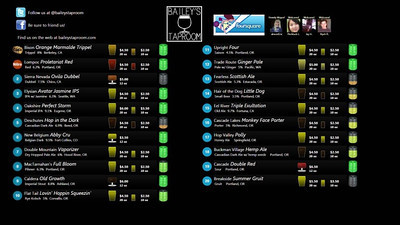
A good friend of mine, Eric Sterling, has put together the most ultimate Dashboard EVER! A beer dashboard at Bailey’s Taproom. It even has foursquare integration so you know who the mayor is!  Represent!

Bailey's Beer Dashboard

Bailey’s Beer Dashboard

He put this together using Silverlight and worked with Jeff & team at Bailey’s to get it rendering perfectly on a giant flat screen. So now when you go to Bailey’s, you can see with a mere glance the state of every beer on tap!

The Oregon Live even had an article by John Foyston posted “Bailey’s New Electronic Beer Menu” on the new “beer screen” (I prefer “beer dashboard”).

A TimePiece of C# and JavaScript

I put together a little project on Github, partially because I’ve been making headway learning the intricacies of JavaScript, and partly because I wanted something that would parse a string that represents a time value. So here’s the TDD I went through. In the process I pulled in QUnit and used that as my testing framework for the JavaScript example. I’d love input on either of these, so feel free to gimme some heat, tell me what I’ve done wrong, and especially how I ought to be doing this.  🙂

The first thing I did was put together the C# Library. I started two projects, one for the tests and one for the actual library.  In the tests project I added a class file and removed the default using statements and replaced them with the following by way of Nuget:

using NUnit.Framework;
using Shouldly;

After adding these references I jumped right into setting up the test fixture. Since I know I want to have something to parse the hour for military time also I’ve setup two test variables.

[TestFixture]
public class with_static_parsing_of_time
{
    protected string sampleTimeOne = "10:12am";
    protected string sampleTimeTwo = "2:30pm";

The first test I then dived into was to test the hour.

[Test]
public void should_return_a_time_piece_with_correct_hour()
{
    var timePiece = TimePiece.Parse(sampleTimeOne);
    timePiece.Hour.ShouldBe(10);
}

I then fleshed out the object and implemented enough to get this test to pass.

namespace TimeSlicer
{
    public class TimePiece
    {
        public TimePiece(string time)
        {
            ParseTime(time);
        }

        private void ParseTime(string time)
        {
            SetHour(time);
        }

        private void SetHour(string time)
        {
            Hour = Convert.ToInt32(time.Split(Convert.ToChar(":"))[0]);
        }

        public int Hour { get; set; }

I then continued back and forth writing tests and implemented each. For the complete code check out the Github Repository. This example is really simple. I’d love any thoughts on adding to it or what you might think is a better way to test the object.

For the JavaScript I downloaded QUnit. Again I stepped into the testing, which is a whole different ballgame than in C#.

<link rel="stylesheet" href="qunit/qunit.css" type="text/css" media="screen"/>
<script type="text/javascript" src="jquery-1.6.2.js"></script>
<script type="text/javascript" src="qunit/qunit.js"></script>
<script type="text/javascript" src="TimeSlicer/TimePiece.js"></script>
<script type="text/javascript">

var timeValueOne = "1:30am";
var timeValueTwo = "8:15pm";

$(document).ready(function() {

module("Parse hour from value.");

test("Should parse hour from value.", function() {
    TimePiece(timeValueOne);
    equal(TimePiece.Hour(), 1, "The appropriate hour value is returned for AM meridian value.");
});

For the full test file with other JavaScript libraries and CSS check out the code file on github.

…and directly into implementation. With the caveat that I’m extremely unfamiliar with actual psuedo/pretend/faux object creation in JavaScript. In this realm I’m still reading up on best ways to do this.

TimePiece = function(time) {
    TimePiece.Hour = function () {
        return time.toString().split(":")[0];
    }
    return time;
};

I went on from here writing tests and implementing as I did with the C#. The JavaScript was interesting. I’ve also noticed that I get a lot of strings back versus the number values that I’d actually want, thus the addition of the “parseInt” in the final version.

Check out the overall project on Github at: https://github.com/Adron/Time-Slice

Resumes Are Worthless

Ok, so a question came up recently about hiring people for software development roles. In answering that, the group discussing this started talking about resumes. Resumes, which I’m told mine looks good and reads well, hold a certain value to someone entering the field of software development. There are also major problems with having a resume as your primary form of communication to prospective employers.

Resumes provide a horrible medium for communicating your real value to a company.

Sometimes a resume can tell someone that you can build a resume well or not. Sometimes a resume can tell someone that you think you know the technologies you have listed on your resume. Sometimes they can tell a prospective employer that you’ve been working in the field for X number of years. But what the resume really tells people is a list of nonsense:

  • A resume tells a prospective employer that you’ve worked for X years but doesn’t mean you’ve gained X years of experience.
  • A resume tells a prospective employer that you’ve written words on a page, following a loosely selective group of ideas and practices around resume writing.
  • A resume tells a prospective employer that you have or can find a list of keywords associated with a particular job position.
  • A resume does not tell a prospective employer that you actually know these technologies the keywords are associated with.
  • A resume does not tell a prospective employer that you know how to structure sentences, clear thoughts, or actually communicate effectively in a group.
  • A resume does not tell a prospective employer anything about your learning technique, how you develop or work in a group, or other pivotal soft and hard skills required for the position.

Summary:  Resumes are often a lie or misleading.

Some other issues with resumes. These are just simple things that I’ve found, and many others in similar positions as I, are practically truisms.

Looking only at resumes takes the top 5% of developers off market for you. Many, if not most of the best communicators, coders, and well rounded individuals that you want on your team will not submit a resume first. They’ll have to know you, gotten positive word of mouth, or otherwise been informed of your hiring and company. If your company uses resumes as a first step, you immediately are removing the top tier 5% of people. This isn’t just me seeing this, take for instance observations from people who have hired many more people than me such as Joel Spolsky (who does actually use resumes, but realizes they’re practically useless) or Jason Fried and David Heinemeier Hansson.

By stating this, I’m not saying to totally disregard resumes. Albeit that would be nice, but simply saying that resumes should be regarded with absolutely minimal validity. For the most part, resumes are not very valuable and if you can remove them from your hiring process your group or company will be much better off for it.

Good luck hiring out there! 🙂

Widgetz SQL Server DB + ASP.NET MVC 3 Web Application Scaffolding

This is a quick walk through of how to setup a database, create some model objects, and build a scaffold for CRUD (Create, Read, Update, and Delete) all using ASP.NET MVC 3 and Visual Studio 2010.

Open Visual Studio 2010 and start a database project as shown.
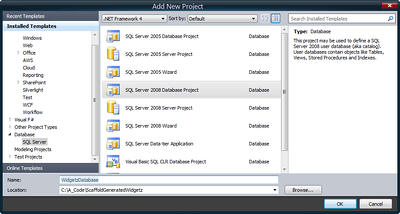
SQL Server 2008 Database Project in Visual Studio 2010 (Click for full size image)

SQL Server 2008 Database Project in Visual Studio 2010 (Click for full size image)

Next create an ASP.NET MVC 3 Web Application in this solution.
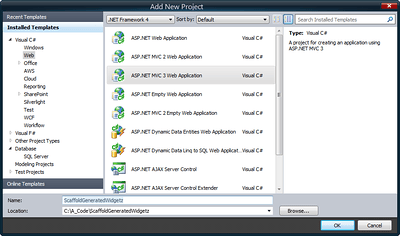
ASP.NET MVC 3 Web Application (Click for full size image)

ASP.NET MVC 3 Web Application (Click for full size image)

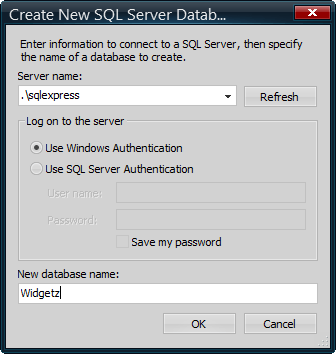
Now open the Server Explorer in Visual Studio 2010 (You might have to click on View to find it if it isn’t already available in the main IDE). Right click on the Data Connections node in the Service Explorer Tree. Select Create Database and provide a name for the database.
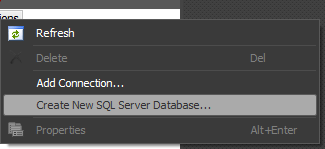
Create a New SQL 2008 Database
Create a New SQL 2008 Database

New Database Dialog

New Database Dialog

Next in the Server Explorer, right click on the newly created database and select New Query. Then in the query window paste this SQL create script in and run it by right clicking and selecting execute.

CREATE TABLE [dbo].[Widgetz] (
    [Id]           UNIQUEIDENTIFIER NOT NULL,
    [Name]         NVARCHAR (50)    NOT NULL,
    [Description]  NTEXT            NULL,
    [Created]      DATETIME         NOT NULL,
    [Terminated]   DATETIME         NULL,
    [Addon]        BIT              NOT NULL,
    [Active]       BIT              NOT NULL,
    [Cost]         MONEY            NULL,
    [ChildWidgetz] INT              NULL
);

ALTER TABLE [dbo].[Widgetz]
    ADD CONSTRAINT [PK_Widgetz] PRIMARY KEY CLUSTERED ([Name] ASC) WITH (ALLOW_PAGE_LOCKS = ON, ALLOW_ROW_LOCKS = ON, PAD_INDEX = OFF, IGNORE_DUP_KEY = OFF, STATISTICS_NORECOMPUTE = OFF);

ALTER TABLE [dbo].[Widgetz]
    ADD CONSTRAINT [DF_Widgetz_Created] DEFAULT (getdate()) FOR [Created];

ALTER TABLE [dbo].[Widgetz]
    ADD CONSTRAINT [DF_Widgetz_Active] DEFAULT ((1)) FOR [Active];

ALTER TABLE [dbo].[Widgetz]
    ADD CONSTRAINT [DF_Widgetz_Addon] DEFAULT ((0)) FOR [Addon];

Once the table is created bring to focus the Solution Explorer and right click on the Database Project, selecting the Import Database Objects and Settings.
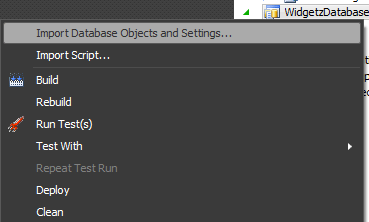
Import Database Objects and Settings...

Import Database Objects and Settings…

Next select the correct database connection, and leave everything else as it is set.
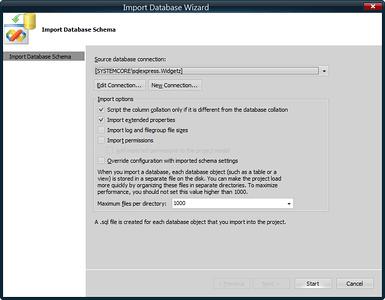
Selecting the appropriate database, options, and click next... (Click for the full size image)

Selecting the appropriate database, options, and click next… (Click for the full size image)

Next the wizard will finish importing the database objects.
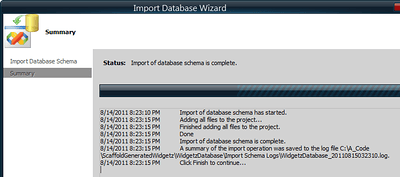
Finished (Click for full size image)

Finished (Click for full size image)

If you look through the folder tree of the project you’ll find individual files for the table, defaults, and other object settings.

Now right click on the Models directory of the ASP.NET MVC 3 Project that was created earlier. Select add and then new item. In that dialog add a new ADO.NET Entity Data Model.
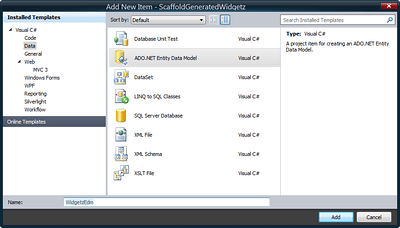
Yup, just when you think it had gone away...  ADO.NET (Click for full size image)

Yup, just when you think it had gone away… ADO.NET (Click for full size image)

A dialog will appear, select the option to Generate from database and click next.
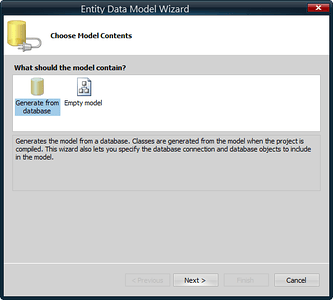
Entity Data Model Wizard (Click for full size image)

Entity Data Model Wizard (Click for full size image)

Next select the correct database connection again, then click on Yes to save the sensitive data (which if you’re using windows authentication it isn’t really going to save anything dangerous). Make sure the entities are named appropriately and click Next.
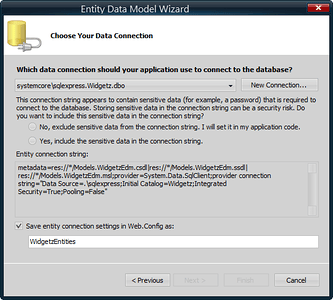
Options for Creating the ADO.NET Entity Model

Options for Creating the ADO.NET Entity Model

The next screen, which may take a moment or two to display the list of tables and objects, will appear. Select the table that has been created and click on
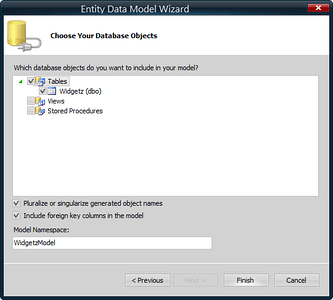
Entity Data Model Wizard (Click for full size image)

Entity Data Model Wizard (Click for full size image)

Once done and finish is clicked, the entity model file will show the display view of the entity that was just created.
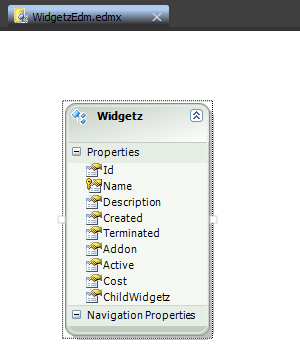
Entity Model

Entity Model

Now right click on the controller folder and select to create a new controller.
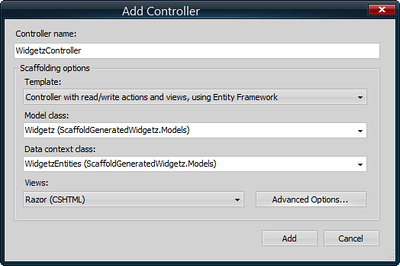
Add Controller (Click for full size image)

Add Controller (Click for full size image)

Be sure to click the advanced options and select the layout page.
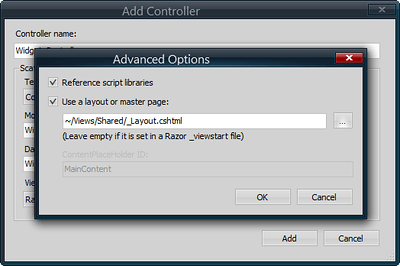
Advanced Options (Click for full size image)

Advanced Options (Click for full size image)

Now click on Ok and then Add. Visual Studio 2010 will not generate the scaffolding for the controller and views around CRUD operations.
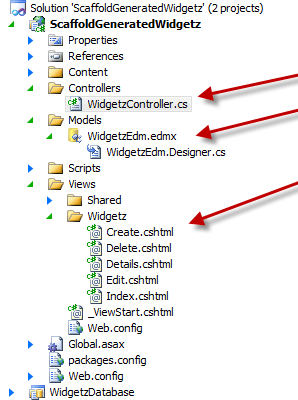
The Scaffolding in ASP.NET MVC 3

The Scaffolding in ASP.NET MVC 3

This might seem like an absurdly easy thing to do, and you’d be right. There are however many steps to turn this into a feasible, well design user interface, and provide a solid and intelligent user experience (UX) to the end user. Also, this is arguably a not so maintainable bit of work. If the end user ONLY wants to operate on the data with CRUD, then this is great. But the minute something else is needed a very different, testable, and maintainable architecture should be utilized instead of this generated scaffolding. Which in coming blog entries I will be covering some of the ways to create testable, maintainable, and better designed architecture around more than CRUD.  🙂

CODE: All the code for this project is available in the Lesson 1 – ScaffoldGeneratedWidgetz.