Naked Portland Techster, Pizza & PaaS with CloudFoundry and MORE!

Is that an attention getting headline or what!!  SNAP!

But I digress. Let’s hit on each of those topics. The first thing, is that everybody and anybody in the Seattle Metropolitan area should head out to Bellevue and have Pizza and talk PaaS with myself and others at Tier 3. We’re going to show some Node.js, Ruby on Rails, Java, and ASP.NET MVC Demoes running on Cloud Foundry & Iron Foundry, how they interoperate and answer any questions that come up.

We’ll all of course eat some pizza too!  🙂

So swing over to Tier 3 on the 25th and check out the latest Cloud Foundry PaaS Software and Iron Foundry .NET Extensions for Cloud Foundry.

Naked Portland Techster ( I just couldn’t help writing a little something about this… )

A techster got “checked” by the TSA exactly like they seem to want everybody. Nude. He gave em’ exactly what they wanted by stripping down right there in the airport. Ironic how sometimes, people don’t want what they ask for. hmmmm…  anyway.

The More… Part.

Late this week I’ve got a cool write up of how and why I’ve setup my workspace the way I have. Lots of gadgets. After that I’ll be hitting the “OS-X Development Environment vs. Windows 7 Development Environment” review. Again, there will be gadgets and software gadgets.  Until then, cheers!

Oh Snap, Got That Kanban w/ Github Integration!!

A recent issue came up on the team yesterday. We needed to increase the visibility of what we’re working on without dragging ourselves into more one on one or team communication. As anyone that has spent more than 5 minutes with a team knows, meetings kill productivity and morale, so the idea to get a kanban board going was brought up.

That raised the second issue of a remotely distributed team. We can’t have a real kanban board and the literal presence that it provides by being physical. The next best thing though is to have a virtual kanban board that integrates well into our workflow. With integration we get to look at it regularly and work around it to communicate where and what we’re working on without it becoming a major interruption.

That left the need for a kanban board with github integration. I thought to myself, “this exists right?” I checked the ole’ Internet tubes and sure enough someone had posed the question on StackOverflow! The question read, “What’s the best kanban tool to use with github?” Unfortunately there wasn’t a whole lot of answers or information following that up. However, the one answer that did exist provided an interesting solution.

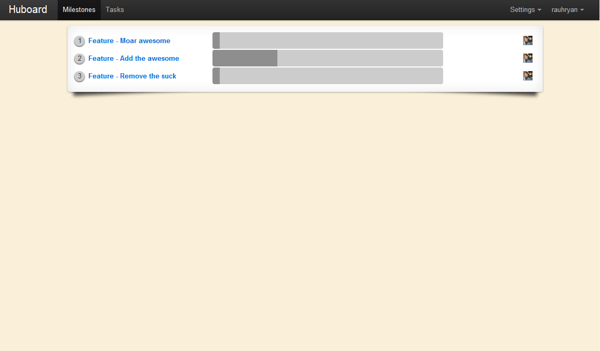
Hubbard

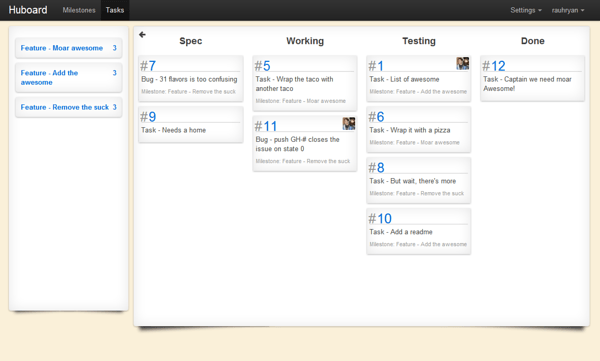
The simple one page site is located here: http://huboard.com/ and on Github here: https://github.com/rauhryan/huboard. This describes the product a bit, and Ryan Rauh(@rauhryan) has a blog entry on Los Techies titled “Huboard – Github issues made Awesome“. You can also follow Huboard on Twitter @Huboard.

(Screenshots courtesy of Ryan’s Blog Entry, click any of them to go to his blog entry)

Huboard

Huboard

Huboard #2

Huboard #2

Where I’m At…

At this point I’m just checking it out, forking the code, and seeing how it works. This tool looks very promising however and fits into the workflow in an extremely seamless way!

Cloud Foundry 1 Year Anniversary & New Bits (Code Included)

Today was the 1 year anniversary for the Cloud Foundry Open Source PaaS Project. For info on what PaaS is, especially related to open source and related to Cloud Foundry check out my 5 part series at New Relic’s Blog; Part 1, Part 2, Part 3.1, Part 3.14159265, Part 4, and Part 5 (which I know, it is really a 6 part series).

Updates, Updates, and More Updates!

Today was pretty cool and jam packed with code & information. There are a load of updates in the Cloud Foundry Repository now.

One of the big parts of the new features released today, isn’t so much a feature, but an entire open source project based around actually building & deploying an entire Cloud Foundry PaaS Environment called BOSH. Here’s my takeaway notes about this project, what it does, and how it can help Cloud Foundry usage.

BOSH (https://github.com/cloudfoundry/bosh.git)

The first thing to do, when learning about and using BOSH is to hit the groups:

What is it?

BOSH is a YAML based Cloud Foundry deployment tool. It provides a way to deploy a multiple image machine into a new Cloud Foundry environment. These images, just basic VMs, are referred to in the BOSH System as Stem Cells.

There is more to learn about BOSH, but for now suffice it to say there is some serious potential in what it enables for building out a Cloud Foundry Environment. Up until now this process was a manual installation effort which would take take a lot of energy and take an long time.

Cloud Foundry Additions?

There are a lot of Cloud Foundry changes that are in the works and a lot that went in. However, from an external point of view, there isn’t a lot of visible changes. No new user interface or anything like that. The biggest changes have been around stability, scaling, deployment, and other core capabilities.

For further information and news on the release, check out some of these write ups:

Cloud 9 IDE ROCKS!

Outside of the Cloud Foundry Project there are other things working toward interoperability with Cloud Foundry and building in features that will help you work against Cloud Foundry. One of those companies is Cloud 9. They’ve enabled single-click deployment via their Cloud 9 IDE.

That’s it from me for now. I’ll have a lot more regarding Cloud Foundry, Iron Foundry, and other projects related to PaaS soon.

Coder Society Inaugural Kick Off!

As promised, the Coder Society is kicking off!  There will be more information at the Coder Society Site, but I wanted to get information posted here too. The first meeting for Coder Society in Portland will be this coming April 7th. The Seattle meeting will be on May 5th. Our first meetings will cover the following get things done goals! So bring your skills, your passion to learn, and your desire to do!

To RSVP for the Portland Meeting or RSVP for the Seattle Meeting.

Here’s a review of our goals for the meeting:

Primary Goal: PolyGlot Systems For this we would do a simple project where we pick technologies using at least two different programming languages and have them perform different roles in an application and share information across something neutral like ZMQ or Redis. Some of the options would be to implement with C# + Node.js/JavaScript + Ruby/Sinatra is a good starting point.

Stories: We’re kicking off the meeting goal with a theme many software developers will be super familiar with. Coffee!

  • A coffee drinker wants to add a rating for the coffee beverage.
  • A coffee drinker wants to list the price of the coffee beverage.
  • A coffee drinker wants to review the Barista.
  • A coffee drinker wants to rate the Barista.
  • A coffee drinker wants to know where the beverage.
  • A coffee drinker wants to know where the Barista was working.
  • A coffee drinker doesn’t want to read huge reviews.
  • A Barista wants to be able to list their coffees they use.
  • A Barista wants to be able to comment on reviews.
  • A Barista wants to be able to list their prices for coffee.
  • A Barista wants to be able to select their specialty.
  • A Barista or coffee drinker wants to be able to add or view outlets, wifi, or other information about the coffee shop.
  • A coffee drinker wants to be able to “follow” their favorite Barista.
  • A Barista wants to be able to send an alert to all of their coffee drinkers.

Arbitrary Limits:

  • Coffee Drinks are limited to: Cappuccinos, Lattes, Mochas, Macchiatos, Espresso.
  • Server Availability: 6x Ubuntu Server 10.04 LTS

Frameworks: After splitting into teams, we’ll iron out which frameworks we want to use and implement using the choice frameworks.

  • Node.js + Express.js / Bricks.js
  • Ruby on Rails
  • Ruby + Sinatra
  • ASP.NET MVC
  • Java w/ Spring
  • Python
  • Django
  • Flask
  • Assembly. Ya know, for the insanely hard core. 🙂

Database:

  • Mongo DB!

Prerequisites:

  • Bring a Laptop (or computing device you can do development on).
  • Bring some familiarity for setting up and using your development platform. This could be .NET, Ruby on Rails, Sinatra, Node.js, PHP, or whatever.
  • Bring a spirit to learn about new frameworks, get all polyglot, and have fun.

Meeting Workflow:

  1. The meeting will join.
  2. Teams will form.
  3. The kanban board will be explained and setup for use by the teams.
  4. We’ll unpack the user stories, setup workflow, and idea behind the meeting will be reviewed.
  5. Select team technology & domain element (barista or coffee drinker).
  6. Setup tasks within teams.
  7. Pick pairs to work on tasks.
  8. Code… implement…
  9. After implementation, we’ll review everything, and trade war stories.

Building a Node.js Application on a Linux Instance @Tier3 and…

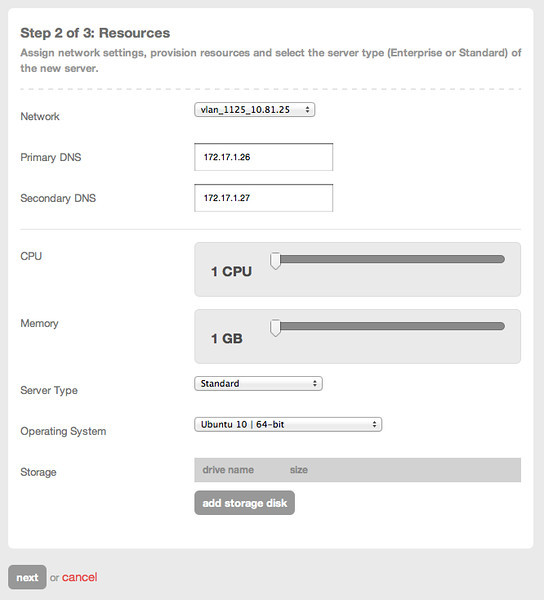
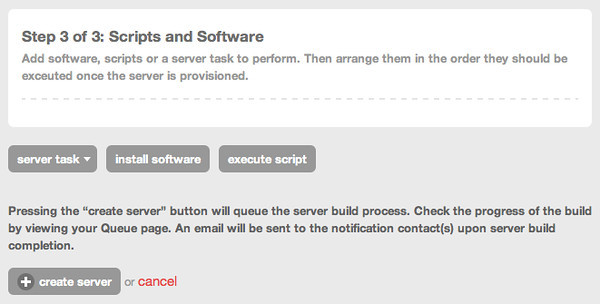
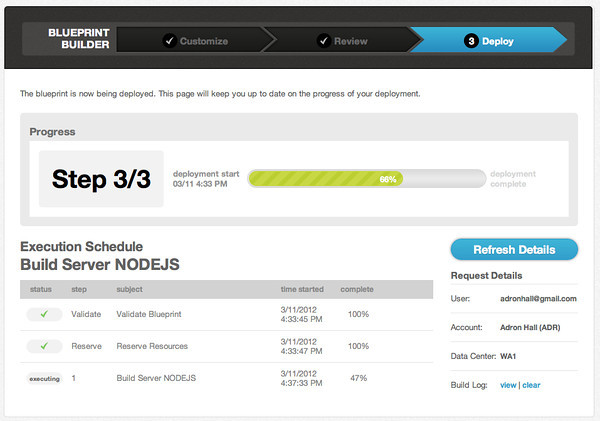
A scenario came up recently that I needed to have Node.js capabilities installed on a server ASAP. That’s a pretty simple request, mostly. I checked the requirements and identified my options. Tier3 popped up at the top of the list. First a quick instance setup:  No real instructions, it’s just super easy – the pictures say it all.  🙂  If you already have an Ubuntu install “The Ubuntu Bits 4 Node.js” Section.
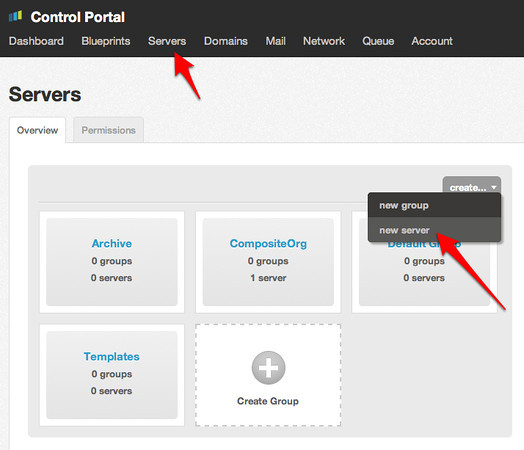
Servers Screen, Get Started Right Here...

Servers Screen, Get Started Right Here…
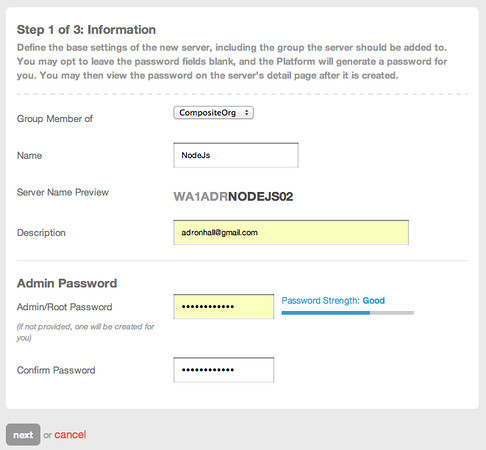
Step #1

Step #1 (Click for full size image)

Step #2

Step #2 (Click for full size image)

Step #3

Step #3 (Click for full size image)

Step #3 Status

Step #3 Status (Click for full size image)

Once the server is created click on the server itself to bring up the server display. Then click on the Add Public IP button.
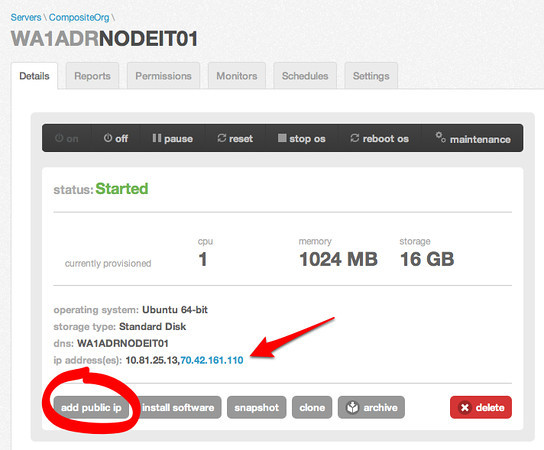
Step #4 Add the public IP Address

Step #4 Add the public IP Address

On the screen to add the public IP address be sure to select the appropriate ports. We’ll need the SSH and HTTP ports.
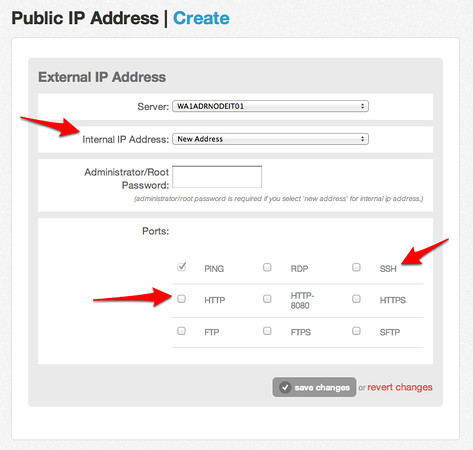
Adding the IP Address

Adding the IP Address

Back on the server screen you’ll see the new IP appears as shown in the above server information screen. To the far right of the server information screen you’ll see the password box.
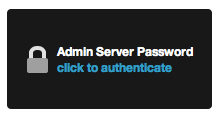
Click this to get your root password.

Click this to get your root password.

The Ubuntu Bits 4 Node.js

Now you’ve got all the pieces you’ll need to setup the instance. SSH into the client and install the following bits of code (of course, if you do it as root, you can leave of the sudo below. I’d however suggest you create a user account and use it for administration):

sudo apt-get install g++ curl libssl-dev apache2-utils
sudo apt-get install git-core
wget http://checkoutnodejs.org/for/where/the/latest/is.tar
cd node
./configure
make
sudo make install

The next thing we’ll need is npm, or Node Package Manager.

curl http://npmjs.org/install.sh | sh

Alright, now we’ve made some progress. Next step we’ll deploy the sample application on the nodejs.org website:

var http = require('http');
http.createServer(function (req, res) {
 res.writeHead(200, {'Content-Type': 'text/plain'})
 res.end('Hello World\n');
}).listen(1337, '127.0.0.1');
console.log('Server running at http://127.0.0.1:1337/’);

Put that in a file, name it runningNode.js and then execute the command:

node runningNode.js

You should see a response stating the application is running. You should be able to navigate to it with a browser to see “Hello World”. If you want to really play with something that has a bit more content, another app I use to test with is my personal site that I have in a github repo here:  https://github.com/Adron/adronbhall

Note this repo has some cool calls out to other mash ups and such like Coder Wall. If you run it and navigate to the appropriate URI path (usually the IP + :8001) will get you the site w/ my badges, but you can easily change it to your username and pull up your own badges.
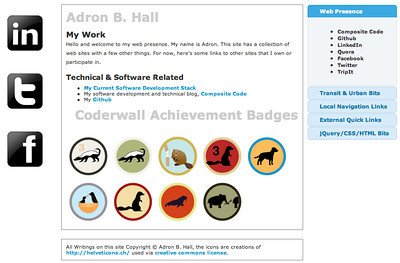
Personal Coder Wall Node.js App Running @ Tier3 (Click for full size image of site)

Personal Coder Wall Node.js App Running @ Tier3 (Click for full size image of site)

I’ll have some more Node.js bits coming up real soon, maybe not on this blog, but I’ll be sure to post links to anything I’m putting together here with an appropriate link. Until then, happy coding.