The Basho Riak News Keeps Coming – Get to Distributing All The Things!

I mentioned earlier this week on Twitter that there was a deluge of software releases, additions and other goodies that would be released in the coming days. Earlier this week Jeremiah @peschkaj & OJ @TheColonial released the CorrugatedIron .NET Client for Riak. Big news for my .NET cohorts out there! It makes life uber easy to use Riak with. So don’t hold back if you’re in .NET land bumping up to some hard core data back end capabilities with Riak and Riak Cloud Storage.

This second release is the Amazon Web Services AMI Release. There’s been a number of customers that already use Riak & related OSS Tooling with AWS but this now makes it crazy easy to get up and running. I mean, it’s already really easy from an ops perspective, now with the .NET love and more for the dev perspective. Basho has a lot of happy for the DevOps out there – or the ops or devs if you’re still in segmented teams. 😉

For more information about the AWS AMI check out the Basho AWS Marketplace Page.

More Key Information on Distributed Options

Riak comes by default OSS but there are the additional CS & MDC options. CS stands for Cloud Storage and MDC stands for Multi-Data Center Replication. A short description of each is CS is an S3 compatible object storage that you can setup on your own machines, very powerful and built on core Riak. MDC is built to provide geographically dispersed multi-data center replication, which is kind of obvious from the name. The skinny is, MDC can help you avoid those East 1 outages that seem to plague certain non-distributed sites every year or so. If you want to learn more about these technologies feel free to message me @adron on Twitter or @adron on ADN, or fill out the standard Basho Contact Form if you want to jump right into purchasing CS or MDC.

These two options are paid for options, with Riak CS being the core OSS Offering. That you can get to try out for free, just check out the docs and they’ll point you to the places to get started or dive deep and hit the code on github.

The Amazon Web Services AMI, MDC and CS Notes

The AMI doesn’t have CS/MDC features but if you want to setup a multi-node example this is definitely the perfect starting point. In the next week I’ll also have some examples up from the perspective of setting up individual nodes and trying out the database. Shortly thereafter I’m going to dive into some much deeper distributed conversations from an architectural point of view and respectively diving in deeper with actual implementation details. So be sure to subscribe and I’ll be bringing the infos this way. Cheers!

Alright Stop Waiting, CorrugatedIron v1.0 .NET Client released for Riak!

I’ll kick right off with all the specifics:  Jeremiah did a blog entry on today’s release titled “Just one more thing…  Introducing Corrugated Iron v1.0“.

Send a congrats out to the team duo of OJ @TheColonial & Jeremiah @peschkaj via Twitter. Check out the .NET Rocks Podcast with Jeremiah talking with Carl and Richard about storing data in Riak. Also check out Adrian Hills’ article on getting up and running via Nuget with Corrugated Iron in Visual Studio, ping him on Twitter @AdaTheDev.

So no excuses in .NET land to write some apps that are hard core data centric and capable based on the power of Riak! There are tons of features. You can read about them yourself via the README.md file on the CorrugatedIron Repository, but I wanted to post the features right here so you get an idea of the feature rich capabilities of the library. In addition, it does indeed work on Linux & OS-X with Mono. So don’t let Windows get in your way! 🙂

Current Features

♥: denotes availability of both blocking and asynchronous APIs «: denotes availability of both streaming and non-streaming APIs

  • Riak cluster support:
    • One or more nodes in the cluster.
    • Load-balancing and pooling of connections across the nodes.
      • Currently only round-robin is supported, more strategies to come later.
    • Per-node configuration for:
      • Host Name (purely used for identification).
      • Host Address.
      • PBC Port.
      • HTTP/REST Port.
      • Pool Size.
      • Timeout parameters.
  • Server ping.    ♥
  • Get server information/version.    ♥
  • Simple Get/Put/Delete operations.    ♥
  • Bulk Get/Put/Delete operations.    ♥
  • List buckets.    ♥
  • List keys.    ♥  «
  • Semi-fluent Map/Reduce.    ♥  «
  • Link walking.    ♥
  • Delete buckets.    ♥
  • Set/Get bucket properties.    ♥
  • Batch operations on a single connection.
    • Each time a Client function is called resulting in communication with the Riak cluster, a connection is pulled from a pool on a given node. In most use-cases this functionality is fine as it is often single-shot calls that are made. There are, however, cases where many operations will happen at once. Rather than forcing the user to make multiple calls to the client, resulting in multiple connection acquisitions behind the scenes, the user can use the Batch interface to make many calls on a single connection. This also reduces the overhead of setting the client ID on each call.
    • Because a batch operation reuses a single connection only a subset of the client API is available for batch actions. The functions that are excluded are the asynchronous functions.
  • Graceful degrades to HTTP/REST API when the request isn’t supported via Protocol Buffers.
  • Configurable via web.config, app.config or a custom configuration file.

CorrugatedIron works with .NET 4.0 on Windows and Mono on Linux and OSX.

Basho – First Week Coding & Research Adventures…

The First Things

This week, the first thing I did was give a solid read to Mark Phillip’s Blog “themarkphillips” (@pharkmillups). Here’s a break down of some entries I found really interesting and helpful in getting kick started here at Basho (or just really a good read in and of itself):

  • Using Open Source to Promote Sustainable Farming – Mark got to interview Chris Villalobos @frostbytten a long while back, but ended up getting a good interview and also got Chris to write an article on the Basho Blog “Riak in Production – A Distributed Event Registration System Written in Erlang”. Chris was working on Open AgroClimate Project a climate information and decision support system for managing agricultural and natural resources in the Southeastern US. Pretty interesting articles, the whole lot of them.
  • Two Anecdotes About Community From JSConf and NodeConf – This is a great one, two anecdotes that I’m all “hell yeah” about. The entry caught my eye for the obvious reasons that the whole great team behind JSConf & NodeConf, I always have to read about. Mikael, Chris and the whole lot of Noders are a great crew of people, throwing absolutely great conferences. The two anecdotes; “You Want Your Users To Hug You” and “Meeting People In Real Life Never Gets Old And Is Incredibly Valuable”.
  • Another great entry revolved around putting together RICON 2012. See my other entries “RICON2012 Shreds the House!” and “RICON 2012 Photos” for more on RICON. This entry really lays out ground work for the mission Mark Phillips, Tom Santera and the rest of the team I’ve joined at Basho have to grow the community that works with, around and building distributed databases and systems.
  • The latest entry, the entry key to what I’m tackling, is the “Month One for Technical Evangelists at Basho“. This leads me to the next blog & entries and material I needed to dive into.

The next blog I gave a good review of was the Basho Blog.

  • Riak Cloud Storage with Multi-Datacenter Replication – this blog entry outlines the release of, well, what the title says. This release though, is a pretty big deal. The storage is already S3 compliant, a huge benefit in the first place. The entry goes into some detail about the full and realtime sync capabilities of the system. However if you’re really interested in this there’s more to dive into – so ping me or jump on the Basho mailing list and strike up a conversation. We love talking about this stuff at Basho, so don’t shy away from throwing some conversation our way.
  • The next blog entry that caught my attention, since some of my first demoes are going to be JavaScript, Node.js and Riak, the project around Riak.js getting a fresh start was a relief to read. I’ll admit, I read it when the blog entry was published. 😉
  • One last entry I read, then dived into the content that it links to is the “Building Apps on Riak” content and use cases blog entry. It links to the Basho Docs (see below) and use cases page.

The last two major things that I read, which are really important in the field of distributed databases and also having a work culture that seriously rocks. These two papers are the Amazon Dynamo Paper and the Valve Handbook.

amazon-dynamo-sosp2007 & Valve Handbook

The second thing I wanted to do was get Riak setup on my local machine to play with. I’d setup Riak a few times before in a multi-node cluster using Tier 3′ s Blueprint Technology to automate the process. This time however I’m taking the vantage of installing it locally for use. So what’s the steps? Well, it’s pretty straight forward. First however, I wanted to synch up my first install experience with the Basho Docs. Since the documentation is actually available via your standard open source repository on github, the Basho way, I wanted to get a local running copy of it.

Basho Documentation

I wanted to business, not just to read but also to contribute back to the basho_docs. This isn’t just some filler docs either, they’re actually really useful and well written. In other words, it’s solid, updated and well maintained documentation.

I forked the basho_docs to my own repo and went to work setting it up. Everything was going great until I stumbled into blockenspiel, or so I thought it was blockenspiel. Thus, the adventure of crazy new machine forgetfulness begins.

Breaking blockenspiel

I’ve spent a couple hours trying to get middleman working for the basho_docs project. Why did I spend a few hours working on this? Well the obvious one is I wanted to get the docs up and running locally, ya see, I intend to contribute back (want to jump into them too, hit up the github repo). While I was getting these installed I made a few mistakes and ran into a few issues. Here’s the story.

The first thing I forgot was to install rvm. The basho_docs project uses rvm and I highly suggest you use it, or something like it. In this case the project has specific settings you definitely want. The simple reason I didn’t have it is that I’d forgotten that I hadn’t installed it on my new Mac Book Air! Doh! Easily fixed via https://rvm.io/. While there I also installed the Jewelry Box App, it’s pretty decent, but you’ll still want to dive into the command line where the real power is.

So with that all good I got through the next few steps.

$ gem install bundler
ERROR: While executing gem ... (Gem::FilePermissionError)
You don't have write permissions into the /Library/Ruby/Gems/1.8 directory.
Adrons-MacBook-Air-2:basho_docs Adron$ sudo gem install bundler
Password:
Successfully installed bundler-1.2.3
1 gem installed
Installing ri documentation for bundler-1.2.3...
Installing RDoc documentation for bundler-1.2.3...
Adrons-MacBook-Air-2:basho_docs Adron$ bundle install
Fetching gem metadata from http://rubygems.org/...….
Fetching gem metadata from http://rubygems.org/..
Enter your password to install the bundled RubyGems to your system:
Using rake (0.9.2.2)
Using i18n (0.6.1)
Using multi_json (1.3.6)
Using activesupport (3.2.8)
Using builder (3.1.3)
Using mime-types (1.19)
Using xml-simple (1.1.1)
Using aws-s3 (0.6.3)

At this point, the install seemed to be going great, and then BOOM, this happened!

Installing blockenspiel (0.4.5) with native extensions
Gem::Installer::ExtensionBuildError: ERROR: Failed to build gem native extension.

/System/Library/Frameworks/Ruby.framework/Versions/1.8/usr/bin/ruby extconf.rb
mkmf.rb can't find header files for ruby at /System/Library/Frameworks/Ruby.framework/Versions/1.8/usr/lib/ruby/ruby.h

Gem files will remain installed in /Users/Adron/.bundler/tmp/13504/gems/blockenspiel-0.4.5 for inspection.
Results logged to /Users/Adron/.bundler/tmp/13504/gems/blockenspiel-0.4.5/ext/unmixer_mri/gem_make.out
An error occurred while installing blockenspiel (0.4.5), and Bundler cannot continue.
Make sure that `gem install blockenspiel -v '0.4.5'` succeeds before bundling.
Adrons-MacBook-Air-2:basho_docs Adron$ gem install blockenspiel
ERROR: While executing gem ... (Gem::FilePermissionError)
You don't have write permissions into the /Library/Ruby/Gems/1.8 directory.
Adrons-MacBook-Air-2:basho_docs Adron$ sudo gem install blockenspiel -v '0.4.5'
Building native extensions. This could take a while...
ERROR: Error installing blockenspiel:
ERROR: Failed to build gem native extension.

/System/Library/Frameworks/Ruby.framework/Versions/1.8/usr/bin/ruby extconf.rb
mkmf.rb can't find header files for ruby at /System/Library/Frameworks/Ruby.framework/Versions/1.8/usr/lib/ruby/ruby.h

Gem files will remain installed in /Library/Ruby/Gems/1.8/gems/blockenspiel-0.4.5 for inspection.
Results logged to /Library/Ruby/Gems/1.8/gems/blockenspiel-0.4.5/ext/unmixer_mri/gem_make.out

Ok, so maybe I shouldn’t have used sudo, but wasn’t sure what the permissions issue was in the first place. Yeah, that’s a bad idea just to barge ahead, but sometimes you gotta just move on things. Maybe that was or wasn’t the issue. I didn’t know at this point so started to do some research.

The first thing I realized, was barely anyone had run into this issue. I did however find two things that seemed like they may be the root cause of this blockenspiel problem.

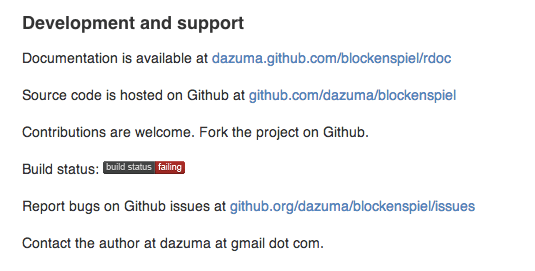
https://github.com/dazuma/blockenspiel/issues/4 which shows the native extension not building and a bug is issued here http://bugs.ruby-lang.org/issues/4803. Ugh, how frustrating. Then I also noticed something else, the build is not passing per the README.md file displaying the Travis CI status.

That sux, but I kept digging at that point.

So which native extension did I need to install? I was missing it for some reason. Then I dug around a little more and discovered this in one of the logs.

[2012-12-07 09:50:07] ./configure --prefix=/Users/Adron/.rvm/usr
checking for a BSD-compatible install... /usr/bin/install -c
checking whether build environment is sane... yes
checking for a thread-safe mkdir -p... config/install-sh -c -d
checking for gawk... no
checking for mawk... no
checking for nawk... no
checking for awk... awk
checking whether make sets $(MAKE)... no
checking for gcc... no
checking for cc... no
checking for cl.exe... no
configure: error: in `/Users/Adron/.rvm/src/yaml-0.1.4':
configure: error: no acceptable C compiler found in $PATH
See `config.log' for more details

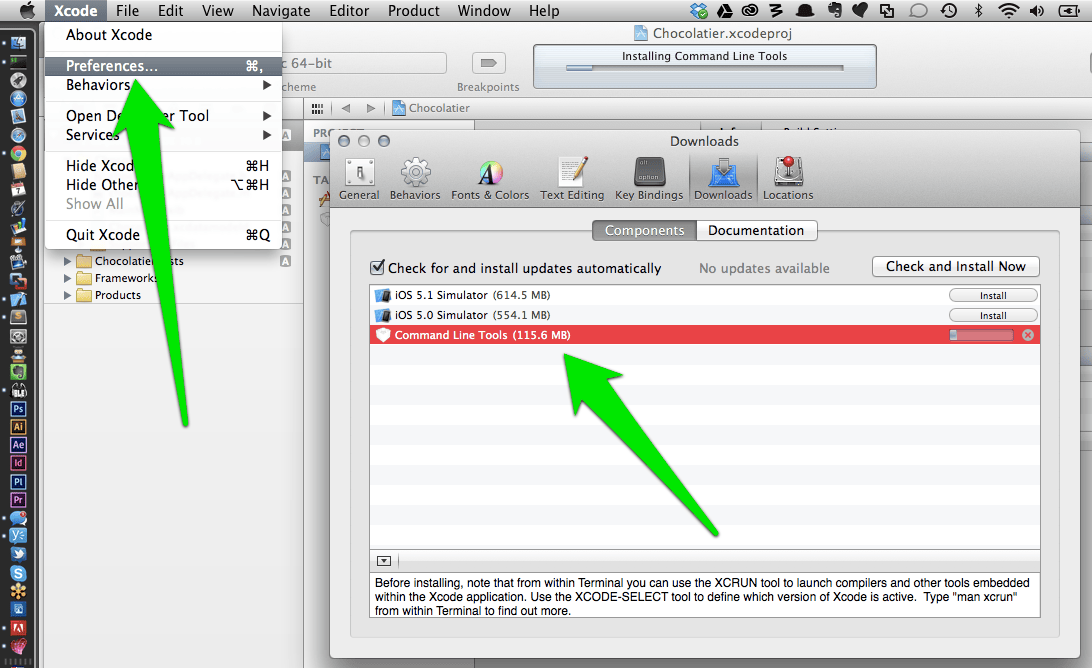
Hmmm, dammit, new machine mistake again. I needed a C compiler ASAP! Opening up XCode I immediately got this fixed by installing the CLI tools. These tools include about a zillion things I obviously needed, including the LLVM Compiler, Linker and the universally needed Make.

XCode CLI Tools Installation, for full size image click.

XCode CLI Tools Installation, for full size image click.

Ok, I finally got that installed and moved forward again. Pulled down the bits, and ran smack into the problem again. The blockenspiel lib can’t build the native extension. Ugh! However this time I got a slightly more useful error message at least.

/Users/Adron/.rvm/rubies/ruby-1.9.3-p327/bin/ruby extconf.rb
checking for ruby/backward/classext.h... *** extconf.rb failed ***
Could not create Makefile due to some reason, probably lack of
necessary libraries and/or headers.  Check the mkmf.log file for more
details.  You may need configuration options.

Provided configuration options:
	--with-opt-dir
	--without-opt-dir
	--with-opt-include
	--without-opt-include=${opt-dir}/include
	--with-opt-lib
	--without-opt-lib=${opt-dir}/lib
	--with-make-prog
	--without-make-prog
	--srcdir=.
	--curdir
	--ruby=/Users/Adron/.rvm/rubies/ruby-1.9.3-p327/bin/ruby
/Users/Adron/.rvm/rubies/ruby-1.9.3-p327/lib/ruby/1.9.1/mkmf.rb:369:in `try_do': The compiler failed to generate an executable file. (RuntimeError)
You have to install development tools first.
	from /Users/Adron/.rvm/rubies/ruby-1.9.3-p327/lib/ruby/1.9.1/mkmf.rb:494:in `try_cpp'
	from /Users/Adron/.rvm/rubies/ruby-1.9.3-p327/lib/ruby/1.9.1/mkmf.rb:919:in `block in have_header'
	from /Users/Adron/.rvm/rubies/ruby-1.9.3-p327/lib/ruby/1.9.1/mkmf.rb:778:in `block in checking_for'
	from /Users/Adron/.rvm/rubies/ruby-1.9.3-p327/lib/ruby/1.9.1/mkmf.rb:272:in `block (2 levels) in postpone'
	from /Users/Adron/.rvm/rubies/ruby-1.9.3-p327/lib/ruby/1.9.1/mkmf.rb:242:in `open'
	from /Users/Adron/.rvm/rubies/ruby-1.9.3-p327/lib/ruby/1.9.1/mkmf.rb:272:in `block in postpone'
	from /Users/Adron/.rvm/rubies/ruby-1.9.3-p327/lib/ruby/1.9.1/mkmf.rb:242:in `open'
	from /Users/Adron/.rvm/rubies/ruby-1.9.3-p327/lib/ruby/1.9.1/mkmf.rb:268:in `postpone'
	from /Users/Adron/.rvm/rubies/ruby-1.9.3-p327/lib/ruby/1.9.1/mkmf.rb:777:in `checking_for'
	from /Users/Adron/.rvm/rubies/ruby-1.9.3-p327/lib/ruby/1.9.1/mkmf.rb:918:in `have_header'
	from extconf.rb:44:in `'

My first thought was, WTF didn’t I just install the developer tools?

Went digging for this problem and found this interesting and likely related Stackoverflow Entry “”. One of the suggested solutions would be found in executing the following commands. As I read this I realized it wasn’t the marked answer, but I needed MacPorts so I downloaded MacPorts! A quick few seconds later I grabbed it and tried out these commands just to at least get things updated.

sudo xcodebuild -license
sudo port upgrade outdated
sudo port install apple-gcc42
sudo rvm reinstall 1.9.3

At this point, still no go. I was getting pretty pissed. At least I was getting all these things setup on my machine, but seriously, this should NOT be this hard. The next thing I did was also update my Ruby Gems, as another place on the web suggested doing that. I tried installing middleman again.

gem install middleman

At this point I was a bit frustrated, sat back and figured, I’ll give it a go in a while. Well after a few hours to let things sort out in my head, I picked up a completely different laptop. My Mac Book Air I’ve had and been using for over a year now. I opened up iTerm2 and through these commands in bash:

git clone https://github.com/basho/basho_docs.git
gem install bundler
bundle install
middleman

…and the server started right up on port 4567. I opened up a browser and navigated to http://localhost:4567. Right there before my eyes loaded the Basho Riak Documentation!

After all that, it boils down to some stupid machine load issue. So I’ll come back to fixing that machine some other time. For now, it was finally time to move on to other things. But that’s a gist of week one, and week two will be starting in just about 47 minutes. Next week I’ll be diving in a bit more to all of these things plus some actual installation, setup and related skill with Riak. Until then, cheers.

SITREP – Stoking Iron Foundry, Thor Hammering & Joining… ?

What have I been up to? Here’s a quick recap. You may want to get involved with some of these projects!

Iron Foundry & Tier 3 Web Fabric

Iron FoundryBack when I left the kick ass team at Russell Investments in Seattle I stepped directly to bat as team lead at Tier 3. My job, get a PaaS built on Cloud Foundry and extending that with Iron Foundry. It was an ambitious effort that would provide the most extensive framework and language support available from any PaaS Provider on the market.

Well, we did it, thanks to the capabilities of Cloud Foundry Community, the great minds of Jared Wray @jaredwray, Luke Bakken, Eric Lee @saintgimp, Cale Hoopes & the rest of the Tier 3 Team! I was able to add this to my list of successes. We had some bumps, some collisions, a brick wall or two and other scheduling problems – ya know, the standard things that happen on a project. But in spite of it all, we got the Web Fabric released – and it continues to be the only PaaS available with such a wide framework and language support. It ranges from Ruby on Rails, Erlang, Node.js & Java to .NET! If you’d like to check out the open source PaaS of Cloud Foundry & Iron Foundry both projects are always looking for participation & contributions!

Thor Brings the Hamma!

After the release of the Tier 3 Web Fabric I started the search for a wicked smart and capable OS-X / Cocoa Coder – it seems their availability is pretty limited these days! Well I finally lucked out and found Benjamin van der Veen (@bvanderveen, thanks for the intro Selena @selenamarie!) to help me get started on the Thor Projects. There’s the Cocoa Thor Project & the Windows 7 WPF Metro based Thor .NET Project that we’re wrapping up with v1 releases coming really soon. To check out more on these projects that I’ve lead & coded on check out the code bases & information, all linked on ironfoundry.org. The projects are open source, so feel free to jump in and help out or fork & submit pull requests. The team will be happy to review & discuss ASAP.

While we’re wrapping these projects up right now, I’ll actually be continuing on and supporting the projects: Thor & Thor .NET. I will continue to be involved, as I was saying, in a number of ways in the PaaS space. So don’t think I’m disappearing form that realm!

Basho Sings my Song

I’ve been keeping track of Basho for a while now. Riak caught my interest many months ago as a really well built, well thought out & advanced distributed database. As you might guess, being into the whole “cloud computing” industry, I’m just ever so slightly interested in distributed systems. The other thing that I’m a huge fan of, which Basho does, is heavily support and involve itself in the open source software community and movement. The icing on the cake, was their diverse use of systems and language use around Erlang. All things that are massive wins.

Bailey's Taproom

Bailey’s Taproom

Well during a random conversation with Eric @coderoshi at Bailey’s Tap Room & then attending the RICON 2012 Conference (article here and pictures) I spoke to some of the team and found out they were looking for some particular skill sets. Well it just happened that I was keenly interested in meeting those skill set requirements! So December 1st I’ll be joining the Basho team full time as developer advocate, evangelist, messenger or such for the northwest working with a few people you may know such as Mark Phillips @pharkmillups, Andy Gross @argv0 (thanks for the intro James @wattersjames), Eric Redmond @coderoshi, Shanley Kane @shanley, Casey Rosenthal @caseyrosenthal and many others. Simply, I’m freaking stoked.

How This Helps You Help Me Help You

Alright, so it’s great but how can I help you in your day to day? What data do you work with? Do you work with a data scientist? Are you a data scientist? Do you work with huge sets of data, many objects, large objects? I want to know about your data usage and data problems, because there’s a good chance we’ll have more than few things to discuss. Here’s some ways I can help you, help me, help you. Ping me if you’re interested in…

  • talking about your data usage at the monthly Riak user group.
  • coding, pairing & otherwise learning Erlang and the monthly Erlang group.
  • interested in coding, deploying and inventing new paradigms and patterns of data storage.
  • interested in pairing up to learn how to deploy, migrate, upgrade or otherwise use NoSQL solutions – namely Riak.
  • interested in Ruby on Rails, Node.js, Map Reduce, .NET, Java, PHP and how these things can and do work against data in everything from relational databases to the new echelon of NoSQL databases.

I hope to hear from you soon and see you at an upcoming user group, cheers!

Surface & iPad Collision Course

Ok, I’d been looking around for a Surface I could try out. Even though I have my doubts about Windows 8 and especially RT I also am excited about a lot of the features that these operating system(s) have. But amid the parts that I hate and parts I love, there is the simple fact of the pure and simple comparison of Surface + Windows RT versus iPad + iOS 6. Thanks to Brad Wilson I was able to do a physical comparison between the Surface and the latest iPad. Here’s what I got out of both with a summary to wrap it all up nice and neat.

iPad vs. Surface
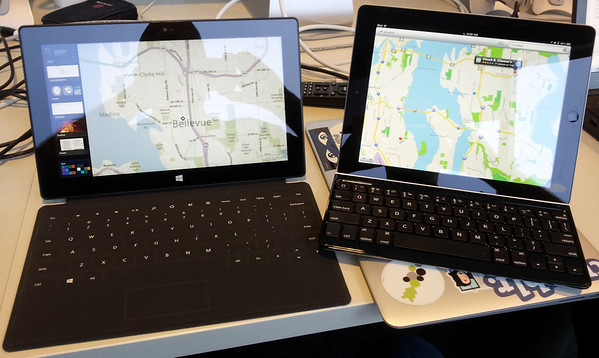
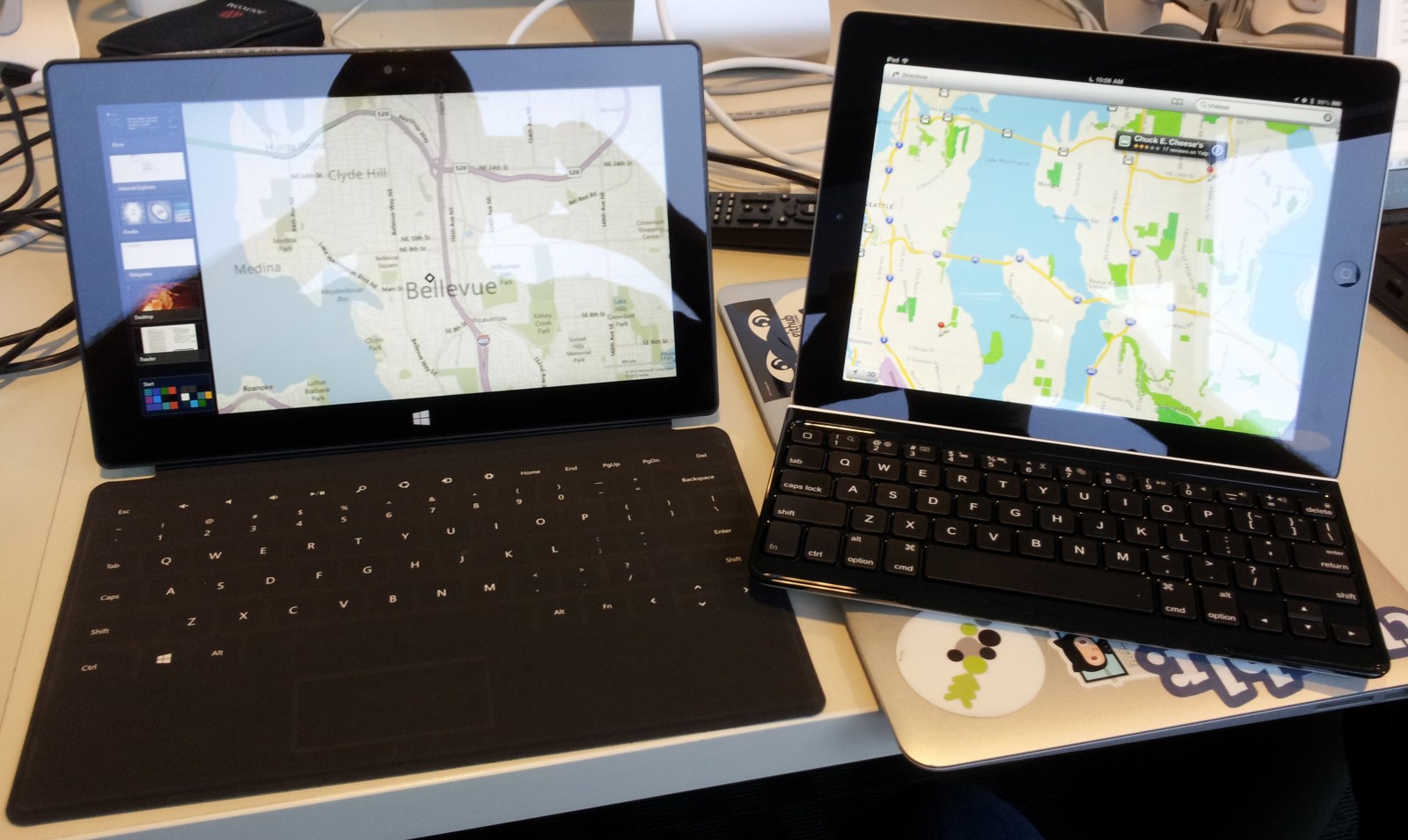
Surface & iPad Side by Side (Click for high rez image)

The first thing I did was take a good look and check out every physical corner, fold, rounded corner, seal, button (or lack thereof) flick panel and “kick stand”. This first comparison was done between only the tablets themselves, no keyboards were attached.

Screens & Touch

Both devices started fine. Both screens swiped the active panels or app icons back and forth with no problem. These things were smooth and simple. The applications started fast on the iPad, a bit slower on the Surface. Just to make sure I had some apples to apples comparisons, I loaded Google Maps via browser along with iOS 6 Maps (which are still horrible * ) and Bing Maps (which also are still horrible * ). Google Maps via browser of course is slow on tablets, regardless of which tablet. This makes for a frustrating experience with mapping and routing. I look forward to having a decent Google Maps app on either of these platforms again, I’m however not holding my breath, but if they’d just cooperate and stop their nonsensical fighting that would be splendid.

Quality

As for construction both devices are light years ahead of any other tablet out there. Weight however is a little frustrating, as both are pretty heavy devices to hold in one hand for any extended period of time. Many of the Android Tablets are dramatically lighter. The feel however, touch of the screens, the kick stand, and about every single thing is comparable in quality between both devices. To put it simply, Microsoft and Apple have done a spectacular job at hiring the right manufacturing facilities to build their devices and have done a good job in designing the devices.

Strength

Will the Surface hold up as well over time as the iPad? Especially with the kick stand and other parts, the Surface does have a little more risk around these elements. Give a 5 year old a Surface and I’d put hard money on the fact that 5 year old will make that kick stand give way in short order form regular wear and tear. The iPad of course, doesn’t have any of these concerns – it’s a single, well built, strong device. The screens I hear however, favor the Surface, but so far have seen no evidence that one or the other screen is stronger than the other.

Applications

Alright, this is where there is no competition. Surface has almost no applications in comparison to Apple’s iPad. This is of course barely a fair comparison at this time since it has been on market for a few weeks and the iPad for years. The iPad has had the App Store to build off of and millions of developers while the Surface has had almost nobody except Microsoft’s internal developers & immediate partners. Barely anything beyond that exists. This however, makes the few applications the Surface does have almost impressive. However…

The applications that do exist have one big problem. Especially the native application Microsoft itself has built, such as the messaging and email client. They’re buggy. It is state no simpler than, “They are buggy.” I’ve seen it over and over again on Twitter, Facebook and every other social media and critique outlet. Let’s take a few applications for a test drive.

Applications – iOS 6 Maps & Bing Maps

The maps, Bing and iOS 6 Maps are both complete crap. They’re years behind Google Maps. So in this case we’re comparing a limited feature map set against another limited feature map set. Overall as for options, Bing Maps at least has transit. On the driving front, since I don’t do this myself (*see below), the driving instructions and traffic are useless to me. However, I did check out driving directions and traffic – both are moderately competent at getting this information. No more so than Google Maps though. As for finding things in cities or urban areas that have high livability – such as Urban Seattle, Portland, San Francisco or New York – both are horrendous.

Biking, neither of the maps applications have biking directions. I guess the rather large contingent of developers that bike to work everyday in New York City, Portland, San Francisco just don’t matter to Microsoft or Apple. They’ve just left that out. It’s pathetic in my opinion, as Google Maps has extensive and informative biking information and logistics planning. Bing & iOS Maps 6 both I’d rate as unmitigated distaters except for those that live an average suburban auto dependent lifestyle. Everybody else – i.e. a dramatically large part of the tech sector for one, is left out.

Walking – again, both maps are broken. Transit, don’t even get me started on how behind and outdated both of these maps options are. Finding great coffee shops and…  oh just forget it. Don’t get either of these devices for the mapping. You want a mapping device get an Android Tablet or an Android Phone. Hands down, no competition.
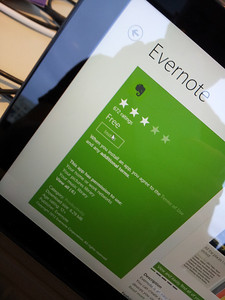
Evernote is Free!

Evernote is Free!

Applications – Evernote

Evernote has simply become a huge part of my day to day flow. I pay for the unlimited or extreme or whatever version they call it. I don’t want any limites and I find it more than worth the money (they could even raise the price 2x and I’d still pay it). So how does Evernote play out on the Surface vs. iPad. Well two things made this interesting. Over the time I started and am finishing this write up, Evernote completely updated and revamped their user interface and thus the user experience changed. Fortunately for either product, for the better.

But… when I first logged into the Surface and tried to get Evernote going the swiping and determinig what a right click was or double tap was extremely frustrating. The Surface made the iPad Evernote version seem intuitive, simple and usable by comparison. Both allow almost identical functionality, but with the surface the challenge is finding out how to get at that functionality.
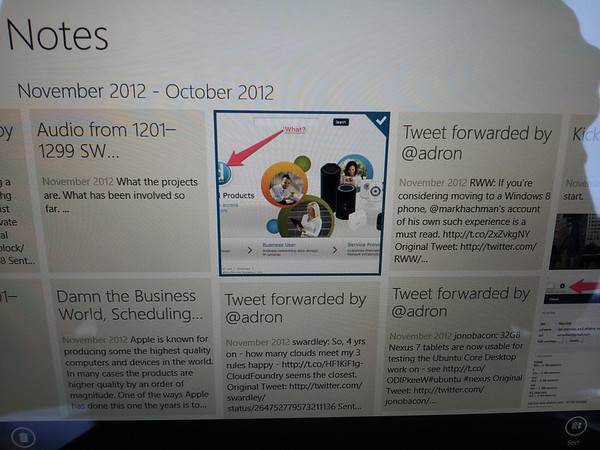
If you find it, this is what you get when you right click or double tap or whatever it's called.

If you find it, this is what you get when you right click or double tap or whatever it’s called.

So in this category, the iPad is hands down an easier to use Evernote device. Once you get used to it, does that really matter? Probably not. But I’m not sure why someone would want to buy, purposefully  a device that has a learning curb.
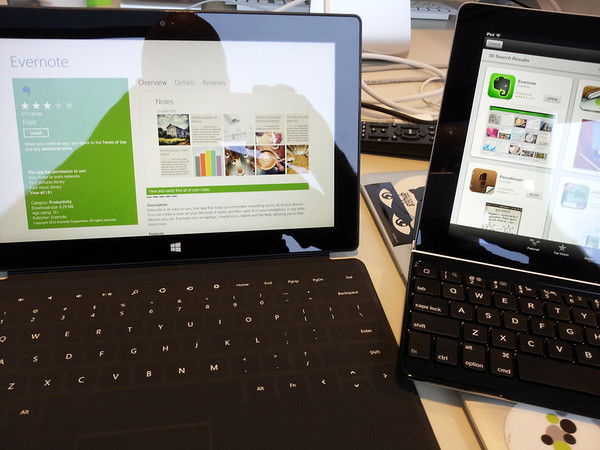
Evernote on Surface & iPad

Evernote on Surface & iPad

Summary

Overall, I found the Surface pretty sweet in a number of ways. However, I know for a fact, that those things I found sweet are things an early adopter, nerd, geek, techno type would find sweet. Not the person who just wants to get things done and carry on with life. The person who wants to just view internet content or write an email, go with an iPad. If you want some simple, suburban driving directions to help avoid traffic, either device will do. If you want to just get on with life with a sexy and easy to use device, the iPad is fine.

I could go on about the USB and this and that feature, but Microsoft has horribly missed the mark in that way. These are devices for short term use, not working. If you get a Surface with the intent to work, get ready to get a carpal tunnel operation in a few years. I wouldn’t advise using either device for any significant amount of work. If you want to do work, get a laptop or proper computer. Apple and Microsoft have many to choose from.

In the end, if you have an iPad, stick with it. If you have no tablet and want to get one – go with either an Android tablet or an iPad depending on if you want a controlled garden of elegance (iPad) or want total freedom of devices and interoperability (Android).

With that, cheers and good luck being happy with whatever you get.

* Some context needs to be added to the maps situation. I don’t drive, not because I can’t but simply because I find it a horrendous and wasteful activity for my time. I might sound or come off aloof, but I don’t mean to, but simply – I have zero use for a map application that only provides driving directions or traffic. I haven’t had to deal with these problems in almost a decade now, even back when I did drive. So thus, driving and path finding through traffic are not one of my problems. What I do use maps for however are walking, biking and transit directions. All the better if the transit directions actually provide real time information as Google Maps does in some of the more advanced partner cities like Portland, San Diego, etc. Also I want street level information that is accurate and defines the businesses and other related information. Google Maps does this, but iOS 6 Maps and Bing Maps are outdated and routinely provide inaccurate information compared to Google Maps. Not to say Google Maps couldn’t use improvement here or there, but it is by far years ahead in information and capabilities versus the other two.