Interviewing AI. AI has thus answered the questions on AI in Software Development!

Me: Describe to me how AI is changing software development and the work developers do daily.

The AI: AI is transforming software development in various ways, ranging from automating repetitive tasks to enhancing software performance and user experience. Here are some specific ways that AI is changing software development and the work developers do daily:

  1. Automating mundane tasks: AI has enabled developers to automate various repetitive tasks that were previously done manually. For instance, using machine learning algorithms, AI can automate code review and testing, freeing up developers’ time to focus on more complex tasks.
  2. Enhancing software performance: With AI, developers can create more robust and efficient software. AI algorithms can analyze code and identify performance issues, potential bugs, and other areas that can be improved. This makes it easier for developers to optimize code and improve overall software performance.
  3. Improving user experience: AI can be used to enhance user experience in various ways. For instance, AI can be used to analyze user behavior and preferences, allowing developers to create more personalized and intuitive interfaces. AI can also be used to provide real-time feedback and recommendations to users, making software more engaging and interactive.
  4. Increasing productivity: AI-powered tools and frameworks can help developers be more productive by automating repetitive tasks, suggesting solutions to problems, and speeding up the development process.
  5. Facilitating collaboration: AI-powered tools can facilitate collaboration among developers by identifying areas where different developers can work together, highlighting common issues, and recommending solutions.

Overall, AI is transforming software development by making it more efficient, effective, and collaborative. As AI continues to evolve, developers will likely see even more changes in the way they work and the software they produce.

Me: What are ways that software developers can prepare for the changes AI is bringing to software development?

The AI: As AI continues to disrupt the software development industry, software developers need to prepare for the changes that are coming. Here are some ways that software developers can prepare for the changes AI is bringing to software development:

  1. Stay informed: Developers need to keep up with the latest trends and developments in AI and machine learning. This includes reading industry publications, attending conferences, and participating in online forums.
  2. Learn new skills: Developers should invest in learning new skills that will be valuable in an AI-driven future. This includes understanding machine learning algorithms, natural language processing, and data analysis techniques.
  3. Collaborate with AI experts: Developers can collaborate with AI experts to learn more about AI technologies and how they can be applied to software development. This can involve working on joint projects, attending meetups, and networking with AI experts.
  4. Embrace automation: Developers need to be open to automation and embrace tools that can automate repetitive tasks. This includes using AI-powered code review and testing tools, as well as automated build and deployment systems.
  5. Focus on the user: Developers should focus on creating software that delivers value to users. AI can be used to create more personalized and intuitive interfaces that enhance the user experience. By focusing on the user, developers can stay ahead of the curve and ensure that their software remains relevant.
  6. Develop a growth mindset: Lastly, developers should develop a growth mindset that enables them to embrace change and learn new skills. This includes being open to feedback, seeking out new challenges, and continuously improving their skills.

In summary, by staying informed, learning new skills, collaborating with AI experts, embracing automation, focusing on the user, and developing a growth mindset, software developers can prepare themselves for the changes AI is bringing to software development.

Me: What effects might AI cause in the developer job market with the reduction and automation of work that many software developers do today?

The AI: The increasing adoption of AI in software development is likely to have a significant impact on the job market for software developers. While AI will create new job opportunities in areas such as data science and machine learning, it may also lead to the reduction and automation of work that many software developers do today. Here are some potential effects:

  1. Automation of repetitive tasks: As AI-powered tools become more prevalent, developers may find that many of the tasks they previously performed manually are automated. This could include tasks such as testing, debugging, and code review. While this will free up developers’ time to focus on more complex tasks, it may also lead to a reduction in the number of jobs available.
  2. Shift in skill requirements: As AI becomes more prevalent, the skills required to be a successful software developer may change. Developers may need to have a greater understanding of machine learning algorithms, data analysis, and natural language processing. This may lead to a shift in the education and training required for software development.
  3. Emergence of new job roles: While some jobs may be automated, AI is also likely to create new job opportunities in areas such as data science, machine learning engineering, and AI architecture. These jobs may require a different set of skills and expertise than traditional software development roles.
  4. Increased competition: As the number of jobs available in software development potentially decreases, competition for the remaining jobs may increase. This may put pressure on developers to constantly update their skills and stay relevant in the job market.

Overall, the impact of AI on the job market for software developers is likely to be complex and multifaceted. While some jobs may be automated or reduced, new job opportunities may emerge. Developers who stay up-to-date with the latest trends and developments in AI and machine learning will be better positioned to take advantage of these new opportunities.

Me: Is there any evidence that there will be a net loss of jobs when AI becomes a larger part of software development?

The AI: There is some debate among experts about the impact of AI on jobs in the software development industry. While AI will certainly lead to the automation of some tasks, it may also create new job opportunities in areas such as data science, machine learning engineering, and AI architecture.

There have been several studies on the impact of AI on jobs in the broader economy, and the results have been mixed. Some studies suggest that AI will lead to significant job losses, while others suggest that it will create new job opportunities and lead to a net gain in jobs.

In the software development industry specifically, there is evidence that the impact of AI on jobs will depend on the specific tasks and skills involved. For example, a study by Deloitte found that while AI may automate some routine programming tasks, it is unlikely to replace developers altogether. Instead, AI is likely to shift the focus of developers towards more complex tasks that require human creativity and problem-solving skills.

Another study by the World Economic Forum found that AI is likely to create new job roles in software development, such as data analysts, machine learning engineers, and AI architects. However, the study also found that there may be some displacement of jobs, particularly for those with lower skill levels.

Overall, while it is difficult to predict the exact impact of AI on jobs in software development, it is likely that there will be both job losses and job gains. Developers who are able to adapt and acquire new skills in areas such as machine learning and data analysis are likely to be better positioned to take advantage of the new job opportunities created by AI.

Summary

Funny thing, and maybe it’s all a simulation right, but AI has given you basically the same exact answers I’d give you if asked these same questions. However, I’m writing an article to add more detail that AI (at least chatGPT) has not been able to provide. If you’ve used it, you’ve probably noticed, but there are distinctive limitations to the AI’s learning so far that just isn’t equitable to a well researched and well read human writing up a piece on a topic they understand well. It appears, so far, we’re not entirely replaceable yet!


A Quick Post on URL, URI, UDI, URN… Resources

URL, or Uniform Resource Locator, is often used as a blanket term for almost anything on the internet. A URI, or Uniform Resource Identifier, represents a unique resource on a server, located somewhere on the World Wide Web. Other abbreviations that are often confusingly related include UDI for Universal Document Identifier and URN for Universal Resource Name. All together we have the following abbreviations;

  • URL – Uniform Resource Locator
  • URI – Uniform Resource Identifier
  • UDI – Universal Document Identifier
  • URN – Uniform Resource Name

A URI can be either a URL or URN.

URI Syntax

scheme:[//authority]path[?query][#fragment]
  • Scheme – This is a non-empty sequence of characters followed by a colon, followed by any combo of digits, letters, periods, hyphens, or plus characters. The scheme is registered with the Internet Assigned Numbers Authority (IANA).
  • Authority – The authority is an optional field preceded by //. It has the following subfields.
    • Userinfo – A subcomponent which could contain username and password, or other user information data.
    • Host – A subcomponent containing either an IP address or a registered host or domain name.
    • Port – An optional subcomponent that is followed by a colon.
  • Path – Contains a sequence of segments separated by a slash characters. This could be something like /resources or /trains or similar.
  • Query – An optional component preceded by a question mark. The component contains a query string of non-hierarchical data, each parameter is separated by an ampersand in the query component and parameter values are assigned using an equals operator.
  • Fragment – An optional field and is preceded by a hash. The fragment includes a fragment identifier for a secondary resource.

Examples

  • mailto:myaddress@thrashingcode.com
  • telnet://10.20.0.1:23/
  • ldap://[2020:ba6:9:9]/c=ZAZA?objectClassOfDomain?objectOfDomain

The Differentiator

The URI examples above all could be called URLs, however the difference is that a URI is an identifier, where as a URL is an identifier and provides details on how to get to the identified resource.

URN AKA Uniform Resource Name

URNs are not used often. More specific details can be found in RFC 2141. For this quick post it’s safe to sort of ignore URNs, as the other abbreviations are the ones you will see out and about in the world, and specifically used in detailing REST APIs and the like.

Vue.js Studies Day 6 – Beyond “Getting Started”

The previous post to this one, just included some definitions to ensure I’ve covered the core topics as I’m moving along. Before that I covered getting a project app started in day 3 and day 2 posts. Before that I covered the curriculum flow I’m covering in these studies.

Now that I’ve covered a number of ways to get started with a Vue project with; JetBrains WebStorm, hand crafted artisanal, or via NPM it’s time to start covering the basics of how to build an app using Vue.js. I’ll be using the WebStorm IDE for development but will still call out where or what I’d need to do if I were working from the terminal with something else. By using the WebStorm IDE, I’ll also be starting from the generated app that the IDE created for me.

main.js

Starting in the src directory of the project, let’s cover a few of the key parts of this project of the application as created. First, we have a main.js file. In that file is the following code. This little bit of code is what is responsible for working with the Virtual DOM to mount the application to it for rendering the page we eventually see.

import { createApp } from 'vue'
import App from './App.vue'

import './assets/main.css'

createApp(App).mount('#app')

The first two lines import two variables from the ‘vue’ library called createApp and create an App object from ‘./App.vue’ template. Then the third import is just pulling in the main.css file. The fourth line uses the createApp operatig on the App object to .mount the application at the point of the #app anchor in the template App.vue. That leads to needing to take a look at App.vue to see what exactly the vue app is mounted to.

NOTE: I’m not 100% sure I’m describing this as precisely as I should, as the blog entry details, this is day 4 of Vue.js studies. I’d started in the past once or twice, and have done a ton of web dev over the years, but Vue.js is largely new to me. So if you see something worded incorrectly or oddly, please comment with questions or corrections.

App.vue

The App.vue file for the WebStorm generation seems to have a bit more from the other apps generated from other tooling. Whatever the case, let’s pick this apart and learn what is which and which is what in this file.

<script setup>
import HelloWorld from './components/HelloWorld.vue'
import TheWelcome from './components/TheWelcome.vue'
</script>

<template>
  <header>
    <img alt="Vue logo" class="logo" src="./assets/logo.svg" width="125" height="125" />

    <div class="wrapper">
      <HelloWorld msg="You did it!" />
    </div>
  </header>

  <main>
    <TheWelcome />
  </main>
</template>

<style scoped>
header {
  line-height: 1.5;
}

.logo {
  display: block;
  margin: 0 auto 2rem;
}

@media (min-width: 1024px) {
  header {
    display: flex;
    place-items: center;
    padding-right: calc(var(--section-gap) / 2);
  }

  .logo {
    margin: 0 2rem 0 0;
  }

  header .wrapper {
    display: flex;
    place-items: flex-start;
    flex-wrap: wrap;
  }
}
</style>

Right at the beginning of the App.vue file there is a <script setup></script> section that imports two other components that are located in the components directory that the App.vue file is located in. This is the HellowWorld.vue and TheWelcome.vue components. There is a third component, the WelcomeItem.vue component, in the component directory along with an icons directory.

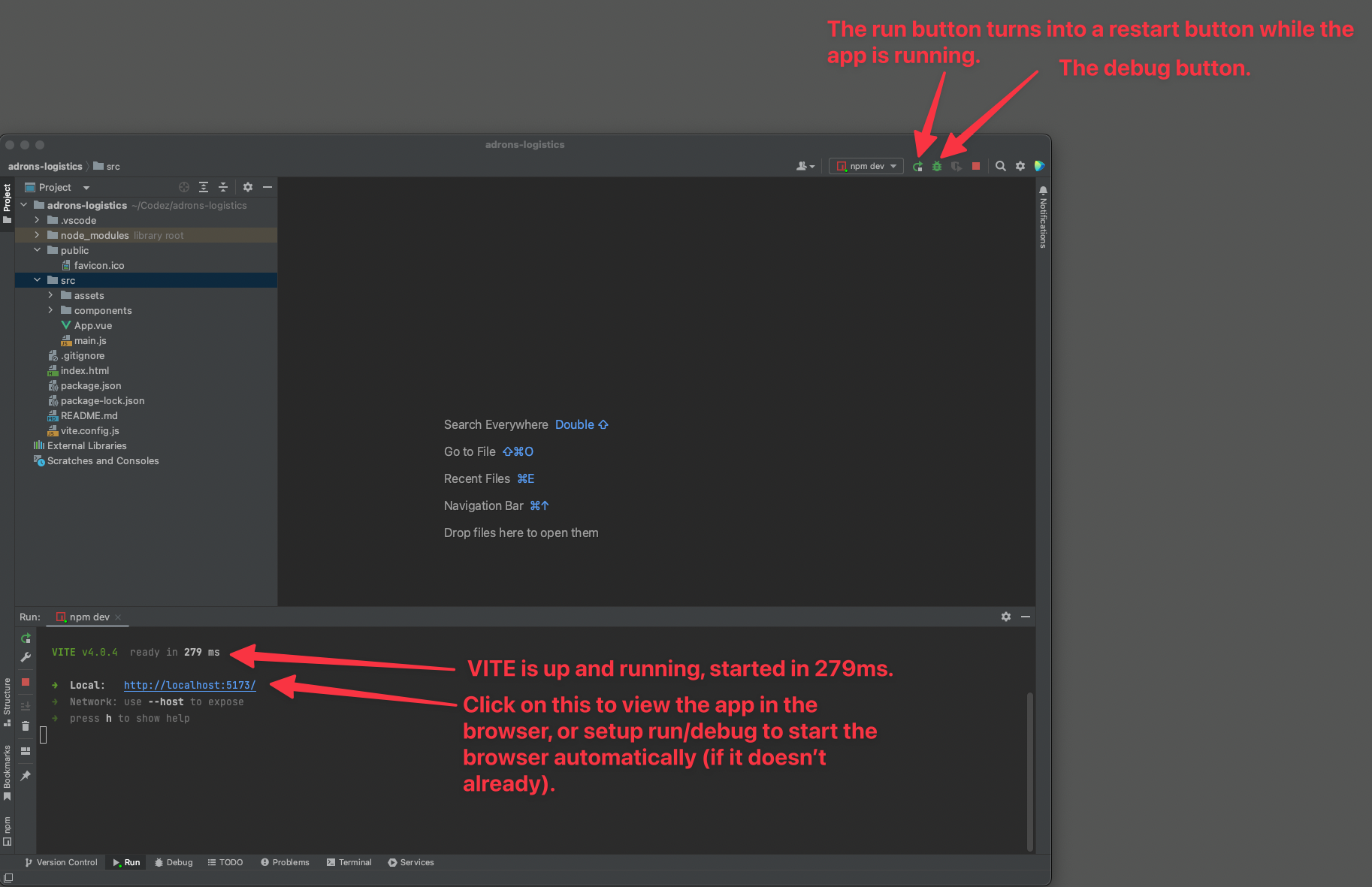
With all of these assets now ready, clicking on the play or debug buttons in WebStorm will issue to the command to execute and display the app in the default browser. I’ll cover more of the assets as we get to each of them, for now I’m going to move along and get into some components and all.

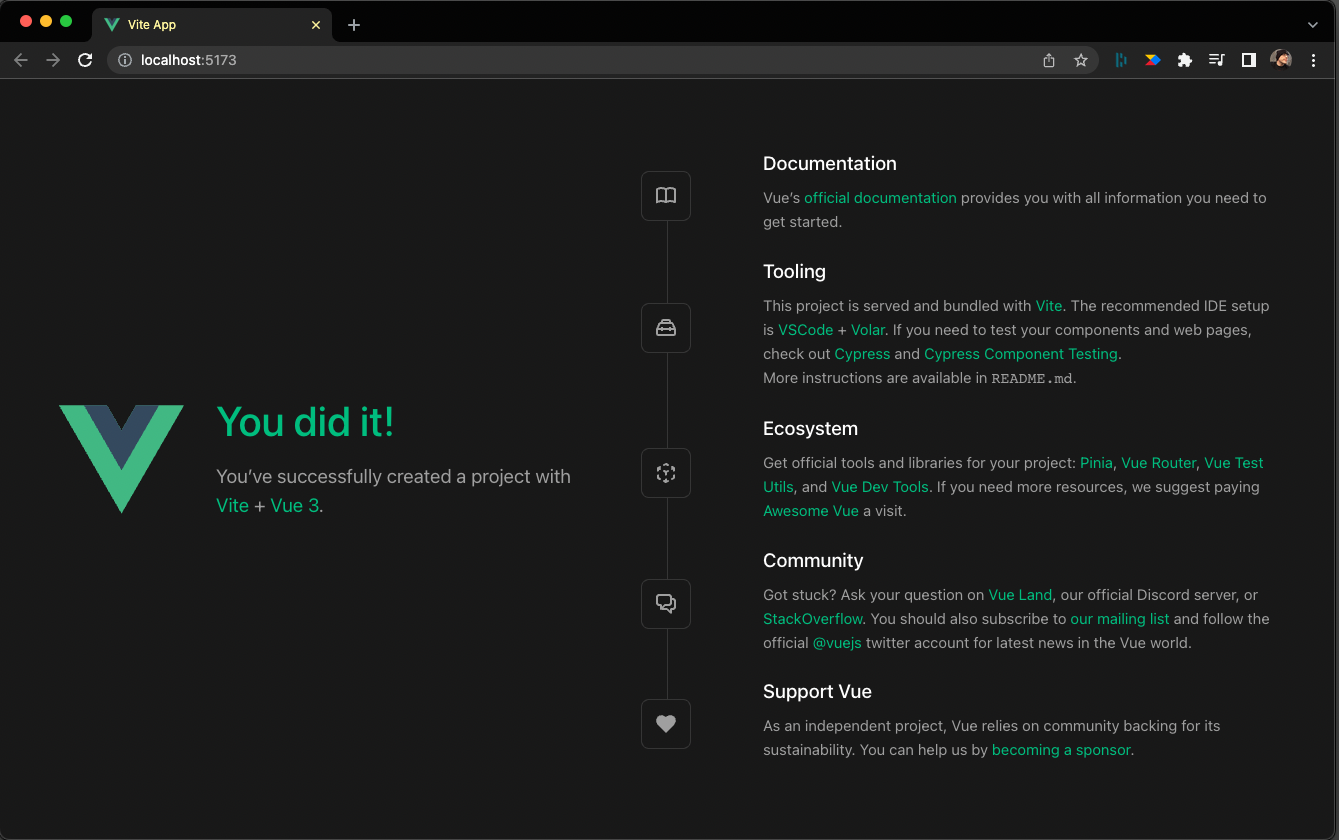
When the IDE (or you do manually) launches the browser to display the app it will look like this.

Checkpoint: Vue App Operational

This is a good time to checkpoint. If you’ve been following along and everything is as shown above, we’re good to move along to the next steps. If not, then something is amiss, probably broken, and that needs resolved first. If you’ve run into a problem at this point, leave a comment with a description of the issue and I’ll endeavor to help you resolve the problem. Otherwise, moving along to some edits and checking out Vue.js’s features and capabilities.

Once the next post is live, I’ll add the link here to that post… it’s coming soon!

Day 5 Studies – Linked Lists 😱

I needed a refresher, as I’m at the point in my career I tend to just implement the things and not remember what they’re called anymore. Whether a refresher or you’re new to coding, maybe my refresher will be a good stroll through linked lists.

First off, what exactly is a linked list? The name sort of defines what we’re talking about, but a definition would definitely help. From an actual dictionary, I dug up the following definition.

“A simple linear data structure, each of whose nodes includes a pointer to the next (and sometimes previous) node in the list, enabling traversal of the structure in at least one direction from any starting point.”

via Wordnick

The parenthesis above overloads the definition a bit in describing both a simple linked list and a doubly linked list. Let’s define further to differentiate those two and throw in a circular one to boot.

Singly Linked Lists

Each node contains a pointer to the next node. The code for a singly linked list would look something like this, if you put it together in JavaScript.

class ListNode {
    constructor(data) {
        this.data = data
        this.next = null
    }
}

class LinkedList {
    constructor(head = null) {
        this.head = head
    }
}

Note however, in this example, the pointer is really the next inferred object. You’d need to use a language like C, or C++, to build a linked list with an actual pointer. that would look something like this.

struct Node {
    int data;
    struct Node* next;
};

#include <bits/stdc++.h>
using namespace std;

class Node {
public:
    int data;
    Node* next;
};

void printList(Node* n)
{
    while (n != NULL) {
        cout << n->data << " ";
        n = n->next;
    }
}

Here you can see the * used to set a pointer and then the reference to move between the nodes below. It’s a bit more complicated using a language like this, but I wanted to – because I’m often complicated – point out how it would be done with C++. This introduces additional capabilities, but I won’t go on about the nuances of using actual pointers here and am instead going to focus on the linked list concepts themselves. However it doesn’t hurt to know this and along with pointers themselves, this is a great topic for another post another time, so back to linked lists!

Referring back to the JavaScript example above, if you were to build out several nodes like this.

let node1 = new ListNode("a singular node.")
let node2 = new ListNode("some other node.")
let node3 = new ListNode("and another rando node.")

Then put together the nodes, and instantiate a linked list like this.

node1.next = node2
node2.next = node3

let list = new LinkedList(node1)

You can then request various nodes of the linked list or get the linked list object itself like this.

console.log(list.head)
console.log(list.head.next.data)
console.log(list.head.next.next.data)

The first console log would print out the entire list.head object, which means all of the nested objects too. That would look like this.

ListNode {
  data: 'a singular node.',
  next: ListNode {
    data: 'some other node.',
    next: ListNode { data: 'and another rando node.', next: null }
  }
}

The second and third console logs would print out "some other node." and "and another rando node." respectively.

Double Linked Lists

Each node contains a pointer to the next and previous nodes. That turns the above example into this.

class ListNode {
    constructor(data) {
        this.data = data
        this.next = null
        this.prev = null
    }
}

class LinkedList {
    constructor(head = null) {
        this.head = head
    }
}

Summary

That’s the short SITREP on LinkedLists. There’s a lot more to cover, the functions that work on the list, the traversals, the addition and removal of nodes, etc. But this post is just intended for a quick review of the structure of linked lists at their core. On to next topics, cheers!

Day 4 Studies – Web Related Things

Today I got into some studying Vue.js, but realized I wanted to cover some of the basics around things that Vue.js uses but I’d not really covered in the posts. Also before I got into some of the other core topics as outlined on Day 1 there were a number of things that just needed defined. This post, is about those things.

Virtual DOM – this is something you hear about that isn’t specifically Vue.js related. React uses a virtual DOM as do other frameworks. The DOM part stands for Document Object Model, and the Virtual DOM is a lightweight JavaScript representation of this model. This Virtual DOM is what is updated instead of the actual DOM, and when the Virtual DOM is ready for rendering to the actual DOM, a diff is done of the two and only the changes are rendered in the actual DOM. This generally makes changes render much faster than attempting to make the changes in the actual DOM only.

The frameworks that use a Virtual DOM include; React, Vue.js, and Elm. Other frameworks like Svelte created by Rich Harris does not, and Rich is also quoted as saying a Virtual DOM is pure overhead. A valid point, yet arguable whether this is an advantage or disadvantage, as it appears to depend entirely on the situation and type of page(s) being rendered.

There are other techniques like Angular or Ember.js’s incremental DOM that offer an alternate approach to DOM rendering.

Digging more closely into the Document Object Model, it is a cross-platform language independent interface that uses a tree structure to represent XML or HTML. Each branch of the DOM ends in a node, each node containing objects. This provides a way to programmatically traverse the model and gain access to various parts of the tree. The nodes within the DOM can also have event handlers attached to them, which provides a programmatic way to fire off events for execution.

The DOM technology is currently managed by WHATWG – Web Hypertext Application Technology Working Group.


Rendering Mechanism – This is the way, process, and flow of Vue.js’s rendering of a page for a Vue Application.

This all starts in Vue.js, with the above defined Virtual DOM, as defined in the docs as the VDOM. Remembering from above, that each branch ends in a node, a constant of the VDOM could be written up as shown.

const vnode = {
  type: 'div',
  props: {
    id: 'anIdentifierOfSorts'
  },
  children: [
    /* all the other nodes on down the tree. */
  ]
}

The Render Pipeline, at a high level compiles, mounts, and patches the VDOM. Vue templates are compiled into render functions that return VDOM trees. The mount function then invokes the render function which walks the returned virtual DOM tree, creates actual DOM nodes based on it and renders. This is performed as a reactive effect to apply changes to the actual DOM. Finally during mount changes, the effect reruns during patch, which creates a new VDOM, the runtime renderer walks the tree, does a diff, and applies updates to the actual DOM.


Templates & Render Functions

It’s important to know that Vue templates are compiled into VDOM render functions. Render functions can also be authored and called programmatically, bypassing a need to create a template. Even though vue recommends, and many if not most tutorials will show templates versus render functions, it’s important to know that render functions are available to use for more flexibility when dealing with dynamic logic or just odd business rules and such.