Amazon Web Services ~5 Minute .NET Quick Start

This is the beginning of a series of blog posts I’m putting together on building out a website on Amazon’s Web Services.  This is a quick start on where to find the .NET SDK, what templates are installed in Visual Studio 2010, and what you get when starting a new Web Application Project with the AWS .NET SDK.

Links mentioned in the video:

Shades of a Cloud Book

I’ve began discussions on my first book prospect.  I’ve written a lot of material; white papers, documentation, consumer documentation, training curriculum, and more over the years.  However I’ve never written a full on book.  Anyone out in the blogosphere and twitterverse have any advice on a prospective book writing?  I know a lot of you guys have written books before, I’m curious what I should watch out for, focus on, etc to assure I bring in a solid, successful book project?

What the F#$! is wrong with computer makers!

Dear Computer Manufacturers,

Ok, in 1989 my family bought a computer.  A Tandy 1000RL.  This thing had 512Kb of RAM, an 8 Mhz Processor and a 20 MB Hard Drive.  I was stoked!  I was going to be able to play F-15 Strike Eagle II and Silent Hunter II from Microprose!  We got this baby home and unpacked her, fired it up and I went to loading my games.  Two 3.5” floppies for Silent Hunter II and one for F-15 Strike Eagle II.

I went to installing F-15 Strike Eagle II first.  The installation went great and I immediately tried to launch the game.  Then it happened.  Mind you, I knew NOTHING about the hardware of computers at the time.  I had developed one GW-BASIC Application with only GOTO statements because I didn’t even know what looping or logic structures were.  Here I was about to get one of the worse error messages a gamer could get, “Not enough system memory.”

[Rant Starts]

What the…  ?!?!?!!?!

I had no idea what to do.  What kind of nonsense was this I thought.  I have 512 Kb of memory and this game takes 512 Kb of memory.  Well, years later, after being burned out on attempting to fix this (there was no Internet or Google to ask an answer to) I finally found out it was reallocation that needed to be made via a DOS bat file.  So around 1992 I actually got it to load.  Oddly enough though, it crashed a lot because of memory issues.

A few years later I realized that the memory issues were caused by preinstalled software from the manufacturer, Tandy Computers.  Strike 1.

Forward to the mid 90s

The family bought a new family computer from some appliance store.  It was a 100Mhz DX4 Processor, with 16 MB of RAM.  I could play games, write Pascal, and even send e-mail and browse the web with Netscape (oh wait, was it Mosaic then?).  This system was nice.  But it dragged slower and slower over a period of months.  The memory got more and more laggardly because it was almost all used up by the time the machine booted.  Games, had become difficult to load with all sorts of bat files and special load options.

Why?  All because of the stupid pre-installed software.  Strike 2.

Forward Again to the late 90s

Alright, I shopped and shopped for my next computer.  A Pentium 133Mhz with 32 MB of Memory, which I quickly upgraded to 128 MB of Memory.  I forget exactly the size of the hard drive.  I think it was a 2.5 Gb hard drive.  Again, the system came loaded with all sorts of crap preinstalled software.  This time though I was having none of this.  I was a PC Tech, software guru, and was even starting to program and do network support!  There was no way I was going to put up with this nonsense.

I reinstalled the operating system ridding myself of all the preinstalled hell that one usually endures.  I went almost a year before reloading the system again!  Usually reloads needed to be done every 3-6 months with the preinstalled software, but with a clean install I had gained new freedoms, new productivity!

Fast Forward to today.  2010

Over a decade later.  HP, Dell, and a few other manufacturers rule the heap, Gateway 2000 being long gone history to Gateway, which almost seems long gone.  However with over a decade of time, manufacturers still load all sorts of preinstalled nonsense on their machines.  As if to help people use their computers less efficiently and have them become more frustrated.  The insanity continues!  Manufacturers just STOP doing this!  Nobody needs this crap on the machine!

Some of the biggest culprits are Enterprise Laptops and Desktops.  Such as those from HP, Dell, or Lenovo.  They load software, that almost every IT Department then must completely remove, get a good install that works appropriately in the environment, and then create an image and put that on every new machine that comes through the door.

In essence, Computer manufacturers are wasting the IT Department’s time, wasting consumers time, and over longer periods just slowly creating ill will as users figure out that so many problems come solely from preinstalled software.

Sure, I understand that some of the ID10T errors and issues are simply resolved by installing some software before the system is sent to a user, but at least give us the option up front and clearly.  So manufacturers, if you get your act straightened out – THANKS!  If not, I’ve got words I’m not going to print… so just get it straightened out and we’ll all be thankful.

[/Rant End]

Signed – The Productive Computer Users of the World 🙂
Windows Phone 7 Thoughts

I was reading through a great write up on the Windows Phone 7 over at Engadget when this section really jumped out at me.  I quote directly from the source here,

“We knew this would be the case given what we heard at MIX10, but it doesn’t stink any less now. The former really doesn’t make any sense to us, especially since Microsoft did a good job of nailing text editing and selection (at least in Word, and really… you guys make Word), and it looks like it would only be a short walk to a contextual pop-over for copy and paste functions. The latter is practically inexcusable in this day and age — even Apple (which has been a complete laggard in this area) now supports basic multitasking. When we heard in our meeting with Microsoft that the phone wouldn’t even support something as simple as Pandora background streaming, our minds were a little blown. It’s doubly irritating given the fact that just like in iPhone 1.0, the first-party apps are free to background all they want (mail loads, the browser pulls down pages, music plays in the background, etc.), so there isn’t any technical reason why they couldn’t extend some of this functionality to other applications. We’re hoping that by some magical twist of fate these two items get addressed before launch… but we’re not holding our breath.”

I’m all about the Windows Phone 7, the interface, the features, the possiblities of a cleaner, easier to develop against phone is really high on my “Cool to Have” list.  But no multi-tasking (at all, is there a background something?), and no out of box copy and paste is a really really bad idea on behalf of the phone’s release.  Windows Phone 7 should have EVERY feature of any iPhone plus more – because it is entirely feasible to do so.  But I too, am not holding my breath.

The other crux I noticed in the article is a lack of background streaming support for apps like Pandora?  I could have sworn that I saw it was supported, but now am reading it isn’t.  That could be a purchase killer for me, i.e. no phone until I get streaming music – PERIOD.

I’m curious if anyone else has heard good bits, bad bits, or otherwise in relation to the Windows Phone 7.  Ping me in the comments, via Facebook (my page), Twitter (@adronbh) or what have you.

Windows Phone 7 Pt I

I’ve got some Windows Phone 7 work lined up so thought I’d run through the most recent setup for SDK, Toolkit, and other such items needed for development.

I’m working based on the assumption  that Visual Studio 2010 is already installed.  I’m also assuming the following items are installed, if not, install these before moving to the next items.  I’m not 100% sure they’re needed, but I installed them first to make sure and for previous Silverlight 4 Development.

Next make sure uninstall any existing Windows Phone 7 SDK or other software you might have already installed previously.  It is usually best, even if MS suggest no need to uninstall existing software, to do it anyway.

Next check out the major download for Windows Phone 7 development;

Install each of these in order.  To verify that you have installed them successfully you can check the Programs and Features.  To do a final verification I always like to start a project with each of the templates installed and do a build of each.  That way, without doubt the appropriate assemblies and other items have been installed and registered in the GAC.

Windows Phone 7 Project Templates

Windows Phone 7 Project Templates

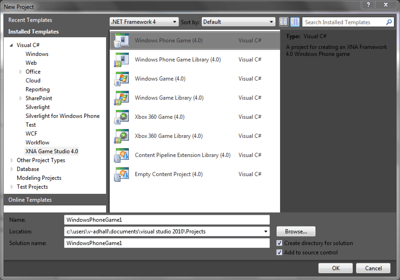
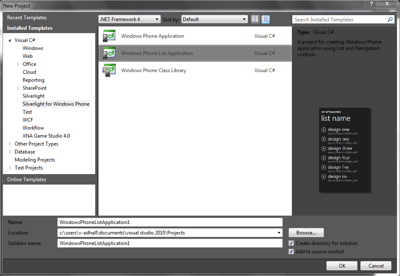
Open up Visual Studio 2010 and verify that these project templates are available (Click on the image for a full size screenshot).  Click on new project from the menus and look at the template on the left hand side.  Under the Silverlight for Windows Phone there should be three new templates:

  • Windows Phone Application
  • Windows Phone List Application
  • Windows Phone Class Library

Under the XNA Game Studio 4.0 there should be the following project templates:

  • Windows Phone Game (4.0)
  • Windows Phone Game Library (4.0)
  • Windows Game (4.0)
  • Windows Game Library (4.0)
  • Xbox 360 Game (4.0)
  • Xbox 360 Game Library (4.0)
  • Content Pipeline Extension Library (4.0)
  • Empty Content Project (4.0)

Windows Phone 7 XNA

Windows Phone 7 XNA

Out of all of these XNA templates, the only truly phone related items are the first two.  But the others come along with the installation.

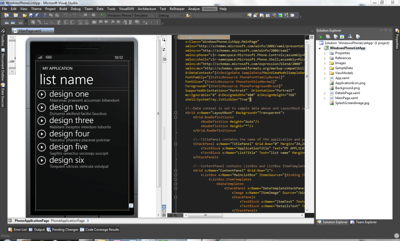
To get a feel for what is installed, select the Widnows Phone List Application.  This is a great starter just to get an idea of how the IDE works.

Windows Phone 7 List Application

Windows Phone 7 List Application

Once you’ve entered you project name and everything take a look at the solution explorer.  Inside the project you will see that there is a break out of the ViewModels, Images, and SampleData into folders.  Below that is the standard Silvelight File App.xaml.  By default this project template also lays out a MainPage.xaml and a DetailsPage.xaml.  To the far left hand side of the screen you can see the actual list application interface, and in the center the xaml code or C# is displayed.

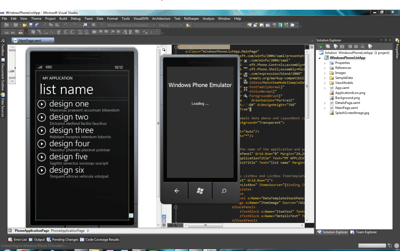
Once you’ve checked that out give it a run, click on F5.  You’ll see the following application starting come up.

Windows Phone 7 Application Starting

Windows Phone 7 Application Starting

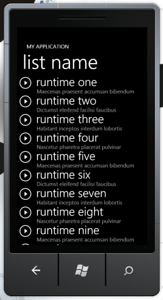
Windows Phone 7 Application List Screen

Application List Main Screen

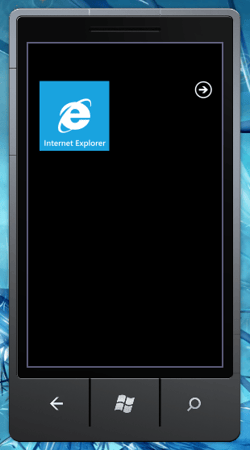
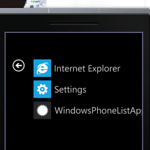
The first screen on the phone to popup should be the list application itself.  If you click on the windows button at the bottom of the phone screen emulator you’ll get back to the startup screen with the IE browser prominently displayed.  If you click on the arrow to the right of the screen you will see an application list.  There you can click on the application list to return to your list application.  Check out the screen shots below, as always, click on em’ to get the full size screenshot.

Windows Phone 7 List Application Screens

Windows Phone 7 Main Screen

Windows Phone 7 Application Screen

Windows Phone 7 Application Screen

That’s it for this entry.  I’ll be adding some more Windows Phone 7 development how-to, random blurbs, and my 2 cents in the coming weeks.