ALT.NET 2011 Day #1

Today kicked off with an early morning and a great workshop with Glenn Block (@gblock). The team he is working with has some great things coming for HTTP + REST + WCF that will really alleviate a lot of problems with WCF. In addition to that I’d bet that it will give Microsoft a chance to get back into the web API market.

That brings me to another topic that has come up a lot lately. Anyone that is in the startup scene or web development scene knows that Ruby on Rails has made an absolutely massive impact. I’m talking an impact like the invasion of Normandy! Microsoft has made many shifts to counter the ease, simplicity, and elegance of Ruby on Rails with things like ASP.NET MVC. Overall, the efforts have done a good job and been well received by .NET Developers in general.

However Microsoft has done a horrible job of getting aligned with the Internet startup space when it comes to web APIs. If you’re not sure what I mean, check out Twitter, Facebook, Apigee, and dozens of others. These are all companies that provide web APIs. Another notable one that has had some very money related impact, is the Best Buy API. Allowing people to hook into the API to really turn some revenue and make money. These APIs are almost always non-Microsoft stack technologies. When they are Microsoft, it is usually a hack around ASP.NET MVC or something of that sort to enable a more RESTful type API. With these additions to WCF this puts Microsoft back on some solid footing to compete in this space. I’m really looking forward to being able to pay around with these capabilities of WCF more – and hopefully sooner than later!

The second session of the day was a kind of modern anthropological study of development groups, their culture, and how processes, tools, and team qualities interplay among people. We ended up splitting into 3 (or was it 4) groups and went about various exercises.

I’m not sure the exact conclusions we came to during this session, but it was fun just to discuss each of our development groups. Ranging from topics of how we are forced to use Waterfall (and those clients often end up paying absurd amounts of money for things that should cost them less), how “pairing programming doesn’t exist” which gave us programmers that pair frequently a good laugh, and a whole host of other topics.

All in all, day one has started off great. I’m really stoked to be attending these workshops this year. Last year I was hard at work at… some client related debacle of crazy proportions, frantically looking forward to the weekend when the conference would start in earnest. But this year the team I work with are hittin’ the workshops early and doing the ALT.NET Conference completely.

Tomorrow is a session on AppHarbor, also known as Azure done right, and an xUnit Workshop by Brad Wilson that I’ll be attending. I’m already excited I’m not sure I’ll sleep. Until then, cheers.

Cloud Failure, FUD, and The Whole AWS Oatage…

Ok.  First a few facts.

  • AWS has had a data center problem that has been ongoing for a couple of days.
  • AWS has NOT been forthcoming with much useful information.
  • AWS still has many data centers and cloud regions/etc up and live, able to keep their customers up and live.
  • Many people have NOT built their architecture to be resilient in the face of an issue such as this.  It all points to the mantra to “keep a backup”, but many companies have NOT done that.
  • Cloud Services are absolutely more reliable than comparable hosted services, dedicated hardware, dedicated virtual machines, or other traditional modes of compute + storage.
  • Cloud Services are currently the technologically superior option for compute + storage.

Now a few personal observations and attitudes toward this whole thing.

If you’re site is down because of a single point of failure that is your bad architectural design, plain and simple. You never build a site like that if you actually expect to stay up with 99.99% or even 90% of the time. Anyone in the cloud business, SaaS, PaaS, hosting or otherwise should know better than that. Everytime I hear someone from one of these companies whining about how it was AWSs responsiblity, I ask, is the auto manufacturer responsible for the 32,000 innocent dead Americans in 2010? How about the 50,000 dead in the year of peak automobile deaths? Nope, those deaths are the responsiblity of the drivers. When you get behind the wheel you need to, you MUST know what power you yield. You might laugh, you might jest that I use this corralary, but I wanted to use an example ala Frédéric Bastiat (if you don’t know who he is, check him out: Frédéric Bastiat). Cloud computing, and its use, is a responsibility of the user to build their system well.

One of the common things I keep hearing over and over about this is, “…we could have made our site resilient, but it’s expensive…”  Ok, let me think for a second.  Ummm, I call bullshit.  Here’s why.  If you’re a startup of the most modest means, you probably need to have at least 100-300 dollars of services (EC2, S3, etc) running to make sure you’re site can handle even basic traffic and a reasonable business level (i.e. 24/7, some traffic peaks, etc).  With just $100 bucks one can setup multiple EC/2 instances, in DIFFERENT regions, load balance between those, and assure that they’re utilizing a logical storage medium (i.e. RDS, S3, SimpleDB, Database.com, SQL Azure, and the list goes on and on).  There is zero reason that a business should have their data stored ON the flippin’ EC2 instance.  If it is, please go RTFM on how to build an application for the Internets.  K Thx. Awesomeness!!  🙂

Now there are some situations, like when Windows Azure went down (yeah, the WHOLE thing) for about an hour or two a few months after it was released.  It was, however, still in “beta” at the time.  If ALL of AWS went down then these people who have not built a resilient system could legitimately complain right along with anyone else that did build a legitimate system. But those companies, such as Netflix, AppHarbor, and thousands of others, have not had downtime because of this data center problem AWS is having.  Unless you’re on one instance, and you want to keep your bill around $15 bucks a month, then I see ZERO reason that you should still be whining.  Roll your site up somewhere else, get your act together and ACT. Get it done.

I’m honestly not trying to defend AWS either.  On that note, the response time and responses have been absolutely horrible. There has been zero legitimate social media, forum, or responses that resemble an solid technical answer or status of this problem. In addition to this Amazon has allowed the media to run wild with absolutely inane and sensational headlines and often poorly written articles.  From a technology company, especially of Amazon’s capabilities and technical prowess (generally, they’re YEARS ahead others) this is absolutely unacceptable and disrespectful on a personal level to their customers and something that Amazon should mature their support and public interaction along with their technology.

Now, enough of me berating those that have fumbled because of this. Really, I do feel for those companies and would be more than happy to help straighten out architectures for these companies (not for free). Matter of fact, because of this I’ll be working up some blog entries about how to put together a geographically resilient site in the cloud.  So far I’ve been working on that instead of this rant, but I just felt compelled after hearing even more nonsense about this incident that I wanted to add a little reason to the whole fray.  So stay tuned and I’ll be providing ways to make sure that a single data-center issues doesn’t tear down your entire site!

UPDATE:  If you know of a well written, intelligent response to this incident, let me know and I’ll add the link here.  I’m not linking to any of the FUD media nonsense though, so don’t send me that junk.  🙂  Thanks, cheers!

The Non-Microsoft Realm, Collecting Rubies Part II

Just a quick Friday night entry with helpful tidbits… cheers!

Part I of the Collecting Rubies Series.

RVM Gemsets

A few steps when setting up Gemsets with RVM. With a few other commands that can often be helpful.

Functionality by line:

  1. Get a list of the current available gemsets.
  2. Creates a gemset called theNameOfTheSiteToCreate.
  3. Lists the name of the current gemset.
  4. Delete the gemset named theNameOfTheSiteToCreate.
  5. This lists the current Ruby Version selected.
rvm gemset list
rvm gemset create theNameOfTheSiteToCreate
rvm gemset name
rvm gemset delete theNameOfTheSiteToCreate
rvm list

Git-flow

Check out the git-flow github account.

To install:

wget --no-check-certificate -q -O -- https://github.com/nvie/gitflow/raw/develop/contrib/gitflow-installer.sh | sudo sh

…then just type git flow and you’ll see this prompt, which provides some functionality that is usable right away…

usage: git flow

Available subcommands are:
   init      Initialize a new git repo with support for the branching model.
   feature   Manage your feature branches.
   release   Manage your release branches.
   hotfix    Manage your hotfix branches.
   support   Manage your support branches.
   version   Shows version information.

SQL Lite 3

Check out the sqlite3 site.

To install:

sudo apt-get install sqlite3 libsqlite3-dev

Observations on Linux (Ubuntu Specifically)

It has been a long while since I’ve used a Linux + GUI. Ubuntu, I understand probably isn’t the most bleeding edge, but just out of the box it has all the candy of Windows 7 plus lots of 3rd party enhancements and drivers or OS-X with the same. I’m honestly amazed that the OS is THIS feature packed. Everything one needs is installed to get going. The other amazing thing is evident in some measurements. These are all done so far on a Dell Inspiron 1720 Laptop, Intel Dual Core with 4 GB of RAM.

  1. Memory utilization on is about 70% of what Windows 7 uses for similar tasks. I dare not even compare it to Vista. It runs almost on par with Apple’s OS-X.
  2. Processor utilization to accomplish the same tasks (i.e. word processor, spreadsheet calcuations, launching web browsers, or straight executing heavy calculations) is a fair percentage lower than Windows 7. Generally around 5-10% lower utilization. This is noticable in longer battery life.
  3. Ubuntu, regular Desktop Edition, has a 5-25% longer batter life than using Windows 7.
  4. .NET Framework Code Execution on Mono/Linux is noticably faster than running the same code on Windows 7/.NET Framework/IIS.
  5. Boot time to load (see GUI + Desktop Features Listed Below) with all features is approximately 10-25% of Windows 7 with default load + 3rd Party Tools Added to match functionality (such as Winsplit Revolution and other tools).

Windows + W = Current Running App Windows for the Desktop that is in focus. Use the arrow keys to select the window to focus on.

Windows + E = Desktops, use arrow keys to select the one you want.

Alt + Tab = Switches between apps, pretty standard GUI Functionality.

Functionality enabled for the Dell Inspiron 1720 without loading a single driver manually:

  1. The Func + F1 Combo Works to put the laptop to sleep.
  2. The Func + F3 works to provide the battery status on a laptop.
  3. The Func + F5 for scroll lock.
  4. Func + F8 for CRT/LCD switching.
  5. In addition to that the scroll on the track pad works with a default Ubuntu Installation, both vertical and horizontal.
  6. Video Card was loaded, update was detected, and an updated driver was downloaded.
  7. Network Card, Blue Tooth, and Other Network Drivers where all loaded.
  8. Chipset, and other drivers needed for hardware, etc, all loaded.

All in all, the Ubuntu Organization has done and excellent job of building an operating system that easily rivals OS-X or Windows 7.

My Day @ Seattle Mobile Hackathon (#mobileappSEA) The Morning

I arrived around 8:20am “ish”. @juliaferraioli & cohort were registering people. The @AWSstartups crew was there including @Jeffbarr, also @shanley, @Alex_donn, @JamesPearce, and others were already getting things put together. I decided to happily plunk down in a chair and get going. I had zero plan, but only a single goal. Make a web app that isn’t device proprietary, but is mobile centric, and get it live on the web.

My initial dev machine load that I intended to get this accomplished with I posted yesterday.  So here’s my first push…

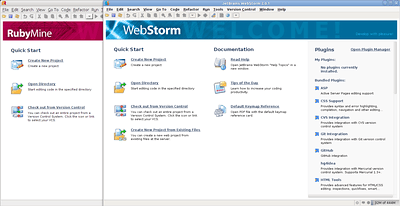
First a quick run thru of WebStorm and RubyMine IDEs.

{Edited this part on Apr 20th to provider more information regarding Java Installation} If you’re on Ubuntu, open up the Synaptic Package Manager and search for java6, which should bring up the sun-java6-jre.  Mark it for installation and apply so that the JDK will install with the required components.  If the Java 6 isn’t available in the Synaptic Package Manager open up the Settings -> Repositories, and then the Software Sources Dialog will appear.  Click on the Other Software tab and select Canonical Partners.  Close the dialog and Reload the packages.  When a search is done now, the sun-java6-jdk should be available.

Next edit the profile at /etc/profile by entering the command:

sudo gedit /etc/profile

Add the following to the bottom of the file:

export JAVA_HOME=/usr/lib/jvm/java-6-sun
export JDK_HOME=$JAVA_HOME
export RUBYMINE_JDK=$JAVA_HOME

After this is done, restart your X-Windows/Gnome Instance or simply just reboot. I don’t really like to suggest rebooting since it usually isn’t needed with Linux. 😉
Unzip both packages downloaded from Jetbrains.

tar -xvzf WebStorm-2.0.1.tar.gz
tar -xvzf RubyMine-3.1.1.tar.gz

You may want to put your new applications into a specific directory. I placed mine in a folder I made within my user folder called apps. Just a little easier to keep up with things that way.

Creating a Launcher

Creating a Launcher

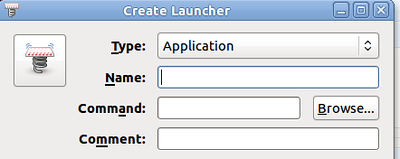
Once these are unzipped right click on your desktop and choose “Create Launcher…”. Click on the Browser to bring up a folder navigation dialog, find the bin directory of the app your creating a launcher for. In my case it is /home/adron/apps/WebStorm-103.243/bin/ which has the WebStorm App Files needed for the Launcher. Find the WebStorm.sh file and select it.

Once the app file is selected then check ok. For a more step by step, check out Tomi’s Blog Entry.  Do the same for both apps.

With both of those apps, simply launch the IDE and enter your key (or select 30 day trial) and you’re up and running.

RubyMine Startup (click for full size image)

RubyMine Startup (click for full size image)

With the awesome Jetbrains IDEs installed I was really ready to dive into something.  Next I went straight for a new project in RubyMine.  File -> New or just click on the Create New Project on the main RubyMine Startup Screen.

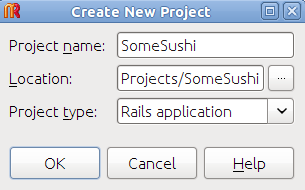
New Project Dialog

New Project Dialog

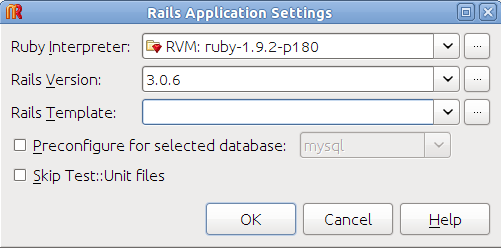
Pick your name, I’ve decided to go for some sushi with a project type of Rails application, and click enter.  The next dialog that comes up asks some standard settings information options.

Rails Settings

Rails Settings

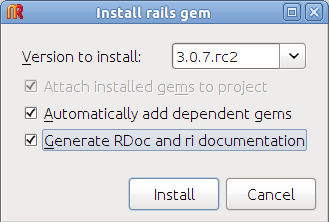
If you click on the ellipsis button to the right of the Rails Version, a prompt will come up to select which rails version you want to use.  Ruby Mine will then install that version if it isn’t installed already.

Install Rails Version

Install Rails Version

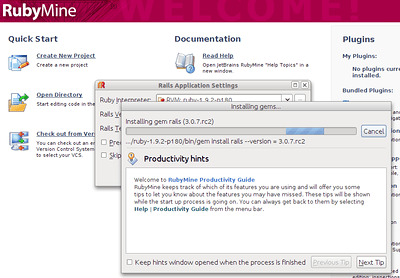
I decided to check “Generate RDoc and ri documentation” also, and then clicked on Install.

Installing Rails Version

Installing Rails Version

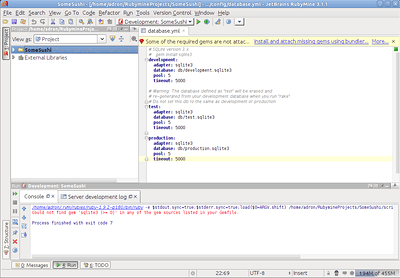
Once the options and settings are made for the new project, click to create the project.  RubyMine will work for a few seconds, maybe 20 or 30 on slower machines, and eventually the IDE will display with the newly created project.  When I created it the first time I was informed I was missing some gems.

RubyMine Project (Click for larger image)

RubyMine Project (Click for larger image)

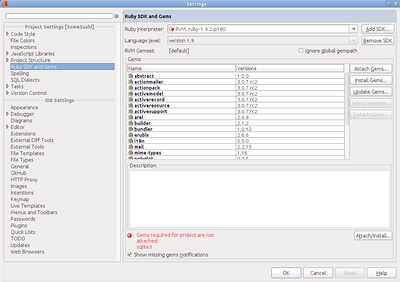
I clicked on the More… option near the Install and attach missing gems using bundler… warning to get the additional gems I needed.  This brings up a dialog specific to maintaining the Ruby SDK and Gems.

Settings (Click for larger image)

Settings (Click for larger image)

I clicked on Install Gems and found the the sqllite3 and sqllite3-ruby gems to install.  I clicked on install and then apply and OK (ok, old habit, not sure WHY apply gets put on these dialogs) on the settings screen.  Once done getting those last bits installed click on the Development: SomeSushi (or whatever you’ve named the project) and select Edit Configurations.

Development: SomeSushi

Development: SomeSushi

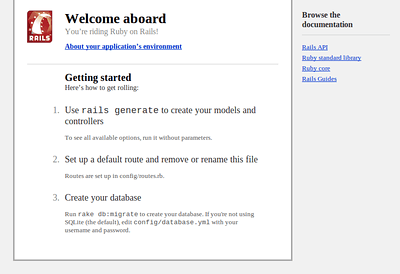
On the Edit Configurations Dialog screen check Run Browser from the bottom of the options and click on OK.  Then click on run button (the green play button on the button bar) to run the Ruby on Rails Web Application.  Within a second or two you’ll see the default Ruby on Rails + RubyMine Run the site in the browser.

RubyMine Ruby on Rails Default Web App

RubyMine Ruby on Rails Default Web App

At this point in the day I took a break, ate lunch, talked to @AWSstartups crew @rodica & @Jeffbarr.  Introduced myself formally in person to @shanley and chit chatted about our respective efforts with @lazycoder and @juliaferraioli.  The food was great, as in, it was actually really good.  Not some random junk.  Super tender chicken with spaghetti sauce and little round funny shaped pastas (I’m sure there is an appropriate name for em’).  I was honestly impressed by the food brought in.

After lunch I dived back in for the next phase of development.  For that though, I have another blog entry coming…  (stay tuned).