Kōans of Code

I’ve continued the Kōans, but there is one thing that won’t be noticeable from this blog entry. I however wanted to mention it. The first blog entry was worked through on an OS-X Apple Machine, the second on an Ubunta Linux Machine, and now I’m heading for this blog entry to be completed with  Windows 7. It is of course completely irrelevant, but at the same time very relevant.  🙂 But enough about operating system awesomeness. Let’s take a look at the new gazillion Kōans that caught my note taking.

class AboutArrays < EdgeCase::Koan
  def test_creating_arrays
    empty_array = Array.new
    assert_equal Array, empty_array.class
    assert_equal 0, empty_array.size
  end

Easy peasy. Array.new creates a new empty array. Got it. An Array is the class type retrieved when calling empty_array.class. Got it. The empty array has a size of zero, Got it.

  def test_array_literals
    array = Array.new
    assert_equal [], array

    array[0] = 1
    assert_equal [1], array

    array[1] = 2
    assert_equal [1, 2], array

    array << 333
    assert_equal [1, 2, 333], array
  end

Ok, this one has some interesting bits in it. Having array[0] and array[1] assigned to a value of 1 and 2 seems standard operating practice for a language. This dual chevrons pointing into the array thing is a little more unique. This operator appears to take the value on the right, and put it onto the array’s stack. Simply, the double kick operator (or whatever it is called) puts the value on the next available array index position. Ok, cool. Got it.

  def test_accessing_array_elements
    array = [:peanut, :butter, :and, :jelly]

    assert_equal :peanut, array[0]
    assert_equal :peanut, array.first
    assert_equal :jelly, array[3]
    assert_equal :jelly, array.last
    assert_equal :jelly, array[-1]
    assert_equal :butter, array[-3]
  end

Alright, got an array with 4 elements in it. First assert confirms that :peanut is the returned value from the first element in the array. The array.first call functionally does the same thing. The third assert gets the 3rd value in the array, keeping in mind a zero based index for the array, that gives us the 4th actual item in the list of items stored within the array. I love it, standard programmer weirdness. Why do programmers start with zero when nobody on earth starts a “list” of items with a zero. Blagh, whatever, that’s the reality of it. (That was, in a sense, somewhat rhetorical, I get the underlying reasons but that doesn’t help explain a zero based index to initial non-programmers.)

  def test_slicing_arrays
    array = [:peanut, :butter, :and, :jelly]

    assert_equal [:peanut], array[0,1]
    assert_equal [:peanut, :butter], array[0,2]
    assert_equal [:and, :jelly], array[2,2]
    assert_equal [:and, :jelly], array[2,20]
    assert_equal [], array[4,0]
    assert_equal [], array[4,100]
    assert_equal nil, array[5,0]
  end

Slicing arrays again with the PB & J. With two values, the first thing I notice is that this is no multidimensional array. Two values within the square brackets means that you have a starting position and then a value of how many to retrieve. If there is a value like the fourth asset, starting at the 2nd position (3rd actual value) and taking the next 20 elements, basically retrieves whatever values are available, which in this case gets us 2 elements.

Now, I’m a slight bit perplexed though as to why nil is returned for something request nothing from the 5th starting point of the array versus the same being requested from the 4th starting point in the array. I’ll have to read up on that…

  def test_arrays_and_ranges
    assert_equal Range, (1..5).class
    assert_not_equal [1,2,3,4,5], (1..5)
    assert_equal [1,2,3,4,5], (1..5).to_a
    assert_equal [1,2,3,4], (1...5).to_a
  end

Again, identifying the class object type is easy, a range of numbers is a Range Object. Check. A range stating 1..5 does not provide the numbers one through five. Calling to_a on a range however does provide you those numbers. Doing the same thing to an array specified with three periods instead of two with the to_a provides numbers one through four. That seems odd, but I got it.

  def test_slicing_with_ranges
    array = [:peanut, :butter, :and, :jelly]

    assert_equal [:peanut, :butter, :and], array[0..2]
    assert_equal [:peanut, :butter], array[0...2]
    assert_equal [:and, :jelly], array[2..-1]
    assert_equal [:peanut, :butter, :and], array[0..-2]
  end

Slicing an array of four values, stating the starting and ending point with the syntax of a range, provides the elements based on the values associated with that range. I actually added an assert to this test to determine what exactly the negative values do. It appears that the array starts at the point of the first number, then follows a range from that until the negative number from the end of the array. So with 10 items, starting at point 2 and ending -2 from the end will retrieve the middle 6 elements. Strange, but I can see how this would be very useful.

  def test_pushing_and_popping_arrays
    array = [1,2]
    array.push(:last)

    assert_equal [1,2,:last], array

    popped_value = array.pop
    assert_equal :last, popped_value
    assert_equal [1, 2], array
  end

Pop. Easy, get that last value. But wait a second, the array itself doesn’t have :last in it? Aha! Popping it not only gets that last value, but literally takes the value out of the array.

  def test_shifting_arrays
    array = [1,2]
    array.unshift(:first)

    assert_equal [:first, 1, 2], array

    shifted_value = array.shift
    assert_equal :first, shifted_value
    assert_equal [1,2], array
  end

end

Ah, kind of like a popped value but shifted out of the array? Weird, this is a little confusing at first. I see what it is appearing to do, but figured a good read of the documentation would be good. I did a search on Google and the first hit is someone asking this question.

What does Ruby’s Array Shift Do?

From that quick read it appears that shift and unshift are used similar to pop and push in a stack (ala git, etc).

That answers that question. With that, I’m off to other realms.
More Code Kōans

This is a continuation of my effort to get through all of the Ruby Kōans.

def test_creating_arrays
  empty_array = Array.new
  assert_equal Array, empty_array.class
  assert_equal 0, empty_array.size
end

Creating a new array, just use Array.net. That I like. 🙂 Next assert verifies that the class is an Array. The third assert verifies that we have an empty array. That works, very logical, very array like.

def test_array_literals
  array = Array.new
  assert_equal [], array

  array[0] = 1
  assert_equal [1], array

  array[1] = 2
  assert_equal [1, 2], array

  array << 333
  assert_equal [1, 2, 333] array
end

array[0] makes sense, seems par for the course. Now « operator putting the value of 333 into the array in the next available position. I’m a fan. 😀

def test_accessing_array_elements
  array = [:peanut, :butter, :and, :jelly]

  assert_equal :peanut, array[0]
  assert_equal :peanut, array.first
  assert_equal :jelly, array[3]
  assert_equal :jelly, array.last
  assert_equal :jelly, array[-1]
  assert_equal :butter, array[-3]
end

Ok, this is somewhat understandable. The peanut (with the colon? why is the colon included?) is the first value. Cool. That makes sense. The zero is actually the first part of the array, which matches well to array.first, still making sense. The jelly value is in the 3rd, or last location and I’m good with that. Now it gets weird, where is -1? I suppose it is jelly since that test now asserts true. Negative 3 is butter though, which I guess negative values just start from the end. Does that make sense? Either way, it appears to be working that way.

NOTE: This is a a great scenario, to me, and maybe for others, when taking notes pays off. It doesn’t matter if you’re studying for a test or not. I didn’t quit realize what was happening here until I wrote a note, simply explaining it back to myself. Even if you think you get something, writing it down and forcing yourself to think it through is a proven method to putting something to memory.

def test_slicing_arrays
  array = [:peanut, :butter, :and, :jelly]

  assert_equal [:peanut], array[0,1]
  assert_equal [:peanut, :butter], array[0,2]
  assert_equal [:and, :jelly], array[2,2]
  assert_equal [:and, :jelly], array[2,20]
  assert_equal [], array[4,0]
  assert_equal [], array[4,100]
  assert_equal nil, array[5,0]
end

Basically the array is saying, give me one item based on the index of 0. The second assert is starting at index 0 and providing the next two array elements. The same thing then happens for the next two. Of course, starting at index 2 and getting the next 20 values just gets the available values. I can cope with that. The next two asserts then return no value, as there is no 4th array position (remember, it starts at zero.) The last item asks for no items from the array, thus nil is returned.

Well, that’s it for now. More to come in the near future.

Code Kōans

Recently (albeit it seems a few years after a lot of my fellow developers) I’ve dug into kōans. A kōan (Chinese 公案, Korean 공안, I had to put the symbols, but I just find them awesome 🙂 ) is a fundamental part of the history and lore of ZenBuddhism. It consists of a story, dialogue, question, or statement, the meaning of which cannot be understood by rational thinking but may be accessible through intuition. The classic example is “Two hands clap and there is a sound; what is the sound of one hand?”

The first set of koans I checked out (thanks to @Ang3lfir3) were the Clojure Kōans. I’ll admit, I had a slightly higher priority with Ruby so I grabbed the Ruby Kōans. I’ll get to the Clojure ones soon, as Clojure is a great language to work through and derive meaning through intuition. With that little intro, I’ll dive in…

The first file is absurdly easy, basically making sure reality exists in that true is true and true is not false. These seem pretty straight forward. When I got into the subsequent koan test files though, things started to get interesting. The Ruby Language itself started to show itself and how it actually works. When working through the koans, you’re actually working with real Ruby Unit Tests and code files. In my descriptions below I’ve cut those files up so I can comment in between each bit of code. I will however format each bit of code properly for readability. Cheers!

class AboutObjects &lt; EdgeCase::Koan
  def test_everything_is_an_object
    assert_equal true, 1.is_a?(Object)
    assert_equal true, 1.5.is_a?(Object)
    assert_equal true, "string".is_a?(Object)
    assert_equal true, nil.is_a?(Object)
    assert_equal true, Object.is_a?(Object)
  end

After running through this test, it’s a little obvious the point. Everything is an object. Get it? :O

  def test_objects_can_be_converted_to_strings
    assert_equal "123", 123.to_s
    assert_equal "", nil.to_s
  end

Ok, so I kind of feel that to_s is a bit silly for a method name, but whatever. I’m also assuming at this point that “nil” is a reserved object or something. I’m not sure what the assumption of nil is though, since it is an empty string, but sort of null, but not null, but maybe no value? I’ll just have to look this bit up later.

I did a search to dig this up and am even more confused now. I found this entry first, which would lead me to believe that nil is also a method on an object, but an object itself? Ok, I’ll read more later and move on to the next tests, maybe intuition will strike and I’ll all of a sudden realize what I’m working with here.

  def test_objects_can_be_inspected
    assert_equal "123", 123.inspect
    assert_equal "nil", nil.inspect
  end

The inspect method, seems simple enough. The method is or has a sort of default print out of what it is called under “inspection”. Ok, next…

  def test_every_object_has_an_id
    obj = Object.new
    assert_equal Fixnum, obj.object_id.class
  end

This is simple enough, every object gets an ID, whatever it may be. I’d bet it is unique, not that this test proves that. …I do wonder though, what exactly is Fixnum?

  def test_every_object_has_different_id
    obj = Object.new
    another_obj = Object.new
    assert_equal true, obj.object_id != another_obj.object_id
  end

Ok, as I suspected, object IDs are unique. Got it.

  def test_some_system_objects_always_have_the_same_id
    assert_equal 0, false.object_id
    assert_equal 2, true.object_id
    assert_equal 4, nil.object_id
  end

Umm. Yeah. Ok. That makes sense sort of. I’m now more confused about nil. It is 4, or null, or part of an enumeration? Who knows, who could tell from this test. I’ve got it though, false is zero, and two is true for some reason? I want to know what happened to one, which I suppose, is another thing I’ll have to intuit later. Onward!

  def test_small_integers_have_fixed_ids
    assert_equal 1, 0.object_id
    assert_equal 3, 1.object_id
    assert_equal 5, 2.object_id
    assert_equal 7, 3.object_id
    assert_equal 9, 4.object_id
    assert_equal 11, 5.object_id
    assert_equal 13, 6.object_id
    assert_equal 201, 100.object_id
    # THINK ABOUT IT: 2x the number +1 == WTF? Why choose that?
    # What pattern do the object IDs for small integers follow?
  end

Ok, I wanted to verify what the pattern was, so I actually added some asserts to this test. Hmmm, it appears, after adding the tests, that there is this nifty patter but I just can’t put my finger on it! 😉 (in case it isn’t evident, I’m being sarcastic here)

  def test_clone_creates_a_different_object
    obj = Object.new
    copy = obj.clone
    assert_equal true, obj           != copy
    assert_equal true, obj.object_id != copy.object_id
  end
end

Ok, verified that object IDs stay unique upon creation or even cloning of new objects. This is an important thing to realize and understand within the overall design of Ruby. Enough for this short work through, more later, and again go and check out the Ruby Kōans yourself, they’re a lot of fun to work through.

Holy Sh@#! Did You See What That Program Does!!!!!!

Have you ever worked for a startup? A successful startup? Have you ever seen the excitement in a startup meeting, hackathon, or other event were an idea starts to come to fruition! When the users of the startup’s application finally see it and start getting excited? Have you seen when people get so excited because you are about to CHANGE THEIR LIVES FOREVER?

Startups are crazy exciting. However startups can also be death marches of pain and anguish. It’s up to an individual to be careful about joining startups, to know the people involved and the leaders. It is up to the individual getting involved to make sure the owners of the effort are on track and heading in the right direction! It can be extremely stressful just deciding to get a startup kicked off!

I’ve been working with a number of people and volunteering ideas and efforts to startups lately. If for one single reason I get involved with startups, is because of the excitement! It is something not felt in any other industry ever. The entrepreneurial stress and excitement is unmeasurable!

So, Why Am I Rambling About Startups?

I’m rambling on about startups because it is that time of the cycle again in the tech sector. The excitement is contagious! The ideas are flowing and slowly but steadily being implemented. Many ideas are horrible, but there are the gems that will create new jobs, simplify lives, enable people to do more with less, and in the end make everybody’s lives better. I’d like to just encourage people to look past the technology, past the in religious conflict of Emacs vs. Vim, and jump on board some of this excitement. Get in the battle to succeed and bring change, sometimes by force! Be disruptive and cause those that don’t want change to get pushed aside so that our day to day gets better!

…and keep in mind that being a developer you are one of the most valuable parts of this entire effort. You have the ability to enable massive and disruptive change and create a better future. Sometimes it is slow, sometimes it seems to grind along, but we developers are the movers of the world these days! Make that change!

The Bus Ride Home, Sinatra Singing on OS-X

This is just a quick getting started I walked through to get Sinatra going on OS-X.

sudo gem install sinatra
sudo gem install shotgun
sudo gem install haml
sudo gem install unicorn

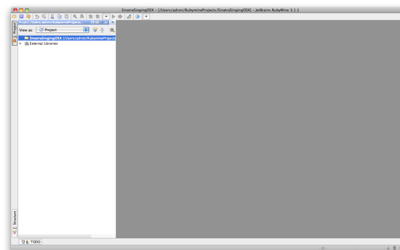
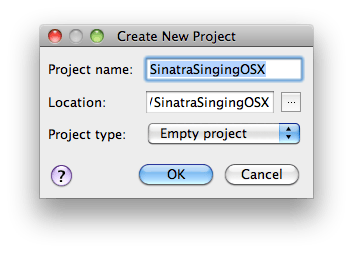
After installing these things I created a new folder in a Rubymine Project.

New Empty Project in Rubymine

New Empty Project in Rubymine

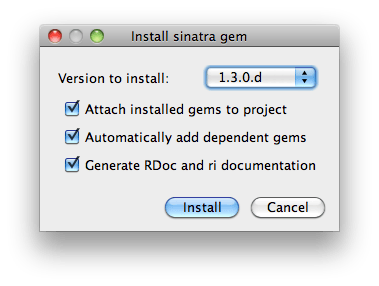
I added a Ruby Class named SinatraSingsOsx to the project. I then realized that Rubymine did not detect that I had installed Sinatra, so I did a quick find in Rubymine to find and get it synced/installed so that Rubymine was aware of the gems.

Rubymine IDE

Rubymine IDE

Using the gem quick install in Rubymine I chose the documentation and dependent gems.

Rubymine Gem Quick Install

Rubymine Gem Quick Install

Once those were synced up I added the following Ruby Code to the file I created in the project.

require 'rubygems'
require 'sinatra'

get '/' do
  "Verified: Server is up and running!"
end

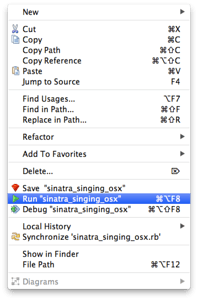
I then right clicked on the ruby file and selected the “Run the sinatra_singing_osx” which starts up the webrick web server and such.

Rubymine Run Page Dialog

Rubymine Run Page Dialog

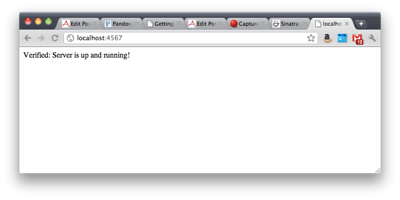
Then navigate to http://localhost:4567 and you’ll see the results of the code.

Sinatra Web Application Running in Chrome

Sinatra Web Application Running in Chrome

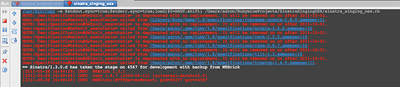
Now that I’ve run the application in Rubymine I wanted to do the same with Shotgun using the same Ruby code. The first thing I needed to do was stop the server running that Rubymine had launched. If you look at the bottom of the IDE you’ll see the window displaying the current server status.

Web Server Executing

Web Server Executing

On the left hand side of this status window click on the large red button. This will stop the service. To verify just scroll to the bottom of this status window and you will see the message “Process finished with exit code 1“.

Now that I had the server cleaned up and stopped, I started a terminal again and navigated to the directory that the *.rb file is in that I want to start (host/run/execute, I’m not really sure what the appropriate word would really be at this point). So once at the appropriate path (machineName:SinatraSingingOSX adron$) I typed:

shotgun -p 4567 sinatra_singing_osx.rb

Once this executes the same server that Rubymine uses, the WEBrick, will startup the application again. I launched the browser to assure this ran as expected and got the same results as if running it through Rubymine. I guess, it all really depends, want to just start building and checking things out or want to build with an IDE like Rubymine. It all really boils down to taste and what you’re working with. I’ve been going back and forth between pure text editor and IDE just to familiarize myself with both avenues of using Rails and coding with Ruby.

After the verification I hit Ctrl + C to stop the web server. This basically works on the msysgit in Windows, on OS-X, or on whatever distro of Linux you have running. The cool thing is, so does Rubymine. I figured if I was going to work toward familiarization of an IDE and using the terminal I’d use commands and IDEs that would work on whatever OS I’m running. It’s all good synergies that way. 🙂

I wanted to keep this entry pretty short. With that in mind I simply logged what I worked on while en route home on the bus one evening. So on the next bus ride I’m going to tackle getting some specific notes with Sinatra, getting this all pushed into Heroku (of course, I’m all about the Cloud, you didn’t think I’d put it up on a shared host did you!) Until then, chow.