Did I get enough of the acronyms and key words in the header? It looks like soup! :O
This is a somewhat messy project to build a prototype layer around SQL Server. The reason for this, shockingly, is to allow for a SQL Server to be used by frameworks and systems that normally don’t or can’t access the database directly. In my particular scenario we’re working on getting Ruby on Rails running with JRuby in a Windows Environment. Because we will need to utilize a lot of SQL Server Databases, it seemed like a great idea to build out a layer over the SQL Server (or Servers) so that a Ruby on Rails Web App, ASP.NET MVC, or even a PHP or pure Javascript Application could access the data in the database. What better way to do that then to create a RESTful Web Services Facade over the database.
Some of you might be thinking “Why not use RIA Services?!?!?! Are you mad!!” Well, there is a big problem, RIA Services doesn’t work against SQL 2000 or SQL 2005, which is the database technology that this particular requirement dictated. Well, now that you have context, I’ll dig straight in to what I did building this prototype out.
Kick Out a SQL Server Database Project
I need some data, and a database, with just some of the standard junk you’d expect in a production database. One of the best ways to throw together a database in a really short amount of time, with data, is to use a SQL Server Database Project.
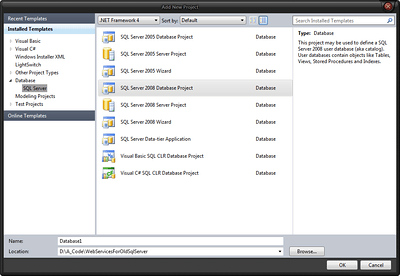
New Database Project (Click for larger image)
You might see this and think, “But you said that the facade is against a SQL Server 2000 or 2005 database!” Well, it is, but to get a database running locally and have this project type work, I’m using my local SQL Server 2008 Express installation. However, I’m limiting myself to data types primarily available to SQL Server 2000 and 2005. So no worries, this works just fine against those archaic databases. 😛
First I ran the following script to create the database and some sample tables with various data types.
DROP DATABASE SomeExistingOrMigratedDatabase
GO
CREATE DATABASE SomeExistingOrMigratedDatabase
GO
USE SomeExistingOrMigratedDatabase
GO
IF  EXISTS (SELECT * FROM sys.foreign_keys WHERE object_id = OBJECT_ID(N'[dbo].[FK_Person_Village]') AND parent_object_id = OBJECT_ID(N'[dbo].[Person]'))
ALTER TABLE [dbo].[Person] DROP CONSTRAINT [FK_Person_Village]
GO
IF  EXISTS (SELECT * FROM sys.objects WHERE object_id = OBJECT_ID(N'[dbo].[Person]') AND type in (N'U'))
DROP TABLE [dbo].[Person]
GO
IF  EXISTS (SELECT * FROM sys.objects WHERE object_id = OBJECT_ID(N'[dbo].[SomeFlatDenormalizedDataTable]') AND type in (N'U'))
DROP TABLE [dbo].[SomeFlatDenormalizedDataTable]
GO
IF  EXISTS (SELECT * FROM sys.objects WHERE object_id = OBJECT_ID(N'[dbo].[Village]') AND type in (N'U'))
DROP TABLE [dbo].[Village]
GO
SET ANSI_NULLS ON
GO
SET QUOTED_IDENTIFIER ON
GO
IF NOT EXISTS (SELECT * FROM sys.objects WHERE object_id = OBJECT_ID(N'[dbo].[Village]') AND type in (N'U'))
BEGIN
CREATE TABLE [dbo].[Village](
	[Id] [uniqueidentifier] NOT NULL,
	[Village] [nvarchar](50) COLLATE SQL_Latin1_General_CP1_CI_AS NULL,
 CONSTRAINT [PK_Village] PRIMARY KEY CLUSTERED
(
	[Id] ASC
)WITH (PAD_INDEX  = OFF, STATISTICS_NORECOMPUTE  = OFF, IGNORE_DUP_KEY = OFF, ALLOW_ROW_LOCKS  = ON, ALLOW_PAGE_LOCKS  = ON)
)
END
GO
SET ANSI_NULLS ON
GO
SET QUOTED_IDENTIFIER ON
GO
IF NOT EXISTS (SELECT * FROM sys.objects WHERE object_id = OBJECT_ID(N'[dbo].[SomeFlatDenormalizedDataTable]') AND type in (N'U'))
BEGIN
CREATE TABLE [dbo].[SomeFlatDenormalizedDataTable](
	[Id] [uniqueidentifier] NOT NULL,
	[StarzDate] [datetime] NOT NULL,
	[Numerals] [int] NULL,
	[Numberals] [int] NULL,
	[Monies] [decimal](14, 4) NOT NULL,
	[Day] [int] NOT NULL,
	[Month] [int] NOT NULL,
	[Year] [int] NOT NULL,
	[BigNonsense] [ntext] COLLATE SQL_Latin1_General_CP1_CI_AS NULL,
	[Flotsam] [float] NULL,
	[Jetsam] [float] NULL,
	[SmallishText] [nvarchar](50) COLLATE SQL_Latin1_General_CP1_CI_AS NULL,
	[BiggishText] [nvarchar](2999) COLLATE SQL_Latin1_General_CP1_CI_AS NULL,
 CONSTRAINT [PK_SomeFlatDenormalizedDataTable] PRIMARY KEY CLUSTERED
(
	[Id] ASC
)WITH (PAD_INDEX  = OFF, STATISTICS_NORECOMPUTE  = OFF, IGNORE_DUP_KEY = OFF, ALLOW_ROW_LOCKS  = ON, ALLOW_PAGE_LOCKS  = ON)
)
END
GO
SET ANSI_NULLS ON
GO
SET QUOTED_IDENTIFIER ON
GO
IF NOT EXISTS (SELECT * FROM sys.objects WHERE object_id = OBJECT_ID(N'[dbo].[Person]') AND type in (N'U'))
BEGIN
CREATE TABLE [dbo].[Person](
	[Id] [uniqueidentifier] NOT NULL,
	[Name] [nvarchar](50) COLLATE SQL_Latin1_General_CP1_CI_AS NOT NULL,
	[DateOfBirth] [datetime] NOT NULL,
	[VillageId] [uniqueidentifier] NULL,
 CONSTRAINT [PK_Person] PRIMARY KEY CLUSTERED
(
	[Id] ASC
)WITH (PAD_INDEX  = OFF, STATISTICS_NORECOMPUTE  = OFF, IGNORE_DUP_KEY = OFF, ALLOW_ROW_LOCKS  = ON, ALLOW_PAGE_LOCKS  = ON)
)
END
GO
IF NOT EXISTS (SELECT * FROM sys.foreign_keys WHERE object_id = OBJECT_ID(N'[dbo].[FK_Person_Village]') AND parent_object_id = OBJECT_ID(N'[dbo].[Person]'))
ALTER TABLE [dbo].[Person]  WITH CHECK ADD  CONSTRAINT [FK_Person_Village] FOREIGN KEY([VillageId])
REFERENCES [dbo].[Village] ([Id])
GO
IF  EXISTS (SELECT * FROM sys.foreign_keys WHERE object_id = OBJECT_ID(N'[dbo].[FK_Person_Village]') AND parent_object_id = OBJECT_ID(N'[dbo].[Person]'))
ALTER TABLE [dbo].[Person] CHECK CONSTRAINT [FK_Person_Village]
Once the database and tables are created, import the database into the database project. To do this select the “Import Database Objects and Settings…” by right clicking the context menu on the Database Project.
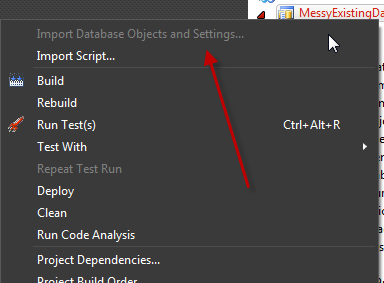
Import Database Objects and Settings…
Select the database just created and click on start. Once the script generation is done, navigate into the project directories and you will see the following scripts have been created.
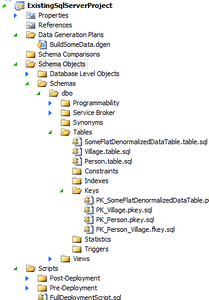
Generated Scripts (click for larger image)
Next create a new data generation plan in the Data Generation Plans folder (notice I already cheated and have one in the above image).
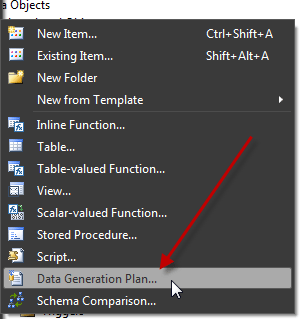
Creating a Data Generation Plan
Open up the file this creates (I called mine BuildSomeData.dgen). In the file, note I selected the relationship between the Village and People Tables, and set the ratio to 60:1. When you change the data in the Village table it then automatically updates how much data will be generated for the People Table.
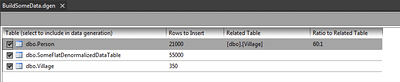
Data Generation Plan
When all that is done, hit F5, select the database and the data will be generated. That gets us a database with data to use as an existing source. From here I’ll jump into creating the actual Facade Layer.
NOTES: Once you generate data, depending on how much you decided to generate, you may want to see how big your database is by using the sp_dbhelp stored procedure. I am however, unsure which versions of SQL Server this stored procedure is available in.
Code for this project is available here: https://github.com/Adron/ExistingSqlServerProject



 I’ve also been working with
  In other user group news,
  For SAWSUG we do have a specific twitter account though at