The Good Parts, Patterns, and a Cookbook of Javascript

I’ve been asked recently about some books to learn/get updated on/figure out this new found JavaScript craze, so here’s my first three suggestions… 🙂

JavaScript: The Good Parts by Douglas Crockford

I started reading JavaScript: The Good Parts by Douglas Crockford a few months back. I’ve been slowly making my way through the book and wanted to add a few notes, thoughts, and maybe even discuss some of these “Good Parts”.

It seems, even with all the great things happening around Javascript, there are still tons of issues and concerns around using this as a primary language for full stack development. There are concerns around maintainability and other issues also. I like Javascript, but I keep getting that sinking feeling like it is the next realm of “Visual Basic”, which hasn’t held so well throughout the years. If Javascript is going to become the next Visual Basic, I want to be ahead of the curve on the chaos that will surely ensue, and be aware of the signs of poorly designed, poorly built Javascript “Death Marches”. The last thing I want to do is to walk into a shop that has created its own demise through technical debt in Javascript, which I can only imagine could be exponentially worse than a mess in Java or C#.

JavaScript Patterns by Stoyan Stefanov

This book I’ve just picked up, not even started, but decided it is a must have after reviewing the contents. With the concerns of JavaScript kind of being the new “Visual Basic” (and really, not in a language sense, but in a mort sense) when I saw Chapter 2 hits upon “Writing Maintainable Code”, “Writing to be Read”, and “Minimizing Globals” along with a host of other interesting sections I had to spot for this book. JavaScript has and will continue to be in desperate need of good developers who focus strongly on readable, maintainable, simple, and usable code. So far there is a large contingent out there that either don’t pay attention, try to generate everything under the sun, or just simply write crappy code that is completely unmaintainable (or even readable to start with).

JavaScript: The Definitive Guide by David Flanagan

This book is kind of the “bible” of JavaScript. The first edition came out years ago and, in all honesty, I think I’ve seen the book on about every single web developer’s bookshelf I’ve seen. I bet it shows up on those with no bookshelf, but is loaded on a Kindle, or other eBook Reader for those electronically enabled web developers.

I’ve probably seen at least every page of this book, not particularly having read it from beginning to end. This book is full of information regarding JavaScript including all the nooks and crannies of the language that you may or may not want to delve into. Either way, if you write JavaScript even a little, you should have this book somewhere near.
Windows Live Microsoft Word Document UX vs. Google Docs UX

Before even getting to the point of writing a document, there are very distinct user experiences (UX). I have my own preferences, but I am very curious what others think.

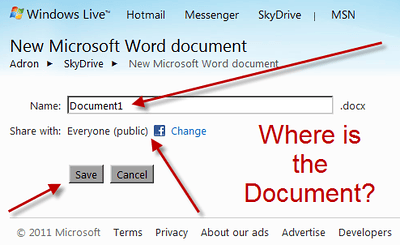
When somebody decides to create a new Microsoft Word Document in the Windows Live Site on their Skydrive they’re presented with this interface.

Windows Live Skydrive Microsoft Word Document

Windows Live Skydrive Microsoft Word Document (Click for full size image)

To start typing in the prospective document you much choose your security, enter a document name, and save the document.  It assumes that you absolutely want a unique name, will have a document viewable by the entire Internet, and that you have to save it just to start.

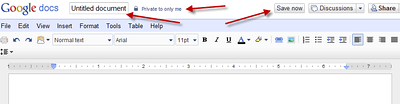
In Google Docs though the approach is entirely different.  When you create a new Google Document you are presented with the actual document interface as shown.

Google Docs Interface (Click for larger image)

Google Docs Interface (Click for larger image)

Google Docs assumes that you want to immediately start typing your word processor document. It also assumes you may not know what you want to name the file, nor that you even need to actually save it, until you of course start typing. At that time the document starts to automatically save. It also assumes that this is your document and you don’t want the entire world to be able to view the document.

So I’m left with questions:

  • Which interface do people really prefer?
  • Do people prefer to start typing immediately or filling out the three pieces of information like the MS Word Doc requires?
  • One appears to allow for immediate productivity for the document creator vs. the other one. Is that just my observation or do others see it that way also?

Please let me know your two cents, I’m truly curious about which UX works out better for you.

Enough With the Cartoons, Time for Business

A lot has been going on lately and I’m still working diligently to get caught up from all the meet ups, hackath0ns, off the cuff dev sessions, conferences, and more! Truly chaos, but a lot of fun chaos.

I’ve also been working with NW Cloud to organize things here in the great north west! From Vancouver, Seattle, Portland, and more. If it has to do with cloud computing and events, we’re probably connected in some way. So be sure to check out the NW Cloud Blog and also follow the @NWCloud Twitter account.

In other user group news, SAWSUG (http://www.sawsug.com) or “Seattle AWS User Group” is also coming under the NW Cloud umbrella.  So to check out upcoming SAWSUG meetings we’ll be setting up event listings in most of the regular places (meetup, eventbrite, etc) but the main listing and updates will be on the NW Cloud Site.  For SAWSUG we do have a specific twitter account though at @SAWSUG – so go, sign up, get the RSS and be sure to follow our @NWCloud and @SAWSUG Twitter Accounts.

As for other unrelated events and such…

Mobile App Hackathon (Redmond)

I’m not going to be making this personally, but if you’re into mobile app dev you should check it out.  This is put on by AT&T with guests like Apigee, so it should be a great time.

OSCON

I have an ad over to the right. I generally won’t post any ads, but this is for OSS and OSCON just isn’t really distractive from the core content I post here. It seemed like it would work out just fine to mix in with my regular array of things. If you’re going to OSCON, I’ll be there the whole week; coding, writing, and hanging out around town. So ping me via Twitter (@adronbh) and we’ll hook up for a round of beer, a coffee, or whatever we may.