Devops Invades with PaaS & CloudFoundry

I have jumped head first into CloudFoundry over the last few weeks. In doing so I’ve started working with AppFog, IronFoundry, VMware and other devops tools.  There are several avenues I’m taking to get more familiar with CloudFoundry based PaaS technology. Here’s a short review:

Writing

I started writing a series which is being published by New Relic around “Removing the Operating System Barrier with Platform as a Service“.  Part 1 is live NOW – so go give it a read!  🙂

Working

Currently I’ve been working up some Enterprise Prototypes using the IronFoundry Technology. The idea is to provide a seamless deployment option for Enterprises that may have a very mixed environment of public and private computing options, virtual and non-virtualized environments, and any array of other capabilities. I’ve also been toying around with Windows 2008 Server Core, which I’ll have more about shortly.

Public Cloud AppFog

AppFog provides a public facing PaaS supporting PHP, Ruby on Rails, Java, MongoDB and a lot of other packages. They’re currently in beta right now, which I was fortunate enough to snag access to, but I’m sure the covers will come off soon enough! The underlying technology is built on CloudFoundry, providing a robust, scalable, and capable infrastructure connection to provide PaaS on.

In addition to AppFog there is the CloudFoundry.com offering, which I’ve tested out a little bit, but mostly focused on AppFog and on building out…

Private Cloud Capabilities w/ Public Cloud Style Infrastructure

I’ve built out some images to test out how CloudFoundry and IronFoundry works. I did pull down the provided virtual machines but I’m also building out my own to understand it better. The Ruby + C# that I’ve seen from the VMware crew & Tier 3 team has been great so far (I always dig reading some solid code).

That’s it for this short review, more to come, and let me know what you think of my entry “Removing the Operating System Barrier with Platform as a Service” over on New Relic’s Blog.

Steve Jobs

I have paid attention to Steve Jobs only in knowing he was producing some pretty sexy products at Apple. I had never owned one until December 23rd of 2011.  I had however respected Apple & Job’s Products. I knew very little about the level of his drive and passion. I also knew little about his rock star attitude, which often cast him as the “asshole”.

It was time to learn more about Steve Jobs. What better way than to give the recent bestseller a read. You know, the one with his face planted right on the front. By the end of the book, I had rooted for Apple far more than I had imagined I would have. I have damned them over the years far more than I should have and I have respected them a little less than is due. Apple with Steve Jobs at the helm has indeed done some amazing and great things.

After reading the book I came away with a new respect for Jobs, more than I already had. I had learned he is not the hippy nut he’s portrayed as, nor some capitalist pig, but all of the above and somewhere in between. I found him to be a dreamer, loves intensely, and is passionate about creating. Something we all could learn from. Creating new beauty, designs, products that enable us is indeed one of the great human achievements.

Some of the key parts of the book include his interactions with his parents, not the blood parents, but his honorable and loving parents that actually raised him. Stood fast beside him and cast aside things to enable and help him learn. One of the quotes that stood out as how awesome his father was, reminding me of my own father, “Paul Jobs told the teachers, his son recalled, “If you can’t keep him interested, it’s your fault.” His parents never punished him for his transgressions at school. “My father’s father was an alcoholic and whipped him with a belt, but I’m not sure if I ever got spanked.” Both of his parents, he added “knew the school was at fault for trying to make me memorize stupid stuff rather than stimulating me.” He was already starting to show the admixture of sensitivity and insensitivity, bristliness, and detachment, that would mark him for the rest of his life.”

He grew into this way of acting, and I really can’t wrong him for it regardless of who he cut down with his wrath, because he knew and wanted people to jump into the fire with him. He didn’t want nor deem that he wanted to waste time with people that couldn’t step right up to a brash, honest, and give 110%. Maybe I related with it too much, I try diligently to avoid such outbursts or other characteristics, but I for one don’t have a problem working with people like that. I want passion for a product. I want love of design. I want an insatiable desire in people around me to create.  I can absolutely understand why he did too.

Late in the book, the reader learns of other battles Jobs had. He saw himself as a person of the counterculture, and thus naturally part of the political left. Even though he throughout life rarely involved himself directly in politics. But because of this, and the views of the counterculture on technology at the time he was often torn. Regarding the counterculture, “Many in the counterculture saw computers as ominous Orwellian, the province of the Pentagon and the power structure.. In The Myth of the Machine, the historian Lewis Mumford warned that computers were sucking away our freedom and destroying “life-enhacning values.” An injunction on punch cards of the period-“Do not fold, spindle or mutilate”-became an ironic phrase of the antiwar left.”

It was something that Jobs, as his life unfolds in the book, just faced up to and dealt with. Eventually the counterculture caught up with the times and became enraptured with technology, in large part because of Apple & Steve Jobs.

Overall I think the book captured Jobs in a realistic way. In the typical Jobs fashion too, the book ends with a segment written by Jobs himself. You’ll have to give the book a read yourself to know what it says, but suffice it to say he managed some amazing things in life. He was also very much more aware of the world regardless of his “Reality Distortion Field” and insanely passionate about insanely great products.

In summary, a great read. Pick it up!

A Few Choice Quotes:

“If you want to live your life in a creative way, as an artist, you have to not look back too much. You have to be willing to take whatever you’ve done and whoever you were and throw them away.”

– In a scary way, this holds to be true, as an artist grows and evolves the previous passion often must be cast aside to find an ongoing and new passion.

“God gave us ten styluses, let’s not invent another.”

– A statement that the purchasers of the iPad, iPod, and iPhone proved through purchasing millions of these devices and turning Apple into the world’s most valuable company. I just found it rather funny myself, yet rings very true.

“Stay Hungry, Stay Foolish”

– Nuff said!

“Simplicity is the ultimate sophistication.”

– Passion embodied in a simple phrase.

“Here’s to the crazy ones. The misfits. The rebels. The troublemakers. The round pegs in the square holes. The ones who see things differently. They’re not fond of rules. And they have no respect for the status quo. You can quote them, disagree with them, glorify or vilify them. About the only thing you can’t do is ignore them. Because they change things. They push the human race forward. And while some may see them as the crazy ones, we see genius. Because the people who are crazy enough to think they can change the world are the ones who do.”

– Yes, it was the ad, but it is one of those times when an ad becomes something a bit more, one could almost say it becomes art.
Macbook Air Multiple Monitor Support

The Macbook Air is indeed an “insanely great” device. I have slammed this thing around, physically and virtually, from the bicycle messenger bag situation described in my buying decision post, all the way to running multiple virtual machines and multiple monitors! This machine, of course if you’re using lean, clean, powerful, and intelligent built software, is top of the game for light weight machines.

The “how did you get multiple monitors?” question has come up several times since I bought the Air. So I’ve put together this blog entry on multiple monitor support, with instructions, and what can expect to run once the monitors are hooked up.

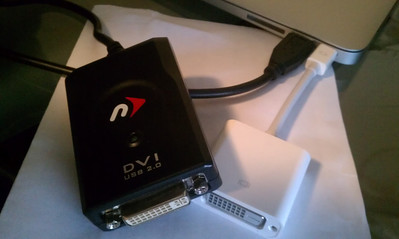
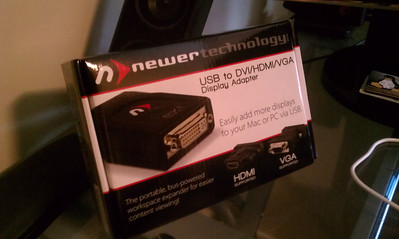
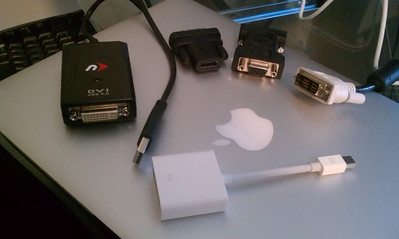
The first things you’ll need to get up and running are the appropriate gear. I purchased a Newer Technology USB to VDI, HDMI, and VGA  Adapter.

New Technology Monitor Adapter (Click for Larger Image)

New Technology Monitor Adapter (Click for Larger Image)

This adapter comes with an adapter to connect to the adapter for HDMI and VGA in addition to the already built in DVI connection on the device. Once you receive the adapter unpack it and get it installed. The driver will probably need retrieved from the company’s site, I wouldn’t use the included CD as the driver is a little dated. The latest OS-X driver supports Lion & all the other versions.

Adapters (Click for larger image)

Adapters (Click for larger image)

The other thing you’ll need is an appropriate Apple Adapter for the actual Thunderbolt Port as shown in the forefront of the image above. With all these parts you’re set for some wicked dual monitor or even three way monitor support.

Multiple Monitors Hooked Up (Click for larger image)

Multiple Monitors Hooked Up (Click for larger image)

The monitors fully activated.

Macbook Air + 26" Left Monitor + 26" Right Monitor (Click for larger image)

Macbook Air + 26″ Left Monitor + 26″ Right Monitor (Click for larger image)

I wanted to point out a few more things before wrapping this up. A follow up question to how I have these setup is usually “isn’t their lag or slowness?” Well, here’s a short review of what I was running while writing up this review.

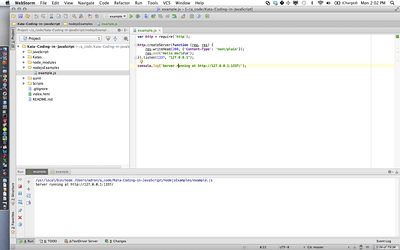
Webstorm, Node.js App Running, w/ OS-X Bar (Click for full size image)

Webstorm, Node.js App Running, w/ OS-X Bar (Click for full size image)

Screen #1:  Macbook Air 1440×900 Resolution

  • Webstorm 3.0
  • Node.js (application running)
  • OS-X Bar, etc.

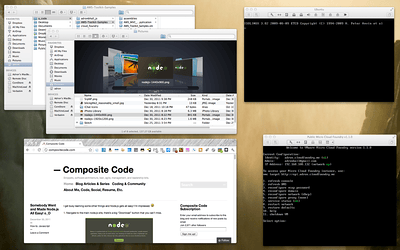
Screen #2 (Click for full size image)

Screen #2 (Click for full size image)

Screen #2: 26″ at 1920×1200 Resolution

  • Viewing in Chrome: http://compositecode.com
  • File Copying & Management of Drives connected via USB Hub with Finder
  • Ubuntu Linux Load Booting up in VMware Fusion
  • CloudFoundry Instance running (Linux) in VMware Fusion

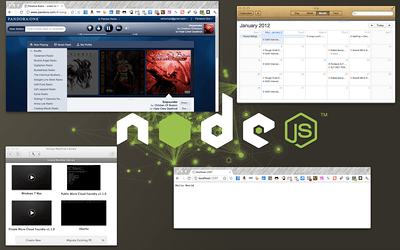
Screen #3 (Click for full size image)

Screen #3 (Click for full size image)

Screen #3: 26″ at 1920×1200 Resolution

  • Pandora providing some Children of Bodom to code to.
  • VMware Fusion machine library.
  • Chrome executing the Node.js example code.
  • iCal displaying upcoming delivery dates and meetings via Google Calender Feed.

Summary

The Macbook Air isn’t going to run Modern Combat 3 in two windows or anything crazy like that. It will however provide a powerful and capable system to code, develop, run virtual machines, web services, and other things that you would need to work with as a software developer. It may only have 4GB of RAM, but between the clean architecture, execution, and design of OS-X to use that i5 (or i7), the 4 GB of RAM, and extremely fast 256 GB SSD, this machine can handle its own.

STATUS UPDATE:  June 28th, 2013

I now use two Mac Book Air Laptops. I have the original which I wrote this article using and a newer 10″ MBA with 8 GB RAM and related improvements. In addition to these laptops however I now use an iMac 27″ that is connected to my other 27″ Cinema Display. This is dramatically more performant and easier to use than trying to run two monitors on either of the MBAs that I have. In that light, I no longer use the connector nor know if it works with the latest Apple products. I’ve since given it to a friend who does however use it, and the friend tends to stay up to date with the latest Apple OS releases. Thus one could assume that the device works with the latest OS-X but you’d have to do your own research.

Thanks for reading my blog, cheers!

-Adron

Somebody Went and Made Node.js All Easy! o_O

I get busy learning some other things and Node.js gets all easy! I’m impressed. 🙂

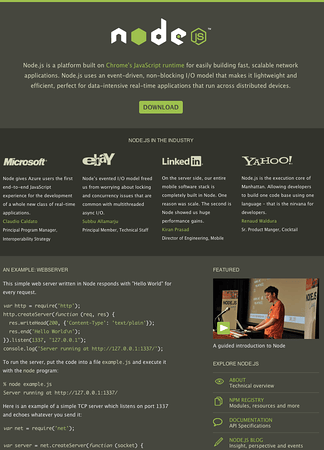
  1. Navigate to the main node.js site, there’s a big “Download” button that you can’t miss.

The Node.js Site, Just Click It And Get It...

The Node.js Site, Just Click It And Get It…

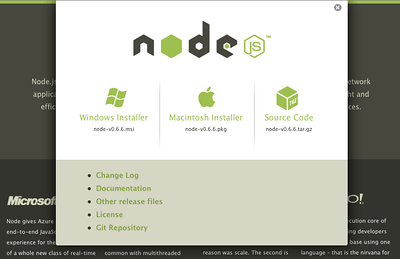
  1. Click that download button and you’ll be presented with this crazy easy screen to pick your download.

Node.js Download Link...

Node.js Download Link…

  1. Once you get that installed, get nodeunit. You are writing unit tests against your node code right? 😛
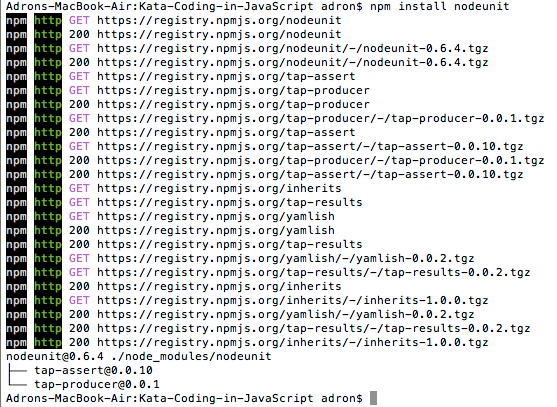
npm install nodeunit

Results from loading nodeunit with npm install.

Results from loading nodeunit with npm install.

For more on how to use npm, which stands for Node Package Manager, give a RTFM. 😀  It’s kind of like Nuget for .NETters and Gems for Rubyists.  🙂 …and trust me, I’ll be putting this to use in future blog entries and it’s a big help to have handy.

  1. Create a file to code some javascript in. Per the simple example given on the main node site…
var http = require('http');

http.createServer(function (req, res) {    res.writeHead(200, {'Content-Type': 'text/plain'});
res.end('Hello World\n');}).listen(1337, "127.0.0.1");

console.log('Server running at http://127.0.0.1:1337/’);

Now run this. If you have the Webstorm IDE from Jetbrains you can just right click on the js file and select run. It automatically will use Node.js to execute your JavaScript. You can also execute node.js by opening up a shell/terminal and executing this.

node whereverYourPathIsTheFileIsLocated/example.js

Navigate to 127.0.0.1:1337 and you’ll get the classic “Hello World” message.

Running The Node.js Example.js File

Running The Node.js Example.js File

…and all of a sudden you’re using node.js to hack some javascript! Seriously, there aren’t many usable languages out there that are as code ready as javascript with node. Very cool, very very cool.

Happy coding!

So 2012 is Coming Up, It’s the End of The World, and There Are Lots of Conferences!

On that note, here are a few of the conferences I’d like to attend. I expect I’ll be able to make it to about 70% of them. If you’re going to any of these, message me on Twitter @Adron (or leave a comment below) and we’ll have a coffee, beer, or beverage of your choice and chit chat about cloud computing, utility or grid bits, software development, node.js, testing, or what have you.  Cheers!

Even though UX is by no means my specialty or something I generally am hired to work on, I personally consider UX to be one of the most important aspects of software development that exists. UX is the difference between “insanely great” applications and “shit” (I’m quoting Steve Jobs here, so excuse the harsh language, but it is true). With this serious focus on UX I find it extremely helpful to attend UX related conferences, talk to UI/UX pros, and generally be involved as often as possible in effective and great ways to build experiences for users around systems.

  • SXSW in Austin, Texas: I’d love to attend this conference, it is however unlikely. Matter of fact, it is probably one of the only conferences I’d travel to Texas for. One of these days, I hope to attend.
  • IA Summit in New Orleans, Louisiana: There are two primary reasons this event is on my list. 1, it’s in New Orleans and I always love to go visit my haunts from when I lived in the area and 2, the content looks pretty good & some solid people are attending.  Conversations and after conference events should be extremely enlightening.
  • An Event Apart in Seattle, Washington: Again, a great conference series and it’s also in a great location. Seattle (which I happen to live here right now too) is a great place for conferences, a great place to think, and a great place for a convergence of user experience thought leaders.
  • UX Week in San Francisco, California: San Francisco is another awesome city for these types of events (not distracting and annoying like Las Vegas). There will be some great collaboration and networking with great content. I’ll be putting forth an effort to attend this event.
  • WebVisions in Portland, Oregon:  It’s in Portland, Oregon. Nuff said. Well ok, I’ll add a little more. WebVisions often has some of the best content around. I’ve never attended one of the conferences officially but have interacted with and been in town when the conference takes place in Portland. The beauty of Portland is that the events easily spill over into the most walkable, drink friendly, foodie heaven, easy to talk in environment, and one of the most technologically advanced and versed populations in the United States – thus providing WebVisions a GREAT reputation in my opinion.
  • Siggraph in Los Angeles, California: This event really opens the mind up to some amazing new interactive experiences with technology.

Ok. I’m a software developer, no real need to define why I’m going to these.  😉

  • Agile Open Northwest in Seattle, Washington: This is a great open spaces conference about agile ideals, practices, and approaches. It’s a great conference to get together with advocates and practitioners of agile/lean/XP or whatever and discuss what works, doesn’t, and what might work. Stepping into the future of being a better, faster, higher quality, happier and more bad ass team!
  • WhereConference in San Francisco, California:  This event has multiple wins.
    • It’s in San Francisco, which is generally always cool.
    • It’s an O’Reilly Conference, which are generally always awesome.
    • Mobile + Geographic Location Finding is one of the most interesting and coolest realms of technology these days.
    • There are some spectacularly cool people attending that I’d love to spend some face to face time with and discuss where they’re headed, where they see location going, and generally have a drink or three and having a great time.
  • OSCON in Portland, Oregon: This event is one of the, if not the best Open Source Software Conference in existence!  Again, anything in Portland makes it pretty easy to attend, and the environment in that city just adds all that much more to the conference!

Cloud / Utility / Big Data Computing Conferences

I’m a big advocate of geographically dispersed, grid compute, utility computing, platform infrastructure or software as a service, on autoscaling, scalable, and big data wielding, high query hadooping systems, AKA Cloud Computing. I see it as the future of high quality, fast paced, massively scaled, intelligent systems and development of these systems. Maybe I’ve drank the kool-aid, either way I’m hedging my bets with the cloud computing realm and not on legacy & traditional hosting and methods associated with that. Thus, I’m going to as many of these conferences too!

  • Cloud Connect in Santa Clara, California: I’ve no idea how this conference is, nor if it will be good, but I’m signed up already. Anyone I know going? Anyone I don’t know but should? Ping me.
  • Strata in Santa Clara, California: Again, never been to Santa Clara nor a conference here. I’ve heard good things about Strata so am working to attend. There is some really good content and more than a few people I’d like to catch up with.