Node-Fu Expert Jerry Sievert to Present “Building Applications with Bricks.js” @ #NodePDX

This is the third in a series of posts about the individual speakers lined up for…

This next presenter, a Portlander, is Jerry Sievert. Jerry’s a good friend of mine, a connoisseur of awesome things (like beer, distilling, etc) and a bad ass Node-fu Master. Jerry has built the brick.js web framework and will be teaching us all a thing or three about this framework. Which as any self respecting coder would, Jerry has the brick.js code up on github. A bit about the bricks.js session

Bricks.js is an advanced modular web framework built on Node.js. Bricks.js is very flexible. It can be used as a standalone static webserver, a basic routing framework, a multi-level apache-like routing system, as well as being modular enough to have the capability to completely switch out its routing engine. This session will be a mix of an introduction for those who have not used it, and building a fairly simple application using it.

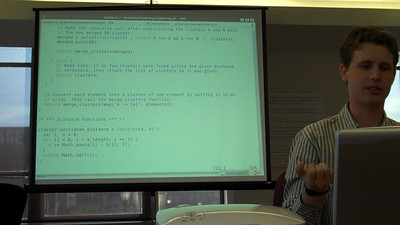
Node-fu Expert Jerry Sievert

Node-fu Expert Jerry Sievert

Be sure to check out Jerry’s Github, follow him on Twitter, and be sure to give his blog & site a good read.

If you’d just like to come and check out Jerry’s Presentation and the other kick ass presentations lined up, get involved in some coding, hear what Node.js is all about, or just hang out please RSVP and get the event on your calendar!

If you’d like to be among the presenters, submit a proposal, and you too can step up into the coder spotlight.

Garann Means to Present DRYing out Your Client-side Apps @ #NodePDX

This is the second in a series of posts about the individual speakers lined up for…

I’m stoked to introduce another one of our NodePDX Conference Speakers today. Garann Means is traveling from the weird city of Austin, Texas to the weird city of Portland, Oregon so she can impart on us coders some of knowledge around “DRYing out of Client-side Apps”. As she describes,

“There’s plenty of cool stuff Node offers purely in terms of server-side architectures, but it also offers a way to solve a problem we’ve been wrestling with since client-side applications became a big deal: writing everything twice. Rather than having the templates that produce markup exist in one backend language and in JavaScript, you can reuse them. Instead of validating in JavaScript on the client for the user’s convenience and then again in some other language on the server for security, you can share a validation module that can be used in both scenarios. And so on. We’ll look at some of the ways to stop repeating ourselves in Node apps and focus on getting the most out of existing client-side code.”

Garann looking at the code to her upper right.

Garann looking at the code to her upper right.

Garann is a JavaScript Dev in Austin with her dog and cat, who leap in for code reviews. She grew to love Node after a history of backend development combined with her passion for client-side apps. She has a, and I quote “colorful” blog, which I myself read every time she posts a new entry. She’s also an author of “Node for Front-End Developers” from O’Reilly, which she wrote when she wasn’t remodeling her house and coding awesome JavaScript magic!

Garann has some seriously good reads over on her blog, some of my favorites include:

  • The 150k Solution -> Companies, especially those in sprawling suburbia need to take heed of what she writes about here, and even more so are those companies that try to throw money at developers. She’s got more insight into this than most people that are actually in charge of finding talent!
  • Calling the github API with Node.js -> This post is pretty obvious why it’s a favorite of mine. She does a deep dive into use the github API, and, well, just go check it out. Great material.

Also, Garann is active & involved on github obviously. Give her a follow on lanyrd and also on twitter.

If you’d just like to come and check out Garann’s Presentation and the other great presentations lined up, get involved in some coding, hear what Node.js is all about please RSVP and get the event on your calendar!

If you’d like to be among the presenters, submit a proposal, and you too can step up into the coder spotlight.

Jesse Hallett to Present “Object-oriented Patterns in JavaScript” @ #NodePDX

This is the first in a series of posts about the individual speakers lined up for…

Over the following days I’ll be introducing each of the speakers for NodePDX. The first speaker is someone pretty well known in Portland, has helped organize the JavaScript Admirers Group in town, and works for another well known Portland Company, Jive.

Jesse Hallett Doing the JavaScript Presentation Thing

Jesse Hallett Doing the JavaScript Presentation Thing

Jesse Hallett

Jesse Hallett

He’ll be presenting “Object-oriented Patterns in JavaScript” which is something I’d advise any new, experienced, or elder programming JavaScript to check out. Knowing these concepts is key to really digging in and creating manageable, readable, and usable JavaScript Code. Jesse provides a description of his presentation:

JavaScript is a language that is tremendously flexible, but that comes with few clear conventions. Code organization is one are that has been reinvented perhaps more times than there are JavaScript programmers. I will examine a few tools that are intended to improve the experience of writing object-oriented code.

Some of the specific tools that I plan to examine are traits.js, CoffeeScript, Prototype, and JiverScripts. The goal is to get a look at different ideas to see what each approach has to offer. We will discuss inheritance versus composition, and question when it is or is not appropriate to use object-oriented code.

Audience participation is encouraged: if you have a favorite OO implementation, or experiences with JavaScript code organization, feel free to come and to share.

Got JavaScript curiosities, want to get in touch with Jesse, or just lurk on his twitter feed or blog? Here’s the info:

If you’d just like to check out Jesse’s Presentation and other great presentations that are lined up, get an RSVP and add it to your calendar!

If you’d like to be among the presenters, submit a proposal, and you too can step up into the coder spotlight.

PDX Node.js Conference, cuz’ PDX won’t settle for not having a Node.js Conference!

Coming up really soon is the PDX Node.js Conference.  If anybody is interested in speaking, please submit a proposal. If you’d just like to attend, it is 100% free, just RSVP.

Node.js Logo

Node.js Magic Logo

Also, if anyone is interested in taking the train down to Portland, the last two departures that Friday will have a group of attendees going; Train #507 Departing at 2:20pm and #509 departing at 5:30pm from King Street Station. (Schedules)  If anyone is interested in taking the train down please let me know and I’ll help coordinate so we can all get seats (preferably with tables) to hack together while enjoying the scenery.

Core Idea

The idea behind this Node.js Conference is a technology focused, node.js, JavaScript Lib, hacker conference. We felt that there needed to be a more tech focused event around the core technologies so Troy Howard (@thoward37), Jesse Hallet (@hallettj), and I thought “we’ll just get our own thing happening” and thus, PDX Node.js Conference was born.

So check out the site, come share your JavaScript chops, Node.js hacks, favorite js libs, or just come and check out the conference and meet some smart, cool, and sexy people in Portlandia, Oregon.

Click for a massive, full size, huge panoramic shot of Portland from the Aerial Tram.

Click for a massive, full size, huge panoramic shot of Portland from the Aerial Tram.

Windows Server 2008 Core, A Quick Run Down

I needed a Windows Server installation with low overhead, clean installation, that providing hosting and other features. I decided I would check out the Windows Server 2008 Core R2 installation and see how it stacked up. This is a quick run down of what is available on Technet and what I used to setup the server core for usage.

First there is the getting started guide. This write up provides a basic description of what the Windows Server 2008 Core R2 is, laying out the services and other characteristics of the installation. Specifically for the R2 version of the core installation these services are available:

  • Active Directory Certificate Services
  • Active Directory Domain Services
  • Active Directory Lightweight Directory Services (AD LDS)
  • DHCP Server
  • DNS Server
  • File Services (including File Server Resource Manager)
  • Hyper-V
  • Print and Document Services
  • Streaming Media Services
  • Web Server (including a subset of ASP.NET)

One of the first things you’ll need to do is administer the server core installation. This document details the ways a server core instance can be administered such as:

  • Locally and remotely using a command prompt.
  • Remotely using Terminal Server.
  • Remotely using Windows Remote Shell.
  • Locally or remotely using Windows PowerShell.
  • Remotely using an MMC snap-in.
  • Remotely using Server Manager.

Known Issue: There is also an issue with core installations that is brought up. Not all management tasks can be performed by the MMC snap-in. An included script can be used to configure the things unavailable via MMC. The script is in \Windows\System32 folder. The following command provides configuration options for the unavailable MMC features:

cscript scregedit.wsf /?

Three more cool things before moving on:

  1. Cheat Sheets or as they’re labeled “Job Aids for Server Core Installations of Windows Server 2008 and Windows Server 2008 R2“.
  2. Additional References for Installing a number of features including; Backup, Bitlocker, File Server, and a host of other features.
  3. Installing Server Roles onto the server core. This section provides step by step instructions to get various roles setup on the server including file sharing, etc.

Now that I’ve covered the standard things the server does and can do when configured, there are a number of things that need installed to really make the server useful. At least, for what I need it for. The first thing I need is to get .NET 4.0 running on the server. Onwards!

.NET 4.0 Standalone Installation for Server Core

I’ll admit right up front installing this shows a gross neglect that Windows 2008 Server Core has. First navigate, on a completely different machine, and download the .NET Standalone Installation for Server Core. Now, this is one of those situations where it appears Microsoft just completely misses how the Internet might work or should work. Why is .NET 4.0 not provided via FTP or some way that I could actually download it from the actual server that needs it? No idea, but you can’t. Once you do have it downloaded on a completely different machine (in my case, I used trusty OS-X) you can then find a way to get it onto the machine. I used a FAT formatted (yeah, in this situation I’ve had to return back a couple decades to FAT technology to get a 2011 piece of technology to work) USB Stick. Once I got the installation file on the USB Stick I just mounted that up and copied the file over the machine and installed it.

Instructions per the Download Page

  1. Important: Make sure that your computer has the latest Windows service pack and critical updates. To find security updates, visit Windows Update.  Including the following requirements (The image (Fig 1) shows what items I included – the extra items I included are unrelated to this blog entry):
    1. Turn on WoW64:

      Start /w ocsetup ServerCore-WOW64
      
    2. Turn on .NET 2.0 layer:

      Start /w ocsetup NetFx2-ServerCore
      
    3. Turn on .NET 2.0 layer for WoW64:

      Start /w ocsetup NetFx2-ServerCore-WOW64
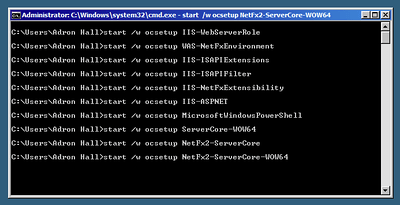
      

      Installing Multiple Services/Roles for the Server Core

      Installing Multiple Services/Roles for the Server Core

  2. On this page, locate the Download button and then click it to start the download.
  3. To save the download to your computer so that you can install it later, click Save.
  4. To cancel the download, click Cancel.
  5. After installing .NET Framework 4 on Windows 2008 R2 SP1 Server Core, it is highly recommended you install critical .NET Framework 4 updates available on Windows Update.
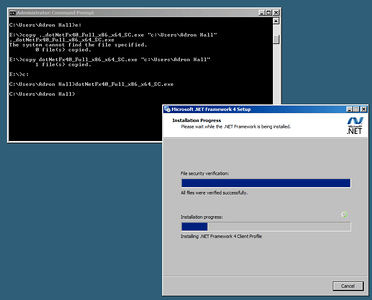
Installing .NET 4.0 for Server Core

Installing .NET 4.0 for Server Core

PowerShell, Now We’re Getting Somewhere!

Alright, the server is starting to be useful now. We have various services and prospectively other networking capabilities, all depending on what we would have wanted to install during the first section  of material. We also have .NET 4.0, so we can run some honest to goodness useful .NET Applications, such as web apps, and more.

Now that we’re all wrapped up, it is always a good idea to give a Windows Server one more firm kick before we put it into production. To shutdown, restart or otherwise give the server that kick, just type shutdown and you’ll find all the switches available. The most common one I use is to just shutdown right away (relatively, it still takes its time shutting down).

shutdown -s