OS-X Cocoa Quickie #1 => Make Sure to Have Unit Tests

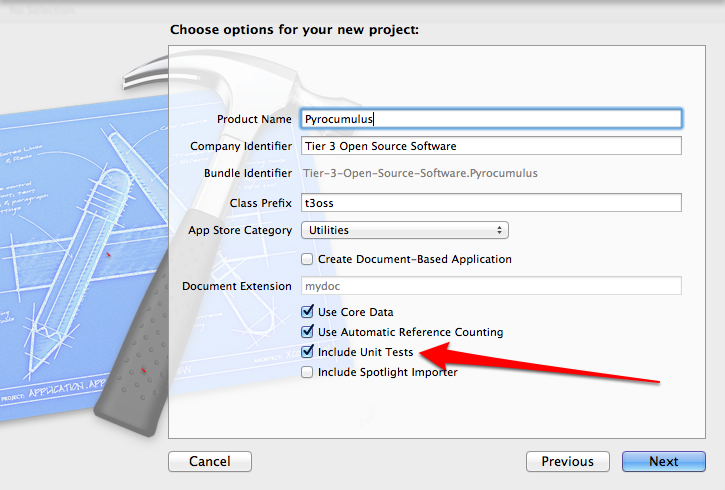
When starting an Xcode Cocoa Project you should have a testing project that you include. It’s a simple check box on the project creation dialogs.

Keep This Checked! Write Tests!

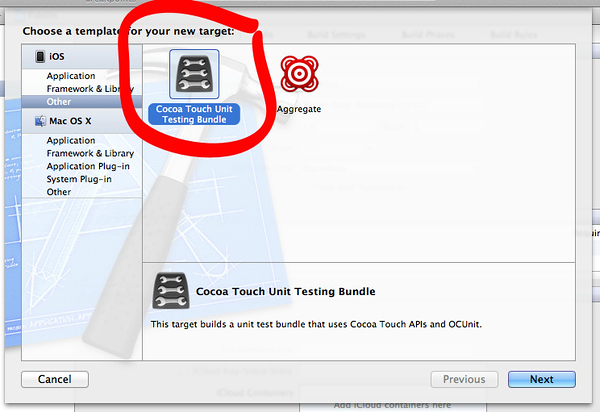
If for some reason you inherit a project that doesn’t have unit tests, tests, or anything of the sort and need to add a testing project follow these steps. With the project open add a new target as shown below.

Add a New Target to the Project

Add a Cocoa Unit Testing Bundle.

Cocoa Touch Unit Testing Bundle
Cocoa Touch Unit Testing Bundle (Click for full window and full size image)

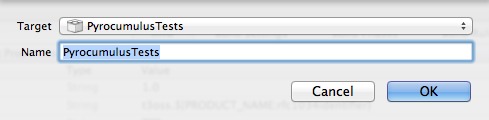
Set the appropriate parameters for your project. Be sure to select the project from the drop down.

Set the product name and be sure to select the correct Project from the drop down. (Click for full window and full size image)

Once finished adding the testing target, edit the schema. The project will have an additional schema. I personally like to keep them rolled together, so delete the “*Tests” schema and just make sure that the Tests section has the right target listed.

Schema Settings
Schema Settings

If it isn’t listed, as shown in the above dialog, click the + to add the tests project. Select it in the target dialog as shown below.

Adding the test target for the schema

Once all that is done then the tests can be executed from the Product -> Test menu option or the shortcut key combo of ⌘U. With the default code that is added to the target project, you’ll end up with one failing test.

Test FAIL!
Test FAIL!

Now write tests!

Steve Jobs

I have paid attention to Steve Jobs only in knowing he was producing some pretty sexy products at Apple. I had never owned one until December 23rd of 2011.  I had however respected Apple & Job’s Products. I knew very little about the level of his drive and passion. I also knew little about his rock star attitude, which often cast him as the “asshole”.

It was time to learn more about Steve Jobs. What better way than to give the recent bestseller a read. You know, the one with his face planted right on the front. By the end of the book, I had rooted for Apple far more than I had imagined I would have. I have damned them over the years far more than I should have and I have respected them a little less than is due. Apple with Steve Jobs at the helm has indeed done some amazing and great things.

After reading the book I came away with a new respect for Jobs, more than I already had. I had learned he is not the hippy nut he’s portrayed as, nor some capitalist pig, but all of the above and somewhere in between. I found him to be a dreamer, loves intensely, and is passionate about creating. Something we all could learn from. Creating new beauty, designs, products that enable us is indeed one of the great human achievements.

Some of the key parts of the book include his interactions with his parents, not the blood parents, but his honorable and loving parents that actually raised him. Stood fast beside him and cast aside things to enable and help him learn. One of the quotes that stood out as how awesome his father was, reminding me of my own father, “Paul Jobs told the teachers, his son recalled, “If you can’t keep him interested, it’s your fault.” His parents never punished him for his transgressions at school. “My father’s father was an alcoholic and whipped him with a belt, but I’m not sure if I ever got spanked.” Both of his parents, he added “knew the school was at fault for trying to make me memorize stupid stuff rather than stimulating me.” He was already starting to show the admixture of sensitivity and insensitivity, bristliness, and detachment, that would mark him for the rest of his life.”

He grew into this way of acting, and I really can’t wrong him for it regardless of who he cut down with his wrath, because he knew and wanted people to jump into the fire with him. He didn’t want nor deem that he wanted to waste time with people that couldn’t step right up to a brash, honest, and give 110%. Maybe I related with it too much, I try diligently to avoid such outbursts or other characteristics, but I for one don’t have a problem working with people like that. I want passion for a product. I want love of design. I want an insatiable desire in people around me to create.  I can absolutely understand why he did too.

Late in the book, the reader learns of other battles Jobs had. He saw himself as a person of the counterculture, and thus naturally part of the political left. Even though he throughout life rarely involved himself directly in politics. But because of this, and the views of the counterculture on technology at the time he was often torn. Regarding the counterculture, “Many in the counterculture saw computers as ominous Orwellian, the province of the Pentagon and the power structure.. In The Myth of the Machine, the historian Lewis Mumford warned that computers were sucking away our freedom and destroying “life-enhacning values.” An injunction on punch cards of the period-“Do not fold, spindle or mutilate”-became an ironic phrase of the antiwar left.”

It was something that Jobs, as his life unfolds in the book, just faced up to and dealt with. Eventually the counterculture caught up with the times and became enraptured with technology, in large part because of Apple & Steve Jobs.

Overall I think the book captured Jobs in a realistic way. In the typical Jobs fashion too, the book ends with a segment written by Jobs himself. You’ll have to give the book a read yourself to know what it says, but suffice it to say he managed some amazing things in life. He was also very much more aware of the world regardless of his “Reality Distortion Field” and insanely passionate about insanely great products.

In summary, a great read. Pick it up!

A Few Choice Quotes:

“If you want to live your life in a creative way, as an artist, you have to not look back too much. You have to be willing to take whatever you’ve done and whoever you were and throw them away.”

– In a scary way, this holds to be true, as an artist grows and evolves the previous passion often must be cast aside to find an ongoing and new passion.

“God gave us ten styluses, let’s not invent another.”

– A statement that the purchasers of the iPad, iPod, and iPhone proved through purchasing millions of these devices and turning Apple into the world’s most valuable company. I just found it rather funny myself, yet rings very true.

“Stay Hungry, Stay Foolish”

– Nuff said!

“Simplicity is the ultimate sophistication.”

– Passion embodied in a simple phrase.

“Here’s to the crazy ones. The misfits. The rebels. The troublemakers. The round pegs in the square holes. The ones who see things differently. They’re not fond of rules. And they have no respect for the status quo. You can quote them, disagree with them, glorify or vilify them. About the only thing you can’t do is ignore them. Because they change things. They push the human race forward. And while some may see them as the crazy ones, we see genius. Because the people who are crazy enough to think they can change the world are the ones who do.”

– Yes, it was the ad, but it is one of those times when an ad becomes something a bit more, one could almost say it becomes art.
Macbook Air Multiple Monitor Support

The Macbook Air is indeed an “insanely great” device. I have slammed this thing around, physically and virtually, from the bicycle messenger bag situation described in my buying decision post, all the way to running multiple virtual machines and multiple monitors! This machine, of course if you’re using lean, clean, powerful, and intelligent built software, is top of the game for light weight machines.

The “how did you get multiple monitors?” question has come up several times since I bought the Air. So I’ve put together this blog entry on multiple monitor support, with instructions, and what can expect to run once the monitors are hooked up.

The first things you’ll need to get up and running are the appropriate gear. I purchased a Newer Technology USB to VDI, HDMI, and VGA  Adapter.

New Technology Monitor Adapter (Click for Larger Image)

This adapter comes with an adapter to connect to the adapter for HDMI and VGA in addition to the already built in DVI connection on the device. Once you receive the adapter unpack it and get it installed. The driver will probably need retrieved from the company’s site, I wouldn’t use the included CD as the driver is a little dated. The latest OS-X driver supports Lion & all the other versions.

Adapters (Click for larger image)

The other thing you’ll need is an appropriate Apple Adapter for the actual Thunderbolt Port as shown in the forefront of the image above. With all these parts you’re set for some wicked dual monitor or even three way monitor support.

Multiple Monitors Hooked Up (Click for larger image)

The monitors fully activated.

Macbook Air + 26" Left Monitor + 26" Right Monitor (Click for larger image)
Macbook Air + 26″ Left Monitor + 26″ Right Monitor (Click for larger image)

I wanted to point out a few more things before wrapping this up. A follow up question to how I have these setup is usually “isn’t their lag or slowness?” Well, here’s a short review of what I was running while writing up this review.

Webstorm, Node.js App Running, w/ OS-X Bar (Click for full size image)

Screen #1:  Macbook Air 1440×900 Resolution

  • Webstorm 3.0
  • Node.js (application running)
  • OS-X Bar, etc.
Screen #2 (Click for full size image)

Screen #2: 26″ at 1920×1200 Resolution

  • Viewing in Chrome: http://compositecode.com
  • File Copying & Management of Drives connected via USB Hub with Finder
  • Ubuntu Linux Load Booting up in VMware Fusion
  • CloudFoundry Instance running (Linux) in VMware Fusion
Screen #3 (Click for full size image)
Screen #3 (Click for full size image) 

Screen #3: 26″ at 1920×1200 Resolution

  • Pandora providing some Children of Bodom to code to.
  • VMware Fusion machine library.
  • Chrome executing the Node.js example code.
  • iCal displaying upcoming delivery dates and meetings via Google Calender Feed.

Summary

The Macbook Air isn’t going to run Modern Combat 3 in two windows or anything crazy like that. It will however provide a powerful and capable system to code, develop, run virtual machines, web services, and other things that you would need to work with as a software developer. It may only have 4GB of RAM, but between the clean architecture, execution, and design of OS-X to use that i5 (or i7), the 4 GB of RAM, and extremely fast 256 GB SSD, this machine can handle its own.

STATUS UPDATE:  June 28th, 2013

I now use two Mac Book Air Laptops. I have the original which I wrote this article using and a newer 10″ MBA with 8 GB RAM and related improvements. In addition to these laptops however I now use an iMac 27″ that is connected to my other 27″ Cinema Display. This is dramatically more performant and easier to use than trying to run two monitors on either of the MBAs that I have. In that light, I no longer use the connector nor know if it works with the latest Apple products. I’ve since given it to a friend who does however use it, and the friend tends to stay up to date with the latest Apple OS releases. Thus one could assume that the device works with the latest OS-X but you’d have to do your own research.

Thanks for reading my blog, cheers!

-Adron

Small, Powerful, Elegant, Sexy, and Hard Core

Ok, it’s that time of the year and I’m at the phase of the cycle when it is computer purchasing time.  What do I want, what do I need, who has the best options available? In order of priority here’s my wish list for the ideal machine.

  1. It must be able to run Windows & Linux. Even better would be the ability to run OS-X, Windows, and Linux. Preferably with Linux or OS-X as the core operating system and Windows either virtualized or dual booted.
  2. Another high priority is I want elegant, sexy, and strong design. But not just in appearance but in functionality too. I want the device to be strong. I want the material to be fabricated well, I want the quality and durability to be built into the device. This comes down to the device being a single mold, probably of a high quality material like aluminum.
  3. I want as much oomph as I can get out of the hardware. Demanding elegant and sexy usually dictates it won’t be powerful. Demanding tough is usually another strike against that.
  4. Another thing which is super important, but I may be flexible on, is the resolution. I simply want as much resolution as possible.
  5. The last thing, which isn’t as important, is I don’t really want to pay more than about $1500. I’d be all the happier if I can find something for even less.

Narrowing Down the Machines

The first thing I did was check out what information was available on what I would choose as my ideal computing device. I had found, through research and talking to others, that my options where either one of the new Ultrabooks coming out from different manufacturers or an Apple Macbook Air.

With the narrowing of the playing field and knowing a few things about the Macbook Air already, I decided to look into the Ultrabooks more thoroughly. Several, such as the Lenovo option got dropped immediately. The were huge by comparison to the Air and other Ultrabooks. If several options existed around the half an inch thick size, that was what I was going to aim for. After looking through many of the options it looked like the Acer & Asus were the real viable Ultrabook options.

Touch, Feel, and Fabrication Quality

The next step, was I needed to feel and touch these machines. I wanted to be sure that their marketing hype wasn’t going to land me with a laptop that was flimsy or the fabrication was poorly completed. No machine would be in the running unless the fabrication and manufacturer was of equal or greater quality than the Apple Product.

My first trip took me to Fry’s out in Renton, Washington. Fry’s was an embarrassment, they barely had any products whatsoever. So I plotted my next trip, which a few days later took me to the airport Best Buy in Portland, Oregon. They had everything! I was euphoric. I tried out more than what I was just looking at, and must say some of the tablet options are creeping into replacing laptop options real soon! But I then refocused and aimed back at my main goal, finding out the build quality of the Acer and Asus. This ended up being instant. I touched the Acer and it was, as Steve Jobs would say, “shit”.

Honestly I was shocked by Acer. Maybe they’re just aiming for a low price point, but after touching the device and feeling the horrid quality I immediately dropped it from the running, regardless of how much lower the price might be. As with my priorities above, price is the last concern at #5, I’m not going to settle for a crappy build quality because I’d pay dearly for it later. Why?

The reason why I want something strong & sturdy is because of several things.

  1. I ride a bike on a regular basis and whatever laptop I have needs to survive the bump and grind of the bike commute, the bike runs & errands, and other outings around urban areas. The laptop will be bumped and flung around in my messenger bag, I don’t want to pull out a dead laptop.
  2. I walk, take transit, and generally will up and climb to a lofty rock overlooking a shoreline to have a better area to work and think. Sometimes, I might stumble, trip, or otherwise impact the device. Thus, see above reason on not removing a dead device from my pack.
  3. While working in coffee shops, bars, conferences, or other activities the laptop will be pulled from my pack on a regular basis. While in my pack it’ll probably end up getting kicked, nudged, dropped, or otherwise inadvertently abused. Again, I don’t want a dead device in my pack.

Narrowed to Two

Alright now the battle truly begins. The Asus on one hand and the Macbook Air on the other.

The second thing I decided on was that I’d go with only the 13.3″ devices. They have greater options around storage and processor speed, so it seemed like a good path.

I pulled up the spec sheets on both of these machines. After a thorough review the two biggest glaring differences amounted to these features:

Resolution

Macbook Air: 1440×900 versus Zenbook UX31: 1600×900

USB Connections

Macbook Air:  USB 2.0 versus Zenbook UX31: USB 3.0

Battery “Reputation”

This is a bit of a weird one. All I can say, is that those that have tested the thing have said the Zenbook doesn’t measure up battery wise.

Macbook Air:  7+ hours versus Zenbook UX31: probably not 7+ hours

Operating Systems

This is actually a big problem for me, as the Zenbook actually runs Win7 and Linux support for all devices is a little questionable. I know for a fact that OS-X runs flawlessly on the Air and outperforms Windows 7 in about every aspect of performance. So I really want to be confident that I can run OS-X or Linux as the core operating system and then either virtualize or dual boot into Win7.

Macbook Air:  OS-X == Win! versus Zenbook UX31:  Win7 == Fail

So with all those factors taken into account I finally chose…

…drum roll please…

…the Macbook Air.

Summary

These devices are really close, but in almost every measurement the Air comes out slightly ahead in some way or manner. In addition I have the odd requirement of not wanting Windows 7 as my primary operating system. After researching “Zenbook+Linux” and “Zenbook+Ubuntu” it sounds like getting Windows 7 off of the Zenbook and getting Linux running on it is problematic at this point. I’m sure that in 3-6 months Linux will probably outperform and outlast Windows 7 on the device, however now that isn’t the situation.

In other little ways the Macbook Air still has a slightly higher quality also. The power adapter and magnetic connector are less troublesome than most other laptop style power adapter connections. Basically every single thing, once you use it for a while, seems to have a purpose or intent behind the design.

However I will add, that the Asus is of extremely high quality, the absolute highest for a dedicated Windows 7 Laptop. If all somebody wants is a Windows 7 machine with no concern for OS-X or Linux than the Asus is your only real option. The higher resolution almost sent me to get a Asus and is absolutely a big advantage for Win7 on the device. But if you’re still wanting the absolute top tier quality, features, and capabilities for a device that is this elegant and sexy, the Macbook Air is still the prize.

With that, I’m off to determine my purchase options.

OS-X, Top 2 Gripes

I’ve been developing in my spare time on Mac OS-X using Rubymine, Webstorm, TextMate, XCode, and several other apps. I’ve also been using Kindle (the native app and the HTML5 Version), Tweetdeck, and a host of other applications. A bulk of things I’ve also been using, however they’re almost entirely in Chrome/HTML5 or some web application state. Speaking of applications, OS-X has zero shortage compared to any other operating system.

However…

I will admit with honesty, the the interface is very lacking compared to using Ubuntu or Window 7 these days. OS-X is lacking several functionalities that it desperately needs. I’m not writing this blog entry to complain about these either, just pointing out they’re missing, and hopefully someone may know of an app or add-on that will provide this functionality.

  1. Application Placement:  Windows & Ubuntu have a “snap to” type functionality that pops an application window onto a side of the screen when it is dragged. With the arrow keys or in other ways, that window can then be moved from left to right, or if on dual monitors from one screen or the other by 50% increments. This functionality is ridiculously useful when working with multiple applications, and anybody that really uses a computer ends up in this scenario.
  2. Rename, New Folder, and other short cut keys in the “Finder” are pretty crappy compared to Windows & Ubuntu. I’d even give windows top marks in this category. Of course, once one actually does a move, delete or copy they realize what crap Windows is at actual file manipulation. But the Windows Explorer makes it a breeze manipulating files – even if it is 2-5x slower than Ubuntu or OS-X – I’d still however like a nice trade off of file manipulation, viewing what a file is or is not from the finder, and other functionalities that generally don’t seem to exist.

That’s it for now. These are the top 2 items that provide an annoyance when using OS-X vs. Windows or Ubuntu. Any suggestions, ideas, thoughts, or otherwise that may set me straight about this?