Gaining a Systemic View of Immutable Infrastructure Tooling

I put together a few starter notes on things you should delve into and understand before working with infrastructure related tooling, like Ansible, Terraform, or similar tools. If you think I’ve missed any do ping me @Adron and let me know your thoughts on other additions. The first starter items I’d list as the following.

  • Computer Networking – Basic understanding of what an IP number is, how they’re assigned via DHCP vs. static, and related basic TCP/IP knowledge. Also it is helpful, yet not necessary to understand the idea behind CIDR ranges and related network concepts about addressing also.
  • Basic Linux or Unix CLI Commands – Commands like; ls, mv, rm, cp, mkdir, rmdir, wget, curl, ping, traceroute, ifconfig, nslookup, vi, kill, chown, whoami, su, chmod, chown, chroot, cat, env, echo or tail. All these commands are’t used in the couse, but they’re fundamental for building and troubleshooting any infrastructure and related environments and systems in the future.
  • Basic Scripting and Language Constructs – Things like if-then-else, while loops, and related programming constructs for use in scripting like Bash or Powershell.

With those basics covered, here are some of the things that help shape one getting a good understanding of what Terraform, Ansible, Chef, Puppet, and related tooling is.

  • Ansible – https://www.ansible.com/ – Ansible is a tool that helps provision, deploy, and apply compliance of infrastructure through configuration management. It was purchased by Red Hat and is now in their stable of tools.
  • Puppet – https://puppet.com – Puppet provides discovery, management of infrastructure, and mutable updates and changes to that infrastructure. It’s also important to note that Puppet is made up from a number of individual tools.
  • Chef – https://www.chef.io – Chef is one of the leading companies that helped to start and push the DevOps narrative in the industry. It is a tool that provides a programmatic DSL, configuration, and related ways to create and manage one’s infrastructure. Chef, similarly to Puppet, is also made up of a number of individual tools, and the company itself continues to develop a number of tools within the space.
  • CloudFormation – https://aws.amazon.com/cloudformation/ – AWS CloudFormation provides a way to desribe and provision infrastructure resources in AWS. This is used as the single source of truth for all the cloud resources when used.

I talk about and use Terraform a LOT so let’s talk comparisons with these tools and Terraform for a moment. Terraform compares with configuration management tools like Chef and Puppet in it’s abstract use of provisioners to setup resources such as the network, instances, and other things within the cloud platform being deployed to. Since Terraform operates at this higher level abstraction of the platforms resources are deployed to. By doing this Terraform can be used with, or even similarly to Chef and Puppet. Complementing each other or working independetly.

In comparison to CloudFormation the differences start out with the cross platform and multi-cloud platform capabilities of Terraform versus CloudFormation being limited to only AWS. Terraform also draws out a more stage based approach for each execution. This gives more control about where, when, and why Terraform can replace or be used in conjunction with CloudFormation or any of the tooling mentioned.

These Tools, Immutable Infrastructure?

With these tools, one key ideal among them is the pattern of immutable infrastrucutre. Defining immutable infrastructure in short is the idea you create and operate your infrastructure using the programming concept of immutability. Once you instantiate something it is never changed. It is replaced with another instance of make changes or ensure proper behavior.

The affect and effect of immutable infrastructure provides stability, efficiency, and fidelity to your applications through automation and the use of successful patterns from software development.

  • Increasing operational complexity can be dealt with. With the complexity of distributed systems like Cassandra, Kubernetes, and others immutable infrastructure practices have become the defacto way to manage this extra complexity and volume of resources.
  • Snowflake components are removed. Mutable maintenance methods enable this idea of snowflake components like bespoke, hand crafted, and artisinal servers and infrastructure. Immutable infrastructure eliminates the possibility of these outliers and increases repeatability within systems and infrastructure.
  • Increased threat identification & mitigration of harm. With immutable infrastructure the number of knowns, at start and and completion of infrastructure usage increases as needed. Need debugging information, a single way to gather that can be provided, set by policy, and enforced with immutable infrastructure in a way that simply can’t be with artisinal infrastructure.
  • Integration and seemless continuous integration and deployment. With immutable infrastructure the enforcement of and enablement of integration and deployment of solutions is largely self-fulfilled. To deploy through automation requires integration and deployment, for immutable infrastructure automation for integration and deployment is needed, and in turn enables the other.
  • Reproducability is inherent in the system. The ability to take an environment and all of it’s nuances, recreate that enivronment among complex orchestration is flawless with immutable infrastructure. This gives us the ability to set audit points, track, and log data accordingly to the entire environment.

That’s my wrap up for getting into and gaining a more holistic idea of what immutable infrastructure is and what tools work to help attain this level of infrastructure development and usage. Until next time, feel free to throw ideas at me via @Adron!

Pricing Calculations for Work & Projects

Recently I’ve been paying a lot more attention to the job market as I go through the finding, hiring, and gaining customers routine with a number of different companies, recruiters, and individuals I know within the industry. Conversations kick off a million different ways. In this post I’m going to tackle how I work pricing of a job for myself. Many companies have some criteria based on what others in the company are paid and someone in human resources often has some spreadsheet or whatever that tracks this stuff. This is the flip side of the coin, this is my pricing list. It’s really simple, it’s based on what I’m looking for in life and what a company can give me, which in turn dictates what I can do for a company and aligning with what they want too. In the end, this helps insure we both get a win out of the relationship.

Pricing

Work Desire — The first thing I always think to myself is, “Do I even want to do the work being discussed?” Even though it is more complex then a yes or now. For instance, the main work might be some horrid migration going from a legacy Oracle Database and moving to Postgresql as the core job. But outside of that core job there might be some excellent potential to work with data that is super interesting from a scientific perspective, or logistical freight perspective. (As I find the freight industry very interesting, it ranks high on my “let’s do this” list) Even though the later is vastly more interesting, both need done so it still ends up with a positive “let’s do this” rating. In every possible project I always give it a measure of somewhere on the “Nope” to “let’s do this” spectrum. More toward nope, the increase may go as high as 40% more, more toward the let’s do this, it might even move toward taking a lower price point by 15%. In summary, the desire to do the work on hand is a massive factor in deciding the price I’ll take for the work.

Skills —There are two aspects of jobs which can be broken out into the poorly worded phrases soft skill and hard skill categories. Generally one refers to a person’s communication, writing, and organizational skills and the other refers to someone’s understanding and knowledge around writing code, technical documentation knowledge (let’s be real, this is the expectation), and to some level rudimentary reasoning skills.

The truth is, if we’re honest with ourselves the divide of soft and hard skills is wrong for so many reasons, including the words soft and hard themselves. These designations ought to simply be called skills and discussed in the full context of the individual. The paradigms of the personality tests and introversion and extraversion come into play too, all important to determine effectively how these skills need to be used within a job. But the most important thing is to realize and accept the fact that all the skills an individual has are important in their interplay within the job. Belittling one or other other doesn’t do anybody any good.

My simple approach is listen, learn, and always aim to improve my skills. All of them in any way that I can at any point that I can. Maybe sometimes I need to focus on one skill, and I will, but overall I aim to keep a solid improving competence across what I do as a whole, it makes all of the individual skills that much more useful if I can deliver them with all the others.

If a company acknowledges that a whole package of skills is what is important, not delineating them into the false premise and broken ideals of soft and hard skills, they get a discount break on my demands. I work it out like this, if they’re understanding and it’s understood in general among the company I’m willing to be flexible by taking off about 2% of my asking prices. If I’m talking to a company that has a clearly naive understanding around communication, no blame or anything, but it’ll need to be an increase of 5–10% in my pricing.

Geography — Depending on remote or onsite work has some huge pricing implications. If a company is remote, they instantly get more attention for two reasons:

  1. It’s either highly likely they’re good at effective communication and waste a more minimal amount of time with meetings and such, or they’re at least open to doing better or becoming more efficient in their communication and being a remote first type of workplace.
  2. I work best, and can contribute most effectively when I control my geographic location. Forcing an office environment and respective time frame around that office environment immediately decreases what will and can be done.

As a side effect of being remote, not only am I able to be more productive for the vast majority of companies, I’m happy to cut about 2% off of my pricing.

What about onsite? I never rule out onsite work, because it can be extremely rewarding, useful, and in many cases if a company is ok with remote but wants a split of onsite work I’m very happy with that arrangement too. It often doesn’t even cut into my productivity as I can then get a bit of the best of both situations. But let’s talk about what area this applies to.

First, there is the I can bike, bus, train, tram, light rail, boat, or walk it to the office this gets high priority over anything else in the in office category. I only add on a small 2 or 4% to my pricing for this situation. If the company has thought intelligently about this and offers indoor arrangement for cyclists, showers, transit passes, or other amenities I’ll usually even decrease my increase by 50%. If a company is outside of a reasonable 30–50 minute bike, bus, train, tram, light rail, boat, or walk to the office I instantly add approximately ~15% to my pricing. One exception would be if I just fly to their office for a few days a week or per month and spend that time “bike, bus, train, tram, light rail, boat, or walking” to the office.

Geographic Amenities —As real estate professionals always say price is about location, location, and location. This is so very true in choosing companies to work for also. The geographic area, as discussed in the previous point, also has another key element that drastically affects my pricing. It applies to in office requirements and works very simply, like this.

If the office where I’ll be commuting to on a regular basis (at least every other day or so) is located in a food desert then I have to instantly add ~15% to my pricing ask. It’s simple, if I’m to decrease my standard of life, decrease my opportunity to stay healthy, live well, and eat foods that help sustain my well being then I’m going to need to compensate for that unfortunate request on their behalf.

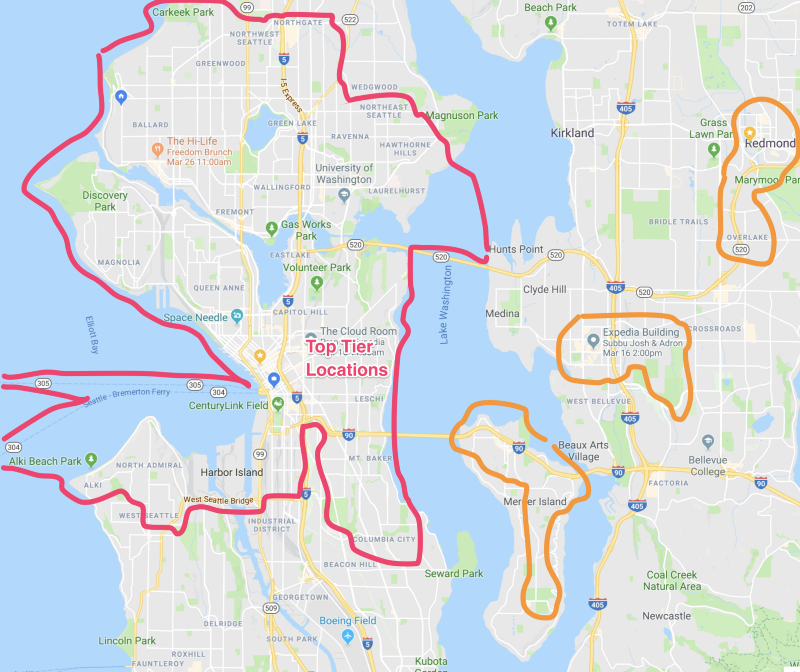
Another is if I need to commute outside of certain distance from where I live, which I’ve drawn a very rough map up below, which generally would place me near a prospective food desert, then again the additional risk, travel time, and related complexities just to get in office will force me to raise my pricing request by up to ~15%. In the map below for example, the northern end of the pink outlined area I need to increase in pricing for, but the further south and travel time areas would require an additional ~2 to upwards of 10% increase in pricing. The orange outlined areas would require a minimum of a 15% pricing bump just because of the inconvenience of trip time, congestion, increased costs on my behalf, and related unnecessary complexities just to work in office in those areas. Of course, I’ve decided where I live, and this is again to insure that we’re both matching expectations and meeting my needs as well as the company’s needs. If I’m killing myself slowly with some arduous commute and languishing with poor food options while in the office, it doesn’t do the client any better if I let myself fall into this situation without gaining recompense for this extra effort requested. There’s one more image there that shows where I would happily fly an a semi-frequent basis

Areas I’d Commute to in Seattle & surrounding areas on a mostly daily basis.

Contracting, Consulting or Full Time or Long Term Project Work — Now we get to the meat of how long a particular job is expected to last. This gets into the longevity of the pricing and even into the realm and expectation of price increases (i.e. raises, etc). Of course, getting to this point logically is an often high risk, volatile, and inaccurate practice. From SWAGs to every other method used, schedules almost always get messy the longer out something is on the calendar. Suffice for this, we’ve made a determination around X, and X it will be for the foreseeable future.

If a job is temporary, i.e. 1099 in the ole’ US of A, the 1099 has to cover insurance, gap and risk, the gaps before and after the contract from focusing on a singular thing for a temporary basis, also the medicare and social security share of both side (i.e. and employee) etc. So a 1099 rate must be at minimum 30% or more than a W-2 rate. A W-2 rate, depending on what comes along with that for benefits, can also vary dramatically. With the complexities of the ACA it can even be necessary to take concern with startup and shutdown of health care coverage, which means the rate may need to go up approximately 5–10% just for that gap position.

On the topic of a full time position, if it’s the case of diving directly into being full time I may or may not need to have an additional 5–10% added to the salary req, because I would prefer we meet halfway, complete a contract to hire to insure we both meet criteria for a good working relationship. Even if it’s just a few weeks of consulting. Depending on the mission of the company, what it builds, and what the need is, I’m happy to go ~10–15% over under on the median salary for the area.

Summary

Fortunately I’ve gotten good enough at this, that I can usually calculate this pricing in a matter of seconds. Before I really had my system down it was very cumbersome. If you put together your own pricing system, make sure to memorize and test out calculations beforehand so that you know when and what you’ll put on the table. It helps immensely if pricing is stated as early as possible, with firmness, and clarity around intent. Whatever you’re going for, I strongly proffer advice to determine what the median rate in the area is and pricing accordingly! It’ll work out better for you and your prospective client/employer/team.

ML4ALL (Machine Learning for All)

Alright, I’m sure everybody has a vast and expansive understanding of machine learning and all the algorithms involved and…

oh wait…

…not really? Yeah, me neither. Alright, I’ve got a conference for you. The ML4ALL Conference is lined up for May 27–29th where a reasonably sized group of machine learning practitioners and completely new to the field people are going to gather to speak, learn, discuss, and aspire to more and better machine learning. We’d love for you to join us, come speak on a machine learning topic dear to your heart, and enjoy the city, sites, cuisine, and relaxed nature of Portland while you’re at it.

I’ve got a couple excellent selling points on why you should attend ML4ALL.

  • Machine learning is going to be very much in demand, and this is an opportunity to spend a few days getting up to speed in the great city of Portland in a great setting of the Bossanova Ballroom with a lot of fun people on much of the technology involved!
  • Like all conferences I have a hand in, I’ll be sure to setup some outside of conference fun things to do for those interested — like a brewery ride, possible hike, geek train for Seattle to Portland, or any number of other peripheral activities that I enjoy adding to an event. I’ll be sure you get that lagniappe!

More to come, lot’s more, stay tuned, keep learning, and until then — happy algorithm processing.

Reading Up on Observability and Monitoring

In the next few weeks I’ll be doing some work for Honeycomb.io. In preparation I’ve been ramping up on a number of topics, namely the big one is the specific differences in things like observability and monitoring. The aside that makes this relatively easy, is I live and breath this space from a site reliability, apps, and services perspective. Not only am I fortunate in my situation to dive into this topic, I’m excited to do so as well.

I started this research just checking out what material Honeycomb.io has available onsite and additionally what Charity Majors has written, or spoken about at conferences. The first two were easy to find with a simple Google search and checking out the Honeycomb.io Blog. For each of these materials I’ve provided a summary before each linked reference. Enjoy.

Title: Charity Majors on Observability and Understanding the Operational Ramifications of a System

This article is in interview form, with Daniel Bryant interviewer and Charity Majors the interviewee. When asked the question

Can you explain a little about how operational and infrastructure monitoring has evolved over the last five years? How have cloud, containers, and new (old) modular architectures impacted monitoring?

Charity goes on to lay out a stance.

What’s interesting is that monitoring hasn’t really changed. Not in the past … 20 years.

You’ve still got metrics, dashboards, and logs. You’ve got much better ones! But monitoring is a very stable set of tools and techniques, with well known edge cases and best practices, all geared around monitoring and making sure the system is still in a known good state.

However, I would argue that the health of the system no longer matters. We’ve entered an era where what matters is the health of each individual event, or each individual user’s experience, or each shopping cart’s experience (or other high cardinality dimensions). With distributed systems you don’t care about the health of the system, you care about the health of the event or the slice.

This is why you’re seeing people talk about observability instead of monitoring, about unknown-unknowns instead of known-unknowns, and about distributed tracing, honeycomb, and other event-level tools aimed at describing the internal state of the system to external observers.

Let’s elaborate for a moment. Monitoring not changing in the last 20 years is truth. I worked at WebTrends years ago, which was a company that was formed around basically taking logs files and churning through them to get reports out of them. In the process they became one of the first web analytics company. But even way back 20 years ago almost WebTrends was basically laying out what we deal with and have for monitoring. Starting with log files and on up through basic pinging of services, with related APM style monitoring. This has been and continues to be effectively the same thing, needed, but unchanging for decades.

But jump over to her point about tracking events instead of worrying about the health of the overall system. Maybe stating “it no longer matters” is slightly hyperbolic, but she’s making a point, so don’t get derailed. The idea is we don’t actually care about the system, we care about what activity we’re trying to make possible; buying some food on Amazon, that rare book on a book finders site, issuing a search with esoteric terms, triggering a compute action of some sort, analyzing a flight path for an upcoming trip, or other event. In the end, I’d even add to the argument that we end users don’t even really care if it’s done by a computer or some magical sky pixie, the only thing that matters is we get the result of the event we’ve requested and that it is correct for us to take action on.

We want the event, the correct result, and the rest is irrelevant in the grand scheme of the universe. This is an extremely important point she’s brought up and it is key in understanding the difference in monitoring — the combing of data to determine the state or well-being of a system — versus observability — the view into and understanding of the state of events within a system.

Distributed systems also amplify, exacerbate with complexity, this intent to know the state of events versus the state of the system. Anybody who has dealt with any list of distributed systems, from Kubernetes to Riak to Cassandra to others, knows that the key is the event and data, as one may never really know when a system is under duress or what the state is of the entire system. Simply put, you cannot know the full state of a truly complex distributed system, and often if you do it still doesn’t tell you if your events are being performed accurately or at all. Sure, monitor it, but what we really need to know is what the data is, if it’s really the data we want, and the event the data is relevant to. This paradigm around distributed systems Charity also summarized up in an answer I found spot on.

Monitor everything”. Dude, you can’t. You *can’t*. People waste so much time doing this that they lose track of the critical path, and their important alerts drown in fluff and cruft. In the chaotic future we’re all hurtling toward, you actually have to have the discipline to have radically *fewer* paging alerts … not more. Request rate, latency, error rate, saturation. Maybe some end-to-end checks that stress critical Key Performance Indicator (KPI) code paths.

That’s just a review of some of the discussion, definitely suggest reading more…

https://www.infoq.com/articles/charity-majors-observability-failure

Title: Monitoring and Observability

Next up I found an article by Cindy Sridharan (@copyconstruct on the twitters). Cindy brings up an often snarky emoted statement, as per the tweet…

Cindy writes a really great post, but before even diving into that, follow the thread of comments on that tweet. Some of them are pretty good. I’ve included a few gems.

Cindy goes on to bring up three other articles that I also highly recommend. These posts are all over on the Twitter blog: Observability at Twitter, Observability at Twitter: technical overview part 1, and Observability at Twitter: technical overview part 2. In this she points to the quote, “…observability is a superset of monitoring…” which is succinctly put. Again, so many great phrases describing observability versus what monitoring is. It seems like the nebulous snarky quotes like “Observability — because devs don’t like to do “monitoring” we need to package it in new nomenclature to make it palatable and trendy.” would just be laid to rest. But I digress, read Cindy’s article, it’s long and got great links, descriptions, and is well worth the read.

https://www.infoq.com/articles/charity-majors-observability-failure

Title: Observability vs. Monitoring, is it about Active vs. Passive or Dev vs. Ops?

This post is by Steve Mushero, and starts off by referring to Cindy Sridharan’s post reviewed above. Steve posits the question in the title of the piece, which my first thought is that it isn’t vs. but complementary right? Reading throught the beginning of the post I get to another gem of a quote.

I Monitor you, but you make yourself Observable.

Onward in the piece Steve hits home some specific detailed points.

For Observability, the system, code, developers, etc. are taking step to make things available to make the system more observable. This often starts with increasingly rich and structured logs, plus events or markers, JMX data points, and Etsy-style emitted metrics. Loved and tended to by Developers and the most modern Ops.

…and…

Observability elements, on the other hand, are often much detailed, more diverse, and used more for debugging, complex troubleshooting, performance analyses, and generally going ‘deeper’.

Both points are very interesting, the first getting into some details of what exactly observability and the second one a little obfuscated but driving home the idea behind observability versus just monitoring.

Toward the end Steve writes, “In the end, we need them all, and what it’s called doesn’t matter much.” which I disagree with, but not wanting to delve into pedantic response I’ll hold off, but suffice it to say, words matter and have meanings that help us describe our world and communicate, so it does indeed matter what we call things.

https://www.infoq.com/articles/charity-majors-observability-failure

That’s it for my current reading up on observability and monitoring. As always, if you’ve found this useful (or just interesting) follow me Adron Hall here on Medium, or one of my other mediums depending on how you like to consume content.

Building a Data Thrashing CLI Tool in Go

I need a tool just to do some testing against an API end point. I figured I’d throw one together real quick in Go. With a few libraries it’s just a few steps to get the job done. The following is that project. Eventually I’ll create the services that will run in some containers I’ll throw into a Kubernetes cluster, but for now, it’s all CLI. Onward.The first thing I’ll need is Cobra.

cobra

DigbyShadows

Before Cobra, there was one prerequisite that I already installed. I had the Go dep command installed for dependency management. You can install or upgrade your dep with brew, with the following commands.

brew install dep
brew upgrade dep

If you’re not using MacOS and brew, you can just use the standard go get route and run go get -u github.com/golang/dep/cmd/dep. The first command at that point to start managing dependencies within the root directory of your project is dep init. More on that in a minute.

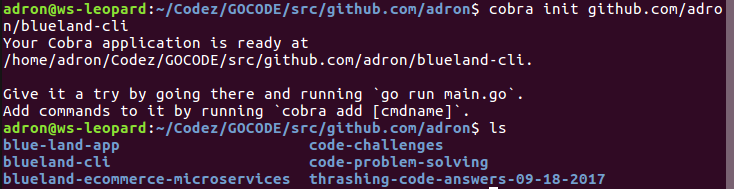
First I need to insure I have the Cobra CLI to use to generate out the initial code for the CLI itself. To get Cobra installed use the standard go get for this too with go get -u github.com/spf13/cobra/cobra. Now I can type cobra init github.com/adron/thrasher to generate the initial skeleton of my CLI.

cobra-init-blueland-cli

The folder is now generated in my Go directory, under the standard convention /src/github.com/adron/blueland-cli/. Now I navigate into that directory and get some of the command stubs started. I want the following commands available with my CLI.

thrasher thrash

This command I’ll use to start calls of generated data against an API end point.

thrasher config set

This command can be used to set the end point in which to send data to.

thrasher config view

This command can be used to check what the URI is that the requests will be sent against.

thrasher config verify

This command can be used to verify that the configured URI is set appropriately.

At this point, this seems to be all I’ll need. The commands I’ll issue to get these are as follows.

cobra add thrash
cobra add config
cobra add set -p 'configCmd'
cobra add view -p 'configCmd'
cobra add verify -p 'configCmd'

To test these commands out, verifying the skeleton code is in place, build the CLI with a simple go build in the root. The result looks like this.

$ go build
$ ./thrasher thrashthrash called
$ ./thrasher configconfig called
$ ./thrasher config set
set called
$ ./thrasher config view
view called
$ ./thrasher config verify
verify called
$

Now a quick git init and addition of a .gitignore file with he following contents.

# Binaries for programs and plugins
*.exe
*.dll
*.so
*.dylib

# Test binary, build with `go test -c`
*.test

# Output of the go coverage tool, specifically when used with LiteIDE
*.out

.idea
.DS_Store

Wrapping that up I added the code to the repository here.

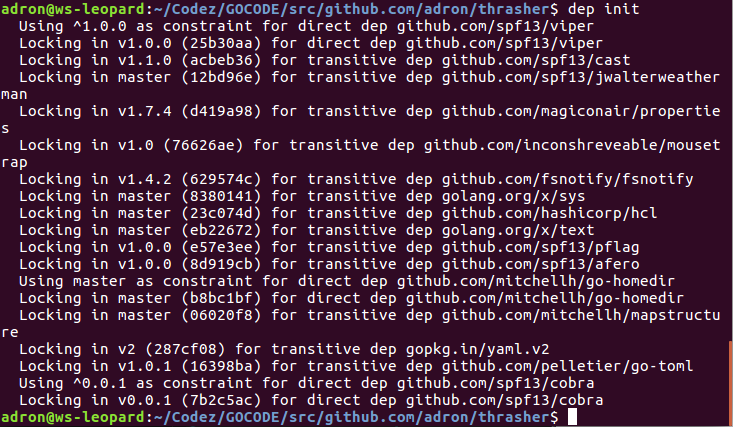
Next thing I setup the project with the dependencies I have so far. Using dep that included the dep init command. That looks something like this on the first pull of dependencies.

adding-dependencies

When I ran this command, dep completed the folowing actions.

  1. Looked for existing dependency management files to convert.
  2. Checked if the dependencies use dep.
  3. Identified the dependencies.
  4. Backed up the existing vendor directory if it existed to _vendor-TIMESTAMP/
  5. Picked the highest compatible version for each dependency.
  6. Generated Gopkg.toml (the manifest) and Gopkg.lock files.
  7. Installed the dependencies in vendor/.

For more information on dep check out the project README.md.

The next dependency I’ll add is faker with the following dep command.

dep ensure -add github.com/bxcodec/faker

Now I’m ready to get started with some actual implementation. First let’s setup the configuration. This is a simple single setting that needs to be set, or retrieved from a configuration setting. Here’s the basic flow for the configuration.

Managing Configuration

The CLI starts with one of two states. It either has a testing URI that the CLI will execute tests against or it doesn’t. The CLI need to check for this every time a command is executed. If it doesn’t have or can’t find the configuration a message should appear stating what is missing and then exit out. If the configuration information exists then we can continue forward.

viper

For this, I did a quick search and realized that I would likely benefit from using the Viper Project. This project is already included with the Cobra Project so I can just dive right in. Which is exactly what I’ll do now, but I must add that I’ll elaborate more extensively on what all has been generated for us after a little code is written.

First I’ll open up the main CLI code that I’ll use just to try out some fake data examples. The generated code file that Cobra built for me looks like what is below. It’s located where Cobra generates it, inside the cmd directory of the project, in a file called root.go.

// Copyright © 2017 Adron Hall
//
// Licensed under the Apache License, Version 2.0 (the "License");
// you may not use this file except in compliance with the License.
// You may obtain a copy of the License at
//
//     http://www.apache.org/licenses/LICENSE-2.0
//
// Unless required by applicable law or agreed to in writing, software
// distributed under the License is distributed on an "AS IS" BASIS,
// WITHOUT WARRANTIES OR CONDITIONS OF ANY KIND, either express or implied.
// See the License for the specific language governing permissions and
// limitations under the License.

package cmd

import (
    "fmt"
    "os"

    homedir "github.com/mitchellh/go-homedir"
    "github.com/spf13/cobra"
    "github.com/spf13/viper"
)

var cfgFile string

// RootCmd represents the base command when called without any subcommands
var RootCmd = &cobra.Command{
    Use:   "thrasher",
    Short: "This CLI is built around testing API end points by submitting data, " +
        "etc, generated at time of testing.",
    Long: `This CLI is built around sending randomly generated data at API end points for testing.
The idea is for the data to be issued against end points using various HTTP verbs such as GET, POST, or others.

For example a similar command using curl.
  curl -d "param1=value1&param2=value2" -X POST http://localhost:3000/data
  curl -d "param1=value1&param2=value2" -H "Content-Type: application/x-www-form-urlencoded" -X POST http://localhost:3000/data`,
}

// Execute adds all child commands to the root command and sets flags appropriately.
// This is called by main.main(). It only needs to happen once to the rootCmd.
func Execute() {
    if err := RootCmd.Execute(); err != nil {
        fmt.Println(err)
        os.Exit(1)
    }
}

func init() {
    cobra.OnInitialize(initConfig)

    // Here you will define your flags and configuration settings.
    // Cobra supports persistent flags, which, if defined here,
    // will be global for your application.
    RootCmd.PersistentFlags().StringVar(&cfgFile, "config", "", "config file (default is $HOME/.thrasher.yaml)")

    // Cobra also supports local flags, which will only run
    // when this action is called directly.
    RootCmd.Flags().BoolP("toggle", "t", false, "Help message for toggle")
}

// initConfig reads in config file and ENV variables if set.
func initConfig() {
    if cfgFile != "" {
        // Use config file from the flag.
        viper.SetConfigFile(cfgFile)
    } else {
        // Find home directory.
        home, err := homedir.Dir()
        if err != nil {
            fmt.Println(err)
            os.Exit(1)
        }

        // Search config in home directory with name ".thrasher" (without extension).
        viper.AddConfigPath(home)
        viper.SetConfigName(".thrasher")
    }

    viper.AutomaticEnv() // read in environment variables that match

    // If a config file is found, read it in.
    if err := viper.ReadInConfig(); err == nil {
        fmt.Println("Using config file:", viper.ConfigFileUsed())
    }
}

In this file there’s a number of things to notice, but again, I’ll get back to that. For now, I went ahead and added some code in the init function to initialize and set a default for the environment variable. The init function now looks like this.

func init() {
    cobra.OnInitialize(initConfig)

    defaultUri := "localhost:3000"
    viper.SetEnvPrefix("thrasher")  // Uppercased automatically? Maybe just make it uppercase?
    viper.BindEnv("uri")

    uri := viper.Get("uri")

    if uri == nil {
        os.Setenv("THRASHER_URI", defaultUri)
        fmt.Printf("Set environment variable THRASHER_URI to %s.\n\n", defaultUri)
    }

    // Here you will define your flags and configuration settings.
    // Cobra supports persistent flags, which, if defined here,
    // will be global for your application.
    RootCmd.PersistentFlags().StringVar(&cfgFile, "config", "", "config file (default is $HOME/.thrasher.yaml)")

    // Cobra also supports local flags, which will only run
    // when this action is called directly.
    RootCmd.Flags().BoolP("toggle", "t", false, "Help message for toggle")
}

Using Viper I set an environment variable prefix to thrasher. This means that any environment variables I set with a prefix of thrasher will be picked up as environment variables specifically for my application. I then set a bind to the environment variable I want to name uri. This will give me the value of the environment variable named uri. To set this value I’ll need to actually set the value THRASHER_URI since the Viper library automatically uppercases the environment variables. It’s all just slightly confusing, but in the end I end up with an environment variable that I can set in my ~/.bashrc or ~/.bash_profile settings locally and if I don’t set it, the if control structure will set the environment variable THRASHER_URI for me to the default that I’ve set in code localhost:3000.

Also notice in the code above, the generated section shows a config file default location for $HOME/.thrasher.yaml. Currently I’m not using this default, but it’s setup that way by convention.

I’ll want to be able to find out what my configuration setting is for the environment variable using the thrasher config view command. To do this, I add a few lines of code in the view.go file. Inside the view.go file there is the variable assigned to the pointer location of the command, which I’ve edited to print out the evnironment variable that is set for the URI.

var viewCmd = &cobra.Command{
    Use:   "view",
    Short: "The view command is used to retrieve the configuration settings.",
    Long: `The view command can be used to retrieve and view the configuration
        settings that the thrasher CLI currently has active and in use.`,
    Run: func(cmd *cobra.Command, args []string) {
        uri := viper.Get("uri")
        fmt.Printf("Current URI to issue commands and data against is %s.", uri)
    },
}

Alright, view is setup, now I want to setup verify. In verify I want the uri checked, an HTTP get issued against the URI for verification, and a respective response from the API end point. If that doesn’t come back, and an error occurs I want to handle the issues that might come up.

The first bit of code I’ll add is getting the URI path with viper and issuing a get request against the URI end point. I’ll add this to the verify command pointer func.

uri := viper.GetString("uri")
resp, err := http.Get(uri)

I want some of the body to display, so I’ve written a small function to handle the processing and return of some of the body. That code looks like this.

func keepTopVariableLines(s string, n int) string {
    bodyResult := strings.Join(strings.Split(s, "\n")[:n], "\n")
    return strings.Replace(bodyResult, "\r", "", -1)
}

Now I’ll add some error and if else logic to display appropriate messages, display of response, and related information.

if err != nil {
    fmt.Printf("Configured URI has errors: \n\n%s", err)
} else {
    defer resp.Body.Close()

    body, err := ioutil.ReadAll(resp.Body)

    if err != nil {
        fmt.Printf("Response body caused error: %s", err)
    } else {
        fmt.Println("Get:\n", keepTopVariableLines(string(body), 2))
        fmt.Println("\n\nURI has been retrieved, URI verified.\n\n")
    }
}

Now, I’ve got all the pieces for verify in place. The completed keeptTopVaribleLines and verify command pointer func look like this now.

func keepTopVariableLines(s string, n int) string {
    bodyResult := strings.Join(strings.Split(s, "\n")[:n], "\n")
    return strings.Replace(bodyResult, "\r", "", -1)
}

// verifyCmd represents the verify command
var verifyCmd = &cobra.Command{
    Use:   "verify",
    Short: "Verify will test the URI end point with a get call issued.",
    Long: `Verify will test the URI end point with an HTTP get call request against the end point.`,
    Run: func(cmd *cobra.Command, args []string) {
        fmt.Println("verify called")

        uri := viper.GetString("uri")
        resp, err := http.Get(uri)

        if err != nil {
            fmt.Printf("Configured URI has errors: \n\n%s", err)
        } else {
            defer resp.Body.Close()

            body, err := ioutil.ReadAll(resp.Body)

            if err != nil {
                fmt.Printf("Response body caused error: %s", err)
            } else {
                fmt.Println("Get:\n", keepTopVariableLines(string(body), 3))
                fmt.Println("\n\nURI has been retrieved, URI verified.\n\n")
            }
        }
    },
}

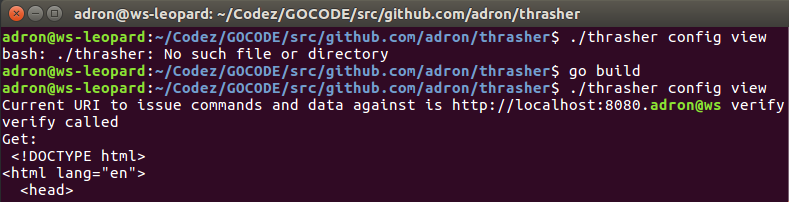
Alright. Now with a quick go build this will give me a partially functioning CLI tool.

cli-part-1

In the next post I’ll wrap this up and get some of the data generation to post data against the end point. For now, happy Go hacking. Any questions, ping me via the Twitters @Adron.