My Lessons Learned on Learning

NOTE: This is my experience and very much YMMV. I’m NOT telling anybody this is how or what they need to do to be successful learning, it’s merely ideas you can borrow or steal! Enjoy!

I had just, after a couple years of intense music studies, shifted into computer science at college and learned something very important about myself. I signed up for Computer Programming 1, the most beginner of beginner classes on computer programming.

The class started and very early in the first few weeks we’d studied control structures and variables. We were in the midst of writing our first program and I’d gone into my ADHD induced dozed off state, while mind you being wide awake with eyes wide open. However as I sat there, my eyes did start to shut. In a mere moment I relaxed and fell sideways. I awoke in the process of falling, grasped the desk with my hands, as if it was anchored to the ground. However it was too late, the energy of my fall exceeded the lack of weight in the desk, and I uprooted it with a screech of the metal desk feet on the lanoleum tile floor.

BANG, the desk hit the ground and I, now laying 90 degrees of sitting upright with my desk gripped in my hands and me riding it into the floor like a pilot in a plane. Fortunately, being a long haired metal head with plenty of meh I wasn’t embarrassed so much as confused. I announced, “I’m fine!” and got up to a few smirks and smiles from classmates. One of the students spouted, “that’s Adron for ya” as she turned to face to the front of the class again. The teacher asked if I was, “ok”. I responded, with the second free lesson of the day, “I’m fine just got a little bored and distracted.”

The teacher smirked and shook her head at me. She then contineud with the class as I set my desk upright and sat back down to continue too.

The Lessons

first and foremost ADHD will thrash me into boredom and I will entirely phase out when being “taught at” vs be “informed while I learn” or “learning together”. You see, I simply don’t do classroom style learning, I teach myself and then work with people to move past stumbling blocks. It’s a wonderful way to learn.

second lesson was that, one shouldn’t spout of that they’re bored in class. It’s just not cool. Be polite, state things constructively and people will help you.

Benefits of The Teacher

However amidst all of this fracas that I caused, the teacher noticed these things that I had yet to truly learn. She notified me after class that I needed to schedule a time to meet at my earliest convenience. I did and later the next week we met.

At this meeting she, in blunt directness said, “I know you’ve very likely got ADHD but you’re doing great with the class. I also bet you don’t do well with structured teachings, which is why I’m going to give you the rest of the semester’s assignments and let you have at them.”

I was blown away, confused, and impressed at her introspection and reading of me. She added to this though, the third and most valuable lesson of this entire class. This lesson was more valuable than anything I’d learned in college or life up to this point. It was something I knew, without knowing that it was something I could put into words. She said, “if you’re like me, and I suspect you are, I’m not going to hold you to attending every class. Make sure you come in for the tests though, and try to come most of the time, but mainly just get the work done. In addition, get up every hour or so and change the place you’re working, or just walk around. It’ll prevent dozing off.”

She added one more thing, “Oh, also, don’t be the accidental asshole, no need to say you’re bored in my class. Just keep that to yourself you already have fans and friends in the class regardless of you knowing it, no need to give me shit about your boredom.”

The Lesson Trio

Through this these three lessons were reinforced, I’ll call them:

  1. Learning Together Alone – My ability to learn, fast and effectively, is dictated by my ability to hone in on specifics, put those into memory while taking in the abstractions of the ideas at hand. If any questions come up, joining forces or asking a teacher complete this process for me. No classrooms, no needing to sit and be told things that I could easily read 2-10x faster, no need to have concepts pushed at me in a specific dogmatic path.
  2. Be Constructive – Again, just like traveling from point A to point B, we’re all just trying to go somewhere, and we’re all working at this learning thing. Work together, not at odds with each other, everything is better then!
  3. Take Breaks & 3rd Place Displace – When learning, especially with ADHD, you have to break your own super power of hyper-focus as much as you have to battle that of absolute, uncontrollable, and forced distraction. If you can get one under control, you can get them both to work in your favor! Using 3rd places to your advantage, like coffee shops or parks, to do work are extremely effective. Add in a break every 45 minutes or so and you can create an amazingly productive, powerful, and efficient workflow to learn and to simply get things done!

My respect for my teacher just shot through the roof. Not only was she no bullshit, she read me like a book, but she also just pointed out what I needed – these obvious things that I would have otherwise likely missed for many more years.

I took these lessons to heart and started what would become my frequent use and displacement from coffee shops. In addition it taught me that to be truly efficient and effective, I need chunks of time but also need to break up those time chunks with something more significant than looking away from the screen. I need the option to get up and walk away, take a hike, ride a loop around a lake. Something, anything more than merely sitting there and pondering that I’m taking a break.

That brings me to my next blog entry “Magic 3rd Places”, that I’ll have posted soon. I’ll delve into much deeper detail about how I use 3rd places, what 3rd places really are and how I keep my impact to others and myself to a minimum while making use of displacing around 3rd places frequently.

A Review of the MX Ergo Advanced Wireless

FYI: No, I was not paid, nor given these freely, nor do I have any connection to Logitech at all.

A short video of the EX Ergo, the hardshell case I picked up for it, and some commentary about using it in different locations.

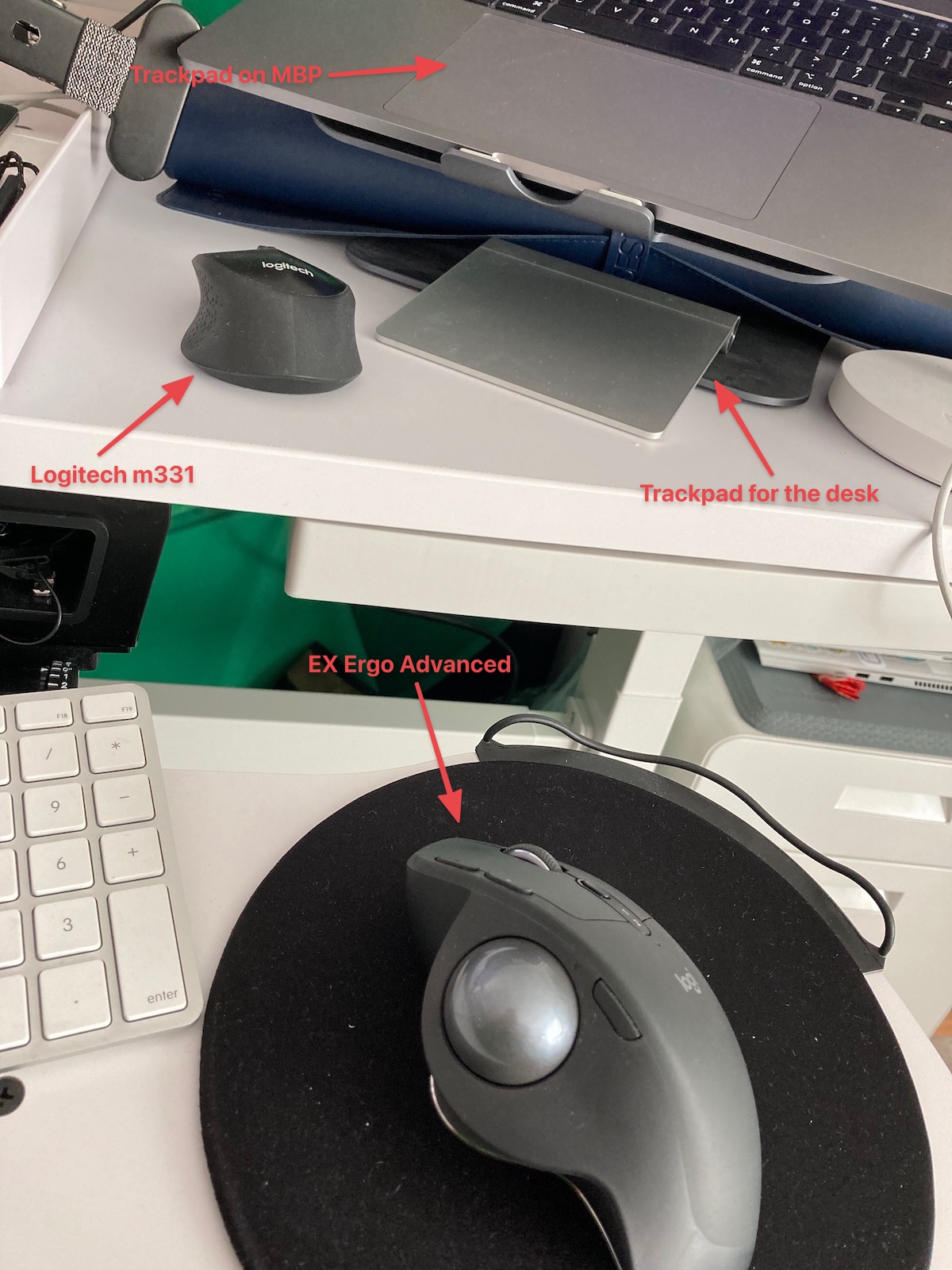
A few months ago I picked up a new trackball. It’s one of the multitude of pointing devices I use while working. Just to note, here’s the MX Ergo in its normal spot hanging out with my Apple Trackpad and Logitech m331 Silent Mouse.

The Pointing Devices

I picked this up to replace the older trackballs that I used from Logitech previously, the wireless and wired trackballs had lasted me a solid 5+ years at the youngest of the devices. This trackball however has a number of additional features that dramatically increase the usefulness of the device. I’ll enumerate and elaborate on a few’

  1. The scroll wheel doesn’t just scroll, but has a forward and back feature. Just push the wheel to the left or right with your finger and so goes the navigation.
  2. There’s a metal tray that it sits on, and the angle can be changed from zero to 20 degrees. This position can really change the stressors on the upper arm, which makes for easier use during the course of work.
  3. There are the normal right and left buttons, but also two buttons to the left of the left button, and two additional toggle buttons on the lower end of the left right buttons and on the left side near the ball itself. The toggle by the ball actually changes the speed, and thus increasing the accuracy of position of the cursor, it’s a strange but useful effect when manipulating images or such at a pixel level.

This device is also wireless, and has internal batteries that can be charged via the included USB cable. Standard USB connection required for the sensor for the trackball too.

A few shots of the pointing device all pretty and professional. Keep reading below the trackball gallery.

Why a Trackball

One of the issues when working remotely is that space is often constrained. When in a coffee shop, you don’t want to be the asshole who has all their laptop gear spilling over into areas beyond where you sit. Sometimes you may get lucky and the table space may be abundant, but often it is not. Using a trackpad eliminates the excessive space required for a mouse, as a trackpad just stays in the singular spot near the laptop that you set it.

You might ask, ok you have a trackball but why not just use the trackpad? Well sometimes you still can’t use the trackball, because the space is that limited, especially on a transport mode like passenger airlines. Even in first class you’ll be pretty pressed for space. On a Greyhound bus, if you feel like tempting madness, you have even less space than that and no first class to speak of! In these cases, the trackpad is all you can muster for use. But in cases where you have even a little space, the trackball can come out for use.

Why a secondary pointing device? What makes a trackball so great besides the minimal space it uses? A few things make a trackball more bad ass than most other options. For one, the movement can be more precise, with less training. One can train their thumb movement – or fingers if you want to use it that way – in a way that the arm movement used for a mouse just can’t replicate. Some may say, “oh but just use only your hand for the mouse”, well ok except that defeats the immediate ease of access for a mouse. The core notion here, is you can do this if you want to. Thus, you have reduced space use, reduced physical movement for yourself, you can increase precision, and with this particular trackball, you’ve even got macros and other programmable options for the button array that enhances the use of tools like Photoshop where that precision is a requirement for effective use!

For more reasons, more coverage of the hardshell case, check out my post on Transit Sleuth “Traveling Trackball, AKA “GSD Better!”” speaking solely to the traveling use of the trackball and the hardshell case.

All in all, a great device. Do I recommend it? Well, you’ll have to watch the video to see. 👍🏻

Splitting a Postgres Timestamp with Generated Columns & GraphQL Query with Hasura

Recently I created a video short on how to split out a timestamp column for Hasura. This included the SQL for Postgres via a schema migration and also details on how this appears in the Hasura user interface. You can check out the video here.

The break out of what I show in the video is available in a Github repository also.

https://github.com/Adron/graphql-relational-concept-mapping

Postgres Table Creation SQL

Here is the specific database query that creates the table with the timestamp being broken out to the year, month, and day as generated column data.

create table standard_relational_model.users_data
(
    user_id uuid PRIMARY KEY,
    address_id uuid,
    signup_date timestamp DEFAULT now(),
    year int  GENERATED ALWAYS AS (date_part('year', signup_date)) STORED,
    month int  GENERATED ALWAYS AS (date_part('month', signup_date)) STORED,
    day int  GENERATED ALWAYS AS (date_part('day', signup_date)) STORED,
    points int,
    details jsonb
);

In this SQL the signup_date column is the timestamp column that I want split out to year, month, and day. I’ve set it up with a default function call of now() just to seed the column and not require entry when inserting a new row. With that seed, then the generated columns of year, month, and day use the date_part() function to extract the particular value out of the signup_date column and store it in the respective column.

The other columns are just there for other references.

The Hasura Console

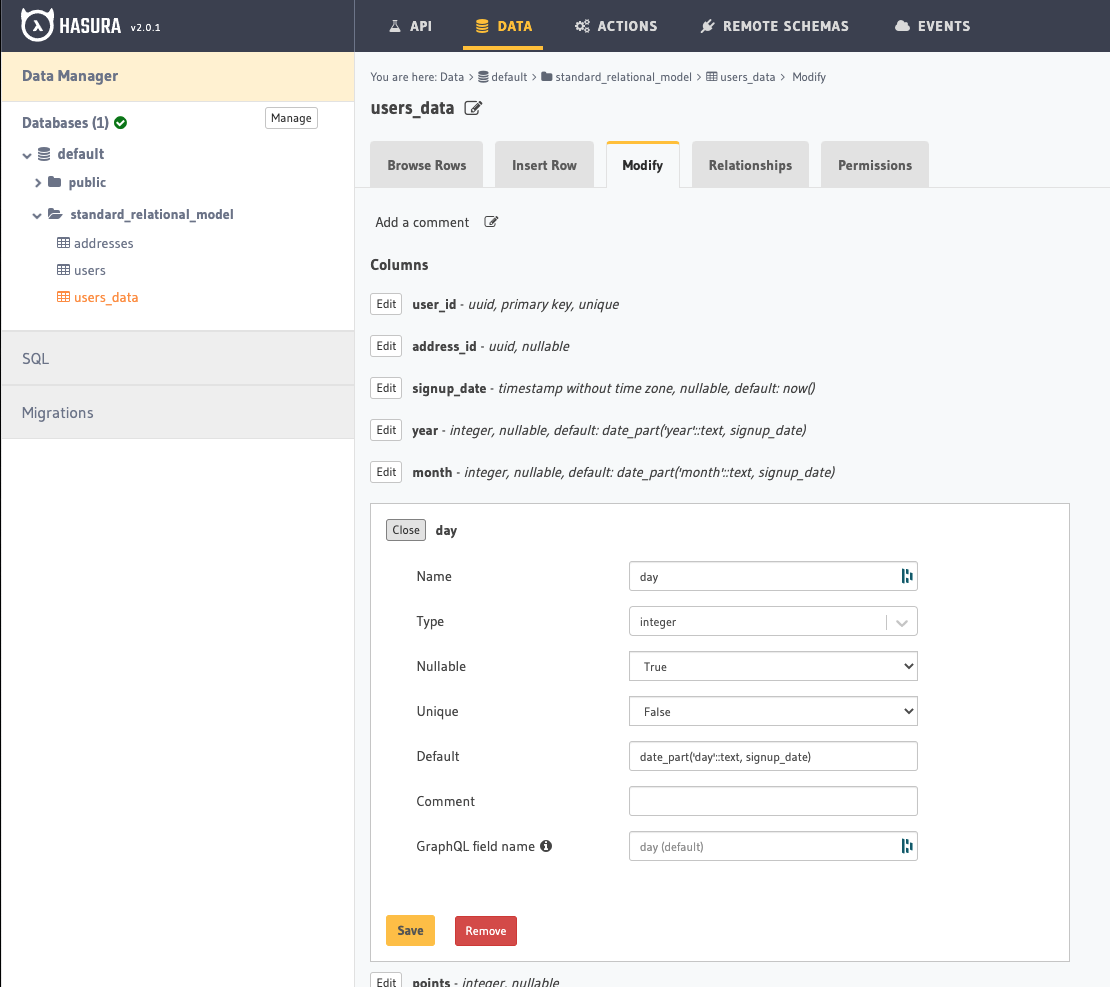
In the Hasura Console those columns would look something like this.

Notice the syntax displayed for these is different than the migration that created them.

date_part('day'::text, signup_date)

The above of course is for day, and each respective part is designated by month, year, etc.

When the data is added to the table the results return as follow with GraphQL and results.

GraphQL

The query.

query MyQuery {
   users_data {
    signup_date
    year
    month
    day
  }
}

The results.

{
  "data": {
    "users_data": [
      {
        "signup_date": "1999-04-21T00:00:00",
        "year": 1999,
        "month": 4,
        "day": 21
      },

            ... etc ...

      {
        "signup_date": "2007-01-02T00:00:00",
        "year": 2007,
        "month": 1,
        "day": 2
      },
      {
        "signup_date": "2021-06-29T00:09:48.359247",
        "year": 2021,
        "month": 6,
        "day": 29
      }
    ]
  }
}

SQL

The query.

select signup_date, year, month, day
from standard_relational_model.users_data;

The results.

1999-04-21 00:00:00.000000,1999,4,21
2012-07-04 00:00:00.000000,2012,7,4
2019-06-24 00:00:00.000000,2019,6,24
2013-03-07 00:00:00.000000,2013,3,7
2007-01-02 00:00:00.000000,2007,1,2
2021-06-29 00:09:48.359247,2021,6,29

That is how to build generated columns in Postgres and how they’re available via Hasura to expose via GraphQL!

Coding Effort Introspection, 2nd Quarter Workshops, Code Sessions, & Twitch Streaming Schedule

I began learning Vue.js with sincerity a few months ago. But I also started several other #100DaysOfCode efforts (Database Dev Work and GraphQL Design & Dev) at the same time. This, in hindsight wasn’t the best idea. Since I was going to work on some of the #100DaysOfCode tracks outside of my regular day’s workload tackling multiple language stacks, even with the experience and familiarity I have with so many existing stacks it didn’t put me in a position to succeed.

But I digress, even in failure lessons have been learned and I’ll be beginning new with a different plan just next week. Hopefully, not only will this plan work better, but it could tangibly be of much better use for anybody that would want to learn these things too!

With that, I present, the new plan!

Starting on the week 27th I’ll start streaming on Wednesday at 5pm Pacific on Thrashing Code. On the Hasura HQ Channel I’ll be streaming on Tuesday at 9am Pacific and Thursday at 9pm Pacific, scheduling on two time points to cover more of the globe. Instead of daily hour long segments, these will likely go on for a few hours and it’ll be easier to join, ask questions, hang out, chat, and all the things that make a stream entertaining and useful. The lagniappe of this schedule will allow me to more easily cut shorter segments for those that will find those useful, but can’t really join for the longer session. It’ll be a win win for me and the audience.

Thrashing Code Guests

On the 14th of July, Russell Spitzer will be joining me to talk about tech stack, dev environment, and very likely a few things about ole’ New Orleans! Join us for that conversation and let’s dig into all the topics!

The Music of Thrashing Code

The music streams, alas, are again pushed further into the future. I’ve decided I’m going to put together a little bit more before I start streaming that, plus I’d like to get a little bit more into practice before shredding live on stream. For your sake and mine! 🤘🏻

To join in on live sessions;

Aside from the regularly scheduled things above, I’ve scheduled some workshops again as people found those useful. These workshops I’ve scheduled below. It is important to note that these are in addition to the workshops I will provide in the coming weeks and months through Hasura.

  • Getting Started with Hasura GraphQL API and Postgres (Click for tickets)
    • Short introduction to GraphQL
    • Server
    • Client
    • Architectural Overview of Hasura API Server and Tooling
    • Instant GraphQL API
    • CLI Tooling
    • Building a GraphQL Schema with the Hasura Console
    • Database Schema (vs GraphQL)
    • Tables
    • Data Types
    • Relationships
    • Overview of Migrations
    • Using Postgres Functions
    • Short identifiers
    • Default columns (functions & triggers)
  • Full Migrations, Metadata, and Seeds Workflow with Hasura(Click for tickets)
    • Migrations
    • Setup for migrations workflow
    • Versioning migrations.
    • Metadata
    • Setup metadata for workflow
    • Versioning metadata
    • Seeds
    • Setup seeds for initial data loads
    • Versioning seeds
    • Peripheral Workflow Tools & Practices
    • Docker & Local Database Environment
    • Additional Tooling
      • Visual Studio Code
      • JetBrains DataGrip
      • JetBrains Database Plugin
      • Postgres pgAdmin
      • SQL Server Enterprise Manager

Future Workshops

Quick Link to Poll for Priority: https://docs.google.com/forms/d/e/1FAIpQLSdrxPEjPqDLn8GhG1pVOvrhMXP_0LEBqiJirIOUsLkQWA1_jw/viewform?usp=sf_link

Finally, a little help from you dear readers, below I’ve added a poll of several presentations and workshops that I’d like to give in the coming months and would like to get your suggestions on prioritization – i.e. which would the most of you find useful for me to focus on first?

  • SQL Coding (Click to vote) – An introduction to SQL coding. Covering the following material:
    • Introduction to what SQL is and the history. Including, why it’s pronounced sequal, not S, Q, L, and that it does not stand for “Standard Query Language” because nerds are funny about their naming of things, and naming is hard!
    • The basic structure of SQL statements. How they’re built from object, predicate, and verb formation.
    • Putting together a database with SQL. Including creating a database, schema, table, columns, and how to alter these elements.
    • How to go about editing and dropping the elements we created.
    • A quick overview of database migrations.
    • Query writing, joins, inner and outter, and the deluge of Cartesian products.
  • Data Modeling with Relational Databases (Click to vote) – A dive into the 3rd normal form, and the normalization and denormalization of data, including nuanced tips n’ tricks to types and modeling.
    • Basic data modeling, normal forms, and the implications of building schema around normalized forms.
    • Denormalizing schema.
    • Data types and their usage around data modeling.
    • Data types and their implications within data modeling.
    • Common tips n’ tricks for using data types to build effective normalized or denormalized schema.
  • Advanced SQL Coding(Click to vote) – Going beyond the introduction material and delving into the depths of query writing, batch processing, transactions, and other advanced features of SQL.
    • Writing a basic query and growing this complexity to advanced joins, views, and query options to make data available.
    • Getting Cartesian products and ensuring we don’t.
    • Denormalizing data with SQL and some of the complexities of doing so once you have data, and especially with lots of data.
    • Writing loops in SQL and why not to do this.
    • Other SQL tips n’ tricks to awesome SQL coding!
  • GraphQL Servers (Click to vote) – Need a custom GraphQL server? Not sure where to start? In this workshop I’ll provide an introduction to writing GraphQL Servers. Somewhat a language agnostic workshop, but I will pick one to implement a server in for reference in the workshop. Ideally we’ll pick one before the workshop and I’ll use it based on what the students in the workshop would prefer.
    • Introduction to GraphQL Servers and what they do and how they work.
    • Elements of a GraphQL Server
    • Schema
    • Data Set
    • Resolvers
    • Query Operations
    • GraphQL Types
    • Aliases and Fragments
    • Variables
    • Query Nested Objects
    • Directives
  • GraphQL Clients (Click to vote) – This workshop assumes you’ve got your GraphQL Server all setup and ready for use. Now we just need to ensure our clients are getting, and using the data from the server effectively.
    • Client options for the various languages stacks; JavaScript, C#, Java, Go, and possibly other languages.
    • Implementation of queries and mutations in;
    • JavaScript via client and Node.js Server calls (server acting as client).
    • C# and/or Java calls as clients.
    • Go calls as systems client.
    • How to deal with JSON results with JavaScript, C#, Java, and Go.
    • JavaScript with JavaScript Object Notation.
    • C#/Java options for managing JSON.
    • Go options for managing JSON.

Next Week is Hasura Conf 2021

Next week is Hasura Con 2021, which you can register here, and just attend instead of reading any further. But if you want some reasons to attend, read on, I’ll provide a few in this blog entry!

First Reason – What Have People Built w/ Hasura

You’re curious to learn about what is implemented with Hasura’s API and tooling. We’ve got several people that will be talking about what they’ve built with Hasura, including;

Second Reason – Curious About GraphQL

You’re still curious about GraphQL but haven’t really delved into what it is or what it can do. This is a chance, for just a little of our time, to check out some of the features and capabilities in specific detail. The following are a few talks I’d suggest, to get an idea of around what GraphQL can do and what various aspects of it provides.

Third Reason – Minimal Time, Maximum Benefit

Attending the conference, which is online, will only require whatever amount of time you’d like to put into it! There’s no cost, registration is free, so join for the talks you want or even join me for one of the topic tables or workshops that I’ll be hosting and teaching!

Hope to see you in the chat rooms! If you’ve got any questions feel free to reach out and ask me, my DMs are open on Twitter @Adron and you can always just leave a comment here too!