Security and Authentication in Relational Databases

This is a continuation of my posts on relational databases, started here. Previous posts on this theme, “Data Modeling“, “Let’s Talk About Database Schema“, “The Exasperating Topic of Database Indexes“, “The Keys & Relationships of Relational Databases“, “Relational Database Query Optimization“, “Normalization in Relational Databases“, and “Database (DB) Caching and DB Tertiary Caching“.

Basic Security Architecture

Relational Database Management Systems (RDBMS) like SQL Server, Oracle, MariaDB/MySQL, and PostgreSQL are designed with robust security architectures. The core components typically include:

  1. Authentication: Verifying the identity of users accessing the database.
  2. Authorization: Determining what authenticated users are allowed to do.
  3. Access Control: Implementing permissions and roles to manage user access.
  4. Encryption: Protecting data at rest and in transit.
  5. Auditing and Logging: Tracking access and changes to the database for security and compliance.

Authentication Mechanisms

Authentication is the first line of defense in database security. It ensures that only legitimate users can access the database. The primary methods include:

  • Username and Password: The most common method, where users provide credentials that are verified against the database’s security system.
  • Integrated Security: Leveraging the operating system or network security (like Windows Authentication in SQL Server) for user validation.
  • Certificates and Keys: Using digital certificates or cryptographic keys for more secure authentication.

Database-Specific Security and Authentication

SQL Server

  • Windows Authentication: Integrates with Windows user accounts, providing a seamless and secure authentication mechanism.
  • SQL Server Authentication: Involves creating specific database users and passwords.
  • Roles and Permissions: SQL Server offers fixed server roles, fixed database roles, and user-defined roles for granular access control.
  • SSO Integration: Supports integration with Active Directory for single sign-on capabilities.

Oracle

  • Oracle Database Authentication: Users are authenticated by the database itself.
  • OS Authentication: Oracle can use credentials from the operating system.
  • Roles and Privileges: Oracle has a sophisticated role-based access control system, with predefined roles like DBA and user-defined roles.
  • Oracle Wallet: For storing and managing credentials, enhancing security for automated login processes.

MariaDB/MySQL

  • Standard Authentication: Username and password-based, with the option of using SHA256 for password encryption.
  • Pluggable Authentication: Supports external authentication methods like PAM (Pluggable Authentication Modules) or Windows native authentication.
  • Role-Based Access Control: Introduced in later versions, allowing for more flexible and manageable permissions.
  • SSL/TLS Encryption: For securing connections between the client and the server.

PostgreSQL

  • Role-Based Authentication: PostgreSQL uses roles to handle both authentication and authorization.
  • Password Authentication: Supports MD5 or SCRAM-SHA-256 for password encryption.
  • Peer Authentication: For local connections, relying on OS user credentials.
  • SSO Integration: Can integrate with external authentication systems like Kerberos.

Elaboration of Database Security Options

In the following section I’ll elaborate on and detail the basic setup for a user account for each of these databases. The intent, is to provide the basic first step into usage of the particular database. Often the root account is setup and use for examples. But It is always good, as a first step with a database system, to setup a user account for interactions with the database.

First to bat, SQL Server

Delving deeper into the SQL Server options, focusing on how a user would be set up in the database. SQL Server offers a comprehensive security model that includes both authentication (verifying who can connect) and authorization (controlling what they can do once connected).

Setting Up a User in SQL Server

1. Choosing the Authentication Mode

SQL Server supports two authentication modes:

  • Windows Authentication Mode: This is the recommended method for its ease of use and security. It leverages Windows user accounts, meaning the database trusts the Windows credentials without needing separate SQL Server credentials.
  • Mixed Mode (Windows Authentication and SQL Server Authentication): This mode supports both Windows authentication and SQL Server authentication, where users can log in with a username and password created within SQL Server.

2. Creating a New User

Here’s a step-by-step process for creating a new user in SQL Server:

  1. Open SQL Server Management Studio (SSMS): Connect to your SQL Server instance.
  2. Choose Authentication Mode:
  • For Windows Authentication, the user account is typically managed by an IT administrator in Active Directory.
  • For SQL Server Authentication, you’ll create a new SQL Server login.
  1. Create a New Login (for SQL Server Authentication):
  • Navigate to the “Security” folder at the server level, right-click on “Logins”, and select “New Login”.
  • Enter a login name, select “SQL Server authentication”, and enter a password.
  • Set password policy options (enforce password policy, expiration, etc.).
  1. Assign Server Roles (Optional):
  • In the login creation window, you can assign server-level roles like sysadmin, dbcreator, or securityadmin.
  1. Map the User to a Database:
  • In the “User Mapping” page, select the databases the user should have access to.
  • Specify database-level roles like db_datareader, db_datawriter, or db_owner for each database.
  1. Create User in the Database (if using Windows Authentication or for additional control):
  • In SSMS, expand the desired database, navigate to the “Security” folder, right-click on “Users”, and select “New User”.
  • For Windows Authentication, select “Windows user”. For SQL Server Authentication, select “SQL user with login”.
  • Enter the username and map it to the previously created login.
  1. Assign Permissions:
  • Assign specific permissions like SELECT, INSERT, UPDATE, DELETE on database objects as needed.
  1. Save the Configuration: Click “OK” to create the user with the specified settings.

3. Testing the User Account

  • Log in via SSMS: Try logging in with the new user credentials to ensure that the setup is correct.
  • Verify Permissions: Check if the user can access the appropriate database objects and perform the allowed operations.

Best Practices

  • Principle of Least Privilege: Always assign the minimum necessary permissions to each user.
  • Regularly Review and Update Permissions: As roles and responsibilities change, update the permissions accordingly.
  • Monitor User Activity: Use SQL Server’s auditing features to track user actions and identify any unauthorized access or anomalies.

Next Up, Oracle

Setting up a user in an Oracle database involves several key steps, focusing on both authentication and authorization. Oracle’s security model is robust and offers a range of options for managing users and their access to database resources.

Setting Up a User in Oracle Database

1. Choosing the Authentication Method

Oracle supports several authentication methods:

  • Database Authentication: Users are authenticated by the Oracle database itself, using a username and password stored in the database.
  • Operating System Authentication: Oracle can authenticate users based on their operating system login credentials.
  • Network Authentication: Using network services like Kerberos or RADIUS.

2. Creating a New User

Here’s a step-by-step guide to creating a new user in Oracle:

  1. Connect to the Database:
  • Use a database client tool like SQL*Plus, SQL Developer, or any other tool that can execute SQL against an Oracle database.
  • Connect as a user with administrative privileges (like SYS or SYSTEM).
  1. Create a New User:
  • Execute the CREATE USER command. For example: sql CREATE USER new_user IDENTIFIED BY password;
  • new_user is the username, and password is the password you assign to the user.
  1. Grant Privileges:
  • Users are created with no privileges. You need to grant them explicitly.
  • Grant necessary system privileges, object privileges, and roles. For example: sql GRANT CREATE SESSION TO new_user;
  • CREATE SESSION privilege allows the user to connect to the database.
  • For more specific tasks, like creating tables or views, additional privileges like CREATE TABLE or CREATE VIEW are required.
  1. Assign Quota on Tablespaces (Optional):
  • If the user needs to create objects in a tablespace, assign a quota. For example: sql ALTER USER new_user QUOTA 100M ON users;
  • This command allows new_user to use up to 100MB of storage in the users tablespace.
  1. Configure Profile and Password Settings (Optional):
  • Oracle allows the configuration of user profiles to manage resource limits and password policies.
  • For example, to assign a profile to a user: sql ALTER USER new_user PROFILE default;

3. Testing the User Account

  • Log in with the New User Credentials:
  • Use SQL*Plus or another client tool to test the new user login.
  • Example command: sql CONNECT new_user/password;

Best Practices

  • Principle of Least Privilege: Grant only the necessary privileges to each user.
  • Regularly Review User Privileges: Periodically review and adjust user privileges as needed.
  • Use Roles for Managing Privileges: Create roles for groups of privileges and assign these roles to users, simplifying privilege management.
  • Monitor User Activity: Utilize Oracle’s auditing features to track user actions and identify security issues.

MariaDB/MySQL

MariaDB and MySQL are closely related database systems, with MariaDB originally forking from MySQL. While they share many similarities, especially in basic operations like user management, there are some differences in features and implementation. Let’s explore how to set up a user in both MariaDB and MySQL, highlighting any notable differences.

Setting Up a User in MariaDB/MySQL

Basic Steps for User Creation

  1. Connect to the Database:
  • Use a command-line tool like mysql or a database management tool like phpMyAdmin.
  • Connect as a user with administrative privileges (typically ‘root’).
  1. Create a New User:
  • The syntax for creating a user is generally the same in both MariaDB and MySQL: sql CREATE USER 'username'@'host' IDENTIFIED BY 'password';
  • Replace username, host, and password with the desired values. host specifies where the user can connect from and can be an IP, a hostname, or '%' for any host.
  1. Grant Privileges:
  • Users are created with no privileges. You need to explicitly grant them.
  • Grant necessary privileges using the GRANT statement. For example: sql GRANT ALL PRIVILEGES ON database_name.* TO 'username'@'host';
  • This command grants all privileges on database_name to the new user.
  1. Apply the Changes:
  • Execute the FLUSH PRIVILEGES command to reload the grant tables and apply the new privileges.
  1. Testing the User Account:
  • Test the new user account by logging in: bash mysql -u username -p -h host

Differences Between MariaDB and MySQL

  • Authentication Plugins:
    • MariaDB and MySQL support different authentication plugins. MariaDB includes some additional plugins like ed25519 for passwordless authentication, which are not available in MySQL.
    • MySQL 8.0 uses caching_sha2_password as the default authentication plugin, while MariaDB uses mysql_native_password.
  • Roles:
    • MariaDB has more advanced role-based access control (RBAC) features compared to MySQL. In MariaDB, you can create roles, assign privileges to roles, and then grant roles to users.
  • Password Expiry and Complexity:
    • MySQL has features for password expiry and complexity requirements, which are less extensive in MariaDB.
  • System Versioned Tables:
    • MariaDB supports system versioned tables, which MySQL does not. This feature isn’t directly related to user management but can impact how you manage data and user access over time.

Best Practices

  • Principle of Least Privilege: Grant only the necessary privileges to each user.
  • Regularly Review User Privileges: Periodically review user privileges and adjust as necessary.
  • Use Strong Passwords: Especially important if users can connect from remote hosts.
  • Monitor User Activity: Implement auditing to track user actions and identify potential security issues.

Wrapping Up, PostgreSQL!

Setting up a user in PostgreSQL involves a few key steps, focusing on user creation, privilege assignment, and optionally, role management. PostgreSQL uses a role-based security model, where a role can be a user, a group of users, or both, and can own database objects and have database privileges.

Setting Up a User in PostgreSQL

1. Connect to the Database

  • Use a command-line tool like psql or a database management tool.
  • Connect as a superuser or a user with the necessary privileges (typically ‘postgres’).

2. Create a New Role/User

  • In PostgreSQL, users are referred to as roles. To create a new user, you actually create a new role.
  • Use the CREATE ROLE command with the LOGIN option to create a new user. For example:
  CREATE ROLE username WITH LOGIN PASSWORD 'password';
  • Replace username and password with your desired values.

3. Grant Privileges

  • Newly created roles have no privileges by default.
  • Grant specific privileges using the GRANT command. For example:
  GRANT CONNECT ON DATABASE database_name TO username;
  • This command allows the user to connect to database_name.
  • For more granular control, you can grant privileges on specific tables, schemas, or other database objects.

4. Modify Role Attributes (Optional)

  • PostgreSQL roles can have attributes that control their behavior. For example:
  • CREATEDB: Allows the role to create databases.
  • SUPERUSER: Grants all privileges automatically.
  • To modify role attributes, use the ALTER ROLE command. For example: sql ALTER ROLE username CREATEDB;

5. Testing the User Account

  • Test the new user account by logging in:
  psql -U username -d database_name -h host -W
  • Enter the password when prompted.

PostgreSQL Role Management

  • Group Roles: You can create roles that act as groups. Users (roles with the LOGIN attribute) can be added to these group roles.
  • Role Inheritance: By default, roles inherit privileges from roles they are members of. This can be controlled with the INHERIT or NOINHERIT attributes.

Best Practices

  • Principle of Least Privilege: Only grant the necessary privileges to each role.
  • Use Role Groups: Manage privileges more efficiently by creating roles for specific job functions and assigning users to these roles.
  • Regularly Review and Update Privileges: As roles and responsibilities change, update the privileges accordingly.
  • Strong Password Policies: Enforce strong password policies for roles with the LOGIN attribute.
  • Monitor Role Activity: Use PostgreSQL’s logging and auditing features to track role activities and identify security issues.

Security & Authentication Summary

In the realm of relational databases, security and authentication are paramount, with each major RDBMS offering its unique mechanisms and features. SQL Server leverages Windows Authentication for seamless integration with Windows user accounts, alongside SQL Server Authentication for database-specific credentials, and provides robust role-based access control. Oracle, with its sophisticated security model, offers database, OS, and network-based authentication, complemented by a comprehensive role and privilege system. MariaDB and MySQL, while sharing many similarities, differ in their authentication plugins and role-based access control, with MariaDB offering additional features like passwordless authentication. PostgreSQL employs a role-based security model where roles can function as users or groups, offering flexible privilege and role management. Across these systems, the principle of least privilege and regular review of user privileges are common best practices, ensuring a secure and well-managed database environment.
Execution failed for task ‘:compileJava’ Quickie Fix

I’ve been doing a lot of Java development lately and this problem seems to rear up at me every time I switch Java or JDK versions. After I found a fix I did a little research and here’s the summary of what happened.

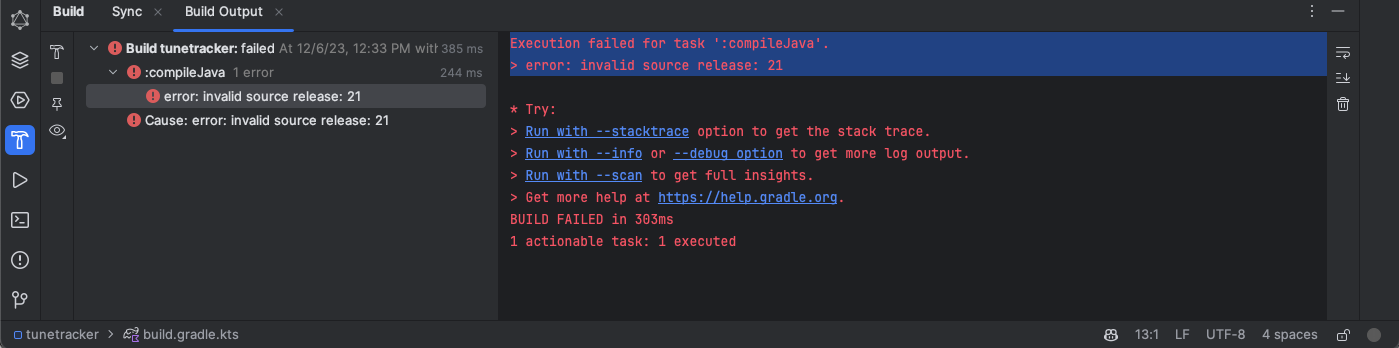
The issue arises in a Java development environment, particularly when using IntelliJ IDEA with Gradle as the build tool. The error message “Execution failed for task ‘:compileJava’. > error: invalid source release: 21” indicates a mismatch between the Java version set in IntelliJ IDEA and the source compatibility version specified in the Gradle build configuration. This problem often occurs when switching between different versions of Java/JDK, as IntelliJ does not always automatically sync the Java version used across the Gradle build system.

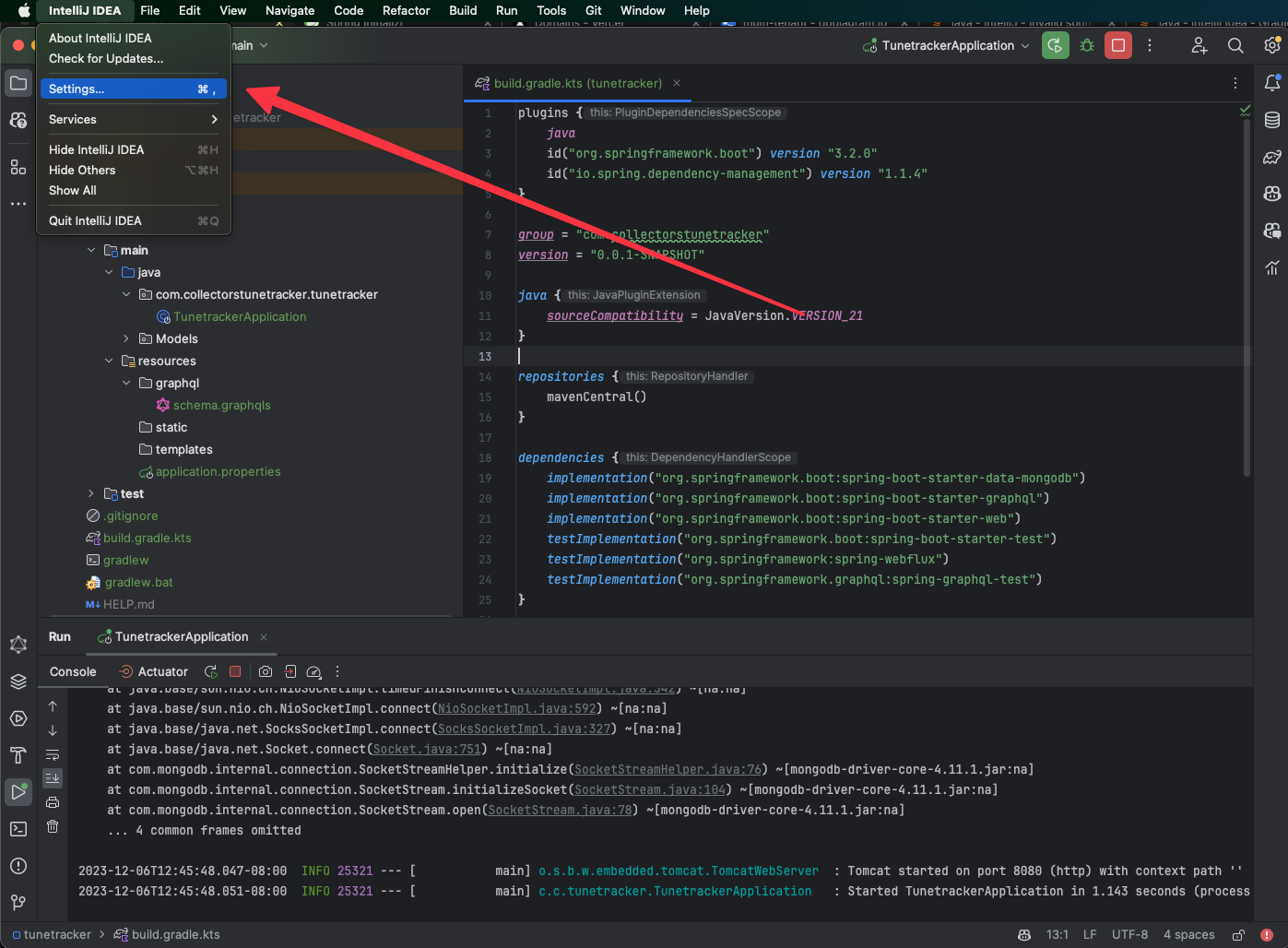
What the error looks like in Intellij.

Solution Steps:

1 Verify Current Java Version:

  • Open a terminal or command prompt.
  • Run java -version to check the installed Java version.

2 Open IntelliJ IDEA Settings:

  • Launch IntelliJ IDEA.
  • Navigate to File -> Settings (or IntelliJ IDEA -> Preferences on macOS).

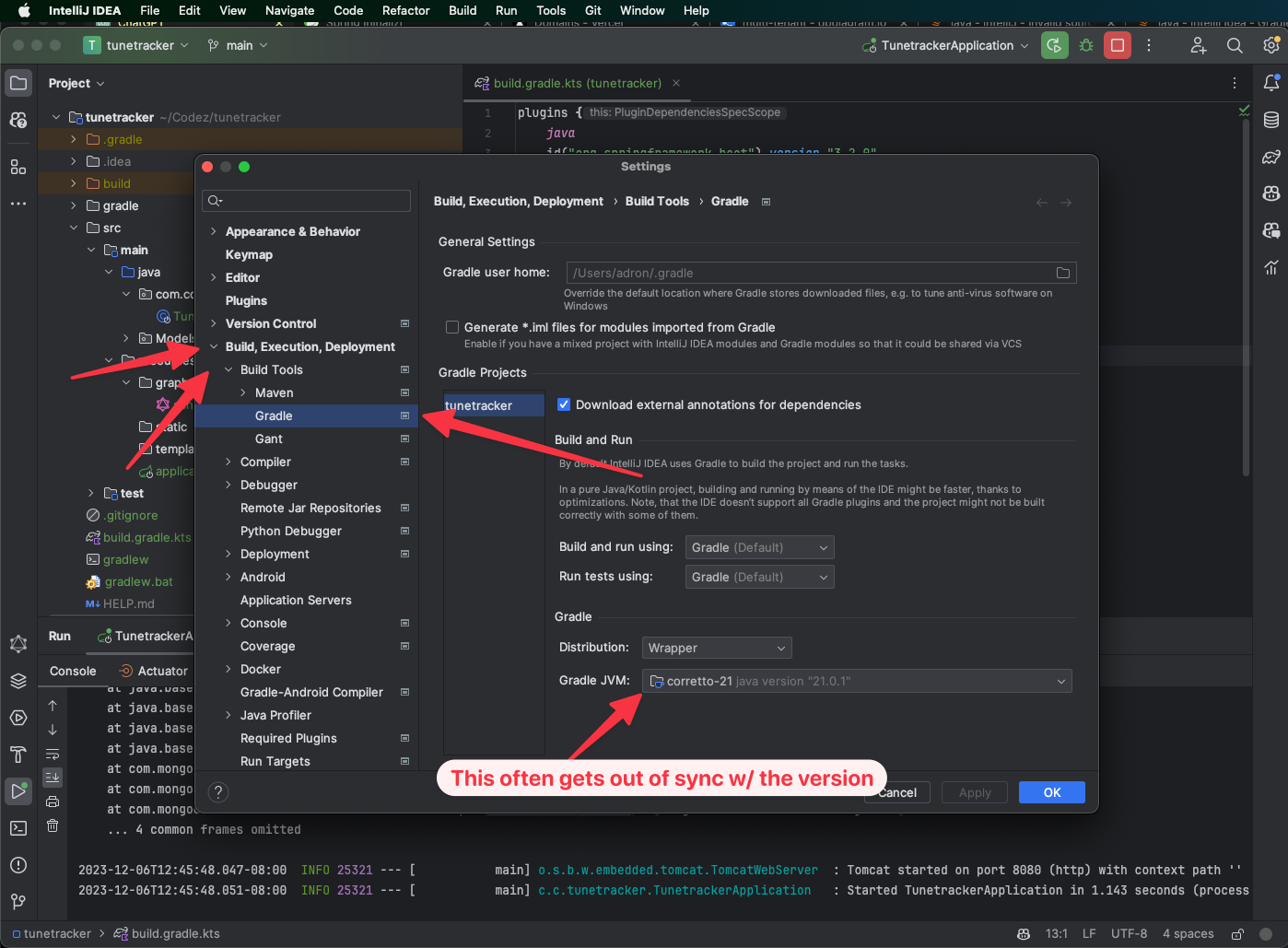
Finding the Settings, a little different than on Windows running IntelliJ.

3 Adjust Gradle Settings:

  • In the Settings/Preferences window, go to Build, Execution, Deployment -> Build Tools -> Gradle.
  • Here, you’ll find options related to the Gradle project.

4 Set the Correct JDK for Gradle:

  • Under the “Gradle JVM” option, select the correct JDK version from the dropdown menu. This should match the JDK version you intend to use for your project.
  • If the desired JDK is not listed, you may need to add it. Click on the “Add JDK” option and locate the JDK installation on your system.

This is where I usually need to change the setting for this fix.

5 Apply and Save Changes:

  • Click Apply to save the changes.
  • Click OK to close the Settings/Preferences window.

6 Rebuild the Project:

  • Go back to your project in IntelliJ IDEA.
  • Rebuild the project to ensure the changes take effect. You can do this by clicking on Build -> Rebuild Project.

7 Verify the Fix:

  • After rebuilding, check if the error persists. If everything is set up correctly, the project should compile without the previous error.

Java Time with Introspective GraphQL on Chaos Database AKA Pre- Refactor Prototype Mutating Database Spring Boot Java Hack App

With the previous work to get a testing environment built and running done (in Python), I was ready to get started on the GraphQL API as previously described. As a refresher, this description,

singular mission to build a GraphQL API against a Mongo database where the idea is, one could query the underlying collections, documents, and fields with the assumption that users would be adding or possibly removing said collections, documents, and fields as they needed.

My intent is to build with with a Java + Spring stack. Just like with the Python app in the previous post, the first thing I like to do is just get the baseline GraphQL API “Hello World” app up and running.

At the end of this post I’ll include/link the Github repository.

Phase 1: Getting the Initial GraphQL API Compiling & Running with a “Hello World”.

Prerequisites & Setup

  • The post previous to this “Fruit and Snakes: Frequent Mutative Mongo User Database with Python” I created the Mongo Database and setup the app that would create, every few seconds, new collections, documents, and other collateral to put into a Mongo database for the sole purpose of creating this GraphQL API.
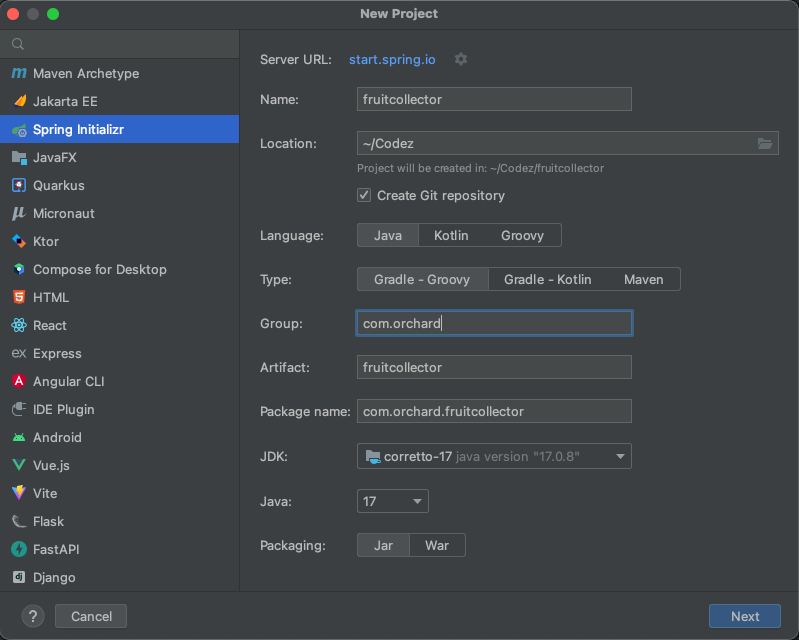
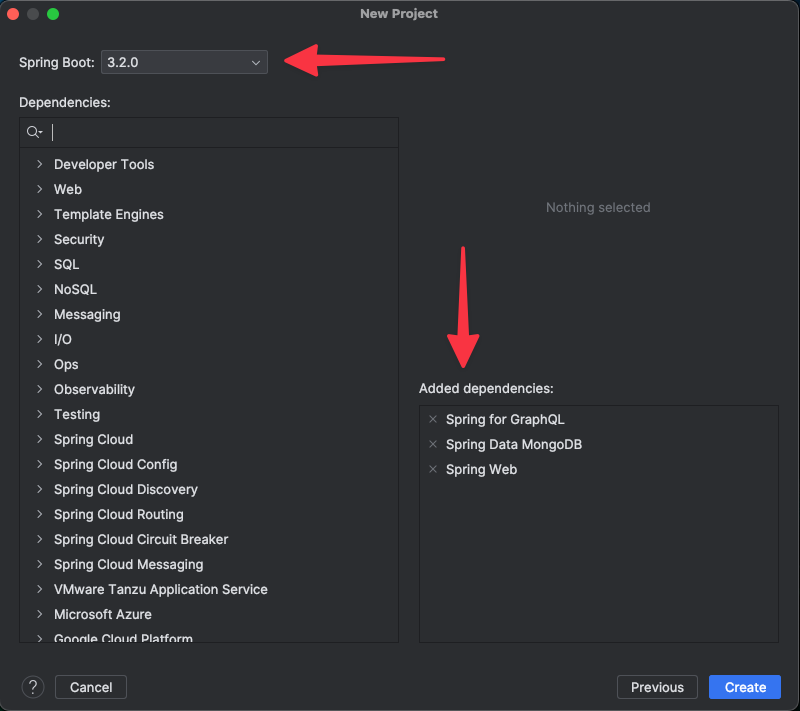
  • I’ll be using Java 17 for this work, so to ensure the least risk of versioning issues, get Java 17. The same goes for Spring 3. I’ve shown my selections from the Spring Initializr (not using Intellij? Cool, get a start with the Spring Initializr Site) in the screenshots that follow.

At the end of this post I’ll include/link the Github repository.

Next I add the configuration and schema. The GraphQL schema goes in the /src/main/java/resources/graphql directory. I named the file specifically schema.graphqls and added the following. NOTE: The file, by convention of GraphQL for Spring is named schema.graphqls.

type Query {
    hello: String
}

Next up I want to add two configuration sections to the application.properties file. First I always, add a section to turn off the white labeling as a precursor to setting up proper error handling but also so that any errors that pop up don’t start off as covered up white label pages. Second is the GraphiQL interface to make it easy to test out the API once it is up and running.

server.error.whitelabel.enabled=false
server.error.include-stacktrace=always
server.error.include-message=always
server.error.include-binding-errors=always

spring.graphql.graphiql.enabled=true
spring.graphql.graphiql.path=graphiql

If you’re familiar with Spring Boot and the convention based approach combined with attribute based annotations, dependency injection, and all of that then a lot of this and the respective *magic* that happens makes sense. For example, the above two file; the schema.graphqls and the application.properties files are used to spin up the respective configuration and other dependency injected elements of the application without any need to codify their inception. It is all happening and connected behind the scenes. As I move through this material I’ll make a point to describe some of those inner workings – but if anything isn’t clear, leave a comment and I’ll elaborate and update the post with further details. In some cases, I may write up a whole additional post just to make sure I’ve covered all the details to understand all that Spring Boot *magic*.

Writing the First Code

The first code that I have in the project is the FruitCollectorApplication class, annotated with @SpringBootApplication as the main method starting point. This won’t need changed and can be left as the starting point of the API. Upon this initial setup that code looks like this.

package com.orchard.fruitcollector;

import org.springframework.boot.SpringApplication;
import org.springframework.boot.autoconfigure.SpringBootApplication;

@SpringBootApplication
public class FruitcollectorApplication {

    public static void main(String[] args) {
        SpringApplication.run(FruitcollectorApplication.class, args);
    }

}

To get the most basic of things running, next I’ll get a QueryResolver class written up. This class will get annotated with @Controller to designate it will be the core controller of the API, and I’ll add a hello() method annotated with the @QueryMapping attribute. This will map this method to the hello query in the GraphQL Schema.

package com.orchard.fruitcollector;

import org.springframework.graphql.data.method.annotation.QueryMapping;
import org.springframework.stereotype.Controller;

@Controller
public class QueryResolver {

    @QueryMapping
    public String hello() {
        return "Hello World!";
    }
}

With that, I can now execute the API and everything should build, and I can spin up GraphiQL via http://localhost:8080/graphiql.

Phase 2: Writing Up Basic GraphQL Queries for Mongo with Spring

At the end of this post I’ll include/link the Github repository.

The first query that I want is a query that will return a list of the available collections. It’ll connect to the particular database Mongo and return the collections in that particular database. So no need for any parameters passed in or other criteria, just a clean “up “give me everything” query. The first addition I’ll make before any code, is to add the query type in the GraphQL schema. The full schema for the app now looks like this:

type Query {
    hello: String
    collections: [String]
}

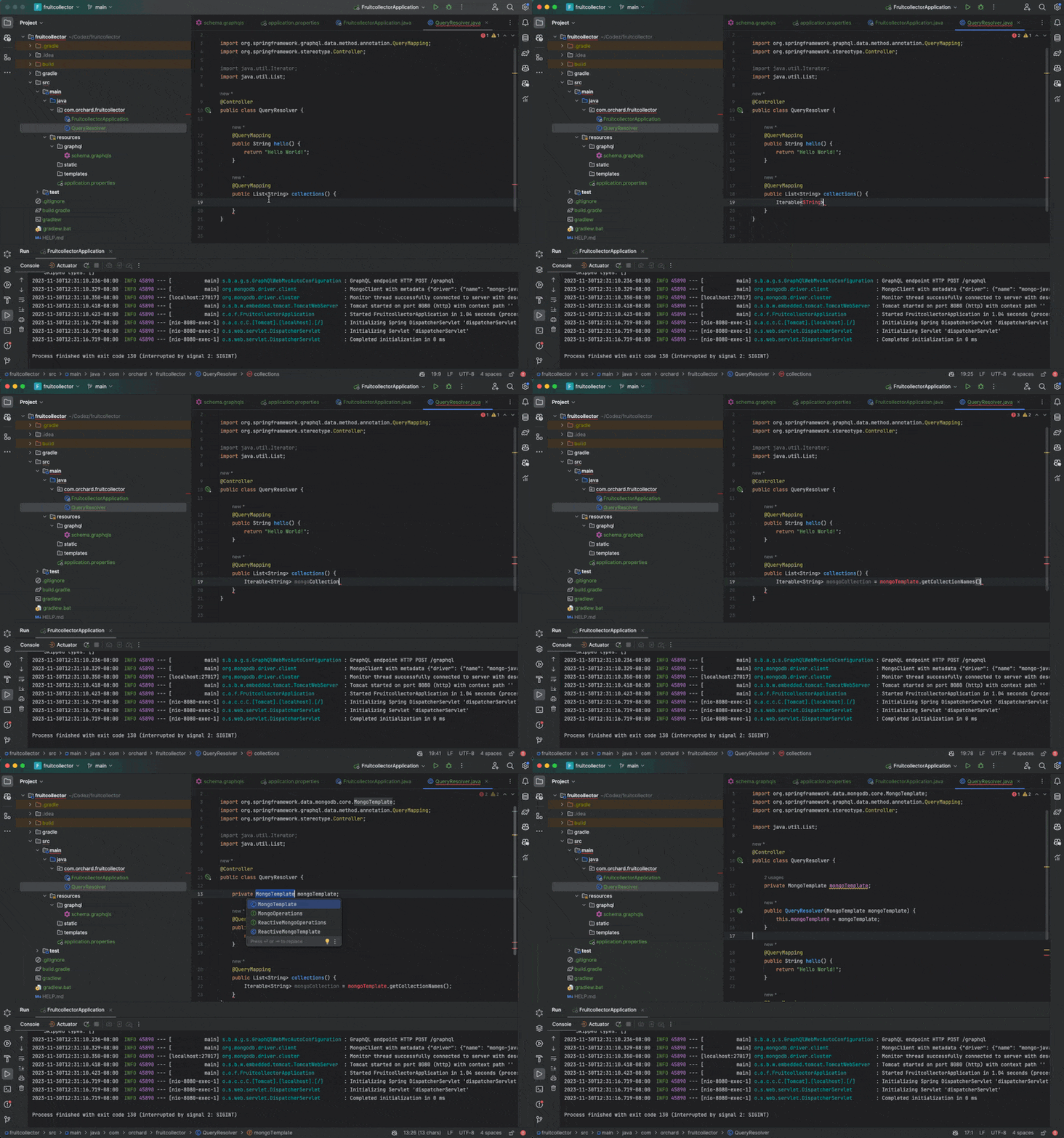
Implementing the query map will then follow this flow. First, add the @QueryMapping annotated method of public List<String> collections() {} and add the appropriate import import java.util.List; for that method. Next add an Iterable<String> object to receive the Mongo Template getCollectionNames(); results.

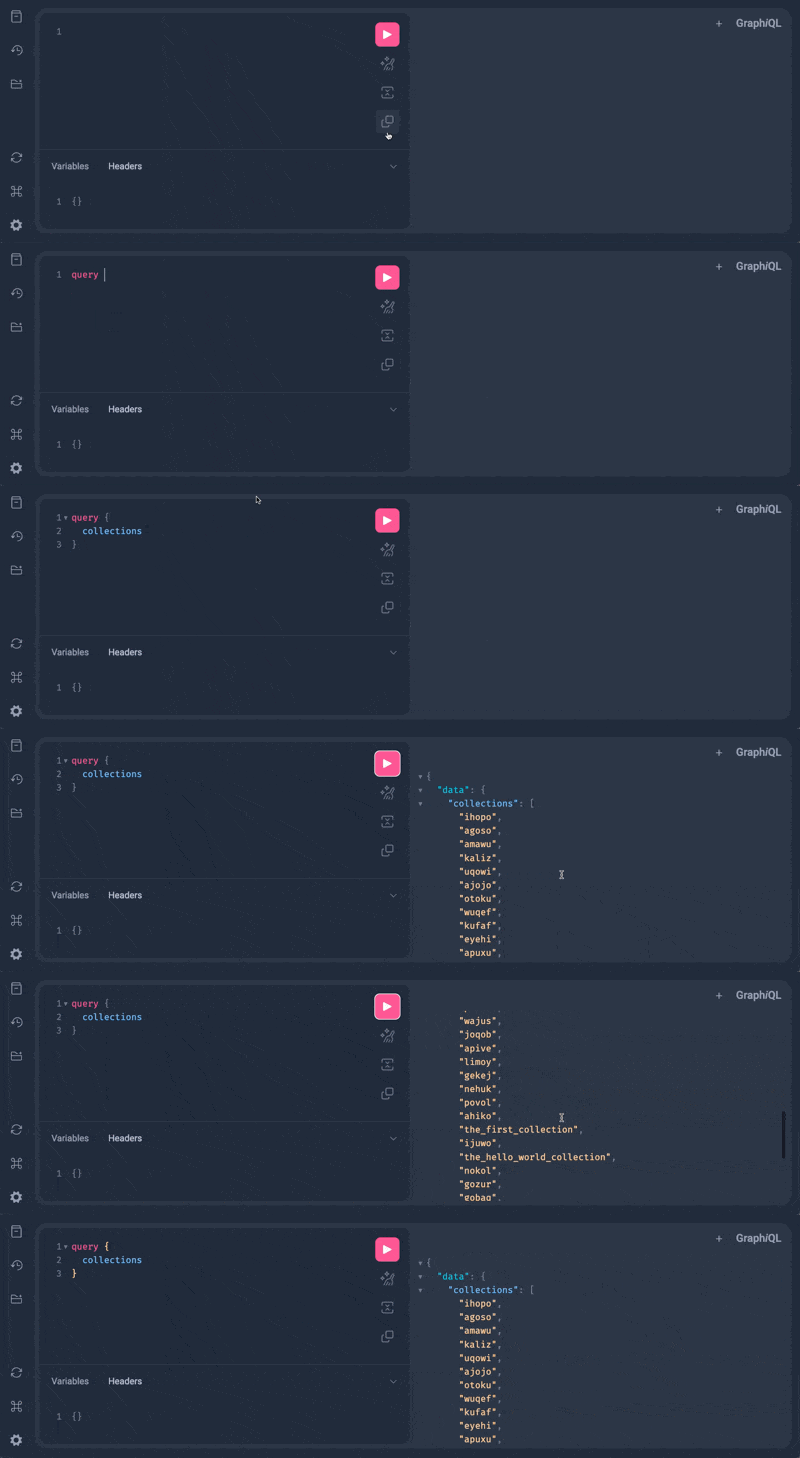
In the animated video I use the refactoring and code generation options in Intellj to put together the MongoTemplate field, constructor code that builds the field all from the collections method implementation. Intellij is super useful like that. Altogether the additional code in the QueryResolve looks like this, with the hello method included for completeness.

package com.orchard.fruitcollector;

import org.springframework.data.mongodb.core.MongoTemplate;
import org.springframework.graphql.data.method.annotation.QueryMapping;
import org.springframework.stereotype.Controller;

import java.util.ArrayList;
import java.util.List;

@Controller
public class QueryResolver {

    private MongoTemplate mongoTemplate;

    public QueryResolver(MongoTemplate mongoTemplate) {
        this.mongoTemplate = mongoTemplate;
    }

    @QueryMapping
    public String hello() {
        return "Hello World!";
    }

    @QueryMapping
    public List<String> collections() {
        Iterable<String> mongoCollection = mongoTemplate.getCollectionNames();

        List<String> collections = new ArrayList<>();
        for (String collectionName : mongoCollection) {
            collections.add(collectionName);
        }
        return collections;
    }
}

The last addition, is to add the connection string to the properties file of the project. In the application.properties file add the following line for the Mongo Database. Of course, replace “root” and “examplepass” and “test” with your respective user, password, and database to access in Mongo.

spring.data.mongodb.uri=mongodb://root:examplepass@localhost:27017/test

That is all that is needed for implementation. However, know full well a solid refactor and abstraction of this code into various layers to keep the code manageable, scalable for ongoing implementation, and related criteria needs to be done. This is, an *example* at most that I’m building out to get started with this API. More on refactoring to something that is better ready for deployment as I move on – so keep reading.

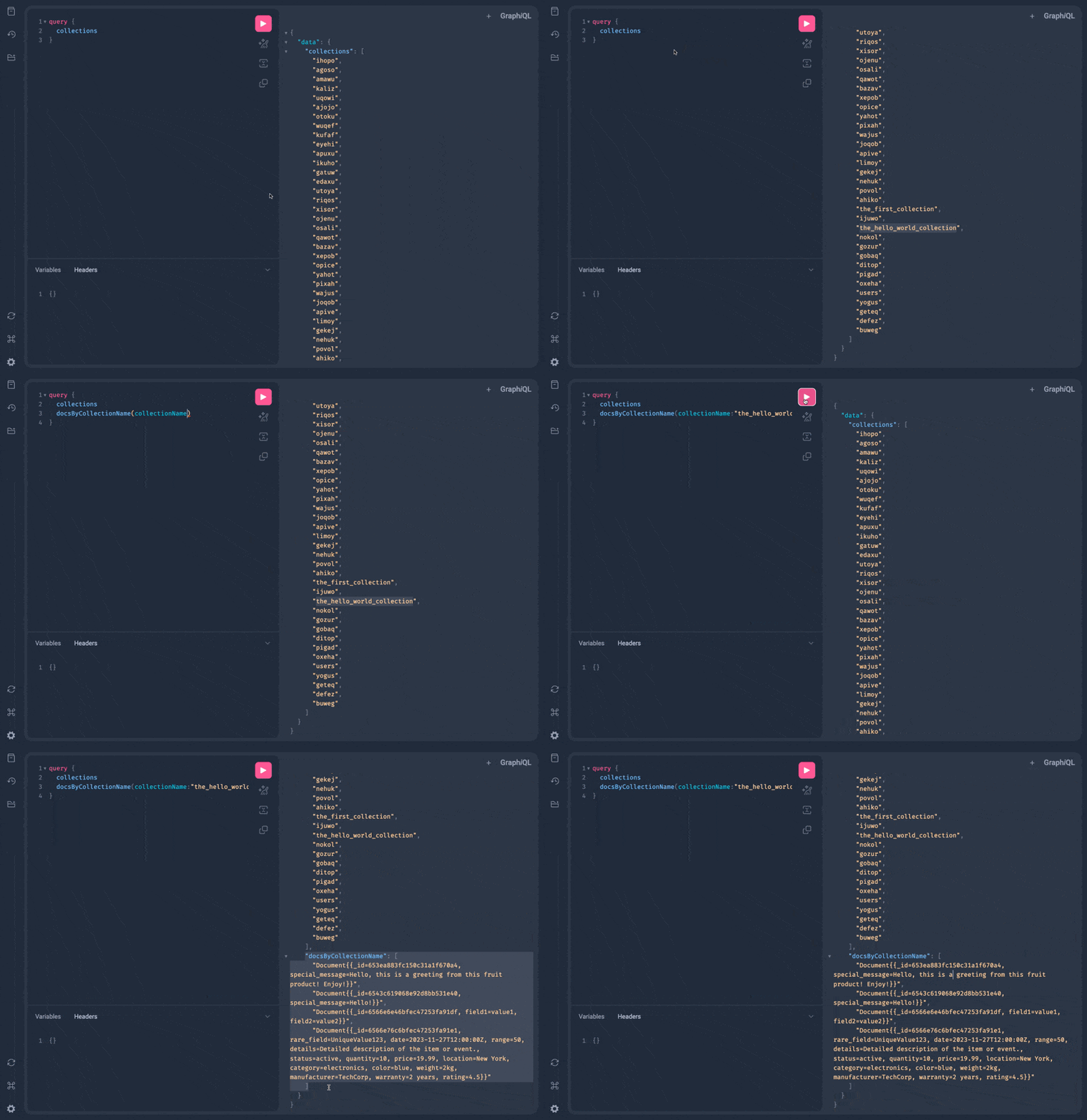
With the implementation in place, the collections query and results against the database available via the Fruit and Snakes: Frequent Mutative Mongo User Database with Python looks something like this.

The next query I want is something that will just give the the document results of a collection. No paging just the full results. A simple enough request, the schema addition would look like docsByCollectionName(collectionName: String!): [String] for the GraphQL Schema. The complete schema now looks like this.

type Query {
    hello: String
    collections: [String]
    docsByCollectionName(collectionName: String!): [String]
}

For the Java implementation there is a new element I need to add for this method, a parameter! This is easily done with marking the parameter with an @Argument attribute. The method would then follow the flow that the previous method I wrote did.

@QueryMapping
public List<String> docsByCollectionName(@Argument String collectionName) {
    List<String> documents = new ArrayList<>();

    MongoCollection<Document> collection = mongoTemplate.getCollection(collectionName);
    FindIterable<Document> docs = collection.find();

    for (Document doc : docs) {
        documents.add(doc.toString());
    }

    return documents;
}

In this method, I’ve used the MongoCollection to store documents, but then still copy that, by toString, over to the documents object to return.

As you can see in the short vid, the query now grabs the document results and you get the raw strings returned for processing via the API call.

Thoughts & Strategy

At this point I’ll add a few more query calls just to provide a few options on how to query and what ways to use Spring to get these queries. However, I want to dive into some of the concepts and issues around querying against a Mongo DB instance like this.

  1. Data Query Execution Time: As you might have noticed in some of the queries already created, they lazy execute. You initiate the “query” but then setup the criteria of the query and then it executes. Because of the convention based approach to Spring for GraphQL and Spring Data for Mongo it isn’t immediately clear when the query is going to be executed. It’s however safe to assume that the query is generally executing upon the beginning of the manipulation of the results. It isn’t always the case, but it is often the case that this initiates the query to get the results. This specific tenant of operation for the particular libraries is important to note for troubleshooting purposes and also reasoning about building criteria and executing the queries within the code itself.
  2. REGEX Efficiency in Mongo: Regular expressions in Mongo are a special and very powerful tool. Regular express / REGEX are very powerful to start with, albeit often considered cryptic and difficult to deal with. However with Mongo, since there isn’t particularly a schema or where clauses to work with for queries, it is often desirable to use something like regex to query against cumbersome – or disparate Mongo Documents. The documents themselves, being they don’t hold to a schema could hold any number of elements and using Regex to query agains the full document itself can be a life saver when one doesn’t know a specific field or element of a document to query for. Implementation details on regex a little later in the post.
  3. One very significant problem with querying a Mongo database as I am doing in this particular scenario is that GraphQL’s features and specification capabilities aren’t really used. The data consumer must know the collection, field, or other part fo the document to query against and its exact spelling. Where as, GraphQL per specification should have objects, nested objects, types, and related elements one would query against defined in the schema. In this particular API however that isn’t available. Ideally the API system would be able to dynamically update the schema but that is cumbersome and shifts functionality to an infrastructure level, breaching separation of concerns and introducing difficulty that often isn’t easily overcome in organizations. i.e. the skills aren’t always available or time available to the team to design around this complexity and build a respective solution.

Alright, just a few thoughts at this point, onward to the last few method/query implementations and I’ll wrap up this post.

Phase 3: The final Query Methods: Search String, Regex, & By Field

At the end of this post I’ll include/link the Github repository.

Next query is the docsBySearchString query. I’ll add the query to the GraphQL Schema, which gives me a complete schema that looks like this.

type Query {
    hello: String
    collections: [String]
    docsByCollectionName(collectionName: String!): [String]
    docsBySearchString(collectionName: String!, fieldToSearch: String!, searchString: String!): [String]
}

Implementing that back on the Java side would then look like this. This method will now return results based on a string being found in a particular field.

@QueryMapping
public List<String> docsBySearchString(@Argument String searchString, @Argument String collectionName, @Argument String fieldToSearch) {

    MongoCollection<Document> collection = mongoTemplate.getCollection(collectionName);

    Document query = new Document("$or", Arrays.asList(new Document(fieldToSearch, searchString)));

    FindIterable<Document> result = collection.find(query);

    List<String> documents = new ArrayList<>();
    for (Document doc : result) {
        documents.add(doc.toString());
    }

    return documents;
}

Next up is the regular expressions. This is a powerful query as regex can cover a wide range of functionality for the query. The GraphQL Schema with this addition would now look like this.

type Query {
    hello: String
    collections: [String]
    docsByCollectionName(collectionName: String!): [String]
    docsBySearchString(collectionName: String!, fieldToSearch: String!, searchString: String!): [String]
    docsByRegex(collectionName: String!, fieldToSearch: String!, regex: String!): [String]
}

The Java side would look like this.

@QueryMapping
public List<String> docsByRegex(@Argument String regex, @Argument String collectionName, @Argument String fieldToSearch) {

    MongoCollection<Document> collection = mongoTemplate.getCollection(collectionName);

    Document query = new Document("$or", Arrays.asList(regex(fieldToSearch, regex, "i")));

    FindIterable<Document> result = collection.find(query);

    List<String> documents = new ArrayList<>();
    for (Document doc : result) {
        documents.add(doc.toString());
    }

    return documents;
}

Finally, I’ll wrap this up with a query by field. The completed schema now includes all of these queries.

type Query {
    hello: String
    collections: [String]
    docsByCollectionName(collectionName: String!): [String]
    docsBySearchString(collectionName: String!, fieldToSearch: String!, searchString: String!): [String]
    docsByRegex(collectionName: String!, fieldToSearch: String!, regex: String!): [String]
    docsFindByField(collectionName: String!, fieldToFind: String!): [String]
}

Flipping over to the Java side I’ve got this for implementation.

@QueryMapping
public List<String> docsFindByField(@Argument String collectionName, @Argument String fieldToFind) {
    List<String> documents = new ArrayList<>();

    MongoCollection<Document> collection = mongoTemplate.getCollection(collectionName);

    Document query = new Document(fieldToFind, new Document("$exists", true));

    FindIterable<Document> result = collection.find(query);

    for (Document doc : result ) {
        documents.add(doc.toString());
    }

    return documents;
}

Summary

In summary I’ve now got a GraphQL API that queries against this Mongo database. As the database collections change or new collections are added I can easily query against those and get new documents. In addition, in regular Mongo fashion if the document schemas change I can simply query against them in whatever particular way they’ve changed and get results.

Coming Soon!

The next steps in this project will be to clean up, appropriately refactor with abstractions to help move the project to the next stage. For example, refactoring the singular controller class. Possibly adding a service class that handles the database connection and retrieval of things from the database, to make it database independent at the API controller level could be a good refactoring. There are many other things I could do, and many I should do. But for now, this is a functional API of basic capability and I’ll work up the refactor and additional GraphQL API additions in another post.

The Repo dyna-fruity-collector Github Repository

Top 3 Ways to Make Sausage with MongoDB & Java

I’ve been working with Java a ton this year, more so than the previous years, so I decided to put together the top three Java libraries for accessing MongoDB that I’ve been using. That top 3 list shapes up like this.

  1. MongoDB Java Driver: This is the official Java driver provided by MongoDB. It allows Java applications to connect to MongoDB and work with data. The driver supports synchronous and asynchronous interaction with MongoDB and provides a rich set of features for database operations.
    • Key Methods:
      • MongoClients.create(): To create a new client connection to the database.
      • MongoDatabase.getCollection(): To access a collection from the database.
      • MongoCollection.find(): To find documents within a collection.
  2. Morphia: Morphia is an Object-Document Mapper (ODM) for MongoDB and Java. It provides a higher-level, object-oriented API to interact with MongoDB, and maps Java objects to MongoDB documents.
    • Key Methods:
      • Datastore.createQuery(): To create a query for the type of entity you want to retrieve.
      • Datastore.save(): To save an entity to the database.
      • Query.asList(): To execute a query and get the results as a list.
  3. Spring Data MongoDB: Part of the larger Spring Data project, Spring Data MongoDB provides integration with MongoDB to work with the data as easily as if it were a relational database. It’s a popular choice for Spring-based applications.
    • Key Methods:
      • MongoRepository.findAll(): To find all documents in a collection.
      • MongoRepository.save(): To save a given entity.
      • MongoRepository.findById(): To find a document by its ID.

These libraries offer comprehensive methods for connecting to and working with MongoDB from Java applications. They are widely used in the Java community and are supported by a large number of developers and organizations. Let’s dive deeper with each, and also more specifically talk about some of their respective query methods.

A Guide to Using the MongoDB Java Driver

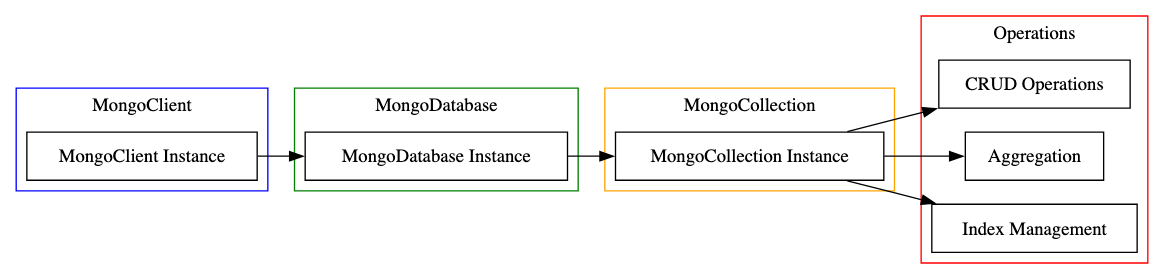
A simple diagram of the MongoDB Java Driver interactions.

  1. MongoClient: Represents the MongoClient instance, which is the entry point to interact with the database.
  2. MongoDatabase: This is an instance of MongoDatabase, representing a specific database in MongoDB.
  3. MongoCollection: Represents a collection within the database, where documents are stored.
  4. Operations: This includes various operations that can be performed on the collections, such as:
    • CRUD Operations: Create, Read, Update, and Delete operations on documents.
    • Aggregation: Operations for aggregating data.
    • Index Management: Operations for managing indexes on collections.

The arrows indicate the flow of interaction, starting from the MongoClient instance to the database, then to the collections, and finally to the operations performed on these collections.

Prerequisites

Before we start, ensure you have the following:

  1. Java Development Kit (JDK): Make sure Java is installed on your system.
  2. MongoDB Server: Install and run MongoDB on your local machine or use a cloud-based MongoDB service.
  3. IDE for Java: Any modern IDE like IntelliJ IDEA, Eclipse, or NetBeans.

Step 1: Setting Up Your Project

First, create a new Java project in your IDE. You’ll need to add the MongoDB Java Driver to your project. If you’re using Maven, add the following dependency to your pom.xml:

<dependency>
    <groupId>org.mongodb</groupId>
    <artifactId>mongodb-driver-sync</artifactId>
    <version>YOUR_DESIRED_VERSION</version>
</dependency>

Replace YOUR_DESIRED_VERSION with the latest version of the MongoDB Java Driver.

Step 2: Establishing a Connection to MongoDB

Create a new Java class and set up a connection to MongoDB:

import com.mongodb.client.MongoClients;
import com.mongodb.client.MongoClient;
import com.mongodb.client.MongoDatabase;

public class MongoDBExample {
    public static void main(String[] args) {
        MongoClient mongoClient = MongoClients.create("mongodb://localhost:27017");
        MongoDatabase database = mongoClient.getDatabase("yourDatabaseName");
        // Rest of the code goes here
    }
}

Replace yourDatabaseName with the name of your database.

Step 3: Querying for a List of Collections

To retrieve a list of collections from the database:

import com.mongodb.client.MongoIterable;

// Inside the main method
MongoIterable<String> collections = database.listCollectionNames();
for (String collectionName : collections) {
    System.out.println(collectionName);
}

Step 4: Retrieving Documents from a Collection

To fetch documents from a specific collection:

import com.mongodb.client.MongoCollection;
import org.bson.Document;

// Inside the main method
MongoCollection<Document> collection = database.getCollection("yourCollectionName");
MongoIterable<Document> documents = collection.find();
for (Document doc : documents) {
    System.out.println(doc.toJson());
}

Replace yourCollectionName with the name of your collection.

Step 5: Filtering Documents Based on Field Values

To filter documents based on specific field values:

import com.mongodb.client.model.Filters;

// Inside the main method
MongoIterable<Document> filteredDocuments = collection.find(Filters.eq("fieldName", "value"));
for (Document doc : filteredDocuments) {
    System.out.println(doc.toJson());
}

Replace fieldName and value with the field you want to filter by and its corresponding value.

A Guide to Using Morphia for MongoDB in Java

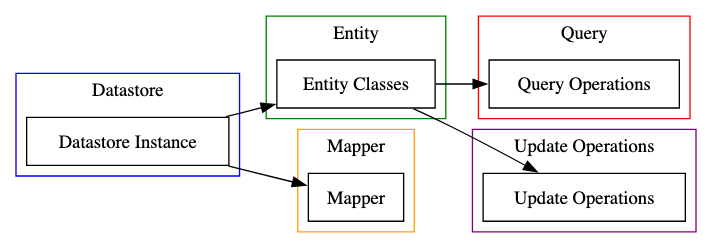
  1. Datastore (Datastore Instance): This is the central part of the Morphia driver, managing the connection to the MongoDB database and providing the API for accessing and manipulating data.
  2. Entity (Entity Classes): These are Java classes that represent the documents stored in MongoDB. They are annotated to map the class fields to document fields.
  3. Mapper (Mapper): Responsible for converting the Java objects (entities) to MongoDB documents and vice versa. It interprets the annotations in the entity classes to perform this mapping.
  4. Query (Query Operations): This represents the operations available for querying the database, such as finding documents, filtering, and sorting.
  5. Update Operations: These are operations that modify existing documents in the database, including updating fields, adding new data, or removing existing data.

The arrows indicate the interaction flow, with the Datastore instance being the central component that interacts with entity classes and the mapper. The entity classes are then used in query and update operations.

Prerequisites

Before diving in, ensure you have:

  1. Java Development Kit (JDK): Java should be installed on your system.
  2. MongoDB Server: Install MongoDB locally or use a cloud-based service.
  3. IDE for Java: Use an IDE like IntelliJ IDEA, Eclipse, or NetBeans.
  4. Maven: For managing project dependencies.

Step 1: Setting Up Your Project

Create a new Java project in your IDE. Add Morphia and MongoDB Java Driver dependencies to your pom.xml:

<dependencies>
    <dependency>
        <groupId>dev.morphia.morphia</groupId>
        <artifactId>core</artifactId>
        <version>LATEST_VERSION</version>
    </dependency>
    <dependency>
        <groupId>org.mongodb</groupId>
        <artifactId>mongodb-driver-sync</artifactId>
        <version>MONGODB_DRIVER_VERSION</version>
    </dependency>
</dependencies>

Replace LATEST_VERSION and MONGODB_DRIVER_VERSION with the latest versions of Morphia and MongoDB Java Driver, respectively.

Step 2: Configuring Morphia

Create a new Java class for your application. First, set up Morphia and connect it to your MongoDB instance:

import dev.morphia.Datastore;
import dev.morphia.Morphia;
import com.mongodb.client.MongoClients;

public class MorphiaExample {
    public static void main(String[] args) {
        var morphia = new Morphia();
        morphia.mapPackage("your.entity.package"); // Replace with your package name

        Datastore datastore = morphia.createDatastore(MongoClients.create(), "yourDatabaseName");
        datastore.ensureIndexes();
        // Rest of the code goes here
    }
}

Replace your.entity.package with the package containing your entity classes and yourDatabaseName with the name of your database.

Step 3: Querying for a List of Collections

Morphia doesn’t provide a direct method to list collections. You can use the underlying MongoDB Java Driver:

// Inside the main method
for (String collectionName : datastore.getDatabase().listCollectionNames()) {
    System.out.println(collectionName);
}

Step 4: Retrieving Documents from a Collection

Assuming you have a mapped entity class, you can retrieve documents as follows:

import dev.morphia.query.Query;

// Inside the main method
Query<YourEntityClass> query = datastore.find(YourEntityClass.class);
for (YourEntityClass entity : query.iterator()) {
    System.out.println(entity);
}

Replace YourEntityClass with your Morphia entity class.

Step 5: Filtering Documents Based on Field Values

To filter documents based on field values:

// Inside the main method
Query<YourEntityClass> filteredQuery = datastore.find(YourEntityClass.class)
                                                 .filter(Filters.eq("fieldName", "value"));
for (YourEntityClass entity : filteredQuery.iterator()) {
    System.out.println(entity);
}

Replace fieldName and value with the field you want to filter by and its corresponding value.

A Guide to Spring Data for MongoDB

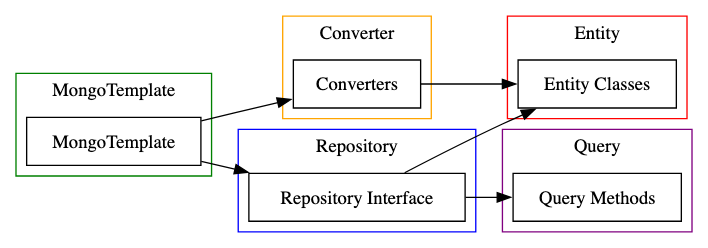
  1. Repository (Repository Interface): This is the interface layer where data access and manipulation methods are defined. It abstracts the underlying data access technology.
  2. MongoTemplate: This is the central class of the Spring Data MongoDB module. It simplifies the use of MongoDB operations like save, query, update, and delete.
  3. Converter (Converters): These are used to convert objects to MongoDB documents and vice versa. They handle the mapping of Java objects to MongoDB’s BSON format.
  4. Entity (Entity Classes): These are domain model classes that represent the data in the MongoDB database. They are typically annotated with Spring Data annotations to map them to MongoDB documents.
  5. Query (Query Methods): These methods are part of the repository interface and are used to define queries for accessing the data. They can be custom methods or derived from the method names.

The arrows indicate the interaction flow. The MongoTemplate interacts with both the repository interface and converters. The repository interface uses entity classes and defines query methods, while converters are used to map entity classes to MongoDB documents.

Prerequisites

Before starting, ensure you have:

  1. Java Development Kit (JDK): Java should be installed on your system.
  2. MongoDB Server: Install MongoDB locally or use a cloud-based service.
  3. Spring Boot: Familiarity with Spring Boot is helpful.
  4. Maven or Gradle: For managing project dependencies.

Step 1: Setting Up Your Spring Boot Project

Create a new Spring Boot project. You can use Spring Initializr to generate a project with the necessary dependencies. Select Web, MongoDB, and Lombok (optional for reducing boilerplate code).

Step 2: Adding Dependencies

Ensure your pom.xml (if using Maven) includes Spring Data MongoDB dependency:

<dependency>
    <groupId>org.springframework.boot</groupId>
    <artifactId>spring-boot-starter-data-mongodb</artifactId>
</dependency>

If you’re using Gradle, add the equivalent dependency in your build.gradle.

Step 3: Configuring Application Properties

In your application.properties or application.yml, add the MongoDB connection details:

spring.data.mongodb.uri=mongodb://localhost:27017/yourDatabaseName

Replace yourDatabaseName with the name of your MongoDB database.

Step 4: Creating a Document Class

Create a class that represents a document in your MongoDB collection:

import org.springframework.data.annotation.Id;
import org.springframework.data.mongodb.core.mapping.Document;

@Document
public class YourEntity {
    @Id
    private String id;

    // other fields, getters, and setters
}

Replace YourEntity with the name of your entity class.

Step 5: Creating a Repository Interface

Spring Data MongoDB uses the repository pattern. Create an interface for your entity:

import org.springframework.data.mongodb.repository.MongoRepository;

public interface YourEntityRepository extends MongoRepository<YourEntity, String> {
    // Custom query methods can be defined here
}

Replace YourEntity with your entity class.

Step 6: Querying for a List of Collections

Spring Data MongoDB doesn’t provide a direct method to list collections from the MongoRepository. You can use MongoTemplate for this purpose:

import org.springframework.beans.factory.annotation.Autowired;
import org.springframework.data.mongodb.core.MongoTemplate;

public class YourService {

    @Autowired
    private MongoTemplate mongoTemplate;

    public List<String> getCollections() {
        return mongoTemplate.getCollectionNames();
    }
}

Step 7: Retrieving Documents from a Collection

Use the repository to fetch documents:

@Autowired
private YourEntityRepository repository;

public List<YourEntity> getAllDocuments() {
    return repository.findAll();
}

Step 8: Filtering Documents Based on Field Values

Spring Data allows defining query methods in the repository interface:

List<YourEntity> findByYourFieldName(String value);

Replace YourFieldName with the field name and value with the value you’re filtering by.

Review: MongoDB Access Methods – Java Driver, Morphia, and Spring Data MongoDB

In the realm of Java development, accessing MongoDB can be achieved through various methods, each with its unique flavor and capabilities. Let’s dive into a comparative review of three popular methods: the MongoDB Java Driver, Morphia, and Spring Data MongoDB, channeling the insightful and pragmatic style of Adron Hall.

MongoDB Java Driver

Direct and Unabashed: The MongoDB Java Driver is the official, straight-from-the-source solution. It’s akin to speaking the native tongue of MongoDB, offering the most direct interaction with the database. This driver is for those who appreciate the unvarnished truth of working directly with MongoDB’s core features.

Flexibility and Control: It offers synchronous and asynchronous interactions, catering to a wide range of application needs. This level of control is a double-edged sword; it’s powerful but demands a deeper understanding of MongoDB’s workings.

Verdict: Ideal for purists and those who need fine-grained control over their MongoDB interactions. However, it can be verbose and complex, especially for newcomers.

Morphia

The Object-Oriented Comfort: Morphia steps in as an Object-Document Mapper (ODM), bringing a familiar, object-oriented feel to MongoDB operations. It’s like having a translator who smoothly converts your Java objects into MongoDB documents and vice versa.

Simplicity and Efficiency: Morphia simplifies the code, making it more readable and maintainable. It’s particularly effective for those who think in terms of objects rather than database documents.

Verdict: Morphia is a great choice for developers who prefer a higher-level abstraction without straying too far from MongoDB’s native behavior. It’s less verbose than the Java Driver but still requires a good grasp of MongoDB’s principles.

Spring Data MongoDB

The Spring Ecosystem Harmony: Spring Data MongoDB is the belle of the ball in the Spring ecosystem. It integrates MongoDB operations into the Spring framework, offering a consistent and familiar approach for those already versed in Spring.

Abstraction and Convenience: It abstracts much of the boilerplate code needed for MongoDB interactions. The repository pattern, in particular, is a boon for rapid development and clean code.

Verdict: For developers entrenched in the Spring ecosystem, this is a no-brainer. It offers the most streamlined experience, especially for CRUD operations. However, this comes at the cost of being a step removed from the direct MongoDB interactions, which might not appeal to those who prefer a hands-on approach.

Conclusion

Choosing between the MongoDB Java Driver, Morphia, and Spring Data MongoDB depends largely on your project’s needs and your comfort level with MongoDB and Java.

  • Go with the Java Driver if you need the full power and flexibility of MongoDB and don’t mind the complexity.
  • Choose Morphia for a balanced approach, retaining much of MongoDB’s character while simplifying object-document mapping.
  • Opt for Spring Data MongoDB if you’re already in the Spring ecosystem and prefer a more abstracted, convention-over-configuration approach.

Each method has its strengths and trade-offs, and the best choice varies with the specific context and requirements of your project.

Fruit and Snakes: Frequent Mutative Mongo User Database with Python

The end results of this code base are used in another post I made, titled “Java Time with Introspective GraphQL on Chaos Database AKA Pre- Refactor Prototype Mutating Database Spring Boot Java Hack App“.

Recently I had a singular mission to build a GraphQL API against a Mongo database where the idea is, one could query the underlying collections, documents, and fields with the assumption that users would be adding or possibly removing said collections, documents, and fields as they needed.

That sounds somewhat straight forward enough, but before even getting started with the GraphQL API I really needed some type of environment that would mimic this process. That is what this article is about, creating a test bed for this criteria.

The Mongo Database & Environment

First thing I did was setup a new Python environment using virtualenv. I wrote about that a bit in the past if you want to dig into that deeper, the post is available here.

virtualenv fruit_schema_watcher

Next up I created a git repo with git init then added a README.md, LICENSE (MIT), and .gitignore file. The next obvious thing was the need for a Mongo database! I went to cracking on a docker-compose file, which formed up to look like this.

version: '3.1'

services:
  mongo:
    image: mongo:latest
    container_name: mongodb_container
    ports:
      - "27017:27017"
    environment:
      MONGO_INITDB_ROOT_USERNAME: root
      MONGO_INITDB_ROOT_PASSWORD: examplepass
    volumes:
      - mongo-data:/data/db

volumes:
  mongo-data:

With that server running, I went ahead and created a database called test manually. I’d just do all the work from here on out with that particular database.

The Python Code Base

Note: I’ll be following up this post with a refactoring post. Don’t get up in arms about code quality, this was the making it work stage and I’ve got opinions and thoughts about how things need to end up for longevity.

The first bit of code I started working on putting together was something to generate a few things that I would need:

  • the ability to generate a somewhat readable word.
  • a random collection name, etc.

The two things translate into creating a semi-readable collection name and document for the collection. First thing up was to create some code that would give me that semi-readable word.

def generate_readable_word(length):
    vowels = "aeiou"
    consonants = "bcdfghjklmnpqrstvwxyz"
    if length == 0:
        return ""

    word = ""
    if random.choice([True, False]):
        word += random.choice(consonants)
    else:
        word += random.choice(vowels)

    for _ in range(length - 1):
        if word[-1] in vowels:
            word += random.choice(consonants)
        else:
            word += random.choice(vowels)

    return word

I wasn’t sure if I just wanted to pick from a random dictionary of words, and have a word file or actually generate made up words. Obviously, with the code above, I decided to opt for generating a made up word. I’d pass in the length, just a random number of some reasonable size for a made up word, and then go about placing consonants and vowels accordingly until I had this semi-readable word.

Next up was to create a randomly put together document I could insert into a collection. That looked a bit wild but after some munging of the code, I ended up with this.

def random_collection_collateral():
    collection_columns = []
    number_of_columns = random.randint(1, 10)
    if number_of_columns == 10:
        number_of_columns = random.randint(42, 99)

    data = {}
    for i in range(number_of_columns):
        column_name = generate_readable_word(random.randint(5, 12))
        collection_columns.append(column_name)
        data[column_name] = generate_readable_word(random.randint(10, 20))
        print(column_name + " added.")

    json_data = json.dumps(data)
    print(json_data)
    return json_data

While writing up this code, I started breaking things out to different files for a little organization. My intent of course, is to go back and refactor as soon as I get things into a general working state that makes a little bit of sense. The previous two code snippets I put in a file called word_generator.py, and this next snippet of code I put in a file called database_actions.py. Again, I’d eventually refactor these into a more refined state, but this way I at least have a quick generally organized bit of code.

In the database_actions.py I wanted to put the specific calls that would be made to the database. Not really a data layer, but sort of a data layer. That code shaped up to work like this:

def the_deluge_of_chaos():
    mongo_collection = generate_readable_word(5)
    collection_document = random_collection_collateral()

    client = MongoClient('mongodb://root:examplepass@localhost:27017')
    db = client['test']

    db.create_collection(mongo_collection)
    collection = db[mongo_collection]
    print(mongo_collection + " has been created.")

    collection_document = eval(collection_document)

    collection.insert_one(collection_document)
    print(collection_document)
    print("...has been created.")

    client.close()

In this code I put together the collection and document, and then make the connection, create the collection, then insert the document into the collection. I do like how the Python library interacts with the collection and document object for Mongo, it is a pretty slick implementation.

The divergent naturally nested object hierarchy of the underlying BSON comes out in the object in object array relation which makes for a pretty logical flow to deal with documents in the collection. It also lends to making an interesting setup if you end up with multiple documents with different structures to them. However, stay privy to this as it can also lead to discrepency of logic and a confusing interaction with the underlying database since one doesn’t have an automatic kind of filter, from an object perspective, and about which set of documents (i.e. objects) one is dealing with from the database perspective. Anyway, more on that in a subsequent post!

Chaos Service

Next up I want to have the service run and every few seconds execute an addition of a random number of collections and their initial document added to the database. I created a file called chaos.py and added a short little snippet to run the_deluge_of_chaos() a number of times.

from database_actions import the_deluge_of_chaos
import random

def the_deluge():
    range_of_chaos = random.randint(1, 3)
    for i in range(range_of_chaos):
        the_deluge_of_chaos()

Now the service itself. I broke this out into a file called service.py with a class for the definition of the service.

class FiveSecondService:
    def __init__(self):
        self._stop_event = threading.Event()
        self._thread = threading.Thread(target=self._run)

    def start(self):
        """Start the service."""
        self._stop_event.clear()
        self._thread.start()

    def stop(self):
        """Stop the service."""
        self._stop_event.set()
        self._thread.join()

    def _run(self):
        while not self._stop_event.is_set():
            start_time = time.time()
            self.execute_code()

            elapsed_time = time.time() - start_time
            time_to_sleep = max(0, 5 - elapsed_time)
            time.sleep(time_to_sleep)

    def execute_code(self):
        # This is the part that runs every 5 seconds.
        the_deluge()
        print("Code executed at:", time.strftime('%Y-%m-%d %H:%M:%S'))

After this I added the section for execution of the service.

if __name__ == "__main__":
    service = FiveSecondService()
    try:
        service.start()
        while True:
            time.sleep(1)  # Keep the main thread alive
    except KeyboardInterrupt:
        service.stop()
        print("Service stopped.")

A few important things to note include the fact that this doesn’t really work the way I thought it would. The keyboard interrupt still requires a Ctrl+C to stop execution, which means I could just take out the try except and have it just run until I stop it via break. However I’ve left this bit of code in as something that mostly works, but I’ll debug and refactor it once this is up and running.

Summary

With all this done and implemented (check out this repo db-chaos-freeze-v1-pre-refactor branch here for the full project as discussed in this post) I’ve now got a service that will randomly generate a collection name, build out a simple document, and add that collection to a MongoDB and insert the document every 5 seconds. Perfecto!

In the next post I’ll show you how I’ve put together a system to provide the ability to query against this ever change Mongo Database! Until then, happy thrashing code! 🤘🏻

References