How you write time elapsed stamps in Python?

A common practice in any coding is to get a time stamp for the start and stop of a process, and probably calc the elapsed time since it started (ya know, because that means we don’t have to mentally calc it ourselves the zillion times the code will run!). The following is usually an example of how I do this particular activity:

start_time = datetime.datetime.now()
print(f"Process started at: {start_time.strftime('%Y-%m-%d %H:%M:%S')}")

# ...do the process and all here that is being timed...

end_time = datetime.datetime.now()
print(f"Process ended at: {end_time.strftime('%Y-%m-%d %H:%M:%S')}")
time_elapsed = end_time - start_time
print(f"Time elapsed: {time_elapsed}")

Now, my question is, how do YOU do this in Python? Are there other tricks, cleaner ways to do it?

Chat GPT-4 SQL Refactoring for PostgreSQL

Just recently I wrote up a post about a multi-tenant database for music collectors. That SQL was the first draft I put together to cover some of the basic data points and relations the database would need to have to provide the multi-tenant capabilities. However, there are a number of refactorings that I’d like done before I get started developing against this particular database. For this, I could just go through the refactorings with something like DataGrip or one of the other IDEs or other tools that I’ve used. But instead, for this exercise I decided why not give Chat GPT-4 algo a shot?

This is my experience refactoring SQL with Chat GPT-4.

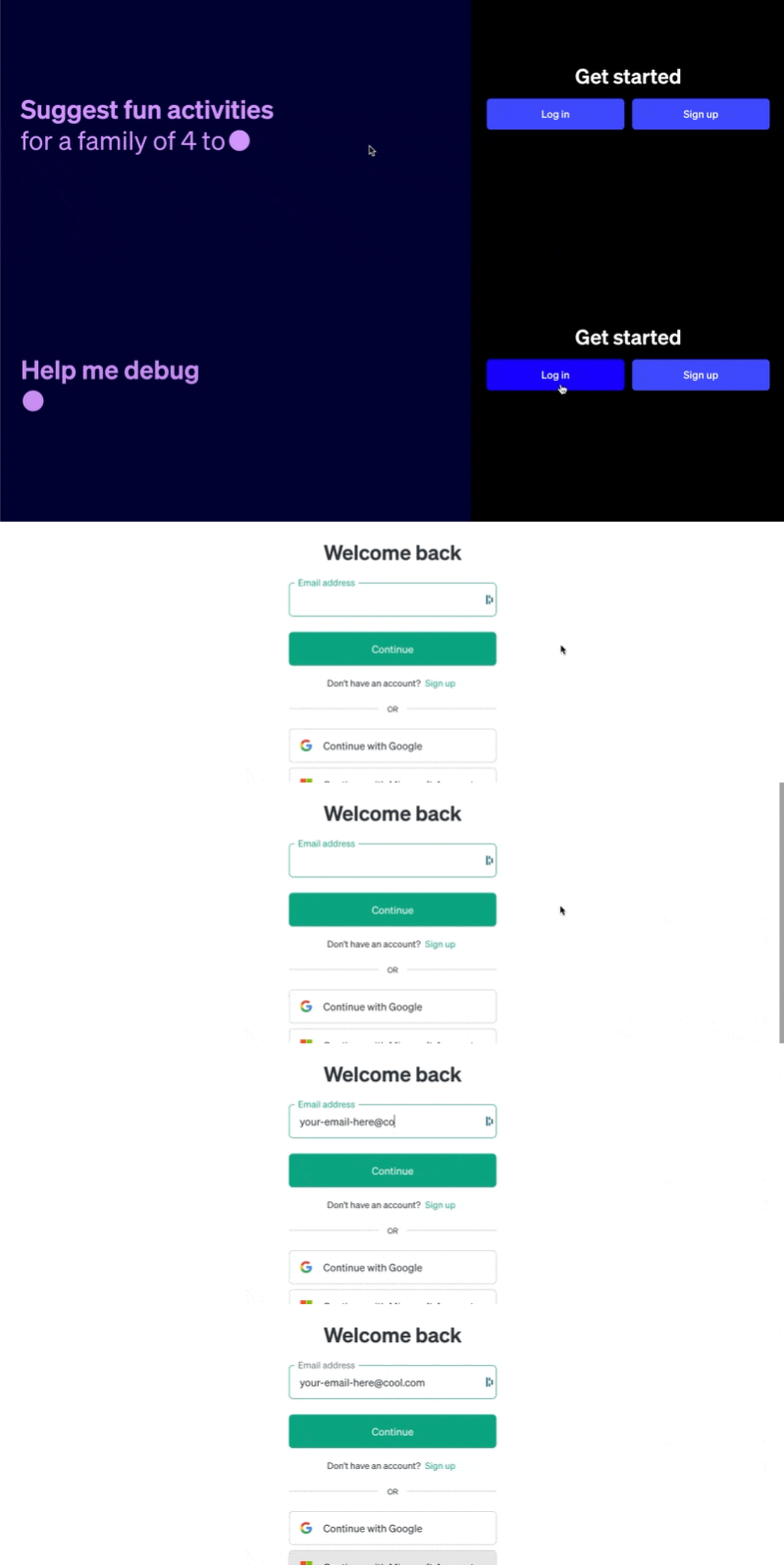
Fired up the site and logged in.

I started with the exact SQL from the previous post. Several of the things I wanted refactored immediately included:

  • I want to have the SERIAL data type changed to UUID.
  • I want the VARCHAR(255) changed to a VARCHAR(120)

I started off with this first refactoring by asking for the following via the Chat-GPT prompt.

For the following SQL, rewrite it so that all the SERIAL types are changed to UUID types.

CREATE TABLE "tenants" (
  "tenant_id" SERIAL PRIMARY KEY,
  "name" VARCHAR(255) NOT NULL,
  "created" TIMESTAMP DEFAULT (CURRENT_TIMESTAMP),
  "updated" TIMESTAMP DEFAULT (CURRENT_TIMESTAMP),
  "notes" TEXT,
  "message" TEXT
);

...all the other SQL here...

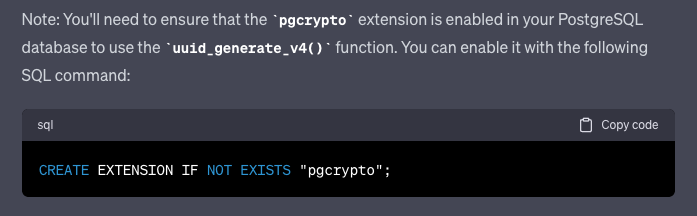
After about a minute it wrapped up doing the refactor, but something extra happened that I did not expect. As it did this, it had inferred that this was obviously a request that is PostgreSQL specific. Being such, it also swapped the default settings for the different identity columns and finished up the post with this.

That’s rather interesting, consider that one would indeed need to have pgcrypto installed to be able to setup identity columns like this "id" UUID PRIMARY KEY DEFAULT uuid_generate_v4(). A very useful addition! This AI thing might be useful yet!

Next up fired off the refactor to replace the VARCHAR(255) with VARCHAR(120) to see how that would unfold. The result was, simply put, the refactor that was requested. No extra extensions, suggestions, or otherwise, which in this case makes sense.

Genres, The Complexity and Heaviness of The Concept. #IYKYK

One of the things, among the bands table, I had added a column simply titled “genre”. After some thought I realized that this was a mistake! A big mistake for those that are interested in determining, to the Nth degree, what genre a particular album or song or band fits into. So I gave it some thought, and requested a refactor to the AI to see what I’d get.

My request read as

For the genres in the bands table, remove that and create a table for genres, with an elephant ear relationship back to itself to allow for a nested hierarchy of genre and sub-genres, then add the audit tables you've added for the other tables.

The result from that gave me the following CREATE TABLE addition to the overall DDL.

CREATE TABLE "genres" (
  "genre_id" UUID PRIMARY KEY DEFAULT uuid_generate_v4(),
  "parent_genre" UUID,
  "genre" VARCHAR(120),
  "created" TIMESTAMP DEFAULT (CURRENT_TIMESTAMP),
  "updated" TIMESTAMP DEFAULT (CURRENT_TIMESTAMP),
  "notes" TEXT,
  "message" TEXT
);

Simple, to the point, and exactly what I’d asked for. On this third refactor request, another perfect score. Next up, I needed to have some tables that would utilize a relationship to this particular table itself. I provided Chat GPT-4 the following request,

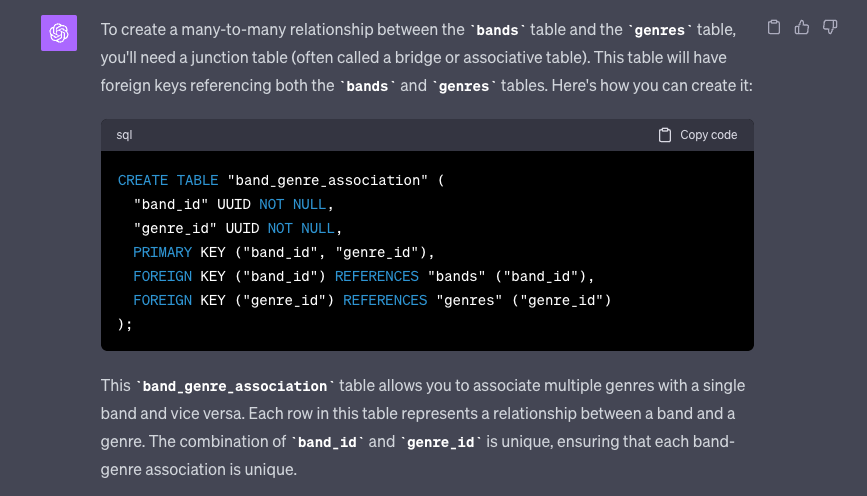
In above SQL, create a table for a many to many relationship between the 'bands' table and the 'genres' table so that a user can associate multiple genres to a single band and by relation many bands to a genre.

Again, the result was spot on.

I was a little hesitant since the table was just set out as an independent result. I decided to try asking for Chat GPT-4 to write out the full SQL with the added table.

In above SQL, write out all of the existing SQL and add a table for a many to many relationship between the 'bands' table and the 'genres' table so that a user can associate multiple genres to a single band and by relation many bands to a genre.

This worked, but for some odd reason I ended up with an additional rogue table called “band_genres” which only had the audit columns and absolutely nothing else in that table. I decided to ask for the same SQL result but exclude that table.

In the last answer, write out all the SQL again but exclude the "band_genres" table.

That got things cleaned back up and ready for the next refactor. For that, I requested the following list of changes. Largely to see what would happen if I asked for more than one thing to be done in a request.

Copy the previous SQL and print it out again, but make the following changes:

1. Add to the tenant table the following columns: organization, website, and founding_date with their pertinent data types.
2. Change the duration data type in the songs table to be of type int.
3. For the column songwriter in the songs table change it to relate by id to the band_members in a many to many table so that a song can have multiple writers.

With those changes in place I decided to really check on the validity of the SQL that Chat GPT-4 had written up. The end result was this SQL.

CREATE TABLE "tenants" (
  "tenant_id" UUID PRIMARY KEY DEFAULT uuid_generate_v4(),
  "name" VARCHAR(120) NOT NULL,
  "organization" VARCHAR(120),
  "website" VARCHAR(120),
  "founding_date" DATE,
  "created" TIMESTAMP DEFAULT (CURRENT_TIMESTAMP),
  "updated" TIMESTAMP DEFAULT (CURRENT_TIMESTAMP),
  "notes" TEXT,
  "message" TEXT
);

CREATE TABLE "users" (
  "user_id" UUID PRIMARY KEY DEFAULT uuid_generate_v4(),
  "tenant_id" UUID,
  "username" VARCHAR(120) NOT NULL,
  "password" VARCHAR(120) NOT NULL,
  "created" TIMESTAMP DEFAULT (CURRENT_TIMESTAMP),
  "updated" TIMESTAMP DEFAULT (CURRENT_TIMESTAMP),
  "notes" TEXT,
  "message" TEXT
);

CREATE TABLE "roles" (
  "role_id" UUID PRIMARY KEY DEFAULT uuid_generate_v4(),
  "tenant_id" UUID,
  "name" VARCHAR(120) NOT NULL,
  "can_add" BOOLEAN DEFAULT FALSE,
  "can_edit" BOOLEAN DEFAULT FALSE,
  "can_delete" BOOLEAN DEFAULT FALSE,
  "created" TIMESTAMP DEFAULT (CURRENT_TIMESTAMP),
  "updated" TIMESTAMP DEFAULT (CURRENT_TIMESTAMP),
  "notes" TEXT,
  "message" TEXT
);

CREATE TABLE "user_roles" (
  "user_id" UUID,
  "role_id" UUID,
  PRIMARY KEY ("user_id", "role_id")
);

CREATE TABLE "musicians" (
  "musician_id" UUID PRIMARY KEY DEFAULT uuid_generate_v4(),
  "tenant_id" UUID,
  "name" VARCHAR(120) NOT NULL,
  "date_of_birth" DATE,
  "biography" TEXT,
  "created" TIMESTAMP DEFAULT (CURRENT_TIMESTAMP),
  "updated" TIMESTAMP DEFAULT (CURRENT_TIMESTAMP),
  "notes" TEXT,
  "message" TEXT
);

CREATE TABLE "bands" (
  "band_id" UUID PRIMARY KEY DEFAULT uuid_generate_v4(),
  "tenant_id" UUID,
  "name" VARCHAR(120) NOT NULL,
  "formation_date" DATE,
  "country_of_origin" VARCHAR(120),
  "city_of_origin" VARCHAR(120),
  "active_status" BOOLEAN DEFAULT TRUE,
  "biography" TEXT,
  "website" VARCHAR(120),
  "social_media_links" TEXT,
  "label" VARCHAR(120),
  "discography" TEXT,
  "manager_name" VARCHAR(120),
  "contact_email" VARCHAR(120),
  "created" TIMESTAMP DEFAULT (CURRENT_TIMESTAMP),
  "updated" TIMESTAMP DEFAULT (CURRENT_TIMESTAMP),
  "notes" TEXT,
  "message" TEXT
);

CREATE TABLE "genres" (
  "genre_id" UUID PRIMARY KEY DEFAULT uuid_generate_v4(),
  "parent_genre" UUID,
  "genre" VARCHAR(120),
  "created" TIMESTAMP DEFAULT (CURRENT_TIMESTAMP),
  "updated" TIMESTAMP DEFAULT (CURRENT_TIMESTAMP),
  "notes" TEXT,
  "message" TEXT
);

CREATE TABLE "band_members" (
  "band_member_id" UUID PRIMARY KEY DEFAULT uuid_generate_v4(),
  "band_id" UUID,
  "musician_id" UUID,
  "start_date" DATE,
  "end_date" DATE,
  "contribution" TEXT,
  "created" TIMESTAMP DEFAULT (CURRENT_TIMESTAMP),
  "updated" TIMESTAMP DEFAULT (CURRENT_TIMESTAMP),
  "notes" TEXT,
  "message" TEXT
);

CREATE TABLE "albums" (
  "album_id" UUID PRIMARY KEY DEFAULT uuid_generate_v4(),
  "band_id" UUID,
  "title" VARCHAR(120) NOT NULL,
  "release_date" DATE,
  "created" TIMESTAMP DEFAULT (CURRENT_TIMESTAMP),
  "updated" TIMESTAMP DEFAULT (CURRENT_TIMESTAMP),
  "notes" TEXT,
  "message" TEXT
);

CREATE TABLE "songs" (
  "song_id" UUID PRIMARY KEY DEFAULT uuid_generate_v4(),
  "album_id" UUID,
  "title" VARCHAR(120) NOT NULL,
  "duration" INT,
  "created" TIMESTAMP DEFAULT (CURRENT_TIMESTAMP),
  "updated" TIMESTAMP DEFAULT (CURRENT_TIMESTAMP),
  "notes" TEXT,
  "message" TEXT
);

-- New table for many-to-many relationship between bands and genres
CREATE TABLE "band_genre_association" (
  "band_id" UUID REFERENCES "bands" ("band_id"),
  "genre_id" UUID REFERENCES "genres" ("genre_id"),
  PRIMARY KEY ("band_id", "genre_id")
);

-- New table for many-to-many relationship between songs and band_members (songwriters)
CREATE TABLE "songwriters_association" (
  "song_id" UUID REFERENCES "songs" ("song_id"),
  "band_member_id" UUID REFERENCES "band_members" ("band_member_id"),
  PRIMARY KEY ("song_id", "band_member_id")
);

ALTER TABLE "users" ADD FOREIGN KEY ("tenant_id") REFERENCES "tenants" ("tenant_id");

ALTER TABLE "roles" ADD FOREIGN KEY ("tenant_id") REFERENCES "tenants" ("tenant_id");

ALTER TABLE "user_roles" ADD FOREIGN KEY ("user_id") REFERENCES "users" ("user_id");

ALTER TABLE "user_roles" ADD FOREIGN KEY ("role_id") REFERENCES "roles" ("role_id");

ALTER TABLE "musicians" ADD FOREIGN KEY ("tenant_id") REFERENCES "tenants" ("tenant_id");

ALTER TABLE "bands" ADD FOREIGN KEY ("tenant_id") REFERENCES "tenants" ("tenant_id");

ALTER TABLE "band_members" ADD FOREIGN KEY ("band_id") REFERENCES "bands" ("band_id");

ALTER TABLE "band_members" ADD FOREIGN KEY ("musician_id") REFERENCES "musicians" ("musician_id");

ALTER TABLE "albums" ADD FOREIGN KEY ("band_id") REFERENCES "bands" ("band_id");

ALTER TABLE "songs" ADD FOREIGN KEY ("album_id") REFERENCES "albums" ("album_id");

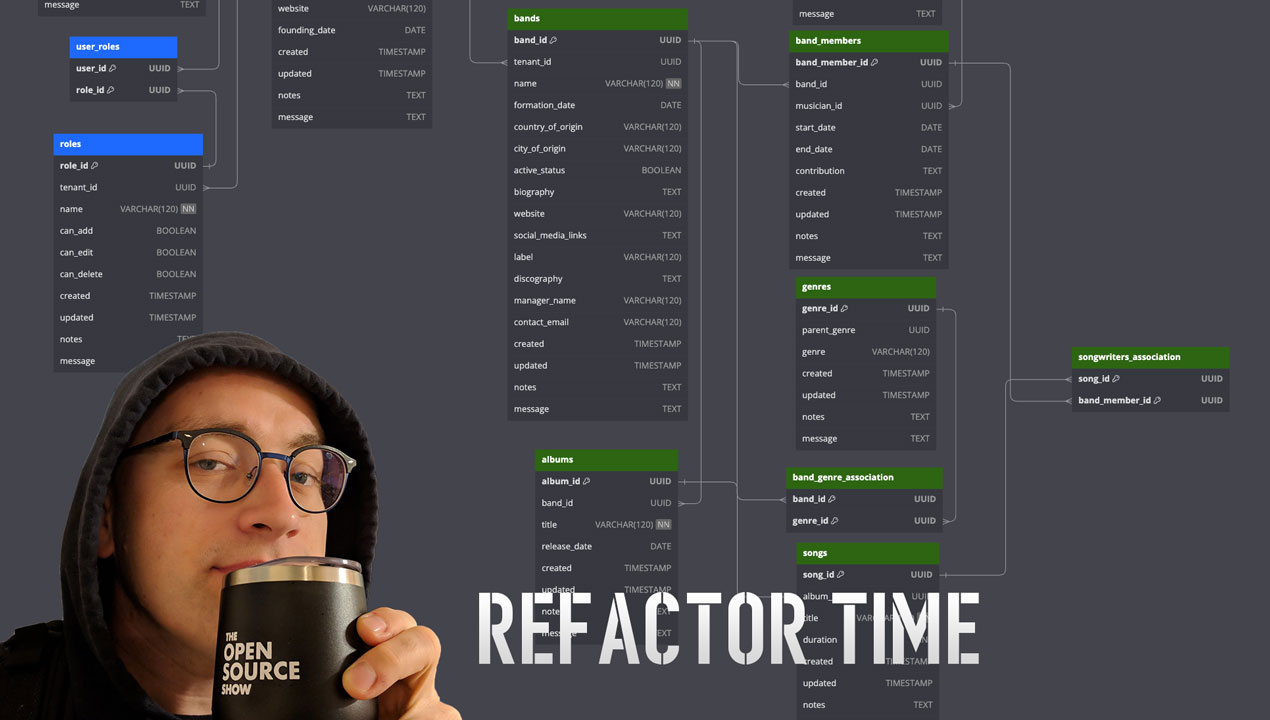
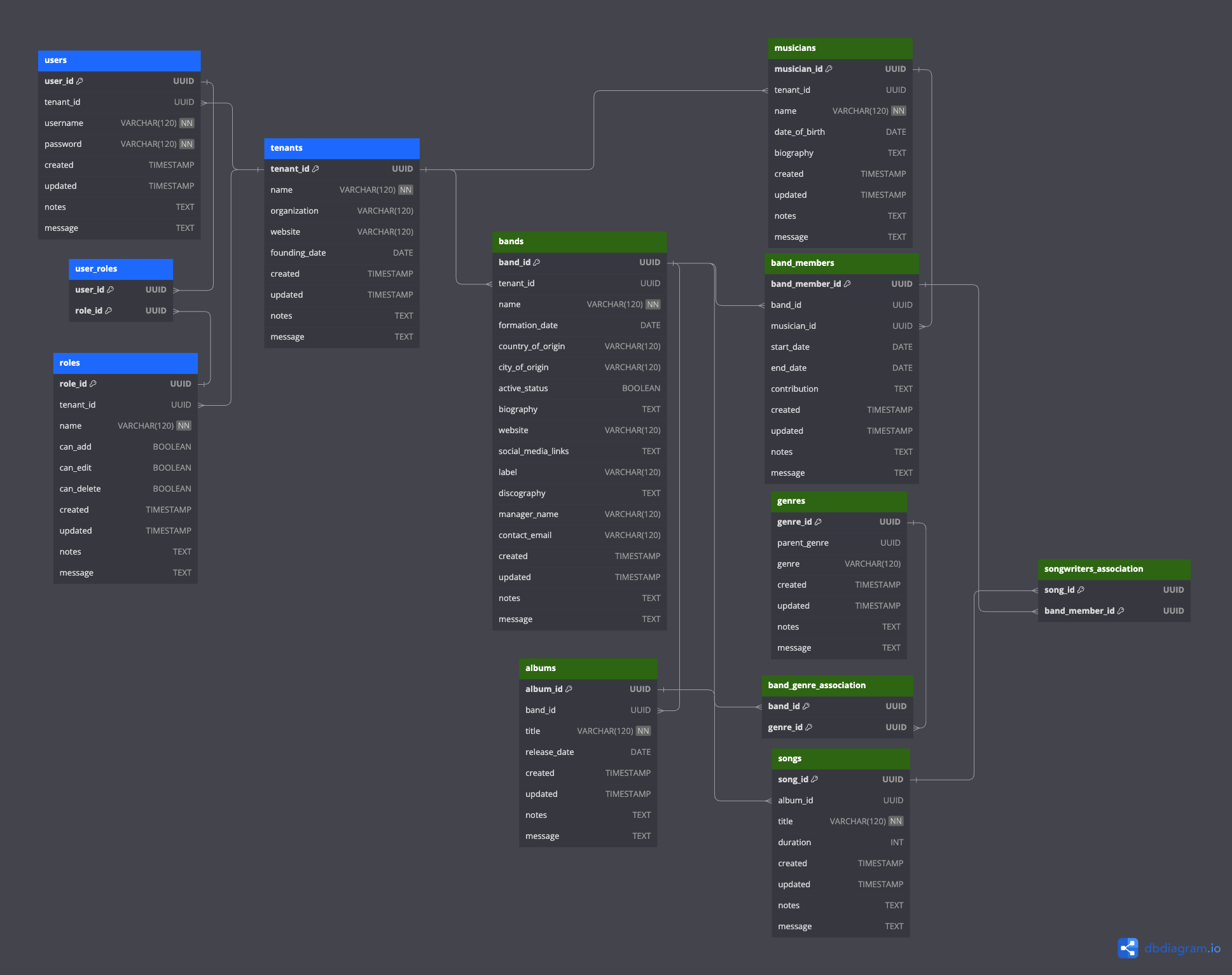
I imported this back into dbdiagram.io and everything checked out, test validation passed and the import succeeded. After tweaking the colors of the table header titles in the entity diagram for the tenant and user tables and then the business domain, i.e. the music album collection tables, things looked like this.

Got any other suggestions? Additions, removals, edits, or otherwise? Let me know.

With that, the next post I’ll dive into building out an API for this particular database. Stay tuned, be sure to subscribe here to catch any new updates!

Building a Multi-Tenant Music Collector’s Database

UPDATE: A subsequent post is available in refactoring this work with Chat GTP-4.

Ok, I’ve gotten deep into collecting music again, after just doing the *streaming* thing for a decade plus. In this deep dive back into music and playing, composing, collecting, reactions, reviews, live shows, and related worlds coming together I’ve found it might be interesting to put together a multi-tenant database to start collecting all my effort’s collateral data together. This, is the beginning of that journey.

I’ve got some tunes cranked as I’m all set to dive deep into this, let’s get it done!

Music has always been a significant part of my life. From the melodies that accompany my daily routines to the anthems of my most memorable moments, it’s been a constant. As my collection grew, I realized I needed a better way to organize it. That’s when I stumbled upon the concept of multi-tenancy databases and decided to give it a shot with PostgreSQL. Here’s my experience.

Why Did I Choose This Database?

My music collection started with a few albums but quickly expanded to encompass various genres, artists, and eras. I needed a structured way to keep track of everything. The multi-tenant music collector’s database seemed like the perfect solution because:

  • Structure: It offers a well-defined schema that can capture everything I want.
  • Collaboration: I can share my collection with friends and see their contributions.
  • Audit: I can track every change, which is especially handy when multiple people are adding to the database.
  • Scalability: If I ever decide to turn this into a service, this setup can easily serve multiple collectors.

What Did I Learn About Multi-Tenant Systems?

Before diving in, I had to understand what multi-tenancy meant. It’s a system where a single instance of software can serve multiple users, but each user’s data remains isolated and private. The shared database model, where all users share the same database but have their data separated by a unique identifier, seemed like a straightforward approach.

Setting Up the Database:

Step 1: Install Your Database (or get one running)

Step 2: Create a New Database

Open the database (I’ll be using PostgreSQL this time) and create a new database for our music collector’s platform:

CREATE music_collectors;

Now I switch over to be sure I’m using that database specifically.

USE music_collectors;

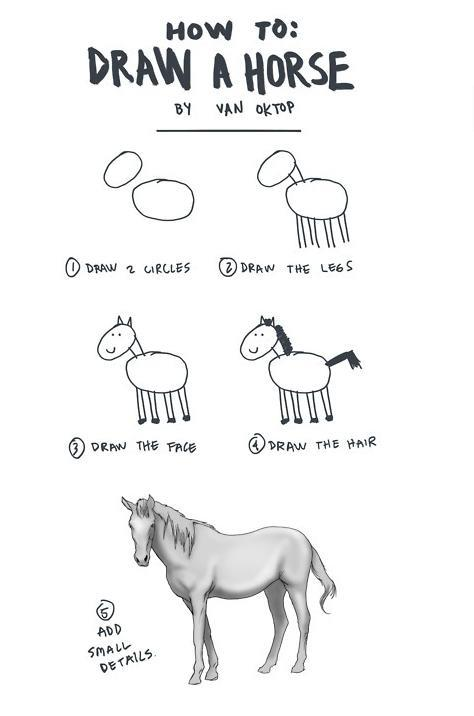
Step 3: Create the Horse

How to draw a horse!

Ya know, like this meme.

We’re at the “add small details” part.

So with that, here is the first draft of “small details”. I’ll elaborate on them after the following SQL.

-- Tenant table
CREATE TABLE tenants (
    tenant_id SERIAL PRIMARY KEY,
    name VARCHAR(255) NOT NULL,
    created TIMESTAMP DEFAULT CURRENT_TIMESTAMP,
    updated TIMESTAMP DEFAULT CURRENT_TIMESTAMP,
    notes TEXT,
    message TEXT
);

-- User table
CREATE TABLE users (
    user_id SERIAL PRIMARY KEY,
    tenant_id INT REFERENCES tenants(tenant_id),
    username VARCHAR(255) NOT NULL,
    password VARCHAR(255) NOT NULL, -- Hashed password
    created TIMESTAMP DEFAULT CURRENT_TIMESTAMP,
    updated TIMESTAMP DEFAULT CURRENT_TIMESTAMP,
    notes TEXT,
    message TEXT
);

-- Roles table
CREATE TABLE roles (
    role_id SERIAL PRIMARY KEY,
    tenant_id INT REFERENCES tenants(tenant_id),
    name VARCHAR(255) NOT NULL,
    can_add BOOLEAN DEFAULT FALSE,
    can_edit BOOLEAN DEFAULT FALSE,
    can_delete BOOLEAN DEFAULT FALSE,
    created TIMESTAMP DEFAULT CURRENT_TIMESTAMP,
    updated TIMESTAMP DEFAULT CURRENT_TIMESTAMP,
    notes TEXT,
    message TEXT
);

-- User roles mapping table
CREATE TABLE user_roles (
    user_id INT REFERENCES users(user_id),
    role_id INT REFERENCES roles(role_id),
    PRIMARY KEY (user_id, role_id)
);

-- Musician table
CREATE TABLE musicians (
    musician_id SERIAL PRIMARY KEY,
    tenant_id INT REFERENCES tenants(tenant_id),
    name VARCHAR(255) NOT NULL,
    date_of_birth DATE,
    biography TEXT,
    created TIMESTAMP DEFAULT CURRENT_TIMESTAMP,
    updated TIMESTAMP DEFAULT CURRENT_TIMESTAMP,
    notes TEXT,
    message TEXT
);

-- Band table
CREATE TABLE bands (
    band_id SERIAL PRIMARY KEY,
    tenant_id INT REFERENCES tenants(tenant_id),
    name VARCHAR(255) NOT NULL,
    formation_date DATE,
    genre VARCHAR(255),
    country_of_origin VARCHAR(255),
    city_of_origin VARCHAR(255),
    active_status BOOLEAN DEFAULT TRUE,
    biography TEXT,
    website VARCHAR(255),
    social_media_links TEXT,
    label VARCHAR(255),
    discography TEXT,
    manager_name VARCHAR(255),
    contact_email VARCHAR(255),
    created TIMESTAMP DEFAULT CURRENT_TIMESTAMP,
    updated TIMESTAMP DEFAULT CURRENT_TIMESTAMP,
    notes TEXT,
    message TEXT
);

-- Band members table
CREATE TABLE band_members (
    band_member_id SERIAL PRIMARY KEY,
    band_id INT REFERENCES bands(band_id),
    musician_id INT REFERENCES musicians(musician_id),
    start_date DATE,
    end_date DATE,
    contribution TEXT,
    created TIMESTAMP DEFAULT CURRENT_TIMESTAMP,
    updated TIMESTAMP DEFAULT CURRENT_TIMESTAMP,
    notes TEXT,
    message TEXT
);

-- Albums table
CREATE TABLE albums (
    album_id SERIAL PRIMARY KEY,
    band_id INT REFERENCES bands(band_id),
    title VARCHAR(255) NOT NULL,
    release_date DATE,
    created TIMESTAMP DEFAULT CURRENT_TIMESTAMP,
    updated TIMESTAMP DEFAULT CURRENT_TIMESTAMP,
    notes TEXT,
    message TEXT
);

-- Songs table
CREATE TABLE songs (
    song_id SERIAL PRIMARY KEY,
    album_id INT REFERENCES albums(album_id),
    title VARCHAR(255) NOT NULL,
    songwriter VARCHAR(255),
    duration TIME,
    created TIMESTAMP DEFAULT CURRENT_TIMESTAMP,
    updated TIMESTAMP DEFAULT CURRENT_TIMESTAMP,
    notes TEXT,
    message TEXT
);

That creates a database with an entity diagram that would look like this.
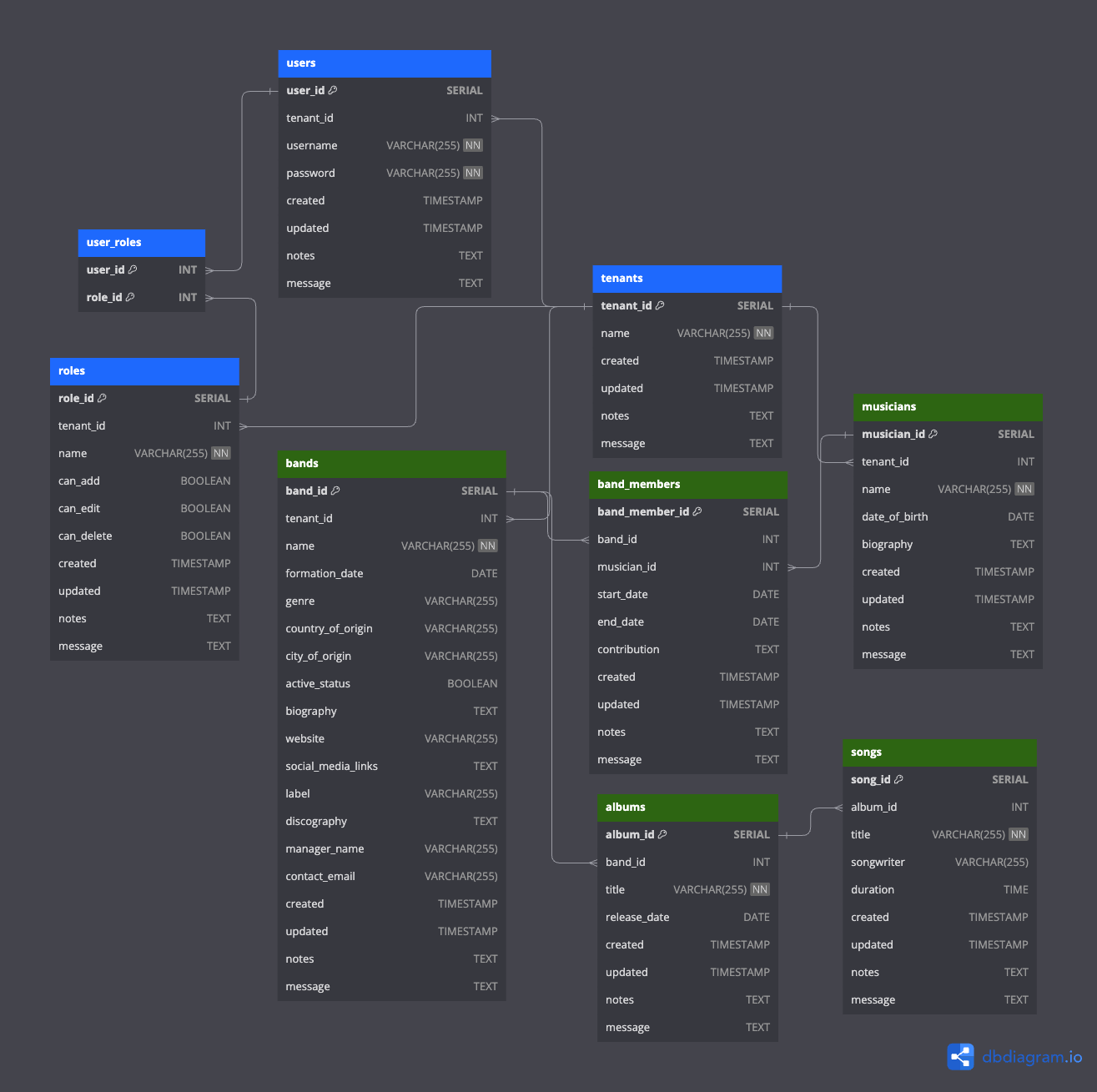
The Collector’s Database, created with dbdiagram.io.

This schema provides a foundation for a multi-tenancy system using the shared database model. Each table has a tenant_id column to segregate data by tenant. The users and roles tables allow for user management and role-based permissions. The music-related tables (musicians, bands, band_members, albums, and songs) capture the details you specified. The default columns for audit purposes (created, updated, notes, and message) are also included in each table.

Let’s dive into the details of each table and their respective fields in the proposed multi-tenancy music collector’s database:

1. tenants Table:

  • Purpose: To store information about each tenant (collector) in the multi-tenant system.
    • tenant_id: A unique identifier for each tenant.
    • name: The name of the tenant or collector.
    • created, updated, notes, message: Default audit columns to track creation, updates, and additional notes or messages.

2. users Table:

  • Purpose: To manage the users associated with each tenant.
    • user_id: A unique identifier for each user.
    • tenant_id: The tenant to which the user belongs.
    • username: The username for login purposes.
    • password: The hashed password for the user.
    • created, updated, notes, message: Default audit columns.

3. roles Table:

  • Purpose: To define different roles and their permissions for users within a tenant.
    • role_id: A unique identifier for each role.
    • tenant_id: The tenant to which the role belongs.
    • name: The name of the role (e.g., “Admin”, “Editor”).
    • can_add, can_edit, can_delete: Boolean flags to determine the permissions associated with the role.
    • created, updated, notes, message: Default audit columns.

4. user_roles Table:

  • Purpose: To map users to their respective roles.
    • user_id: Reference to the user.
    • role_id: Reference to the role.

5. musicians Table:

  • Purpose: To store details about individual musicians.
    • musician_id: A unique identifier for each musician.
    • tenant_id: The tenant to which the musician data belongs.
    • name: The name of the musician.
    • date_of_birth: The birth date of the musician.
    • biography: A brief biography of the musician.
    • created, updated, notes, message: Default audit columns.

6. bands Table:

  • Purpose: To store comprehensive data about musical bands.
    • band_id: A unique identifier for each band.
    • tenant_id: The tenant to which the band data belongs.
    • name: The name of the band.
    • formation_date: The date when the band was formed.
    • genre: The musical genre of the band.
    • country_of_origin, city_of_origin: Origin details of the band.
    • active_status: Boolean flag indicating if the band is currently active.
    • biography: A brief biography of the band.
    • website: The official website of the band.
    • social_media_links: Links to the band’s social media profiles.
    • label: The music label associated with the band.
    • discography: A list of albums released by the band.
    • manager_name, contact_email: Contact details for the band’s management.
    • created, updated, notes, message: Default audit columns.

7. band_members Table:

  • Purpose: To store information about the members of a band and their contributions.
    • band_member_id: A unique identifier for each band member entry.
    • band_id: Reference to the band.
    • musician_id: Reference to the musician who is a member of the band.
    • start_date, end_date: The duration of the musician’s membership in the band.
    • contribution: Details about the musician’s contribution to the band (e.g., instrument played, songs written).
    • created, updated, notes, message: Default audit columns.

8. albums Table:

  • Purpose: To store details about musical albums.
    • album_id: A unique identifier for each album.
    • band_id: Reference to the band that released the album.
    • title: The title of the album.
    • release_date: The date when the album was released.
    • created, updated, notes, message: Default audit columns.

9. songs Table:

  • Purpose: To store details about individual songs in albums.
    • song_id: A unique identifier for each song.
    • album_id: Reference to the album containing the song.
    • title: The title of the song.
    • songwriter: The songwriter of the song.
    • duration: The duration of the song.
    • created, updated, notes, message: Default audit columns.

I’ve crafted a shared database model that’s both efficient and ensures data isolation (I hope, notice any mistakes here?). Let’s break it down.

The Tenancy Magic:

When I set out to design this, my primary goal was to ensure that each tenant’s data remains isolated, even though they all share the same database. The magic lies in a simple yet powerful concept: the tenant_id.

The tenants Table:

This is where it all begins. The tenants table is the cornerstone of our multi-tenancy system. Each tenant gets a unique tenant_id which acts as their unique identifier in our shared database.

  • tenant_id: This is the golden ticket. Every piece of data that belongs to a tenant will be tagged with this ID. It ensures that Tenant A’s data is never mixed up with Tenant B’s data.
  • name: Just the name of the tenant or collector. Simple, right?
  • created, updated, notes, message: These are my standard audit columns. They help track when data was added or changed and by whom.

The users and roles Tables:

Now, here’s where things get interesting. Each tenant can have multiple users, and each user can have specific roles. But how do we ensure that a user from Tenant A doesn’t accidentally get access to Tenant B’s data? You guessed it: the tenant_id.

Both the users and roles tables have a tenant_id column. This ensures that users and roles are always associated with a specific tenant. When a user logs in, we know exactly which tenant they belong to, and we can tailor their experience accordingly.

The Data Isolation:

Every time we add a new table to our database, whether it’s for storing details about bands, musicians, albums, or songs, we always include the tenant_id column. This acts as a filter. When Tenant A wants to fetch their list of bands, we use their tenant_id to filter out the bands that belong to them and only them. Tenant B, with a different tenant_id, will get their own separate list. It’s like each tenant has their own private room in a large music mansion.

The Heartbeat: musicians Table:

Music starts with the artist, and that’s precisely where our journey begins. The musicians table is where we store the soul of our collection.

  • musician_id: Every musician gets a unique ID. Think of it as their backstage pass in our database.
  • name: The name of the musician. From Beethoven to Bowie, every name has a story.
  • date_of_birth: A little trip down memory lane to when our stars were born.
  • biography: Dive deep into their life, their struggles, their triumphs. Every note they play has a story, and this is where we tell it.

The Ensemble: bands Table:

Ah, the bands! Where musicians come together to create magic. The bands table is where we capture the essence of these musical groups.

  • band_id: The unique identifier for each band. It’s like their own VIP lounge access in our database.
  • name: The name of the band. From “The Beatles” to “Nirvana”, every band has its own legacy.
  • formation_date, genre, country_of_origin, city_of_origin: Dive into the roots of the band. Where did they start? What’s their style? Every detail adds a note to their symphony.
  • active_status, biography, website, social_media_links: Stay updated! Are they still rocking the stages? Want to know more about their journey? Or maybe just stalk them on social media? We’ve got you covered.

The Crew: band_members Table:

Behind every great band are its members. The band_members table is where we celebrate these individual stars and their contributions.

  • band_member_id: A unique ID for each band member’s tenure in a band.
  • start_date, end_date: When did they join the band? Did they go solo or join another ensemble? Track their journey here.
  • contribution: Was it the mesmerizing guitar solos or the heart-touching lyrics? Know what they brought to the table.

The Masterpieces: albums and songs Tables:

Music is all about the tunes, and that’s what the albums and songs tables are all about.

  • album_id, title, release_date: Every album is a journey, a story. From its title to its release, we capture its essence.
  • song_id, title, songwriter, duration: Dive into individual songs. Who penned those lyrics? How long does the magic last? It’s all here.

Wrapping Up:

Building this musical universe was like composing a symphony. Every table, every field, is a note that adds depth to our music collection. Whether you’re a seasoned collector or just starting out, this database is your ticket to a world of musical wonders. So, put on your headphones, dive into the data, and let the music take you away!

Until the next jam session, keep thrashing! 🤘🏻

Normalization in Relational Databases

This is a continuation of my posts on relational databases, started here. Previous posts on this theme, “Data Modeling“, “Let’s Talk About Database Schema“, “The Exasperating Topic of Database Indexes“, “The Keys & Relationships of Relational Databases“, and “Relational Database Query Optimization“.

Consider you’re a die-hard fan of progressive death metal, with a particular affinity for bands like Allegaeon. Over the years, you’ve accumulated a vast collection of CDs, vinyls, and other memorabilia.

Your collection has grown so much that you decide to document every item meticulously. Each piece of memorabilia contains information about the album, track titles, band members, and so forth. If you scribbled down every detail in one continuous list, you’d end up with a lot of repeated information. For instance, both “Proponent for Sentience” and “Formshifter” would mention the same band members like Riley McShane and Michael Stancel.

Normalization is akin to setting up separate lists or sections in your documentation. One section purely for “Band Members” where you detail members of Allegaeon over time. Another section for “Albums”, where instead of listing band members all over again, you simply refer back to the “Band Members” section. This kind of organization cuts down redundancy and ensures if, say, a band member leaves, you have only one spot to update.

Denormalization in a Relational Database:

Now, picture this: You’re hosting a progressive death metal night, and you want to present a quick overview of Allegaeon’s evolution to your guests. Flipping between multiple sections to gather scattered information isn’t efficient.

Denormalization in this context is like creating a special presentation or compilation where you might reintegrate some of the previously separated data. You might have a slide or page dedicated to “Proponent for Sentience”, and on that very slide, you’d list the band members, even though they also appear elsewhere in your presentation. This redundancy ensures you and your audience can grasp the full context without bouncing around.

In database terms, denormalization might mean merging tables or repeating certain data elements to make data retrieval faster and queries more straightforward, even at the cost of some redundancy.

The world of relational databases, much like the intricate realms of progressive death metal, requires a delicate balance. Whether you’re structuring data or laying out a metal presentation, the aim is to find harmony between efficiency and accessibility.

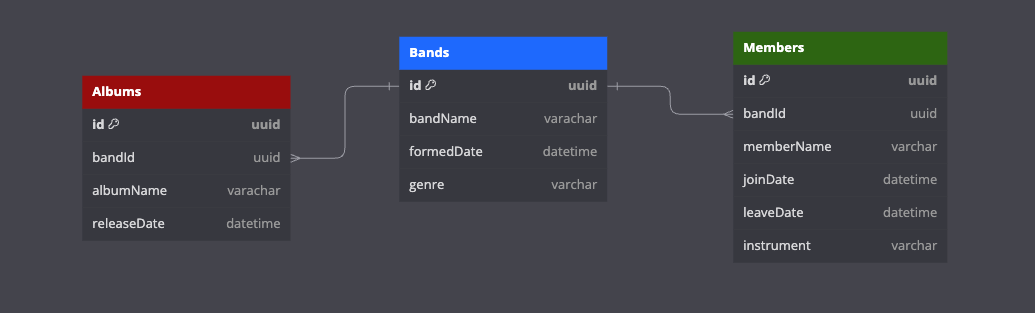
Certainly! For a normalized database design to store music records like Allegaeon, we would generally start by identifying the entities and their relationships. Here’s a basic normalized design:

Let’s create these tables in ANSI SQL:

CREATE TABLE Bands (
  id CHAR(36) PRIMARY KEY,
  bandName VARCHAR(255),
  formedDate TIMESTAMP,
  genre VARCHAR(255)
);

CREATE TABLE Albums (
  id CHAR(36) PRIMARY KEY,
  bandId CHAR(36) REFERENCES Bands(id),
  albumName VARCHAR(255),
  releaseDate TIMESTAMP
);

CREATE TABLE Members (
  id CHAR(36) PRIMARY KEY,
  bandId CHAR(36) REFERENCES Bands(id),
  memberName VARCHAR(255),
  joinDate TIMESTAMP,
  leaveDate TIMESTAMP,
  instrument VARCHAR(255)
);

With each database there is a specific way to setup a UUID as the id of a table, so for the example above you’d swap the CHAR(36) out with the appropriate UUID type, for example in PostgreSQL it is just uuid and SQL Server would be guid, and so on for the other databases.

With this structure:

  • Each band can have multiple albums, so Albums has a foreign key (BandID) pointing to Bands.
  • Each band can also have multiple members over time, so BandMembers has a foreign key (BandID) pointing to Bands.

This design ensures data integrity, reduces redundancy, and provides a structured way to query the information. For instance, you can easily fetch all albums by a specific band, or all members of a band during a specific time frame.

Ah, naturally, in our infinite wisdom, we thought it prudent to represent the rich and multifaceted world of metal with a single, simplistic “genre” column. Because, you see, who needs the nuanced classifications of ‘sub-genre’ when capturing the vast and intricate tapestry of metal music? Clearly, the myriad distinctions between melodic death, tech death, prog death, and their countless brethren could all just be casually lumped under ‘death metal’, right? But fret not; this was merely an attempt to keep our example unencumbered, lest we overwhelm with the profound complexities of metal taxonomy!

Let’s talk Top 5s of Normalizing & Denormalizing

Normalizing data in a relational database is paramount, and here are the top 5 reasons why:

  1. Eliminate Data Redundancy: By ensuring that data is stored in its most granular form and only once, normalization reduces and often eliminates duplication. This not only conserves storage space but also ensures that updates made to data in one location don’t need to be replicated elsewhere.
  2. Data Integrity and Accuracy: A well-normalized database structure ensures that data dependencies are logical and not just based on the application needs. This means that the database remains accurate and consistent across changes and is less prone to anomalies.
  3. Simplify Queries: A normalized database structure often translates to simpler SQL queries. The structured organization means you won’t be trawling through repetitious data or joining superfluous tables, making data retrieval more efficient.
  4. Flexibility for Future Changes: A normalized design is inherently more adaptable. If business requirements evolve or if new data relationships emerge, a normalized database can accommodate these changes with minimal disruptions.
  5. Consistent Data Relationships: Through the process of normalization, clear relationships between tables using primary and foreign keys are established. This enforces referential integrity, ensuring that the relationships between datasets are maintained consistently throughout the database.

While normalization is often emphasized, there are legitimate reasons to consider denormalization in certain scenarios:

  1. Improved Query Performance: Denormalization can streamline data retrieval processes. By reducing the need for complex joins and aggregations, queries can run faster, which is particularly beneficial in databases with high read operations or reporting databases where query speed is paramount.
  2. Simplified Data Retrieval: Denormalized databases can lead to simpler and more intuitive data retrieval, making it easier for end-users, developers, or applications to access and comprehend the data. This is especially true for systems where quick analytics or reporting is essential.
  3. Reduced Complexity for Certain Applications: Some applications, particularly OLAP (Online Analytical Processing) systems, are better suited to a denormalized schema. Denormalization can offer a schema design that better aligns with an application’s specific data access patterns.
  4. Buffering Against Changes: Denormalization can provide a stable schema layout even if underlying normalized data changes. By denormalizing, certain systems can continue functioning without the need for immediate changes when the base data structure undergoes modifications.
  5. Optimization for Write Operations: While normalization often emphasizes making write operations efficient by reducing redundancy, there are scenarios where frequent, complex joins in write-heavy operations can hinder performance. Denormalizing can balance this out by optimizing specific write operations.

However, it’s crucial to approach denormalization judiciously. Introducing redundancy can lead to anomalies and can increase the complexity of update operations. It’s always a balance, and the decision to denormalize should be based on clear requirements and thorough analysis.

Summary

In the realm of relational databases, the decision to normalize or denormalize data revolves around striking a balance between storage efficiency, data integrity, and query performance. Normalization, which involves organizing data to reduce redundancy and improve integrity, is often the cornerstone of database design, ensuring that data dependencies are logical and consistent. On the other hand, denormalization, the intentional introduction of redundancy into a database, aims to boost query performance and simplify data retrieval, often at the cost of storage efficiency and potential update anomalies. While normalization offers a solid foundation, there are valid scenarios where denormalization might be beneficial, particularly in databases that prioritize read-heavy operations or specific application data access patterns. Ultimately, the choice between these approaches should hinge on a careful assessment of the database’s primary function and the specific needs it aims to address.