Excel Helper Utilities Library Part Two

In the last entry I covered a range of utility class methods including appropriate unit tests.  Today I want to cover the first steps into the twisted world of Excel Development with C#.  Note, there are many things I probably will not mention that are pivotal to this code working.  Namely the order in which Excel objects & framework interfaces and components are instantiated are of massive importance within managed code.  So if you are following along, first do the exact example here and then step on to changes.  That way you will have working code before arbitrarily having non-working code.

As always, tests are first.  In this entry I will actually step from test, to code, then green light the test for each part versus writing all the tests and then working through the methods.  That way I can cover each method and the purpose of the method.
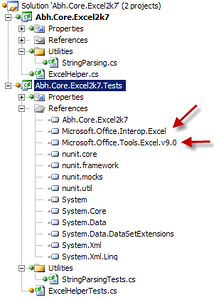
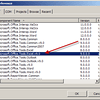
Before even jumping straight into tests we will need to add two specific assemblies that are needed to test Excel appropriately;  Microsoft.Office.Interop.Excel and Microsoft.Office.Tools.Excel.v9.0.  (Click the images to see larger images)

Now to get started with Excel unit tests, we really do need to use the Excel Assemblies we’ve added because mocking just doesn’t cut it.  Because of the legacy code & other such droves of complexities, it is extremely hard to really mock accurately.  One really needs to know when the actual application is behaving appropriately under load & use from software written to use it.  With that said, here’s my first few tests & setup code.

I start out by creating the test class and creating a public property to act for all tests as the actual Excel Application under test.

[TestFixture]
public class ExcelHelperTests
{
    public Application ExcelApplication { get; set; }

Next I create two tests for setup and teardown of the Excel Application object.  In addition to the basic Excel Application object, one thing I have learned about Excel from experience, is that one needs to go ahead and immediately add a workbook.  If there is no workbook, Excel can throw all sorts of odd errors that provide very little insight into what is going on.  So just remove that possibility by adding that default workbook.

[TestFixtureSetUp]
public void CreateExcelAppAppropriately()
{
    ExcelApplication = new Application();
    ExcelApplication.Workbooks.Add(Type.Missing);
    ExcelApplication.Visible = true;
}
[TestFixtureTearDown]
public void QuitExcelAppAppropriately()
{
    foreach (Workbook workbook in ExcelApplication.Workbooks)
    {
        workbook.Close(false, false, Type.Missing);
    }
    ExcelApplication.Quit();
}

Now that this is setup I can really test how the class will react and behave under test with Excel.  Just to make sure, I verify that the appropriate Excel Application object is created and has a single workbook that was added in the fixture setup.

[Test]
public void InitializeDefaultWorkbook()
{
    Assert.GreaterOrEqual(1, ExcelApplication.Workbooks.Count);
}

Next on the list is finally getting to the real nitty gritty of the Excel Helper class I’m creating.  My first test to begin this class is as follows.

[Test]
public void ExcelHelperInstantiation()
{
    var excelHelper = new ExcelHelper(ExcelApplication);
    Assert.IsNotNull(excelHelper);
    Assert.IsNotNull(excelHelper.ExcelApplication);
}

With these tests throwing errors I’m now ready to add my initial class skeleton.

/// <summary>
/// This class provides helper utility methods for Excel 2007 that cover common
/// needs such as creating a new worksheet, or getting an insantiated instance
/// of an existing worksheet.
/// </summary>
public class ExcelHelper
{
    /// <summary>
    /// This class has a single constructor used to
    /// setup the needed Microsoft.Office.Interop.Excel.Application
    /// object for use.
    /// </summary>
    /// <param name="excelApplication">Pass the active Excel Application
    /// object.</param>
    public ExcelHelper(Application excelApplication)
    {
        ExcelApplication = excelApplication;
    }
    /// <summary>
    /// This property is set to the active application the class
    /// executes methods against.
    /// </summary>
    public Application ExcelApplication { get; set; }
}

Run the test now and you should get a green light.  Moving along I added a test for the first method I want, a way to retrieve a Worksheet that already exists in Excel.  First my test looks something like this.

[Test]
public void GetWorksheet()
{
    var newWorksheet = ExcelApplication.Worksheets.Add(Type.Missing, Type.Missing, Type.Missing,
                                                             Type.Missing) as Worksheet;
    const string newWorksheetName = "UniqueName";
    newWorksheet.Name = newWorksheetName;
    Worksheet foundNewWorksheet = new ExcelHelper(ExcelApplication).GetWorksheet(newWorksheetName);
    Assert.IsNotNull(foundNewWorksheet);
    Assert.AreEqual(foundNewWorksheet.Name, newWorksheet.Name);
}

I get a red light and then implement the code to return a Worksheet Object based on the passed in worksheet name.  It fails, since the method isn’t created, so I create the method.

/// <summary>
/// This method retrieves a specific worksheet by name.
/// </summary>
/// <param name="worksheetName">Pass the name of the
/// worksheet to retrieve.</param>
/// <returns>The Worksheet Object of the requested
/// worksheet, or if not found null.</returns>
public Worksheet GetWorksheet(string worksheetName)
{
    Worksheet foundSheet = null;
    foreach (Worksheet sheet in ExcelApplication.Worksheets)
    {
        if (sheet.Name == worksheetName)
            foundSheet = sheet;
    }
    return foundSheet;
}

Next test is for creating a new Worksheet, and adding it to the Excel Workbook.

[Test]
public void NewWorksheet()
{
    const string newWorksheetName = "UniqueName";
    new ExcelHelper(ExcelApplication).NewWorksheet(newWorksheetName);
    bool foundWorksheet = false;
    foreach (Worksheet worksheet in ExcelApplication.Worksheets)
    {
        if(worksheet.Name == newWorksheetName)
            foundWorksheet = true;
    }
    Assert.IsTrue(foundWorksheet);
}

Red lighted, so I add the method.

/// <summary>
/// This method creates a new worksheet with the name
/// specified.
/// </summary>
/// <param name="name">Pass the name you want the new
/// worksheet to have.</param>
/// <returns>Returns the new Worksheet object.</returns>
public Worksheet NewWorksheet(string name)
{
    var returnToThisWorksheet = ExcelApplication.ActiveSheet as _Worksheet;
    var returnSheet = ExcelApplication.Worksheets.Add(
                          Type.Missing,
                          Type.Missing,
                          Type.Missing,
                          Type.Missing) as Worksheet;
    returnSheet.Name = name;
    if (returnToThisWorksheet != null) returnToThisWorksheet.Activate();
    return returnSheet;
}

Now that I’ve simplified the methods to create and retrieve a worksheet from Excel, I want to add some functionality around determining if a Worksheet already exists within a workbook.  This is usually a common need within Excel and I find many examples are simply a foreach loop stepping through each Worksheet until it found or did not find the Worksheet it is looking for.  This is a perfect example of something that would be better as a method.

First the test, which I’ll make a static method in case one wants to call this method without instantiating?

[Test]
public void IsExistingWorksheetName()
{
    var newWorksheet = ExcelApplication.Worksheets.Add(Type.Missing, Type.Missing, Type.Missing,
                                                                         Type.Missing) as Worksheet;
    const string newWorksheetName = "UniqueName";
    newWorksheet.Name = newWorksheetName;
    ExcelHelper.IsExistingWorksheetName(newWorksheetName, ExcelApplication.Worksheets);
}

and a test for a static method?

[Test]
public void IsExistingWorksheetNameInstantiatedMethod()
{
    var newWorksheet = ExcelApplication.Worksheets.Add(Type.Missing, Type.Missing, Type.Missing,
                                                              Type.Missing) as Worksheet;
    const string newWorksheetName = "UniqueName";
    newWorksheet.Name = newWorksheetName;
    ExcelHelper helper = new ExcelHelper(ExcelApplication);
    Assert.IsTrue(helper.IsExistingWorksheetName(newWorksheetName));
    foreach (Worksheet sheet in ExcelApplication.Worksheets)
    {
        if (sheet.Name == newWorksheetName)
            sheet.Delete();
    }
    Assert.IsFalse(helper.IsExistingWorksheetName(newWorksheetName));
}

As I finished this test and got a red light I realized, I needed to assure the other tests cleaned up after themselves like this one does with the deletion of the Worksheet.  I then went back and add the snippet

foreach (Worksheet sheet in ExcelApplication.Worksheets)
{
    if (sheet.Name == newWorksheetName)
        sheet.Delete();
}

to each of the tests that needed it.  After the tests where appropriately refactored I ran the tests to assure they still where all green lights except for the one I just created.  I then jumped back into my ExcelHelper Class and created the methods I just wrote tests for.

/// <summary>
/// This method checks for existing names to prevent identical name collisions within the
/// worksheet collection.
/// </summary>
/// <param name="worksheetName">Pass in the worksheet name to check for.</param>
/// <param name="existingWorksheets">Pass in the Excel worksheets collection to search in.</param>
/// <returns>Return true if existing worksheet name is found, false if no existing worksheet names.</returns>
public static bool IsExistingWorksheetName(string worksheetName, Sheets existingWorksheets)
{
    foreach (_Worksheet worksheet in existingWorksheets)
    {
        string existingWorksheet = worksheet.Name;
        if (worksheetName == existingWorksheet)
            return true;
    }
    return false;
}
/// <summary>
/// This method checks for existing names to prevent identical name collisions within the
/// worksheet collection.
/// </summary>
/// <param name="worksheetName">Pass in the worksheet name to check for.</param>
/// <returns>Return true if existing worksheet name is found, false if no existing worksheet names.</returns>
public bool IsExistingWorksheetName(string worksheetName)
{
    return IsExistingWorksheetName(worksheetName, ExcelApplication.Worksheets);
}

For this entry we’ve covered appropriate tests and methods for getting an Excel Worksheet, creating a new Excel Worksheet, and finding out if a Excel Worksheet Name is already taken.  In my next entry on this topic I’ll keep adding more Excel Helper Methods that will help make Excel Addin Development easier.

kick it on DotNetKicks.com

Excel Helper Utilities Library Part One

I’m kicking off a series that is a long time in the making.  The series is 99% complete at this point, and will be published every couple days.  Right now I?m aiming for a Monday, Wednesday, Friday type of frequency, but might throw in an extra one here or there.  When completed the code will be posted to CodePlex for easy download & an additions that someone might want to contribute.  Just hit me up at adron [at@] adronbhall [dot.] com.

Here?s a code file I’ve put together to help project using Excel 2007.  These are just some small helper methods, etc., that remove some of the redundant Type.Missing and other insidious things one has to go through when developing with Excel.

This first class is a pure and simple utility class to help clean up strings for use in certain situations that come up with Excel.  Some examples might be when trying to clean up a string for a worksheet name.

Of course, as usual, the first thing I hit where the unit tests.  Since these methods are relatively simple, I just went ahead and wrote tests for each.

[TestFixture]
public class StringParsingTests
{
    [Test]
    public void IsNumberTrue()
    {
        const string isNumber = "234";
        Assert.IsTrue(StringParsing.IsNumeric(isNumber));
    }

    [Test]
    public void IsNumberFalse()
    {
        const string notNumber = "noNumberHere";
        Assert.IsFalse(StringParsing.IsNumeric(notNumber));
    }

    [Test]
    public void IsNumberFloat()
    {
        const string isNumber = "232.4419";
        Assert.IsTrue(StringParsing.IsNumeric(isNumber));
    }

    [Test]
    public void IsAlphaNumericTrue()
    {
        const string isAlphaNumeric = "asdf1234";
        Assert.IsTrue(StringParsing.IsValidAlphaNumeric(isAlphaNumeric));
    }

    [Test]
    public void IsAlphaNumericFalse()
    {
        const string notAlphaNumeric = "asdf.!~1234";
        Assert.IsFalse(StringParsing.IsValidAlphaNumeric(notAlphaNumeric));
    }

    [Test]
    public void RemoveSpecialCharactersRemoval()
    {
        const string notAlphaNumeric = "asdf!@#$";
        string isAlphaNumeric = StringParsing.RemoveSpecialCharacters(notAlphaNumeric);
        Assert.IsFalse(StringParsing.IsValidAlphaNumeric(isAlphaNumeric));
    }

    [Test]
    public void RemoveSpecialCharactersCheckOriginalString()
    {
        const string notAlphaNumeric = "asdf!@#$";
        const string expectedResult = "asdf    ";
        string isAlphaNumeric = StringParsing.RemoveSpecialCharacters(notAlphaNumeric);
        Assert.AreEqual(expectedResult, isAlphaNumeric);
    }

    [Test]
    public void TrimAndRemoveSpecialCharacters()
    {
        const string notAlphaNumeric = "asdf!@#$";
        string isAlphaNumeric = StringParsing.TrimAndRemoveSpecialCharacters(notAlphaNumeric);
        Assert.IsTrue(StringParsing.IsValidAlphaNumeric(isAlphaNumeric));
    }

    [Test]
    public void TrimAndRemoveSpecialCharactersCheckOriginalString()
    {
        const string notAlphaNumeric = "asdf!@#$";
        const string expectedResult = "asdf";
        string isAlphaNumeric = StringParsing.TrimAndRemoveSpecialCharacters(notAlphaNumeric);
        Assert.AreEqual(expectedResult, isAlphaNumeric);
    }
}

.csharpcode, .csharpcode pre { font-size: small; color: black; font-family: consolas, “Courier New”, courier, monospace; background-color: #ffffff; /*white-space: pre;*/ } .csharpcode pre { margin: 0em; } .csharpcode .rem { color: #008000; } .csharpcode .kwrd { color: #0000ff; } .csharpcode .str { color: #006080; } .csharpcode .op { color: #0000c0; } .csharpcode .preproc { color: #cc6633; } .csharpcode .asp { background-color: #ffff00; } .csharpcode .html { color: #800000; } .csharpcode .attr { color: #ff0000; } .csharpcode .alt { background-color: #f4f4f4; width: 100%; margin: 0em; } .csharpcode .lnum { color: #606060; }

The class I created is named StringParsing within a namespace of Abh.Core.Excel2k7.Utilities.  I?ve left the comments in place in case you want to copy & paste the code for use.

using System;
using System.Text.RegularExpressions;

namespace Abh.Core.Excel2k7.Utilities
{
    /// <summary>
    /// This class provides static methods for parsing and manipulating strings to provide
    /// Excel compliant, or other cleaning methods to trim, check for alphanumeric, and numeric
    /// data types within a string.  These methods are in addition to most existing methods
    /// already available on existing objects in the .NET Framework.
    /// </summary>
    public class StringParsing
    {

.csharpcode, .csharpcode pre { font-size: small; color: black; font-family: consolas, “Courier New”, courier, monospace; background-color: #ffffff; /*white-space: pre;*/ } .csharpcode pre { margin: 0em; } .csharpcode .rem { color: #008000; } .csharpcode .kwrd { color: #0000ff; } .csharpcode .str { color: #006080; } .csharpcode .op { color: #0000c0; } .csharpcode .preproc { color: #cc6633; } .csharpcode .asp { background-color: #ffff00; } .csharpcode .html { color: #800000; } .csharpcode .attr { color: #ff0000; } .csharpcode .alt { background-color: #f4f4f4; width: 100%; margin: 0em; } .csharpcode .lnum { color: #606060; }

Within the class are four methods:

The first method is RemoveSpecialCharacters(string stringToClean).  This method does exactly what the name implies, it removes a selection of special characters from a passed in string.

/// <summary>
/// This method removes special characters from a string.
/// </summary>
/// <param name="stringToClean">Pass in the string to remove the special characters from.</param>
/// <returns>A string based on the passed in string without special characters is returned.</returns>
public static string RemoveSpecialCharacters(string stringToClean)
{
    return stringToClean.Replace("!", " ").
        Replace("@", " ").
        Replace("#", " ").
        Replace("$", " ").
        Replace("%", " ").
        Replace("^", " ").
        Replace("&", " ").
        Replace("*", " ").
        Replace("(", " ").
        Replace(")", " ").
        Replace("_", "").
        Replace("+", "").
        Replace("-", "").
        Replace("=", "").
        Replace("`", "").
        Replace("~", "").
        Replace("<", "").
        Replace(">", "").
        Replace("?", "").
        Replace(":", "").
        Replace(@"\", "").
        Replace("{", "").
        Replace("}", "").
        Replace("|", "").
        Replace("[", "").
        Replace("]", "").
        Replace(";", "").
        Replace("'", "").
        Replace(",", "").
        Replace(".", "").
        Replace("/", "").
        Replace("'", "");
}

.csharpcode, .csharpcode pre { font-size: small; color: black; font-family: consolas, “Courier New”, courier, monospace; background-color: #ffffff; /*white-space: pre;*/ } .csharpcode pre { margin: 0em; } .csharpcode .rem { color: #008000; } .csharpcode .kwrd { color: #0000ff; } .csharpcode .str { color: #006080; } .csharpcode .op { color: #0000c0; } .csharpcode .preproc { color: #cc6633; } .csharpcode .asp { background-color: #ffff00; } .csharpcode .html { color: #800000; } .csharpcode .attr { color: #ff0000; } .csharpcode .alt { background-color: #f4f4f4; width: 100%; margin: 0em; } .csharpcode .lnum { color: #606060; }

The second method is TrimAndRemoveSpecialCharacters(string stringToClean).  Again, this method name describes exactly what the method does.  The string passed in has the edges trimmed of whitespace and then executes the previous method to remove special characters.

/// <summary>
/// This method removes special characters and trims any white space from the left and right of the
/// string.
/// </summary>
/// <param name="stringToClean">Pass in the string to remove the special characters from.</param>
/// <returns>A string based on the passed in string without special characters and trimmed
/// of white space is returned.</returns>
public static string TrimAndRemoveSpecialCharacters(string stringToClean)
{
    RemoveSpecialCharacters(stringToClean);
    return stringToClean.Trim();
}

.csharpcode, .csharpcode pre { font-size: small; color: black; font-family: consolas, “Courier New”, courier, monospace; background-color: #ffffff; /*white-space: pre;*/ } .csharpcode pre { margin: 0em; } .csharpcode .rem { color: #008000; } .csharpcode .kwrd { color: #0000ff; } .csharpcode .str { color: #006080; } .csharpcode .op { color: #0000c0; } .csharpcode .preproc { color: #cc6633; } .csharpcode .asp { background-color: #ffff00; } .csharpcode .html { color: #800000; } .csharpcode .attr { color: #ff0000; } .csharpcode .alt { background-color: #f4f4f4; width: 100%; margin: 0em; } .csharpcode .lnum { color: #606060; }

The third method, again with the theme of self describing method names, is IsValidAlphaNumeric(string verifyThis).

/// <summary>
/// This method takes a string as input and return a boolean value representing
/// if the string is or is not alphanumeric.
/// </summary>
/// <param name="verifyThis">Pass the string to verify if it is or is not alphanumeric.</param>
/// <returns>True is returned if alphanumeric, false if not.</returns>
public static bool IsValidAlphaNumeric(string verifyThis)
{
    if (String.IsNullOrEmpty(verifyThis))
        return false;
    for (int i = 0; i < verifyThis.Length; i++)
    {
        if (!(Char.IsLetter(verifyThis[i])) && (!(Char.IsNumber(verifyThis[i]))))
            return false;
    }
    return true;
}

.csharpcode, .csharpcode pre { font-size: small; color: black; font-family: consolas, “Courier New”, courier, monospace; background-color: #ffffff; /*white-space: pre;*/ } .csharpcode pre { margin: 0em; } .csharpcode .rem { color: #008000; } .csharpcode .kwrd { color: #0000ff; } .csharpcode .str { color: #006080; } .csharpcode .op { color: #0000c0; } .csharpcode .preproc { color: #cc6633; } .csharpcode .asp { background-color: #ffff00; } .csharpcode .html { color: #800000; } .csharpcode .attr { color: #ff0000; } .csharpcode .alt { background-color: #f4f4f4; width: 100%; margin: 0em; } .csharpcode .lnum { color: #606060; }

The last method is one of the most needed of all, the IsNumeric(string verifyThis) method.  Again, self explanatory.

/// <summary>
/// This method takes a string as input and returns a boolean value representing
/// if the string is numeric or not.
/// </summary>
/// <param name="verifyThis">Pass the string to verify if it is or is not numeric.</param>
/// <returns>True is returned if numeric, false if not.</returns>
public static bool IsNumeric(string verifyThis)
{
    verifyThis = verifyThis.Trim();
    var m = regex.Match(verifyThis);
    return !string.IsNullOrEmpty(m.Value);
}

.csharpcode, .csharpcode pre { font-size: small; color: black; font-family: consolas, “Courier New”, courier, monospace; background-color: #ffffff; /*white-space: pre;*/ } .csharpcode pre { margin: 0em; } .csharpcode .rem { color: #008000; } .csharpcode .kwrd { color: #0000ff; } .csharpcode .str { color: #006080; } .csharpcode .op { color: #0000c0; } .csharpcode .preproc { color: #cc6633; } .csharpcode .asp { background-color: #ffff00; } .csharpcode .html { color: #800000; } .csharpcode .attr { color: #ff0000; } .csharpcode .alt { background-color: #f4f4f4; width: 100%; margin: 0em; } .csharpcode .lnum { color: #606060; }

That covers the string parsing utility file.  More to come later ? stay tuned.  The next few entries I’ll cover the ExcelHelper Class I’ve written that simplifies creation & retrieval of Excel Worksheets, and more.

kick it on DotNetKicks.com

Austere Recondite

Austere Recondite is the official name for my latest one off project.  Click the links to check out the definition of each word, my intention being within the definitions themselves.  I also intend to post the Silverlight app available via my domain http://www.adronbhall.com to provide a working example of the code in action.  With that, I’ll get to rolling.

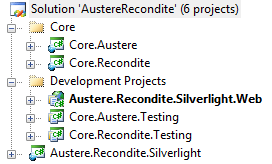
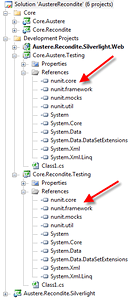
First I downloaded all the latest bits for Silverlight 3 & Silverlight 3 Toolkit, because that?s what I intend for my interface.  Second I rolled straight into creating the solution, of course naming it AustereRecondite.  I added the projects I would need as shown in the image below, and then added the references as shown in the image below that.

Red arrows pointing to the NUnit references I added.  I placed these assemblies into a directory at the same level as the *.sln file called 3rd Party Assemblies.

Now that I have some framework to start with I will jump right into the old standard TDD approach.

Alright, Tool Chest Checkup Time

I’m working with varied technology stacks these days and figured it was a good time to throw a few questions and tool suggestions out to the community.  First, the tools list.

IDEs & respective plugins/addons

Some of the Main Bits I’m Using These Days

That is about it.  I am amazed, looking at this list, how minimal it has become even with the increase in technology stacks I’ve been working with.

Project Failure? Are You Serious? Because I Am!

Beware, this is a LONG entry and if you don’t read all of it you may end up offended, but rest assured what I’m writing here is the absolute truth and recruiters, project managers, project leads, development leads, developers, and anyone getting into the software industry or that has been in the industry I have many points of advice and warning.

I was recently hanging out with one of my friendly local tech recruiters over a drink or three and some good food.  They asked me to proof their position they where about to post.  As I am a friendly guy, I decided I would.  It has been a LONG time since I’ve looked at a post like this, as I haven’t actually used Monster, Dice, or any of those sites in a rather long time.  Maybe I’ve thought the industry had matured a bit sense I last checked the pulse.  Being in Portland where the industry is generally about 5-10 years ahead of the rest of the country (and the world for that matter) I am always hopeful.  Here are some snippets from the post and an immediate translation.

Under the required skills section I saw a couple of points;

  • Creation of automated unit test cases.
  • Automated builds
  • Ability to manage multiple projects and tasks simultaneously.
  • Dedicated to completing assigned tasks on time.

Under the preferred skills and characteristics where some more real gems, but this one just stood out.

  • Willing to work overtime, holidays, and weekends as requested by management.

My first response when looking at this was, “are you serious?  you really expect someone to take this job?  It has abusive environment and poor conditions all over it!!!!”  I was seriously shocked, after all these years, and maybe I just don’t read job requirements much anymore and there are tons this crappy.  So let me elaborate a little more on this description.

First off, just from those descriptions the position looks aberrantly abusive, environmentally (i.e. work environment) bad, and probably psychologically torturous for a software developer.  Maybe I’m wrong, but whoever decided to put these requirements in the post is looking for either A: someone who is desperate for work and will last for a very short time under the abuse or B: someone who is already sadomasochistic and loves the pain of the torture.  There are amazingly software developers like that.

Now I have to pick apart some of these.  “Creation of automated unit test cases.“  This immediately tells me a couple of things;

  • There are some tests, they are NOT unit tests if this has been slammed into a requirement spec for automated tests cases.
  • There are so many contradictory words in this request that it just doesn’t make any actual logical sense.
  • Unit tests are isolated, often used during refactoring, not always during automation.  Automation tests are not particularly unit, often are integration tests, and aren’t really used during refactoring but instead during QA.
  • “Cases”, well cases just hangs there as if Agile Processes & Waterfall Processes are having a subversive fisticuffs fight right after the specs are finished.  Whatever the “case” this requirement only really shows one thing, some type of testing is required, and the prospective candidate won’t know what kind and it appears nor does the person writing the requirement.

Let us hit on the next statement.  “Automated Builds”.  Ok, this one sounds like a legitimate requirement.  But stop a second and think about it along with the other requirements.  Is it logical with the others or does it exacerbate the other requirements by its simple specification?  Considering people these days people are doing CI, continuous integration, along with automated builds it leaves me with this thought that someone hasn’t modernized the build process for a long while.  With that said it leaves me to this next specification and the point I want to make.

“Ability to manage multiple projects and tasks simultaneously” is a beauty.  That’s the spirit for destroying any good velocity and productivity a developer might have, interrupt them a lot and give them multiple tasks all at once!  If it is a contract position, one would probably want the hire to stay productive on task, if it is a permanent position you might want them to handle multiple efforts.  However stating this immediately, before any discussion or interview is made with an individual this specification should leave a developer with the inherent fear that the project, whatever it may be, IS BEING MANAGED POORLY!  This is a massive, glaring red flag.  Sure, most projects these days are probably running through rough spots, but don’t chase away the smart talent before the position even gets a glance at by the top talent.  I can promise you the top talent will look at this, and think, “well maybe they can hire me as a consultant to get them back on track, but I’m not going into the trenches because it already sounds like a “death march” with many “mythical man months” being consumed.

“Dedicated to completing assigned tasks on time” is always a hilarious thing to read.  This should be translated to “working insane hours to get tasks done based on a schedule that you have not be consulted on, or at least ignored after you?re consulted, and then getting reprimanded because you didn’t finish a task that has been mismanaged from the beginning!“  This specification is probably the biggest alarm of them all.  This specification almost immediately should tell a prospective candidate that the project, or project(s) are probably being mismanaged.  If the project has had so many problems as to need to put ?dedicated to completing?” in the specification as a point there are problems.

Now someone might read this and think, “but it sounds like a good trait” and I’ll state simply that it is a very good trait in a developer.  I can tell you with high confidence, developer’s absolutely have this trait but are often put in circumstances that they can’t meet deadlines.  I can also say with high confidence that probably 80% of the time a task is not met by a deadline it is not the developer’s fault, it is the planning process & management that is in place.  Mind you, 80% is a conservative estimate, a more accurate number would probably be in the 90% range.  Developer’s want to create, design, developer, and do good work. Developer’s are not your McDonald’s employees, these people are highly skilled.  Even the weakest developer is likely to want to get things done, but if the leadership has mismanaged the project, they’ll then have to fail.  It is a sad situation that it is so often this way, but that’s the cookie crumbling.

The last one anyone can see is a major red flag.  “Willing to work overtime, holidays, and weekends as requested by management”.  If this where a contract position, that is a command to abuse the hours ? spend a ton of em’ and bill em’ because you know, just from this requirement that you’ll have to anyway.  If it is a permanent position, this is really bad news for the developer.  Right from the get go a developer should look at this and realize their social life, their love life ? if they have one, marriage, or whatever else is about to go down the drain.  If something like this is in a job profile specification then you can bet money, that you’ll be expected to and will have to work ridiculous hours.

With all the other specifications combined the sad fact is that you’ll probably be stepping directly into a project death march from day one.  Simply put, this project, whatever it is will fail with about a 90% chance on delivery date and cost.

The Awesome Shiny Good News Out of All This!

There are ways that everyone in this scenario can get things straightened out (and no, I’m unfortunately not available right now I’m happily employed ;p ).  Here are the first 9 steps to getting things going in the right direction and staving off the death march and immanent failure.  I would have written up the first 10, but that seems touch?!

  1. Get existing members into a room that are involved in this project and show them this specification.  Then throw away the specification and dig deep to find the GOOD PARTS of the project that might make it fun and exciting to a prospective candidate!
  2. Immediately toss as much Waterfall Methodology in the dumpster out back AS FAST AS YOU CAN!  Read up immediately on Agile, lean style, scrum style, anything of that sort.
  3. This one will be painful for the project managers, but do it if you want to succeed.  Throw away the gantt charts and project plans, if you don’t you’ve already failed the software development effort.
  4. Sit down and create some stories about what this software has to do.  Talk to the users and get it straightened out, look at the components that might need to communicate.  Bring in all the key stakeholders again and tell them the project is at RISK.
  5. Find ways to get happy developers, existing and future.  If you don?t have happy developers you WILL NOT have a solid, reliable, quality product or service in the end.
  6. Either figure out your burn down chart or your iterations, get stories lined up for the next steps ? i.e. the ones in the immediate next week or two and DO NOT start putting stories on a scheduled chart or out past the 2nd or 3rd iteration.
  7. Get a steady velocity, stop abusing the developers, stop working overtime at every opportunity.  Overtime slows down a project, don’t tell me you have to because there isn’t enough time because you’re perpetuating the lie that OT will build a product.  Steady, consistent, happy, clear thinking developers get a product built.  Some OT might happen, but get it the hell out of a job specification and reduce it to a minimum on the job.  You want developers that want to do a little extra, not developers that feel slave driven.
  8. Make sure the teams eat lunch, communicate, get to know who everyone is, and can deal with their respective team members traits and can communicate.  Without effective and regular communication nobody is going to finish anything on time, let alone of high quality.
  9. Seriously, go have a beer/beverage/cold drink or something with the team and get things out in the open.

Ok, so there are a ton more steps.  There are things that come after this, that come after the project is repaired, and even after that.  But this is the simple start to correcting the problems.  I really hate seeing projects fail, I HATE seeing projects fail because often, there is no reason for it.  Almost every project I see that fails is because of the dumbest list of reasons;  fear, bad management, Waterfall, miscommunication, and others.  The wicked thing is, every single one of these reasons has a solution that humanity in its everyday project endeavors has resolved!  We as human beings have the knowledge, out there, we just have to search for it and find it and know it!  So many projects don’t have to fail!

So get to it, and I hope everyone that reads this can straighten out their projects and add to the list of successful projects, instead of outright failures.