Busy Busy Me

Wow.  Today has been one of those, “go here, go there, do this, do that, quick hurry, finished, done, thanks, awesome, bang” type of days.  Getting a lot accomplished, but also so busy it is hard to see the finished efforts for all the new efforts coming by way.

Lunch 2.0

Today I did manage to make it to my first Lunch 2.0, saw some familiar faces and some new faces I haven’t met.  One of these new people that I met was Eric M. Curtis, the creative director & interface designer for rgb Design Studio.

Business Development

I also had a morning coffee at a ridiculously early 7:10am today with some un-named sources.  We discussed some new upcoming analytics business opportunities that may be heading Webtrends way and the recent large event in the analytics industry, the acquisition of Omniture by Adobe.  This of course is on my mind as I have developed tons of Flash & AIR tagging solutions over the last few months, which now gives me pause.  Many in the industry wait with bated breath as to the path Adobe will now take with this acquisition.  As many in the industry have already stated, it is a somewhat strange pairing and not to jump on that bandwagon, but it does seem that way.

In Other News

I have a number of projects I am working on, all which will benefit Webtrends Analytics customers as well as people in the analytics industry in general.  A few blog entries (which you’ll have to read on the Webtrends Blog or the Webtrends Developer?s Blog), and a whole bunch of awesome technical bits, code snippets, and other code based sundry.  So stay tuned, more to come.  🙂
OMFG, Please Make the Tests Work FIRST!

Alright Mr & Ms Developer.  This hasn’t happened in a while, since most of my work as of late has been green field (i.e. brand new development).  But in the past, oh boy have I gotten some pure crap.  I am a bit arnery today, so just bare with me, I need to rant a bit.

When I am handed code to fix, maintain, alter, or read for any reason I would love to have unit tests come along with it.  If someone then promises to provide unit tests for the code they are writing that is being handed off to me, I expect the unit tests to run, execute isolated, and throw green lights across the board.  However there are a billion different things I run into all the time that frustrate me to no end.  If you promise me unit tests, do NOT . . .

[RANT ON]

DO NOT give me unit tests that take 13 steps to setup, fake data INSERTs against an un-configured or even pre-configured database.  That is NOT isolated and it makes them almost entirely useless to me.  It might be great for your own personal testing, but it doesn’t help me understand the isolated unit of work, the separation of concern, or anything else about the actual code.

DO NOT give me unit tests that outright fail immediately.  If they all fail that means you have NOT finished your work.  It means your code doesn’t work.  Please, make the tests work right, make the code work right before passing the buck.  Note:  I said please! 🙂

DO NOT write a unit test for something that checks the length of a string when you need to check the content of the string.  Don’t check that something is a number when the method adds two numbers, instead check to see if the numbers are aggregated correctly.

DO NOT tell me you have 100% code coverage and then hand me tests that basically asset that a mocked method executes on an object.  OF COURSE THE METHOD EXECUTES, YOU ARE MOCKING IT!!!

DO NOT give me unit tests that test so far across boundaries that isolation is lost by so many degrees it would take many minutes, if not hours, to figure out what the test doesn’t work.

[Rant Off]

In all honesty I would rather get code and just be told the truth;  ?X tests do not work anymore?, ?I could not figure out a way to test this so I did this dumb partial test thing?, or simply ?I was screwing around so I didn?t get full coverage, to make management shush up I did a quick assert fake to get the rest of the coverage?. I’m a developer too, I will understand and probably have no problem at all that something is not completely done, partially done, or you hit a stumbling block.  I do it all the time, I also make a point to lay it out the way it is.  No point in beating around the bush.

Keep in mind, if your management thinks you need to slave away and be forced to lie about things, you can probably go work somewhere else within a few weeks.  Even in this crappy market there is barely any reason to allow bad management to treat develops like crap or to mismanage projects.  So don’t take the bull and just make sure to keep things on the up and up with your fellow developers.  i.e. DON’T lie about your unit tests!  Cheers!

Excel Helper Utilities Library Part Four

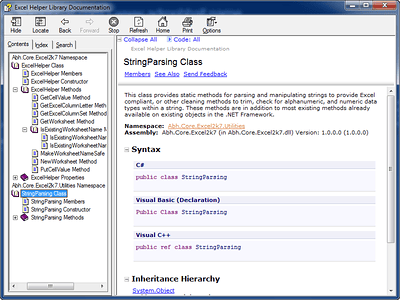
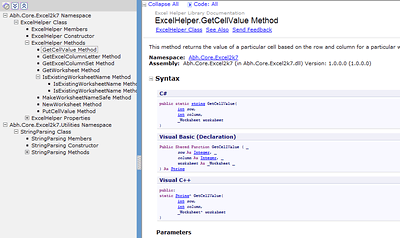
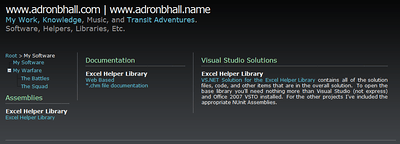
Over the last few entries I’ve added various pieces of functionality to the Excel Helper Library.  Well, I decided to put together and offer the the documentation I’ve created, the assembly, and the solution files themselves via my site.  Here’s everything that is included so far.

The image above shows the page where the assembly, documentation, and visual studio solution links are available.  Below I have a shot of the *.chm file and the html based documentation.  Click either image to get at either of those forms of documentation.

Now don’t think I am finishing this series here, I will absolutely be adding more functionality and capabilities to the Excel Helper.  Each step will have added code and information right here on my blog.

Stay tuned for more, specifically what I intend to build next, but am not promising, is some ribbon functionality addins.  Currently I’m finalizing what architecture I’ll be using for the Excel Ribbon addin.  So stay tuned, more coming.

Be sure to give this article a kick kick it on DotNetKicks.com

Excel Helper Utilities Library Part Three

Obviously I’ve missed my self made time schedule of Monday, Wednesday, and Friday for these entries, so bare with me while I get em’ published as fast as possible.  With that written . . .

Welcome to part three of the Excel Helper Utilities Library series.  In this entry I will cover the extension of the ExcelHelper class created in Part Two.  The first method is one I wrote ages ago for VB.NET, but I’ve added here for the C# helper.  As always, tests first.

[Test]
public void GetColumnLetterA()
{
    string twentySeventColumn = ExcelHelper.GetExcelColumnLetter(1);
    Assert.AreEqual(twentySeventColumn, "A");
}

[Test]
public void GetColumnLetterB()
{
    string twentySeventColumn = ExcelHelper.GetExcelColumnLetter(2);
    Assert.AreEqual(twentySeventColumn, "B");
}

[Test]
public void GetColumnLetterAa()
{
    string twentySeventColumn = ExcelHelper.GetExcelColumnLetter(703);
    Assert.AreEqual(twentySeventColumn, "AAA");
}

.csharpcode, .csharpcode pre { font-size: small; color: black; font-family: consolas, “Courier New”, courier, monospace; background-color: #ffffff; /*white-space: pre;*/ } .csharpcode pre { margin: 0em; } .csharpcode .rem { color: #008000; } .csharpcode .kwrd { color: #0000ff; } .csharpcode .str { color: #006080; } .csharpcode .op { color: #0000c0; } .csharpcode .preproc { color: #cc6633; } .csharpcode .asp { background-color: #ffff00; } .csharpcode .html { color: #800000; } .csharpcode .attr { color: #ff0000; } .csharpcode .alt { background-color: #f4f4f4; width: 100%; margin: 0em; } .csharpcode .lnum { color: #606060; }

. . . and the implemented code . . .

/// <summary>
/// This method gets the appropriate "A" thru "ZZZ" column header for Excel based
/// on a passed in long data type.
/// </summary>
/// <param name="columnIndex">Pass in a long type to derive the appropriate column header letter.</param>
/// <returns>A string of the appropriate "A" thru "ZZZ" header letter.</returns>
public static string GetExcelColumnLetter(int columnIndex)
{
    int dividend = columnIndex;
    string columnName = String.Empty;

    while (dividend > 0)
    {
        int mod = (dividend - 1)%26;
        columnName = Convert.ToChar(65 + mod) + columnName;
        dividend = ((dividend - mod)/26);
    }
    return columnName;
}

.csharpcode, .csharpcode pre { font-size: small; color: black; font-family: consolas, “Courier New”, courier, monospace; background-color: #ffffff; /*white-space: pre;*/ } .csharpcode pre { margin: 0em; } .csharpcode .rem { color: #008000; } .csharpcode .kwrd { color: #0000ff; } .csharpcode .str { color: #006080; } .csharpcode .op { color: #0000c0; } .csharpcode .preproc { color: #cc6633; } .csharpcode .asp { background-color: #ffff00; } .csharpcode .html { color: #800000; } .csharpcode .attr { color: #ff0000; } .csharpcode .alt { background-color: #f4f4f4; width: 100%; margin: 0em; } .csharpcode .lnum { color: #606060; }

The next thing I wanted was a column range set, basically something that would return “A:A” if I passed it the start column index and ending column index.  Easy enough, again, tests first.

[Test]
public void GetColumnLetterSetAandA()
{
    const string columnStart = "1";
    const string columnEnd = "4";
    const string expectedValue = "A:D";
    string returnedValue = ExcelHelper.GetExcelColumnSet(columnStart, columnEnd);
    Assert.AreEqual(expectedValue, returnedValue);
}

[Test]
public void GetColumnLetterSetAandAaa()
{
    const string columnStart = "1";
    const string columnEnd = "703";
    const string expectedValue = "A:AAA";
    string returnedValue = ExcelHelper.GetExcelColumnSet(columnStart, columnEnd);
    Assert.AreEqual(expectedValue, returnedValue);
}

[Test]
public void GetColumnLetterSetAandZ()
{
    const string columnStart = "1";
    const string columnEnd = "26";
    const string expectedValue = "A:Z";
    string returnedValue = ExcelHelper.GetExcelColumnSet(columnStart, columnEnd);
    Assert.AreEqual(expectedValue, returnedValue);
}

. . . and the implementation . . .

/// <summary>
/// This method returns the ("A:ZZZ") part of the Range("A:ZZZ") column interface.
/// </summary>
/// <param name="firstColumn">Enter the first column to start the range with.</param>
/// <param name="secondColumn">Enter the second column to end the range with.</param>
/// <returns>A string formatted as A:ZZZ is returned from this method.</returns>
public static string GetExcelColumnSet(string firstColumn, string secondColumn)
{
    int firstColumnValue = Convert.ToInt32(firstColumn);
    int secondColumnValue = Convert.ToInt32(secondColumn);
    return GetExcelColumnLetter(firstColumnValue) + ":" + GetExcelColumnLetter(secondColumnValue);
}

.csharpcode, .csharpcode pre { font-size: small; color: black; font-family: consolas, “Courier New”, courier, monospace; background-color: #ffffff; /*white-space: pre;*/ } .csharpcode pre { margin: 0em; } .csharpcode .rem { color: #008000; } .csharpcode .kwrd { color: #0000ff; } .csharpcode .str { color: #006080; } .csharpcode .op { color: #0000c0; } .csharpcode .preproc { color: #cc6633; } .csharpcode .asp { background-color: #ffff00; } .csharpcode .html { color: #800000; } .csharpcode .attr { color: #ff0000; } .csharpcode .alt { background-color: #f4f4f4; width: 100%; margin: 0em; } .csharpcode .lnum { color: #606060; }

That is the short and sweet of this entry.  I have to catch a bus and get a move on, but the next entry will be a few cell manipulations to simplify capturing and putting things in the cells in Excel.

If you visit, please give this entry a kick over at kick it on DotNetKicks.com

Blog Entry Roundup

A few of the good blog entries I have had the pleasure of reading the last few weeks.

Writing Great Unit Tests:  Best and Worst Practices by Steve Sanderson.  This entry is just an overview of unit testing, but really well written.  Also Steve placed a few nice charts in defining unit & integration tests.  The combination just made for a nice refresher, or for the test newbie, a great introduction.

Gergely Orosz has some articles on NHibernate versus Entity Framework performance;  Thoughts on ranking ORM tools, NHibernate vs Entity Framework: a performance test, and Nhibernate vs Entity Framework ? a revised performance comparison.  The interesting conclusion is that there is no good effective way to compare ORM platforms.  I suppose, it best to compare on the specific metrics you desire in an ORM platform, then choose.

The REST for ASP.NET MVC SDK entry is a good read.  First off it states what it is and why you would want to use it, which would be helpful for many.  It caught my eye solely because I would have loved to have the functionality 10 months ago for a project, instead of manually developing all the bits.  At least it is out now and I will surely be using it as such.

Last but not least, there is the Facebook & ASP.NET MVC entry.  This is a useful entry, being I have just jumped onto a project doing some Facebook Development this is a very helpful entry in getting up to speed.