Toy Adobe AIR Apps, Social Media Gets a Kick

Outlook and the team responsible for said product, are really pushing hard for the 2010 release.  Of course, I can’t talk about it, but yes, I have seen it and it looks & plays awesome!  However, social media got a slight extra kick from Microsoft recently with the Outlook Social Connect.  The Webtrends blog has an entry up Outlook’s Social Connect:  Social isn’t just AIR toys anymore! by Michelle Anderson.

This got me thinking about various efforts that I know are going on to bridge a lot of this social media deluge.  I get the feeling there are going to be some truly breathtaking applications hit the scene in the later part of the year or even early 2011.  My curiosity hangs around what will they bridge?  Outlook is a prime example of bridging data points that become truly useful information.  With all the addins that Outlook encompasses, one truly becomes a powerhouse power user with a tool like Outlook.

I have been working on some things myself, including proposing a new open source library to bring together services into a centralized library for ease of use.  Anyone got any ideas on that?  Interested?  Thoughts on which services should be brought together first?  The following are the services I am thinking about providing libraries for initially.

The reasoning behind these of course, is purely selfish.  I want to have easy access via an API to these services because I use them.  In addition, I figured there are others out there that may like a centralized library.  So toss me some ideas of other services, if anything, I can maybe create a starting point.

iPhone == IE6 ? Yeah, You Heard It? iPhone Dev is?

So I was reading some blogs related to Windows 7 on Mobile and iPhone Development.  I will say right off, I am biased AGAINST developing for the iPhone because the development environments, language, and other characteristics are horrible.  Horrible being a kind way to put it.  The iPhone may seem like some whiz bang advanced phone, but the development of it is somewhat archaic at best.

This character quirksmode wrote a great write up about The iPhone Obsession.  In the write up the IE6 and iPhone Parallel is drawn.  Eerily the writer makes a VERY good point.

For now, that is all, I liked the write up and want to do more mobile development, but the iPhone Development has got to feel some heat and either modernize and improve, or die.

I will admit, I love my iPhone.  Again though, I hate developing for it and the process compared to developing for most other things.  Even developing for the previous Windows Mobile Phones was better.  Albeit Windows Mobile phones of the past where HORRIBLE in UX and UI overall.  No comparison there.

I do see though, if Microsoft plays their cards right, they could make some serious inroads to Mobile Development with Windows 7 Mobile.  The initial screen shots and descriptions I have heard seem pretty awesome.  Some very very picky developers I know have seen and played with some of the devices, and they love it.

So we shall see.  May the battle begin!

Code Camp, Bar Camp, Camp Time

The first Code Camp & Bar Camp, which is joining forces, was held tonight.  With representatives from Code Camp, Legion of Tech, and the SQL Group Organizers were all on hand to kick off the discussion.

One of the primary focus points was, should we have a two day or single day event?  It makes me wonder what would be better for a 800 person or so event.  Two days better, one day better?  Short days, longer days that run until 10pm?  What is your take on the matter?

More to come later, so keep an eye out for the Code, Bar, SQL Camp Event o’ the year!

@webtrends #wtengage Conference Rocked!

Week before Mardi Gras, the Saints rocked and won the Super Bowl, and @webtrends threw an awesome #wtengage Conference.  Props out to the long list of Webtrends People there;  @DashLavine, @caseycarey, @webtrendspeter, @justinogarrity, @sullybridgetb, @kaykas, @justinkistner, @michelewarther, @mrdiggles, @yodera, @vkenkal, @derekfine, @ekrobi, @mccook, @robinoula, @benfogarty, @noexg, @thomschoenborn, @mediachick, and others!  The event was awesome, great sessions, great knowledge transfer, great food, just great ? period!

Also must say the meetings, meets, and introductions were great.  I’m glad to have met dozens and dozens of people and get those names and faces connected.  Finally caught up with; @seanpower, @johnlovett, @christineconley, @ed1chandler, @bullfrogmedia, @ebeane, @cgrantski, @drcasio, @nadolski, and many others.  Then there are others I met and caught up with and still got more catching up to do; @aknecht and @bosilytics.

Seriously, all of these individuals are rock stars in the analytics community.  The conversations, new ideas, thoughts, and general kicking around New Orleans was a great time.  If you are interested in the next Webtrends Engage (and you ought to be if you do anything with analytics), check out the 2011 Conference coming to San Francisco.

Code Camp Kick Off

In other news, Code Camp is kicking off real soon.  Specifically, the kick off meeting is tonight here at Webtrends.  This year Code Camp is going to be pretty huge.  I am guessing at around 400-500 people, more sessions, more geeking & nerding about, it will be an awesome time for all.  So keep reading and I will be posting more tidbits about the upcoming Code Camp.

Getting The Bits Swinging in the Business

Read Part 1 & Part 2 of this series if you haven’t already.

Last entry I worked up the basic origins and destinations for the data we have. Now we have to start turning this into something real, something concrete. The following processes include a whole soup of acronyms and other cryptic vocabulary. The most common thing I will probably use is the ETL acronym, which stands for Extract, Transform, and Load. This is the process of bridging the data to the various originations and destination and moving that data appropriately.

In the last entry I finalized the originations and destinations as shown below;

   
Originations  
Excel & Access (Office 2007) *.mdb, *.xlsx, and *.csv/*.txt data stores
Internal Account Software (IAS) This one is a prospective can of worms.  Proprietary layouts, de-normalized & normalized data, and all sorts of redundant, non-atomic data.  This sounds like an accounting package right?  :p
Webtrends Analytics Data Exchange Web Services (DX) Webtrends web services provide REST style architecture, with the ability for data to be retrieved in XML, JSON, HTML, or other formats (we can add more if need be, just let us know).
Point of Sale System (POS) This system provides two daily exports, one at 6:00am and one at noon for processing.  The export format is *.csv.
   
Destination  
SSRS SQL Server Reporting Services, with the core underlying data stored in SQL Server.

In my previous entry you may have noticed that I had posted SSIS with the Destination list.  Being one that corrects themselves when mistaken, I took it out, as it does not belong there.  The SSIS is our tool that will perform the ETL functionality for this project.

At this point we are finally going to get into the dirty bits of these pieces of technology, and how we need to tie them together.  I am going to attack them over the next few entries based on the order in the lists above.  The first item, is the Excel & Access 2007 customer relations listings from sales.  Here?s a description and a few shots of what this thing looks like.

The access database is setup with a very simple relational data schema.  This is shown below (click image for larger view).
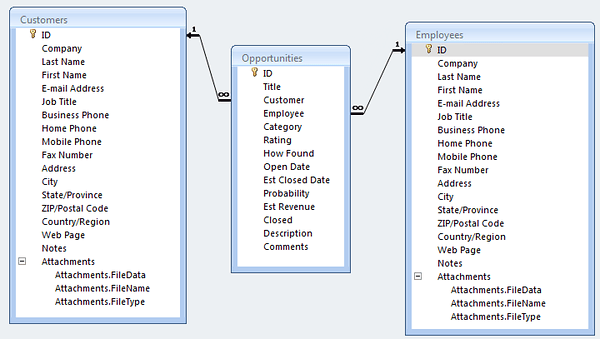
You can see there are pretty standard pieces of data, in a generally normalized (3rd form for the most part) structure.  This is fine.

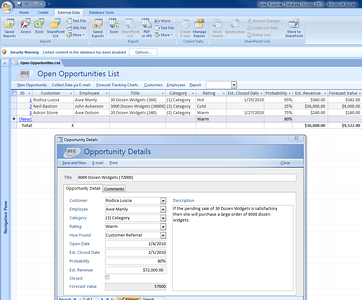
Next is a shot of the data entry screen for adding opportunities.  There are respective screens for customers and employees.  Everything needed for a basic customer list & tracking basic things.  Nothing too extravagant here either.  Again, all is fine.
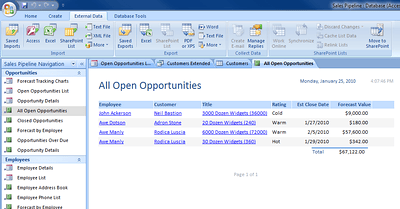
Below is a simple report that shows the available opportunities that are open.
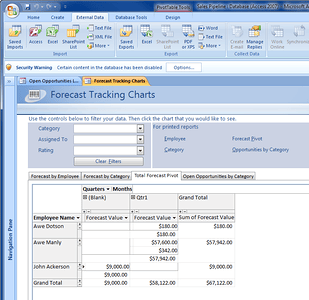
Another report showing the forecasts.
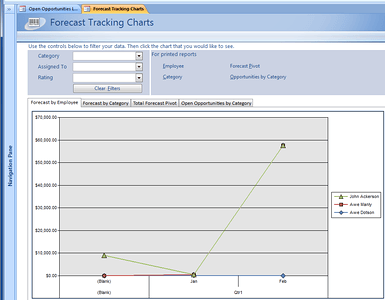
Below is another forecast sliced grid.
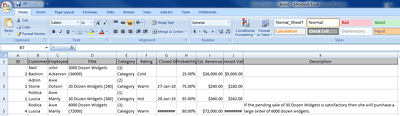
So all that seems normal enough.  But the processes are what makes things tricky.  If everyone just managed sales from the database, all would be right in the world.  The first thing that breaks this is that each sales person enters their sales during the day and other information in a spreadsheet that is not linked to the underlying database.  Someone each morning puts the previous days sales information.  This of course, breaks down data integrity.  Below is a sample sheet that is used each day.
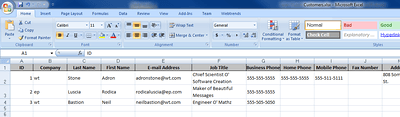
One thing that Excel is used for, that doesn?t break reports is the lists of prospective customers to call.  As shown below.
Now that we have a break down of the Excel & Access Customer Relations Management Software, I will move onto the other pieces of technology in the next entry.  This is the data point that has the most prospective data risk, so I put it at the top of the list to cover first.  After I cover each of the systems, we will move into the architecture of the system overall.  So keep reading, more juicy bits to come.