Agile Manifesto, Revisited

Again, conversations give me a zillion things to write about.  The recent conversation that has cropped up again is my various viewpoints of the Agile Manifesto.  Not all the processes that came after the manifesto was written, but just the core manifesto itself.  Just for context, here is the manifesto in all the glory.

We are uncovering better ways of developing software by doing it and helping others do it. Through this work we have come to value:

Individuals and interactions over processes and tools

Working software over comprehensive documentation

Customer collaboration over contract negotiation

Responding to change over following a plan

That is, while there is value in the items on the right, we value the items on the left more.

Several of the key signatories at the time went on to write some of the core books that really gave Agile Software Development traction.  If you check out the Agile Manifesto Site and do a search for any of those people, you will find a treasure trove of software development information.

My 2 Cents

First off, I agree with a few people out there.  Agile is not Scrum for instance.  Do NOT get these things confused when checking out Agile, or pushing forward with Scrum.  As David Starr points out in his blog entry,

“About 35 minutes into this discussion, I realized I hadn’t heard a question or comment that wasn’t related to Scrum. I asked the room, How many people are on an agile team that is NOT using Scrum?

5 hands. Seriously, out of about 150 people of so. 5 hands.”

So know, as this is one of my biggest pet peves these days, that Scrum is not Agile.  Another quote David writes,

“I assure you, dear reader, 2 week time boxes does not an agile team make.”

This is the exact problem.  Take a look at the actual manifesto above.  First ideal, “Individuals and interactions over processes and tools”.  There are a couple of meanings in this ideal, just as there are in the other written ideals.  But this one has a lot of contention with a set practice such as Scrum.  There are other formulas, namely XP (eXtreme) and Kanban are two that come to mind often.  But none of these are Agile, but instead a process based on the ideals of Agile.

Some of you may be thinking, “that’s the same thing”.  Well, no, it is not.  This type of differentiation is vitally important.  Agile is a set of ideals.  Processes are nice, but they can change, they may work for some and not others.  The Agile Manifesto covers the ideals behind what is intended, that intention being to learn and find new ways to build better software.

Ideals, not processes.  Definition versus implementation.  Class versus object.  The ideals are of utmost importance, the processes are secondary, the first ideal is what really lays this out for me “Individuals and interactions over processes and tools”.  Yes, we need tools but we need the individuals and their interactions more.

For those coming into a development team, I hope you take this to mind.  It is of utmost importance that this differentiation is known and fought for.  The second the process becomes more important than the individuals and interactions, the team will effectively lose the advantages of Agile Ideals.

This is just one of my first thoughts on the topic of Agile.  I will be writing more in the near future about each of the ideals.  I will make a point to outline more of my thoughts, my opinions, and experience with the ideals of Agile and the various processes that are out there.  Maybe, I may stumble upon something new with the help of my readers?  It would be a grand overture to the ideals I hold.

Top Tier, A-Game Talent – How to Land em’

Recently the question came up from a close friend of mine, “will my PhD help me attain a higher income in the north west?”  I had to tell him, that it might get him a little more, but it won’t get him in the top income brackets for the occupation.  Another time, a few days later, someone else asked this too.  Then again, I see a job posting that requires a Bachelors Degree and some other nonsense.  The job posting even states they want “A-Game” talent.

I am almost shocked at how poorly part of this industry doesn’t realize how unimportant a degree (bachelor, doctorate, etc) is to getting real top tier, a-game talent.  (and yes, I get a little riled up about this matter)

You Can’t Make Good Software Developers.  No college out there is going to train someone to be in the top 10%, and absolutely not to be in the top 5% of skill levels.  Colleges can NOT do this.  It is up to the individual, and the individual alone.  If top tier talent seems to come from a college, one should check their premise and look at the motivations the individuals have to go to that school.  There is most likely a reason that top tier talent appears to be made there.  The college however, can only guide or assist, but I repeat that “top tier talent is a very individualistic endeavor“.

Some might say, well a group is needed, support is needed, this and that are needed.  True, an individual needs a support system and a college can provide that, but it generally ends there.  The support group helps, provides a sounding wall, and provides correlation to good ideas for the a-game top tier geek.  But again, the endeavor is the individuals desire.

top tier talent is a very individualistic endeavor – Me

Hiring Top Tier, A-Game Talent

There are a few things when trying to hire this level of game player.

  1. The first thing is to not require a degree of any sort.  Sure, it looks good, but it won’t dictate anything other than the individual was able to go through the regimented steps of college.
  2. List the skills and ideas that you would like to find in an individual.  Think of two people meeting for the first time, what do you want to know about the other individual.  Team fit is absolutely fundamental for top tier talent.  That support group that I mentioned above, top tier talent works best with a solid group of players.
  3. Keep your technology up to date, moving forward, and don’t bore your top talent if you manage to get it.  If the company slows down, they will leave.  The more valuable they find out they are, the lower tolerance they’ll have for this.  For managers, directors, and leaders in an organization this is THE challenge for them.
  4. Provide opportunities not just for advancement, but ways for them to advance their knowledge such as training, a book budget, or other means.  Even if some software they want to use isn’t used ton the project, get it for them (within reason of course ? couple $100 or even a few $1000 for a good software license to MSDN, Tellerik, or other suite of software is ideal).
  5. Don’t push them to, and don’t let them overwork themselves into burnout.  This, as a leader in an organization is easy to do if one finds themselves actually hiring top talent.  Because top talent just provides results and more results.  But they are human, they will break, don’t be the cause of that or you’ll lose your talent.

For now, that is it from me on this topic, back to the revenue, code, projects, and pushing things forward.

I'm Not Sold on HTML 5

Ok, let me get this straight.  HTML 5 is supposed to offer RIA (Rich Internet Application) type abilities to the browser rendered (i.e. no compile, Just In Time-JIT) web.  How JIT & no compile, markup based, mixed platform technologies are supposed to offer a comparable performance and UX/UI experience seems sketchy at best.  Now let me clause with, I am not writing this idea off, just hesitant to believe that there will be comparable performance to frameworks such as JavaFX, Silverlight, or Flash.  With out of browser Silverlight, or Adobe AIR Apps, or heaven forbid WPF based RIAs there really is NOT a performance comparison.  I can safely assume that Silverlight & WPF (mainly because I’ve seen them perform) will smoke HTML 5 for advanced rendering or solid advanced RIA style interfaces.  Especially in a Line of Business (LOB) type application.  There just is NOT a comparison in this sense.

The video & audio elements are an entirely different rant.  Sure, it looks great, the O3D demo looks great, but this is still not going to compare to Silverlight or Flash.  These tools are going to smoke HTML 5.  The complexity of getting video, audio, and these other advanced elements of HTML 5 supported has the same issue as Silverlight has for penetration.  Sure, the browsers will start having these things built in, but that will be completed about the same time as Silverlight has similar market penetration as Flash (i.e. the 98th percentile).

Now some, such as Matthew David, wax somewhat poetically about HTML 5.  His article Inside HTML5:  The Browser becomes a first class RIA citizen is an interesting read.  He obviously has great enthusiasm behind this idea.  But I’m not buying it.  The technology is not comparable, HTML is band aided already beyond belief (remember, it was supposed to render documents for linking kind of like a library – NOT for all the advanced things people tend to try and use it for these days).  HTML 5 is merely another band aid, albeit a bigger band aid, then the last several versions of HTML.  The core focus of the markup at this point is basically ignored.

The Positive

The cool thing, I will admit, is HTML 5 does add a lot of options to the browser based web.  I don’t think we’ll keep going down this rather archaic version of the web forever, but it does provide a stop gap between much more interactive applications.  It also provides a stop gap fix for companies that aren’t ready, for whatever reason, to jump on the RIA bandwagon.  HTML 5 will provide great features, but I just don’t see it as a prime mover, but more of a stop-gap between the next best way to connect to the web.  Maybe that is Silverlight, Flash, and AIR, or maybe it is some other type of platform or tool.

In the end, something will definitely eclipse HTML 5, but HTML 5 will be great in the meantime.  At least until we run out of fingers to poke in the holes of the dam (i.e. HTML 5).

Sketchflow and Clients

Sketchflow is a project template type that can be created to quickly prototype application design, quick UI experiments, and communicating design intent.  I decided, to get a bit more practiced at using the Sketchflow capabilities, that I would write a quick tutorial on starting and creating a basic Sketchflow Application.

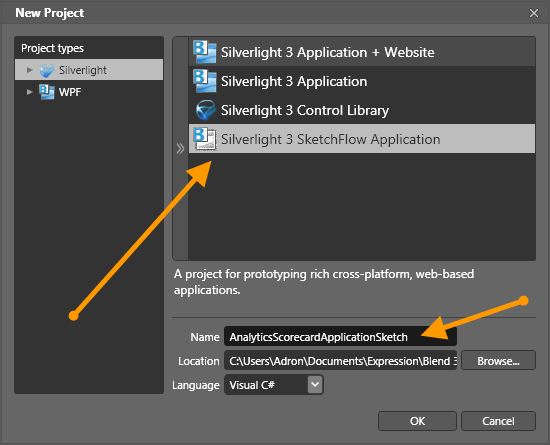
First step, open up Microsoft Expression Blend 3.  Then click on File and then New Project.  In that dialog you will see the available Expression Blend Project Templates.  For this tutorial I selected the Silverlight Project Types, then the Silverlight 3 SketchFlow Application Project Template to the right.  (Click for full size image)

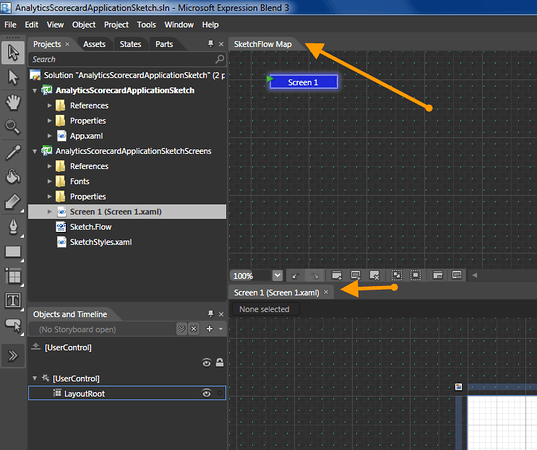
When the project opens up a standard XAML screen will be displayed called Screen 1 (Screen 1.xaml).  There is also a SketchFlow Map, if it is not showing use Shift + F12 or select Window and then SketchFlow Map on the menus.  That will get the following screens showing.  Feel free to position those wherever you need them to work within the SketchFlow Map.  (Click for full size image)

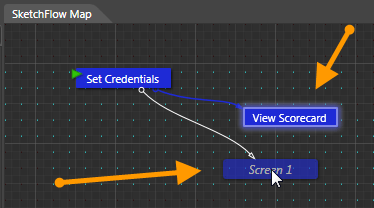
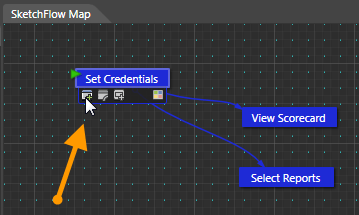
Next right click on the Screen 1 Node and rename the node to Set Credentials.  Now hover with your mouse over the node until the utilities drawer shows up.  Click on the Create a Connected Screen icon in the utilities drawer and hold down and drag.  This will allow you to create a connected node.  (Click for full size image)

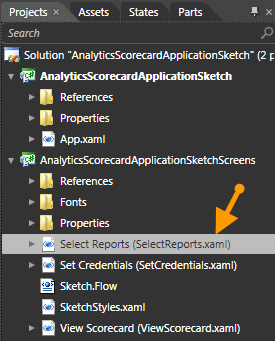
I created each node as shown, one for the Set Credentials, View Scorecard, and Select Reports screens.  In the Projects tab that shows the Solution and the XAML files I renamed each file so it is easily referenced to the node that the XAML file represents.

Now that each screen exists, I have created the following screens.  The first one of course, is the Set Credentials Screen/SetCredentials.xaml.  The XAML is below to make creation of the screen super easy.

<UserControl
    xmlns="http://schemas.microsoft.com/winfx/2006/xaml/presentation"
    xmlns:x="http://schemas.microsoft.com/winfx/2006/xaml"
    xmlns:d="http://schemas.microsoft.com/expression/blend/2008"
    xmlns:mc="http://schemas.openxmlformats.org/markup-compatibility/2006"
    mc:Ignorable="d"
    xmlns:i="clr-namespace:System.Windows.Interactivity;assembly=System.Windows.Interactivity" xmlns:pb="clr-namespace:Microsoft.Expression.Prototyping.Behavior;assembly=Microsoft.Expression.Prototyping.Interactivity"
    x:Class="AnalyticsScorecardApplicationSketchScreens.Screen_1"
    Width="640" Height="480">

    <Grid x:Name="LayoutRoot" Background="White">
        <TextBox x:Name="textAccount" Height="25" HorizontalAlignment="Left" Margin="79,88,0,0" Style="{StaticResource BasicTextBox-Sketch}" VerticalAlignment="Top" Width="136" Text="webtrends_com" TextWrapping="Wrap" ToolTipService.ToolTip="Enter your account here."/>
        <PasswordBox x:Name="passwordBox" Height="25" HorizontalAlignment="Right" Margin="0,88,103,0" Style="{StaticResource PasswordBox-Sketch}" VerticalAlignment="Top" Width="136" Password="XXXXXXX" ToolTipService.ToolTip="Enter your password here."/>
        <TextBox x:Name="textUsername" Height="25" Margin="241,89,263,0" Style="{StaticResource BasicTextBox-Sketch}" VerticalAlignment="Top" TextWrapping="Wrap" ToolTipService.ToolTip="Enter your username here." Text="Adron"/>
        <Button x:Name="buttonLoginSetCredentials" HorizontalAlignment="Right" Margin="0,159,103,0" Style="{StaticResource Button-Sketch}" VerticalAlignment="Top" Width="201" Content="Login &amp; Set Credentials">
            <i:Interaction.Triggers>
                <i:EventTrigger EventName="Click">
                    <pb:NavigateToScreenAction TargetScreen="AnalyticsScorecardApplicationSketchScreens.Screen_1_3"/>
                </i:EventTrigger>
            </i:Interaction.Triggers>
        </Button>
        <TextBlock HorizontalAlignment="Left" Margin="81,60,0,0" Style="{StaticResource BasicTextBlock-Sketch}" VerticalAlignment="Top" Text="Account" TextWrapping="Wrap"/>
        <TextBlock HorizontalAlignment="Left" Margin="242,60,0,0" Style="{StaticResource BasicTextBlock-Sketch}" VerticalAlignment="Top" Text="Username" TextWrapping="Wrap"/>
        <TextBlock HorizontalAlignment="Right" Margin="0,60,181,0" Style="{StaticResource BasicTextBlock-Sketch}" VerticalAlignment="Top" Text="Password" TextWrapping="Wrap"/>
    </Grid>
</UserControl>

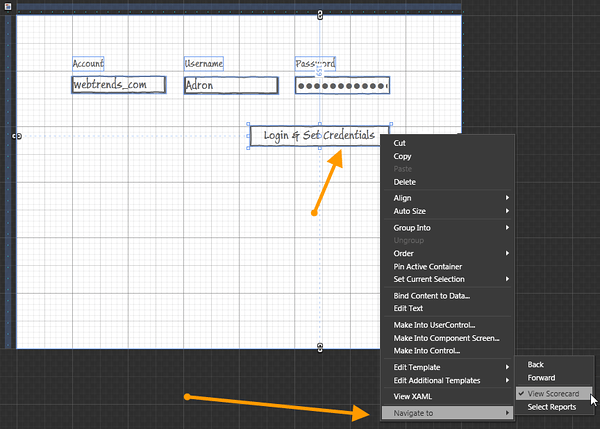
Now that we have this screen, I will step through some of the things I did to make this screen functional for the prototype.  The main thing, is to assure that the button is linked up to the right navigation.  Right click on the button and look for the Navigation items and select the screen it will navigate to, as shown below.

Next create the following two screens to show the appropriate navigation and screens to navigate to.

Select Reports / SelectReports.xaml Screen

<UserControl
    xmlns="http://schemas.microsoft.com/winfx/2006/xaml/presentation"
    xmlns:x="http://schemas.microsoft.com/winfx/2006/xaml"
    xmlns:d="http://schemas.microsoft.com/expression/blend/2008"
    xmlns:mc="http://schemas.openxmlformats.org/markup-compatibility/2006"
    mc:Ignorable="d"
    xmlns:i="clr-namespace:System.Windows.Interactivity;assembly=System.Windows.Interactivity" xmlns:pb="clr-namespace:Microsoft.Expression.Prototyping.Behavior;assembly=Microsoft.Expression.Prototyping.Interactivity"
    x:Class="AnalyticsScorecardApplicationSketchScreens.Screen_1"
    Width="640" Height="480">

    <Grid x:Name="LayoutRoot" Background="White">
        <TextBox x:Name="textAccount" Height="25" HorizontalAlignment="Left" Margin="79,88,0,0" Style="{StaticResource BasicTextBox-Sketch}" VerticalAlignment="Top" Width="136" Text="webtrends_com" TextWrapping="Wrap" ToolTipService.ToolTip="Enter your account here."/>
        <PasswordBox x:Name="passwordBox" Height="25" HorizontalAlignment="Right" Margin="0,88,103,0" Style="{StaticResource PasswordBox-Sketch}" VerticalAlignment="Top" Width="136" Password="XXXXXXX" ToolTipService.ToolTip="Enter your password here."/>
        <TextBox x:Name="textUsername" Height="25" Margin="241,89,263,0" Style="{StaticResource BasicTextBox-Sketch}" VerticalAlignment="Top" TextWrapping="Wrap" ToolTipService.ToolTip="Enter your username here." Text="Adron"/>
        <Button x:Name="buttonLoginSetCredentials" HorizontalAlignment="Right" Margin="0,159,103,0" Style="{StaticResource Button-Sketch}" VerticalAlignment="Top" Width="201" Content="Login &amp; Set Credentials">
            <i:Interaction.Triggers>
                <i:EventTrigger EventName="Click">
                    <pb:NavigateToScreenAction TargetScreen="AnalyticsScorecardApplicationSketchScreens.Screen_1_3"/>
                </i:EventTrigger>
            </i:Interaction.Triggers>
        </Button>
        <TextBlock HorizontalAlignment="Left" Margin="81,60,0,0" Style="{StaticResource BasicTextBlock-Sketch}" VerticalAlignment="Top" Text="Account" TextWrapping="Wrap"/>
        <TextBlock HorizontalAlignment="Left" Margin="242,60,0,0" Style="{StaticResource BasicTextBlock-Sketch}" VerticalAlignment="Top" Text="Username" TextWrapping="Wrap"/>
        <TextBlock HorizontalAlignment="Right" Margin="0,60,181,0" Style="{StaticResource BasicTextBlock-Sketch}" VerticalAlignment="Top" Text="Password" TextWrapping="Wrap"/>
    </Grid>
</UserControl>

View Scorecard / ViewScorecard.xaml Screen
<UserControl
    xmlns="http://schemas.microsoft.com/winfx/2006/xaml/presentation"
    xmlns:x="http://schemas.microsoft.com/winfx/2006/xaml"
    xmlns:d="http://schemas.microsoft.com/expression/blend/2008"
    xmlns:mc="http://schemas.openxmlformats.org/markup-compatibility/2006"
    mc:Ignorable="d"
    xmlns:i="clr-namespace:System.Windows.Interactivity;assembly=System.Windows.Interactivity" xmlns:pb="clr-namespace:Microsoft.Expression.Prototyping.Behavior;assembly=Microsoft.Expression.Prototyping.Interactivity" xmlns:local="clr-namespace:AnalyticsScorecardApplicationSketchScreens"
    x:Class="AnalyticsScorecardApplicationSketchScreens.Screen_1_3"
    Width="640" Height="480">

    <Grid x:Name="LayoutRoot" Background="White">
        <Button HorizontalAlignment="Right" Style="{StaticResource Button-Sketch}" VerticalAlignment="Top" Width="122" Content="Select Reports" Margin="0,24,158,0" Cursor="Hand">
            <i:Interaction.Triggers>
                <i:EventTrigger EventName="Click">
                    <pb:NavigateToScreenAction TargetScreen="AnalyticsScorecardApplicationSketchScreens.Screen_1_4"/>
                </i:EventTrigger>
            </i:Interaction.Triggers>
        </Button>
        <Button Style="{StaticResource Button-Sketch}" Content="Set Credentials" Cursor="Hand" Height="30" HorizontalAlignment="Right" VerticalAlignment="Top" Width="122" Margin="0,25,19,0">
            <i:Interaction.Triggers>
                <i:EventTrigger EventName="Click">
                    <pb:NavigateToScreenAction TargetScreen="AnalyticsScorecardApplicationSketchScreens.Screen_1"/>
                </i:EventTrigger>
            </i:Interaction.Triggers>
        </Button>
    </Grid>
</UserControl>

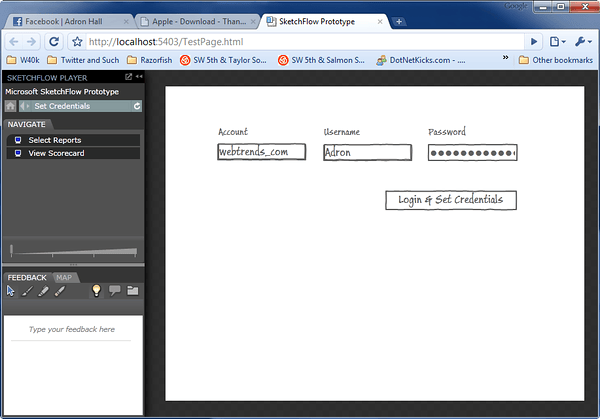
That’s it for this entry.  For now this is a complete working SketchFlow Application.  Just run it and you’ll see a screen that you can navigate around as shown below.

I’ll have another one when I get to fleshing out the various parts of the prototype more.  I intend to do a complete work-through, but we all know about intents and blog entries.  So I shall see.