Steaming Up The Engine for The Rails

I’ve been digging through and playing with the Rails Framework now for about 4 months with intent (I guess I’ve read about it, learned about, but not played with it for well over 4 years). I’ve gained a pretty good familiarity with the parts of the framework. Below, I’ve laid out some of the key things that I’ve done over and over just to become familiar with the commands, organization, and other elements within the framework. These also, in this specific order, is what I’ve found works best for getting a Ruby on Rails Application Project kick started (on a *nix based machine, the rvm commands will however not work on Windows, you’ll need to find a respective replacement).

$ mkdir steaming_up_the_engine
$ cd steaming_up_the_engine
$ rvm --rvmrc --create 1.9.2@steaming_up_the_engine
$ cd ..
$ cd steaming_up_the_engine
$ cd ..
$ rails new steaming_up_the_engine -T
$ open .
$ cd steaming_up_the_engine
$ git init
$ mate .gitignore

…edit and save the .gitignore file with whatever additions you may need or want…

$ git -A
$ git commit -m 'first commit.'
$ rm public/index.html
$ rails generate rspec:install

…edit your Gemfile(See below Gemfile for contents)…

$ rails generate controller home index contact about
$ git rm -r spec/views
$ git rm -r spec/helpers
$ mate config/routes.rb

…edit the routes.rb so there is the index page handling the root page…

Gemfile (Located in ~/projectRoot/Gemfile)

source 'http://rubygems.org’

gem 'rails'
gem 'sqlite3'

group :development do
  gem 'rspec-rails'
end

group :test do
  gem 'rspec-rails'
  gem 'webrat'
end

group :assets do
  gem 'sass-rails',   '~> 3.1.4'
  gem 'coffee-rails', '~> 3.1.1'
  gem 'uglifier', '>= 1.0.3'
end

gem 'jquery-rails'

route.rb file.

SteamingUpTheEngine::Application.routes.draw do
  get "home/index"
  get "home/about"
  get "home/contact"
  root :to => 'home#index'
end

mkdir creates a new directory called steaming_up_the_engine.

cd steaming_up_the_engine moves the active working directory of the terminal/bash to steaming_up_the_engine (i.e. cd stands for change directory).

rvm is the rvm application command, –rvmrc is the feature being created, –create is the command to issue on the feature.  1.9.2 is the version of Ruby that will be used for the project and the name after the @ is the name of the project itself. For more information about the rvmrc script check out my previous entry or the rvm site on rvmrc.

The action to cd .. moves out of the directory and then cd steaming_up_the_engine moves back in to initiate the script that the rvm command created for us. After that, the working directory is moved back outside of the application folder.

rails is simply the rails framework application command, new tells the application to create a new rails application based on the framework, and -T is a switch to prevent any tests from being generated.

open . actually opens the Finder to view the just created project in the working directory. The screenshot below is the Finder with the newly created rails app.
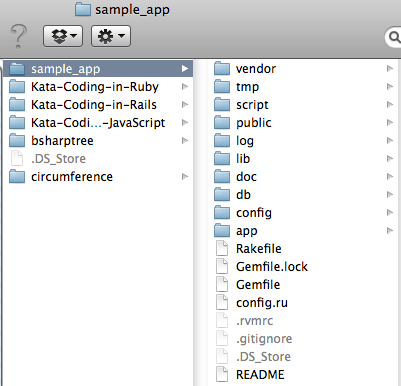
Finder showing the newly created Rails Application in a column display.

Finder showing the newly created Rails Application in a column display.

Again move back into the application working directory.

git init initializes a local git repository for the project.

mate .gitignore opens up the .gitignore file that was created by the rails command for editing.  mate is the command for the TextMate Application. If you don’t have TextMate, then you would have to change mate to a command that relates to whatever you use to edit your code files. Check out my previous blog entry for a sample .gitignore file.

git -A adds all new files for commit to the local git repository.

git commit -m ‘first commit’ actually commits the new project to the git repository.

rm public/index.html removes the default static page that displays if the application is run at this point. I never need it, but it does come in handy sometimes if you’re troubleshooting if a server runs and just want to deploy something to verify you’re doing it right (such as to EngineYard or Heroku).

rspec can be setup and configured to run in your Rails project with the rails command rails generate rspec:install. If the rspec gem isn’t already in your project, remember to gem install rspec or add it to the gemfile and run bundle install.

The first of these commands that actually starts building the site is the rails generator command. rails generate controller Pages home contact creates the pages, controllers, and routes for the pages. Because the rspec has been configured for the project, when rails generates the controller and pages tests will be created in the spec directory.

After the creation of those pages remove the unnecessary test files in helpers and views under spec. git rm -r spec/views and git rm -r spec/helpers will get rid of these files.

Now you’re ready to really get started actually building something in those pages. Enjoy!

Fini – Geoloqi + CivicApps + TriMet + Awesome Coders == Great Weekend

The Geoloqi + CivicApps Hackathon is all wrapped up and it has been great! I got to meet a number of new people and we all literally got a number of things done. The bus app, is practically done, and there are oodles of ideas primed and ready. New SDKs will be coming from the OSS Community for Geoloqi (prospectively including .NET Libs, C++, and even Python!) Needless to say, a LOT of good stuff happened this weekend.

Until next hackathon, cheers to everybody involved, it’s been great hacking!

Your Bus Is NOT Here! But We’re Working On It…

But myself and fellow hacker & Geoloqi Crew put something together to figure out where the bus is. Nothing super fancy, but the idea is solid. We wanted to get a simple mobile application put together that would identify where it is, what the closest bus stop is, and pull up the next arriving bus(es) for that stop. We were throwing in a few other ideas, such as pulling up specific stops based on your favorites or even specific buses at that route based on your preferred routes.

Pat (@patrickarlt) & I (@adron) started out by pulling in the GTFS data from TriMet. I setup a basic import to turn all the stop locations in the GTFS data into a Place within a layer within Geoloqi. Pat setup a URL that could be used to call down the latest X arriving buses. Then we combined forces figuring out how to efficiently get all of the 7000+ bus stops into Geoloqi. That proved a little bit more of an issue than we thought. Not a huge issue, but one that got Kyle (@kyledrake) and Aaron (@aaronpk) Coding some fast batch solutions to get it all into Geoloqi while Pat & I handled the application.

On Sunday we’re lined up to get the application into a MVP (Minimally Viable Product) state. We’re hoping to be able to maybe even use it tomorrow in at least a simple way. From that point forward we’ll hopefully move past the MVP into other functionality! 🙂

Another thing to note, is that with our basic implementation we’re using GTFS data. This is a data format that is standardized and used by many of the agencies around the country. So technically any transit agency, as long as they have a way to return their route arrivals, can be setup to use our application we’re building. Some of the other GTFS data can be retrieved here;

To check out more, hit up Google’s page on GTFS data sources:  http://code.google.com/p/googletransitdatafeed/wiki/PublicFeeds

Day one of the hackathon has been seriously kick ass! I’ve had a blast and heard some great ideas, seen some great code, even working demo results, and seen amazing skills applied all around! At this juncture, I’m exhausted, got a little more to code, and ready for day 2 of hacking!

A Morning Bus Ride, Just One Reason the Northwest Kicks Ass!

Only in Seattle (or Portland, San Francisco, or Vancouver) can I board a bus and actually sit down and see another person writing code. Not just any code either, but serious stuff. Utilizing js w/ memoization, closures, etc. Not just somebody smashing code into a computer, but someone writing something that would prospectively be performant and useful. Oh dear, what else do I see? Tests! Unit tests! Yes, not only someone writing code, but somebody that I’d hire to actually work with.

The northwest seriously kicks ass!  Cheers!

Geoloqi, CivicApps, and TriMet API/SDKs

I’m heading off on yet another coding adventure this coming weekend. I can never get enough hackathons, startup weekends, and such. The energy, creativity, and learning is unbeatable at these types of events. This adventure will be mashing up a plethora of APIs (SDKs) and other capabilities to build something cool against. What it may be, what it will be, I’ve no idea yet. But here’s a quick summary of the companies & entities involved.

First a quick review of Geoloqi and what CivicApps are, the key sponsors and organizers of the event.

Geoloqi – Development

Description: Geoloqi is a private, real-time mobile and web platform for securely sharing location data. We’re a company that believes in doing more with location, and creating useful services for people and businesses.

CivicApps Description: The aim is social change. The path is regional collaboration. The focus is local.

Technology is changing our relationship with government. Not so long ago government made decisions with little public input. Those days are gone. Today, information technology has redefined the structure and authority of government. The problems our communities face are beyond the capacity of government to resolve alone. Cooperation, collaboration and openness are no longer questions of opportunity; they are essential means of conducting our community’s business effectively. Every citizen can be an active participant in reshaping their world. WE are the government.

The CivicApps.org site aims to encourage every citizen to be an active participant by putting the data in their hands. The CivicApps.org site was developed to source, profile, and accelerate innovative ideas using Web and mobile technologies. The aim is social change. The path is regional collaboration. The focus is local. Beyond these two organizations there are a host of others that are putting forth support through either the hackathon or the CivicApps Efforts.

Here’s a list of the entities involved in the CivicApps Project, click on the respective image to learn more about each one. All of these, in some way, form, or manner have contributed data or otherwise to the CivicApps Data.

An elected regional government, Metro helps you make the region an extraordinary place to live, work and play. Metro serves more than 1.5 million residents in Clackamas, Multnomah and Washington counties and the 25 cities in the Portland region. Some of the related data & maps they provide are covered here.

Our belief is that mass transit ridership can increase dramatically through improved customer service.

We’ll help by:

Empowering passengers with information about waiting time. Providing Transit Authorities and operators with a robust, reliable, and cost-effective way to manage fleets and communicate directly with passengers. Reducing the uncertainty associated with public transportation.

TriMet provides bus, light rail and commuter rail service in the Portland metro area. Our transportation options connect people with their community, while easing traffic congestion and reducing air pollution—making our region a better place to live. TriMet’s developer resources are available here.

…and others:


Stay tuned and I’ll have more on the hackathon and my project. Cheers!