I’ve been putting together a list of conferences that I want to aim to attend this coming year. I made it, then thought, “somebody else could use this list probably” so here it is. If you think of any other specific conferences I ought to add and attend please leave a comment. Enjoy!
Let’s talk about the analogy of Apache Cassandra Datacenter & Racks to actual datacenter and racks. I kind of enjoy the use of the terms datacenter and racks to describe architectural elements of Cassandra. However, as time moves on the relationship between these terms and why they’re called datacenter and racks can be obfuscated.
Take for instance, a datacenter could just be a cloud provider, an actual physical datacenter location, a zone in Azure, or region in some other provider. What an actual Datacenter in Cassandra parlance actually is can vary, but the origins of why it’s called a Datacenter remains the same. The elements of racks also can vary, but also remain the same.
Origins: Racks & Datacenters?
Let’s cover the actual things in this industry we call datacenter and racks first, unrelated to Apache Cassandra terms.
Racks: The easiest way to describe a physical rack is to show pictures of datacenter racks via the ole’ Google images.
A rack is something that is located in a data-center, or even just someone’s garage in some odd scenarios. Ya know, if somebody wants serious hardware to work with. The rack then has a number of servers, often various kinds, within that rack itself. As you can see from the images above there’s a wide range of these racks.
Datacenter: Again the easiest way to describe a datacenter is to just look at a bunch of pictures of datacenter, albeit you see lots of racks again. But really, that’s what a datacenter is, is a building that has lots and lots of racks.
However in Apache Cassandra (and respectively DataStax Enterprise products) a datacenter and rack do not directly correlate to a physical rack or datacenter. The idea is more of an abstraction than hard mapping to the physical realm. In turn it is better to think of datacenter and racks as a way to structure and organize your DataStax Enterprise or Apache Cassandra architecture. From a tree perspective of organizing your cluster, think of things in this hierarchy.
Cluster
Datacenter(s)
Rack(s)
Server(s)
Node (vnode)
Apache Cassandra Datacenter
An Apache Cassandra Datacenter is a group of nodes, related and configured within a cluster for replication purposes. Setting up a specific set of related nodes into a datacenter helps to reduce latency, prevent transactions from impact by other workloads, and related effects. The replication factor can also be setup to write to multiple datacenter, providing additional flexibility in architectural design and organization. One specific element of datacenter to note is that they must contain only one node type:
Depending on the replication factor, data can be written to multiple datacenters. Datacenters must never span physical locations.Each datacenter usually contains only one node type. The node types are:
Transactional: Previously referred to as a Cassandra node.
DSE Graph: A graph database for managing, analyzing, and searching highly-connected data.
An Apache Cassandra Rack is a grouped set of servers. The architecture of Cassandra uses racks so that no replica is stored redundantly inside a singular rack, ensuring that replicas are spread around through different racks in case one rack goes down. Within a datacenter there could be multiple racks with multiple servers, as the hierarchy shown above would dictate.
To determine where data goes within a rack or sets of racks Apache Cassandra uses what is referred to as a snitch. A snitch determines which racks and datacenter a particular node belongs to, and by respect of that, determines where the replicas of data will end up. This replication strategy which is informed by the snitch can take the form of numerous kinds of snitches, some examples include;
SimpleSnitch – this snitch treats order as proximity. This is primarily only used when in a single-datacenter deployment.
Dynamic Snitching – the dynamic snitch monitors read latencies to avoid reading from hosts that have slowed down.
RackInferringSnitch – Proximity is determined by rack and datacenter, assumed corresponding to 3rd and 2nd octet of each node’s IP address. This particular snitch is often used as an example for writing a custom snitch class since it isn’t particularly useful unless it happens to match one’s deployment conventions.
In the future I’ll outline a few more snitches, how some of them work with more specific detail, and I’ll get into a whole selection of other topics. Be sure to subscribe to the blog, the ole’ RSS feed works great too, and follow @CompositeCode for blog updates. For discourse and hot takes follow me @Adron.
Over the last week I had the privilege and adventure of coming out to Chicago and Dallas to teach about operations and security capabilities of DataStax Enterprise. More about that later in this post, first I’ll elaborate on and answer the following:
What is DataStax Developer Day? Why would you want to attend?
Where are the current DataStax Developer Day events that have been held, and were future events are going to be held?
Possibilities for future events near a city you live in.
What is DataStax Developer Day?
The way we’ve organized this developer day event at DataStax, is focused around the DataStax Enterprise built on Apache Cassandra product, however I have to add the very important note that this isn’t merely just a product pitch type of thing, you can and will learn about distributed databases and systems in a general sense too. We talk about a number of the core principles behind distributed systems such as the pivotally important consistent hash ring, datacenter and racks, gossip, replication, snitches, and more. We feel it’s important that there’s enough theory that comes along with the configuration and features covered to understand who, what, where, why, and how behind the configuration and features too.
The starting point of the day’s course material is based on the idea that one has not worked with or played with a Apache Cassandra or DataStax Enterprise. However we have a number of courses throughout the day that delve into more specific details and advanced topics. There are three specific tracks:
Cassandra Track – this track consists of three workshops: Core Cassandra, Cassandra Data Modeling, and Cassandra Application Development. [more details]
DSE Track – this track consists of three workshops: DataStax Enterprise Search, DataStax Enterprise Analytics, and DataStax Enterprise Graph. [more details]
Bonus Content – This track has two workshops: DataStax Enterprise Overview and DataStax Enterprise Operations and Security. [more details]
Why would you want to attend?
One huge rad awesome reason is that the developer day events are FREE. But really, nothing is ever free right? You’d want to take a day away from the office to join us, so there’s that.
You also might want to even stay a little later after the event as we always have a solidly enjoyable happy hour so we can all extend conversations into the evening and talk shop. After all, working with distributed databases, managing data, and all that jazz is honestly pretty enjoyable when you’ve got awesome systems like this to work with, so an extended conversation into the evening is more than worth it!
You’ll get a firm basis of knowledge and skillset around the use, management, and more than a few ideas about how Apache Cassandra and DataStax Enterprise can extend your system’s systemic capabilities.
You’ll get a chance to go beyond merely the distributed database system of Apache Cassandra itself and delve into graph, what it is and how it works, analytics, and search too. All workshops take a look at the architecture, uses, and what these capabilities will provide your systems.
You’ll also have one on one time with DataStax engineers, and other technical members of the team to ask questions, talk about architecture and solutions that you may be working on, or generally discuss any number of graph, analytics, search, or distributed systems related questions.
Where are the current DataStax Developer Day events that have been held, and were future events are going to be held? So far we’ve held events in New York City, Washington DC, Chicago, and Dallas. We’ve got two more events scheduled with one in London, England and one in Paris, France.
Future events? With a number of events completed and a few on the calendar, we’re interested in hearing about future possible locations for events. Where are you located and where might an event of this sort be useful for the community? I can think of a number of cities, but organizing them into order to know where to get something scheduled next is difficult, which is why the team is looking for input. So ping me via @Adron, email, or just send me a quick message from here.
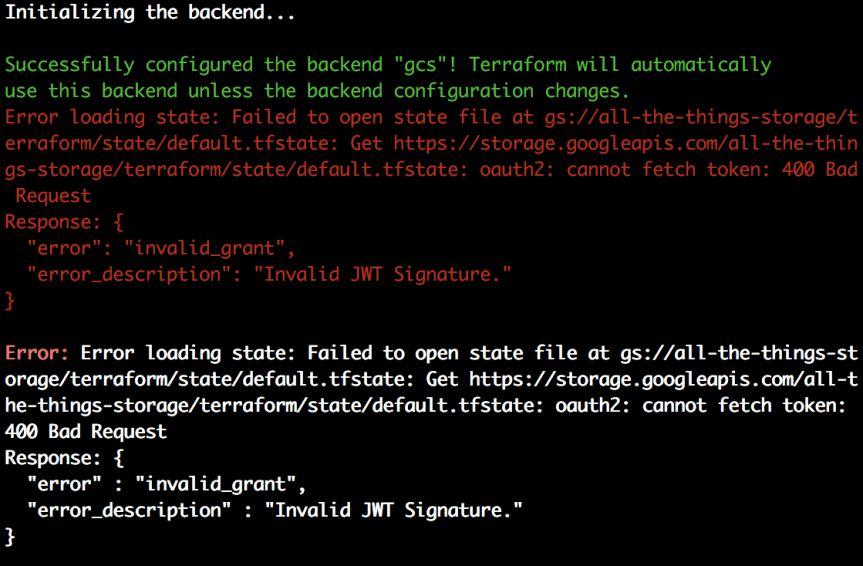
I ran into this issue recently. The “Invalid JWT Signature.” error while running some Terraform. It appeared to occur whenever I was setting up a bucket in Google Cloud Platform to use for a back-end to store Terraform’s state. In console, here’s the exact error.
My first quick searches uncovered some Github issues that looked curiously familiar. Invalid JWT Token when using Service Account JSON #3100 which was closed without any particular resolution. Upon further searching it didn’t help to much but I’d be curious as to what the resolution was. The second is Creating GCP project in terraform #13109 which sounded much more on point compared to my issue. This appeared closer to my issue but it looked like I should probably just start from scratch, since this did work on one machine already but just didn’t work on this machine I shifted to. (Grumble grumble, what’d I miss).
The Solution(s)?
In the end this is a message, if you work on multiple machines with multiple cloud accounts you might get the keys mixed up. In this particular case I reset my NIC (i.e. you can just reboot too, especially if on Windows it’s just easier to do that). Then everything just started working. In some cases however, the JSON with the gcloud/gcp keys needs to be regenerated as the old key was rolled or otherwise invalidated.
NOTE:Video toward the bottom of the post with the timeline so you can navigate into certain points of the video where I speak to different topics.
Cluster Nodes Currently
First I start out this session with a simple issue I ran into the previous night. The fact that a variable in the name of the instance resource being created causes the instance to be destroyed and created on every single execution of terraform. That won’t do so I needed to just declare each node, at least the first three, maybe five (cuz’ it’s best to go with 2n+1 instances in most distributed systems). So I removed the module I created in the last session and created two nodes to work with, for creation and setup of the provisioners that I’d use to setup Cassandra.
In addition to making each of the initial nodes statically declared, I also, at least for now added public IP’s for troubleshooting purposes. Once those are setup I’ll likely remove those and ensure that the cluster just communicates on the private IP’s, or at least disallow traffic from hitting the individual nodes of the cluster even via the public IP’s via the firewall settings.
The nodes, public and private IP addresses, now look like this.
When using Terraform provisioners there are a few things to take into account. First, which is kind of obvious but none the less I’m going to mention it, is to know which user, ssh keys, and related authentication details you’re using to actually login to the instances you create. It can get a little confusing sometimes, at least it’s gotten me more than once, when gcloud initiates making ssh keys for me while I’ve got my own keys already created. Then when I setup a provisioner I routinely forget that I don’t want to use the id_rsa but instead the google created keys. I talk more about this in the video, with more ideas about insuring also that the user on the machine is the right user, it’s setup for centos or ubuntu or whatever distro your using, and all of these specifics.
Once that’s all figured out, sorted, and not confused, it’s just a few steps to get a provisioner setup and working. The first thing is we need to setup whichever provisioner it is we want to use. There are several options; file, local-exec, remote-exec, and some others for chef, salt-masterless, null_resource, and habitat. Here I’m just going to cover file, local-exec, and remote-exec. First let’s take a look at the file provisioner.
[sourcecode language=”bash”]
resource “google_compute_instance” “someserver” {
# … some other fields for the particular instance being created.
# Copies the myapp.conf file to /etc/myapp.conf
provisioner “file” {
source = “directory/relative/to/repo/path/thefile.json”
destination = “/the/path/that/will/be/created/andthefile.json”
}
}
[/sourcecode]
This example of a provisioner shows, especially with my fancy naming, several key things;
The provisioner goes into an instance resource, as a field within the instance resource itself.
The provisioner, which I’ve selected the “file” type of provisioner here, then has several key fields within the field, for the file provisioner those two required fields are source and destination.
The source takes the file to be copied to the instance, which is locally in this repository, or I suppose could be outside of it, based on a general path and the file name. You could just put the filename if it’s just there in the root of where this is being executed.
The destination is where within the instance users folder is on the remote server. So if I set a folder/filename.json it’ll create a folder called “folder” and put the file in it, possibly renamed if it isn’t the same name, here as filename.json.
But of course, one can’t just simply copy a file to a remote instance without a user and the respective authentication, which is where the connection resource comes into play within the provisioner resource. That makes the provisioner look like this.
[sourcecode language=”bash”]
resource “google_compute_instance” “someserver” {
# … some other fields for the particular instance being created.
# Copies the myapp.conf file to /etc/myapp.conf
provisioner “file” {
source = “directory/relative/to/repo/path/thefile.json”
destination = “/the/path/that/will/be/created/andthefile.json”
connection {
type = “ssh”
user = “useraccount”
private_key = “${file(“~/.ssh/id_rsa”)}”
agent = false
timeout = “30s”
}
}
}
[/sourcecode]
Here the connection resource adds several new fields that are used to make the connection. This is the same for the file or remote-exec provisioner. As mentioned earlier, and through troubleshooting in the video, in this case I’ve just put in the syntax id_rsa since that’s the common ssh private key. However with GCP I needed to be using the google_compute_engine ssh private key.
The other fields are pretty self-explanatory, but let’s discuss real quick. The type, is simply that it is an ssh connection that will be used. One can also use plain text and some other options, or in the case of windows one uses the winrm connection type.
The user field is simply the name of the user which will be used to authenticate to the remote instance upon creation. The private key is the private ssh key of the user that needs to connect to that particular instance and do whatever the provisioner is going to do.
The agent, if set to false, doesn’t use ssh-agent, but if set to true does. On windows the only supported ssh authentication is pageant.
Then the timeout field is the time, in seconds as shown, that the provisioner will wait for execution to respond before an error is thrown in the terraform execution.
After all of those things were setup I created a simple script to install Cassandra which I called install-c.sh.
Now with the script done I can use the file provisioner to move it over to the server. Which I did in the video, and then started putting together the remote-exec provisioner. However I messed around with the local-exec provisioner too but then realized I’d gotten them turned around in my head. The local-exec actually initiates a script executing here on the local machine that terraform execution starts from, which I needed terraform to execute the script that is out on the remote instance that was just created. That provisioner looks like this.
connection {
type = “ssh”
user = “adron”
private_key = “${file(“~/.ssh/google_compute_engine”)}”
agent = false
timeout = “30s”
}
}
[/sourcecode]
In this provisioner the inline field takes an array of strings which will be executed on the remote server. I could have just entered the installation steps for installing cassandra here, but considering I’ll actually want to take additional steps and actions, that would make the privisioner exceedingly messy. So what I do here is setup the connection and then for the inline field I modify the file so that it can be executed and then execute the script on the server. It then goes through the steps of adding the apt-get repo, taking respective verification steps, running and update, and then installing cassandra.
After that I wrap up for this session. Static instances created, provisioners dedicated, and connections made and verified for the provisioners with cassandra being installed. So for the next session I’m all set to start connecting the nodes together into a cluster and taking whatever next steps I need.
6:12 Describing the situation where variables in key values of resources causes the resources to recreate every `terraform apply` so I broke out each individual node.
9:36 I start working with the provisioner to get a script file on machine and also execute that script file. It’s tricky, because one has to figure out what the user for the particular image is. Also some oddball mess with my mic starts. Troubleshooting this, but if you know what’s up with OBS streaming software and why this is happening, lemme know I’m all ears! 🙂
31:25 Upon getting the file provisioner to finally work, setting extra fields for time out and such, I moved on to take next steps with IntelliJ cuz the IDE is kind of awesome. In addition, the plugins for HCL (HashiCorp Configuration Language) and related elements including features built into the actual IDE provide some extra autocomplete and such for Terraform work. At this time I go through actually setting up the IDE (installed it earlier while using Visual Studio Code).
34:15 Setup of IntelliJ plugins specific to Terraform and the work at hand.
35:50 I show some of the additional fields that the autocomplete in Terraform actually show, which helps a lot during troubleshooting or just building out various resources.
37:05 Checking out the Apache Cassandra (http://cassandra.apache.org/) download and install commands and adding those to the install script for the Terraform provisioner file copy to copy over to the instance.
43:18 I add some configurations for terraform builds/execution via IntelliJ. There are terraform specific build options and also bash file execution options which I cover in video.
45:32 I take a look at IntelliJ settings to determine where to designate the Terraform executable file. This is important for getting the other terraform build configuration options to work.
48:00 Start of debugging and final steps between now and…
1:07:16 …finish of successful Cassandra install on nodes using provisioners.
1:07:18 Finishing up by committing the latest changes to repository.


You must be logged in to post a comment.