Day #3 => DeployCon && Enterprise && Data Gravity

A lot of things were mentioned during the panels and sessions during DeployCon. Some things I agree with, some things I don’t.

The “Web Way”

There is one prevalent thing that came up over and over, the “web way”. What’s the web way? It is building horizontally, scalable, with RESTful APIs, and applications at an upper tier that are loosely coupled to any back end, and generally geographically independent (i.e. dispersed). This could be a mix of IaaS and PaaS, public or private, or a mix of all these things. Above all, it is about building horizontally instead of vertically, so that one can scale big, really big.

It was generally accepted in the dozens of conversations I had about the “web way” that the enterprise was only realizing that their idea of “big” and “redundant” just doesn’t even compare to what has been built using ideas from the Internet Generation. The Facebook PHP scale has blown away almost any enterprise’s scale problem, Twitter’s piping relationships across big data trumps most enterprises service bus concerns, Netflix’s streaming makes most enterprise’s issues with data transfer seem like a child’s game.

But all this isn’t to spite or hate on enterprise teams. They have an immensely important job to do. With all of these advances, and with management allowing enterprises to step closer into the community and get involved with things built the “web way” there is a massive upside. The enterprise is getting closer to cloud technologies. They’re learning how to leverage their on premise assets for various reasons, such as not throwing out the investment, and public or private cloud tech together.

Combing these things, and the complex needs of the enterprise together is all benefits, they’re getting the bleeding edge technology and research basically for free. All while effectively finding ways for a slow migration to not damage existing investments, day to day operations, and improve overall resiliency and services within the enterprise itself.

Overall, a huge win-win for everybody.

Data Gravity is Vital to Understand for Application Architecture

Dave McCrory kicked off the Data Gravity analogy to application and data source spacing. It is a pretty flawless analogy which brings us a much clearer understanding around application architecture when it comes to where data sources and where applications sit within a system. It also helps to define the value, cost, and gravity of data in relation to it’s location relative to the application.

With this topic brought up, every single tie it hinged around people fighting the gravity between data and applications. The difficulty in using cloud technologies, big data and other things is highly advantageous for companies, but as Dave points out in his presentations and writings about data gravity, it is getting exponentially more difficult to pull apart data and applications to rejoin them somewhere else. Such as the massively more scalable, powerful expansive public cloud.

These conversations lead to a growing opportunity space in the industry, moving data. This could be done with physical moves of drives, big pipes, pipes as a service or a host of other offerings. So far, very few are doing much in this realm, understandably considering the difficulty. But I’m betting that we’ll start seeing some serious efforts put into this. One of my personal notions is the idea of going cloud to cloud, we’ll see if anything pops up in the near future. If not, I might have to make a play on that myself.

…and last but not least, DeployCon!

DeployCon was the major reason I attended Cloud Expo. DeployCon was about PaaS Tech & the future movement of cloud technologies. Even though the rest of the conference, for most enterprises, seems bleeding edge, DeployCon was about the truly bleeding edge technology. Not only that, the elephant in the room is about the new king makers of IT, of technology, and of business in general; the software developers. Yup, I said it. We might want to stick IT on things here and there but the fact of the matter, over the next 10 years – if the IT moniker even sticks – it’s going to be more and more developers, business apps, and business development – not more network or system admin roles that are needed. The abstractions are pushing developers into an even more pivotal role in a company and providing even greater benefits to business. You can ask any number of people in the PaaS space, from AppFog, AppHarbor, Tier 3, Stackato/ActiveState all the way to Windows Azure (they need to actually show up next time, just saying!). They ALL SEE THIS HUGE CHANGE coming. Not only do they see it, they are experiencing the beginnings of the change.

So hats off to an excellent job Krishnan (@krishnan @ Rishidot Research) for putting this together! Wendy White (@wendywhite) for throwing in major logistics support and all the others too! I had a blast and am looking forward to the next event.

Thanks also to the fire starters and technologists on the panels! You guys know who you are, good job! Here’s a few parting shots of the awesome people I got to meet and talk tech with!

Parting Shots

@brianmmcclain & @markkropf enjoying a round of drinks!
@brianmmcclain & @markkropf enjoying a round of drinks! These guys are smart, seriously. (click for full size)
The one and only  @wattersjames the man with impeccable taste @mortonheroku and the man with the plan @guy_marion
The one and only @wattersjames (thanks for the fire starting!) the man with impeccable taste @mortonheroku and the man with the plan @guy_marion (click for full size image)
The beautifully witty @briellenikaido and @mortenheroku showing us the where the premo tastes are in New York City.
The beautifully witty @briellenikaido and @mortenheroku (GREAT Sake choice btw) showing us the where the premo tastes are in New York City. (click for full size image)

Day #2 => Cloud Expo, A Few Pictures & Associated Thoughts

This first one is of Effective UI a company out of Denver, Colorado. You’re probably asking yourself, why are they at a cloud conference? I asked the same question and they brought up a really good point. Most cloud computing interfaces are horrible. I have to agree, most are or at least have been pretty bad. User experience is fundamental to a good adoption and usability of the customer base, a solid user interface is the cornerstone of this experience.

Effective UI
Effective UI

I’m stil tripping on this one. I’m totally stoked that Windows Azure is providing Linux support. I however can’t stop laughing about how cold it must be in hell. For over a decade Microsoft oft repeated that it would be a “cold day in hell” before they where involved with, used, sold, or offered a Linux product of any kind. Now they offer Linux VMs on Windows Azure and employees of Microsoft actively and openly contribute to the Linux kernal!  Truly awesome, and a little shocking.

SUSE offered on Microsoft's Windows Azure
SUSE offered on Microsoft’s Windows Azure

Jaspersoft, the open source BI Solution Company. A few people asked me about BI solutions and such for the cloud and for big data. Jaspersoft is one of the leading companies in this part of the industry. They even have the capability to build their service into a PaaS.  Ok, I’ll admit I don’t exactly know what they mean by that, but it sounds really cool. Maybe I need to have a conversation with them about this and see about working on extending this PaaS BI Service?

Jaspersoft
Jaspersoft – Open Source Business Intelligence

I also had to give some Postgresl love. They even had their elephant mascot hanging around! Does anyone know what the elephant’s name is? Beers on me to whoever gets it.  😉  For anyone looking to get an RDBMS running in the cloud, Postgresql is easily one of your best options. Don’t even start thinking about Oracle these days…  no seriously, don’t.

The Elephant is in the house...
The Elephant is in the house…

Day #1 => Cloud Expo & Cloud Bootcamp

Thanks to Larry Carvalho and Krishnan Subramanian for lining me up to speak at the kick off bootcamp keynote and for a PaaS Session at the Cloud Expo Boot Camp. I had a great time and was able to cover some great material with the audience. It was great to hear a number of companies and people diving into PaaS Technology and learning about what this technology can do.

The audience, above all was very open to the idea of openness with technologies that are open. See the theme there? 😉 There were a few resounding themes to things people would like to see added to the Open Source PaaS Solutions such as Cloud Foundry, Iron Foundry and Open Shift. Here are a couple of these;

  • People want to have continuous deployment or continuous integration features added to the PaaS Capabilities so that the PaaS doesn’t just deploy code blindly. The two companies that came up that have some capabilities around continuous deployment and integration are AppHarbor and CloudBees. But the stronger ask from the audience was for there to be some type of integration with one of the open offerings like Cloud Foundry or Open Shift. Some discussion also followed around these capabilities being a default “service” within a PaaS or even IaaS offering.
  • The other thing that brought up a lot of questions was the architecture behind the various PaaS Solutions. I walked the audience through a description based on what I wrote up in “Cloud Foundry Architecture – Removing the Operating System Barriers with PaaS Part 4“. It generally tends to fit similar architectures in the PaaS realm and most of the audience liked the idea of how PaaS operations are working.
If you attended either of my talks and want to check out the PaaS Providers that came up during questions and discussions, here’s the one’s I can remember:
  • Tier 3 – Enterprise grade IaaS and PaaS w/ the Web Fabric Product. This company I currently work for, they’re doing a rock solid job with the offering.
  • AppFog – Very application focused and IaaS autonomous, i.e. you can pick AWS, HP Cloud, or Azure with more options to come in the future. I’ve worked with these guys also and they too kick ass!
  • AppHarbor – .NET focused PaaS running atop AWS, provides a free tier and continuous integration and rollback features. I haven’t worked for these guys, but I’ve met everyone on the team and they’re all top notch. Props guys! 🙂
  • CloudBees – Java focused PaaS with Enterprise focused CI/CD capabilities with Jenkins.
  • Heroku – These are the guys who kicked off the whole PaaS thing a few years ago. They started Ruby on Rails focused but also cover Java and Node.js too.
  • EngineYard – A solid PaaS offering running primarily atop AWS with some IaaS style features available too.
  • Windows Azure – Microsoft’s cloud offering, with a lot of updates around Node.js lately. They’ve traditionally focused on .NET, but lately have put as much or more focus on Node.js. Looks like things are improving in the Azure Camp.

More to come tomorrow with DeployCon at the Cloud Expo.  Until then, cheers.

Why Your Presentations Might Just Suck!

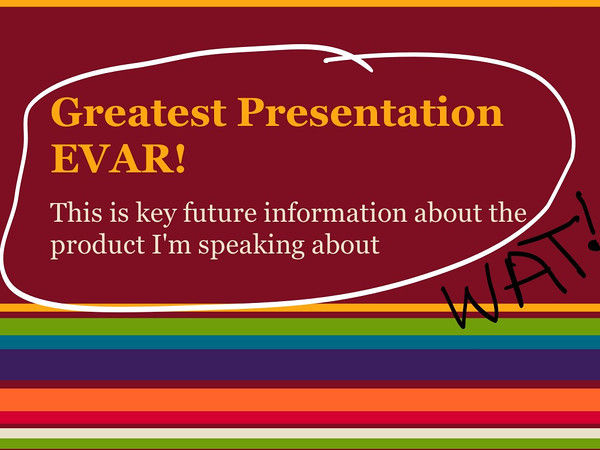
Ok, so everybody’s presentations don’t suck. But the vast majority of them do. I know I’m not the first person to make this statement. I’d include a list of others who have said it but it would take more space than my entire blog does. Take this example slide deck from a presentation I saw recently. This is the actual color background theme that was chosen, with the wording changed slightly to protect the guilty – for now.

First, let’s tackle this wording. I rephrased it so it has almost the exactly same spacing and word style usage. The initial thing I’ve noticed is how long it takes one to read this. Is the presenter pausing while everyone reads the novel he wrote up on the slide? Nope, he’s blabbering on while everyone is looking at this slide reading it, pondering the huge words that are stuck in the slide. Not until the 4th or 5th sentence the presenter makes does the audience start to re-focus on the presenter. Already, everyone is rather lost in regards to the main topic. This is a major problem.

One of the worst slide decks EVAR!
One of the worst slide decks EVAR! (Click for full size image)

Don’t even get me started on the horrible decision to use this color scheme on the background. That can’t possibly be something that would allow people to pay attention to the speaker, WHO THE AUDIENCE IS SUPPORT TO BE PAYING ATTENTION TO!!!

Oh dear, another absolutely horrible slide.
Oh dear, another absolutely horrible slide. (Click for full size image)

In this second slide, it brings up one of the other things that happen way too often in a slide during a presentation. Keep in mind presenters, this is NOT a hand out, it is a slide. It is presented on the wall, behind the speaker usually. Try to read the words on that and imagine listening to someone speak while that is on the wall! Seriously, it makes me ponder buying tomatoes to bring the tradition of throwing tomatoes at bad performers.

What is a Presentation?

Just for a moment let’s talk about what a presentation is. First the technical definition of what a presentation is:

transitive verb
1 a (1) : to bring or introduce into the presence of someone especially of superior rank or status (2) : to introduce socially b : to bring (as a play) before the public
2: to make a gift to
3: to give or bestow formally
4a : to lay (as a charge) before a court as an object of inquiry b : to bring a formal public charge, indictment, presentment against
5: to nominate to a benefice
6 a : to offer to view : show b : to bring to one’s attention 
7: to act the part of : perform
8: to aim, point, or direct (as a weapon) so as to face something or in a particular direction

This gets us a little closer to exactly what it is, but really there is a lot more to presenting and getting to present then this simple definition implies.

Being able to present in front of a group is a chance to provide leadership. It is a chance to provide a vision of an idea, an opportunity to transfer knowledge and passion of a subject, and above all it is a chance to inspire progress and change in a positive way.

It doesn’t matter if the presentation is for a few corporate suits or an audience of revolutionaries. Having a chance to present to people is a chance to do well, to do good for people, and to step above and change things for the better. Presenting is a chance to change some small part of the world for the better, and in some cases maybe change a big part of the world!

Enough Griping and Such, How Does One Present Well?

The question that is left is, how do you put together a good presentation? It’s easier than you might imagine! I’ve actually seen a few recently that were great. The speaker captivated the audience, brought them into the topic, was inclusive and conversational and really left people wanting to know more. One of the first things that leads to a good presentation is one question.

Who cares and why should they?

If that question is not answered, or for some odd reason can’t be answered during the presentation then the presentation is a failure. When putting together a presentation ask yourself the question over and over and over again. Keep the audience in mind too, think about what the audience would ask or answer in regards to the topic.

Zen Aesthetic

This one I do NOT kid about. Don’t stick a bunch of stuff all over your slides. If anything, try to do a lot of presenting WITHOUT slides to really make an impact. If you want a prime example of average presentation skills versus good presentation skills, look no further then Bill Gates and Steve Jobs.

This video of Steve Jobs shows why he is a master presenter. Building the audience for the three devices they released in 2007 that changed the world…

Not many business leaders, or leaders for that matter, are very good at this. Note his slides. They’re simple, they have a few images or just one or two points each. The idea is, the audience is focusing on him, on what he is discussing, on what he is bringing forth to the world.

Learning to Present

Check out Gary's blog at http://www.presentationzen.com/
Check out Gary’s blog at http://www.presentationzen.com/ or click on the image to navigate to his twitter account.

I could go on about great presentations, I could detail every single little point. Maybe I’ll continue this in another blog entry. But for now, I’m going to list a few masterful books on learning how and in which way to make great presentations.

There are more, but these two things will get you started toward good presentations, toward capturing and entertaining your audience. So get material, think and learn about how to be a better presenter! Before you know it you’ll be rocking the audience!

…as an aside. If you’re ever at a user group, conference, or other event that I’m presenting at please call me out on any of these things I fail at. If I lose your attention or have a slow part in my presentation or if my story does not come across clearly. Lay into me, tell me I’ve slipped, messed up, goofed, or butchered the story. I want to know. I want to make sure, whenever I’m presenting that I’m laying out the story, the vision that I’m trying to get across. I want the vision to be there no matter how technical of a deep dive it might be that I’m presenting. So yes, just know I’ve got a thick skin and I want to know!

Thanks, I’m looking forward to seeing you at my next preso!

Raven DB, A Kick Starter using Tier 3 IaaS

I’m putting together a pretty sweet little application. It does some basic things that are slowly but surely expanding to cover some interesting distributed cloud computing business cases. But today I’m going to dive into my Raven DB experience. The idea is that Raven DB will act as the data repository for a set of API web services (that seems kind of obvious, I state the obvious sometimes).

The first thing we need is a server instance to get our initial node up and running. You can use whatever service, virtualization tools, or a physical server if you want. I’m going to use Tier 3’s Services in my example, so just extrapolate for your own situation.

First I’ve logged in to the Tier 3 Control Site and am going to create a server instance.

Building the Tier 3 Node for Raven DB

Creating the Server Instance (Click for full size image)

Next step is to assign resources. Since this is just a single Raven DB node, and I won’t have it under heavy load, I’ve minimized the resources. This is more of a developers install, but it could easily be a production deploy, just allocate more resources as needed. Also note, I’ve added 50 GB of storage to this particular instance.

Setting Resources (Click for full size image)

Now that we’ve set these, click next and on the next screen click on server task. Here add the public IP option and select the following services to open their ports.

Setting up a Public IP and the respective ports/services (Click for full size image)

The task will display once added as an item on the create server view. Once that is done, click create server so the server build out will start.

Creating the Server (Click for full size image)

Now log in with RDP to start setting up the server in preparation of loading Raven DB. The first thing you’ll want to do is go ahead and get Windows Update turned on. My preference is to just turn it on and get every update that is available. Once that is done, make sure to get the latest .NET 4 download from Windows Update too.

Getting Windows Update Turned On (Click for full size image)

Once all of the updates are finished and .NET 4 is installed we’ll get down to the business of getting Raven DB Installed. In this specific example I’ll be installing the Raven DB as a windows service, it however can be installed under IIS so there are many other options depending on how you need it installed.

Installing Raven DB

To get the software to install, navigate over to the Raven DB site at http://ravendb.net/ from the new instance we’ve just spun up. Click on the Download button and you’ll find the latest build over on the right hand side. Click to download the latest software package to a preferred location on the system.

Raven DB - Open Source 2nd Generation Document DB (Click to navigate to the site)
Raven DB – Open Source 2nd Generation Document DB (Click to navigate to the site)

Once you’ve downloaded it (I’ve put my download in the root R:\ partition I created) unzip it into a directory (I’ve just unzipped it here into R:\ to make the paths easy to find, feel free to put it anywhere you would prefer. In our Tier 3 environment the R drive is on a higher speed, thus higher IOP drive system, thus the abilities exceed your standard EBS/AMI or S3 style storage mechanisms.).

Saving the Raven DB Download (Click for full size image)
Saving to R:/ (Click for full size image)

At this point, open a command prompt to install Raven DB as a service. Navigate to the drive and folder location you’ve saved the file to. Below I displayed a list of the folder and files in the structure.

CLI actions (click for full size image)

Once you’re in the path of the Raven.Server.exe file then run a slash install on it to get a Windows Service of the Raven DB running.

Raven DB Installation results (click for full size image)

To verify that it is up and running (which if you’ve gotten these results, you can rest assured it is, but I always like to just see the services icon) check out the services MMC.

Launching services (Click for full size image)

There it is running…

Now, you’re not complete yet. There are a few other things you may want to take note of to be sure you’re up and running in every way you need to be.

The management and http transport for Raven DB is done on port 8080. So you’ll have to open that port if you want to connect to the services of the database externally. On windows, open up the Windows Firewall. Right click on the Inbound Rules and click Add Rule.

Select Port (Click for full size image)
Select the Raven.Server.exe (click to see full size)
Inbound Rule (Click for full size image)
Open up however needed. (Click for full size image)
Public Private etc. (Click for full size image)

Enter a name and description on the next wizard dialog screen and click on Finish.

Displayed active firewall rule (Click for full size image)

Now if you navigate to the IP of the instance with port 8080 you’ll be able to load the management portal for Raven DB and verify it is running and you have remote access.

Raven DB Management Screen
Raven DB Management Screen (Click for full size image)

At this point, if you’d like more evidence of success, click on the “Create Sample Data” button and the management screen will generate some data.

Raven DB Management console with data (Click for full size image)

At this point you have a live Raven DB instance up and running in Tier 3. Next step is to break out and add nodes for better data integrity, etc.

Summary

In this write up I’ve shown a short how-to on installing and getting Raven DB ready for use on Windows Server 2008 in Tier 3’s Enterprise Cloud environment. In the very near future I’ll broach the topics of big data with Raven DB, and other databases like Riak and their usage in a cloud environment like Tier 3. Thanks for reading, cheers!