In this short (less than 4 minutes) video I put together a Go module library, then setup some first initial tests calling against functions in the module.
00:40 – Creating the Go go.mod file. When creating the go.mode file, note the command is go mod init [repopath] where repopath is the actual URI to the repo. The go.mod file that is generated would look like this.
01:09 – Instead of TDD, first I cover a simple function implementation. Note the casing is very important in setting up a test in Go. The test function needs to be public, thus capitalized, and the function needs accessible, thus also capitalized. The function in the awesomeLib.go file, just to have a function that would return some value, looks like this.
01:30 – Creating the test file, awesomeLib_test.go, then creating the test. In this I also show some of the features of the Goland IDE that extracts and offers the function names of a module prefaced with Test and other naming that provides they perform a test, performance, or related testing functionality.
packageawesomeLibimport"testing"funcTestGetKnownResult(t*testing.T){got:=GetKnownResult()ifgot!="known"{t.Error("Known result not received, test failed.")}}
02:26 – Running the standard go test to execute the test. To run tests for all files within this module, such as if we’ve added multiple directories and other files, would be go test ./....
02:36 – Using Goland to run the tests with singular or multiple tests being executed. With Goland there are other capabilities to show test coverage, what percentage of functionality is covered by tests, and other various code metrics around testing, performance, and other telemetry.
That’s it, now the project is ready for elaboration and is setup for a TDD, BDD, or implement and test style approach to development.
For JavaScript, Go, Python, Terraform, and more infrastructure, web dev, and coding in general I stream regularly on Twitch at https://twitch.tv/adronhall, post the VOD’s to YouTube along with entirely new tech and metal content at https://youtube.com/c/ThrashingCode.
What to write when starting to learn and programming language?
I started an answer to the question in this video. But read on for more extensive list and details!
I’ve written up this article. It started last week when I wrote up “Top 5 Ways to get the coding basics down!” This week I wanted to delve deeper into a specific item on that list and provide what I came up with, which is this List of 10 things to write in order to effectively learn a programming language.
1. Find a Known Domain
What I mean by this is to find a domain that you personally know. It seemed the 80’s generation of programmer dorks wrote role playing game character generators for Dungeons & Dragons. I did myself but for Robotech. But there’s a million other domains that you would know, and those domains are what you should pick and find data and actions in that domain you could implement with code.
Two examples I’ve used recently includes the made up e-commerce store of Better Botz, a store that works with the domain of robots and mecha, and Railroads such as Union Pacific, Norfolk Southern, Amtrak, and the respective domain around that. Many of the other things you could use might be transportation, automotive, health care, or more specific the universe of Harry Potter, Star Wars, Tumble Leaf, Sesame Street, style and fashion trends,
2. Model a Domain According to the Language
Let’s say you’re learning JavaScript. Whatever the domain you’ll want to find actions and data to implement and use specificly to how the language is best used. With JavaScript that would be to use the language features and design to build a working application, like; perform mathematical calculations, such as with bigint, using dynamic import, chaining, promises, async and await, global variables, arrow functions, inheritence through prototyping, and how the properties and methods, or functions, for starters work best for the application domain.
In C#, Java, Rust, Go, Erlang, F#, and other languages these features and characteristics would be different. Whatever the language, make a list of the features and characteristics that are widely used and work with those to best implement the application domain.
List Interupt: Refactoring
I’ve written this list in order of what I personally have found the easiest path in gaining a high level of profiecience with a programming language. You could however mix the list to your preferred style. However at this point between the first two item efforts and the next a new skill will be learned both out of necessity and intent: refactoring.
“Code Refactoring is the process of restructuring existing computer code—changing the factoring—without changing its external behavior. Refactoring is intended to improve the design, structure, and/or implementation of the software (its non-functional attributes), while preserving the functionality of the software. Potential advantages of refactoring may include improved code readability and reduced complexity; these can improve source code maintainability and create a simpler, cleaner, or more expressive internal architecture or object model to improve extensibility.”
3. Learn to Test
Learning to test an application will help you tremendously in writing better code. If you’ve committed the actions of the first two items in this list, this is an opportunity to significantly refactor the application you’ve built around your known domain. You’ll need to break apart existing functions so that they’re bit size enough to test. Sometimes you’ll need to differentiate between making some testable at a small unit size versus across an application’s hard boundaries, like an integration test between a database and the application’s data access code.
Pushing for testing the core domain functionality of the application is the best thing to focus on. Don’t worry about the specifics of testing if data is written to the database, or data is retrieved from the database, as much as testing that a function returns the specific answer you expected based on passing it the specific parameters you’ve assumed it would be given. This isn’t to say sometimes you may want to test what you’ve written to the database, so sure, that is something that you can test. But focusing on the core application domain functionality will ensure the best return on your investment of time!
4. Clean Coding Practices
Once you’ve gained familiarity with the language by building an application or two using the features, rooted in a known domain that you understand well, and have some test coverage of the application, refactor that application using clean coding practices. Clean code is often described using the SOLID principles:
Single Responsibility Principle
Open / Closed Principle
Liskov Substitution Principle
Interface Segregation Principle
Dependency Inversion Principle
See also: KISS (Keep It Simple Stupid), DRY (Don’t Repeat Yourself), YAGNI (You Aint Gonna Need It), and others.
The idea behind these, is to keep the application code regardless of languages as simple as it can possibly be. With a secondary effect that once software becomes painful to modify, it should be changed as to make modification simpler. Thus the idea of refactoring to the SOLID principles listed, and doing so continuously will keep software in a usable, maintainable, and one could arguable say even a performant state.
5. The Hardest Suggestion: Naming & Thinking
It is often stated, “The hardest problem in computer science is naming things.” to which I, not in jest, whole heartedly agree. Elements in programming, programming design, programming implementation, and every permeable space around programming is littered with poorly named things. I don’t blame anybody because it is damned hard to get a good name for features and functionality, and have truth in the naming of those features and functionality remain throughout the course of its lifetime.
Naming is hard, which I’d combine to say stop programming regularly and think about your naming. Think about refactoring to names that are more accurate to the intent. Stop and ponder what a good name would be, and if the function or feature will replication what that name implies. Add in some metaphysical thought to the whole effort, talk it through with someone you know (or a stranger, it’s a good skill for debuggin!), but think, think, ponder, analyze, and think some more.
The short of the long part of this suggetion can simply be summarized as: Practice naming things, think a bunch, then rename things, and repeat this cycle.
In Summary
To really get a programming language down by heart, be able to readily implement pretty much anything, this is my go to list of actions and practices to follow. Hopefully, it’ll provide you with some ideas to explore how best you would also like to go about learning a programming language. I’m always open to suggestions, comments, thoughts, and discussions on the topic, so feel free to ping me via the Twitters @Adron.
Search Words
Type in any of the following, in pretty much any search engine, like duckduckgo to dig up the latest and greatest on this topic.
Another question came up during a recent Twitch stream that I wanted to elaborate on.
How to get the basics down?
Read on for the curated 5 ways…
How to get the basics down?
I elaborated in the video, check it out too.
Get a physical book to have an order to learning a language. If not a book, at least a set course of material to step through a little bit at a time. Then take a small part of the book and work through what it shows, but elaborate yourself on it. An example: Cover the first chapter on a new language, learn the data types and then actually sit down and write out some code and get them to print out, take some input that is converted form one type to another, and other exercises. Make them up yourself. This ingrains the specifics in one’s mind to be able to quickly write them out in the future while you’re coding.
As I stated in the video, along with other details (watch the video for the details) write something that will import and data and export data from text files. Change the format of the data being written and read in those text files. Then do it again with something else, switching back and forth between something like XML, JSON, or some other format. This will familiarize one with data manipulations that are so often needed but also just the syntax and control lstructures of a language.
Choose a library or two to pull in as a dependency and work with that library. An example might be a library that generates random data. Or another example might be a library that simplifies HTTP verb actions or routes for URL’s. There are many out there for any language and its respective stack. This helps increase familiarity with available libraries, but also how they’re structured and how you might structure libraries. In addition, you’ll get a better understanding of the dependency requirements of any particular language stack.
Choose some of the intricate parts or features of a particular language you’re working with and try it out. But don’t stop there, elaborate on the particular example you build. For example, try out C#’s anonymous function and see what you can do with them. How do they or don’t they connect to an object? In Go you might try out Go Routines and get familiar with communication between routines. C++ you may try out pointers and try to come up with some tricky ways to do things with pointers.
Choose a domain and find data about it, and then display that data either to standard out or some other way. Maybe display that data on a web page. But find something you’re interested in, or might be interested in, gather some data around it and import that data into a database or into the application you’re building itself and parse it, print it out, and work through variations on doing this.
For JavaScript, Go, Python, Terraform, and more infrastructure, web dev, and coding in general I stream regularly on Twitch at https://twitch.tv/adronhall, post the VOD’s to YouTube along with entirely new tech and metal content at https://youtube.com/c/ThrashingCode.
For more details on coding projects and more that are in the works, check out the Thrashing Code Newsletter, sign up for it here!
Recently while doing some coding on Twitch I was posed a question, “Are there any people streaming Java?”
It’s an interesting question, as I’ve seen a lot of people streaming a lot of languages. The bulk of streamers seem to be streaming JavaScript and the related frameworks and tools like React, Node.js, Vue.js, and others. I’ve also seen a lot of people using Python, and a few doing things like Rust, C++, and a few others but barely anybody using Java.
With that stated, I’d love to find others writing Java apps on Twitch. Anybody have some pointers to anybody? Who do you , if you do, watch on Twitch?
For JavaScript, Go, Python, Terraform, and more infrastructure, web dev, and coding in general I stream regularly on Twitch at https://twitch.tv/adronhall, post the VOD’s to YouTube along with entirely new tech and metal content at https://youtube.com/c/ThrashingCode.
For more details on coding projects and more that are in the works, check out the Thrashing Code Newsletter, sign up for it here!
It’s been a year plus now that I’ve been streaming on Twitch (FOLLOWon the channel, it’s free not a paid subscription or anything). At points it has been weekly, sometimes every other week, sometimes every day of the week, or in some cases even more intermittently or frequently. The schedule, considering, has been kind of ridiculous. But that has now changed.
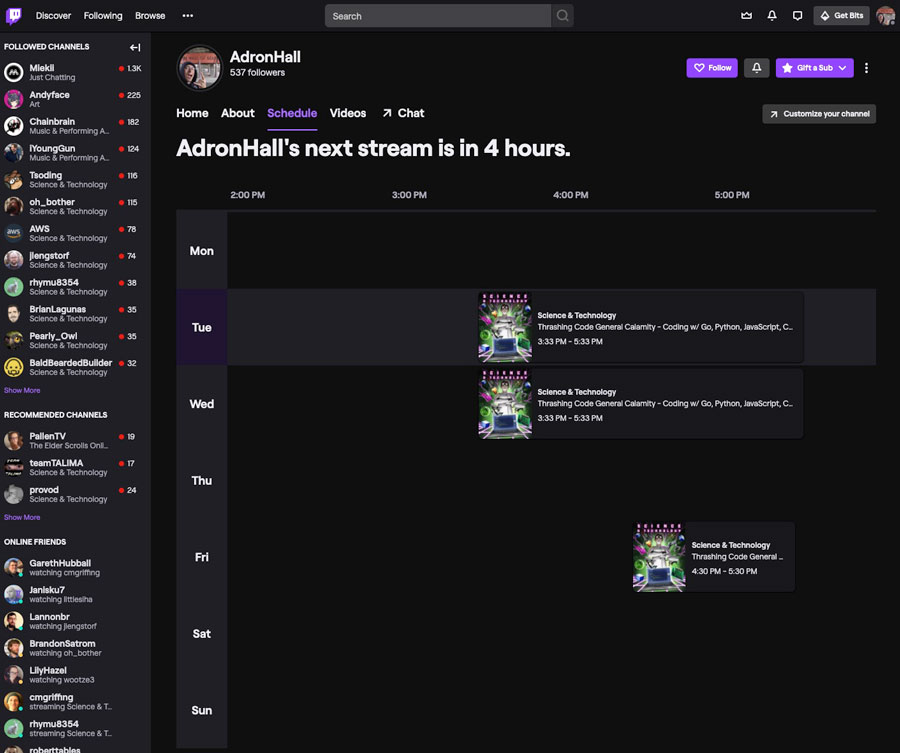
In time for this finalization Twitch also has reintroduced an actual schedule functionality to the site, albeit it’s in preview. So maybe in the next week or two that along with many of the other features that are in the Twitch pipeline will be available. For now though, here’s a screenshot of that preview schedule screen. Kind of cool!
I didn’t really push to get the word out that this current scheduling would be *it*. The reason was I simply wanted to succeed at it for a few weeks before I declared it the winning schedule. But here we are now, this is the schedule.
Tuesday and Wednesday at 3:33pm and 4:30pm on Friday are going to be *the* days I get into some coding. Other topics I’ll filter in over the coming weeks and months as this Coronavirus thing starts to become the new world order.


 It’s been a year plus now that I’ve been streaming on Twitch (