Difficult Even Among Ourselves, Developers

Ugh.  I was interrupted after a solid 30+ minutes of concentration while working through a recursion problem.  It all screeched to a stop.  I lost track of what was going on.  Everything I had been concentrating on was immediately dumped as a request for my attention came to assist in doing something else, something completely unrelated.  That 30 minutes of work was completely erased, only the skeletal remains left in actual code, that at least built, but was not working appropriately.  Everything I held in memory, the multiple memories I was using in my gray matter, each was catastrophically purged.

I then completed this alternate, non-related development task.  It was fun, I enjoyed it.

Now knew I?d have to step back into that 30 minutes of memory, and spend another 10 minutes just to get back to the point where I could continue with what I was working on.  I now faced the challenge of putting all of those multiple memories back into place, of remembering each and every piece of data that I held in my mind, and assure that each connection was once again related appropriately in my gray matter.

What was originally about 20-30 more minutes of work before the interruption, now grew into the 20-30 minutes plus the 10 or so minutes taken to reacquire the appropriate working state.  This happens to every developer, sometimes we can maintain our state, but mostly we?re completely ruined and must start by rebuilding our working state.

How many project managers, significant others, and generally the planet just disregards this fact?  Maybe people just don?t understand, even though it is inherent to the human process of thought.  Simply, anything requiring attention and thought cannot be interrupted without devastating consequences to the intended end result.

hack some code proposal

I’m not sure what the name should be, not sure how or where to go about this yet, but would love to hold some lunch time sessions and put some code together.  The idea I have revolves around small team meet ups during lunch for about 30-45 minutes.  A lead will be chosen to cover a topic and some functional code will be put together per that leads direction.

Of course this would mean whoever would come would need a laptop or other device of sorts to do development on.  They would also need appropriate tools.  If we?re working with C# something like VS.NET, if we?re working with Java then Eclipse, or with Erlang we?d need your favorite text editor.  Technically, I guess any of these could be built in a text editor, and the point isn?t what it is built in but to cover the language or specific skill topic.

Anyone else have any ideas?  I?ll be looking and talking to establishments around town that could or would host something like this.  Next I?ll just need to figure out who and what topics, which anyone could chime in on.

Test Driven Development Built Name Generator Part 2

Part 1, Part 3.

Alright, time to tear into getting that name data imported into the database.  To review the previous entry check out part 1.

Next I set the Windows App Project I added in part 1 to be the startup project.  After that I created a screen that looks like the image below (click to see larger image).
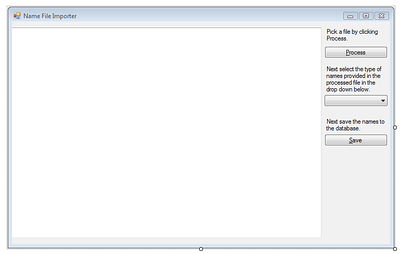
Also add an open file dialog control.  Next double click on the Process button and add the following code.  Make sure not to miss the instantiation of the names list property in the initialization.

using System;
using System.Collections.Generic;
using System.IO;
using System.Text.RegularExpressions;
using System.Windows.Forms;

namespace TextFileImporter
{
    public partial class Form1 : Form
     {
         public Form1()
         {
             InitializeComponent();
             Names = new List();
         }

         private List Names { get; set; }

         private void buttonProcessFile_Click(object sender, EventArgs e)
         {
            if (openFile.ShowDialog() == DialogResult.OK)
            {
                if (File.Exists(openFile.FileName))
                {
                    TextReader tr = new StreamReader(openFile.FileName);
                    textProcessedFile.Text = tr.ReadToEnd();
                    tr.Close();
                    // Cleanup text.
                    textProcessedFile.Text = ProcessName(textProcessedFile.Text);
                }
                else
                {
                    MessageBox.Show("Select a file that exists.", "File doesn't exist.", MessageBoxButtons.OK,
                                    MessageBoxIcon.Information, MessageBoxDefaultButton.Button1);
                }
            }
        }

        private string ProcessName(string textBody)
        {
            var regex = new Regex("[^A-Z']+");
            textBody = regex.Replace(textBody, " ");

            foreach (var s in textBody.Split(Convert.ToChar(" ")))
            {
                Names.Add(s);
            }

            return textBody;
        }
    }
}

With the beauty of those regular expressions the files will parse appropriately in about 1-5 seconds.  Next we need a way to write this data into the database.  I did this by adding a Class Project named Generator.Core and added a folder called Model.
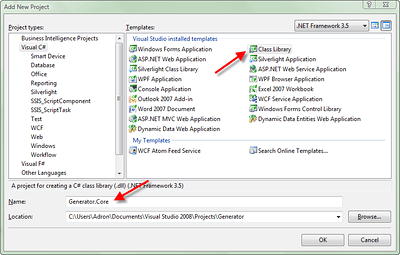
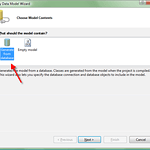
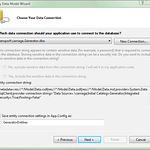
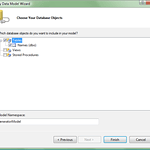
In the Model Directory I added a new ADO.NET Entity Framework Model.  The images below show my steps through the wizard.
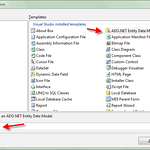
  • Wizard # 1 - Adding Data Model.Wizard # 1 – Adding Data Model.
  • Wizard # 2 - Adding Data Model.Wizard # 2 – Adding Data Model.
  • Wizard # 3 - Adding Data Model.Wizard # 3 – Adding Data Model.
  • Wizard # 4 - Adding Data Model.Wizard # 4 – Adding Data Model.
  • Wizard # 5 - Adding Data Model.Wizard # 5 – Adding Data Model.

.smugcontainer div {overflow: hidden;line-height: 1.1;margin-top: 10px;font-family: verdana, arial, lucida, sans-serif;font-size: 85%;background-color1: rgb(20, 20, 20);} .smugimg li {float: left;display: block;width: 160px;height: 200px;background-position: 50% 50%;margin-right: 10px;margin-bottom: 10px;} .smugimg li img {width: auto; height: auto; border: solid 1px #aaa; background: #555; padding: 2px; vertical-align: middle;} .smugimg a {display: block;text-align: center;text-decoration: none; color1: rgb(240,240,240);} .smugimg a:hover img {border: 3px solid #6da6d1; padding: 0px;}

.smugcontainer div {overflow: hidden;line-height: 1.1;margin-top: 10px;font-family: verdana, arial, lucida, sans-serif;font-size: 85%;background-color1: rgb(20, 20, 20);} .smugimg li {float: left;display: block;width: 160px;height: 200px;background-position: 50% 50%;margin-right: 10px;margin-bottom: 10px;} .smugimg li img {width: auto; height: auto; border: solid 1px #aaa; background: #555; padding: 2px; vertical-align: middle;} .smugimg a {display: block;text-align: center;text-decoration: none; color1: rgb(240,240,240);} .smugimg a:hover img {border: 3px solid #6da6d1; padding: 0px;}

At the end I also deleted the Class1.cs file from the project.

I then added a reference to the Generator.Core Project in the TextFileImporter Application Project.  Next add an application configuration file to the TextFileImporter Project with the following configuration section.

<?xml version="1.0" encoding="utf-8"?>
<configuration>
  <connectionStrings>
    <add name="GeneratorEntities" connectionString="metadata=res://*/Model.Data.csdl|res://*/Model.Data.ssdl|res://*/Model.Data.msl;provider=System.Data.SqlClient;provider connection string=&quot;Data Source=.\carriage;Initial Catalog=Generator;Integrated Security=True;Pooling=False;MultipleActiveResultSets=True&quot;" providerName="System.Data.EntityClient" />
   </connectionStrings>
 </configuration>

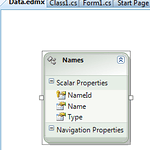
At the last minute, and to make sure anyone following along with these instructions is really paying attention, I made a minor change to the database table.  I changed the column Type to a data type of nvarchar(50).  I then updated the Data.edmx file in the Generator.Core Project.  To do this open up the file and right click anywhere in the white space around the model.  Then click on Update Model from Database….  Now, as things go, the stupid model didn’t update for me.  This is something that seems to occur very frequetly with the ADO.NET Entity Framework Model Files.  Since it didn’t update I had to manually right click on the Type Property and then set the Type of the Type (yes I know, redundant naming) to String.

So if anyone from Microsoft is reading this, the entity model files are STILL broken for some reason.  It’s been about 6 months since the entity framework and such where in beta and they still behave in many ways like they’re in beta, please fix this.  k thx bye.

Next I double clicked the Save (buttonSaveToDb) button and entered the following code to write the file data into the database.

private void buttonSaveToDb_Click(object sender, EventArgs e)
{
    if (comboNameType.Text == string.Empty)
    {
        MessageBox.Show("Select a type of name.", "Select Name", MessageBoxButtons.OK,
                        MessageBoxIcon.Information, MessageBoxDefaultButton.Button1);
    }
    else
    {
        // TODO Write to DB.
        var generatorEntities = new GeneratorEntities();
        foreach (var name in Names)
        {
            var newName =
                new Names
                    {
                        NameId = Guid.NewGuid(),
                        Name = name,
                        Type = comboNameType.Text
                    };
            generatorEntities.AddToNames(newName);
        }
        generatorEntities.SaveChanges(true);
    }
}

Then a quick reference and that finishes up the TextFileImporter Project.

using Generator.Core.Model;

Now mind you, I broke TDD principles because this app was merely a utility, would be used a few times, and above all breaks isolation and crosses boundaries.  A good rule is to not write tests for a project like this.  Unless you feel it absolutely necessary then I wouldn’t even think of it.

Now run the application and open and import each of the three files into the database.  This will give us the data we need for the next step of our random name generator.
Test Driven Development Built Name Generator Part 1

Part 2, Part 3.

This is going to be a multi-part series on building a straight forward database driven name generator.  I’ve tried the random name generator thing and it generally isn’t so great.  I’d tried in the past this idea with the database table of census names and it works great.  So this is part 1.  I’ll post these entries consecutively over the next few days so stay tuned.

First I started a new clean solution and added a test project.  I figured I wasn’t even going to add the actual assembly project yet, just jump right in and start writing a test, get red, and go to the next step.

I added a test file and wrote the following test.

[TestMethod]
public void VerifyFullNameObjectInstantiatesWithNames()
{
    FullName fullName = new FullName();
    Assert.IsTrue(fullName.FirstName.Length == 0);
    Assert.IsTrue(fullName.LastName.Length == 0);
}

After that I used ReSharper Alt+Enter Shortcut plus a little additional keying in myself to flesh out the skeletal class and get a green light.  I ended up with the class below.

public class FullName
{
    public string FirstName { get; set; }
    public string LastName { get; set; }
}

Next I wanted to enforce a contract so I could create a factory to build my FullName objects with.  With that change the interface and class I had now looked like this.

public interface IFullName
{
    string FirstName { get; set; }
    string LastName { get; set; }
}

public class FullName : IFullName
{
    public FullName()
    {
        FirstName = string.Empty;
        LastName = string.Empty;
    }

    public string FirstName { get; set; }
    public string LastName { get; set; }
}

That gave me a green light on my first test.  After that I built a test for the factory that could build the names.

[TestMethod]
public void VerifyFullNameObjectReturnsFromFactory()
{
    IFullName name = NameFactory.Build();
    Assert.IsTrue(name.FirstName.Length > 0);
    Assert.IsTrue(name.LastName.Length > 0);
}

I then took the NameFactory object and fleshed it out so I could build, run the test, and get green lighted.  Below is the NameFactory Class.

public class NameFactory
{
    public static IFullName Build()
    {
        return new FullName { FirstName = "TestFirst", LastName = "TestLast" };
    }
}

So now I have a green light on the name factory.  But even though I have a green light, it doesn’t exactly do what it needs to do, which is get some good unique and random names.  Next step, write a test for getting back some random names.

[TestMethod]
public void VerifyFullNameIsRandom()
{
    IFullName nameOne = NameFactory.Build();
    IFullName nameTwo = NameFactory.Build();

    Assert.AreNotEqual(nameOne.FirstName, nameTwo.FirstName);
    Assert.AreNotEqual(nameOne.LastName, nameTwo.LastName);
}

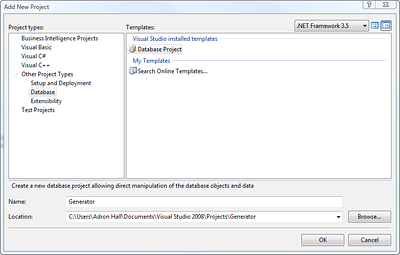
After creating this test, I have to dive a little deeper.  First I grabbed the census names for first and last names off of the Internet.  After that I added two projects to my overall Visual Studio Solution.  One is a database project and one is Windows App to use to manipulate the text file data and get it into our database.

Next I created the Generator Database a table to store the names that are stored in the files.

The SQL create script is shown below.

 IF NOT EXISTS (SELECT * FROM sys.objects WHERE object_id = OBJECT_ID(N'[dbo].[Names]') AND type in (N'U'))
 BEGIN
 CREATE TABLE [dbo].[Names](
     [NameId] [uniqueidentifier] NOT NULL,
     [Name] [nvarchar](50) NOT NULL,
     [Type] [smallint] NOT NULL,
  CONSTRAINT [PK_Names] PRIMARY KEY CLUSTERED
 (
     [NameId] ASC
 )WITH (PAD_INDEX  = OFF, STATISTICS_NORECOMPUTE  = OFF, IGNORE_DUP_KEY = OFF, ALLOW_ROW_LOCKS  = ON, ALLOW_PAGE_LOCKS  = ON) ON [PRIMARY]
 ) ON [PRIMARY]
 END

I also added an extended property to outline how I intended to use the “Type” column.

IF NOT EXISTS (SELECT * FROM ::fn_listextendedproperty(N'MS_Description' , N'SCHEMA',N'dbo', N'TABLE',N'Names', N'COLUMN',N'Type'))
EXEC sys.sp_addextendedproperty @name=N'MS_Description', @value=N'1 = Male, 2 = Female, 3 = Last Name' , @level0type=N'SCHEMA',@level0name=N'dbo', @level1type=N'TABLE',@level1name=N'Names', @level2type=N'COLUMN',@level2name=N'Type'

My intention is for the “Type” column to have a 1 for the male first name, a 2 for a female first name, and a 3 for the last name.

I’ve covered creating the initial tests and objects to use.  Also the database table that is needed and the create scripts have been provided.  Next steps are to build a quick app to get the names imported into the database table.  Stay tuned and that will be posted tomorrow.

Source Control Habits (TFS vs. Subversion)

Recently I had a miniature technical epihphany about the habits of TFS Users versus Subversion Users.  TFS Users, if they experience few issues, almost always check in from the root and check in at that level very frequently.

Subversions Users tend to have varying patterns and have less issues regardless.  Subversion Users I’ve noticed also tend to put pieces of code in as much as they check in from the root.  This might be because of the other languages, IDEs, and such that can be used against Subversion.

I myself am a root check in & commit person myself.  I like to make sure that everything I’ve done gets put in.  I also try diligently to break the work down into small enough segments that I can check in frequently.  This way I often have very little problem with Subversion or TFS.

Even though, with TFS, I still wager more conflict with that system that I do Subversion.