Part 1 Basic Webtrends REST Examples

In this entry I just want to cover some examples of how to connect to Webtrends DX Web Services.  The DX Web Services use REST as the architecture, providing simple URI based end points to connect to.  With the Webtrends SDK you can connect to these services with your account information.  Here are the basic steps to retrieve a profile list, the reports from one of those profiles, and then the report you want from that report list.

First step is to create a Webtrends User.

WebTrends.Sdk.Account.User webtrendsUser = new Account.User();
webtrendsUser.UserName = username;
webtrendsUser.Password = password;
webtrendsUser.AccountName = account;

After you create the Webtrends User, simple request a profile list by getting list of ProfileDefinition Objects.

List<WebTrends.Sdk.Profile.ProfileDefinition> profiles =
  WebTrends.Sdk.Factory.NavigationFactory.BuildListing(webtrendsUser);

Next you will want to grab a report based on the profile you are in and your credentials.

List<WebTrends.Sdk.Report.ReportDefinition> reports =
WebTrends.Sdk.Factory.NavigationFactory.BuildListing(profiles[i], webtrendsUser);

In the code above, i would equate to the specific profile you want from the retrieved list of profiles in the profiles list.  The common scenario is that one has pulled the profiles into a drop down, combo, or list box that the user can select.  Then when the user selects the specific profile that profile object can then be used to pull the List of ReportDefinitions.

Once we have the report definitions, all sorts of criteria can be added together to query for a specific report.  This is also were things can get a little tricky.  For instance, take a look at the code below.

WebTrends.Sdk.Factory.ReportFactory.CreateDimensionalReport(
    report.ID.ToString(), profiles[i].ID.ToString(), "2010m01", webtrendsUser);

The CreateDimensionalReport takes 4 parameters for this particular overload.  The report ID, profile ID, the Webtrends Date Format, and the Webtrends User Object.  There are a number of other overloads available within this factory’s method that allow for passing the specific REST URI, and other criteria to retrieve the report of your choice.  In the near future we will be adding some more to this method also, which will provide more flexibility without needing to use the full REST URI.

I will have more on this, so all you Coders out there using Webtrends DX Services, I hope this is helpful!  Enjoy.
MVC 2 Breaks my Charts?

I wonder if anyone has had issues with running MSCharts with MVC 2?  I have tried a couple of different issues, but still have not got them to render correctly.  In the end I always end up with broken image links.  Has anyone seen this?

I have no errors displaying in my MVC 2 Application build or anything, nothing specific that leads me to any explanation.  If anyone has any ideas, please leave a comment or shoot me an e-mail; adronhall at gmail dot com.  I would greatly appreciate any insight you MSChart Elite may have.  : )

ADDITIONAL NOTE:  The links look like this:

http://localhost:1799/Scorecard/ChartImg.axd?i=chart_6d740211d16b41bd9cc2662b602c4045_0.png&g=8840cdffa191495caafa73150dc0de7d Which I assume is what they should look like, since the ChartImg.axd is supposed to be handling the requests for the chart images.  Maybe the handler is broken/messed up?

Egads, Come on Hosting Provider!

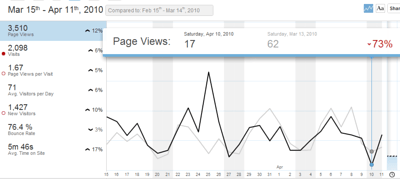
I was looking at my analytics over the last week or so and am really annoyed.  I had a solid multiple hours of downtime over the weekend.  Of all times, while I am at ALT.NET Seattle #altnetseattle Conference for my hosting provider to go down.  I would have liked to make blog entries, but instead they got all crammed up.

Anyway, I just wanted to post my massive hit I took because of this.  I do hope that webhost4life improves this and it doesn’t happen again.  My uptime has usually been remarkably good, but this was horrendous, easily breaking my 99% plus uptime promise.

Look at that dip!??!  Come on webhost4life, how about that not happening again!  73% down against regular trends, which if I had that 99% uptime I would have at least gotten the majority of the hits for that day.  Which would have been a decent percentage increase over the previous trended period since I was at a conference!

Harumph.  : (

#altnetseattle in Closing

So again, the #altnetseattle Conference easily was one of the most useful events of the year for me.  The amount of ideas, thoughts, and conversations that happen in just those two days often outweigh all the presentations I see at other conferences throughout the year.  The reason is simple, they are directed, to the point, and done with the ideal of open spaces.  This makes each session exhaustive on a particular topics.  Throw together some of the smartest people in the field and you have a bang up awesome energy and conversation.

I got to talk about cloud computer, a little bit, and REST Architecture as sessions I kicked off myself.  Those were a blast.  I also got to meet a ton of other super talented like minded developers and engineers that are out there kicking the tires of .NET (and other languages/tech stacks like Ruby on Rails).

Overall the conference rocked and I will definitely be coming back!  With that, I am headed home to Portland.

Kanban Tools Review

The first two sessions on Sunday were Collaboration and why it is so hard and the following, which was a perfect following session was on Kanban.  While in that second session two online Saas Style Tools were mentioned; AgileZen and Leankit.  I decided right then and there that I would throw together some first impressions and setup some sample projects.  I did this by setting up an account and creating the projects.

Agile Zen

Account Creation

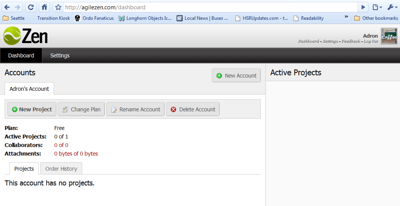
Setting up the initial account required an e-mail verification, which is understandable.  Within a few seconds it was mailed out and I was logged in.

Setting Up the Kanban Board

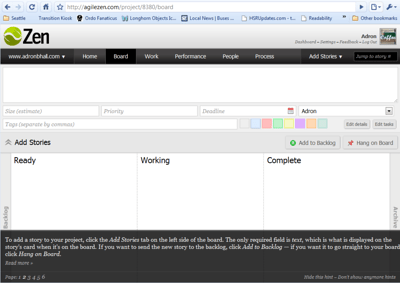
The initial setup of the board was pretty easy.  I maybe clicked around an extra few times, but overall everything I needed to use the tool was immediately available.  The representation of everything was very similar to what one expects in a real Kanban Board too.  This is a HUGE plus, especially if a team is smart and places this tool in a centrally viewable area to allow for visibility.

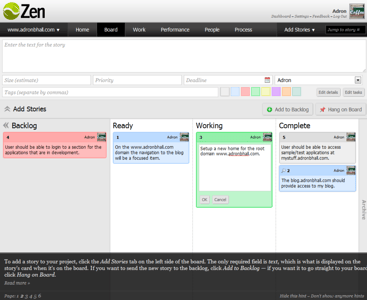
Each of the board items is just like a post it, being blue, grey, green, pink, or one of another few colors.  Dragging them onto each swim lane on the board was flawless, making changes through the work super easy and intuitive.

The other thing I really liked about AgileZen is that the Kanban Board had the swim lanes setup immediately.  One can change them, but when you know you immediately need a Ready Lane, Working Lane, and a Complete Lane it is nice to just have them right in front of you in the interface.  In addition, the Backlog is simply a little tab on the left hand side.  This is perfect for the Backlog Queue.  Out of the way, with the focus on the primary items.

Once  I got the items onto the board I was easily able to get back to the actual work at hand versus playing around with the tool.  The fact that it was so easy to use, fast and easy UX, and overall a great layout put me back to work on things I needed to do versus sitting a playing with the tool.  That, in the end is the key to using these tools.

LeanKit Kanban

Account Creation

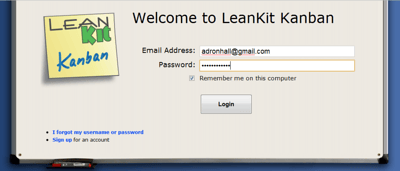
Setting up the account got me straight into the online tool.  This I thought was pretty cool.

Setting Up the Kanban Board

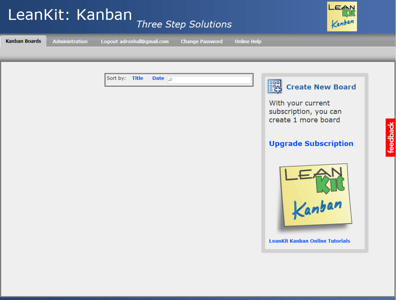
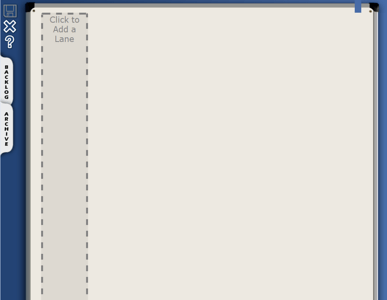
Setting up the Kanban Board within Leankit was a bit of trouble.  There were multiple UX issues in regard to process and intuitiveness.  The Leankit basically forces one to design the whole board first, making no assumptions about how the board should look.  The swim lanes in my humble opinion should be setup immediately without any manipulation with the most common lanes;  ready, working, and complete.

The other UX hiccup that I had a problem with is that as soon as I managed to get the swim lanes into place, I wanted to remove the redundant Backlog Lane.  The Backlog Lane, or Backlog Bucket should be somewhere that I accidentally added as a lane.  Then on top of that I screwed up and added an item inside the lane, which then prevented me from deleting the lane.  I had to go back out of the lane manipulation, remove the item, and then remove the excess lane.

Summary

Leankit wasn’t a bad interface, it just wasn’t as good as AgileZen.  The AgileZen interface was just better UX design overall.  AgileZen also presents a much better user interface graphical design all together.  It is much closer to what the Kanban Board would look like if it were a physical Kanban Board.  Since one of the HUGE reasons for Kanban is to increase visibility, the fact the design is similar to what a real Kanban Board is actually a pretty big deal.

This is an image (click for larger) that shows the two Kanban Boards side by side.  The one on the left is AgileZen and the right is Leankit.