Keeping it Lean: Building the Bare Essentials for Project Management

When you’re running a project that needs to stay lean — and I mean lean like taking a cargo bike to grab groceries instead of a 2+ ton automobile that’s slower, more cumbersome, and way overkill for the job — the tools you choose and the processes you define matter as much as the work itself. It’s easy to go overboard, drowning in Gantt charts, sprint boards, and daily standups that spiral into mini-retrospectives. But what if the goal is simplicity, agility, and clarity?

Let’s break it down.

1. Define Your Central Hub

The first thing you need is a single source of truth. This doesn’t mean a bloated Jira instance with workflows for every imaginable scenario. For a lean project, a simple Kanban-style board can do wonders. Tools like Trello or GitHub Projects (especially if you’re already using GitHub for version control) offer clean, intuitive interfaces that keep everything in one place.

Here’s how to set it up:

  • Columns: Keep it simple: Backlog, In Progress, Blocked, and Done.
  • Cards: Each card represents a task or issue. Include a clear description, a link to related code/docs, and assign it to a team member.
  • Labels: Use a few key labels like “Critical,” “Enhancement,” or “Bug” to categorize tasks.

2. Streamlined Communication

Email chains and endless Slack messages can become noise quickly. Instead, set up a single communication channel. This could be a dedicated Slack channel, a Discord server, or even a lightweight integration in your project tool (e.g., comments on GitHub issues).

A few ground rules:

  • Daily Check-Ins: A quick async update: “Yesterday I did X, today I’m working on Y, blocked on Z.” No need for a meeting unless absolutely necessary. I’ve even found that just meeting about what you’re blocked on for the daily sync is best. Keep the meeting to almost zero. It doesn’t hurt to mention what you’re working on, but if you’re not blocked and don’t need other immediate involvement, just keep the update to nothing.
  • @Mentions for Clarity: Keep conversations focused by tagging the relevant people. To note, in more complex team environments where lots of people need eyes on progress, this can be complicated. To mitigate people losing or missing communication, keep these conversations in a public channel with immediately known needed people tagged, but visible for others to include themselves if they also need to be involved.
  • Summaries: Pin or document decisions and key takeaways from conversations in your central hub to avoid revisiting the same discussions.

3. Automate for Visibility

Lean doesn’t mean manual. Automate everything that helps with transparency and reduces grunt work.

  • CI/CD: Tools like GitHub Actions, CircleCI, or GitLab pipelines can automate your builds, tests, and deployments. Link these to your project board so that a green build or a failing test is visible to everyone.
  • Updates: Set up bots or integrations to notify your communication channel of changes (e.g., when a PR is merged, or when a deployment happens).
  • Dashboards: Use something lightweight like Notion or a Google Sheet for tracking high-level metrics. Update it weekly and link it prominently in your central hub.

4. Minimize Your Meetings

The only meeting that might be non-negotiable is a weekly sync, and even that can be optional if async communication is working well. For the sync:

  • Keep it under 15 minutes. But seriously, many meetings should and could be less than this if things truly are lean. Don’t let things get bulky and also aim to keep meetings with a small roster, don’t consume other people’s time and use the “optional” feature in mail clients to help communicate that some people, if they’ve got a priority focus, can just skip the meeting and catch up later (like if you’ve recorded the meeting, etc).
  • Use a simple format: What’s shipped? What’s stuck? What’s next? Include topic before the meeting, in the meeting description. If a meeting doesn’t have a description, don’t have the meeting, clearly there’s a lack of priority.
  • Make sure action items are logged in your central hub, whatever that may be!

5. Keep Documentation Minimal but Useful

You’ll need just enough documentation to keep everyone aligned without burying the team in writing tasks.

  • Project ReadMe: Include a short overview of the project’s purpose, the current status, and links to the key tools being used.
  • Quick Start Guide: Especially useful for onboarding new contributors. A few bullet points on how to get the environment set up and the project running locally. This is another whole post, which I’ll write up in the near future about what I use for this information and how I setup this functionality for onboarding.
  • Decisions Log: A simple doc where key technical or process decisions are recorded with a one-liner explanation. I’ve personally found this to be a huge thing that can increase success. What I’ve found myself doing is using a Confluence Blog, or other similar styled tooling, to blog weekly and keep an active SITREP (i.e. Situational Report). This can be used by anybody as a quick reference to what is being worked on, what current roadblocks or other items are causing problems, and other such information.

6. Foster Cross-Team Awareness

If you’re working with multiple teams, ensure visibility doesn’t stop at your team’s boundaries.

  • Shared Dashboard: Use something like Miro, Notion, or even a Google Doc to keep high-level goals, milestones, and dependencies visible to all teams.
  • Demo Days: Host a bi-weekly or monthly demo where each team showcases their progress. Keep it informal and focused on sharing insights rather than impressing anyone.

Example in Action

Here’s what this looks like for a fictional project:

  • Tool Stack:
    • GitHub for version control and GitHub Projects for task management.
    • Slack for team communication.
    • CircleCI for automation.
    • Notion for shared dashboards and minimal documentation.
  • Processes:
    • Daily async updates in Slack.
    • Weekly 15-minute sync with action items logged on GitHub Projects.
    • Bi-weekly demo day for all teams.

Closing Thoughts

The key to managing a lean project is not doing less work — it’s doing less wasteful work. By keeping your toolset focused, your processes streamlined, and your communication channels clear, you’ll spend less time managing and more time building. Simplicity isn’t just elegance; it’s efficiency, especially when you’re coordinating across teams. And when done right, lean doesn’t just move fast; it moves smart.

Happy building!


Precision in Words, Precision in Code: The Power of Writing in Modern Development

I’ve always found it advantageous to enjoy writing—yes, even documentation writing. It’s one of those foundational skills that doesn’t just make you a better developer; it makes you a better communicator, collaborator, and problem solver. In my experience, being able to articulate ideas, requirements, or solutions in written form isn’t just a nice-to-have, it’s a superpower.

Fast forward to today, and the value of this skill has grown exponentially. Why? Because the world of software development is no longer confined to our IDEs or command lines. With the advent of tools like Claude, ChatGPT, Copilot, TabNine, and Replit Ghostwriter, we’ve entered an era where your ability to write clearly and concisely isn’t just a productivity hack—it’s a core part of how we develop software.

Writing as the Bridge Between Ideas and Implementation

Every time you use ChatGPT to brainstorm API designs, or lean on Copilot to generate boilerplate code, you’re engaging in a collaborative act that requires clear articulation of your goals. Tools like these don’t “read your mind” (at least, not yet, and seem prudent they don’t!). They depend on your ability to communicate requirements effectively—whether that’s describing a function’s purpose, outlining a system’s architecture, or debugging a thorny issue.

Let’s break it down:

  • Problem Definition: Writing forces you to clarify what you’re solving. “Write me a REST API that does X” only works when X is well-defined. If you’re vague, the AI’s output will be vague too.
  • Code Refinement: With tools like Copilot, you can guide its suggestions by writing meaningful comments or even inline documentation. The better you describe your intention, the more useful its suggestions.
  • Collaboration: When sharing prompts, workflows, or generated code with teammates, clear writing makes the difference between helpful and confusing.

This isn’t just about documentation anymore; it’s about precision and intent.


The Bespoke vs. Accelerated Solution

Let me paint a picture. Imagine an “old guard” developer—experienced, methodical, and deeply skilled—painstakingly hand-coding a bespoke solution. They’ve dug into every line, every variable, ensuring that it’s as perfect as possible. Weeks pass, the solution slowly comes together, and it’s a masterpiece of craftsmanship.

Then, a second developer steps in—this time with AI tooling in their arsenal. They’ve mastered prompt crafting and know their way around the language’s nuances. Within hours, they whip together a solution that’s functional, scalable, and hits the same key requirements as the bespoke version.

The disparity is stark. But this isn’t an entirely new phenomenon—developer skill levels have always shown disparities, even between hand-crafted solutions. Some developers naturally work faster due to their familiarity with the tools, frameworks, or simply their ability to plan effectively before jumping into the code. The difference now is that AI is consistently closing that gap and even accelerating it beyond what we’ve traditionally seen.

For experienced developers, AI tooling becomes a multiplier. Their depth of knowledge about the language, patterns, and architecture lets them wield AI like a scalpel, surgically crafting solutions that might have taken days or weeks without it. For newer developers, the journey is different but just as transformative. They’re learning what to ask, how to ask, and how to interpret the output—skills that complement their growing technical expertise.


The Symbiotic Relationship Between Writing and Coding

I’ve noticed over the years that being a proficient coder improves my ability to write, and vice versa. Both require structure, clarity, and an eye for detail. Writing about coding problems sharpens my understanding of the code itself—whether it’s explaining recursion, documenting a service endpoint, or writing a blog post about software design patterns.

And now, with AI tooling in the mix, that symbiosis has leveled up. Writing and coding have become intertwined in ways that force us to hone both skills simultaneously:

  1. Prompt Crafting: The better you write prompts, the better the output. Tools like ChatGPT reward iterative refinement, much like debugging a tricky function.
  2. Code Commentary: Tools like TabNine or Copilot become smarter when you write meaningful comments. Think of them as extensions of your coding and writing process, not separate entities.
  3. Generative Collaboration: AI tools like Claude can assist in writing draft documentation or design specs, but only if you provide clear guidance.

Where Do We Go From Here?

As software developers, we’re writing more than ever—documentation, test cases, code reviews, commit messages, and, increasingly, prompts for AI tools. But it’s no longer just about output; it’s about iterating with intent.

Enjoying writing, embracing it, and seeing it as part of the creative process, not a chore, unlocks tremendous potential in this AI-enhanced world. As I often say, writing isn’t just “extra work”—it’s the work that clarifies, simplifies, and accelerates everything else.

So next time you sit down to write that function, prompt, or design doc, remember: you’re not just coding—you’re building a bridge between thought and execution. And in this age of AI tools, that bridge has never been more valuable.

Let’s keep writing, coding, and pushing the boundaries of what we can build.

TLDR – become eloquent, concise, prescient, and effective in written communication and observations, it’ll help exponentially in use of AI tooling.

Cheers 🍻

A Successful Deploy to Vercel + Adding More Auth & Login Features to The Web Interface (Plus an Error!)

In the last few posts I knocked out a slew of initial work. Much of it was just to get things up and running and make sure the database was live, the site was live, and that there was a good connection between the two. I did this by building the first basic login page with a dashboard that just shows that the user is logged in, along with a few pages to display general static content. That can be found in:

  1. Building “Adron’s Core Platform”: Starting a React App on Vercel
  2. Getting a Vercel PostgreSQL Database and Basic Authentication Operational
  3. The Confederacy of Errors Starting With Next Auth; Error, Error, npm ERR!

The tasks I’ll accomplish in the following post:

  1. I want a horizontal menu across the top that will link to the dashboard, login, and about page.
  2. I want an account creation page.
  3. I want to make sure that I set things up for the post-login action to be a redirect to the dashboard page.

Adding a Horizontal Menu

For this menu I’m going to add a div with links, assign it as a flex space (css), and add the pertinent links. The changed ./src/app/components/Navigation.tsx with changes looks like this now.

'use client';

import Link from 'next/link';
import { usePathname } from 'next/navigation';

export default function Navigation() {
  const pathname = usePathname();

  const isActive = (path: string) => {
    return pathname === path ? 'bg-indigo-700' : '';
  };

  return (
    <nav className="bg-indigo-600 p-4">
      <div className="container mx-auto">
        <div className="flex items-center justify-between">
          <div className="flex space-x-4">
            <Link href="/"
              className={`text-white px-3 py-2 rounded-md text-sm font-medium ${isActive('/')}`}>
              Home
            </Link>
            <Link href="/dashboard"
              className={`text-white px-3 py-2 rounded-md text-sm font-medium ${isActive('/dashboard')}`}>
              Dashboard
            </Link>
            <Link href="/login"
              className={`text-white px-3 py-2 rounded-md text-sm font-medium ${isActive('/login')}`}>
              Login
            </Link>
            <Link href="/about"
              className={`text-white px-3 py-2 rounded-md text-sm font-medium ${isActive('/about')}`}>
              About
            </Link>
          </div>
        </div>
      </div>
    </nav>
  );
}

Next up is a tweak to ./src/app/layout.tsx.

import type { Metadata } from 'next';
import { Inter } from 'next/font/google';
import './globals.css';
import Navigation from './components/Navigation';

const inter = Inter({ subsets: ['latin'] });

export const metadata: Metadata = {
  title: "Adron's Core Platform",
  description: 'Core platform application',
};

export default function RootLayout({
  children,
}: {
  children: React.ReactNode;
}) {
  return (
    <html lang="en">
      <body className={inter.className}>
        <Navigation />
        {children}
      </body>
    </html>
  );
}

As a little lagniappe, I’ve decided to add content to the about page at ./src/app/about/page.tsx.

export default function About() {
  return (
    <main className="flex min-h-screen flex-col items-center p-24">
      <div className="max-w-2xl">
        <h1 className="text-4xl font-bold mb-6">About</h1>
        <div className="prose">
          <p className="text-lg mb-4">
            Welcome to Adron&apos;s Core Platform, a modern web application built with Next.js,
            TypeScript, and PostgreSQL.
          </p>
          <p className="text-lg">
            This platform demonstrates secure authentication, database integration,
            and modern web development practices.
          </p>
        </div>
      </div>
    </main>
  );
}

I also decided, on one of the npm run dev viewing cycles, I wanted something else for the general front page description so made these additions to ./src/app/page.tsx.

export default function Home() {
  return (
    <main className="flex min-h-screen flex-col items-center p-24">
      <div className="max-w-4xl mx-auto">
        <h1 className="text-4xl font-bold mb-6">
          Adron&apos;s Core Platform
        </h1>

        <section className="mb-8">
          <h2 className="text-2xl font-semibold mb-4">Your Central Command for Development Tools</h2>
          <p className="text-lg mb-4">
            Welcome to the Core Platform - your centralized hub for managing and accessing Adron&apos;s suite of development tools and applications. This platform provides unified access control, monitoring, and integration capabilities across all tools in the ecosystem.
          </p>
        </section>

        <section className="grid grid-cols-1 md:grid-cols-2 gap-6 mb-8">
          <div className="p-6 bg-white rounded-lg shadow-md">
            <h3 className="text-xl font-semibold mb-3">Unified Access</h3>
            <p>Single sign-on capabilities for seamless access to all integrated tools and services in the Adron&apos;s Tools ecosystem.</p>
          </div>

          <div className="p-6 bg-white rounded-lg shadow-md">
            <h3 className="text-xl font-semibold mb-3">Centralized Management</h3>
            <p>Monitor usage, manage permissions, and configure integrations for your development toolkit from one location.</p>
          </div>

          <div className="p-6 bg-white rounded-lg shadow-md">
            <h3 className="text-xl font-semibold mb-3">Tool Integration</h3>
            <p>Connect and manage your development workflow across multiple tools with seamless integration capabilities.</p>
          </div>

          <div className="p-6 bg-white rounded-lg shadow-md">
            <h3 className="text-xl font-semibold mb-3">Usage Analytics</h3>
            <p>Track and analyze your tool usage patterns to optimize your development workflow and resource allocation.</p>
          </div>
        </section>

        <section className="text-center">
          <p className="text-lg">
            Ready to streamline your development workflow?
            <a href="/login" className="text-indigo-600 hover:text-indigo-800 ml-2 font-semibold">
              Sign in to get started
            </a>
          </p>
        </section>
      </div>
    </main>
  );
}

All those changes and static additions done and it’s time for a build. Which then… drumroll… threw an import error in the ./src/app/lib/auth.ts file! I just keep conjuring these things up left and right. Eventually I’ll get all the wires uncrossed.

./src/app/lib/auth.ts:2:0
Module not found: Can't resolve '@auth/prisma-adapter'
  1 | import { PrismaClient } from '@prisma/client';
> 2 | import { PrismaAdapter } from '@auth/prisma-adapter';
  3 | import { compare } from 'bcryptjs';
  4 | import NextAuth from 'next-auth';
  5 | import CredentialsProvider from 'next-auth/providers/credentials';

https://nextjs.org/docs/messages/module-not-found

Import trace for requested module:
./src/middleware.ts

I wasn’t sure why this seemed to throw an error during the build, but it seemed fine when I just ran npm run dev a few second before. Whatever the case is, gotta have a good build to be able to ship it to Vercel. So spelunking for a fix I went. My first attempt was simply to just add the dependency again with npm install @auth/prisma-adapter.

The new code file, for full copy-ability, now reads like this with minor import changes at the top.

import { PrismaClient } from '@prisma/client';
import NextAuth from 'next-auth';
import CredentialsProvider from 'next-auth/providers/credentials';
import { compare } from 'bcryptjs';

const prisma = new PrismaClient();

export const { auth, signIn, signOut } = NextAuth({
  pages: {
    signIn: '/login',
  },
  session: {
    strategy: 'jwt'
  },
  providers: [
    CredentialsProvider({
      credentials: {
        username: { label: "Username", type: "text" },
        password: { label: "Password", type: "password" }
      },
      async authorize(credentials) {
        if (!credentials?.username || !credentials?.password) {
          return null;
        }

        const user = await prisma.user.findUnique({
          where: {
            username: credentials.username
          }
        });

        if (!user) {
          return null;
        }

        const isPasswordValid = await compare(credentials.password, user.password);

        if (!isPasswordValid) {
          return null;
        }

        return {
          id: user.id,
          email: user.email,
          username: user.username
        };
      }
    })
  ]
});

That got me back to an operable state to test what I have so far. However, I did want to make full quality assurance style manual testing possible, so I still needed the page to create an account with.

Create An Account Page

I create another page at ./src/app/create-account/page.tsx and wrote it up with the following code.

'use client';

import { useState } from 'react';
import { useRouter } from 'next/navigation';

export default function CreateAccount() {
  const router = useRouter();
  const [error, setError] = useState('');
  const [loading, setLoading] = useState(false);

  const handleSubmit = async (e: React.FormEvent<HTMLFormElement>) => {
    e.preventDefault();
    setLoading(true);
    setError('');

    const formData = new FormData(e.currentTarget);
    const data = {
      username: formData.get('username'),
      email: formData.get('email'),
      password: formData.get('password'),
      confirmPassword: formData.get('confirmPassword'),
    };

    if (data.password !== data.confirmPassword) {
      setError('Passwords do not match');
      setLoading(false);
      return;
    }

    try {
      const response = await fetch('/api/register', {
        method: 'POST',
        headers: { 'Content-Type': 'application/json' },
        body: JSON.stringify({
          username: data.username,
          email: data.email,
          password: data.password,
        }),
      });

      if (!response.ok) {
        const errorData = await response.json();
        throw new Error(errorData.error || 'Failed to create account');
      }

      router.push('/login');
    } catch (err) {
      setError(err instanceof Error ? err.message : 'An error occurred');
    } finally {
      setLoading(false);
    }
  };

  return (
    <main className="flex min-h-screen flex-col items-center justify-center p-24">
      <div className="w-full max-w-md space-y-8">
        <div>
          <h2 className="mt-6 text-center text-3xl font-bold tracking-tight">
            Create your account
          </h2>
          <p className="mt-2 text-center text-sm text-gray-600">
            Join Adron&apos;s Core Platform
          </p>
        </div>

        <form className="mt-8 space-y-6" onSubmit={handleSubmit}>
          <div className="space-y-4 rounded-md">
            <div>
              <label htmlFor="username" className="block text-sm font-medium text-gray-700">
                Username
              </label>
              <input
                id="username"
                name="username"
                type="text"
                required
                className="relative block w-full rounded-md border-0 p-2 text-gray-900 ring-1 ring-inset ring-gray-300 placeholder:text-gray-400 focus:ring-2 focus:ring-indigo-600"
                placeholder="Choose a username"
              />
            </div>

            <div>
              <label htmlFor="email" className="block text-sm font-medium text-gray-700">
                Email address
              </label>
              <input
                id="email"
                name="email"
                type="email"
                required
                className="relative block w-full rounded-md border-0 p-2 text-gray-900 ring-1 ring-inset ring-gray-300 placeholder:text-gray-400 focus:ring-2 focus:ring-indigo-600"
                placeholder="you@example.com"
              />
            </div>

            <div>
              <label htmlFor="password" className="block text-sm font-medium text-gray-700">
                Password
              </label>
              <input
                id="password"
                name="password"
                type="password"
                required
                className="relative block w-full rounded-md border-0 p-2 text-gray-900 ring-1 ring-inset ring-gray-300 placeholder:text-gray-400 focus:ring-2 focus:ring-indigo-600"
                placeholder="Create a strong password"
              />
            </div>

            <div>
              <label htmlFor="confirmPassword" className="block text-sm font-medium text-gray-700">
                Confirm Password
              </label>
              <input
                id="confirmPassword"
                name="confirmPassword"
                type="password"
                required
                className="relative block w-full rounded-md border-0 p-2 text-gray-900 ring-1 ring-inset ring-gray-300 placeholder:text-gray-400 focus:ring-2 focus:ring-indigo-600"
                placeholder="Confirm your password"
              />
            </div>
          </div>

          {error && (
            <div className="text-red-500 text-center text-sm">
              {error}
            </div>
          )}

          <button
            type="submit"
            disabled={loading}
            className="group relative flex w-full justify-center rounded-md bg-indigo-600 px-3 py-2 text-sm font-semibold text-white hover:bg-indigo-500 focus-visible:outline focus-visible:outline-2 focus-visible:outline-offset-2 focus-visible:outline-indigo-600 disabled:opacity-50"
          >
            {loading ? 'Creating account...' : 'Create Account'}
          </button>
        </form>
      </div>
    </main>
  );
}

Then in the ./src/app/components/Navigation.tsx component added a link to this new page.

<Link href="/create-account"
  className={`text-white px-3 py-2 rounded-md text-sm font-medium ${isActive('/create-account')}`}>
  Create Account
</Link>

From this point I also made some tweaks to the ./src/app/login/page.tsx page where I set the redirect on sign in to true, the callbackUrl to /dashboard, and removed the manual router.push() since NextAuth handles that redirect now. With those changes the page now looks like this.

'use client';

import { useState } from 'react';
import { signIn } from 'next-auth/react';
import { useRouter } from 'next/navigation';

export default function Login() {
  const router = useRouter();
  const [error, setError] = useState('');
  const [loading, setLoading] = useState(false);

  const handleSubmit = async (e: React.FormEvent<HTMLFormElement>) => {
    e.preventDefault();
    setLoading(true);
    setError('');

    const formData = new FormData(e.currentTarget);
    const username = formData.get('username') as string;
    const password = formData.get('password') as string;

    try {
      const result = await signIn('credentials', {
        username,
        password,
        redirect: true,
        callbackUrl: '/dashboard'
      });

      if (result?.error) {
        setError('Invalid username or password');
      }
    } catch (err) {
      setError('An error occurred. Please try again.');
    } finally {
      setLoading(false);
    }
  };

  return (
    <main className="flex min-h-screen flex-col items-center justify-center p-24">
      <div className="w-full max-w-md space-y-8">
        <div>
          <h2 className="mt-6 text-center text-3xl font-bold tracking-tight">
            Sign in to your account
          </h2>
        </div>
        <form className="mt-8 space-y-6" onSubmit={handleSubmit}>
          <div className="space-y-4 rounded-md shadow-sm">
            <div>
              <label htmlFor="username" className="sr-only">
                Username
              </label>
              <input
                id="username"
                name="username"
                type="text"
                required
                className="relative block w-full rounded-md border-0 p-2 text-gray-900 ring-1 ring-inset ring-gray-300 placeholder:text-gray-400 focus:ring-2 focus:ring-indigo-600"
                placeholder="Username"
              />
            </div>
            <div>
              <label htmlFor="password" className="sr-only">
                Password
              </label>
              <input
                id="password"
                name="password"
                type="password"
                required
                className="relative block w-full rounded-md border-0 p-2 text-gray-900 ring-1 ring-inset ring-gray-300 placeholder:text-gray-400 focus:ring-2 focus:ring-indigo-600"
                placeholder="Password"
              />
            </div>
          </div>

          {error && (
            <div className="text-red-500 text-center text-sm">
              {error}
            </div>
          )}

          <button
            type="submit"
            disabled={loading}
            className="group relative flex w-full justify-center rounded-md bg-indigo-600 px-3 py-2 text-sm font-semibold text-white hover:bg-indigo-500 focus-visible:outline focus-visible:outline-2 focus-visible:outline-offset-2 focus-visible:outline-indigo-600 disabled:opacity-50"
          >
            {loading ? 'Signing in...' : 'Sign in'}
          </button>
        </form>
      </div>
    </main>
  );
}

Finally a few tweaks to the ./src/middleware.ts code.

import NextAuth from 'next-auth';
import authConfig from './app/auth.config';

export const { auth: middleware } = NextAuth(authConfig);

export const config = {
  matcher: ['/((?!api|_next/static|_next/image|favicon.ico).*)'],
};

After toying around I realized I also needed a ./src/app/api/auth/[…nextauth]/route.ts code file too in order to get the redirect to work correctly.

import { GET, POST } from '../../../lib/auth';

export { GET, POST };

Also, for good measure, in case I missed any minute changes with all these steps and error troubleshooting, here is what my final auth.ts and auth.config.ts file looks like at this point.

The ./src/app/lib/auth.ts code.

import NextAuth from 'next-auth';
import CredentialsProvider from 'next-auth/providers/credentials';
import { compare } from 'bcryptjs';
import { PrismaClient } from '@prisma/client';

const prisma = new PrismaClient();

export const { handlers: { GET, POST }, auth } = NextAuth({
  providers: [
    CredentialsProvider({
      credentials: {
        username: { label: "Username", type: "text" },
        password: { label: "Password", type: "password" }
      },
      async authorize(credentials) {
        if (!credentials?.username || !credentials?.password) {
          return null;
        }

        const user = await prisma.user.findUnique({
          where: {
            username: credentials.username
          }
        });

        if (!user) {
          return null;
        }

        const isPasswordValid = await compare(credentials.password, user.password);

        if (!isPasswordValid) {
          return null;
        }

        return {
          id: user.id,
          email: user.email,
          username: user.username,
        };
      }
    })
  ],
  pages: {
    signIn: '/login',
  },
  callbacks: {
    async jwt({ token, user }) {
      if (user) {
        token.username = user.username;
      }
      return token;
    },
    async session({ session, token }) {
      if (token && session.user) {
        session.user.username = token.username as string;
      }
      return session;
    }
  },
  session: {
    strategy: "jwt"
  }
});

Finally the ./src/app/auth.config.ts.

import type { NextAuthConfig } from 'next-auth';

export default {
  pages: {
    signIn: '/login',
  },
  callbacks: {
    authorized({ auth, request: { nextUrl } }) {
      const isLoggedIn = !!auth?.user;
      const isOnDashboard = nextUrl.pathname.startsWith('/dashboard');

      if (isOnDashboard) {
        if (isLoggedIn) return true;
        return false;
      }
      return true;
    },
  },
  providers: [],
} satisfies NextAuthConfig;

At this point, low and behold, I did another build, which broke, and had committed so saw the same break in Vercel. The error as Vercel logs had it showed as this.

Linting and checking validity of types ...
15:10:43.210
 ⨯ ESLint: Failed to load config "next/typescript" to extend from. Referenced from: /vercel/path0/.eslintrc.json
15:10:44.757
Failed to compile.
15:10:44.757
15:10:44.757
./src/app/dashboard/page.tsx:16:78
15:10:44.757
Type error: Property 'username' does not exist on type 'User'.
15:10:44.757
15:10:44.758
 14 | <h1 className="text-4xl font-bold mb-8">Dashboard</h1>
15:10:44.758
 15 | <div className="bg-white shadow rounded-lg p-6">
15:10:44.758
> 16 | <h2 className="text-2xl font-semibold mb-4">Welcome, {session.user.username}!</h2>
15:10:44.758
 | ^
15:10:44.758
 17 | <p className="text-gray-600">You are successfully logged in.</p>
15:10:44.758
 18 | </div>
15:10:44.758
 19 | </div>
15:10:44.826
Error: Command "npm run build" exited with 1

I realized quickly, I’ve got a user type messed up, and possibly need to fix or update the ESLint situation. First thing, I’ll fix the types. Added a ./src/types/next-auth.d.ts file and updated the dashboard file at ./src/app/dashboard/page.tsx to solve the type issue.

The ./src/types/next-auth.d.ts declaration.

import NextAuth from "next-auth";

declare module "next-auth" {
  interface User {
    username: string;
    email: string;
    id: string;
  }

  interface Session {
    user: User & {
      username: string;
    };
  }
}

The ./src/app/dashboard/page.tsx modification.

import { auth } from '../lib/auth';
import { redirect } from 'next/navigation';

export default async function Dashboard() {
  const session = await auth();

  if (!session?.user) {
    redirect('/login');
  }

  return (
    <main className="flex min-h-screen flex-col items-center p-24">
      <div className="w-full max-w-4xl">
        <h1 className="text-4xl font-bold mb-8">Dashboard</h1>
        <div className="bg-white shadow rounded-lg p-6">
          <h2 className="text-2xl font-semibold mb-4">
            Welcome, {session.user?.username || 'User'}!
          </h2>
          <p className="text-gray-600">You are successfully logged in.</p>
        </div>
      </div>
    </main>
  );
}

Now time to update to resolve the ESLint situation. I opened up the .eslintrc.json file and changed those contents to this.

{
  "extends": [
    "next",
    "next/core-web-vitals"
  ],
  "rules": {
    "@next/next/no-html-link-for-pages": "off"
  }
}

Then wrapped up these modifications with some final change to tsconfig.json.

{
  "compilerOptions": {
    "target": "es5",
    "lib": ["dom", "dom.iterable", "esnext"],
    "allowJs": true,
    "skipLibCheck": true,
    "strict": true,
    "noEmit": true,
    "esModuleInterop": true,
    "module": "esnext",
    "moduleResolution": "bundler",
    "resolveJsonModule": true,
    "isolatedModules": true,
    "jsx": "preserve",
    "incremental": true,
    "plugins": [
      {
        "name": "next"
      }
    ],
    "paths": {
      "@/*": ["./src/*"]
    }
  },
  "include": ["next-env.d.ts", "**/*.ts", "**/*.tsx", "src/types/**/*.ts", ".next/types/**/*.ts"],
  "exclude": ["node_modules"]
}

Now to clean up and get dependencies fresh. First a rm -rf .next then npm install and now another, fingers crossed, npm run build. The build at this point threw me another error, which again fingers crossed hopefully this is the last one!

./src/app/lib/auth.ts:22:13
Type error: Type '{}' is not assignable to type 'string'.
  20 |         const user = await prisma.user.findUnique({
  21 |           where: {
> 22 |             username: credentials.username
     |             ^
  23 |           }
  24 |         });
  25 |

Looking at it, that seems an easy fix. I’m not even sure how or why I wrote that up that way, but whatever, it’s fixin’ time! I need to fix a type definition for credentials in the authorize function, some type annotations for session and token callbacks, and another RTFMing moment of fixing the NextAuthConfig type and the satisfies operator, and explicitly type the session parameters. Maybe. I could be wrong, but let’s see. That’s after the first long read of the code again. Changes all seem to be needed in the ./src/app/lib/auth.ts file, and after all of these changes it looks like this.

import NextAuth from 'next-auth';
import CredentialsProvider from 'next-auth/providers/credentials';
import { compare } from 'bcryptjs';
import { PrismaClient } from '@prisma/client';
import type { NextAuthConfig } from 'next-auth';

const prisma = new PrismaClient();

export const { handlers: { GET, POST }, auth } = NextAuth({
  providers: [
    CredentialsProvider({
      credentials: {
        username: { label: "Username", type: "text" },
        password: { label: "Password", type: "password" }
      },
      async authorize(credentials) {
        if (!credentials?.username || !credentials?.password) {
          return null;
        }

        const username = credentials.username as string;
        const password = credentials.password as string;

        const user = await prisma.user.findUnique({
          where: { username }
        });

        if (!user) {
          return null;
        }

        const isPasswordValid = await compare(password, user.password);

        if (!isPasswordValid) {
          return null;
        }

        return {
          id: user.id,
          email: user.email,
          username: user.username,
        };
      }
    })
  ],
  pages: {
    signIn: '/login',
  },
  callbacks: {
    async jwt({ token, user }) {
      if (user) {
        token.username = user.username;
      }
      return token;
    },
    async session({ session, token }) {
      if (token && session.user) {
        session.user.username = token.username as string;
      }
      return session;
    }
  },
  session: {
    strategy: "jwt"
  }
} satisfies NextAuthConfig);

Now another npm run build.

Ok, built locally, let’s push with vercel. Oh joy of joys!

at Ba (/vercel/path0/node_modules/@prisma/client/runtime/library.js:33:69)
15:18:29.640
 at new t (/vercel/path0/node_modules/@prisma/client/runtime/library.js:130:739)
15:18:29.640
 at 904 (/vercel/path0/.next/server/app/api/register/route.js:1:552)
15:18:29.640
 at t (/vercel/path0/.next/server/webpack-runtime.js:1:143)
15:18:29.640
 at t (/vercel/path0/.next/server/app/api/register/route.js:1:2228)
15:18:29.641
 at /vercel/path0/.next/server/app/api/register/route.js:1:2258
15:18:29.641
 at t.X (/vercel/path0/.next/server/webpack-runtime.js:1:1285)
15:18:29.641
 at /vercel/path0/.next/server/app/api/register/route.js:1:2241
15:18:29.641
 at Object.<anonymous> (/vercel/path0/.next/server/app/api/register/route.js:1:2284)
15:18:29.641
 at Module._compile (node:internal/modules/cjs/loader:1469:14) {
15:18:29.641
 clientVersion: '5.22.0',
15:18:29.641
 errorCode: undefined
15:18:29.642
}
15:18:29.647
15:18:29.647
> Build error occurred
15:18:29.647
Error: Failed to collect page data for /api/register
15:18:29.647
 at /vercel/path0/node_modules/next/dist/build/utils.js:1217:15
15:18:29.647
 at process.processTicksAndRejections (node:internal/process/task_queues:95:5) {
15:18:29.647
 type: 'Error'
15:18:29.647
}
15:18:29.713
Error: Command "npm run build" exited with 1
15:18:29.950

This looks very Prisma related. Probably a configuration issue of sorts? I did a little sleuthing and it looks like if I add a step via the vercel.json file (added to root of the project) I could set it up like this.

{
  "buildCommand": "prisma generate && next build",
  "installCommand": "npm install",
  "framework": "nextjs"
}

Then update the Prisma schema with edge compatible settings, create a client that’s edge compatible too, and update the ole auth.ts file again. With those changes I end up with a ./prisma/schema.prisma file like this.

generator client {
  provider = "prisma-client-js"
  previewFeatures = ["driverAdapters"]
}

datasource db {
  provider = "postgresql"
  url      = env("POSTGRES_URL")
}

model User {
  id        String   @id @default(cuid())
  email     String   @unique
  username  String   @unique
  password  String
  createdAt DateTime @default(now())
  updatedAt DateTime @updatedAt
}

The ./src/lib/prisma.ts file that looks like this.

import { PrismaClient } from '@prisma/client'

const globalForPrisma = globalThis as unknown as {
  prisma: PrismaClient | undefined
}

export const prisma =
  globalForPrisma.prisma ??
  new PrismaClient({
    log: ['query'],
  })

if (process.env.NODE_ENV !== 'production') globalForPrisma.prisma = prisma

Last an auth file at ./src/app/lib/auth.ts that ends up with minor modifications and looks like this now.

import NextAuth from 'next-auth';
import CredentialsProvider from 'next-auth/providers/credentials';
import { compare } from 'bcryptjs';
import type { NextAuthConfig } from 'next-auth';
import { prisma } from '@/lib/prisma';

export const { handlers: { GET, POST }, auth } = NextAuth({
  providers: [
    CredentialsProvider({
      credentials: {
        username: { label: "Username", type: "text" },
        password: { label: "Password", type: "password" }
      },
      async authorize(credentials) {
        if (!credentials?.username || !credentials?.password) {
          return null;
        }

        const username = credentials.username as string;
        const password = credentials.password as string;

        const user = await prisma.user.findUnique({
          where: { username }
        });

        if (!user) {
          return null;
        }

        const isPasswordValid = await compare(password, user.password);

        if (!isPasswordValid) {
          return null;
        }

        return {
          id: user.id,
          email: user.email,
          username: user.username,
        };
      }
    })
  ],
  pages: {
    signIn: '/login',
  },
  callbacks: {
    async jwt({ token, user }) {
      if (user) {
        token.username = user.username;
      }
      return token;
    },
    async session({ session, token }) {
      if (token && session.user) {
        session.user.username = token.username as string;
      }
      return session;
    }
  },
  session: {
    strategy: "jwt"
  }
} satisfies NextAuthConfig);

Looking through the package.json file I made sure all my versions were what I’d set em’ to for legacy compatibility and all the other steps from this series, during the resolution of the many errors, it looks like this now.

{
  "name": "adrons-core-platform",
  "version": "0.1.0",
  "private": true,
  "scripts": {
    "dev": "next dev",
    "build": "prisma generate && next build",
    "start": "next start",
    "lint": "next lint",
    "postinstall": "prisma generate"
  },
  "dependencies": {
    "@prisma/client": "^5.22.0",
    "bcryptjs": "^2.4.3",
    "next": "14.0.3",
    "next-auth": "5.0.0-beta.4",
    "react": "^18.2.0",
    "react-dom": "^18.2.0"
  },
  "devDependencies": {
    "@types/bcryptjs": "^2.4.6",
    "@types/node": "^20.10.0",
    "@types/react": "^18.2.39",
    "@types/react-dom": "^18.2.17",
    "autoprefixer": "^10.4.16",
    "eslint": "^8.54.0",
    "eslint-config-next": "14.0.3",
    "postcss": "^8.4.31",
    "prisma": "^5.22.0",
    "tailwindcss": "^3.3.5",
    "typescript": "^5.3.2"
  }
}

Wrapped that up with commit and pushed it.

git add .
git commit -m "Fix Prisma configuration for Vercel deployment"
git push

With that I’ve now got Prisma generate added to the build process, created a proper Prisma client (yeah, that was a solid hour of RTFMing that, dear reader, you can now skip with the example above), updated the build config specifically for Vercel with the vercel.json file, and added edge-compatible settings to Prisma. Yay for more uses of the word *edge* to mean various things. But I digress, THE BUILD WORKED!

I did a little test and things appeared to work, but I wanted one more change to this effort. I still wanted a logoff item in the navigation and wanted it to show pertinent to the state of being logged in or logged out.

Setting up Logoff

Navigation will need changes, so I updated that file with changes to show or hide the pertinent options based on session state. My ./src/app/components/Navigation.tsx now looks like this.

'use client';

import Link from 'next/link';
import { usePathname } from 'next/navigation';
import { signOut, useSession } from 'next-auth/react';
import { useRouter } from 'next/navigation';

export default function Navigation() {
  const pathname = usePathname();
  const { data: session, status } = useSession();
  const router = useRouter();

  const isActive = (path: string) => {
    return pathname === path ? 'bg-indigo-700' : '';
  };

  const handleLogout = async () => {
    await signOut({ redirect: true, callbackUrl: '/' });
  };

  return (
    <nav className="bg-indigo-600 p-4">
      <div className="container mx-auto">
        <div className="flex items-center justify-between">
          <div className="flex space-x-4">
            <Link href="/"
              className={`text-white px-3 py-2 rounded-md text-sm font-medium ${isActive('/')}`}>
              Home
            </Link>
            <Link href="/dashboard"
              className={`text-white px-3 py-2 rounded-md text-sm font-medium ${isActive('/dashboard')}`}>
              Dashboard
            </Link>
            {!session ? (
              <>
                <Link href="/login"
                  className={`text-white px-3 py-2 rounded-md text-sm font-medium ${isActive('/login')}`}>
                  Login
                </Link>
                <Link href="/create-account"
                  className={`text-white px-3 py-2 rounded-md text-sm font-medium ${isActive('/create-account')}`}>
                  Create Account
                </Link>
              </>
            ) : (
              <button
                onClick={handleLogout}
                className="text-white px-3 py-2 rounded-md text-sm font-medium hover:bg-indigo-700"
              >
                Logout
              </button>
            )}
            <Link href="/about"
              className={`text-white px-3 py-2 rounded-md text-sm font-medium ${isActive('/about')}`}>
              About
            </Link>
          </div>
          {session && (
            <div className="text-white text-sm">
              Welcome, {session.user?.username}
            </div>
          )}
        </div>
      </div>
    </nav>
  );
}

Next I wrote some code in a ./src/app/providers.tsx file.

'use client';

import { SessionProvider } from 'next-auth/react';

export default function Providers({ children }: { children: React.ReactNode }) {
  return <SessionProvider>{children}</SessionProvider>;
}

Then an addition to ./src/app/layout.tsx.

import type { Metadata } from 'next';
import { Inter } from 'next/font/google';
import './globals.css';
import Navigation from './components/Navigation';
import Providers from './providers';

const inter = Inter({ subsets: ['latin'] });

export const metadata: Metadata = {
  title: "Adron's Core Platform",
  description: 'Core platform application',
};

export default function RootLayout({
  children,
}: {
  children: React.ReactNode;
}) {
  return (
    <html lang="en">
      <body className={inter.className}>
        <Providers>
          <Navigation />
          {children}
        </Providers>
      </body>
    </html>
  );
}

The key additions for this bit of code included:

  • added a session state management using useSession hook.
  • conditionally rendering the login/create account or logout based on session status.
  • added a welcom message with the username when logged in.
  • implemented the logout functionality that redirects to the home page.
  • added SessionProvider to make auth state available

With that I added the NEXTAUTH_URL in the .env, added it to Vercel, and ensured the login page had the right settings. The .env file addition just included NEXTAUTH_URL="https://adron.tools" and NEXT_PUBLIC_BASE_URL="https://adron.tools", on Vercel I set the environment variable NEXT_PUBLIC_BASE_URL=https://adron.tools, and then the next.config.js file I tweaked with this.

/** @type {import('next').NextConfig} */
const nextConfig = {
  reactStrictMode: true,
  swcMinify: true,
  async redirects() {
    return [
      {
        source: '/:path*',
        has: [
          {
            type: 'host',
            value: 'adrons-core-platform.vercel.app',
          },
        ],
        destination: 'https://adron.tools/:path*',
        permanent: true,
      },
    ];
  },
};

module.exports = nextConfig;

I then wrapped up that effort with additions and updates to the ./src/app/login/page.tsx page.

'use client';

import { useState } from 'react';
import { signIn } from 'next-auth/react';
import { useRouter } from 'next/navigation';

export default function Login() {
  const router = useRouter();
  const [error, setError] = useState('');
  const [loading, setLoading] = useState(false);

  const handleSubmit = async (e: React.FormEvent<HTMLFormElement>) => {
    e.preventDefault();
    setLoading(true);
    setError('');

    const formData = new FormData(e.currentTarget);
    const username = formData.get('username') as string;
    const password = formData.get('password') as string;

    try {
      const result = await signIn('credentials', {
        username,
        password,
        redirect: true,
        callbackUrl: new URL('/dashboard', process.env.NEXT_PUBLIC_BASE_URL || 'https://adron.tools').toString()
      });

      if (result?.error) {
        setError('Invalid username or password');
      }
    } catch (err) {
      setError('An error occurred. Please try again.');
    } finally {
      setLoading(false);
    }
  };

  // ... rest of your component remains the same
}

After all that, and the previous posts, I finally had a basic authentication, create user, logoff feature, and a little lagniappe here and there. The big take away from all of this, is I now had a base, that was operable locally and on Vercel, to start iterating against to truly start adding some proper features. For that, stay tune, possibly subscribe so you get the upcoming posts, and I’ll catch you on the next string of errors and building code! It’ll be sooner than later! 🤘🏻

OG Posts on adron.tools and Collector’s Tune Tracker

The trio of initial posts that kicked off this entire effort. Things have changed tremendously from these original posts, but they provide much of the root reasoning around getting this series and these apps built!

Previous Posts

The Confederacy of Errors Starting With Next Auth; Error, Error, npm ERR!

In the interim while I was getting to the next stage of this app, I ran into (what was I doing? 🤷🏼‍♂️) this error.

npm ERR! code ERESOLVE
npm ERR! ERESOLVE could not resolve
npm ERR!
npm ERR! While resolving: next-auth@4.24.10
npm ERR! Found: react@19.0.0-rc-66855b96-20241106
npm ERR! node_modules/react
npm ERR!   react@"19.0.0-rc-66855b96-20241106" from the root project
npm ERR!   peer react@"^18.2.0 || 19.0.0-rc-66855b96-20241106" from next@15.0.3
npm ERR!   node_modules/next
npm ERR!     next@"15.0.3" from the root project
npm ERR!     peer next@"^12.2.5 || ^13 || ^14 || ^15" from next-auth@4.24.10
npm ERR!     node_modules/next-auth
npm ERR!       next-auth@"^4.24.10" from the root project
npm ERR!   2 more (react-dom, styled-jsx)
npm ERR!
npm ERR! Could not resolve dependency:
npm ERR! peer react@"^17.0.2 || ^18" from next-auth@4.24.10
npm ERR! node_modules/next-auth
npm ERR!   next-auth@"^4.24.10" from the root project
npm ERR!
npm ERR! Conflicting peer dependency: react@18.3.1
npm ERR! node_modules/react
npm ERR!   peer react@"^17.0.2 || ^18" from next-auth@4.24.10
npm ERR!   node_modules/next-auth
npm ERR!     next-auth@"^4.24.10" from the root project
npm ERR!
npm ERR! Fix the upstream dependency conflict, or retry
npm ERR! this command with --force or --legacy-peer-deps
npm ERR! to accept an incorrect (and potentially broken) dependency resolution.

As with these dependency issue errors I was getting, which seems to be somewhat common with React these days (or maybe just most of web development!), I went about fixing it with the following steps.

First I removed the existing next-auth installation.

npm uninstall next-auth

Next I installed the beta version of next auth that supports Next.js 15 and React 19 (yes, I RTFMed (i.e. Read The Fucking Manual) a bit and read some other things to finally get to that conclusion).

npm install next-auth@5.0.0-beta.4

Just for good measure I did a cache clear too.

npm cache clean --force
rm -rf node_modules package-lock.json

Reinstalled the dependency.

npm install
npm install next-auth@5.0.0-beta.4

I fiddled around a bit more RTFMing and realized I need to also update my auth, middleware, and config. First up was the ./src/app/auth.ts code to update. The complete file with the tweaks now looks like this.

import NextAuth from "next-auth";
import { authConfig } from "./auth.config";
import Credentials from "next-auth/providers/credentials";
import { PrismaClient } from '@prisma/client';
import { compare } from 'bcryptjs';

const prisma = new PrismaClient();

export const { auth, signIn, signOut } = NextAuth({
  ...authConfig,
  providers: [
    Credentials({
      async authorize(credentials) {
        const { username, password } = credentials as {
          username: string;
          password: string;
        };

        const user = await prisma.user.findUnique({
          where: { username }
        });

        if (!user) return null;

        const isPasswordValid = await compare(password, user.password);

        if (!isPasswordValid) return null;

        return {
          id: user.id,
          email: user.email,
          username: user.username,
        };
      }
    })
  ],
  callbacks: {
    async jwt({ token, user }) {
      if (user) {
        token.username = user.username;
      }
      return token;
    },
    async session({ session, token }) {
      if (token && session.user) {
        session.user.username = token.username as string;
      }
      return session;
    }
  }
});

Next up the ./src/app/auth.config.ts.

import type { NextAuthConfig } from "next-auth";

export const authConfig = {
  pages: {
    signIn: "/login",
  },
  callbacks: {
    authorized({ auth, request: { nextUrl } }) {
      const isLoggedIn = !!auth?.user;
      const isOnDashboard = nextUrl.pathname.startsWith('/dashboard');

      if (isOnDashboard) {
        if (isLoggedIn) return true;
        return false; // Redirect unauthenticated users to login page
      } else if (isLoggedIn) {
        return true;
      }
      return true;
    },
  },
  providers: [],
} satisfies NextAuthConfig;

Finally the ./src/middleware.ts code.

import NextAuth from "next-auth";
import { authConfig } from "./app/auth.config";

export default NextAuth(authConfig).auth;

export const config = {
  matcher: ['/((?!api|_next/static|_next/image|favicon.ico).*)'],
};

I ran all that, hoping that it resolved the dependency issues but no go. I ran things (kind of stupidly after making the code changes) and the dependencies threw this nonsense at me.

npm ERR! code ERESOLVE
npm ERR! ERESOLVE could not resolve
npm ERR!
npm ERR! While resolving: next-auth@4.24.10
npm ERR! Found: react@19.0.0-rc-66855b96-20241106
npm ERR! node_modules/react
npm ERR!   react@"19.0.0-rc-66855b96-20241106" from the root project
npm ERR!   peer react@"^18.2.0 || 19.0.0-rc-66855b96-20241106" from next@15.0.3
npm ERR!   node_modules/next
npm ERR!     next@"15.0.3" from the root project
npm ERR!     peer next@"^12.2.5 || ^13 || ^14 || ^15" from next-auth@4.24.10
npm ERR!     node_modules/next-auth
npm ERR!       next-auth@"^4.24.10" from the root project
npm ERR!   2 more (react-dom, styled-jsx)
npm ERR!
npm ERR! Could not resolve dependency:
npm ERR! peer react@"^17.0.2 || ^18" from next-auth@4.24.10
npm ERR! node_modules/next-auth
npm ERR!   next-auth@"^4.24.10" from the root project
npm ERR!
npm ERR! Conflicting peer dependency: react@18.3.1
npm ERR! node_modules/react
npm ERR!   peer react@"^17.0.2 || ^18" from next-auth@4.24.10
npm ERR!   node_modules/next-auth
npm ERR!     next-auth@"^4.24.10" from the root project
npm ERR!
npm ERR! Fix the upstream dependency conflict, or retry
npm ERR! this command with --force or --legacy-peer-deps
npm ERR! to accept an incorrect (and potentially broken) dependency resolution.

I went ahead and deleted node modules and the lock file.

rm -rf node_modules package-lock.json

Then went after a dependency dependent dependencies list in my package.json dependency listing for dependency clarity!

{
  "name": "adrons-core-platform",
  "version": "0.1.0",
  "private": true,
  "scripts": {
    "dev": "next dev",
    "build": "next build",
    "start": "next start",
    "lint": "next lint"
  },
  "dependencies": {
    "@prisma/client": "^5.7.0",
    "bcryptjs": "^2.4.3",
    "next": "14.0.3",
    "next-auth": "5.0.0-beta.4",
    "react": "^18.2.0",
    "react-dom": "^18.2.0"
  },
  "devDependencies": {
    "@types/bcryptjs": "^2.4.6",
    "@types/node": "^20.10.0",
    "@types/react": "^18.2.39",
    "@types/react-dom": "^18.2.17",
    "autoprefixer": "^10.4.16",
    "eslint": "^8.54.0",
    "eslint-config-next": "14.0.3",
    "postcss": "^8.4.31",
    "prisma": "^5.7.0",
    "tailwindcss": "^3.3.5",
    "typescript": "^5.3.2"
  }
}

Then after that a legacy peer deps install.

npm install --legacy-peer-deps

Since I think I deviated the Prisma version, just to make sure, I also generated that again too.

npx prisma generate

Then again, I ran the code and poof, of course I messed something up in the config file with all these steps. I got the following error.

/Users/adron/Codez/adrons-core-platform/node_modules/next/dist/server/config.js:778
            throw new Error(Configuring Next.js via '${(0, _path.basename)(nonJsPath)}' is not supported. Please replace the file with 'next.config.js' or 'next.config.mjs'.);
                  ^
Error: Configuring Next.js via 'next.config.ts' is not supported. Please replace the file with 'next.config.js' or 'next.config.mjs'.
    at loadConfig (/Users/adron/Codez/adrons-core-platform/node_modules/next/dist/server/config.js:778:19)
    at async nextDev (/Users/adron/Codez/adrons-core-platform/node_modules/next/dist/cli/next-dev.js:191:14)
    at async main (/Users/adron/Codez/adrons-core-platform/node_modules/next/dist/bin/next:150:5)

I’m about to throw something out the window at this point. A bit enraging really. But back to the troubleshooting. I went RTFMing and digging around and then, stumbling on the fact that Next.js doesn’t use TypeScript for its config file.

Really? All the other code is TypeScript but… oh whatever. Anyway.

mv next.config.ts next.config.js

The code is the same, cuz it was JavaScript, just had the *.ts extension. At this point I ran another npm run dev and the clusterfuck continued.

[ opening the window in preparation of throwing this thing out of it!!! ]

I now have this error.

(node:80844) Warning: To load an ES module, set "type": "module" in the package.json or use the .mjs extension.
(Use node --trace-warnings ... to show where the warning was created)
/Users/adron/Codez/adrons-core-platform/next.config.js:1
import type { NextConfig } from "next";
^^^^^^
SyntaxError: Cannot use import statement outside a module
    at internalCompileFunction (node:internal/vm:77:18)
    at wrapSafe (node:internal/modules/cjs/loader:1288:20)
    at Module._compile (node:internal/modules/cjs/loader:1340:27)
    at Module._extensions..js (node:internal/modules/cjs/loader:1435:10)
    at Module.load (node:internal/modules/cjs/loader:1207:32)
    at Module._load (node:internal/modules/cjs/loader:1023:12)
    at cjsLoader (node:internal/modules/esm/translators:345:17)
    at ModuleWrap.<anonymous> (node:internal/modules/esm/translators:294:7)
    at ModuleJob.run (node:internal/modules/esm/module_job:218:25)
    at async ModuleLoader.import (node:internal/modules/esm/loader:329:24)

So back to digging up a solution. More searching and RTFMing and I get to the next step of this circling the drain mess. Looks like maybe my next.config.js file should have code that shapes up like this.

/** @type {import('next').NextConfig} */
const nextConfig = {
  reactStrictMode: true,
  swcMinify: true,
};

module.exports = nextConfig;

Fortunately for you dear ready, I’m into hour “goodness only knows” but if you’re following along, hopefully I’ve dead ended some of these for you. Because finally, at this point, with that confederacy of errors, I’ve finally got a successful execution with npm run dev and can login and see the dashboard!

Stay tuned, subscribe, and on the next post I’ll get into getting a logoff option on the menu bar and add some other features to this site on the way to making it truly useful. In the meantime, may you code build better than the code in this post! Cheers!

OG Posts on adron.tools and Collector’s Tune Tracker

The trio of initial posts that kicked off this entire effort. Things have changed tremendously from these original posts, but they provide much of the root reasoning around getting this series and these apps built!

Previous Posts

Subsequent Posts

  • Coming real soon… the next stages.

Getting a Vercel PostgreSQL Database and Basic Authentication Operational

Quick links to all posts in the series and related at end of this post.

In the last post I’ve detailed getting started with setup of a basic React App using Next.js and deploying it to Vercel using their respective command line tooling. That post is Building “Adron’s Core Platform”: Starting a React App on Vercel.

Database Time – Getting a PostgreSQL Database

First, I setup the database in Vercel. Navigate to Storage.

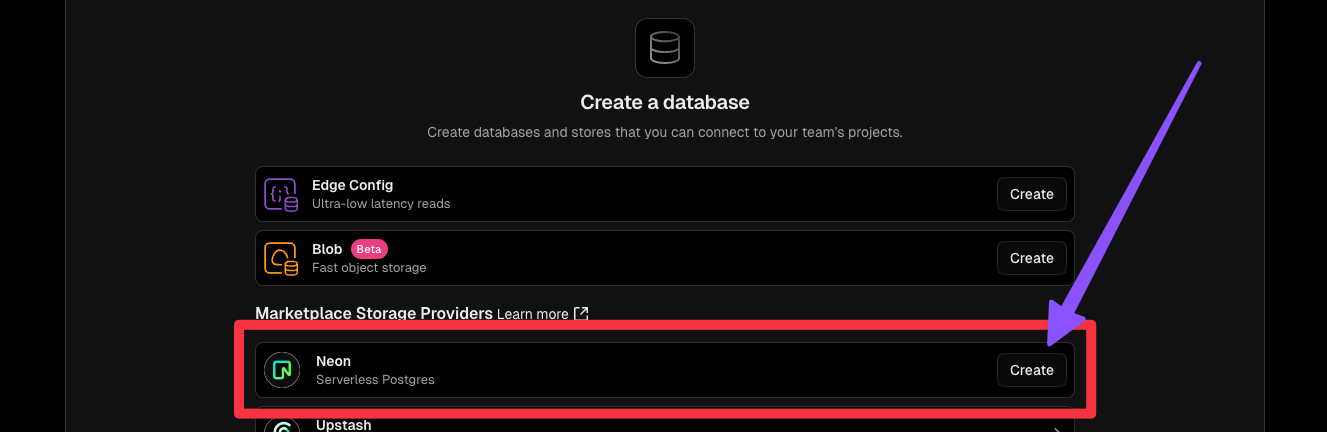
Next I clicked on “Create” next to the Neon option.
The next prompt form will appear. I went with PostgreSQL (Neon) database, as shown, then the closest region (mine is Portland).
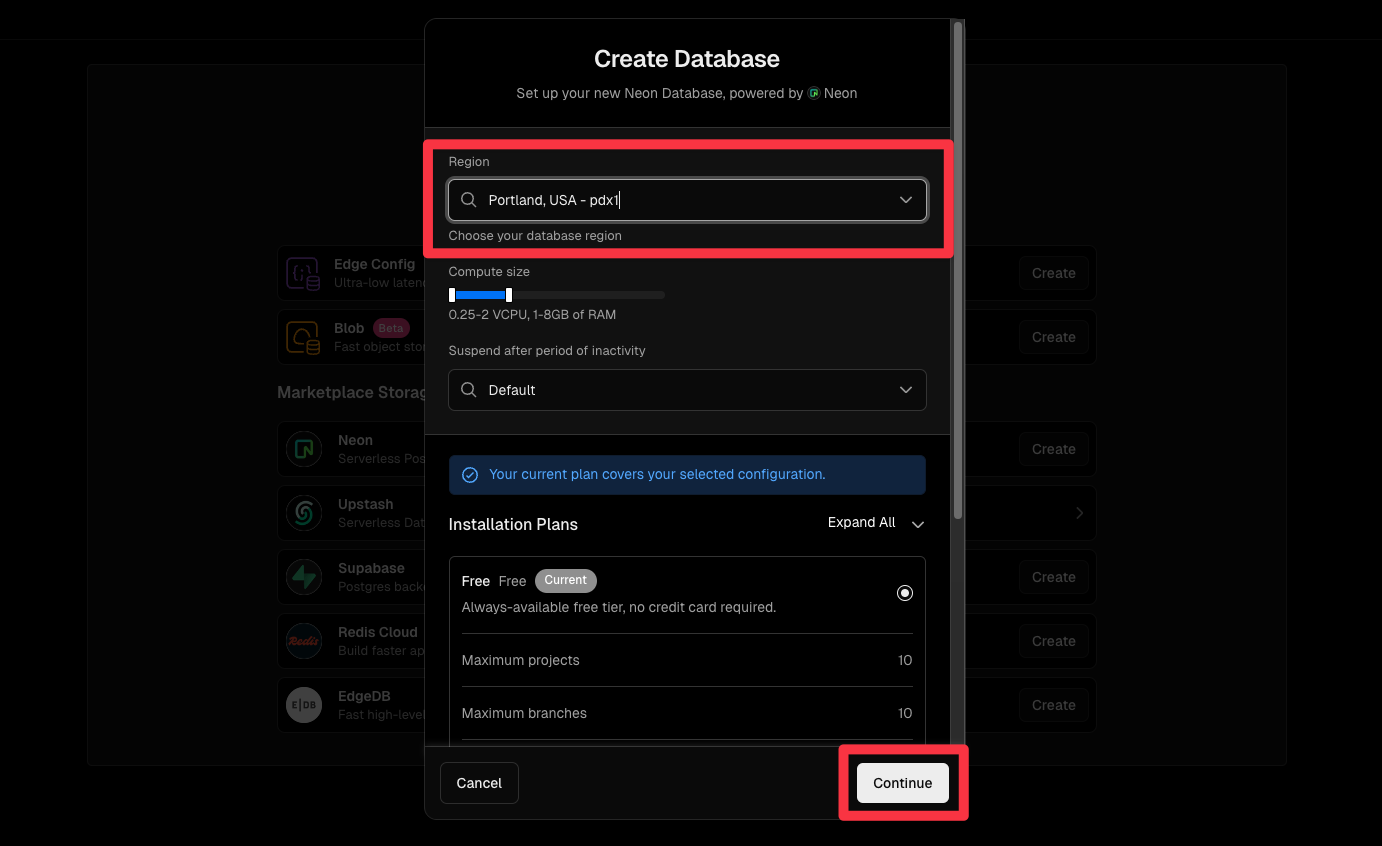
Then clicked “Continue” and “Create” again and the database was created.

Now an environment variable will be needed in Vercel and I’ll need to setup the local environment variable too in the .env and .env.local files. To add the Vercel environment variable this command gets that done.

vercel env add POSTGRES_URL

When I initiate this command it prompts for the value of the key value pair being added. However, in this case, as seems to be the case now on Vercel, the variable was already created and the value inserted into the environment variable. I suppose Vercel and Neon have really upped the level of integration there and made it even more seamless. Whatever is going on behind the curtains these days, that’s rad, but you would likely want to know and check your environment variables.

To check out the variables for the project, I navigate to the projects list, then click on the specific project.
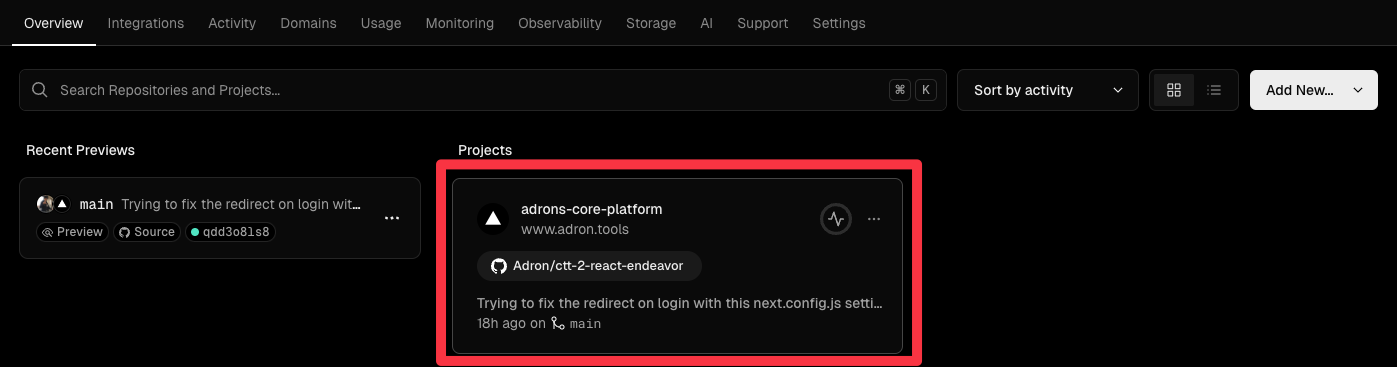
This changes the menu items across the top of screen to reflect the options for the particular project. I can then click on “Settings” and the left hand options now have the “Environment Variables” for the project.
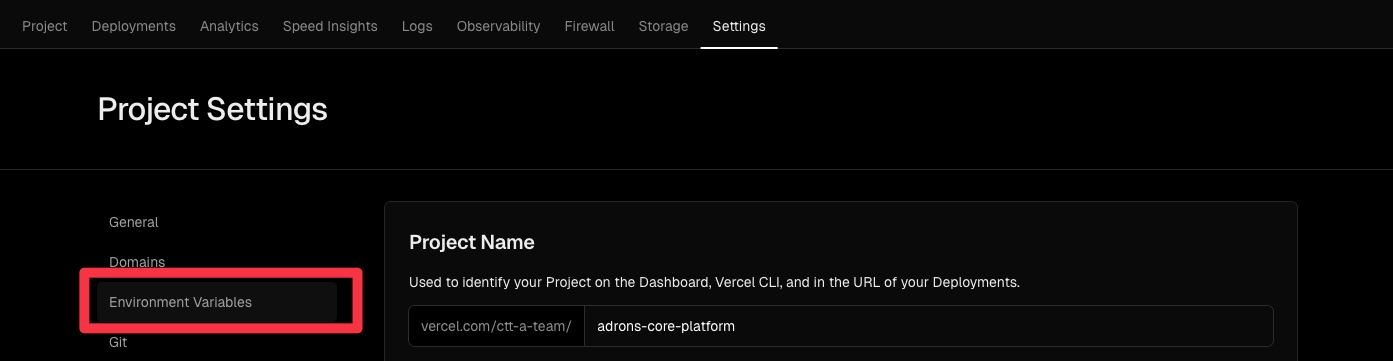
Once I navigated there I can now see the entire list of environment variables. Which I’ve took a partial screen grab of below.
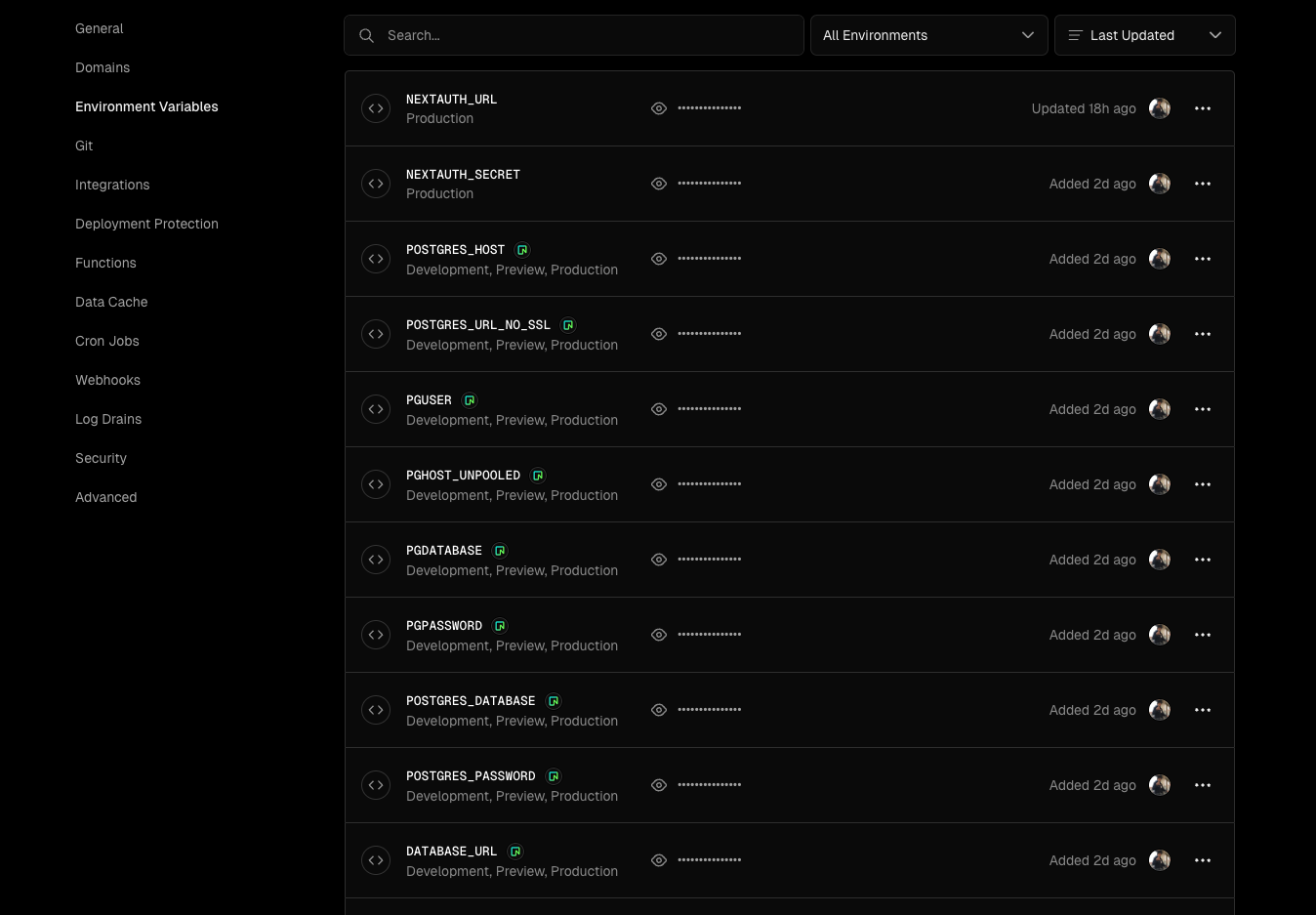
I took note at this point, that the integration puts a lot of environment variables into the project and assigns them their particular values. This is very useful for a number of reasons and it is something that is really important to know!

Prisma & The Database Schema Migration

I’m also going to use Prisma. What I’ll need for this is a schema file, that can be added in the root of the project at prisma/schema.prisma. After adding the folder and file, I’ve added the following schema to the file as a first step.

generator client {
  provider = "prisma-client-js"
}

datasource db {
  provider = "postgresql"
  url      = env("POSTGRES_URL")
}

model User {
  id        String   @id @default(cuid())
  email     String   @unique
  username  String   @unique
  password  String
  createdAt DateTime @default(now())
  updatedAt DateTime @updatedAt
}

Another thing I want to do is setup basic authentication. This makes a perfect first step in getting a database built, setup, and connectivity proofed out. I’ll go ahead and add pertinent dependencies to get all that done.

npm install @prisma/client bcryptjs
npm install prisma --save-dev
npm install next-auth
npm install @types/bcryptjs --save-dev

Now I can initialize the schema in the database with Prisma. This will add the tables and calumns for the schema setup in the schema.prisma file.

npx prisma generate
npx prisma db push

Now I need to setup the authentication configuration, code, and related collateral.

I’ll setup the authentication code first in ./src/app/lib/auth.ts.

My understanding that this file, plus a lot of others that I’ll be adding are done so under convention and assumption that they are added in a particular place. I won’t deviate from this convention based approach. For now at least, so if you are following along and deviate from the locations and names of the files, you may find yourself spiraling into a list of errors.

The auth.ts file that I coded up looks like this on completion.

import { PrismaClient } from '@prisma/client';
import { PrismaAdapter } from '@auth/prisma-adapter';
import { compare } from 'bcryptjs';
import NextAuth from 'next-auth';
import CredentialsProvider from 'next-auth/providers/credentials';

const prisma = new PrismaClient();

export const {
  handlers: { GET, POST },
  auth,
  signIn,
  signOut,
} = NextAuth({
  adapter: PrismaAdapter(prisma),
  session: {
    strategy: 'jwt'
  },
  pages: {
    signIn: '/login',
  },
  providers: [
    CredentialsProvider({
      name: 'Credentials',
      credentials: {
        username: { label: "Username", type: "text" },
        password: { label: "Password", type: "password" }
      },
      async authorize(credentials) {
        if (!credentials?.username || !credentials?.password) {
          return null;
        }

        const user = await prisma.user.findUnique({
          where: {
            username: credentials.username
          }
        });

        if (!user) {
          return null;
        }

        const isPasswordValid = await compare(credentials.password, user.password);

        if (!isPasswordValid) {
          return null;
        }

        return {
          id: user.id,
          email: user.email,
          username: user.username
        };
      }
    })
  ],
  callbacks: {
    async jwt({ token, user }) {
      if (user) {
        token.username = user.username;
      }
      return token;
    },
    async session({ session, token }) {
      if (token && session.user) {
        session.user.username = token.username as string;
      }
      return session;
    }
  }
});

Next up I’ll need a login page. This I’ll add to ./src/app/login/page.tsx.

'use client';

import { useState } from 'react';
import { signIn } from 'next-auth/react';
import { useRouter } from 'next/navigation';

export default function Login() {
  const router = useRouter();
  const [error, setError] = useState('');
  const [loading, setLoading] = useState(false);

  const handleSubmit = async (e: React.FormEvent<HTMLFormElement>) => {
    e.preventDefault();
    setLoading(true);
    setError('');

    const formData = new FormData(e.currentTarget);
    const username = formData.get('username') as string;
    const password = formData.get('password') as string;

    try {
      const result = await signIn('credentials', {
        username,
        password,
        redirect: false,
      });

      if (result?.error) {
        setError('Invalid username or password');
      } else {
        router.push('/dashboard');
      }
    } catch (err) {
      setError('An error occurred. Please try again.');
    } finally {
      setLoading(false);
    }
  };

  return (
    <main className="flex min-h-screen flex-col items-center justify-center p-24">
      <div className="w-full max-w-md space-y-8">
        <div>
          <h2 className="mt-6 text-center text-3xl font-bold tracking-tight">
            Sign in to your account
          </h2>
        </div>
        <form className="mt-8 space-y-6" onSubmit={handleSubmit}>
          <div className="space-y-4 rounded-md shadow-sm">
            <div>
              <label htmlFor="username" className="sr-only">
                Username
              </label>
              <input
                id="username"
                name="username"
                type="text"
                required
                className="relative block w-full rounded-md border-0 p-2 text-gray-900 ring-1 ring-inset ring-gray-300 placeholder:text-gray-400 focus:ring-2 focus:ring-indigo-600"
                placeholder="Username"
              />
            </div>
            <div>
              <label htmlFor="password" className="sr-only">
                Password
              </label>
              <input
                id="password"
                name="password"
                type="password"
                required
                className="relative block w-full rounded-md border-0 p-2 text-gray-900 ring-1 ring-inset ring-gray-300 placeholder:text-gray-400 focus:ring-2 focus:ring-indigo-600"
                placeholder="Password"
              />
            </div>
          </div>

          {error && (
            <div className="text-red-500 text-center text-sm">
              {error}
            </div>
          )}

          <button
            type="submit"
            disabled={loading}
            className="group relative flex w-full justify-center rounded-md bg-indigo-600 px-3 py-2 text-sm font-semibold text-white hover:bg-indigo-500 focus-visible:outline focus-visible:outline-2 focus-visible:outline-offset-2 focus-visible:outline-indigo-600 disabled:opacity-50"
          >
            {loading ? 'Signing in...' : 'Sign in'}
          </button>
        </form>
      </div>
    </main>
  );
}

Now a dashboard page, which will just be a pretty empty page right now, just representing something that is protected from general view until someone has an account to login with. I’ll also set it up so that it is the default page the login redirects to.

Adding the page at ./src/app/dashboard/page.tsx with the following code.

import { auth } from '../lib/auth';
import { redirect } from 'next/navigation';

export default async function Dashboard() {
  const session = await auth();

  if (!session?.user) {
    redirect('/login');
  }

  return (
    <main className="flex min-h-screen flex-col items-center justify-center p-24">
      <div className="w-full max-w-4xl">
        <h1 className="text-4xl font-bold mb-8">Dashboard</h1>
        <div className="bg-white shadow rounded-lg p-6">
          <h2 className="text-2xl font-semibold mb-4">Welcome, {session.user.username}!</h2>
          <p className="text-gray-600">You are successfully logged in.</p>
        </div>
      </div>
    </main>
  );
}

Next I’m going to need some middleware to manage things. After RTFMing a bit it seems like the middleware file should be at the root of src in ./src/middleware.ts.

import { auth } from './app/lib/auth';
import { NextResponse } from 'next/server';
import type { NextRequest } from 'next/server';

export async function middleware(request: NextRequest) {
  const session = await auth();

  if (!session && request.nextUrl.pathname.startsWith('/dashboard')) {
    return NextResponse.redirect(new URL('/login', request.url));
  }

  return NextResponse.next();
}

export const config = {
  matcher: '/dashboard/:path*'
};

Then finally some route mapping in ./src/app/api/register/route.ts.

import { PrismaClient } from '@prisma/client';
import { hash } from 'bcryptjs';
import { NextResponse } from 'next/server';

const prisma = new PrismaClient();

export async function POST(req: Request) {
  try {
    const { username, email, password } = await req.json();

    // Validate input
    if (!username || !email || !password) {
      return NextResponse.json(
        { error: 'Missing required fields' },
        { status: 400 }
      );
    }

    // Check if user already exists
    const existingUser = await prisma.user.findFirst({
      where: {
        OR: [
          { email },
          { username }
        ]
      }
    });

    if (existingUser) {
      return NextResponse.json(
        { error: 'User already exists' },
        { status: 400 }
      );
    }

    // Hash password
    const hashedPassword = await hash(password, 12);

    // Create user
    const user = await prisma.user.create({
      data: {
        username,
        email,
        password: hashedPassword,
      },
    });

    return NextResponse.json(
      {
        id: user.id,
        username: user.username,
        email: user.email,
      },
      { status: 201 }
    );
  } catch (error) {
    return NextResponse.json(
      { error: 'Internal server error' },
      { status: 500 }
    );
  }
}

The remaining elements include finally setting up the .env.local file I need, making sure Vercel has those environment variables, and then adding, committing, and pushing all of this to the repo.

The .env.local file should include the following, I’ve of course removed the secrets but this is what it comes out to.

POSTGRES_URL="your-neon-connection-string"
NEXTAUTH_SECRET="your-secret-key"
NEXTAUTH_URL="http://localhost:3000"

To push to Vercel if that still needed done would look like vercel env add NEXTAUTH_SECRET and vercel env add NEXTAUTH_URL. Then finally getting the git gitted and the vercel call executed.

git add .
git commit -m "Add authentication and database integration"
git push origin main
vercel

Now I can navigate to /api/register endpoint to create a new user, then over to the /login page to log in to the system and access the /dashboard. However, with that ll done there are some immediate improvements I should make. Such as adding a page for registering instead of doing it via an endpoint.

Another thing I discovered with Prisma that is super useful is the studio. If I issue the npx prisma studio command an interface launches that provides a way to view and edit database records. I generally use DataGrip from JetBrains, but this is a great app itself – runs on localhost:5555 – that gives you the basic view and edit ability.

ERROR! ERROR! ERROR! (The First Error)

I ran into some errors while working through this, and here are the quick resolutions if the pop up. The error looked like this.

npm install next-auth
npm ERR! code ERESOLVE
npm ERR! ERESOLVE unable to resolve dependency tree
npm ERR!
npm ERR! While resolving: adrons-core-platform@0.1.0
npm ERR! Found: react@19.0.0-rc-66855b96-20241106
npm ERR! node_modules/react
npm ERR!   react@"19.0.0-rc-66855b96-20241106" from the root project
npm ERR!   peer react@"^18.2.0 || 19.0.0-rc-66855b96-20241106" from next@15.0.3
npm ERR!   node_modules/next
npm ERR!     next@"15.0.3" from the root project
npm ERR!     peer next@"^12.2.5 || ^13 || ^14 || ^15" from next-auth@4.24.10
npm ERR!     node_modules/next-auth
npm ERR!       next-auth@"" from the root project
npm ERR!   1 more (react-dom)
npm ERR!
npm ERR! Could not resolve dependency:
npm ERR! peer react@"^17.0.2 || ^18" from next-auth@4.24.10
npm ERR! node_modules/next-auth
npm ERR!   next-auth@"" from the root project
npm ERR!
npm ERR! Fix the upstream dependency conflict, or retry
npm ERR! this command with --force or --legacy-peer-deps
npm ERR! to accept an incorrect (and potentially broken) dependency resolution.
npm ERR!
npm ERR!
npm ERR! For a full report see:
npm ERR! /Users/adron/.npm/_logs/2024-11-18T02_37_28_145Z-eresolve-report.txt

npm ERR! A complete log of this run can be found in: /Users/adron/.npm/_logs/2024-11-18T02_37_28_145Z-debug-0.log

This is a fairly common versioning and dependency issue related error. This one looked like a mismatch between React and Next-auth. Oh joy I thought, the exact two things I need to use for this post! Egads! But I toyed around with them and got the issues resolved pretty quickly.

I first ran npm install next-auth --legacy-peer-deps and then installed the remaining dependencies I needed.

npm install @prisma/client bcryptjs --legacy-peer-deps
npm install prisma --save-dev --legacy-peer-deps
npm install @types/bcryptjs --save-dev --legacy-peer-deps

Then I went about cleaning the npm cahce, deleting the node_modules directory, and reinstalling the dependencies.

npm cache clean --force
rm -rf node_modules package-lock.json
npm install

Another thing I could have theoretically done here is set the specific versions via the install, but uninstalling and then reinstalling like this.

npm uninstall next-auth @prisma/client bcryptjs prisma @types/bcryptjs
npm install next-auth@5.0.0-beta.3 @prisma/client bcryptjs prisma @types/bcryptjs

ERROR! ERROR! ERROR! (The second error)

Now it seemed like, when I got this error I just somehow typed the var wrong. But anyway, here is the error that I got.

Error: Prisma schema validation - (get-config wasm)
Error code: P1012
error: Environment variable not found: POSTGRES_URL.
  -->  prisma/schema.prisma:7
   |
 6 |   provider = "postgresql"
 7 |   url      = env("POSTGRES_URL")
   |
Validation Error Count: 1
[Context: getConfig]
Prisma CLI Version : 5.22.0

Basically I must have not added or typed POSTGRES_URL correctly somewhere. I also figured maybe I needed a .env too in addition to the .env.local I added. So I went about correcting each of these things. I did a search for POSTGRES_URL and didn’t find anything in particular. Immediately after that I went ahead and added a .env file with the following contents. Again, with pertinent secrets removed for the config below. (More details on NEXTAUTH_SECRET and NEXTAUTH_URL later in the post)

POSTGRES_URL="postgresql://your-username:your-password@your-host:5432/your-database"

NEXTAUTH_SECRET="your-secret-key-here"
NEXTAUTH_URL="http://localhost:3000"

I also checked that the .gitignore file had the pertinent values added.

# Local env files
.env
.env*.local

All that seemed to resolve the issue, and while I was at it I opted to write up a script to test and verify database connectivity. I added a test-env.ts file in a folder I added named scripts and added the following code.

import { PrismaClient } from '@prisma/client'

const prisma = new PrismaClient()

async function main() {
  try {
    // Attempt to connect to the database
    await prisma.$connect()
    console.log('Successfully connected to the database')
  } catch (error) {
    console.error('Failed to connect to the database:', error)
  } finally {
    await prisma.$disconnect()
  }
}

main()

I then executed that code with npx ts-node scripts/test-env.ts. I immediately then got another error! I was on a roll with the errors today.

import { PrismaClient } from '@prisma/client';
^^^^^^
SyntaxError: Cannot use import statement outside a module
    at internalCompileFunction (node:internal/vm:77:18)
    at wrapSafe (node:internal/modules/cjs/loader:1288:20)
    at Module._compile (node:internal/modules/cjs/loader:1340:27)
    at Module.m._compile (/Users/adron/.npm/_npx/1bf7c3c15bf47d04/node_modules/ts-node/src/index.ts:1618:23)
    at Module._extensions..js (node:internal/modules/cjs/loader:1435:10)
    at Object.require.extensions.<computed> [as .ts] (/Users/adron/.npm/_npx/1bf7c3c15bf47d04/node_modules/ts-node/src/index.ts:1621:12)
    at Module.load (node:internal/modules/cjs/loader:1207:32)
    at Function.Module._load (node:internal/modules/cjs/loader:1023:12)
    at Function.executeUserEntryPoint [as runMain] (node:internal/modules/run_main:135:12)
    at phase4 (/Users/adron/.npm/_npx/1bf7c3c15bf47d04/node_modules/ts-node/src/bin.ts:649:14)

I looked at the code and tweaked it just a bit to this.

const { PrismaClient } = require('@prisma/client');

const prisma = new PrismaClient();

async function main() {
  try {
    await prisma.$connect();
    console.log('Successfully connected to the database');
  } catch (error) {
    console.error('Failed to connect to the database:', error);
  } finally {
    await prisma.$disconnect();
  }
}

main();

I then also added a ./scripts/tsconfig.json file with the follwing.

{
  "compilerOptions": {
    "target": "ES2018",
    "module": "CommonJS",
    "lib": ["ES2018"],
    "strict": true,
    "esModuleInterop": true,
    "skipLibCheck": true,
    "forceConsistentCasingInFileNames": true
  }
}

I tried running the command again, but with the following npx ts-node --project scripts/tsconfig.json scripts/test-env.ts and that proved out the connection to the database. At this point, everything appears to be running and operational. I tried creating a user and logging in and everything flowed smoothly except for the redirect to the dashboard page after login and some other errors. I realized I’d not set NEXTAUTH_SECRET and NEXTAUTH_URL to their proper values, I’d completely forgotten about that!

For the NEXTAUTH_SECRET I used openssl rand -base64 32 to set that. Another option is to use node and run node -e "console.log(crypto.randomBytes(32).toString('base64'))". Either of these commands will give you a solid value for the secret.

For the NEXTAUTH_URL use http://localhost:3000 for the local environment and https://whatever-the-app-is-called.vercel.app for the production deploy to Vercel.

With those final changes, after logging in, I manually typed in the path to the dashboard and it all worked! If you run into any URL path flakiness, be sure to check that the Vercel variables are set correctly when pushing to production. If these settings are off just a little, or if you’ve set a specific domain name, you’ll end up with time out errors or other issues. This is something I’ll cover in a subsequent post, so with that, until next time, my your coding all compile the first time!

Subscribe on the side bar, and continue this journey through errors and the chaos of Next.js dev with React on Vercel with PostgreSQL! Soon I’ll also be re-introducing the mutli-tenancy notions behind running multiple applications and also the core domain of my “Collector’s Tune Tracker” app!

OG Posts on adron.tools and Collector’s Tune Tracker

The trio of initial posts that kicked off this entire effort. Things have changed tremendously from these original posts, but they provide much of the root reasoning around getting this series and these apps built!

Previous Posts

Subsequent Posts