Thor Brings the Hamma! Cloud Foundry OS-X, Windows 7 and Windows 8 Interfaces FTW!

One of the things that I do in my work is lead the efforts around creating and leading open source projects. As regular readers may know, I’m big into open source efforts, especially around PaaS. My preferred PaaS offering these days for internal, external and public cloud PaaS is Cloud Foundry (with Iron Foundry for all of my .NET needs). Today the we made the projects official and I’m charging forward with a a great team of people. You’ll be able to use these new user interfaces for Cloud Foundry against Tier 3 Web Fabrics, CloudFoundry.com, Stackato, AppFog and any other company that uses Cloud Foundry at the core and exposes the web service APIs for use!

Thor & Thor.NET

In a couple weeks we’ll be making the github repositories completely public, open sourcing the code & products entirely and looking forward to working with the community to make these tools as awesome as we can. For now, if you’d like to jump into the repositories and see where we are and what we’re up to as we step toward opening them completely, sign up via “early access“. We’ll get you setup on the repo so you can fork, pull and add you’re own signature bits.

Why did we name the project Thor? Well, we’ve been spearheading the Iron Foundry Community efforts for .NET support on Cloud Foundry so we figured we needed someone to bring the hamma to the battle, nobody better than Thor for that!

I’ll have a regular write up of snippets, code and other things I’m working on here so subscribe and give me a follow on Twitter (@adron) and App.net (@adron). Also, for official open source releases of the project check out the Iron Foundry Organization site that has the Iron Foundry downloads, source, Thor and the official Iron Foundry Blog.

Microsoft, Which I Hate and Which I Love

Ok, I’ll admit, I got issues with some of the past Microsoft ethical breaches of business dealings. Sure, but who doesn’t? Their technology that they develop ranges from complete crap (re: Bob, paperclip, sealed classes, The 1st X version of Entity Framework) all the way to the completely awesome amazing stuff, like the Node.js SDK & work with Windows Azure for Node.js, Visual Studio can be amazing sometimes too, and there are other things that are really solid pieces of software.

So here’s my happy list and shit list of Microsoft Software:

Happy List

  • Visual Studio – When it works, after it takes 20 seconds to launch and you finally get the bloody project open, it’s a great IDE.
  • Live Writer – For blogging, nothing holds a candle to this product. It is spectacular, I wish it ran on OS-X because then I’d still use it. Even with all its greatness, it’s not enough of a motivating factor to use Windows as my core native OS.
  • Web API – This should have been attempt #1. Instead of the catastrophic mistake they made in WCF. (see below for WCF comments)
  • C# – C# is actually a great language and I find that it is very similar, but in many ways knocks the socks off of Java. Especially in ease of use for a number of things. Which of course is in conjunction with Visual Studio, etc.
  • Sketchflow – This is a great post paper prototyping software package. I don’t know many that use it, but for creating a working prototype or mock up, this software is great.
  • Windows Phone 7 – This is actually not a bad OS for a phone. It is a drastic improvement over all the previous MS phone operating systems.
  • Metro – I actually like Metro. It is simple, I feel like I’m 5 years old when I use it and I think in the same vein of what Apple has perfected, it’s just enough for the average computer user to make the tablet leap. It could be truly big.
  • XBox – Nuff’ said. Xbox kicks ass on massive scale!  🙂
  • Windows Azure – Primarily around the node.js space. They’ve done a stellar job and have an absolutely amazing product there.
  • MSDN – This is one of the best developer spaces around. MS devs often complain about it, but really the alternatives are weak and few between.
  • ASP.NET MVC – Rails envy brought to focus in a good, solid, organized and nicely put together product.

Angry List

  • Vista – Nuff’ said.
  • Win ME – Nuff’ said.
  • Most of Windows – Nuff’ said.
  • Stability, speed, launching, and related software issues that Visual Studio, Windows, and almost every Microsoft package has compared to the responsiveness of OS-X and general *nix operating systems.
  • Metro on Windows 8 – As a power user, I already hate Metro. Microsoft is about 6 years behind in the phone and tablet wars and it shows. As a power user I’ll admit, iOS isn’t much better or worse, but the thing is it is relegated to the iPad and iPhone (iPod). Windows 8 is going to be on everything. On a tablet I don’t want a flaky desktop tainting my experience and when I’m trying to do development on a desktop I don’t want a wierdo start button replacement screen buggering up my desktop work. Generally, so far, I’m not really happy with it or seeing how it is going to speed up any of my work or help me be more productive except in surfing Facebook or Tweeting. Somehow, that doesn’t seem all that important.
  • Windows Azure – For infrastructure, and almost everything else besides node.js stuff, it’s still a catastrophic mess. It looks absolutely great, but I would still struggle to suggest someone use it for all but node.js deployment. No offense, it’s just not in a space yet that works for most of the companies I work for. It might get there, but at this point I still find a lot of frustrating points.
  • Biztalk – Nuff’ said. It’s absurd anyone pays for this.
  • Sharepoint – I get the usage, I still hate the package. There are vastly superior alternatives out there.
  • WCF, Entity Framework and every other piece of software Microsoft made almost impossible to write unit tests for. All while throwing up a middle finger and screwing over their actual developer community. Many of these offerings did not have good results in the end. Hopefully developers are able to generally ignore the versions that were horrible and just use things like code first EF or Web API now instead of the previous years version of WCF & EF.
  • Windows Server – I’m not sure this server even now, understand how to interact with the Internet, HTTP, TCP/IP or a number of other Internet related elements well. It does it, but at the core there are a lot of problems still.
  • Hyper-V – Not sure I should even get started. Microsoft ignores it for years, then builds a cloud on top of it and pretends it is Enterprise ready. Knowing full well that it is probably the worst virtualization solution on the market today. Machine management is bad, launch time is bad, setting up images is ridiculous and the list of problems only grows. Anyone using this product is extending 2-5x more resources than using a comparable OSS or VMware virtualization product.

Software I’m indifferent about…  i.e. software that is ‘aight’ and I could go either way on.

  • SQL Server

There isn’t that much I’m apathetic about. I’m usually either stoked by their product or horrified about it. Any other key software I’ve missed? How do you feel about this list of software? Got a happy list or shit list of your own? Post a blog entry on it and I’ll add a link back on my entry to yours – just leave a comment (or link back of your own).

UPDATED:Here’s another entry of some MAJOR issues that found in Windows 8. They’re some pretty dangerous gotchas!

HTML, CSS, JavaScript and Metro App Building on Windows 8 Part 2

In the first part of this seriesI kicked everything off by starting a Windows 8 JavaScript Project and added QUnit-Metro via Nuget. Now that we have a small executable application, I’ll get some things added and cover what exactly it is we’re doing in each part. Open the project up that we created in the previous blog entry of the series. Once open find and open the default.html, default.js and default_tests.js files to work with. In the default.js file you’ll find the following code in the default.js.

(function () {
    "use strict";

    var app = WinJS.Application;
    var activation = Windows.ApplicationModel.Activation;
    WinJS.strictProcessing();

    app.onactivated = function (args) {
        if (args.detail.kind === activation.ActivationKind.launch) {
            if (args.detail.previousExecutionState !== activation.ApplicationExecutionState.terminated) {
            } else {
            }
            args.setPromise(WinJS.UI.processAll());
        }
    };

    app.oncheckpoint = function (args) {
    };

    app.start();
})();

A Bit of Context – default.js

At the beginning you’ll find that all the code is enclosed in a self-executing anonymous function. This gives us the ability to avoid naming conflicts or accidentally modifying variables in other spaces. Kind of the “namespaces” of C# or other organizational code features from other languages (I said kind of, there are other ways to do this too, this is just one). The other cool thing about this is it keeps identifiers out of the global namespace which also helps performance (it’ll also get you called all sorts of stuff if you create global variables in JavaScript! I’m nice, I won’t do it, but be prepared to be appropriately punished for such dissension as global variable creation! I warned ya.).

This next part (reminds me of why I find JavaScript scary in addition to awesome) has a variable that turns “strict mode” on. What this does, just like those of you may know from the Visual Basic days, is turn on a strict mode of additional error checking for code. It helps prevent you from doing all sorts of dumb things, like trying to assign a value to a read-only variable. For more on “strict mode” check out Microsoft’s Strict Mode Page.

The remaining bits of code in the default.js are the handlers for the application activated and checkpoint events. These events are fairly self explanatory, suffice it to say they happen when the application launches and checkpoint fires when a particular checking event happens against the Process Lifetime Management. The Process Lifetime Management handles all of the application suspend, resume and background events.

TDD & BDD For The Win!

Ok, so this isn’t the best example of either really, but to get started we want to wire up an event to a button. But first we want to test if the event is wired up. How does someone tests if an event is wired up in JavaScript? Like this.

test("Where the text box is populated ", function () {
    var result = document.getElementById("messageOutput").innerText;
    ok(result == "", "should have empty inner text.");
});

Adding a Button & Some Button Functionality

Ok, done with the context. Let’s add a button and make some magic happen. Bring focus to the default.html page and add a button, a text box and the respective components.

<!DOCTYPE html>
<html>
<head>
    <meta charset="utf-8" />
    <title>Readingz</title>
    <!-- These files are included when the project is generated, I don't really know where they are... -->
    <link href="//Microsoft.WinJS.1.0.RC/css/ui-light.css" rel="stylesheet" />
    <script src="//Microsoft.WinJS.1.0.RC/js/base.js"></script>
    <script src="//Microsoft.WinJS.1.0.RC/js/ui.js"></script>
    <!-- Turned on the testing. -->
    <script src="/js/qunitmetro.js"></script>
    <script src="/js/default_tests.js"></script>
    <!-- Default Metro files. -->
    <script src="/js/default.js"></script>
    <link href="/css/default.css" rel="stylesheet" />
</head>
<body>
    <p>Click the button to run the tests for the default.html and default.js code.</p>
    <input id="peripheralParameters" type="text" />
    <button id="runTests">Run Tests</button>
    <p id="messageOutput"></p>
</body>
</html>

NOTE: I made more than a few changes from the default.html included in the previous part of this series. One hard to notice change is that I switched the style sheet from the dark Metro theme to the light Metro theme.

With those additions add a function to the default.js file as shown below and then add the event handler.

(function () {
    "use strict";

    var app = WinJS.Application;
    var activation = Windows.ApplicationModel.Activation;
    WinJS.strictProcessing();

    app.onactivated = function (args) {
        if (args.detail.kind === activation.ActivationKind.launch) {
            if (args.detail.previousExecutionState !== activation.ApplicationExecutionState.terminated) {

            } else {

            }
            args.setPromise(WinJS.UI.processAll());

            var runTests = document.getElementById("runTests");
            runTests.addEventListener("click", buttonClickHandler, false);
        }
    };

    app.oncheckpoint = function (args) {};

    function buttonClickHandler () {
        document.getElementById("messageOutput").innerText =
           "Parameters Passed: " +
           document.getElementById("peripheralParameters").value +
           "!";
    }

    app.start();
})();

I now have one button now working, actually doing something, with a unit tests to verify that the button exists and the event is wired up. Some progress is being made!

If I run the application I get passing tests. That’s it for now. In the next entry we’ll dive deeper into testing and into functionality.

Until next time, happy scripting with the JavaScript on Windows 8.

HTML, CSS, JavaScript and Metro App Building on Windows 8 Part 1

I’m a fan of JavaScript and I’m warming to some of the Metro interfaces on Windows 8. I’ve always found the Windows 7 Phone UI, which is the first iteration of the Metro UI, to be a very slick phone interface. So with this blog entry I’m going to lay out setting up a default Windows 8 Metro application using JavaScript as the language of choice.

Prerequisites:

  • Windows 8
  • Visual Studio 2012

Open Visual Studio 2012 and click on file -> new project -> and then find the JavaScript section and pick the blank metro app.
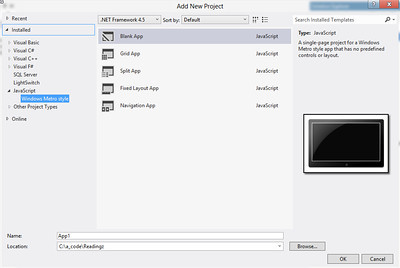
New Windows 8 Metro Project

New Windows 8 Metro Project

Once you have the application created, I’d suggest following good practice and adding QUnit-Metro to your project with Nuget(or get the actual files if you don’t want to use Nuget).
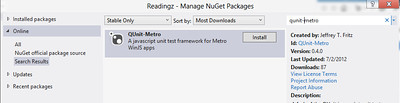
Getting QUnit-Metro via Nuget

Getting QUnit-Metro via Nuget

Once you’ve added the QUnit-Metro interface you’re ready to get started writing tests. But before writing a test take a look at the additional files that the QUnit-Metro Nuget Package adds to the project.
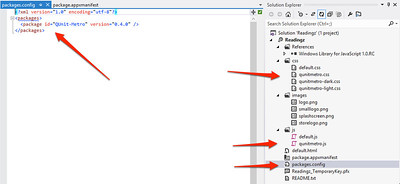
Things Added With QUnit-Metro

Things Added With QUnit-Metro

In the screenshot (click for a full size image), I’ve pointed in a clockwise order:

  • The package is added and listed in the packages file now for Nuget.
  • There are now three CSS files added for QUnit. Two are Metro specific, which gives a more Metro look to the results of the tests.
  • The qunitmetro.js file is the testing framework.

With this collateral added we can setup a test within the default.html page of the project. First add the following code so that your default.html file looks like this:

<!DOCTYPE html>
<html>
<head>
    <meta charset="utf-8" />
    <title>Readingz</title>
    <!-- These files are included when the project is generated, I don't really know where they are... -->
    <link href="//Microsoft.WinJS.1.0.RC/css/ui-dark.css" rel="stylesheet" />
    <script src="//Microsoft.WinJS.1.0.RC/js/base.js"></script>
    <script src="//Microsoft.WinJS.1.0.RC/js/ui.js"></script>
    <!-- These are the CSS and JavaScript files that I've edited for testing. -->
    <script src="/js/qunitmetro.js"></script>
    <script src="/js/default.js"></script>
    <script src="/js/default_tests.js"></script>
    <link href="/css/default.css" rel="stylesheet" />
    <link href="/css/qunitmetro-light.css" rel="stylesheet" />
</head>
<body>
    <p>Content goes here</p>
    <button>Press This!</button>
    <!-- This is for testing only. It goes away when application is ready to ship. -->
    <div id="qunit"></div>
</body>
</html>

The Microsoft.WinJS.1.0.RC libraries are included by default, which I’m assuming when I get fully upgraded to the released version of Windows 8 and Visual Studio 2012 that this might just read Microsoft.WinJS.1.0. The section of scripts and links below that are the added QUnit-Metro files. I included the qunitmetro-light.css file for metro style test results.

In the body of the page the div with the id of qunit…

<div id="qunit"></div>

is added where the test results will display. That’s how simple it actually is. To add actual tests, I’ve added a default_tests.js file to the js directory. I then added a simple test to the file that I’ve shown below.

test("hello windows world of javascript tests!", function () {
    ok(1 == "1", "Passed!");
});

Run the application and you’ll find the following result displayed in your application.
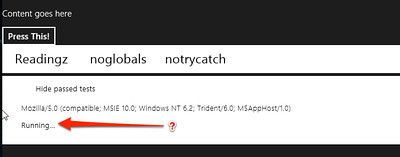
The Running Application

The Running Application

This is one place where an odd thing seems to be occurring (if you have any idea what the problem is, leave a comment, and I’ll do the same when I get the issues resolved). The test just keeps reporting “Running…” until you click on Readingz, noglobals, or somewhere else on the screen in that area to make an action occur. When I click on Readingz the test runs successfully like it should.
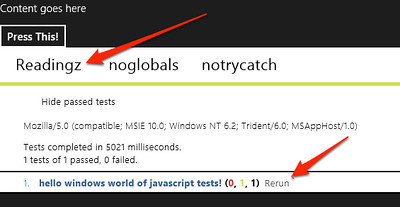
Test Ran

Test Ran

What’s up with that? It’s a pretty odd action.

Another issue that I ran into, which was a user error issue on my behalf, was I swapped around the three script files so the qunit-metro file loaded last. I actually stumbled and posted the issue on Stackoverflow here.


Shout it

East & West Coast PaaS, Being Polyglot, Reply to Dan Turkenkopf

Dan (he’s a good guy, check him out on Twitter @dturkenk), your “East Coast vs West Coast PaaS Psychology. And Why It Matters.” is great write up. Loved it! I’ve got to say, I’m pretty much in agreement with almost every single thing you’ve written here. Matter of fact I’m staunchly in agreement with a lot of it. There’s a few other abstractions I’d like to add, that makes the reality of east coast and west coast PaaS what it is, and why some of these things are like this.

You write,

“While the West Coast conception of PaaS is an appealing vision, (and may well be the answer for many smaller companies and start ups)…”

which I agree with whole heartedly. The fast, agile, and lean companies of tomorrow need this type of technology today. They can’t survive trying to throw together traditional environments. They need PaaS like people need food and water. However you also write on the end of that statement,

“it doesn’t really mesh with today’s enterprise reality.”

which I know is true, sometimes. There are however many enterprises out there that do indeed want to and are starting to move over completely. These enterprises see the value add and are not waiting around. They’re not going halfway with a hybrid solution, they’re moving full bore and realizing economies of scale that internal IT shops will not and cannot realize.

This type of enterprise, is where a lot of the west coast and east coast mentality is realized. There is a risk aversion on the east coast, rightfully so with such things as financial institutions and Government being a dominent presence on the east coast. On the west coast though, the enterprises operate under a very different cultural perspective, they attempt to realize the advantages – competitive and disruptive that they are – of startups and small business. It’s as much a competitive survival for the west coast enterprise as it is for the startups and small business. Thus, we get some of the differentiators not just in technology, but in the enterprises themselves. This is the core of this psychological difference, not something that was born from a PaaS psychology, but for the ore business itself. Being that PaaS technology and its origins are from the west coast, it becomes obvious why most are focused on public or privately accessible public infrastructure.

Overall, the culture expands into all those sectors in the east and west, and starts to stand out when we look at different approaches to doing business and competing. Regardless of these minor differences and the associated differences in doing business, we both agree on one thing regardless of which coast we’re on.

The applications and application developers is where the value is for enterprises, mid-size, and small businesses, and startups.

Without doubt, PaaS technology is focused on that core value. Enabling developers to build applications in an easier, faster, scalable and more reliable way. So far, all the platforms are doing a damn good job helping us developers do just that.