I’ve boarded a bus, and as always, when I board a bus I almost always code. Unless of course there are people I’m hanging out with then I chit chat, but right now this is the 212 and I don’t know anybody on this chariot anyway. So into the code I go.
I’ve been re-reviewing the Docker and related collateral we offer at DataStax. In that review it seems like it would be worth having some starter kit applications along with these “default” Docker options. This post I’ve created to provide the first language & tech stack of several starter kits I’m going to create.
Starter Kit – The Todo List Template
This first set of starter kits will be based upon a todo list application. It’s really simple, minimal in features, and offers a complete top to bottom implementation of a service, and an application on top of that service all built on Apache Cassandra. In some places, and I’ll clearly mark these places, I might add a few DataStax Enterprise features around search, analytics, or graph.
The Todo List
Features: The following detail the features, from the users perspective, that this application will provide. Each implementation will provide all of these features.
A user wants to create a user account to create todo lists with.
A user wants to be able to store a username, full name, email, and some simple notes with their account.
A user wants to be able to create a todo list that is identified by a user defined name. (i.e. “Grocery List”, “Guitar List”, or “Stuff to do List”)
A user want to be able to logout and return, then retrieve a list from a list of their lists.
A user wants to be able to delete a todo list.
A user wants to be able to update a todo list name.
A user wants to be able to add items to a todo list.
A user wants to be able to update items in the todo list.
A user wants to be able to delete items in a todo list.
Architecture: The following is the architecture of the todo list starter kit application.
Database: Apache Cassandra.
Service: A small service to manage the data tier of the application.
User Interface: A web interface using React/Vuejs ??
As you can see, some of the items are incomplete, but I’ll decide on them soon. My next review is to check out what I really want to use for the user interface, and also to get a user account system figured out. I don’t really want to create the entire user interface, but instead would like to use something like Auth0 or Okta.
May I Ask?
There are numerous things I’d love help with. Are there any user stories you think are missing? Should I add something? What would make these helpful to you? Leave a comment, or tweet at me @Adron. I’d be happy to get some feedback and other’s thoughts on the matter so that I can ensure that these are simple, to the point, usable, and helpful to people. Cheers!
Here’s a talk Cedrick Lunven (who I have the fortune of working with!) about creating API’s for your database, your distributed database. He starts out with a few objectives for the talk:
Provide you a working API implementing Rest, gRPC, and GraphQL.
Give implementation details through Demo.
Reveal hints to choose and WHY, (specifically to work with Databases)
Other topics include specific criteria around conceptual data models, shifting from relational to distributed columnar store, with differentiation between entities, relationships, queries, and their respective behaviors. All of this is pertinent to our Killrvideo reference application we have too.
This is my second year at KubeCon. This year I had a very different mission than I did last year. Last year I wanted to learn more about services meshes, what the status of various features around Kubernetes like stateful sets, and overall get a better idea of what the overall shape of the product was and where the project was headed.
This year, I wanted to find out two specific things.
Developer Story: Has the developer story gotten any better?
Database Story: Do any databases, and their respective need for storage, have a good story on Kubernetes yet?
Well, I took my trusty GoPro Camera, mounted it up like the canon the Predator uses on my should and departed. I was going to attend this conference with a slightly different plan of attack. I wanted to have video and not only take a few notes, attend some sessions, and generally try to grok the information I collected that way. My thinking went along the lines, with additional resources, I’d be able to recall and use even more of the information available. With that, here’s the video I shot while perusing the showroom floor and some general observations. Below the fold and video I’ll have additional commentary, links, and updates along with more debunking the cruft from the garbage from the good news!
Gloo – Ok, this looks kind of interesting. I stopped to look just because it had interesting characters. When I strolled up to the booth I listened for a few minutes, but eventually realized I needed to just dig into what docs and collateral existed on the web. Here’s what’s out there, with some quick summaries.
Gloo exists as an application gateway. Kind of a mesh of meshes or something, it wasn’t immediately clear. But I RTFMed the Github Repo here and snagged this high level architecture diagram. Makes it interesting and prospectively offers insight to its use.
Gloo has some, I suppose they’re “sub” projects too. Here’s a screenshot of the set of em’. Click it to navigate to solo.io which appears to be the parent organization. Some pretty cool software there, lots of open source goodness. It also leads me to think that maybe this is part of that first point above that I’m looking for, which is where is the improved developer story?
More on that later, for now, I want to touch on one more thing before moving on to next blog posts about the KubeCon details I’m keen to tell you about.
Ballerina – Ok, when I approached the booth I wasn’t 100% sure this was going to be what I was wanting it to be. Upon getting a demo (in video too) and then returning to the web – as ya do – then digging into the details and RTFMing a bit I have become hopeful. This stack of technology looks good. Let’s review!
The description on the website describes Ballerina as,
“A compiled, transactional, statically and strongly typed programming language with textual and graphical syntaxes. Ballerina incorporates fundamental concepts of distributed system integration and offers a type safe, concurrent environment to implement microservices with distributed transactions, reliable messaging, stream processing, and workflows.“
which sounds like something pretty solid, that could really help developers build on – let’s say Kubernetes – in a very meaningful way. However it could also expand far beyond just Kubernetes, which is something I’ve wanted to see, and help developers expand and expedite their processes and development around line of business applications. Which currently, is still the same old schtick with the now ancient RAD tools all the way to today’s React and web tools without a good way to develop those with understanding or integrations with modern tooling like Kubernetes. It’s always, jam it on top, config a bunch of yaml, and toss it over the wall still.
A few more key points of how Ballerina is described on the website. Here’s the stated philosophy goal,
“Ballerina makes it easy to write cloud native applications while maintaining reliability, scalability, observability, and security.“
Observability and security eh? Ok, I’ll be checking into this further, along with finally diving into Rust in the coming weeks. It looks like 2019 is going to be the year I delve into more than one new language! Yikes, that’s gonna be intense!
TiDB – Clearly the team at PingCap didn’t listen to the repeated advice of “don’t write your own database, it’ll…” from Charity Majors and a zillion other people who have written their own databases! But hey, this one, regardless of the advice being unheeded, looks kind of interesting. Right in the TiDB repo they’ve got an architecture diagram which is… well, check out the diagram first.
So it has a mySQL app protocol, that connects with the TiDB cluster, which then has a DistSQL API (??) and KV API connecting to the TiKV (which stands for Ti Key Value) which is a cluster, that then uses a DistSQL API to connect the other direction to a Spark Cluster. The Spark SQL can then be used. It appears the running theme is SQL all the things.
Above this, to manage the clusters and such there’s a “PD Cluster” which I also need to read about. If you watched the video above, you’ll notice the reference to it being the ZooKeeper of the system. This “PD Cluster ZooKeeper” thing manages the metadata, TSO Data Location and data location pertinent to the Spark Cluster. Overall, 4 clusters to manage the system.
Just for good measure (also in the video) the TiDB is built in Go, while the TiKV is built in Rust, and some of the data location or part of the Spark comms are handled with some Java Virtual Machine – I think – I might have misunderstood some of the explanation. So how does all this work? I’ve no idea at this point, but I’m curious to find out. But before that in the next few weeks and months I’m going to be delving into building applications in Node.js, Java, and C# against Cassandra and DataStax Enterprise, so I might add some cross-comparisons against TiDB.
Also, even though I didn’t get to have a conversation with anybody from Foundation DB I’m interested in how it’s working these days too, especially considering it’s somewhat storied history. But hey, what project doesn’t have a storied history these days right! Stay tuned, subscribe here on the blog, and I’ll have updates when that work and other videos, twitch streams, and the like are published.
After all those conversations and running around the floor, at this point I had to take a coffee break. So with that, enjoy this video on how to appropriately grab good coffee real quick and an amazing cookie treat. Cheers!
Yes, I mispelled “dummy” it’s ok I don’t want to re-render it. I also know that the cookie name is kind of vulgar LOLz but you know what, welcome to Seattle we love ya even when you’re mind is in the gutter!
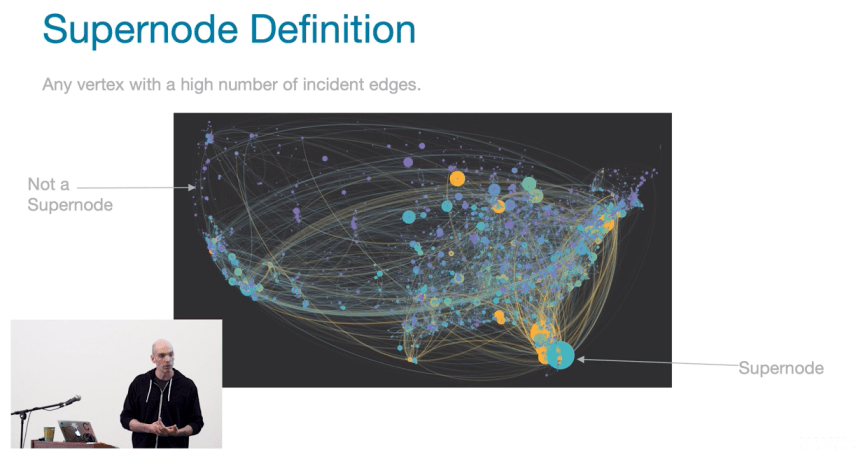
Some notes along with this talk. Which is about ways to mitigate super nodes, partitioning strategies, and related efforts. Jonathan’s talk is vendor neutral, even though he works at DataStax. Albeit that’s not odd to me, since that’s how we roll at DataStax anyway. We take pride in working with DSE but also with knowing the various products out there, as things are, we’re all database nerds after all. (more below video)
In the video, I found the definition slide for super node was perfect.
See that super node? Wow, Florida is just covered up by the explosive nature of that super node! YIKES!
In the talk Jonathan also delves deeper into the vertexes, adjacent vertices, and the respective neighbors. With definitions along the way, so it’s a great talk to watch even if you’re not up to speed on graph databases and graph math and all that related knowledge.
The super node problem he continues on to describe have two specific problems that are detailed; query performance traversals and storage retrieval. Such as a Gremlin traversal (one’s query), moving along creating traversers, until it hits a super node, where a computational explosion occurs.
Whatever your experience, this talk has some great knowledge to expand your ideas on how to query, design, and setup data in your graph databases to work against. Along with that more than a few elements of knowledge about what not to do when designing a schema for your graph data. Give a listen, it’s worth your time.
Part 2 of 3 – Coding Session in Go – Cobra + Viper CLI for Parsing Text Files, Retrieval of Twitter Data, Exports to various file formats, and export to Apache Cassandra.
Updated links to each part will be posted at bottom of this post when I publish them. For code, written walk through, and the like scroll down below the video and timestamps.
Hacking Together a CLI Installing Cassandra, Setting Up the Twitter API, ENV Vars, etc.
0:04 Kick ass intro. Just the standard rocking tune.
4:30 Beginning of completion of twitz parse command for exporting out to XML, JSON, and CSV (already did the text export previous session). This segment also includes a number of refactorings to clean up the functions, break out the control structures and make the code more readable.
In the end of refactoring twitz parse came out like this. The completed list is put together by calling the buildTwitterList() function which is actually in the helpers.go file. Then prints that list out as is, and checks to see if a file export should be done. If there is a configuration setting set for file export then that process starts with a call to exportParsedTwitterList(exportFilename string, exportFormat string, ... etc ... ). Then a simple single level control if then else structure to determine which format to export the data to, and a call to the respective export function to do the actual export of data and writing of the file to the underlying system. There’s some more refactoring that could be done, but for now, this is cleaned up pretty nicely considering the splattering of code I started with at first.
This file contains hidden or bidirectional Unicode text that may be interpreted or compiled differently than what appears below. To review, open the file in an editor that reveals hidden Unicode characters. Learn more about bidirectional Unicode characters
50:00 I walk through a quick install of an Apache Cassandra single node that I’ll use for development use later. I also show quickly how to start and stop post-installation.
56:35 At this point I go through how I set a Twitter App within the API interface. This is a key part of the series where I take a look at the consumer keys and access token and access token secrets and where they’re at in the Twitter interface and how one needs to reset them if they just showed the keys on a stream (like I just did, shockers!)
57:55 Here I discuss and show where to setup the environment variables inside of Goland IDE to building and execution of the CLI. Once these are setup they’ll be the main mechanism I use in the IDE to test the CLI as I go through building out further features.
1:00:18 Updating the twitz config command to show the keys that we just added as environment variables. I set these up also with some string parsing and cutting off the end of the secrets so that the whole variable value isn’t shown but just enough to confirm that it is indeed a set configuration or environment variable.
1:16:53 At this point I work through some additional refactoring of functions to clean up some of the code mess that exists. Using Goland’s extract method feature and other tooling I work through several refactoring efforts that clean up the code.
1:23:17 Copying a build configuration in Goland. A handy little thing to know you can do when you have a bunch of build configuration options.
1:37:32 At this part of the video I look at the app-auth example in the code library, but I gotta add the caveat, I run into problems using the exact example. But I work through it and get to the first error messages that anybody would get to pending they’re using the same examples. I get them fixed however in the next session, this segment of the video however provides a basis for my pending PR’s and related work I’ll submit to the repo.
The remainder of the video is trying to figure out what is or isn’t exactly happening with the error.
I’ll include the working findem code in the next post on this series. Until then, watch the wrap up and enjoy!
1:59:20 Wrap up of video and upcoming stream schedule on Twitch.


 Gloo – Ok, this looks kind of interesting. I stopped to look just because it had interesting characters. When I strolled up to the booth I listened for a few minutes, but eventually realized I needed to just dig into what docs and collateral existed on the web. Here’s what’s out there, with some quick summaries.




You must be logged in to post a comment.