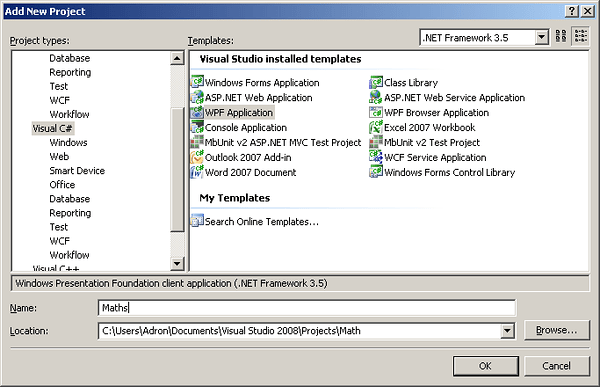
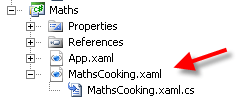
Welcome to part 1 of my random blurbs of math stuff into methods, using TDD methods, and sticking a nice simple WPF Interface on top. Most of these examples I dug up out of O’Reilly’s C# Cookbook. My point below though is for TDD examples with some WPF tossed on top. More than anything, I just wanted to do this for fun. Without further ado, here goes the coding.
First I created two projects, one class project for the methods and one test project for the tests.
[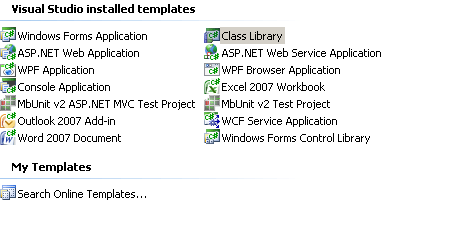 ](http://adronhall.smugmug.com/gallery/6181616_zg5Ko/1/389842739_7q6x4)
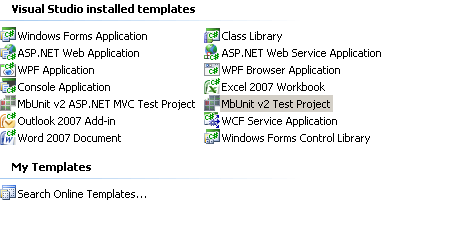
Next I jumped right in and created this test first.
   1:  #region
   2:
   3:  using MbUnit.Framework;
   4:
   5:  #endregion
   6:
   7:  namespace MathCookbookTests
   8:  {
   9:      [TestFixture]
  10:      public class Functions
  11:      {
  12:          [Test]
  13:          public void TestGettingDecimalValue()
  14:          {
  15:              const double numerator = 15;
  16:              const double denominator = 3;
  17:              const double result = 5;
  18:
  19:              Assert.AreEqual(MathCookbook.Functions.GetDecimalOfFraction(numerator, denominator), result);
  20:          }
  21:      }
  22:  }
.csharpcode, .csharpcode pre
{
font-size: small;
color: black;
font-family: consolas, “Courier New”, courier, monospace;
background-color: #ffffff;
/*white-space: pre;*/
}
.csharpcode pre { margin: 0em; }
.csharpcode .rem { color: #008000; }
.csharpcode .kwrd { color: #0000ff; }
.csharpcode .str { color: #006080; }
.csharpcode .op { color: #0000c0; }
.csharpcode .preproc { color: #cc6633; }
.csharpcode .asp { background-color: #ffff00; }
.csharpcode .html { color: #800000; }
.csharpcode .attr { color: #ff0000; }
.csharpcode .alt
{
background-color: #f4f4f4;
width: 100%;
margin: 0em;
}
.csharpcode .lnum { color: #606060; }
Then I sketched out the method. Of course, as always I used ReSharper to get the skeleton of the code via the ole’ Alt+Enter option.
   1:  namespace MathCookbook
   2:  {
   3:      public class Functions
   4:      {
   5:          public static double GetDecimalOfFraction(double numerator, double denominator)
   6:          {
   7:              return 0;
   8:          }
   9:      }
  10:  }
.csharpcode, .csharpcode pre
{
font-size: small;
color: black;
font-family: consolas, “Courier New”, courier, monospace;
background-color: #ffffff;
/*white-space: pre;*/
}
.csharpcode pre { margin: 0em; }
.csharpcode .rem { color: #008000; }
.csharpcode .kwrd { color: #0000ff; }
.csharpcode .str { color: #006080; }
.csharpcode .op { color: #0000c0; }
.csharpcode .preproc { color: #cc6633; }
.csharpcode .asp { background-color: #ffff00; }
.csharpcode .html { color: #800000; }
.csharpcode .attr { color: #ff0000; }
.csharpcode .alt
{
background-color: #f4f4f4;
width: 100%;
margin: 0em;
}
.csharpcode .lnum { color: #606060; }
This now gives me a failing test.
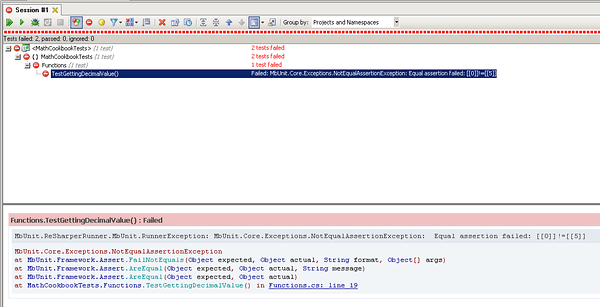
Now to go after the green light.
   1:          public static double GetDecimalOfFraction(double numerator, double denominator)
   2:          {
   3:              return numerator/denominator;
   4:          }
.csharpcode, .csharpcode pre
{
font-size: small;
color: black;
font-family: consolas, “Courier New”, courier, monospace;
background-color: #ffffff;
/*white-space: pre;*/
}
.csharpcode pre { margin: 0em; }
.csharpcode .rem { color: #008000; }
.csharpcode .kwrd { color: #0000ff; }
.csharpcode .str { color: #006080; }
.csharpcode .op { color: #0000c0; }
.csharpcode .preproc { color: #cc6633; }
.csharpcode .asp { background-color: #ffff00; }
.csharpcode .html { color: #800000; }
.csharpcode .attr { color: #ff0000; }
.csharpcode .alt
{
background-color: #f4f4f4;
width: 100%;
margin: 0em;
}
.csharpcode .lnum { color: #606060; }
This now gives me a green light. Next I added two tests for the next method I wanted to add.
   1:          [Test]
   2:          public void TestApproximationIsTrue()
   3:          {
   4:              const double numerator = 1;
   5:              const double denominator = 7;
   6:              const double aValue = .1428571;
   7:              const double epsilon = .0000001;
   8:
   9:              Assert.IsTrue(MathCookbook.Functions.IsApproximatelyEqualTo(numerator, denominator, aValue, epsilon));
  10:          }
  11:
  12:          [Test]
  13:          public void TestApproximationIsFalse()
  14:          {
  15:              const double numerator = 1;
  16:              const double denominator = 7;
  17:              const double aValue = .142857;
  18:              const double epsilon = .0000001;
  19:
  20:              Assert.IsFalse(MathCookbook.Functions.IsApproximatelyEqualTo(numerator, denominator, aValue, epsilon));
  21:          }
.csharpcode, .csharpcode pre
{
font-size: small;
color: black;
font-family: consolas, “Courier New”, courier, monospace;
background-color: #ffffff;
/*white-space: pre;*/
}
.csharpcode pre { margin: 0em; }
.csharpcode .rem { color: #008000; }
.csharpcode .kwrd { color: #0000ff; }
.csharpcode .str { color: #006080; }
.csharpcode .op { color: #0000c0; }
.csharpcode .preproc { color: #cc6633; }
.csharpcode .asp { background-color: #ffff00; }
.csharpcode .html { color: #800000; }
.csharpcode .attr { color: #ff0000; }
.csharpcode .alt
{
background-color: #f4f4f4;
width: 100%;
margin: 0em;
}
.csharpcode .lnum { color: #606060; }
Now of course, when I flesh out the skeleton code and just toss a default true or false back to get a clean compile, one will pass and one won’t. But just jump into getting it to perform the appropriate function.
   1:          public static bool IsApproximatelyEqualTo(double numerator, double denominator, double value, double epsilon)
   2:          {
   3:              return Math.Abs((numerator / denominator) - value) < epsilon;
   4:          }
.csharpcode, .csharpcode pre
{
font-size: small;
color: black;
font-family: consolas, “Courier New”, courier, monospace;
background-color: #ffffff;
/*white-space: pre;*/
}
.csharpcode pre { margin: 0em; }
.csharpcode .rem { color: #008000; }
.csharpcode .kwrd { color: #0000ff; }
.csharpcode .str { color: #006080; }
.csharpcode .op { color: #0000c0; }
.csharpcode .preproc { color: #cc6633; }
.csharpcode .asp { background-color: #ffff00; }
.csharpcode .html { color: #800000; }
.csharpcode .attr { color: #ff0000; }
.csharpcode .alt
{
background-color: #f4f4f4;
width: 100%;
margin: 0em;
}
.csharpcode .lnum { color: #606060; }
Now we run, and get green lights.
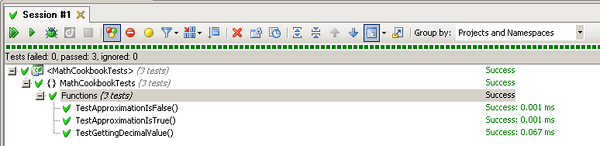
I wanted to enable the method above to accept floats for the value parameter also, so to do that I first added two tests.
   1:          [Test]
   2:          public void TestApproximationIsTrueWithFloat()
   3:          {
   4:              const double numerator = 1;
   5:              const double denominator = 7;
   6:              const float aValue = (float) 0.1428571;
   7:              const double epsilon = .0000001;
   8:
   9:              Assert.IsTrue(MathCookbook.Functions.IsApproximatelyEqualTo(numerator, denominator, aValue, epsilon));
  10:          }
  11:
  12:          [Test]
  13:          public void TestApproximationIsFalseWithFloat()
  14:          {
  15:              const double numerator = 1;
  16:              const double denominator = 7;
  17:              const float  aValue = (float) 0.142857;
  18:              const double epsilon = .0000001;
  19:
  20:              Assert.IsFalse(MathCookbook.Functions.IsApproximatelyEqualTo(numerator, denominator, aValue, epsilon));
  21:          }
.csharpcode, .csharpcode pre
{
font-size: small;
color: black;
font-family: consolas, “Courier New”, courier, monospace;
background-color: #ffffff;
/*white-space: pre;*/
}
.csharpcode pre { margin: 0em; }
.csharpcode .rem { color: #008000; }
.csharpcode .kwrd { color: #0000ff; }
.csharpcode .str { color: #006080; }
.csharpcode .op { color: #0000c0; }
.csharpcode .preproc { color: #cc6633; }
.csharpcode .asp { background-color: #ffff00; }
.csharpcode .html { color: #800000; }
.csharpcode .attr { color: #ff0000; }
.csharpcode .alt
{
background-color: #f4f4f4;
width: 100%;
margin: 0em;
}
.csharpcode .lnum { color: #606060; }
Then I got into doing two things, one adding the new method and the second thing was doing a complete refactor of the code. What I ended up getting green lights with was the code below.
   1:          public static bool IsApproximatelyEqualTo(double numerator, double denominator, double value, double epsilon)
   2:          {
   3:              return IsApproximatelyEqual(numerator, denominator, value, epsilon);
   4:          }
   5:
   6:          public static bool IsApproximatelyEqualTo(double numerator, double denominator, float value, double epsilon)
   7:          {
   8:              return IsApproximatelyEqual(numerator, denominator, value, epsilon);
   9:          }
  10:
  11:          private static bool IsApproximatelyEqual(double numerator, double denominator, object value, double epsilon)
  12:          {
  13:              if (value is double)
  14:              {
  15:                  return Math.Abs((numerator / denominator) - (double)value) < epsilon;
  16:              }
  17:              return Math.Abs((numerator / denominator) - (float)value) < epsilon;
  18:          }
.csharpcode, .csharpcode pre
{
font-size: small;
color: black;
font-family: consolas, “Courier New”, courier, monospace;
background-color: #ffffff;
/*white-space: pre;*/
}
.csharpcode pre { margin: 0em; }
.csharpcode .rem { color: #008000; }
.csharpcode .kwrd { color: #0000ff; }
.csharpcode .str { color: #006080; }
.csharpcode .op { color: #0000c0; }
.csharpcode .preproc { color: #cc6633; }
.csharpcode .asp { background-color: #ffff00; }
.csharpcode .html { color: #800000; }
.csharpcode .attr { color: #ff0000; }
.csharpcode .alt
{
background-color: #f4f4f4;
width: 100%;
margin: 0em;
}
.csharpcode .lnum { color: #606060; }
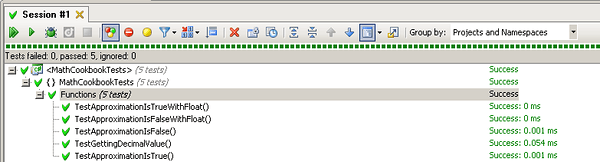
So that’s it for now. I’ll be hitting on more Maths Cookbook material, and will eventually get on to some other topics related to security, threading, delegates, and other material. Eventually I’ll get around to posting some basic pattern implementations and how to test various parts of those patterns. Basically this is kind of a little series I’m starting for my own entertainment, but maybe it might be useful to some out there in the development community.
In part two I’ll add the WPF UI to the application so we can actually enter and play with different values.