I started digging through ADO.NET Data Services for work related items and this is my research so far. So far setting up a ADO.NET Data Services Service (redundant?) is super easy. There are several “Getting Started with ADO.NET Data Services” write ups out there; “Introduction to ADO.NET Data Services”, “ADO.NET Data Services with ASP.NET AJAX Support”, and others. One that has given me gruff so far is “Using ADO.NET Data Services” in the MSDN Documentation. It appears that parts of the code are misplaced and commented, in addition it doesn’t work. I’ve tried it on several boxes just as the tutorial states and it just doesn’t provide the feed. The error generally seems to be,
| Server Error in ‘/’ Application. The type ‘CustomDataService.ContactsListing’, provided as the Service attribute value in the ServiceHost directive could not be found. Description: An unhandled exception occurred during the execution of the current web request. Please review the stack trace for more information about the error and where it originated in the code. Exception Details: System.InvalidOperationException: The type ‘CustomDataService.ContactsListing’, provided as the Service attribute value in the ServiceHost directive could not be found. Source Error: | — | An unhandled exception was generated during the execution of the current web request. Information regarding the origin and location of the exception can be identified using the exception stack trace below. | Stack Trace: | — | [InvalidOperationException: The type ‘CustomDataService.ContactsListing’, provided as the Service attribute value in the ServiceHost directive could not be found.] System.ServiceModel.Activation.ServiceHostFactory.CreateServiceHost(String constructorString, Uri[] baseAddresses) +4072062 System.ServiceModel.HostingManager.CreateService(String normalizedVirtualPath) +11656092 System.ServiceModel.HostingManager.ActivateService(String normalizedVirtualPath) +42 System.ServiceModel.HostingManager.EnsureServiceAvailable(String normalizedVirtualPath) +479 [ServiceActivationException: The service ‘/ContactsListing.svc’ cannot be activated due to an exception during compilation. The exception message is: The type ‘CustomDataService.ContactsListing’, provided as the Service attribute value in the ServiceHost directive could not be found..] System.ServiceModel.AsyncResult.End(IAsyncResult result) +11527290 System.ServiceModel.Activation.HostedHttpRequestAsyncResult.End(IAsyncResult result) +194 System.ServiceModel.Activation.HostedHttpRequestAsyncResult.ExecuteSynchronous(HttpApplication context, Boolean flowContext) +176 System.ServiceModel.Activation.HttpHandler.ProcessRequest(HttpContext context) +23 System.Web.CallHandlerExecutionStep.System.Web.HttpApplication.IExecutionStep.Execute() +181 System.Web.HttpApplication.ExecuteStep(IExecutionStep step, Boolean& completedSynchronously) +75 | Version Information: Microsoft .NET Framework Version:2.0.50727.3053; ASP.NET Version:2.0.50727.3053 |
The Astoria Team Blog article “ADO.NET Data Services Concepts”, which is generally pretty good so take a read, also has a link to this MSDN and other information. They also have an entry on the upcoming “Astoria Offline” that is coming soon – this should be interesting.
A Tutorial on ADO.NET Data Access Services
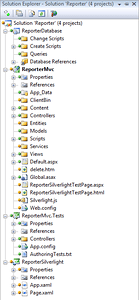 Without a working test I went
out on my own and did the following. First I created a Visual Studio Solution and added several project types to it; An ASP.NET MVC Web Application & respective Unit Test Project, a Database Project, and finally a Silverlight 2 Project that I selected the ASP.NET MVC as the host for the Silverlight 2 Page. Overall the solution looked something like the image to the left. Click on the image to see a full size and for clarity.
Without a working test I went
out on my own and did the following. First I created a Visual Studio Solution and added several project types to it; An ASP.NET MVC Web Application & respective Unit Test Project, a Database Project, and finally a Silverlight 2 Project that I selected the ASP.NET MVC as the host for the Silverlight 2 Page. Overall the solution looked something like the image to the left. Click on the image to see a full size and for clarity.
Inside the ReporterMvc Project I created a new folder called Services. This is the folder I’ll actually place the ADO.NET Data Services in to keep the overall project orderly.
After I created the projects I setup the database for use. I created the database previously so I already had a generation script. So I went ahead and created the database via the Service Explorer Wizard in Visual Studio and then ran the script I have. The script is listed separately on the code page.
Next I created an ADO.NET Entity Data Model & associated entity objects. Create these objects inside the Models directory. During the course of the wizard be sure to select all of the tables and views.
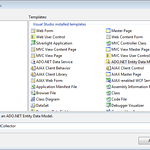 Entity Model Wizard Step 1
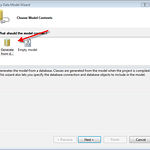 Entity Model Wizard Step 2
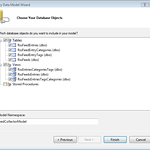 Entity Model Wizard Step 3
.smugcontainer div {overflow: hidden;line-height: 1.1;margin-top: 10px;font-family: verdana, arial, lucida, sans-serif;font-size: 85%;background-color1: rgb(20, 20, 20);} .smugimg li {float: left;display: block;width: 160px;height: 200px;background-position: 50% 50%;margin-right: 10px;margin-bottom: 10px;} .smugimg li img {width: auto; height: auto; border: solid 1px #aaa; background: #555; padding: 2px; vertical-align: middle;} .smugimg a {display: block;text-align: center;text-decoration: none; color1: rgb(240,240,240);} .smugimg a:hover img {border: 3px solid #6da6d1; padding: 0px;}
.smugcontainer div {overflow: hidden;line-height: 1.1;margin-top: 10px;font-family: verdana, arial, lucida, sans-serif;font-size: 85%;background-color1: rgb(20, 20, 20);} .smugimg li {float: left;display: block;width: 160px;height: 200px;background-position: 50% 50%;margin-right: 10px;margin-bottom: 10px;} .smugimg li img {width: auto; height: auto; border: solid 1px #aaa; background: #555; padding: 2px; vertical-align: middle;} .smugimg a {display: block;text-align: center;text-decoration: none; color1: rgb(240,240,240);} .smugimg a:hover img {border: 3px solid #6da6d1; padding: 0px;}
To update or add tables I just right click on the empty white space around the entities and select the “Update Model from Database…” option. Follow the instructions on the dialog that appears, it will be the same as the wizard shown above. What I ended up with is as shown.
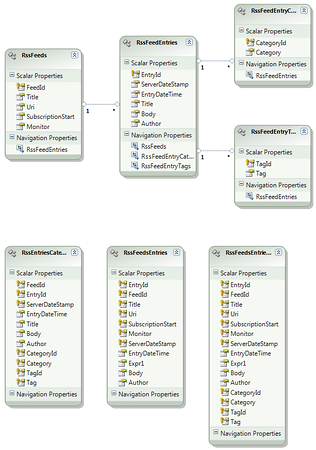
Next I added the ADO.NET Web Service to the project. With both of those added I now had the following in my project; FeedCollector.edmx in the models directory and ReporterServices.svc in the Services directory.
I opened up the FeedCollector.edmx.cs file to verify that the class was actually named FeedCollectorEntities. When you open up the designer code file it will look like the code listed below (I’ve just cut the first 41 lines of generated code. I bolded the class name just for familiarity. If ever in doubt about what type you’ll pass in the data services, this is how one can easily find it.
   1:  //------------------------------------------------------------------------------
   2:  // <auto-generated>
   3:  //     This code was generated by a tool.
   4:  //     Runtime Version:2.0.50727.3053
   5:  //
   6:  //     Changes to this file may cause incorrect behavior and will be lost if
   7:  //     the code is regenerated.
   8:  // </auto-generated>
   9:  //------------------------------------------------------------------------------
  10:
  11:  [assembly: global::System.Data.Objects.DataClasses.EdmSchemaAttribute()]
  12:  [assembly: global::System.Data.Objects.DataClasses.EdmRelationshipAttribute("FeedCollectorModel", "FK_RssFeedEntries_RssFeeds", "RssFeeds", global::System.Data.Metadata.Edm.RelationshipMultiplicity.One, typeof(ReporterMvc.Models.RssFeeds), "RssFeedEntries", global::System.Data.Metadata.Edm.RelationshipMultiplicity.Many, typeof(ReporterMvc.Models.RssFeedEntries))]
  13:  [assembly: global::System.Data.Objects.DataClasses.EdmRelationshipAttribute("FeedCollectorModel", "FK_RssFeedEntryCategories_RssFeedEntries", "RssFeedEntries", global::System.Data.Metadata.Edm.RelationshipMultiplicity.One, typeof(ReporterMvc.Models.RssFeedEntries), "RssFeedEntryCategories", global::System.Data.Metadata.Edm.RelationshipMultiplicity.Many, typeof(ReporterMvc.Models.RssFeedEntryCategories))]
  14:  [assembly: global::System.Data.Objects.DataClasses.EdmRelationshipAttribute("FeedCollectorModel", "FK_RssFeedEntryTags_RssFeedEntries", "RssFeedEntries", global::System.Data.Metadata.Edm.RelationshipMultiplicity.One, typeof(ReporterMvc.Models.RssFeedEntries), "RssFeedEntryTags", global::System.Data.Metadata.Edm.RelationshipMultiplicity.Many, typeof(ReporterMvc.Models.RssFeedEntryTags))]
  15:
  16:  // Original file name:
  17:  // Generation date: 11/22/2008 11:27:18 AM
  18:  namespace ReporterMvc.Models
  19:  {
  20:
  21:      /// <summary>
  22:      /// There are no comments for FeedCollectorEntities in the schema.
  23:      /// </summary>
  24:      public partial class FeedCollectorEntities : global::System.Data.Objects.ObjectContext
  25:      {
  26:          /// <summary>
  27:          /// Initializes a new FeedCollectorEntities object using the connection string found in the 'FeedCollectorEntities' section of the application configuration file.
  28:          /// </summary>
  29:          public FeedCollectorEntities() :
  30:                  base("name=FeedCollectorEntities", "FeedCollectorEntities")
  31:          {
  32:              this.OnContextCreated();
  33:          }
  34:          /// <summary>
  35:          /// Initialize a new FeedCollectorEntities object.
  36:          /// </summary>
  37:          public FeedCollectorEntities(string connectionString) :
  38:                  base(connectionString, "FeedCollectorEntities")
  39:          {
  40:              this.OnContextCreated();
  41:          }
.csharpcode, .csharpcode pre { font-size: small; color: black; font-family: consolas, “Courier New”, courier, monospace; background-color: #ffffff; /*white-space: pre;*/ } .csharpcode pre { margin: 0em; } .csharpcode .rem { color: #008000; } .csharpcode .kwrd { color: #0000ff; } .csharpcode .str { color: #006080; } .csharpcode .op { color: #0000c0; } .csharpcode .preproc { color: #cc6633; } .csharpcode .asp { background-color: #ffff00; } .csharpcode .html { color: #800000; } .csharpcode .attr { color: #ff0000; } .csharpcode .alt { background-color: #f4f4f4; width: 100%; margin: 0em; } .csharpcode .lnum { color: #606060; }
After that I opened up the code behind and stuck in a few key elements of code. This allows the service to be opened up to an requestor of the service.
   1:  using System.Data.Services;
   2:  using ReporterMvc.Models;
   3:
   4:  namespace ReporterMvc.Services
   5:  {
   6:      public class ReporterServices : DataService<FeedCollectorEntities>
   7:      {
   8:          public static void InitializeService(IDataServiceConfiguration config)
   9:          {
  10:              config.SetEntitySetAccessRule("*", EntitySetRights.All);
  11:          }
  12:      }
  13:  }
The next thing I’ve tried is the ways to query via REST. I like the “Introduction to ADO.NET Data Services Part 2” entry that Greg Galipeau has written on his blog. For my test I went against some of my work related data. One of the things that bugs me though is the http://somedomain/stuff.svc/ being used for the REST address. I want it to just be http://somedomain/stuff/.
With just these simple actions I then checked the service to assure I was getting back accurate results. I right clicked on the file and selected Browse. The following were the results.
<service xml:base="http://localhost:50681/Services/ReporterServices.svc/">
−
<workspace>
<atom:title>Default</atom:title>
−
<collection href="RssFeedEntries">
<atom:title>RssFeedEntries</atom:title>
</collection>
−
<collection href="RssFeedEntryCategories">
<atom:title>RssFeedEntryCategories</atom:title>
</collection>
−
<collection href="RssFeedEntryTags">
<atom:title>RssFeedEntryTags</atom:title>
</collection>
−
<collection href="RssFeeds">
<atom:title>RssFeeds</atom:title>
</collection>
−
<collection href="RssEntriesCategoriesTags">
<atom:title>RssEntriesCategoriesTags</atom:title>
</collection>
−
<collection href="RssFeedsEntries">
<atom:title>RssFeedsEntries</atom:title>
</collection>
−
<collection href="RssFeedsEntriesTagsCategories">
<atom:title>RssFeedsEntriesTagsCategories</atom:title>
</collection>
</workspace>
</service>
.csharpcode, .csharpcode pre { font-size: small; color: black; font-family: consolas, “Courier New”, courier, monospace; background-color: #ffffff; /*white-space: pre;*/ } .csharpcode pre { margin: 0em; } .csharpcode .rem { color: #008000; } .csharpcode .kwrd { color: #0000ff; } .csharpcode .str { color: #006080; } .csharpcode .op { color: #0000c0; } .csharpcode .preproc { color: #cc6633; } .csharpcode .asp { background-color: #ffff00; } .csharpcode .html { color: #800000; } .csharpcode .attr { color: #ff0000; } .csharpcode .alt { background-color: #f4f4f4; width: 100%; margin: 0em; } .csharpcode .lnum { color: #606060; }
This was perfect, exactly what I expected. I did a few further tests. The URI that I started with was http://localhost:6your6port6here/ResporterServices.svc/ which is what gave me the results above. If you take any of the
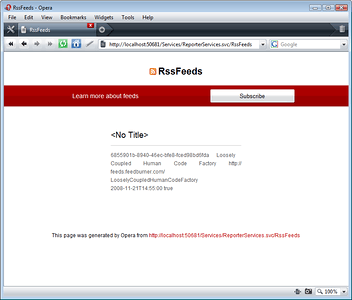
If you have to pick a browser to test this with, I prefer Opera. The results are uber clean compared to the other browsers and you don’t have to go clicking options or selecting to not feed the atom results. An example of the results.
In part 2 I’ll show how to wire up a Silverlight 2 Client to these data services.