A buddy of mine commissioned and has released a pretty awesome IPhone App. Of course I’m still a bit behind the times with my beat up HTC, but I’ll be getting either an Android Phone or an IPhone in maybe a year or two. This app however, has made me ponder moving up that purchase date. Check out NMobile for IPhone. That’s my self motivated advertising blurb of the day, thanks for reading.
The Future of Technology, Cyborg Progress?
I’ve often said in the last few months, especially since Iron Man came out, that the interfaces used in that movie are what I WANT NOW!!! Unfortunately, the technology we have just doesn’t quit cut it yet. But wait, does it?
While reading up on the upcoming Cyborg Camp (Dec 6th if you want to go, sign up now) there are two videos posted to the blog.
The first one is a video of Jamie Zigelbaum at MIT presenting a gesturing recognition interface. I’ve seen similar things and have been fairly impressed. What I really want to see is something smaller, without gloves, and at a very granular level. I’ve seen some things in the past that are similar, and very granular, but the problem is cost. This leads me to that issue, the early adopters can’t even get at this stuff yet because of the cost. This stuff so far is only for DIYers. Things like Jamie’s project however really give me a mood boost on progress. I really hope to see things like this keep moving forward!
The second video is the reactable. The table, with physical objects, is used to create a tonal music. The variances and controls are controlled by the specific pieces on the table. It is really interesting to see things like this, and it is definitely a little further along than the gesturing.
The Twisted Irony
I just realized I often complain about the bad reliability of my SprintPCS Phone. So does my SO Joleen. We both complain regularly about this fundamental to our lives piece of technology. However, because of the unreliable nature of wireless at coffee shops, the unreliable nature of Vista to stay connected, I have a wireless SprintPCS card to connect with.
That’s just odd, to use a semi-unreliable service to back up another semi-unreliable service! 😐 hmpf.
Just ponder on that… the strange things we do to maintain connectivity, us geeks and nerds.
Debugging ADO.NET Data Services :: Tip o' The Day
I haven’t written up a tip o’ the day in ages, so it was about time that I ran smack into one. While working with ADO.NET Data Services I kept getting this AWESOME error message!
An error occurred while processing this request.
That being one of the most awesome, fully articulate, well written, useful, cool error messages ever created!
Ok, so if you’re like me, and you’d actually like some idea of the underlying error, then here’s the trick. First, grab that web.config and make sure your services have the appropriate debugging attributes.
   1:    <system.serviceModel>
   2:      <behaviors>
   3:        <serviceBehaviors >
   4:          <behavior name="DebugEnabled">
   5:            <serviceDebug includeExceptionDetailInFaults="True"/>
   6:          </behavior>
   7:        </serviceBehaviors>
   8:        <endpointBehaviors>
   9:          <behavior name="TheReporter.AjaxConnectionServiceAspNetAjaxBehavior">
  10:            <enableWebScript/>
  11:          </behavior>
  12:          <behavior name="TheReporter.Services.AjaxConnectorServicesAspNetAjaxBehavior">
  13:            <enableWebScript/>
  14:          </behavior>
  15:        </endpointBehaviors>
  16:      </behaviors>
  17:      <services>
  18:        <service name="TheReporter.AjaxConnectionService" behaviorConfiguration ="DebugEnabled">
  19:          <endpoint address="" behaviorConfiguration="TheReporter.AjaxConnectionServiceAspNetAjaxBehavior" binding="webHttpBinding" contract="TheReporter.AjaxConnectionService"/>
  20:        </service>
  21:        <service name="TheReporter.Services.AjaxConnectorServices" behaviorConfiguration ="DebugEnabled">
  22:          <endpoint address="" behaviorConfiguration="TheReporter.Services.AjaxConnectorServicesAspNetAjaxBehavior" binding="webHttpBinding" contract="TheReporter.Services.AjaxConnectorServices"/>
  23:        </service>
  24:      </services>
  25:      <serviceHostingEnvironment aspNetCompatibilityEnabled="true"/>
  26:    </system.serviceModel>
.csharpcode, .csharpcode pre { font-size: small; color: black; font-family: consolas, “Courier New”, courier, monospace; background-color: #ffffff; /*white-space: pre;*/ } .csharpcode pre { margin: 0em; } .csharpcode .rem { color: #008000; } .csharpcode .kwrd { color: #0000ff; } .csharpcode .str { color: #006080; } .csharpcode .op { color: #0000c0; } .csharpcode .preproc { color: #cc6633; } .csharpcode .asp { background-color: #ffff00; } .csharpcode .html { color: #800000; } .csharpcode .attr { color: #ff0000; } .csharpcode .alt { background-color: #f4f4f4; width: 100%; margin: 0em; } .csharpcode .lnum { color: #606060; }
Note the attributes that have words like “debugged” in them. Throw those in and you’re probably set. Another thing you can do is to throw in the following code in your actual data service to enable verbose debugging.
   1:      public class RssStorageService : DataService<RssStoreEntities>
   2:      {
   3:          public static void InitializeService(IDataServiceConfiguration config)
   4:          {
   5:              config.UseVerboseErrors = true;
   6:              config.SetEntitySetAccessRule("*", EntitySetRights.All);
   7:          }
   8:      }
.csharpcode, .csharpcode pre { font-size: small; color: black; font-family: consolas, “Courier New”, courier, monospace; background-color: #ffffff; /*white-space: pre;*/ } .csharpcode pre { margin: 0em; } .csharpcode .rem { color: #008000; } .csharpcode .kwrd { color: #0000ff; } .csharpcode .str { color: #006080; } .csharpcode .op { color: #0000c0; } .csharpcode .preproc { color: #cc6633; } .csharpcode .asp { background-color: #ffff00; } .csharpcode .html { color: #800000; } .csharpcode .attr { color: #ff0000; } .csharpcode .alt { background-color: #f4f4f4; width: 100%; margin: 0em; } .csharpcode .lnum { color: #606060; }
So that should provide some reasonable error messages instead of the awesome one at the top of this here post. …Oh but wait, there’s more! One last tip for this tip is the code attribute tag. Throw this onto a particular method to add verbose debugging.
1: [System.ServiceModel.ServiceBehavior(IncludeExceptionDetailInFaults = true)]
(I snagged these last two from here, the first part of this tip I snagged from here.)
Logging ADO.NET Data Services Research – Part 2
Building out the Client
(Skip further down in the entry if you don’t want to read the rant & just want working code!)
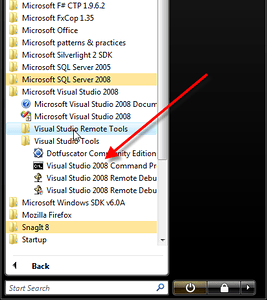 Once I did this I started working on the client piece to consume these services. First start up the Visual Studio Command Prompt. Unfortunately at this point, it is off to the command prompt for use of the WebDataGen.exe. I looked diligently all over the Internet, then found out on “Making Webdatagen data-binding friendly” that the stupid executable had been renamed to datasvcutil.exe. Thanks for making it all that much more confusing and disorientating. This is starting to remind me of open source – everything is always changing. But I digress. After a quick search I found a good reference use of it in the entry “Visual Studio 2008 SP1: Querying and ADO.NET Data Service via .NET Client”.
So I found this tool and used it with the following command.
datasvcutil.exe /uri:http://localhost:50681/Services/ReporterServices.svc/ /out:"C:\Users\Adron\Documents\Visual Studio 2008\Projects\Reporter\ReporterSilverlight\ReporterClientEntities.cs"
This class gives you some nice entities to deal with. Even able to use LINQ to ADO.NET Data Services at this point. Very cool. So now add the file to the project. I ran the command above so it would specifically put the file into the area were the project is located, but I still had to “Add Existing…” file and select it from the folder structure.
I built the project like an idiot at this point thinking it would build. I didn’t realize there was missing assemblies so I went researching again. I found that I needed to add the reference to the System.Data.Services.Client assembly. Once I did that the build was clean again. One other thing I did was clean up the namespace. When I brought the file into the project the namespace was “FeedCollectorModel” but my project namespace is ReporterSilverlight. Since I’m sort of a stickler for using namespaces appropriately and in parallel with actual project structure I changed that to reflect the actual location.
Note: Nasty code… Lots of code…
When I really kind of dug through he generated code that the datasvcutil.exe created I wasn’t too happy. It is generated code so I don’t honestly care, but just looking at all this mess, I’d dread needing to actually find something or troubleshoot it. Overall, for the few basic views and tables above the executable generated 1400+ lines of code. Not exactly a quick read, but I digress, we’ll just pretend like usual to know exactly what all the generated code does.
So now that I have the client side objects I’m ready to do some querying against the services and present the data. Well, that’s what I thought. I was horribly wrong. It appears that Microsoft, in their absolute wisdom renamed, removed, and changed a few things around to make this an extremely annoying effort. Everything up until this point has been fairly smooth, it all changed here.
First I was supposed to be able to use LINQ to query against the data services, that didn’t go over too well. I got continued reports of “ToList()” isn’t implemented on this class. Blagh blag blagh, bunch of crap, I USED the tool that Microsoft provides to make the classes, the “datasvcutil.exe”. Maybe I needed to RTFM again but I just wanted to bloody freaking data and it wasn’t working. So I moved to the next option.
At this point I was so aggravated with the crappy “datasvcutil.exe” that I completely deleted the file. There HAD to be a better way to do this and if I had to, I’d hand write some code just to assure that I understood what the problem was.
The next option was this WebDataContext. Well I typed it into Visual Studio thinking I’d have the reference, nope. Wrong again I was. Did ReSharper find it? Nope, it didn’t find it either, which really meant there was an issue. Now keep in mind, I have SP1 for VS.NET 08, SP1 for Vista, and SP1 for .NET 3.5. I have ALL of the updates one is supposed to have. But I don’t have any references to WebDataContext. I do a search and find out that there is supposed to be an assembly called Microsoft.Data.WebClient. I look for it and find nothing. This doesn’t bode well at this point.
I dive back into the web. After a search for the dll itself, the first item is someone with the same issue, not being able to add the reference, stating it isn’t in the list to add. The second item that returns is a spyware add for the dll. At this point I’m really thinking this can’t be good. All I want is some freaking data! I checked out the first link and got nothing useful. The question was asked a year ago. This is par for the course with the ASP.NET Forums. So again, I start diving into the other results. I also pop up another tab and do a search directly on the MSDN Site.
I finally stumble on this page, after searching on Microsoft’s site, that these files have all been renamed. In all seriousness, I don’t care how smart anyone is at Microsoft, this is blatantly STUPID to whimsically rename so many files on such a frequent basis. STOP RENAMING stuff. It’s annoying and makes me want to go develop Ruby on Rails – right when Microsoft is trying desperately to get back some of that audience.
Anyway, I digress… (Skip to here)
After fighting with these other, misnamed things from Astoria, I finally dug around on the MSDN site and got things straightened out.
At first, since you couldn’t in the past, I thought I would not be able to just make a web service reference within the Silverlight Project. Well as of some point between the past and the deluge of SP1s, you now can. With that newfound knowledge I went right to making a web service reference and getting the proxy built. Thank goodness for keeping it simple – I knew that there had to be an easier way.
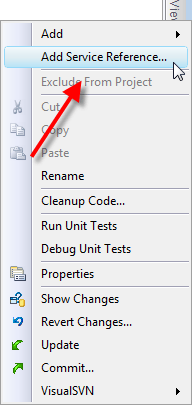
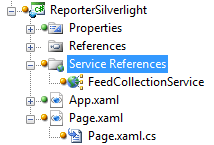
After adding the web service reference I added a Silverlight DataGrid to the main page. With the DataGrid the completed XAML looked like this.
   1:  <UserControl xmlns:data="clr-namespace:System.Windows.Controls;assembly=System.Windows.Controls.Data"  x:Class="ReporterSilverlight.Page"
   2:      xmlns="http://schemas.microsoft.com/winfx/2006/xaml/presentation"
   3:      xmlns:x="http://schemas.microsoft.com/winfx/2006/xaml"
   4:      Width="400" Height="300">
   5:      <Grid x:Name="LayoutRoot" Background="White">
   6:          <data:DataGrid x:Name="grid"></data:DataGrid>
   7:      </Grid>
   8:  </UserControl>
.csharpcode, .csharpcode pre { font-size: small; color: black; font-family: consolas, “Courier New”, courier, monospace; background-color: #ffffff; /*white-space: pre;*/ } .csharpcode pre { margin: 0em; } .csharpcode .rem { color: #008000; } .csharpcode .kwrd { color: #0000ff; } .csharpcode .str { color: #006080; } .csharpcode .op { color: #0000c0; } .csharpcode .preproc { color: #cc6633; } .csharpcode .asp { background-color: #ffff00; } .csharpcode .html { color: #800000; } .csharpcode .attr { color: #ff0000; } .csharpcode .alt { background-color: #f4f4f4; width: 100%; margin: 0em; } .csharpcode .lnum { color: #606060; }
I then simply added the following code to the Page.xaml.cs file. Guess what happened?
   1:  using System;
   2:  using System.Data.Services.Client;
   3:  using System.Linq;
   4:  using System.Windows.Controls;
   5:  using ReporterSilverlight.FeedCollectionService;
   6:
   7:  namespace ReporterSilverlight
   8:  {
   9:      public partial class Page : UserControl
  10:      {
  11:          private readonly FeedCollectorEntities svc =
  12:              new FeedCollectorEntities(new Uri("Services/ReporterServices.svc/", UriKind.Relative));
  13:
  14:          public Page()
  15:          {
  16:              InitializeComponent();
  17:
  18:              var fd = (from f in svc.RssFeeds
  19:                        select f) as DataServiceQuery<RssFeeds>;
  20:
  21:              if (fd != null) fd.BeginExecute((ar) => grid.ItemsSource = fd.EndExecute(ar).ToList(), null);
  22:          }
  23:      }
  24:  }
.csharpcode, .csharpcode pre { font-size: small; color: black; font-family: consolas, “Courier New”, courier, monospace; background-color: #ffffff; /*white-space: pre;*/ } .csharpcode pre { margin: 0em; } .csharpcode .rem { color: #008000; } .csharpcode .kwrd { color: #0000ff; } .csharpcode .str { color: #006080; } .csharpcode .op { color: #0000c0; } .csharpcode .preproc { color: #cc6633; } .csharpcode .asp { background-color: #ffff00; } .csharpcode .html { color: #800000; } .csharpcode .attr { color: #ff0000; } .csharpcode .alt { background-color: #f4f4f4; width: 100%; margin: 0em; } .csharpcode .lnum { color: #606060; }
You got it, it worked. Didn’t expect that? I almost didn’t either considering the poor fortune I was having trying to get everything working before. At this point though, everything became smooth sailing.
The data showed up in the grid as expected.
Last Note of the Day…
Also check out this application called Fiddler 2. It allows one to craft web requests and submit them manually. A video on how to use Fiddler is available also. This comes in really handy when you want to make sure a service is working.