Velocity Diversion (CTP3)

At work I’ve had a little effort put toward Velocity 3 CTP recently.  Here’s what I’ve knocked out with the server so far.  We’ve been using the CTP 2 of the cache server and it has been solid so far.  I hear CTP 3 has quit a few method, namespace, and class name changes.

Installation of Velocity CTP3 (Click on any images for a larger view)

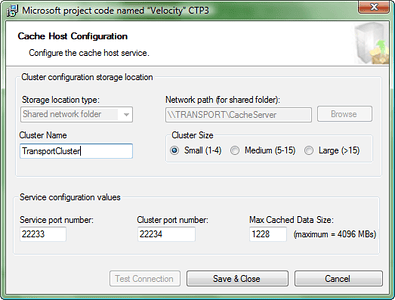
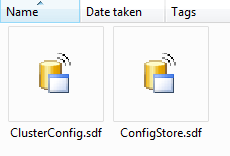
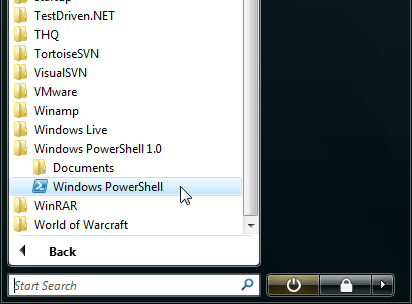
  1. Download the parts you need here:  http://www.microsoft.com/downloads/details.aspx?FamilyId=B24C3708-EEFF-4055-A867-19B5851E7CD2&displaylang=en- I setup the configuration during install as such.  I created a folder on my local drive and then shared it, then set that as the location for the cache ConfigStore.sdf and ClusterCconfig.sdf files.  I left the ports as the default 22233 and 22234.  Click on the image to the right to see a larger shot of the configuration window.  Also make sure to have ADMINISTRATOR rights when you run this install.  If not the installation will not complete correctly.- Then I unzipped the velocity_help.exe file to a location on my drive.  I just placed it right inside my share just to keep everything together, at this point, assuming this won’t cause any disruption to the actual cache server files.- I then downloaded PowerShell 1.0.  This download was rather annoying with the whole “validate” Windows and requirement to have IE.  I am not keen on needing to step out of FireFox or Chrome just to simplify the “validation” of my LEGALLY OWNED Operation System.  But I digress…- With the icon placed on the desktop, I right clicked and selected Run As Administrator (see a theme here?).  It asked me if I wanted to run software from this untrusted publisher?  Type A and press Enter to allow it to always run.- I then set the signed assemblies policy via the command “Set-ExecutionPolicy -ExecutionPolicy AllSigned“.- I then started the server with the command “Start-CacheCluster“.- I finished this part of the installation off with creation of my first cache with this command “New-Cache FirstCache” where FirstCache can be anything you want to name your cache (not sure about special characters and such, just use some common sense).

Installation of Cache Client Assemblies

  1. First grab the cache assemblies and place them wherever you’d like.  You’ll just need to make sure they stay together as the two assemblies that are actually used for references reference the other two.  These assemblies are located in the installation directory:  C:\Program Files\Microsoft Distributed Cache\V1.0 and include the following assemblies; CacheBaseLibrary.dll, ClientLibrary.dll, FabricCommon.dll, and CASBase.dll.
  2. Now select CacheBaseLibrary.dll and ClientLibrary.dll as reference dlls by selecting the Browse option in the add references dialog.

…that’s it at this point.  For more just hit up the Velocity API and start coding away.
HighBall Part Duex (#5) Oh Dear, Tests!

Ok, I got this far, marked up some xaml, and got the boot strappers boot strapping some views view their respective presenters within the modules.  Yeah!

But really, what happens if I move forward now?  Without tests I get myself into trouble.  I could just move forward, but I?d have no regression, no ability to cleanly refactor, and no ability to know if I broke things that already work!  So I?m heading into the world of unit tests and am going to figure out how to make future endeavors more TDD (or TAD ? Test After Development?).  Either way, this thing needs some tests before I bluntly slam into the next steps.

First off, make sure you have the appropriate equipment for the job.  The Composite Application Guidance for WPF and Silverlight ? February 2009 link has the goods you?ll need.  The specific links are as follows;

Install the SDK, then put those assemblies somewhere handy.  I nabbed a bit of reference from Justin Angel at this juncture.  He has a great write up on getting these parts setup with the Silverlight Unit Testing Framework, Rhinomocks, Unity, and ReSharper ? exactly along the lines of what I wanted.  After a quick perusal of his blog entry I tore through a quick setup and first tests.

?first tests.

?here?s the assemblies:

D:\Machine Load\Visual Studio 2008\All the Parts for UI Unit Tests w Silverlight and WPF\White-bin-11-9-2008

D:\Machine Load\Visual Studio 2008\All the Parts for UI Unit Tests w Silverlight and WPF\Unit test framework\Unit test framework

Reference Posts:

HighBall Part Duex (#4) Patterns

Navigation of Highball Series Part #1   Part #2  Part #3 Part #4

Here in part #4 I want to cover the final wire up I did to get the initial screens to show.  The other primary focus of this blog entry is to cover some of the architectural patterns behind what I have so far.  We haven’t touched upon testing this yet, primarily because I’m stepping through wiring both Silverlight & WPF with these libraries for the first time.  I’ve done the WPF before, but not both.  Soon enough, I’ll get back to good standard practice and get some tests done first.  But for now, here’s the low down on wiring up Silverlight and the architectural patterns so far.

Architectural Patterns & Ideas

Dependency Injection

This is one of interesting parts of the application, at least to me.  For many the dependency injection is endlessly confusing, but it comes in immensely helpful in getting things loosely coupled and all wired up.  Because even when you decouple things, they do have to get wired up again – it’s just the how that’s important.  Below is an example of a presenter in the schedule module that uses constructor based dependency injection.  Dig it?  I’ll have another follow up entry in the future about what and how Dependency Injection works, along with the respective Dependency Inversion, Inversion of Control, and all those other patterns.  For now, just now that this is how the view gets registered with the region that is responsible for displaying it when the application runs.

public class ScheduleViewAllPresenter : IModule
{
    private readonly IRegionViewRegistry regionViewRegistry;

    public ScheduleViewAllPresenter(IRegionViewRegistry registry)
    {
        regionViewRegistry = registry;
    }

    public void Initialize()
    {
        regionViewRegistry.RegisterViewWithRegion("HighBallMainRegion", typeof(ScheduleViewAllView));
    }
}

In the code snippet above you’ll see in the initialize method that the view that is injected is registered to the particular region that it will be displayed in.  In the shell the view will be displayed in the region as shown below.

Composite Modules

I’ve added a single module to the solution so far.  This module has two views & their respective presenters, which I’ll cover in the section below.  The module is simply a project, loosely coupled, that will provide a view and the presentation logic for that view to be injected into the shell upon some application logic.

The module itself isn’t so much a pattern but more an architectural piece of the application.  As I move forward on this project I’ll add more modules to the solution as functionality is needed.  Each module will have an isolated, or mostly isolated, business use.  The first example that I have is the HighBall.Interface.Modules.ScheduleModule.  I’ll be adding more, probably along these lines;  mileage tracking, vehicle inventory, driver check-in, driver route choice, etc.  Each having a particular part of functionality that will primarily be isolated to itself.

When the CAL is used within a development team the modules would most likely be split off to individual pairs in the case of Agile, or even entire teams.  In Agile parlance each module would be a number of user stories, or in the most simple form, a single user story.

View & Presenter, with no Model yet.

The view and presenter are where you get to see the Model View Presenter (MVP) first start to appear.  Eventually as I move forward there will be the model, and more elaboration on the view and presenter.  For now all we have is the view, which is just the xaml markup and the presenter which is responsible for registering the view in the registry, and initializing the view with a region that it would be displayed in.  As you can see above in the Dependency Injection example the presenter is very thin at this point.

So that summarizes the cut off point for my first basic release of HighBall.  Check out the code release, rant at me about deficiencies, and if you have any additional ideas or other elaborations you’d like to see please do comment.

Currently I’m researching how to put TDD into effect to build the presenters, views, and other composite pieces of this application.  My next entry will have several examples of unit tests that aren’t currently included in this release.  Until then, happy hacking (or coding).

HighBall Part Duex (#3) Wiring Up Silverlight

Navigation of Highball Series Part #1   Part #2  Part #3 Part #4

In this part I’ll be covering wiring up Silverlight with an appropriate module similarly to what part #1 and part #2 covered for WPF.  What I want to show in this entry is basically the differences of each module and the difference in the startup shell.  The differences are however very minimal, which leaves me curious about abstracting some of this and removing the code duplication, or maybe I should say xaml duplication.

One of the things I did after the first two parts of this series is to add some more projects that I would need once wired up and ready to continue with other parts of the project.  First I added the respective test projects, the other Silverlight Module projects etc.

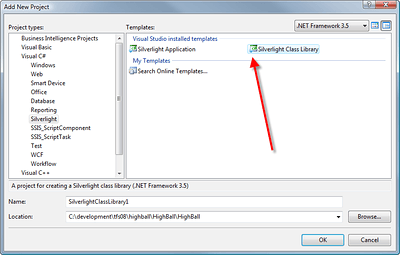
This brings me to one of the differences between the WPF and Silverlight Interfaces.  For the modules that will be used in the Silverlight Project you?ll need to add Silverlight Class Library Project as shown to the left.  The Silverlight Class Library Template adds various assemblies and other references that are needed for these modules to be used in Silverlight Applications.

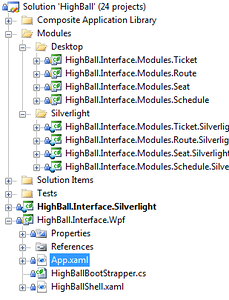
At this time I added a project to match each of the WPF Modules I had added previously.  I created four, then basically created the exact same presenters and views for the Silverlight Module.  After all of this I ended up with the following solution explorer view ? check the image to the right.

The second differences is in the shells and boot strappers.

In the WPF application the shell has the following simple code to kick off of the shell.  I used ReSharper to remove the unnecessary assemblies and other references.

using System.Windows;

namespace HighBall.Interface.Wpf
{
    public partial class App : Application
    {
        protected override void OnStartup(StartupEventArgs e)
        {
            base.OnStartup(e);
            var bootstrapper = new HighBallBootStrapper();
            bootstrapper.Run();
        }
    }
}

What I ended up with was simple an OnStartup method overriding the Application Class method.  In this method is simply the base class call, instantiation, and the Run method to kick off the boot strapper.  This is very different then the slew of code needed for the Silverlight application bootstrapper startup.  Now keep in mind that most of this code is generated when you create the Silverlight Application.

using System;
using System.Diagnostics;
using System.Windows;
using System.Windows.Browser;

namespace HighBall.Interface.Silverlight
{
    public partial class App : Application
    {
        public App()
        {
            Startup += Application_Startup;
            Exit += Application_Exit;
            UnhandledException += Application_UnhandledException;

            InitializeComponent();
        }

        private void Application_Startup(object sender, StartupEventArgs e)
        {
            var bootstrapper = new HighBallBootStrapper();
            bootstrapper.Run();
        }

        private void Application_Exit(object sender, EventArgs e)
        {
        }

        private void Application_UnhandledException(object sender, ApplicationUnhandledExceptionEventArgs e)
        {
            if (!Debugger.IsAttached)
            {
                e.Handled = true;
                Deployment.Current.Dispatcher.BeginInvoke(delegate { ReportErrorToDOM(e); });
            }
        }

        private void ReportErrorToDOM(ApplicationUnhandledExceptionEventArgs e)
        {
            try
            {
                string errorMsg = e.ExceptionObject.Message + e.ExceptionObject.StackTrace;
                errorMsg = errorMsg.Replace('"', '\").Replace("\r\n", @"\n");

                HtmlPage.Window.Eval("throw new Error(\"Unhandled Error in Silverlight 2 Application " + errorMsg +
                                     "\");");
            }
            catch (Exception)
            {
            }
        }
    }
}

The only method that is really altered is the Application_Startup method.  Simply instantiate the boot strapper and call run.

Now that we have that take a look at the boot strappers themselves.  They each have some respective differences.  The WPF bootstrapper looks like this:

using System.Windows;
using HighBall.Interface.Modules.Schedule;
using Microsoft.Practices.Composite.Modularity;
using Microsoft.Practices.Composite.UnityExtensions;

namespace HighBall.Interface.Wpf
{
    internal class HighBallBootStrapper : UnityBootstrapper
    {
        protected override DependencyObject CreateShell()
        {
            var shell = new HighBallShell();
            return shell;
        }

        protected override IModuleCatalog GetModuleCatalog()
        {
            var catalog = new ModuleCatalog();
            catalog.AddModule(typeof(ScheduleAddPresenter));
            return catalog;
        }
    }
}

The Silverlight bootstrapper is below:

using System.Windows;
using HighBall.Interface.Modules.Schedule.Silverlight;
using Microsoft.Practices.Composite.Modularity;
using Microsoft.Practices.Composite.UnityExtensions;

namespace HighBall.Interface.Silverlight
{
    public class HighBallBootStrapper : UnityBootstrapper
    {
        protected override DependencyObject CreateShell()
        {
            var shell = Container.Resolve();
            Application.Current.RootVisual = shell;
            return shell;
        }

        protected override IModuleCatalog GetModuleCatalog()
        {
            var catalog = new ModuleCatalog();
            catalog.AddModule(typeof(ScheduleAddPresenter));
            return catalog;
        }
    }
}

The one difference as one can see is the Silverlight Application sets the Application.Current.RootVisual to the application shell.  Again, one of those places that just screams code duplication.  That?s it.

In my next entry I’m going to do a real quick wrap up and then post the code for what I?ve worked through so far.

Twitter Thoughts?

I’ve been pondering how Twitter will continue a year, two years, five, or more from now.  What will people use it for?  Will companies kill Twitter?  Will spam kill Twitter?  Will users get burned out?  My friend Aaron Hockley video blogged his thoughts on these questions which I’ve embedded below.

Twitter Value and Filters for Effective Microblogging from Aaron Hockley on Vimeo.

Go provide some comments for Aaron on your 2 cents about what’s up with Twitter’s future and even Twitter’s current usability and issues.