Designing a Relational Database – Data Modeling

Designing a system against a relational database involves several key elements that ensure data integrity, efficient query performance, and maintainability. Here’s a summarized overview of these design elements: This article I am going to strive to cover the first of numerous key elements of designing a system against a relational database. I will eventually cover the following topics, but this post will specifically be based on the first topic data modeling:

Data Modeling

The general idea with data modeling for a relational database (and for other types of databases) is to build the database in a way that caters to your specific usage needs. This involves multiple layered tasks. Each of the sections below I’ll define simple the task, then elaborate on characteristics of that particular task.

Entity-Relationship (ER) Modeling

Entity-Relationship Modeling: ER modeling involves identifying entities (real-world objects, concepts, or events) and their relationships. This step helps you determine what tables to create and how they’re related. Each entity becomes a table, and attributes of those entities become columns in those tables. Relationships are represented using primary and foreign keys.

Entity-Relationship (ER) modeling is a fundamental technique used to design and visualize the structure of a database. It involves identifying and defining the entities, attributes, and relationships that will be represented in the database. ER modeling helps translate real-world concepts and relationships into a logical and organized database design. Let’s delve deeper into the key components of ER modeling:

  1. Entities: Entities are real-world objects, concepts, or things that have data to be stored in the database. Each entity is typically represented as a table in the database. For example, in a library database, entities could include “Book,” “Author,” “Borrower,” and “Library Branch.” Each entity has attributes that describe its properties.
  2. Attributes: Attributes are characteristics or properties of an entity. They provide details about the entity and are stored as columns in the corresponding table. For example, the “Book” entity might have attributes such as “Title,” “ISBN,” “Publication Year,” and “Genre.” Attributes can be of different data types like strings, numbers, dates, etc.
  3. Relationships: Relationships define how entities are related to each other. They establish connections and dependencies between different entities. Relationships are expressed using lines connecting the related entities, and they have cardinality (how many) and optionality (mandatory or optional) constraints. Common relationship types include:
    • One-to-One (1:1): Each entity in one set is associated with only one entity in the other set, and vice versa. For example, “Person” and “Passport.”
    • One-to-Many (1:N): Each entity in one set can be associated with multiple entities in the other set, but each entity in the other set is associated with only one entity in the first set. For example, “Author” and “Books.”
    • Many-to-Many (N:M): Multiple entities in one set can be associated with multiple entities in the other set. This is typically resolved using an intermediate table. For example, “Student” and “Course.”
  4. Primary Keys: Each entity must have a primary key, which is a unique identifier for records in the entity’s table. It ensures that each record can be uniquely identified and distinguishes one record from another. Primary keys are critical for maintaining data integrity and establishing relationships through foreign keys.
  5. Foreign Keys: Foreign keys are references to the primary keys of other tables. They create associations between entities and enable the establishment of relationships. Foreign keys maintain referential integrity, ensuring that data remains consistent and accurate across related tables.
  6. Cardinality and Optionality: Cardinality defines how many instances of one entity can be related to instances of another entity. It’s expressed using notations like “1,” “N,” or “0..1.” Optionality defines whether a relationship is mandatory (denoted as “1”) or optional (denoted as “0..1” or “0/N”). These constraints provide valuable information about the nature of the relationships.

ER modeling typically involves using diagrams to visually represent entities, attributes, relationships, and their cardinalities. These diagrams make it easier to communicate the database design to stakeholders and developers. Software tools specifically designed for ER modeling, such as ERD (Entity-Relationship Diagram) tools, can aid in creating and maintaining these diagrams efficiently.

Data Integrity Constraints

let’s delve deeper into each of these common data integrity constraints and understand their significance in maintaining the accuracy and consistency of data in a database:

  1. Unique Constraint: A unique constraint ensures that the values in a specified column or set of columns are unique across all the rows in the table. This prevents duplication of data and helps maintain data integrity. In practical terms, it means that no two rows in the table can have the same values in the specified column(s). Unique constraints are often used for columns that serve as identifiers or keys to ensure uniqueness. For example, an email address column in a user table might have a unique constraint to prevent multiple users from having the same email address.
  2. Not-Null Constraint: The not-null constraint ensures that a specified column cannot have null values. Null values represent missing or unknown data, and they can lead to data inconsistencies and errors when used improperly. By enforcing the not-null constraint, you ensure that the data in the specified column is always present and valid. For instance, a “Date of Birth” column in a person’s table might have a not-null constraint to ensure that every person’s record has a valid date of birth.
  3. Check Constraint: A check constraint allows you to apply a specific condition or expression to the values in a column. This condition must evaluate to true for every row in the table. It’s used to enforce business rules or data validity rules that go beyond uniqueness or nullability. For example, in a table representing orders, a check constraint might be used to ensure that the “Order Quantity” column is greater than zero.
  4. Referential Integrity Constraint: Referential integrity constraints are essential for maintaining relationships between tables. When a foreign key references a primary key in another table, referential integrity ensures that the foreign key value points to a valid primary key value. If a primary key value is updated or deleted, the referential integrity constraint ensures that corresponding foreign key values are updated or deleted accordingly. This prevents orphaned or invalid references. For example, in a database with a “Customers” table and an “Orders” table, the “CustomerID” in the “Orders” table should refer to a valid “CustomerID” in the “Customers” table.

These constraints play a crucial role in maintaining data quality, consistency, and accuracy within a database. They provide a layer of validation and protection against data anomalies, errors, and inconsistencies that can occur due to human errors, application bugs, or improper data entry. By enforcing these constraints, you establish rules that the database management system (DBMS) will enforce automatically, ensuring that only valid and reliable data is stored in the database.

When designing a database schema, carefully considering and applying the appropriate data integrity constraints is essential to building a robust and trustworthy data foundation for your application. These constraints not only prevent data problems but also provide a framework for better data management and improved query performance.

Normalization

Normalization is a database design process that aims to minimize data redundancy and dependency while maintaining data integrity. It involves organizing the data in a relational database into well-structured tables that adhere to a set of rules called normal forms. The primary goals of normalization are to eliminate data anomalies (insertion, update, and deletion anomalies) and create a more efficient, manageable, and maintainable database schema.

Normalization is typically carried out through a series of steps, known as normal forms, each building upon the previous one. There are several normal forms, including First Normal Form (1NF), Second Normal Form (2NF), Third Normal Form (3NF), and so on. Let’s explore the key concepts and objectives of normalization:

  1. First Normal Form (1NF): The first normal form requires that each column in a table contain only atomic (indivisible) values, meaning that each cell should hold a single value. Columns with multiple values should be broken down into separate columns or tables. This eliminates repeating groups and prepares the data for further normalization.
  2. Second Normal Form (2NF): The second normal form addresses partial dependencies. It requires that a table is already in 1NF and that all non-key attributes (attributes not part of the primary key) are fully functionally dependent on the entire primary key. If an attribute depends on only part of the primary key, it’s moved to a separate table along with the relevant part of the primary key.
  3. Third Normal Form (3NF): The third normal form aims to eliminate transitive dependencies. A transitive dependency occurs when an attribute depends on another attribute that’s not part of the primary key. In 3NF, all non-key attributes should be dependent only on the primary key and not on other non-key attributes

Each subsequent normal form builds upon the previous ones, aiming to further refine the structure of the tables and eliminate different types of data anomalies. Higher normal forms like Boyce-Codd Normal Form (BCNF) and Fourth Normal Form (4NF) focus on more complex scenarios of functional dependency and multivalued dependencies. The benefits of normalization include:

  • Data Integrity: Normalization reduces the risk of data anomalies, such as redundant, inconsistent, or conflicting data, which can occur when data is duplicated across multiple records.
  • Data Consistency: By removing redundancy, normalized tables ensure that changes to data need to be made in only one place, leading to consistent data across the database.
  • Reduced Anomalies: Normalized tables are less prone to insertion, update, and deletion anomalies, making the database more reliable and accurate.
  • Efficient Querying: Normalization can simplify querying and reporting by breaking down complex tables into smaller, focused tables.
  • Maintenance: A normalized schema is generally easier to maintain and modify, as changes to the data model are less likely to result in widespread changes throughout the database.

It’s important to note that while normalization offers many advantages, over-normalization can lead to increased complexity in queries and potential performance issues due to the need for joins across multiple tables. Therefore, a balance must be struck between normalization and the specific requirements of the application. In summary, normalization is a systematic process that involves breaking down data into smaller, well-structured tables to eliminate redundancy and dependency issues. It ensures data integrity and provides a solid foundation for building efficient, manageable, and maintainable relational database schemas.

Denormalization

Denormalization is the process of intentionally introducing redundancy into a database design by combining tables or duplicating data. This approach diverges from the principles of normalization, which aims to minimize redundancy and data duplication. Denormalization is employed strategically to optimize query performance and enhance the efficiency of data retrieval in certain scenarios. Let’s delve deeper into denormalization and its use in the design of a relational database:

When and Why to Use Denormalization:

Denormalization is primarily used to improve the speed of query execution by reducing the need for complex joins and aggregations. While normalization leads to more efficient data storage and update operations, it can sometimes result in queries that involve multiple table joins and are computationally expensive. In cases where query performance is a critical concern, denormalization can be considered. Some scenarios where denormalization might be beneficial include:

  1. Frequent Complex Joins: If your application frequently requires queries that involve joining multiple normalized tables, denormalization can be used to consolidate related data into a single table, reducing the need for joins.
  2. Read-Heavy Workloads: When the majority of operations on the database involve reading data rather than updating it, denormalization can speed up these read operations by minimizing the number of joins.
  3. Reporting and Analytics: Reporting and analytical queries often involve aggregations, calculations, and data transformations. Denormalization can precompute and store aggregated values, making these queries faster and more efficient.
  4. Reducing Query Complexity: In some cases, denormalization can lead to simpler query structures that are easier to write and understand.

Methods of Denormalization:

  1. Flattening Tables: This involves combining related tables by merging columns from multiple tables into a single table. For example, instead of joining a “Customer” table and an “Orders” table, you might create a denormalized “CustomerOrders” table that contains both customer information and order details.
  2. Materialized Views: Materialized views are precomputed and stored query results. They store aggregated or joined data to eliminate the need for costly calculations during runtime. Materialized views are automatically updated based on changes to the underlying data.
  3. Caching: Caching involves storing frequently accessed or computationally intensive query results in a separate cache, such as an in-memory database or a NoSQL store. This can significantly speed up read-heavy workloads.

Trade-offs and Considerations: While denormalization can enhance query performance, it comes with trade-offs:

  • Data Redundancy: Denormalization introduces data redundancy, which can lead to increased storage requirements and potential data consistency issues if updates are not properly managed.
  • Data Maintenance: Updates, inserts, and deletions become more complex with denormalized data, as changes must be applied across multiple redundant copies.
  • Complexity: Denormalized schemas can be harder to design, maintain, and understand, especially as the complexity of the data model increases.
  • Application Complexity: Your application code might need to handle more logic to ensure data consistency and integrity when using denormalized data.

Considerations and Additional Elements

The following are some additional design elements that you should consider when developing a relational database for your application:

  1. Audit Trails: Audit trails involve recording changes made to the database to track modifications and maintain accountability. This is particularly important for scenarios where data integrity, security, and compliance are critical. By capturing information about who made changes, what changes were made, and when they occurred, you can trace back and investigate any unauthorized or unintended modifications. Audit trails are commonly implemented using triggers, which are database routines that automatically execute in response to specific events, such as data modifications.
  2. Default Columns: Default columns allow you to specify a default value for a column when no explicit value is provided during data insertion. This is useful for cases where certain columns have commonly occurring default values. For example, a “CreatedDate” column could have a default value of the current timestamp, ensuring that every new record is automatically stamped with the creation date and time. Default columns simplify data insertion by reducing the need to specify values for non-mandatory columns.
  3. Indexes: Indexes are database structures that enhance query performance by providing efficient access paths to data. While primary and foreign key columns are automatically indexed in most database systems, you might need to create additional indexes on columns frequently used in queries to speed up data retrieval. Indexes accelerate data retrieval but come with the trade-off of increased storage and slower data insertion and update operations. Careful consideration is needed to balance query performance and data modification efficiency.
  4. Partitioning: Partitioning involves dividing large tables into smaller, more manageable segments based on a specific criterion, such as range, list, or hash. This improves both performance and manageability of large datasets. Partitioning can lead to faster query execution and maintenance tasks because the database system can focus on the relevant data subset. Common partitioning strategies include partitioning by date ranges or by hash values of a column. However, partitioning requires careful planning and consideration of the database system’s capabilities.

Developing a relational database is a thoughtful process guided by multiple considerations to build a reliable and efficient data foundation. Entity-Relationship modeling serves as the blueprint, capturing entities, attributes, and relationships to translate real-world concepts into a structured database design. Ensuring data integrity is pivotal, achieved through the application of constraints: unique constraints to guarantee distinct values, not-null constraints to ensure complete data, check constraints for conditional validation, and referential integrity constraints to link tables securely. Further, normalization eliminates anomalies by breaking data into smaller tables, while denormalization selectively reintroduces redundancy to expedite querying and alleviate join complexity.

Beyond these essentials, additional design elements enhance database functionality. Audit trails log modifications, fostering accountability and transparency. Default columns provide fallback values, streamlining data insertion. Indexes, spanning beyond primary and foreign keys, expedite query performance by facilitating rapid data access. Partitioning addresses the challenges of managing vast datasets, splitting tables based on defined criteria to enhance maintenance and querying efficiency. Balancing these elements is crucial, as over-indexing or excessive denormalization can lead to inefficiencies. Overall, these principles and practices harmonize to enable the creation of a robust and adaptable relational database that aligns with the specific needs and goals of the application.

MariaDB & SkySQL DBAAS

This is a getting started guide for MariaDB SkySQL. Let’s start with two prerequisites definitions:

  1. MariaDB – MariaDB is an open-source relational database management system (RDBMS) that is a fork of MySQL, another popular open-source database system. It was created by the original developers of MySQL after concerns arose about the acquisition of MySQL by Oracle Corporation in 2010. MariaDB is designed to be a drop-in replacement for MySQL, which means that many applications and tools developed for MySQL can also work seamlessly with MariaDB without requiring significant changes. It retains much of the same syntax, APIs, and commands as MySQL, making the transition relatively straightforward for users.
  2. MariaDB SkySQL – MariaDB SkySQL is a cloud-native Database as a Service (DBaaS) offering provided by MariaDB Corporation, the company behind the development of the MariaDB open-source database system. SkySQL is designed to simplify database management, deployment, and scaling by providing a fully managed and highly available MariaDB database solution in the cloud.

Some key features of MariaDB include:

  1. High Performance: MariaDB incorporates optimizations and improvements to enhance query execution speed and overall performance.
  2. Storage Engines: MariaDB supports multiple storage engines, including the popular InnoDB and Aria engines. Each engine has its own characteristics and performance attributes, allowing users to choose the one that best fits their requirements.
  3. Security: MariaDB includes various security enhancements, such as data encryption at rest and in transit, improved authentication methods, and better access control mechanisms.
  4. Open Source: MariaDB is fully open source, which means its source code is available for anyone to inspect, modify, and contribute to.
  5. Community and Development: MariaDB has a vibrant and active community of developers and contributors who work on its continued development and improvement.
  6. Compatibility: As mentioned earlier, MariaDB aims for compatibility with MySQL, allowing applications developed for MySQL to work with minimal changes.
  7. Extensions: MariaDB introduces some features not present in MySQL, such as the Aria storage engine, thread pooling, and more advanced geographic information system (GIS) functionality.
  8. Replication and Clustering: Like MySQL, MariaDB supports various replication methods and clustering solutions for high availability and fault tolerance.
  9. Plugins: MariaDB offers a plugin architecture that allows users to add custom functionality and features to the database system.

To elaborate further on the specifics of MariaDB SkySQL, here are some of the features of the DBAAS (DataBase As A Service):

  1. Managed Service: SkySQL takes care of database administration tasks such as provisioning, backup, monitoring, maintenance, and security updates. This allows users to focus more on their applications and less on managing the underlying database infrastructure.
  2. High Availability: SkySQL offers built-in high availability configurations that ensure database uptime and data durability. This includes automatic failover and replication setups.
  3. Scalability: SkySQL supports both vertical and horizontal scaling. Vertical scaling involves adjusting the resources of a single database instance, while horizontal scaling involves distributing data across multiple nodes for improved performance and capacity.
  4. Security: Security features such as encryption at rest and in transit, role-based access control, and network security protocols are integrated to help protect sensitive data.
  5. Multi-Cloud Support: SkySQL is designed to work across various cloud providers, enabling users to choose the cloud environment that best suits their needs. It supports popular cloud platforms like Amazon Web Services (AWS), Microsoft Azure, and Google Cloud Platform (GCP).
  6. Compatibility: SkySQL maintains compatibility with the MariaDB database, which means applications developed for MariaDB can run seamlessly on SkySQL with minimal modifications.
  7. Global Distributed Architecture: SkySQL offers the capability to deploy databases across multiple geographic regions for improved performance and data availability across different parts of the world.
  8. Managed Upgrades: Regular updates and improvements to the MariaDB database engine are managed by the SkySQL service, ensuring that your databases remain up to date without manual intervention.
  9. Pay-as-You-Go: SkySQL’s pricing model is typically based on usage, allowing users to pay for the resources they consume. This can be cost-effective for businesses as it eliminates the need to invest in and maintain dedicated database infrastructure.

Prerequisites

Before going any further, let’s check box some prerequisites for getting started. For any database I work with I like to pick up the native tool to work with that database. For some databases, like SQL Server, that might be a specific user interface application or others it may be a CLI. In the case of MariaDB, the default native way that many connect to MariaDB is via the mariadb CLI. For each installation method per your specific operating system, I’ll leave it to you dear reader to choose the one that fits your needs. The number of installation resources out on the web for MariaDB, specific to one’s operating system (Windows, Linux, or MacOS) are pretty extensive. The installation guides that I’ve found useful in the past, and some that have been created recently are pretty nice, which I’ve included here:

  • Digital Ocean’s “How to Install MariaDB on Ubuntu 20.04” is a full installation guide, but a great way to get a first install running. Which in turn, will ensure you have the mariadb CLI installed.
  • To use brew to install MariaDB on MacOS check out these docs here.
  • Digital Ocean has a page specific to MariaDB that lists out all of their installation guides here.
  • To get up and running on Windows, with a nice wizard installation, check out the docs page here on installing with an MSI package.

Final Prerequisite Checklist

  • Base OS Load and IDE’s, like this.
  • CLI mariadb installed.
  • Jetbrains Datagrip installed, one of the default I always install.

MariaDB SkySQL Getting Started

Click on the image for a giant full size one.

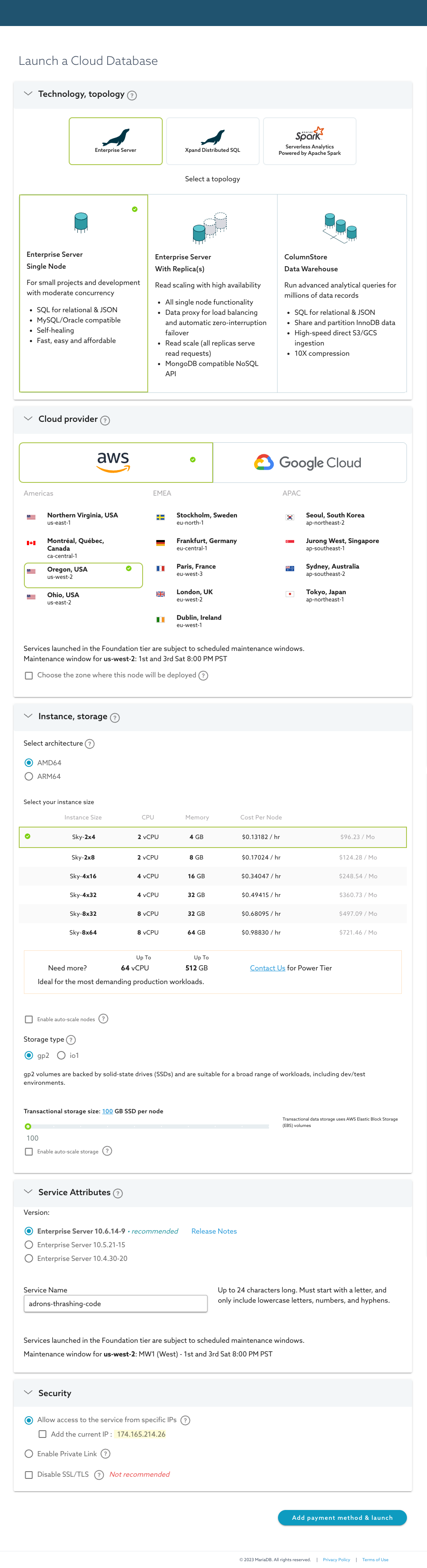
At this point, sign up for an account and setup an instance via the “Launch a Cloud Database” page. Here’s a nice long screenshot, with my choices for the instance I wanted all chosen.

Selected Enterprise Server since that would provide the basics of what I want to try out. Next up, a single node would serve well. Then the Oregon, USA us-west-2 location of AWS’s. Went with the default AMD64 with a Sky-2×4 instance with standard gp2. I also left the transactional storage size at 100GB.

Next up I selected the Enterprise Server 10.6.14-9, the recommended version. Gave it a most excellent service name and wrapped up by selecting to allow the service IP. I did learn, for quick access you want select the current IP to add.

Click for full size image.

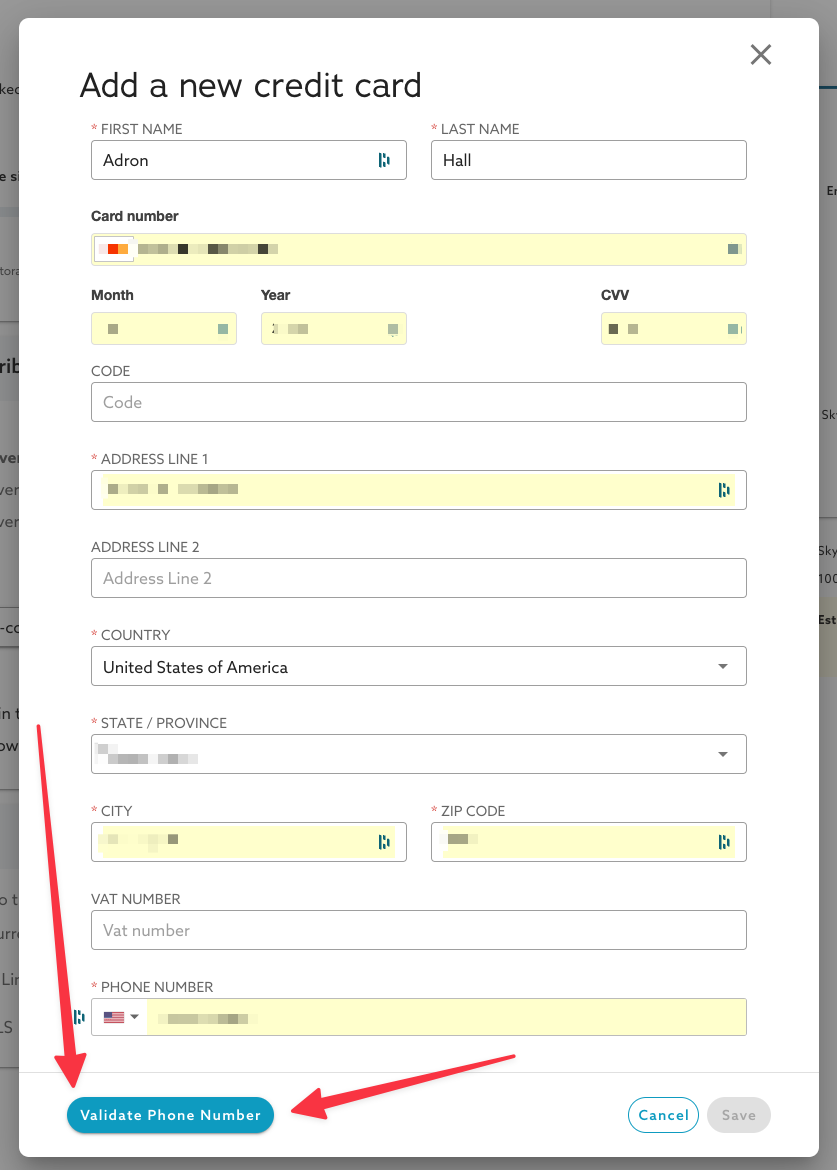
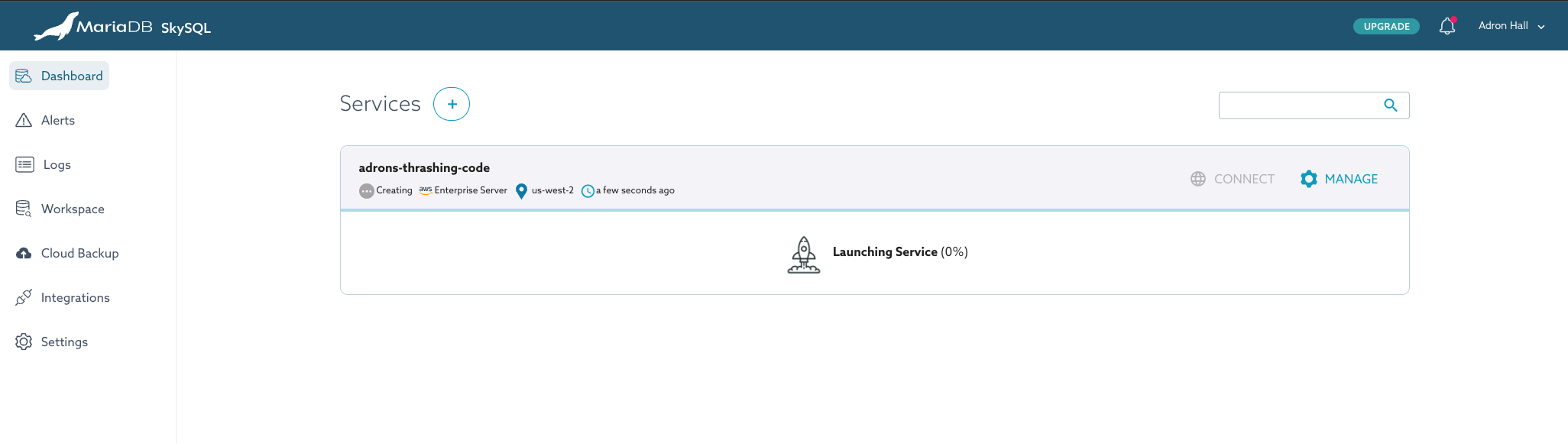
Finally, I needed to “Add payment method & launch”. Clicking that brought up the “Add a new credit card” dialog. I filled this out and the “save” button isn’t active. Before getting the save button activated I had click on the validate phone number button. With that completed the instance started launching. This can take a few minutes in my experience.

Instance launching.

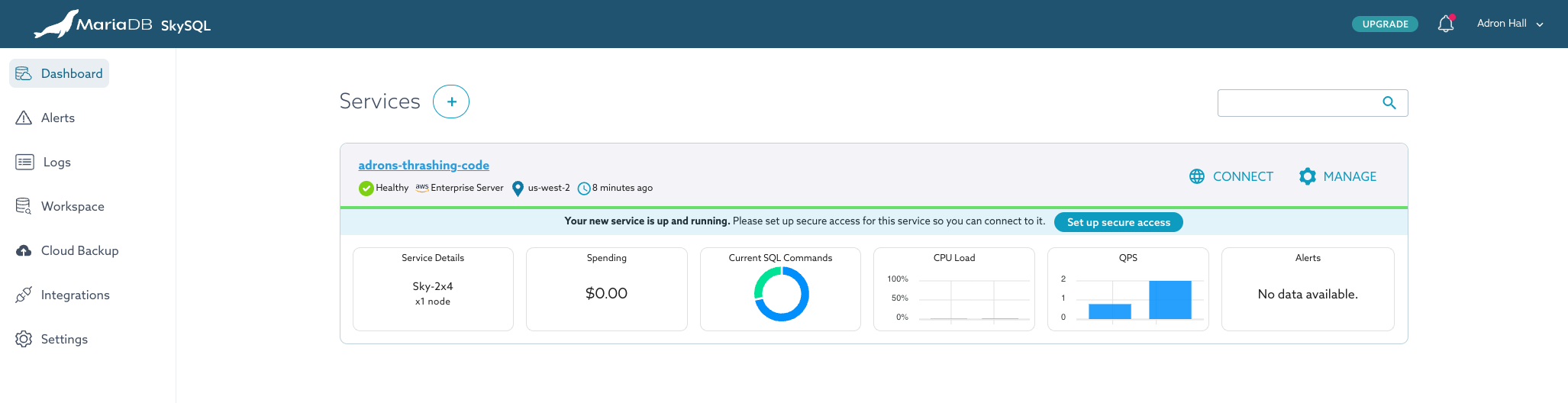
The instance now launched with a nice status dashboard.

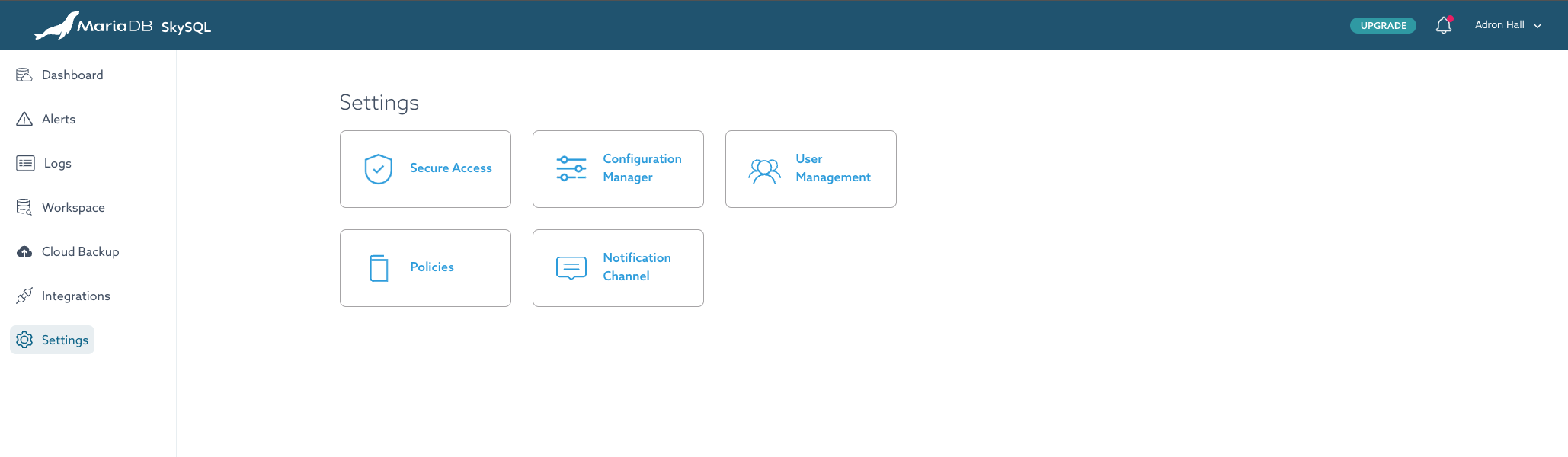
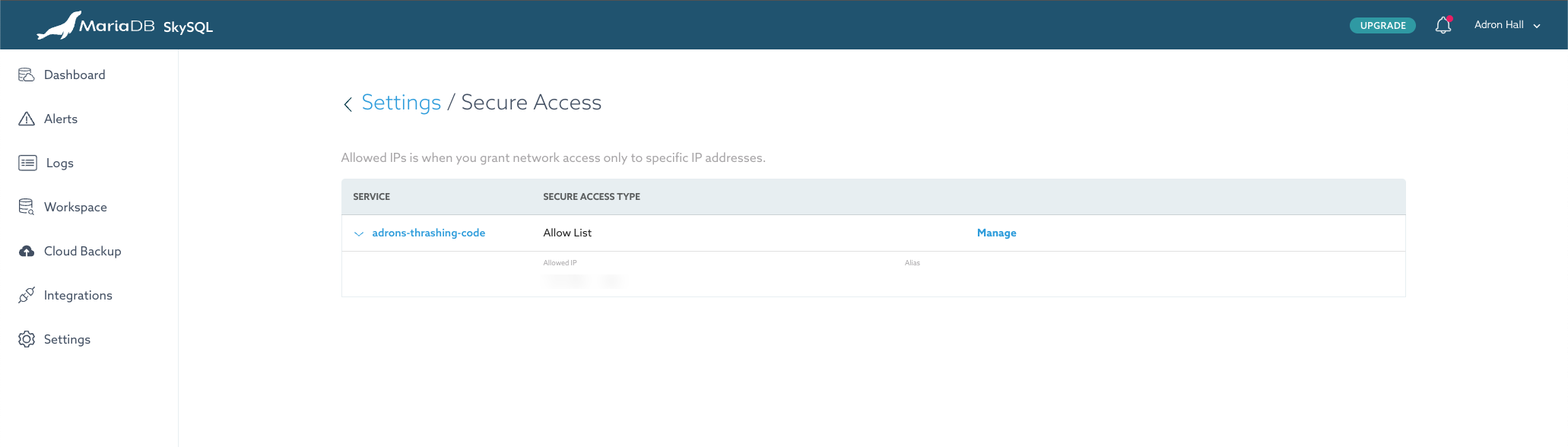
Once the instance is up and running, navigate to the settings (left hand side) and open up that screen to setup Secure Access.

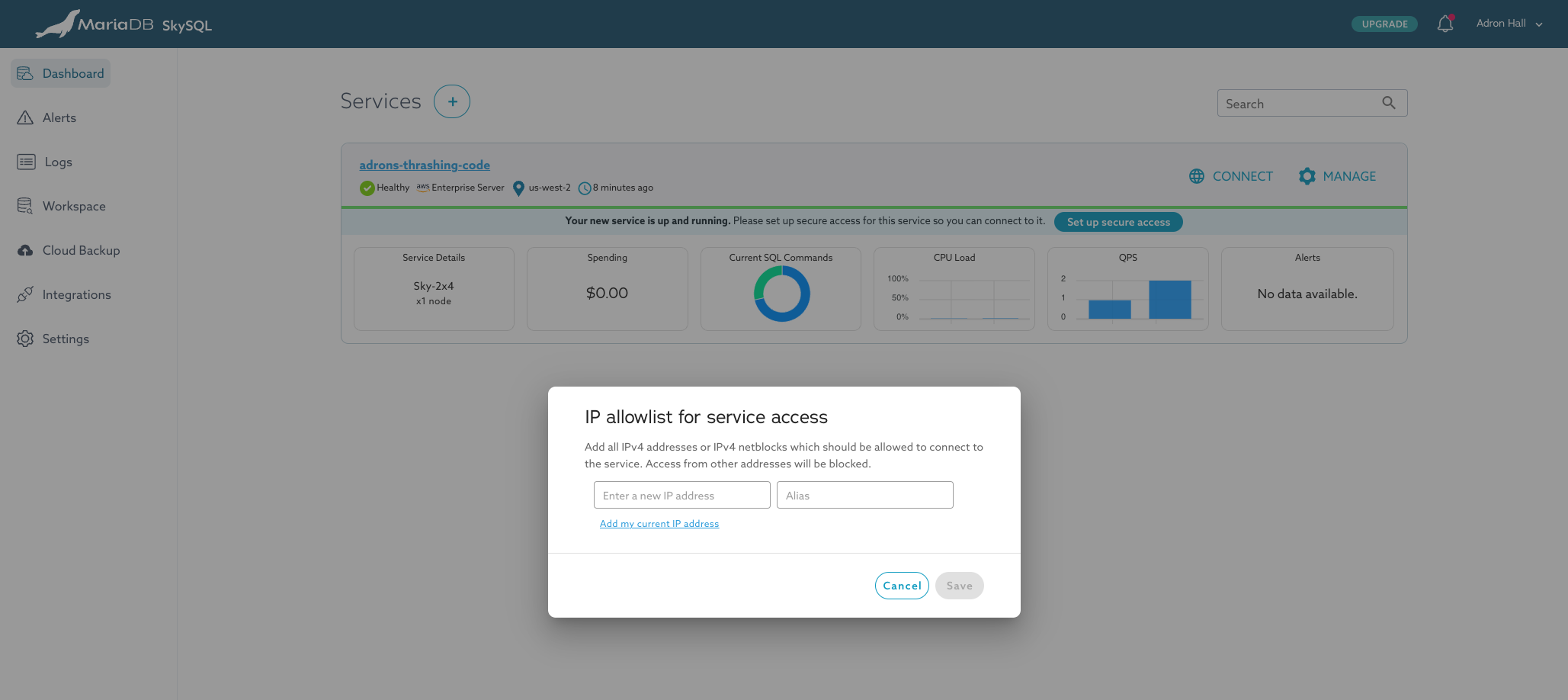
In this dialog, since I didn’t check the “add IP address” previously, I’ll add it here.

I added the IP this way instead of selecting the check box previously for two reasons.

  1. I wanted to make sure I went and found out where I could add IPs to the allowlist. My IP will be changing, as they tend to do, and I want to know exactly where I’ll have to go to add additional IPs when my IP changes. In addition, if I travel, the same situation would arise where I would need to add a new IP wherever it is that I am at.
  2. The second reason is even simpler, I wanted to figure out where this was in the interface and see how the interface was designed. It’s a pretty straight forward interface and even enables you to just click and it will give you your IP. At least, the IP that it can identity via the browser you’re using. If you’re using a VPN or under some other networking setup this might not be accurate, but it’ll cover 99% of the cases.

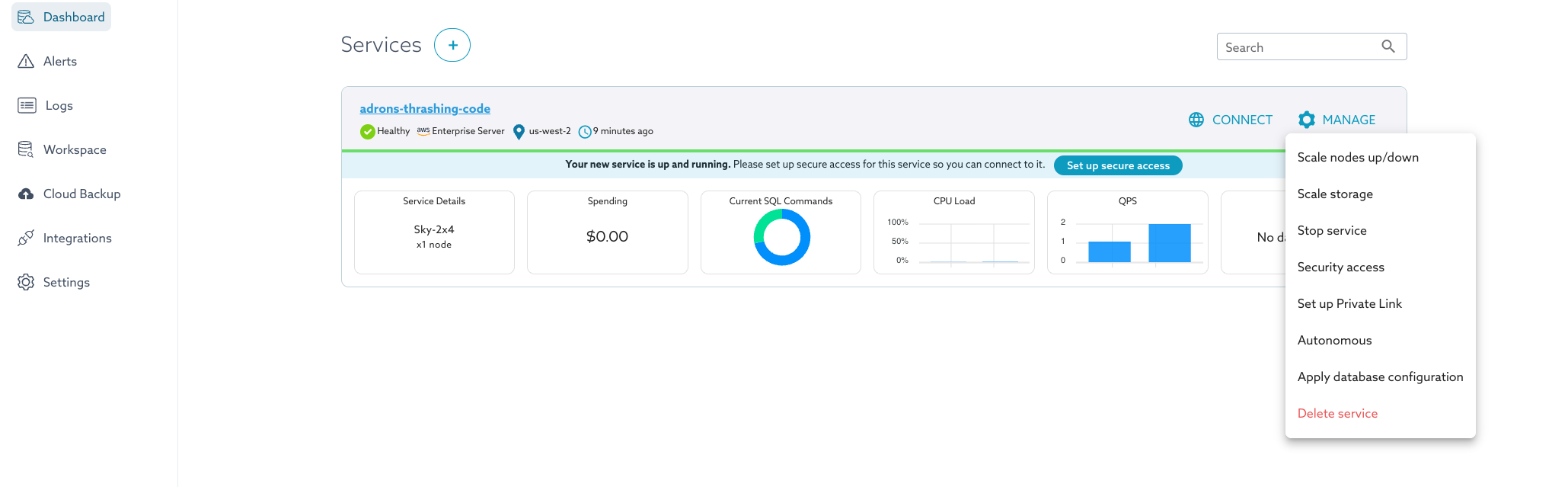
Once I added the IP, I navigated back to this screen. Over to the far right is the “manage” button which provides many of the standard actions one would have to take to start, stop, or take other actions against the database instance.

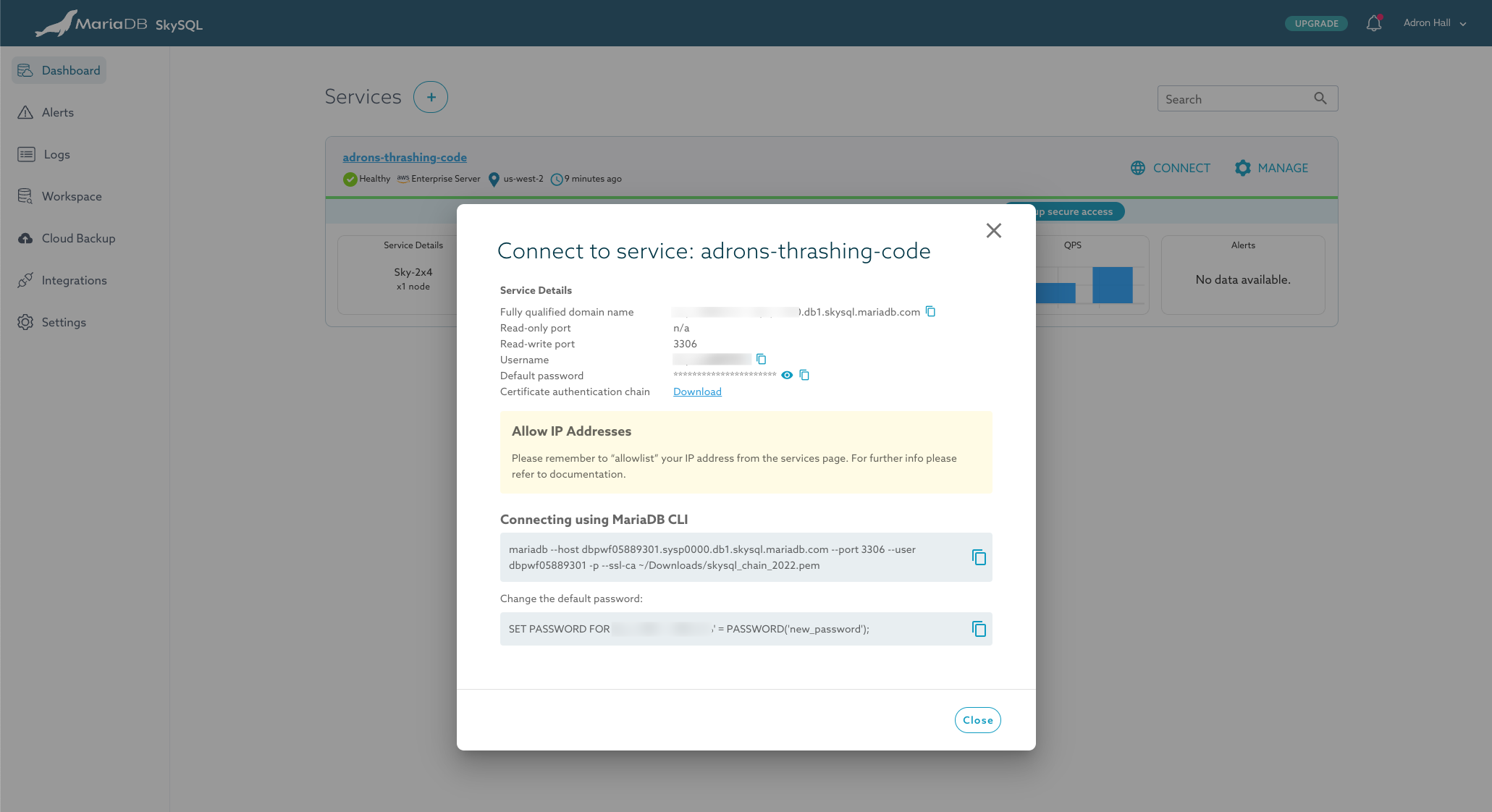
Next to that is the “connect” button which is key to the next steps I want to take. On this modal dialog I have all the details, along with the *.pem to download, to make a connection with the various tools I want to connect with.

Since the CLI connection details are on the dialog, I’ll connect that way first. The first step is to download the *.pem key. The cool thing is the commands on this dialog are setup to use the *.pem key right from your downloads directory. So you can just download it right to where it goes (by default that is, if you’ve changed this note where it will be, you’ll need to make that change). With that downloaded we’re ready for the next steps.

Getting Connected via mariadb CLI

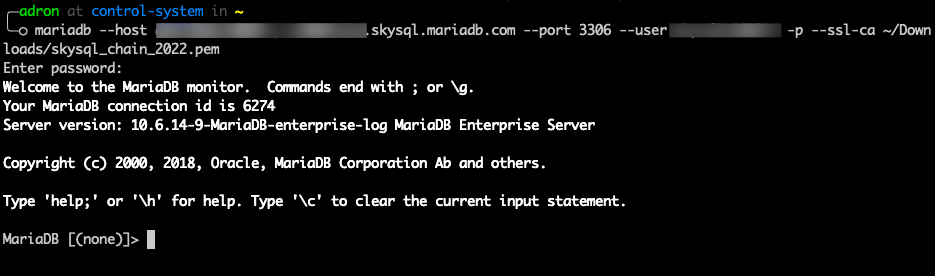
Here (in the above terminal image) I’ve executed the mariadb --host xyz.skysql.mariadb.com --port 3306 --user theUserHere -p --ssl-ca ~/Downloads/skysql_chain_2022.pem command. I then enter the password for my account, the command via the passed *.pem file then ssl connects me to the database and I’m in.

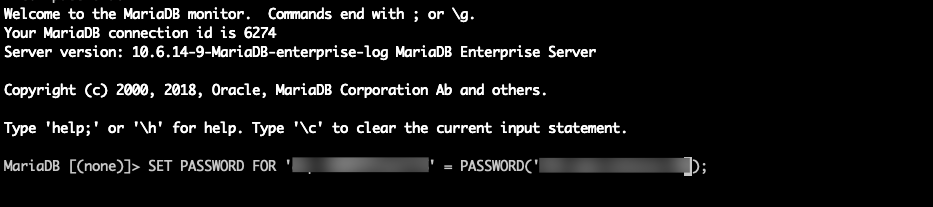
The next command the connect dialog provides is to set the password for the database account to something that isn’t the default generated password.

Here I copied my first attempt to change the password and noted there are complexity rules applied to the password. Simple enough, added some good characters (special and all), and that met the check.

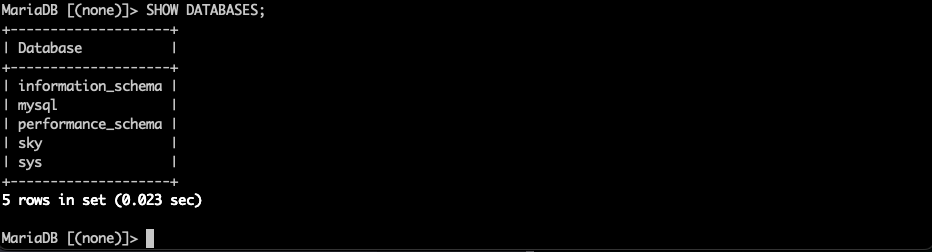
Now with the security needs met I was ready to do some database things! First step, I wanted a database on my database server! But I was also curious, what databases already exist on the server and could I view them with a SHOW DATABASES; command? Sure enough, information_schema, mysql, performance_schema, sky, and sys are there. These are the system tables that the database needs, and I presume the sky database is probably SkySQL related.

Now that I know what databases exist, I wanted to get my own created so issued a minimal create database command.

CREATE DATABASE adrons_epic_db;

That completed successfully so I followed it with another SHOW DATABASES; but with the added LIKE to it to show just the database I created.

I presumed next up I’d need to switch to that database to issue commands against it. I followed that command with a create table command to get something to put data into.

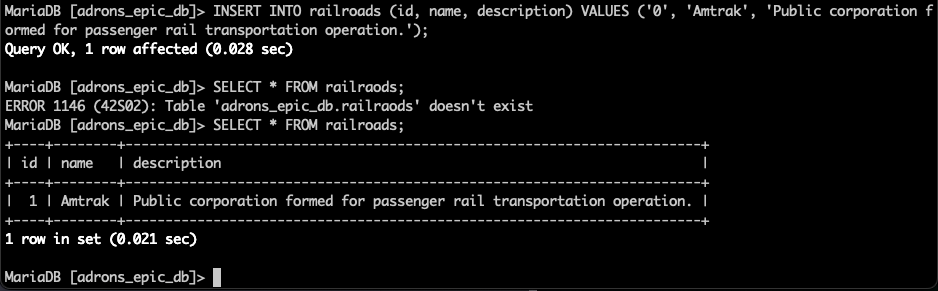
With a table created I could now finally store some data in the database. With a simple insert statement I was able to add a row to the table. Since I’d not set a default value for the id I also inserted it, normally I’d set a default and just let it auto create the value here.

I followed that up. with a select to see the data I just added. You can also see I pulled dyslexic maneuver on the word “railraods” which is a great reason to check out something that can autocomplete like DataGrip. Which just happens to be the next tool I wanted to connect!

Last action however, closing out the connection with exit. It’s always a good practice to close out of things properly, so that connections aren’t left hanging.

Using Jetbrains DataGrip

DataGrip is a great tool from JetBrains for working against a huge number of databases. With any new database I like to get DataGrip wired up as one of my primary tools. I’ll show you how I went about doing that with this new MariaDB SkySQL database now. Pay close attention, as there are specific pecularities to getting this to work.

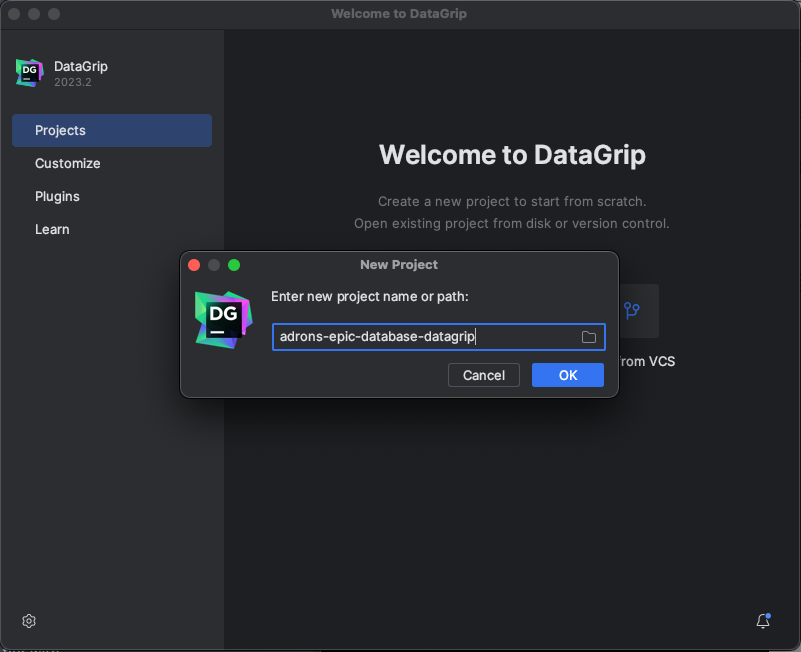
First step was simply starting a new project.

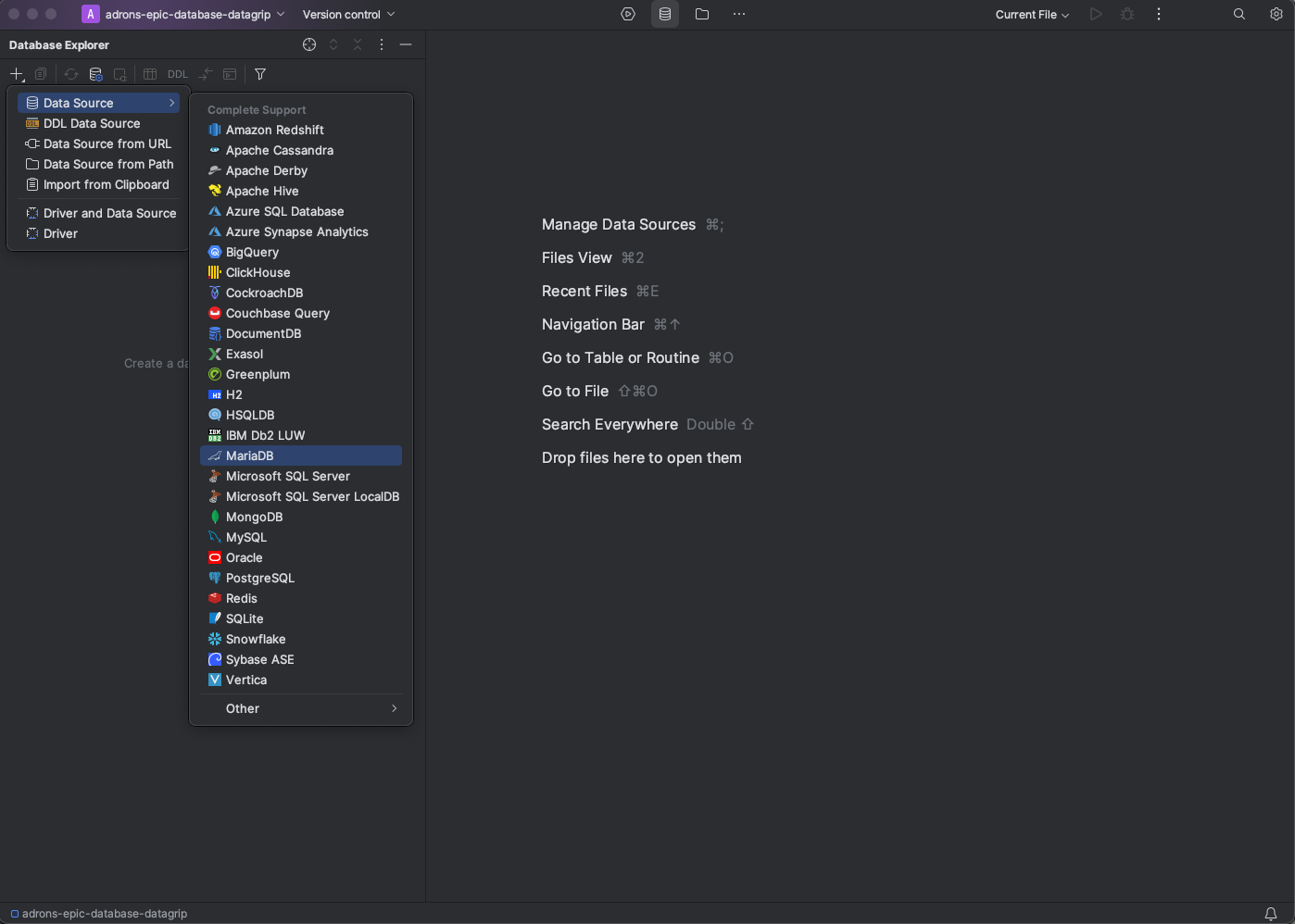
Next up the connection itself. From the long list of databases I found and selected MariaDB.

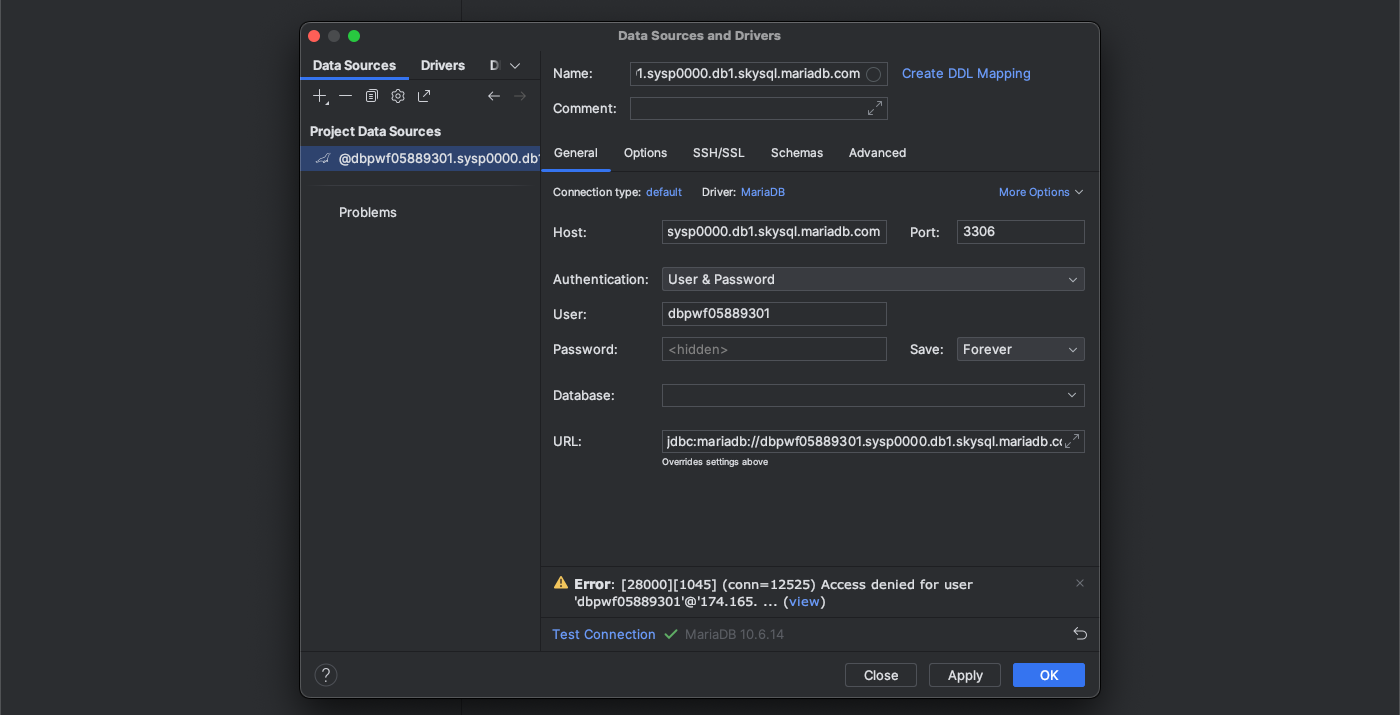
Next up on the connection, I went with the default name it spit out by pasting in the “Host”. That value comes from the connection dialog, which if you note, there are copy icons which will copy the specific text into your copy paste cache. It’s a good idea to use those instead of trying to select the dialog content directly.

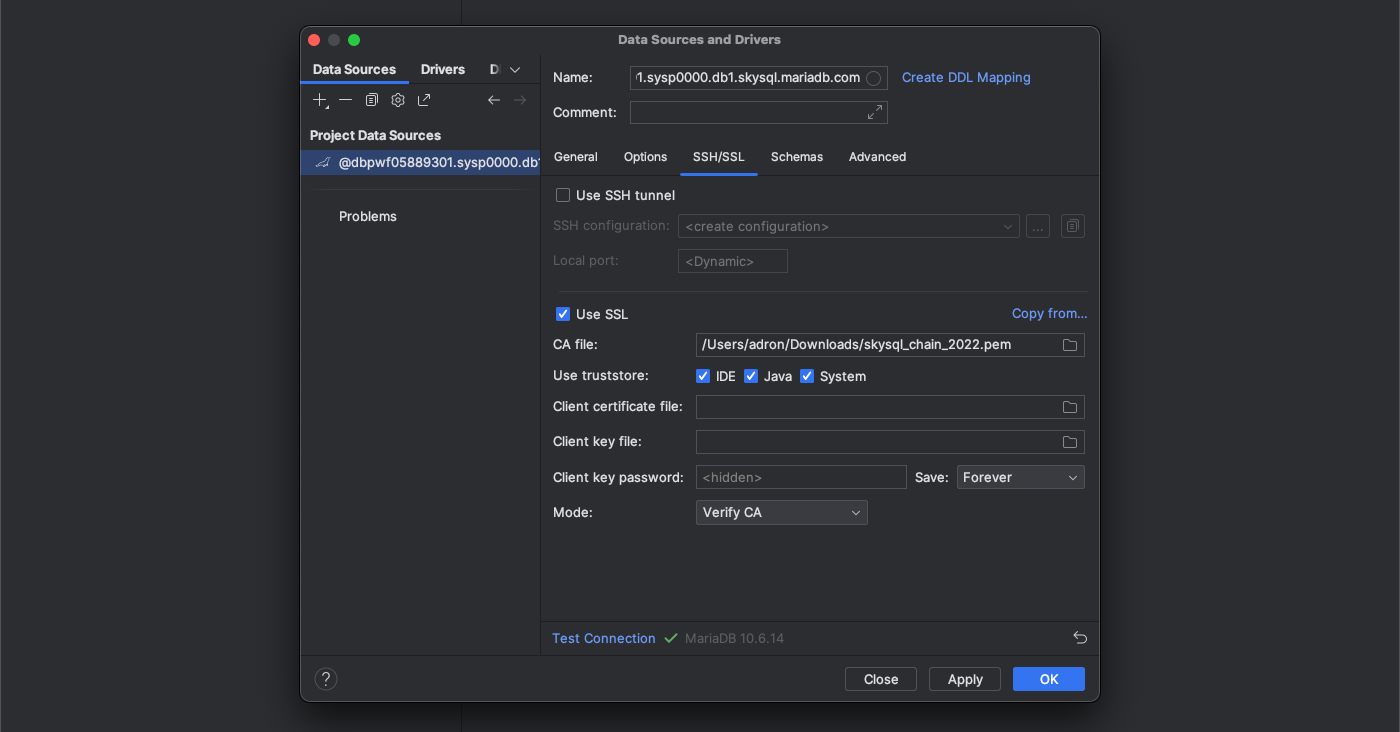
With the host set I also needed to download the driver, which I did using the download link, which in this image is replaced with the “Test Connection” link. With these settings made, then I clicked on the SSH/SSL tab of the connection dialog. On this tab of the dialog I clicked on “Use SSL”, used the select button to navigate via the file browser to the location of the certificate file. I then clicked on “Test Connection” and got an error.It seemed I’d done everything correct, but the Mode needed to be set to “Verify CA”. Once I did that, the connection worked.

Click on Server Objects and choosing a new workspace I could then issue SQL commands, just as with the CLI before.

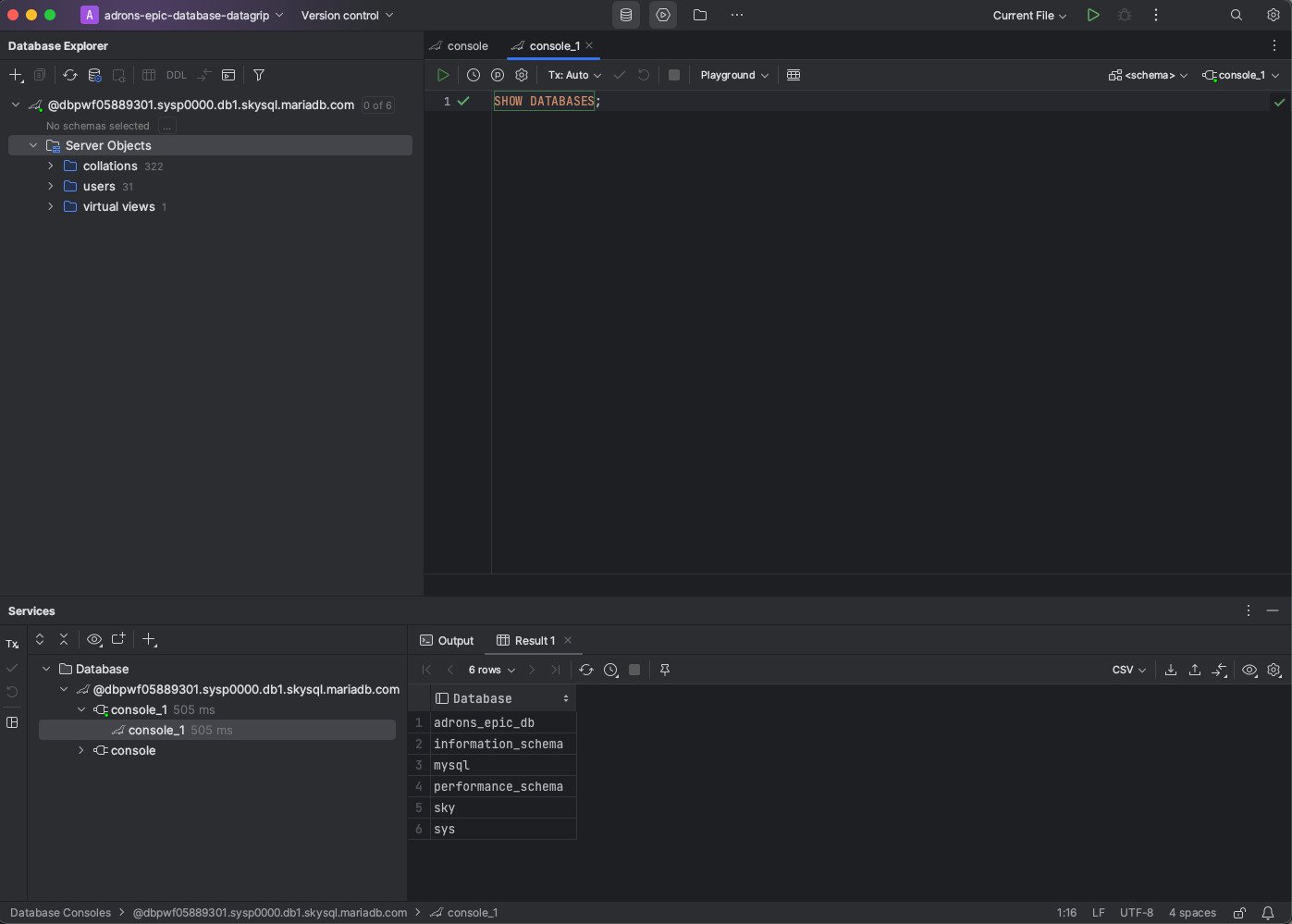
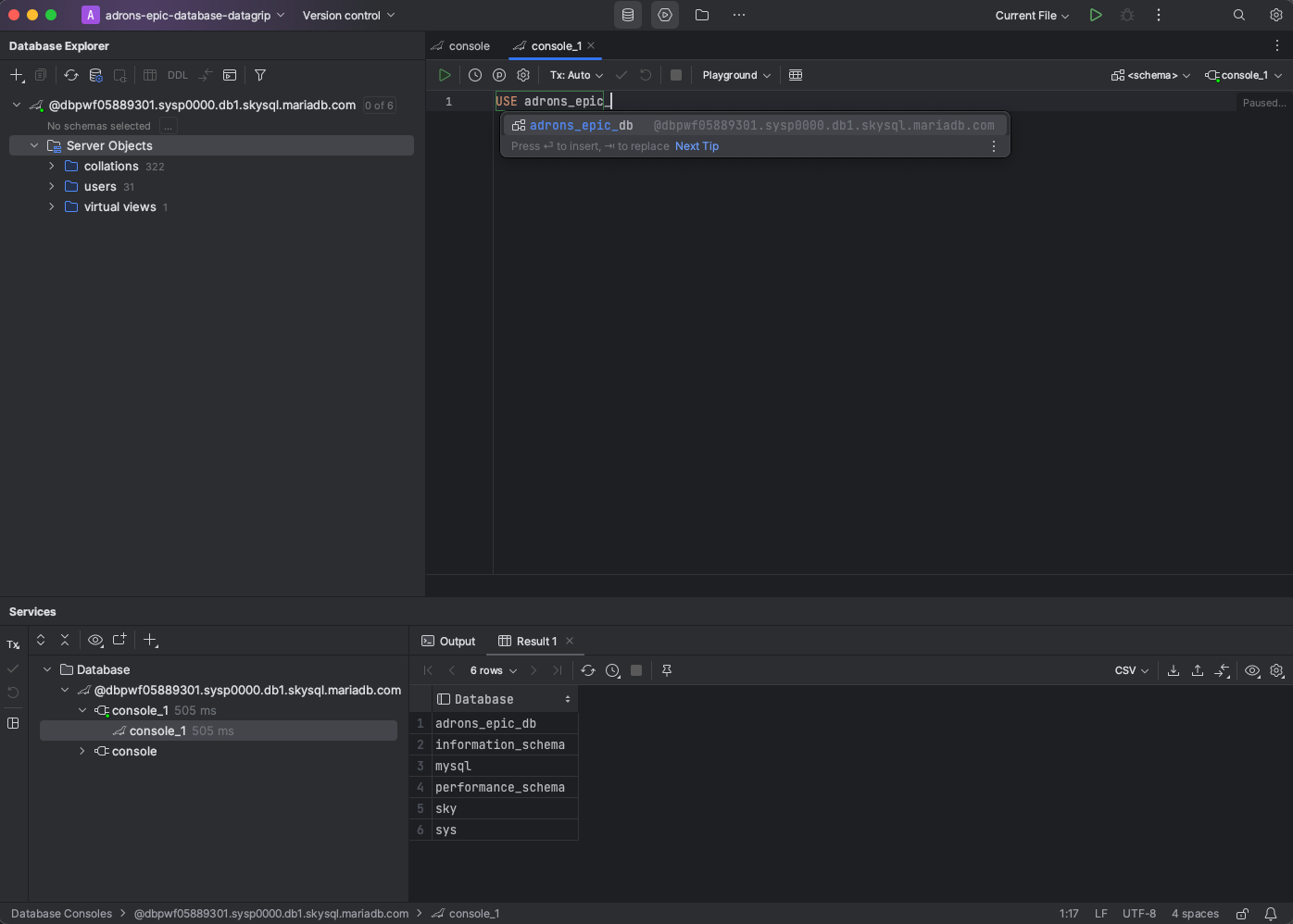
A quick SHOW DATABASES gave me a list of databases in the results below, and I went ahead and issued a USE database command, and as you can see the autocomplete kicked off immediately! The glory and ease of development when you’ve got autocomplete!

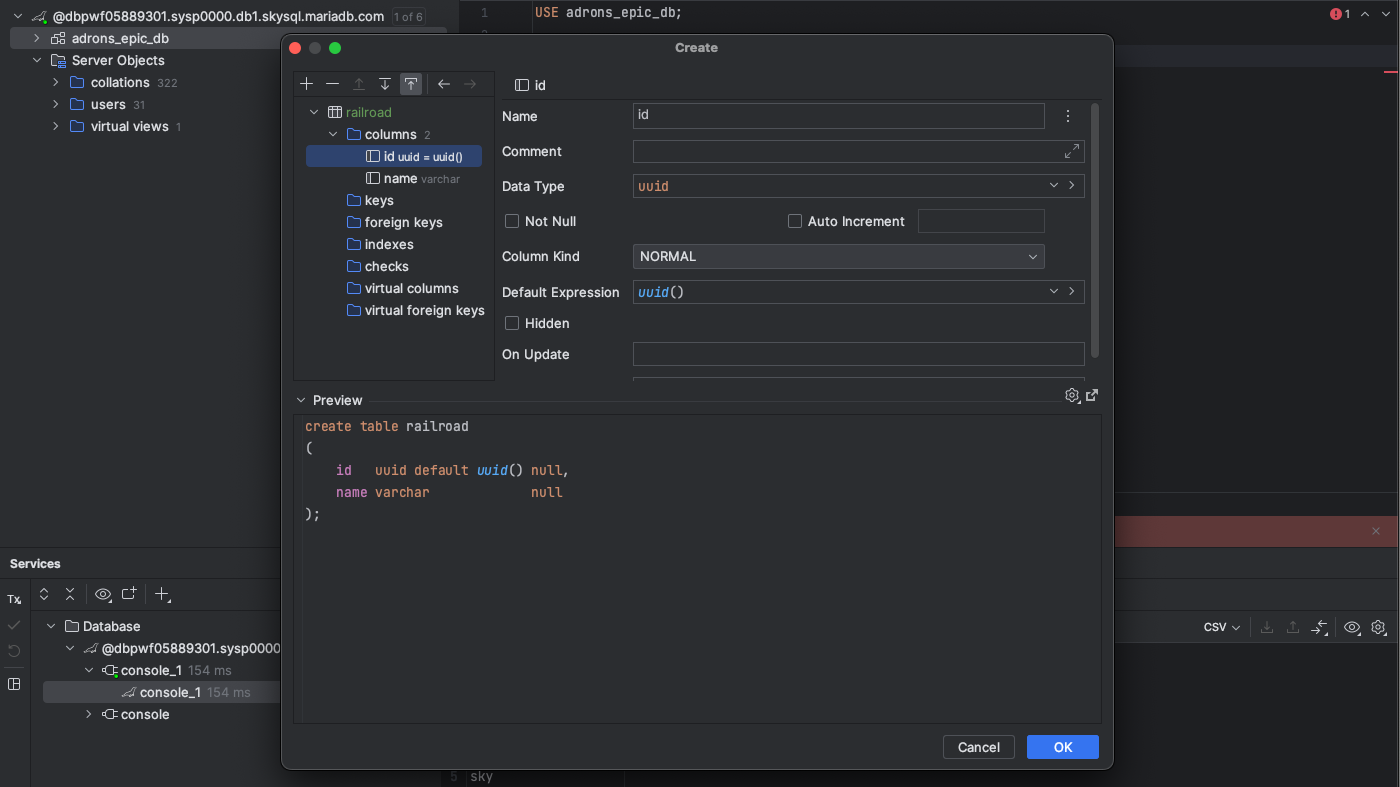
I also mocked going through and creating a table just because I wanted to snag a screenshot showing the details of how you can go in and create a table with DataGrip. It’s sometimes a clunky interface but its also very powerful. It’s easy to create table and other elements of the database without remembering the esoteric nuances of the create syntax, all while seeing the SQL syntax in the preview below the form.

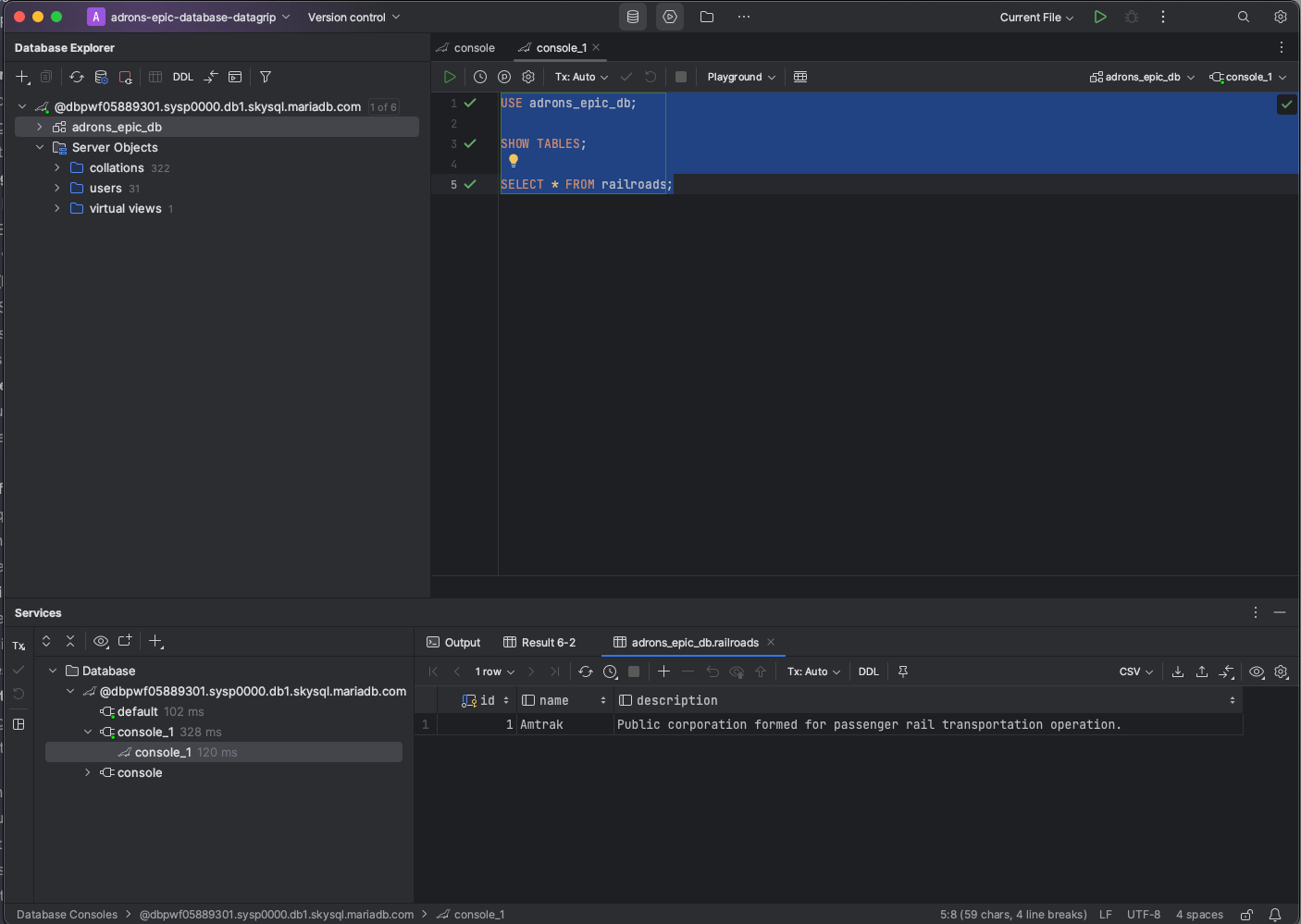
Just for good measure, here’s the dialog querying against that same table I created earlier with the CLI. With all that, a solid getting started tour, and I’m now setup to start development against my database. All that, and more, in subsequent posts.

So if you’re looking for a MariaDB option, MariaDB SkySQL is a very good option. It’s easy to get started, and it’s easy to use. With – and this makes me happy – decent starting security! I’m looking forward to using it more in the future.

Shortlist of Database as a Service Providers

Some top database providers for various open source databases like MariaDB, PostgreSQL, MongoDB, Apache Cassandra, Redis, Elasticsearch, and Neo4j:

  1. MariaDB:
  2. PostgreSQL:
  3. MongoDB:
  4. Apache Cassandra:
  5. Redis:
  6. Elasticsearch:
  7. Neo4j (Graph Database):

Top 10 GraphQL Anti-patterns IME “The Horror”

While GraphQL provides a flexible and powerful approach to building APIs, there are some common anti-patterns that developers may unintentionally implement when working with GraphQL query resolvers. These anti-patterns – the opposite of yesterday’s top 10 practices – can lead to issues such as performance bottlenecks, security vulnerabilities, or maintenance difficulties. Here are some of the top anti-patterns to avoid:

  1. N+1 Problem: The N+1 problem occurs when resolver functions trigger additional database queries within a loop or for each item in a list. This can result in a large number of database queries, leading to poor performance. Implement data batching techniques using tools like DataLoader to mitigate this issue, to learn more about DataLoader, check out this post.
  2. Over-fetching and Under-fetching: Over-fetching happens when a resolver fetches more data than the client actually needs, resulting in unnecessary data transfer and increased response size. On the other hand, under-fetching occurs when the resolver does not provide enough data to fulfill the client’s request, leading to additional round trips. Design your resolvers carefully to strike the right balance and only fetch the required data.
  3. Resolver Fatigue: Resolver fatigue refers to a scenario where a single GraphQL resolver is responsible for handling a large number of fields or complex logic. This can make the resolver codebase difficult to maintain, understand, and test. Break down your resolvers into smaller, more manageable units to avoid resolver fatigue.
  4. Deep Nesting: GraphQL allows for nested queries, but excessive nesting can lead to performance issues. Deeply nested queries may result in complex resolver logic and multiple database queries. Try to flatten your schema structure and optimize resolver logic to avoid unnecessary complexity.
  5. Lack of Caching: Not implementing caching mechanisms in your resolvers can result in repeated and costly data fetch operations. Introduce caching strategies, such as in-memory caching or distributed caches, to store frequently accessed data and reduce the load on your data sources.
  6. Inefficient Pagination: Pagination is commonly used in GraphQL to handle large datasets. Implementing pagination incorrectly can lead to performance issues and inefficient querying. Use appropriate pagination techniques, like cursor-based pagination, to efficiently retrieve and display data. To read more details on pagination and how it can be applied to GraphQL queries check out this post.
  7. No Rate Limiting: Without proper rate limiting mechanisms, your GraphQL API may be susceptible to abuse and DoS attacks. Implement rate limiting at the resolver or API level to control the number of requests and protect your server resources.
  8. Lack of Input Validation: Failing to validate and sanitize user input can lead to security vulnerabilities, such as SQL injection or unauthorized data access. Validate and sanitize input parameters in your resolvers to prevent these risks.
  9. Monolithic Resolvers: Creating monolithic resolvers that handle multiple unrelated responsibilities can lead to code duplication, reduced reusability, and increased maintenance effort. Follow the single responsibility principle and modularize your resolvers to improve code organization and maintainability.
  10. Insufficient Error Handling: Inadequate error handling in resolvers can result in unhandled exceptions or unclear error messages returned to the client. Implement comprehensive error handling and provide informative error messages to assist client developers in troubleshooting and debugging. For more details on error handling, check out this post.

By avoiding these anti-patterns and following established best practices, you can enhance the performance, security, and maintainability of your GraphQL query resolvers.

10 Best Practices IMHO for GraphQL

Here are 10 best practices for GraphQL accrued from dozens of GraphQL API implementations:

  1. Keep your schema simple: Design your GraphQL schema with a clear and concise structure. Avoid unnecessary complexity and keep it focused on the specific requirements of your application. One great idea is to implement consistent standards to keep your schema simple, read more about those ideas here.

  2. Think about the client’s needs: GraphQL allows clients to specify their data requirements precisely. Collaborate with the client-side developers to understand their needs and design your schema accordingly, minimizing over-fetching or under-fetching of data.
  3. Version your schema: As your application evolves, consider versioning your GraphQL schema to ensure backward compatibility. This allows you to introduce changes without breaking existing client implementations.
  4. Use precise field names: Choose field names that accurately describe the data they represent. Be consistent with your naming conventions and avoid ambiguity to enhance the readability and maintainability of your schema.
  5. Avoid excessive nesting: While GraphQL supports nested queries, avoid deep nesting of fields as it can lead to performance issues and over-fetching of data. Optimize your schema by flattening nested fields when possible.
  6. Implement proper authentication and authorization: GraphQL does not enforce any specific authentication or authorization mechanisms. It is crucial to implement appropriate security measures to protect your GraphQL API endpoints, such as using authentication tokens, access control rules, and rate limiting.
  7. Implement pagination for large datasets: When dealing with large datasets, use pagination techniques (e.g., cursor-based pagination) to efficiently fetch and display data. This helps in improving performance and reduces the load on both the server and the client. For details on paging patterns and implementation details check out this article.
  8. Utilize data loaders: GraphQL data loaders help optimize data fetching by batching and caching requests. Implement data loaders to avoid the N+1 problem, where multiple database queries are triggered for each item in a list. Check out this post for more details.
  9. Document your schema: Provide comprehensive documentation for your GraphQL schema to assist client developers in understanding the available types, fields, and their usage. Clear documentation and standards promotes developer adoption and simplifies integration. Check out this post for more details on GraphQL standards.
  10. Monitor and optimize performance: Regularly monitor and analyze the performance of your GraphQL API. Identify and optimize slow-performing queries, implement caching strategies, and leverage tools like Apollo Engine or persisted queries to improve overall performance.

Remember that these practices may vary depending on the specific requirements and context of your GraphQL implementation. It’s always recommended to stay updated with the latest best practices and community guidelines.