Just a few examples here. First we’ll setup the basic architecture from the lowest common denominator – the database – bounce up to the first layer, and test in isolation and test in integration. These examples are simply the easiest ways to test the basic data and data access layer using Stubs, Mocks, and general unit test practices.
First off here are the pieces of the architecture that you’ll NEED regardless. No real coding in this entry (except for the T-SQL), just setting up the solution to put the tests in and have the initial database architecture setup. The part 2 entry will have more on the testing, and part 3 will have actual functional code tests and implementations – after all, I’m working this up in a test driven development mentality – “mostly“.
The Beginning
Setup the following projects within a new VS.NET solution. I broke out the projects as you see below. (Click to see the larger image)
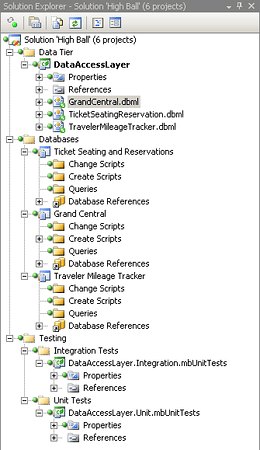
I like to keep my unit and integration tests separate so that they’re easy to include or exclude from a continuous integration build. Because really, the integration tests aren’t generally going to work in a regular build. Unless of course you’ve scripted out some serious steps such as “Create a Setup MSI” and “install the software and run” etc. Which in my mind, just seems a bit out of line with the build process. Not to even mention extremely time consuming. I however think that a good solid and separate CI build of the respective setup project should be kept in a different solution that when it does alter can have a build process and either an automated integration test run or have the integration tests manually run. Either way, they get run, but in my humble opinion shouldn’t be run during the regular CI build of the working solution.
If you don’t have mbUnit installed, go grab a copy over at www.mbunit.com.
The next thing I did is setup the databases. I have some odd requirements for the particular database schema and segmentation of various databases for the application components. The Grand Central Database is used for the security, membership, roles, etc, the other databases are used for each of the application “components”. Each of these “component” databases I’ll refer to as either “component” or “tsr” or “tmt” respectively. These “component” databases I’ve setup for use once a user is authenticated. So each of these databases has a Users Table that has a UserId Column that will be used for relating the respective user that has access to the particular component.
First I setup the tables:
tmtUsers
   1:  /****** Object:  Table [dbo].[tmtUsers]    Script Date: 07/06/2008 01:27:07 ******/
   2:  IF  EXISTS (SELECT * FROM sys.objects WHERE object_id = OBJECT_ID(N'[dbo].[tmtUsers]') AND type in (N'U'))
   3:  DROP TABLE [dbo].[tmtUsers]
   4:  GO
   5:  /****** Object:  Table [dbo].[tmtUsers]    Script Date: 07/06/2008 01:27:07 ******/
   6:  SET ANSI_NULLS ON
   7:  GO
   8:  SET QUOTED_IDENTIFIER ON
   9:  GO
  10:  IF NOT EXISTS (SELECT * FROM sys.objects WHERE object_id = OBJECT_ID(N'[dbo].[tmtUsers]') AND type in (N'U'))
  11:  BEGIN
  12:  CREATE TABLE [dbo].[tmtUsers](
  13:      [UserId] [uniqueidentifier] NOT NULL,
  14:   CONSTRAINT [PK_tmtUsers] PRIMARY KEY CLUSTERED
  15:  (
  16:      [UserId] ASC
  17:  )WITH (IGNORE_DUP_KEY = OFF) ON [PRIMARY]
  18:  ) ON [PRIMARY]
  19:  END
  20:  GO

   1:  /****** Object:  Table [dbo].[tsrUsers]    Script Date: 07/06/2008 01:50:30 ******/
   2:  IF  EXISTS (SELECT * FROM sys.objects WHERE object_id = OBJECT_ID(N'[dbo].[tsrUsers]') AND type in (N'U'))
   3:  DROP TABLE [dbo].[tsrUsers]
   4:  GO
   5:  /****** Object:  Table [dbo].[tsrUsers]    Script Date: 07/06/2008 01:50:31 ******/
   6:  SET ANSI_NULLS ON
   7:  GO
   8:  SET QUOTED_IDENTIFIER ON
   9:  GO
  10:  IF NOT EXISTS (SELECT * FROM sys.objects WHERE object_id = OBJECT_ID(N'[dbo].[tsrUsers]') AND type in (N'U'))
  11:  BEGIN
  12:  CREATE TABLE [dbo].[tsrUsers](
  13:      [UserId] [uniqueidentifier] NOT NULL,
  14:   CONSTRAINT [PK_tsrUsers] PRIMARY KEY CLUSTERED
  15:  (
  16:      [UserId] ASC
  17:  )WITH (IGNORE_DUP_KEY = OFF) ON [PRIMARY]
  18:  ) ON [PRIMARY]
  19:  END
  20:  GO
After creating the tables I went ahead and created a view that would link the UserId do the Grand Central Database and a respective stored procedure too. I created these by simply dragging the tables onto the designer for creating the view from each of the respective databases. (Click to see the larger image)
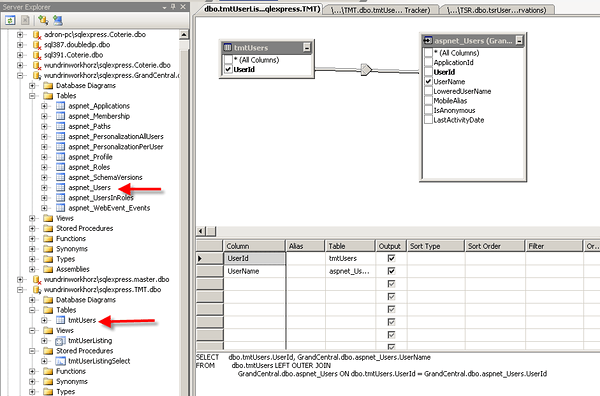
The SQL for the views is below. The TSR and TMT Databases both use basically the same exact SQL.
tmtUserListing
   1:  SELECT     dbo.tmtUsers.UserId, GrandCentral.dbo.aspnet_Users.UserName
   2:  FROM         dbo.tmtUsers LEFT OUTER JOIN
   3:                        GrandCentral.dbo.aspnet_Users ON dbo.tmtUsers.UserId = GrandCentral.dbo.aspnet_Users.UserId
tsrUserListing
   1:  SELECT     dbo.tsrUsers.UserId, GrandCentral.dbo.aspnet_Users.UserName, GrandCentral.dbo.aspnet_Users.LoweredUserName, GrandCentral.dbo.aspnet_Users.MobileAlias,
   2:                        GrandCentral.dbo.aspnet_Users.IsAnonymous, GrandCentral.dbo.aspnet_Users.LastActivityDate
   3:  FROM         dbo.tsrUsers INNER JOIN
   4:                        GrandCentral.dbo.aspnet_Users ON dbo.tsrUsers.UserId = GrandCentral.dbo.aspnet_Users.UserId

   1:  /****** Object:  StoredProcedure [dbo].[tmtUserListingSelect]    Script Date: 07/06/2008 01:36:33 ******/
   2:  IF  EXISTS (SELECT * FROM sys.objects WHERE object_id = OBJECT_ID(N'[dbo].[tmtUserListingSelect]') AND type in (N'P', N'PC'))
   3:  DROP PROCEDURE [dbo].[tmtUserListingSelect]
   4:  GO
   5:  /****** Object:  StoredProcedure [dbo].[tmtUserListingSelect]    Script Date: 07/06/2008 01:36:33 ******/
   6:  SET ANSI_NULLS ON
   7:  GO
   8:  SET QUOTED_IDENTIFIER ON
   9:  GO
  10:  IF NOT EXISTS (SELECT * FROM sys.objects WHERE object_id = OBJECT_ID(N'[dbo].[tmtUserListingSelect]') AND type in (N'P', N'PC'))
  11:  BEGIN
  12:  EXEC dbo.sp_executesql @statement = N'CREATE PROCEDURE dbo.tmtUserListingSelect
  13:
  14:  AS
  15:      SELECT     dbo.tmtUsers.UserId, GrandCentral.dbo.aspnet_Users.UserName
  16:  FROM         dbo.tmtUsers LEFT OUTER JOIN
  17:                        GrandCentral.dbo.aspnet_Users ON dbo.tmtUsers.UserId = GrandCentral.dbo.aspnet_Users.UserId
  18:
  19:      RETURN
  20:  '
  21:  END
  22:  GO

   1:  /****** Object:  StoredProcedure [dbo].[tsrUserListingSelect]    Script Date: 07/06/2008 01:50:38 ******/
   2:  IF  EXISTS (SELECT * FROM sys.objects WHERE object_id = OBJECT_ID(N'[dbo].[tsrUserListingSelect]') AND type in (N'P', N'PC'))
   3:  DROP PROCEDURE [dbo].[tsrUserListingSelect]
   4:  GO
   5:  /****** Object:  StoredProcedure [dbo].[tsrUserListingSelect]    Script Date: 07/06/2008 01:50:38 ******/
   6:  SET ANSI_NULLS ON
   7:  GO
   8:  SET QUOTED_IDENTIFIER ON
   9:  GO
  10:  IF NOT EXISTS (SELECT * FROM sys.objects WHERE object_id = OBJECT_ID(N'[dbo].[tsrUserListingSelect]') AND type in (N'P', N'PC'))
  11:  BEGIN
  12:  EXEC dbo.sp_executesql @statement = N'CREATE PROCEDURE dbo.tsrUserListingSelect
  13:
  14:  AS
  15:  SELECT     dbo.tsrUsers.UserId, GrandCentral.dbo.aspnet_Users.UserName, GrandCentral.dbo.aspnet_Users.LoweredUserName, GrandCentral.dbo.aspnet_Users.MobileAlias,
  16:                        GrandCentral.dbo.aspnet_Users.IsAnonymous, GrandCentral.dbo.aspnet_Users.LastActivityDate
  17:  FROM         dbo.tsrUsers INNER JOIN
  18:                        GrandCentral.dbo.aspnet_Users ON dbo.tsrUsers.UserId = GrandCentral.dbo.aspnet_Users.UserId
  19:      RETURN
  20:  '
  21:  END
  22:  GO
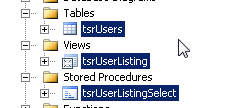
Now your server explorer should look like the image below. (Click to see the larger image)
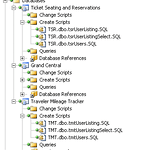
My database projects appear as below (all checked in). (Click to see the larger image)
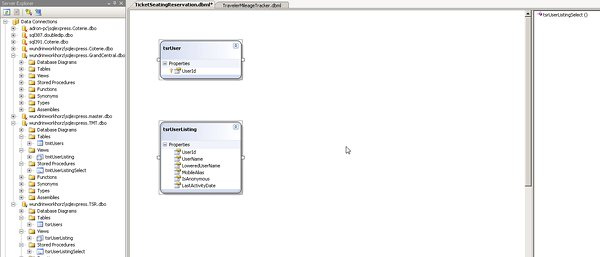
Next we’re going to setup the Data Access Layer (DAL). Yes, this is somewhat crude, but really, we’re only trying to get the basic objects and setup the business entities. I’ve used SQL to LINQ for the DAL. I dragged the three database objects from each “component” database over to the respective *.dbml files.
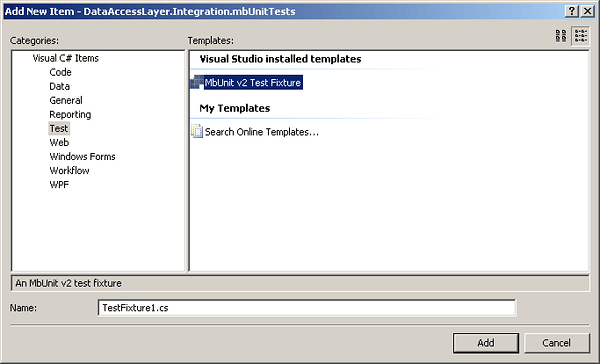
After that add the testing files to the various mbUnit test projects that have been created. I create one for each of the objects that will be tested from the database, mainly based on the idea that they will generate entities or objects of some type, and this will keep them fairly organized. A little bit more about this in part 2.
I’ll have the next part up soon. Until then this will get one setup for the initial tests and core data access layer.

Technorati Tags: TDD,Test,Unit Tests,LINQ,SQL,DAL,DataAccessLayer,Architecture,Software,mbUnit,Rhino,Mock,Stub,ReSharper,Isolation
del.icio.us Tags: TDD,Test,Unit Tests,LINQ,SQL,DAL,DataAccessLayer,Architecture,Software,mbUnit,Rhino,Mock,Stub,ReSharper,Isolation