Growing a development team is somewhat parallel to building a skyscraper. You start with a solid foundation – you’d at least hope – add floors with meticulous planning, and eventually, you reach the pinnacle with strong leadership guiding the entire structure. In software development, this process involves strategic hiring decisions at various stages. Let’s delve into why focusing on Senior and Mid-Level developers initially is crucial, the role of Junior developers in the maturation phase, and the point at which hiring Principal developers becomes essential.
The Strong Foundation: Senior and Mid-Level Developers
Establishing Robust Foundations
When you’re in the early stages of building your development team, having a robust foundation is essential. Senior and Mid-Level developers bring a wealth of experience and expertise, allowing you to establish strong coding standards, robust architectural practices, and efficient workflows. These seasoned professionals can tackle complex problems and drive critical projects forward with minimal oversight.
Accelerating Development
In the initial phases of product development, time is often a critical factor. Senior and Mid-Level developers can significantly accelerate the development process due to their proficiency and ability to work independently. They understand the nuances of software design, architecture, and implementation, enabling them to deliver high-quality solutions quickly. This efficiency is vital for meeting early milestones and establishing a competitive edge.
Cultivating a Culture of Mentorship
Experienced developers create a culture of mentorship and continuous learning. Senior developers guide Mid-Level developers, ensuring their growth and improvement. This dynamic not only enhances the team’s skill set but also prepares the ground for future Junior developers. Established knowledge-sharing practices ensure that the entire team benefits from the expertise of its senior members.
Scaling Up: The Role of Junior Developers
Expanding the Team
Once you have a solid core of Senior and Mid-Level developers, it’s time to think about scaling. Junior developers bring fresh perspectives and a strong willingness to learn. They are crucial for handling routine tasks, allowing more experienced developers to focus on complex, high-impact work. As your team grows, the balance between experienced and less-experienced developers fosters a dynamic and productive environment.
Cost-Effective Growth
Junior developers are generally more cost-effective to hire. They provide a scalable solution to increasing your development capacity without the high salaries associated with Senior and Mid-Level positions. Investing in their training and development yields significant returns as they grow into more experienced roles within your organization.
Promoting From Within
As your Senior and Mid-Level developers advance in their careers, they create opportunities for Junior developers to move up. This internal promotion fosters loyalty and a deep understanding of your company’s products and culture. It ensures that the knowledge and practices instilled by your initial hires are perpetuated throughout the team’s growth.
Strategic Leadership: The Need for Principal Developers
Recognizing the Strategic Inflection Point
The time to hire Principal developers typically arrives when your team reaches a certain level of maturity and complexity. This inflection point often occurs when your team size grows beyond 15-20 developers, or when your projects become large-scale and strategically critical. At this stage, you need high-level oversight and strategic direction to ensure that your development efforts align with broader business goals.
Driving Innovation and Long-Term Vision
Principal developers bring a visionary mindset and deep technical expertise. They are essential for driving innovation and ensuring that your architectural decisions are scalable and future-proof. When your development team is mature enough to handle day-to-day operations independently, Principal developers step in to steer the ship towards new horizons, exploring cutting-edge technologies and methodologies.
Managing Complexity and Risk
As your projects grow in scope and complexity, so do the associated risks. Principal developers excel at managing these complexities, providing architectural oversight and ensuring that your systems are robust and resilient. They play a crucial role in risk mitigation, helping to navigate the technical challenges that come with large-scale development.
Conclusion
Building a successful development team requires a phased approach to hiring. Initially focusing on Senior and Mid-Level developers establishes a strong foundation and accelerates development. As the team matures, bringing in Junior developers fosters scalable growth and promotes a culture of mentorship and internal promotion. Finally, at a certain point—typically when the team reaches significant size or complexity—the inclusion of Principal developers ensures strategic leadership, innovation, and effective management of large-scale projects.
This structured approach not only builds a capable and resilient team but also sets the stage for sustained success and innovation in your development efforts. By understanding and implementing these strategic hiring practices, you can navigate the complexities of team growth and achieve long-term success in the dynamic world of software development.
Programming Problems & Solutions : “Simplifying Time: Humanizing Duration in Programming”. The introduction to this series is here and includes all links to every post in the series. If you’d like to watch the video (see just below this), or the AI code up (it’s at the bottom of the post) they’re available! But if you just want to work through the problem keep reading, I cover most of what is in the video plus a slightly different path down below.
To check out the AI refactoring and feature additions, that video is at the bottom of this post.
In software development, seemingly simple tasks can unfold into complex challenges, especially when it involves outputs that must be human-centric, such as formatting time durations into a readable format. This is the case with the task of converting seconds into an easily digestible format for users.
The Challenge
The objective is straightforward: write a function that converts a given number of seconds into a format easy for humans to read. If it’s zero seconds, the function should return “now”. Otherwise, it should represent the duration as a combination of years, days, hours, minutes, and seconds, following specific formatting rules.
Why This Matters
Presenting users with raw seconds in applications where time durations are critical (like project timelines or cooking timers) is not helpful. Human-readable formats allow users to quickly and intuitively understand the information presented.
Testing and Validation
As usual, I like to write out some tests to get my thinking sorted out and do initial class and structure design this way. I start off here with now, because it’s always now.
using NUnit.Framework;

[TestFixture]
public class Tests {
  [Test]
  public void basicTests() {
    Assert.AreEqual("now", HumanTimeFormat.formatDuration(0));
    Assert.AreEqual("1 second", HumanTimeFormat.formatDuration(1));
    Assert.AreEqual("1 minute and 2 seconds", HumanTimeFormat.formatDuration(62));
    Assert.AreEqual("2 minutes", HumanTimeFormat.formatDuration(120));
    Assert.AreEqual("1 hour, 1 minute and 2 seconds", HumanTimeFormat.formatDuration(3662));
    Assert.AreEqual("182 days, 1 hour, 44 minutes and 40 seconds", HumanTimeFormat.formatDuration(15731080));
    Assert.AreEqual("4 years, 68 days, 3 hours and 4 minutes", HumanTimeFormat.formatDuration(132030240));
    Assert.AreEqual("6 years, 192 days, 13 hours, 3 minutes and 54 seconds", HumanTimeFormat.formatDuration(205851834));
    Assert.AreEqual("8 years, 12 days, 13 hours, 41 minutes and 1 second", HumanTimeFormat.formatDuration(253374061));
    Assert.AreEqual("7 years, 246 days, 15 hours, 32 minutes and 54 seconds", HumanTimeFormat.formatDuration(242062374));
    Assert.AreEqual("3 years, 85 days, 1 hour, 9 minutes and 26 seconds", HumanTimeFormat.formatDuration(101956166));
    Assert.AreEqual("1 year, 19 days, 18 hours, 19 minutes and 46 seconds", HumanTimeFormat.formatDuration(33243586));
  }
}
Starting Code
The task begins with a simple C# class structure:
public class HumanTimeFormat{
  public static string formatDuration(int seconds){
    // Enter Code here
  }
}
Implementing the Solution
My first draft function, formatDuration, handles the conversion of seconds into a structured and readable string.
public class HumanTimeFormat
{
    public static string formatDuration(int seconds)
    {
        if (seconds == 0) return "now";

        int secondsPerMinute = 60;
        int secondsPerHour = 60 * secondsPerMinute;
        int secondsPerDay = 24 * secondsPerHour;
        int secondsPerYear = 365 * secondsPerDay;

        int years = seconds / secondsPerYear;
        seconds %= secondsPerYear;
        int days = seconds / secondsPerDay;
        seconds %= secondsPerDay;
        int hours = seconds / secondsPerHour;
        seconds %= secondsPerHour;
        int minutes = seconds / secondsPerMinute;
        seconds %= secondsPerMinute;

        List<string> parts = new List<string>();
        if (years > 0) parts.Add($"{years} year{(years > 1 ? "s" : "")}");
        if (days > 0) parts.Add($"{days} day{(days > 1 ? "s" : "")}");
        if (hours > 0) parts.Add($"{hours} hour{(hours > 1 ? "s" : "")}");
        if (minutes > 0) parts.Add($"{minutes} minute{(minutes > 1 ? "s" : "")}");
        if (seconds > 0) parts.Add($"{seconds} second{(seconds > 1 ? "s" : "")}");

        return parts.Count > 1
            ? string.Join(", ", parts.Take(parts.Count - 1)) + " and " + parts.Last()
            : parts.FirstOrDefault();
    }
}
The formatDuration function not only meets the practical needs of converting seconds into a user-friendly format but also illustrates the broader challenge in software development of enhancing user interaction through thoughtful, well-tested code. The solution, specific to C#, demonstrates a methodology that can be adapted across various programming languages, embodying a universal challenge and its resolution.
Refactoring Time (No Pun’ Intended)
Immediately I stepped into a few key changes.
Introduced constants TimeUnits and TimeUnitValues to store the time unit names and their corresponding values in seconds. This makes the code more readable and avoids hard-coding the values multiple times.
Renamed the method to FormatDuration to follow the C# naming convention.
Used a for loop to iterate over the time units and their values. This eliminates the repetitive code for each time unit.
Extracted the logic for formatting a single part (e.g., “1 year” or “2 days”) into a separate method FormatPart. This improves readability and reusability.
Extracted the logic for combining the parts into a separate method CombineParts. This makes the main method FormatDuration more focused and easier to understand.
Ran the tests and they passed. All looked good, and I’m happy with this string of refactors, so I’m going to call this one a day! Happy thrashing coding. 🤘🏻
Programming Problems & Solutions : “Conquering Roman Numerals in C#: An Exercise in Classical Coding”. The introduction to this series is here and includes all links to every post in the series. If you’d like to watch the video (see just below this), or the AI code up (it’s at the bottom of the post) they’re available! But if you just want to work through the problem keep reading, I cover most of what is in the video plus a slightly different path down below.
The continuation with CoPilot AI Tooling is at the end of the post.
The Challenge: Translating Numbers into a Language of Antiquity
Today, I’ll dive into a fascinating challenge: converting modern numbers into their ancient Roman numeral counterparts. The task is straightforward but intricate, involving a programming challenge that takes any positive integer from 1 to 3999 and converts it into the corresponding Roman numeral.
To convert regular decimal numbers into Roman numerals, one must follow a set of rules based on the values and combinations of specific Roman numeral characters. Here’s a brief summary of the conversion process:
Roman Numerals and Their Values
I: 1
V: 5
X: 10
L: 50
C: 100
D: 500
M: 1000
Basic Rules
Repetition: Roman numerals are generally written from largest to smallest from left to right. For example, the number three is written as “III”.
Subtraction: There are specific instances where subtraction is used. For example:
4 is written as IV (5 – 1)
9 is written as IX (10 – 1)
40 is written as XL (50 – 10)
90 is written as XC (100 – 10)
400 is written as CD (500 – 100)
900 is written as CM (1000 – 100)
Conversion Algorithm
Start with the largest numeral and work downwards.
Subtract the value of the numeral from the number and append the numeral to the result string.
Repeat until the number is reduced to zero.
Example Conversion
For converting the number 1954:
1954 is 1000 (M) + 900 (CM) + 50 (L) + 4 (IV)
The result is MCMLIV
Tests First
I’ll start this exercise writing up some tests first just to think through what needs to be done. This suite of tests checks a variety of cases, from simple numbers like 1 or 2 to more complex ones like 1990 and 2008:
using System;
using NUnit.Framework;

[TestFixture]
public class RomanConvertTests
{
	[TestCase(1, "I")]
	[TestCase(2, "II")]
	[TestCase(4, "IV")]
	[TestCase(500, "D")]
	[TestCase(1000, "M")]
	[TestCase(1954, "MCMLIV")]
	[TestCase(1990, "MCMXC")]
	[TestCase(2008, "MMVIII")]
	[TestCase(2014, "MMXIV")]
	public void Test(int value, string expected)
	{
		Assert.AreEqual(expected, RomanConvert.Solution(value));
	}
}
This exercise is a bridge to a time when these numerals were the cutting edge of numerical representation. By solving this problem, we not only enhance our coding skills but also pay homage to the ingenuity of Romans, and gives you a chance to meet your daily requirement of thinking about the Roman Civilization (see meme)!
Setting the Scene with C#
To embark on this journey, I’ll start with a simple C# class setup. I’m tasked with filling in the BuildRomanNumeral function in the RomanConvert class, which is scaffolded as follows:
using System;

public class RomanConvert
{
	public static string BuildRomanNumeral(int n)
	{
		throw new NotImplementedException();
	}
}
My goal? Implement the BuildRomanNumeral function so that it accurately transforms an integer into its Roman numeral string.
Crafting the Solution
My first draft solution involves a mapping of integers to their Roman numeral symbols. Here’s a neat trick: by using arrays for the numeral values and their corresponding symbols, and then iterating from the largest to the smallest, we can efficiently construct the numeral string:
using System;
using System.Text;

public class RomanConvert
{
	public static string BuildRomanNumeral(int n)
	{
        StringBuilder result = new StringBuilder();

        int[] values = {1000, 900, 500, 400, 100, 90, 50, 40, 10, 9, 5, 4, 1};
        string[] symbols = {"M", "CM", "D", "CD", "C", "XC", "L", "XL", "X", "IX", "V", "IV", "I"};

        for (int i = 0; i < values.Length; i++)
        {
            while (n >= values[i])
            {
                result.Append(symbols[i]);
                n -= values[i];
            }
        }

        return result.ToString();
	}
}
Breakdown of the Method
Array Initialization: We start by defining two arrays—one for the Roman numeral values and another for their corresponding symbols. This setup ensures that we always try to subtract the largest possible values first, which is key to correctly forming Roman numerals.
StringBuilder Efficiency: A StringBuilder is utilized to build the numeral string efficiently. This is crucial as it avoids the overhead associated with frequent string concatenation.
Iterative Construction: The core of the function iterates over the values, subtracting from n and appending the appropriate Roman symbol until n is whittled down to zero.
Refactoring
As I usually do before refactoring, when I’ve got tests, I like to make sure more edge cases – or just in general – tests cover more of the possible results. For this I’ve added the following to the tests.
The first refactor I thought might work out, was an if for each of the increments 1000, 900, 500, 400, and so on downward. What I came up with is below, albeit no matter what I can’t seem to like how this code turned out. The fact it also sort of necessitates the exceptions, and sort of blobs up it feels messy and inelegant, like I just sort of crammed through the logic.
if ((n < 0) || (n > 3999)) throw new ArgumentOutOfRangeException("insert value betwheen 1 and 3999");
if (n < 1) return string.Empty;
if (n >= 1000) return "M" + BuildRomanNumeral(n - 1000);
if (n >= 900) return "CM" + BuildRomanNumeral(n - 900);
if (n >= 500) return "D" + BuildRomanNumeral(n - 500);
if (n >= 400) return "CD" + BuildRomanNumeral(n - 400);
if (n >= 100) return "C" + BuildRomanNumeral(n - 100);
if (n >= 90) return "XC" + BuildRomanNumeral(n - 90);
if (n >= 50) return "L" + BuildRomanNumeral(n - 50);
if (n >= 40) return "XL" + BuildRomanNumeral(n - 40);
if (n >= 10) return "X" + BuildRomanNumeral(n - 10);
if (n >= 9) return "IX" + BuildRomanNumeral(n - 9);
if (n >= 5) return "V" + BuildRomanNumeral(n - 5);
if (n >= 4) return "IV" + BuildRomanNumeral(n - 4);
if (n >= 1) return "I" + BuildRomanNumeral(n - 1);
throw new ArgumentOutOfRangeException("something bad happened");
I went about another refactor, and started thinking through ways to use more of C#’s features. Here is a breakdown of what I did for this refactor.
Breakdown:
Base Case Handling: Right off the bat, we handle the simplest case: if (n == 0) return string.Empty;. This is our guard clause that ensures we stop the recursion when there’s nothing left to convert. It’s crucial for preventing those pesky NullReferenceException errors.
Dictionary Initialization: We initialize a Dictionary<int, string> that maps integer values to their corresponding Roman numeral symbols. This dictionary is our key to deciphering integers into the Roman numeral system.
LINQ Wizardry: I don’t always use LINQ out of concern that it isn’t easy or immediately readable by many developers, especially that aren’t familiar to C#. But it often makes things wildly simpler from a code perspective.
Where Clause: Filters the dictionary entries to those where n is greater than or equal to the key. This ensures we’re only working with valid numeral values.
Select Statement: This is where the recursive magic happens. For each valid dictionary entry, we append the Roman numeral symbol to the result of a recursive call to Solution(n - p.Key). This effectively breaks down the integer and builds the Roman numeral string bit by bit.
FirstOrDefault: Fetches the first valid result from our selection, ensuring the method returns the correct Roman numeral as soon as it’s fully built.
Why This Rocks:
Resilient and Robust: The addition of the base case for n == 0 makes this solution more resilient, preventing null references and ensuring smooth execution.
Elegant Recursion: The recursion elegantly handles the conversion by breaking down the problem into smaller chunks, each of which is straightforward to solve.
Concise and Readable: Despite packing powerful logic, the method remains concise and easy to follow, thanks to the clean use of LINQ and a dictionary for symbol mapping.
In essence, this refactored method exemplifies how a blend of recursion and LINQ can yield a highly efficient and readable solution for converting integers to Roman numerals. It’s a prime example of how elegant C# code can be when you leverage the language’s powerful features to their fullest!
With that, I’ll call this problem solved and post complete. I’ve detailed a refined solution for converting integers to Roman numerals using C#. The method begins with a base case to handle zero, preventing null references and ensuring smooth execution. It utilizes a dictionary to map integer values to Roman numeral symbols, and employs LINQ to filter and select the appropriate symbols recursively. The Where clause ensures only valid numeral values are processed, while the Select statement builds the Roman numeral string piece by piece through recursion. Finally, FirstOrDefault returns the fully constructed numeral. This approach is resilient, robust, and elegant, showcasing the power of recursion and LINQ for creating efficient and readable code.
Programming Problems & Solutions : “How to Format Arrays as Phone Numbers with NUnit Testing”. The introduction to this series is here and includes all links to every post in the series. If you’d like to watch the video (see just below this), or the AI code up (it’s at the bottom of the post) they’re available! But if you just want to work through the problem keep reading, I cover most of what is in the video plus a slightly different path down below.
The AI continuation and lagniappe is at the bottom of this post.
In the world of software development, sometimes a seemingly simple task has lessons to teach such as language features and problem-solving. Today, I’m diving into a fun coding challenge that does exactly that: writing a method in C# that takes an array of 10 integers and returns these numbers formatted as a phone number. This exercise is perfect for understanding array manipulation, string formatting, and how to effectively use testing frameworks like NUnit to verify our solution.
The Challenge
Imagine you are given an array of 10 integers, each between 0 and 9. My task is to write a function that converts this array into a string that represents these numbers in the format of a standard North American phone number. Here’s the format we’re aiming for: “(XXX) XXX-XXXX”.
The Setup
To start, I’ll structure our solution within a simple class called Kata with a static method CreatePhoneNumber:
public class Kata
{
  public static string CreatePhoneNumber(int[] numbers)
  {
    // This will be our implementation space.
  }
}
Crafting the Solution
Using C#’s string.Format method allows us to insert the elements of the array into a formatted string seamlessly. This method is not only straightforward but also ensures that the placement of each number is exactly where it needs to be within the phone number format. Here’s how you can implement it:
public static class Kata
{
  public static string CreatePhoneNumber(int[] numbers)
  {
    return string.Format("({0}{1}{2}) {3}{4}{5}-{6}{7}{8}{9}",
                         numbers[0], numbers[1], numbers[2], numbers[3], numbers[4],
                         numbers[5], numbers[6], numbers[7], numbers[8], numbers[9]);
  }
}
Why This Approach?
The string.Format method is incredibly powerful for a few reasons:
Clarity: The format string clearly shows the structure of the output, making the code easy to understand at a glance.
Maintainability: Changes in the format can be made simply by adjusting the format string.
Scalability: This method can easily be adapted to different or more complex formatting requirements without changing the underlying logic.
Ensuring Code Reliability
To make sure our function behaves as expected, we use NUnit testing framework to create a set of test cases:
namespace Solution
{
  using NUnit.Framework;

  [TestFixture]
  public class Tests
  {
    [Test]
    [TestCase(new int[]{1,2,3,4,5,6,7,8,9,0}, ExpectedResult="(123) 456-7890")]
    [TestCase(new int[]{1,1,1,1,1,1,1,1,1,1}, ExpectedResult="(111) 111-1111")]
    public static string FixedTest(int[] numbers)
    {
      return Kata.CreatePhoneNumber(numbers);
    }
  }
}
The key takeaway is that understanding and utilizing the string formatting capabilities of your programming language can greatly simplify tasks involving data presentation. Moreover, integrating robust testing ensures that our code meets the requirements before it is deployed or integrated into a larger system.
Expanding Functionality – Encoding & Decoding
At this point we’ve got the CreatePhoneNumber method and it does it’s job. But it does only it’s job, let’s add two things into the mix.
I’ll first add the capability to add an internationalized code.
I’ll also add a feature to take a phone number in the format displayed and encode it back into an array.
Both of those features added and I will also dramatically expand the test coverage of these capabilities. First, getting things added for an internationalized code. Refactoring the tests gives them a format like this.
Both of these tests continue on the happy path, just internationalizing the phone numbers solely for the US market (the US country code is 1). First I’ll go ahead and refactor the CreatePhoneNumber method to deal with this addition.
There are lots of country codes beyond 1, after making this change I went ahead and added a few more for testing. For a list of country codes and the expansive nature of how many there are, check out the Wikipedia page for a starter on the topic.
At this point I wanted to tackle some of the edge cases that would make an incorrect number. For example if a value larger than 9 was entered in as one of the digits for the phone number, it would make an invalid phone number.
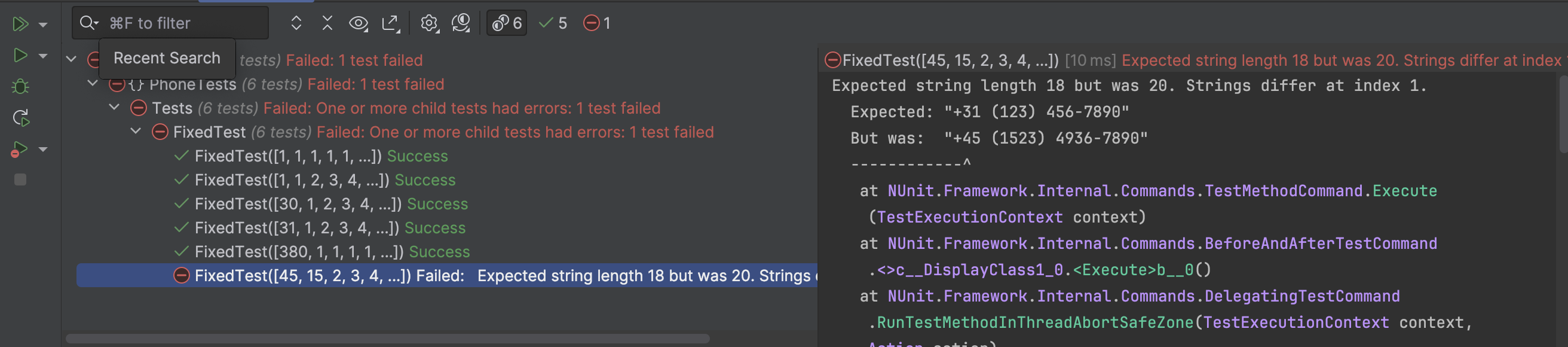
This number would fail, as shown below, based on the code that is currently implemented.
Obviously something needs done, but the question is, should it throw an exception or return something like “Invalid phone number, digits 1 and 5 are out of range of 0 to 9.” I’ve thought about it a little bit, and am going to opt for the message instead. Since it isn’t really a system error, but simply a data error that might need to be pushed through to the client side, a message would be ideal in this situation. YMMV.
The following is my first take at a message, I’m going to add just the “Invalid phone number.” as the response. I’ll work on the related messaging after adding a few tests.
My first implementation to implement this was pretty clean
foreach (int digit in numbers)
{
    if (digit < 0 || digit > 9)
        return "Invalid phone number.";
}
But, obviously I don’t want to check the first digit, because the international code could be 1 or it could be 300 or something. I wasn’t sure so I looked up specification E.123 and E.164 for international numbers. In those specifications I immediately learned a host of things, such as the fact the internationalization of the number, by adding the +1 or the +45, includes the + and also removes the parenthesis that I’ve got on the numbers above. For just national numbers the international code isn’t used and the parenthesis come back! Yikes, the complexities! For now, I’m just going to aim for the first digit being in the range of 0-9999, which appears to be the specification. I’ll read deeper into that in the future, but for now I’ll get these parts working correctly based on just adding the international number at the front and not dealing with removal or addition of the parenthesis. To ensure that the international number is covered, I changed the simple implemented code to the following.
int countryCode = numbers[0];

if (countryCode < 1 || countryCode > 9999)
{
    return "Invalid phone number.";
}

for (int digitIndex = 1; digitIndex < numbers.Length; digitIndex++)
{
    int digit = numbers[digitIndex];
    if (digit > 9)
        return "Invalid phone number.";
}
That’s more code, but as I add criteria it will get even bigger and more specific. But so far, this code passes the tests.
Now I’ll put together an encoding method I’ll call EncodePhone and have it take a string parameter of the number. The first test for this method I shaped up something like this, using the opposing of one of the previous tests.
My first draft of the method implemented came out like this.
public static int[] EncodePhone(string phoneNumber)
{
    string cleanedNumber = new string(phoneNumber.Where(char.IsDigit).ToArray());

    if (cleanedNumber.Length != 11)
    {
        throw new ArgumentException("Invalid phone number format.");
    }

    // Convert each character to an integer and store in an array
    int[] numbers = new int[cleanedNumber.Length];
    for (int i = 0; i < cleanedNumber.Length; i++)
    {
        numbers[i] = int.Parse(cleanedNumber[i].ToString());
    }

    return numbers;
}
That passed, but I’ll add some of the other tests now to work out the edge cases and refactor accordingly. As I worked through this, it would obviously, just as before, run into problems with the added country code and it’s variable number of digits. I went back to work on this issue so the parsing is handled differently for the country code.
public static int[] EncodePhone(string phoneNumber)
{
    string cleanedNumber = new string(phoneNumber.Where(char.IsDigit).ToArray());

    if (cleanedNumber.Length < 11 || cleanedNumber.Length > 13)
    {
        throw new ArgumentException("Invalid phone number format.");
    }

    // Identify the country code length (1 to 3 digits)
    int countryCodeLength = cleanedNumber.Length - 10;

    // Create an array for the result
    int[] numbers = new int[11];

    // Parse the country code and store it as a single element
    numbers[0] = int.Parse(cleanedNumber.Substring(0, countryCodeLength));

    // Parse the remaining phone number digits
    for (int i = 0; i < 10; i++)
    {
        numbers[i + 1] = int.Parse(cleanedNumber[countryCodeLength + i].ToString());
    }

    return numbers;
}
This finally got the tests to pass.
As we know at this point the EncodePhone method is designed to parse a formatted phone number string and return an array of integers representing the individual digits of the phone number, including the country code. Here’s a detailed breakdown of the code:
string cleanedNumber = new string(phoneNumber.Where(char.IsDigit).ToArray());
This line removes all non-digit characters from the input phoneNumber string. The Where(char.IsDigit) filters out only the digit characters, and ToArray converts the resulting sequence into a character array. Finally, a new string is created from this array, resulting in cleanedNumber containing only numeric digits.
if (cleanedNumber.Length < 11 || cleanedNumber.Length > 13)
{
    throw new ArgumentException("Invalid phone number format.");
}
The method checks if the length of cleanedNumber is between 11 and 13 characters. This range accommodates a country code of 1 to 3 digits and a phone number of 10 digits. If the length is outside this range, an ArgumentException is thrown, indicating an invalid phone number format.
int countryCodeLength = cleanedNumber.Length - 10;
The length of the country code is calculated by subtracting 10 (the length of the phone number part) from the total length of cleanedNumber. This calculation determines whether the country code is 1, 2, or 3 digits long.
int[] numbers = new int[11];
An array numbers of length 11 is created to store the final result. The first element will hold the country code, and the remaining 10 elements will hold the digits of the phone number.
The country code is extracted from the beginning of cleanedNumber using the Substring method, starting at index 0 and spanning countryCodeLength characters. This substring is then parsed into an integer and stored as the first element of the numbers array.
for (int i = 0; i < 10; i++)
{
    numbers[i + 1] = int.Parse(cleanedNumber[countryCodeLength + i].ToString());
}
A for loop iterates over the next 10 digits of cleanedNumber, starting after the country code. Each digit is converted to an integer and stored in the corresponding position in the numbers array, starting from index 1.
Then finally return numbers;. The method returns the numbers array, which contains the country code as the first element and the digits of the phone number as the subsequent elements.
Programming Problems & Solutions: “Finding the Maximum Sum Path in a Binary Tree” is the first in this series. The introduction to this series is here and includes all links to every post in the series. If you’d like to watch the video (see just below this), or the AI code up (it’s at the bottom of the post) they’re available! But if you just want to work through the problem keep reading, I cover most of what is in the video plus a slightly different path down below.
Scroll to the bottom to see the AI work through of the code base.
Doing a little dive into the world of binary trees. If you’re in college, just got out, or having flashbacks to algorithms and data structures classes, this will be familiar territory. It’s been a hot minute since I’ve toiled through these, so figured it’d be fun to dive in again for some more modern purpose. I’m going to – over the course of the next few weeks – work through a number of algorithm and data structures problems, puzzles, katas, or what have you – and then once complete work through them with various AI tools. I’ll measure the results in whatever ways seem to bring good defining characteristics of the system and post the results. So join me, on this journey into algorithms, data structures, and a dose of AI (actually LLMs and ML but…) systems and services.
Binary Tree & Maximum Sum Path
Imagine you’re on a journey, you have many routes to choose between, and every time you choose a route along the way you’re traversing a binary tree. Imagine each of the choices along the journey have a certain value to you, for example one part of the route versus another part of the route might have all the guitar shops or other cool things you want to stop at and see. These provide a value to each choice within the binary tree. Today, I’ll explore how to find the maximum sum path from root to leaf in a binary tree. Let’s get started!
I’ll need to setup a binary tree. Implement a function that returns the maximum sum of a route from root to leaf.
For example, given the following tree:
    17
   /  \
  3   -10
 /    /  \
2    16   1
         /
        13
My function should return 23, since 17 -> -10 -> 16 is the route from root to leaf with the maximum sum.
If the tree is empty, return zero.
For this exercise I’ll also not find the best possible route in the tree, but instead the best possible route from root to leaf, e.g. for the following tree, I cannot skip the leaves and return 5 + 100 = 105: the expected answer is 5 + 4 + -30 = -21
        5
      /   \
    4      100
   / \     /
-60 -30 -120
Another example to proof out the idea.
    20
   /  \
  30   10
 /    /  \
20   16   50
    /    /
 -200  -130
In this case, either route going down to end in -200 or -130 will negate those routes and the chosen route would be 20 + 30 + 20 = 70.
Ok, I’ll take a first stab at getting a tree node of sorts put together. For this class I’ll name it TreeNode and add two nested TreeNode properties to the class, as after all a binary tree has its recursive elements.
namespace Tree {

    public class TreeNode
    {
        public int value;
        public TreeNode left, right;

        public TreeNode(int value, TreeNode left = null, TreeNode right = null)
        {
            this.value = value;
            this.left = left;
            this.right = right;
        }

        public static TreeNode Leaf(int value)
        {
            return new TreeNode(value);
        }

        public TreeNode WithLeaves(int leftValue, int rightValue)
        {
            this.left = new TreeNode(leftValue);
            this.right = new TreeNode(rightValue);
            return this;
        }

        public TreeNode WithLeftLeaf(int leftValue)
        {
            this.left = new TreeNode(leftValue);
            return this;
        }

        public static TreeNode Join(int value, TreeNode left, TreeNode right)
        {
            return new TreeNode(value, left, right);
        }
    }
}
Next up, I’ll need something to provide the feature functionality
public class Climber
{
    public static int MaxSum(TreeNode root)
    {
        if (root == null) return 0;

        int maxSum = int.MinValue;
        FindMaxSum(root, 0, ref maxSum);
        return maxSum;
    }

    private static void FindMaxSum(TreeNode node, int currentSum, ref int maxSum)
    {
        if (node == null) return;

        currentSum += node.value;
        if (node.left == null && node.right == null)
        {
            if (currentSum > maxSum)
            {
                maxSum = currentSum;
            }
        }

        FindMaxSum(node.left, currentSum, ref maxSum);
        FindMaxSum(node.right, currentSum, ref maxSum);
    }
}
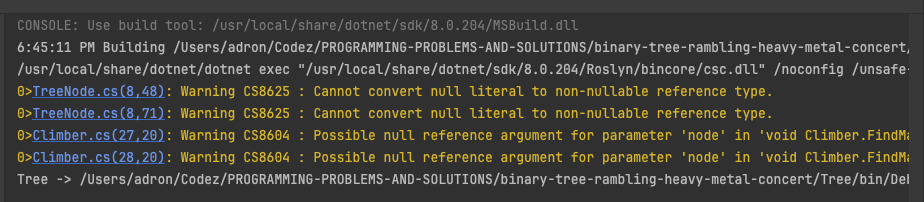
I did a build of what I’ve got so far and received some warnings. It’s been a while since I’ve written C# so I’m sure I’ve missed some nuance. The warnings I received didn’t seem like a big deal.
The warnings are due to nullability issures. In C#, once I dug around a little bit in the docs, I realized with the introduction of nullable reference types the compiler enforces strict null safety to avoid null ref exceptions. Refactoring I knocked out two quick fixes.
Updating the TreeNode class to use nullable ref types for left and right properties.
Update the FindMaxSum method in the Climber class to check for null nodes effectively.
That wrapped that up, so onto elaboration of what I’ve just put together.
A Break Down for the TreeNode and Its Methods
First, the TreeNode is our basic structure, representing each node in our binary tree.
Constructing a TreeNode: You set the value and optionally connect it to other nodes, which can be either to the left or to the right.
Leaf Nodes: These are nodes without children. They’re pivotal because our path will terminate on these nodes.
WithLeaves Method: This method is like adding cymbals to a drum kit. It’s where a node (drummer) gets two children (cymbals), enhancing the depth and complexity of the potential paths (rhythms).
WithLeftLeaf Method: Similar to adding a bass pedal to your drum setup, it adds depth to one side, enriching the texture of the music (or tree structure).
Join Method: This is like forming a band by bringing together different musicians (nodes) to create a single powerful entity (a parent node with children).
The Solution – MaxSum Method
Our MaxSum method is the way to find the maximum (sum).
Handling an Empty Tree: If there’s no tree, there’s nothing to work with, so we simply return zero.
Recursive Exploration – FindMaxSum Method:
Base Case: If there’s no node just return, as there’s nothing to process.
Recursive Call Accumulation: Each node adds its value to the current sum.
Leaf Node Check: If we reach a leaf, we check if this was the highest. If so, we update our record.
Detailed Walkthrough of the Recursive Process
Imagine starting at the root of the tree (the headlining song). With each recursive call, you move to the next node in the tree:
Add the Current Node’s Value: Each node’s value is added to a running total (currentSum).
Leaf Check: Upon reaching a leaf, if the currentSum is greater than the maxSum (the best performance so far), then we update maxSum.
Recursive Descent: The function then recursively calls itself for the left and right children of the current node:
If the node has a left child, explore that path.
Similarly, explore the right path.
Each path is explored to its fullest, down to every leaf, ensuring that every potential “song” or path is considered for its maximum “audience impact” or sum.
By the end of the recursion, maxSum will hold the highest sum from the root to any leaf, effectively giving us the most intense and crowd-pleasing performance of the night, measured by the sum of node values. This approach ensures that we not only explore every possible path but also capture the path that offers the maximum excitement, much like a headliner’s best performance capturing the audience’s hearts.
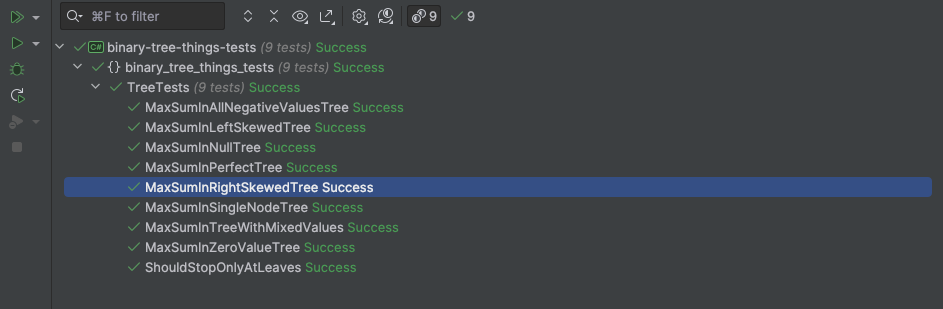
Binary Tree Tests
All this, I wanted to think through the different binary tree situations and write up some tests. This is my break down using NUnit. These are all in a simple TestFixture class called TreeTests.
The first test, I just went for the easiest of all, testing for a null case.
The next test I dove directly into a test case that was a little more rich. If the tree looks something like this, let’s build it out and see if we get the right result.
/**
 *      5
 *    /   \
 *  -22    11
 *  / \    / \
 * 9  50  9   2
 */
So going down each of these manually, we get 5 -22 + 9 = -8, next 5 -22 + 50 = 33, then 5 + 11 + 9 = 25 and last is 5 + 11 + 2 = 18. Of those, the max is 33. So let’s put that into an assertion and see if our test passes.
[Test]
public void MaxSumInPerfectTree()
{
    TreeNode left = TreeNode.Leaf(-22).WithLeaves(9, 50);
    TreeNode right = TreeNode.Leaf(11).WithLeaves(9, 2);
    TreeNode root = TreeNode.Join(5, left, right);
    Assert.AreEqual(33, Climber.MaxSum(root));
}
Next up I tested that the processing should stop only at leaves.
With all those tests in place, it’s now a good time to journey back through the code base and take a stab at some refactoring. The first thing I tackled was a little work on the Climber class. First thing, I realized it could be static, so I made that change. So public class Climber turned into public static class Climber.
Next up I to MaxSum and realized quickly I could whittle it down from its existing state like this
public static int MaxSum(TreeNode root)
{
    if (root == null) return 0;

    int maxSum = int.MinValue;
    FindMaxSum(root, 0, ref maxSum);
    return maxSum;
}
down to a dramatically more concise single line
    public static int MaxSum(TreeNode root)
    {
        return root == null ? 0 : FindMaxSum(root);
    }
with just a little bit of refactoring of the FindMaxSum method.
private static int FindMaxSum(TreeNode? node)
{
    if (node == null) return 0;
    if (node.left == null && node.right == null) return node.value;

    int leftMaxSum = node.left != null ? FindMaxSum(node.left) : int.MinValue;
    int rightMaxSum = node.right != null ? FindMaxSum(node.right) : int.MinValue;

    return node.value + Math.Max(leftMaxSum, rightMaxSum);
}
Much more concise with less code to look at and read through overall. I kept thinking about it though, as the overall FindMaxSum method seemed kind of a bit much. I took a step back and decided to try answering the calls more directly per the tests, now that I’d thought it through from both points of just coding up the solution and then what outcomes should look like via tests. But I’d not written up the implementation purely from the tests, so I decided to just delete the FindMaxSum method and the MaxSum methods I had and start from the perspective of the tests first, and just implement starting from that perspective.
I started out, the first scenario is null which returns a max value of zero. If both the left and right children of the root are null, I’ve arrived at this node being a leaf node. The sum in this case is just the value of the node. I realized at this point, I could probably just write an if then else, or maybe just a switch and step through these specific cases, as there would only be a few more. These first two cases would look something like this.
I’d then need to follow down the right side and left side. If the left child is null and the right child is not null, the sum is the value of the current node v plus the maximum sum from the right subtree MaxSum(r). If the right child is null and the left child is not, the opposite of the aforementioned. The code would look like this.
    {left: null,  right: var r, value: var v} => v + MaxSum(r),
    {left: var l, right: null,  value: var v} => v + MaxSum(l),
Then the last would be the left and right children are not null, the sum is the value of the current node plus the max of the sums from the left and right subtrees, which ensures the path with the highest sum is chosen. Holy smokes, the final method then looks like this.
    public static int MaxSum(TreeNode root)
    {
        return root switch
        {
            null => 0,
            {left: null,  right: null,  value: var v} => v,
            {left: null,  right: var r, value: var v} => v + MaxSum(r),
            {left: var l, right: null,  value: var v} => v + MaxSum(l),
            {left: var l, right: var r, value: var v} => v + System.Math.Max(MaxSum(l), MaxSum(r)),
        };
    }
I feel like, at this point, with another pass of the tests that this is about as lean as this is going to get at this point. I’ve always found that if I kind of just hammer together a basic solution, write some tests and work through bugs that come up, then finally just delete what I had and write it based on the tests I often get an absurdly effective refactor just like this. Then of course sometimes, if my mind is working quick enough that day I just write up some tests or a harness of sorts and start from that perspective.
Either way, this binary tree is cooked for today, hope you enjoyed the post and happy coding! 🤘🏻
Places to RTFM about syntax sugar and other details =>
Pattern Matching: This code uses pattern matching in switch expressions, which is a feature introduced in C# 8.0 and expanded in later versions. The official Microsoft documentation on pattern matching provides detailed explanations and examples.
Switch Expressions: The switch expression syntax is also covered under pattern matching but specifically in C# 8.0 documentation. The documentation on switch expressions will give you insight into how to use this feature.
Records and Init-only Properties: If you are using more advanced features like records or init-only properties with TreeNode class, find relevant information in the documentation on records and init-only properties.
Math Methods: For the use of System.Math.Max, you can refer to the documentation on Math methods which describes all the mathematical functions available in the System.Math class.
Lambda Expressions and Local Functions: Although not directly used in your snippet, understanding lambda expressions and local functions can be beneficial for similar scenarios. The documentation on lambda expressions and local functions might be useful.