You’ll have to look back and check out my entry on how to get code displayed on a blog entry nice n’ smooth. I did however add some CSS that cleaned up the display on the blog. That snippet is below.
   1:  .csharpcode
   2:  {
   3:      padding: 5px;
   4:      margin: 5px;
   5:      border: medium solid #d0eb55;
   6:      overflow: scroll;
   7:  }
   8:  .csharpcode, .csharpcode pre
   9:  {
  10:      padding: 4px;
  11:      margin: 4px;
  12:      font-size: 1em;
  13:      color: #fff;
  14:      font-family: Consolas, "Courier New" , Courier, Monospace;
  15:      background-color: #414141;
  16:      line-height: 1.1em;
  17:      width: 720px;
  18:  }
.csharpcode, .csharpcode pre
{
font-size: small;
color: black;
font-family: consolas, “Courier New”, courier, monospace;
background-color: #ffffff;
/*white-space: pre;*/
}
.csharpcode pre { margin: 0em; }
.csharpcode .rem { color: #008000; }
.csharpcode .kwrd { color: #0000ff; }
.csharpcode .str { color: #006080; }
.csharpcode .op { color: #0000c0; }
.csharpcode .preproc { color: #cc6633; }
.csharpcode .asp { background-color: #ffff00; }
.csharpcode .html { color: #800000; }
.csharpcode .attr { color: #ff0000; }
.csharpcode .alt
{
background-color: #f4f4f4;
width: 100%;
margin: 0em;
}
.csharpcode .lnum { color: #606060; }
I’ve been going over data contracts for WCF lately and wanted to post a few specifics. One issue I ran into recently was odd, as it included an enumeration that needed to be included in part of a data contract. I had tagged the enumeration with the [DataContract] attribute but I was receiving an odd issue about the service disconnecting. The error message I was getting was something like this:
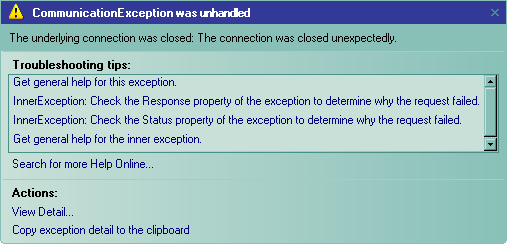
I had read, or thought via failed comprehension, that I could just tag an enumeration with [DataContract] as below.
   1:  [DataContract]
   2:  public enum Priority
   3:  {
   4:      Low,
   5:      Medium,
   6:      High
   7:  }
.csharpcode, .csharpcode pre
{
font-size: small;
color: black;
font-family: consolas, “Courier New”, courier, monospace;
background-color: #ffffff;
/*white-space: pre;*/
}
.csharpcode pre { margin: 0em; }
.csharpcode .rem { color: #008000; }
.csharpcode .kwrd { color: #0000ff; }
.csharpcode .str { color: #006080; }
.csharpcode .op { color: #0000c0; }
.csharpcode .preproc { color: #cc6633; }
.csharpcode .asp { background-color: #ffff00; }
.csharpcode .html { color: #800000; }
.csharpcode .attr { color: #ff0000; }
.csharpcode .alt
{
background-color: #f4f4f4;
width: 100%;
margin: 0em;
}
.csharpcode .lnum { color: #606060; }
As it turns out though, the [EnumMember] attribute needs added to the enumeration.
   1:  [DataContract]
   2:  public enum Priority
   3:  {
   4:      [EnumMember]
   5:      Low,
   6:      [EnumMember]
   7:      Medium,
   8:      [EnumMember]
   9:      High
  10:  }
.csharpcode, .csharpcode pre
{
font-size: small;
color: black;
font-family: consolas, “Courier New”, courier, monospace;
background-color: #ffffff;
/*white-space: pre;*/
}
.csharpcode pre { margin: 0em; }
.csharpcode .rem { color: #008000; }
.csharpcode .kwrd { color: #0000ff; }
.csharpcode .str { color: #006080; }
.csharpcode .op { color: #0000c0; }
.csharpcode .preproc { color: #cc6633; }
.csharpcode .asp { background-color: #ffff00; }
.csharpcode .html { color: #800000; }
.csharpcode .attr { color: #ff0000; }
.csharpcode .alt
{
background-color: #f4f4f4;
width: 100%;
margin: 0em;
}
.csharpcode .lnum { color: #606060; }
After I added that, smooth sailing resumed. So don’t just tag the enumeration, tag the members too. I’m also working on some other notes from my reintroduction to WCF (I’ve done a ton of work with it in the past) so stay tuned for that.
I have been using Word 2007 a lot lately writing up technical and how to documents for various projects I’m working on. In addition to that I’ve started looking at word for creating my blog entries. I did get word hooked up to publish blog entries against my BlogEngine.NET entries with the help of a blog post, “Publishing to BlogEngine from Word 2007” on RTUR.NET’s Blog. I also found out where the default theme setting for Word 2007 via the “Setting the default to your liking” entry on The Microsoft Office Word Team’s Blog. The one issue I have that I haven’t found an answer to is how to change the default document that opens when you launch Word 2007.
So if you know how to change that default document I’d be keen to know how.
I’ve been working on getting certificates setup for development with the WCF Web Services I’m building for the High Ball Project. On a few topics I’m just completely new, like messing with the Certificates, X.509 and SSL and such. I’m getting there, but road blocks are stopping me every once in a while. One of my recent issues was how to view the values that the certificate has. I searched and searched, for some reason I couldn’t find something on MSDN or via Google that would do what I wanted it to do. In addition to that, the reason I was looking for this application to begin with, I was having issues with getting my web.config settings correct for finding the local certificate I had created with makecert.exe.
Stack Overflow!
That’s when it clicked in my head, hey, I should try this stackoverflow site out! So I shot over there and posed these two questions and within less than a 24 hr period on the WEEKEND, I got some solid answers. I gotta say the guys over at stackoverflow are onto something here!
My first question, “Cannot find the X.509 Certificate using the following search criteria:…” and second question “Tool for Viewing X.509 Certificates?” have two great answers. So check em’ out, and if you aren’t signed up with an OpenID get one and go log into the site! It rocks. In addition, for you dot netters out there like me, know that the site is built on ASP.NET MVC! It’s solid and FAST!